

Inbox Placement Monitoring: What It Measures, Where It Breaks, and How to Fix It
Your ESP says 98% delivered. Your open rate says 12%. That gap isn't a mystery - it's your emails sitting in spam folders while delivery metrics paper over the problem. Roughly one in six emails globally never reach the inbox, putting the average placement rate around 84%. Inbox placement monitoring is the only way to see what your ESP dashboard won't show you.
The Quick Version
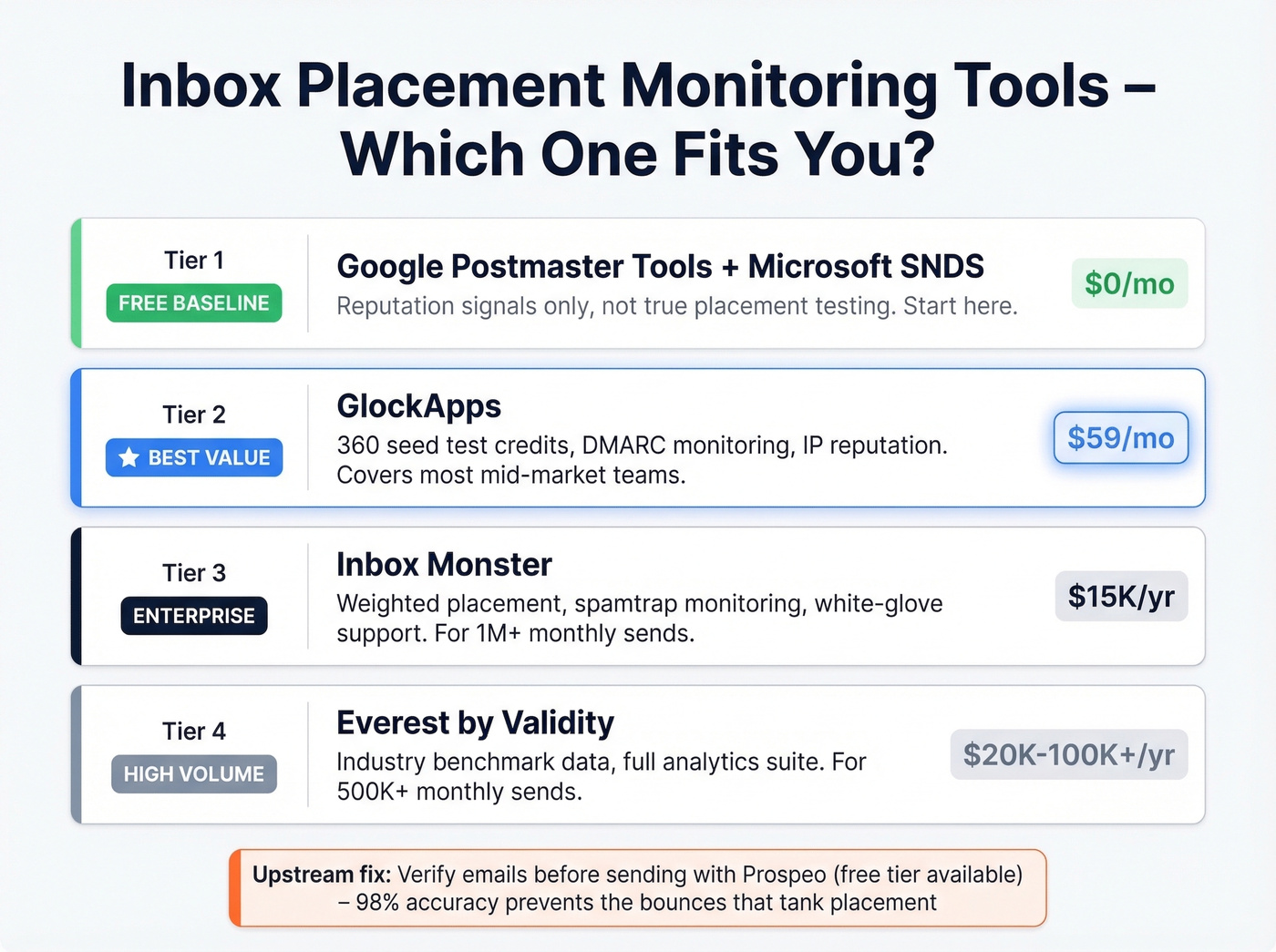
- Free baseline: Google Postmaster Tools + Microsoft SNDS - reputation signals only, not true placement testing
- Best value: GlockApps ($59/mo) - seed-list testing with DMARC monitoring included
- Enterprise: Inbox Monster (~$15K/year) - weighted placement, blocklist monitoring, white-glove support
- Upstream fix: Prospeo (free tier available) - 98% email accuracy prevents the bounces that tank your reputation in the first place
Inbox Placement vs Delivery Rate
Delivery rate measures whether a server accepted your email. That's it. Inbox placement measures whether the email actually reached the inbox - not the spam folder, not the Promotions tab, not some silent void. A 98% delivery rate with 60% inbox placement means four in ten "delivered" emails are invisible to recipients.
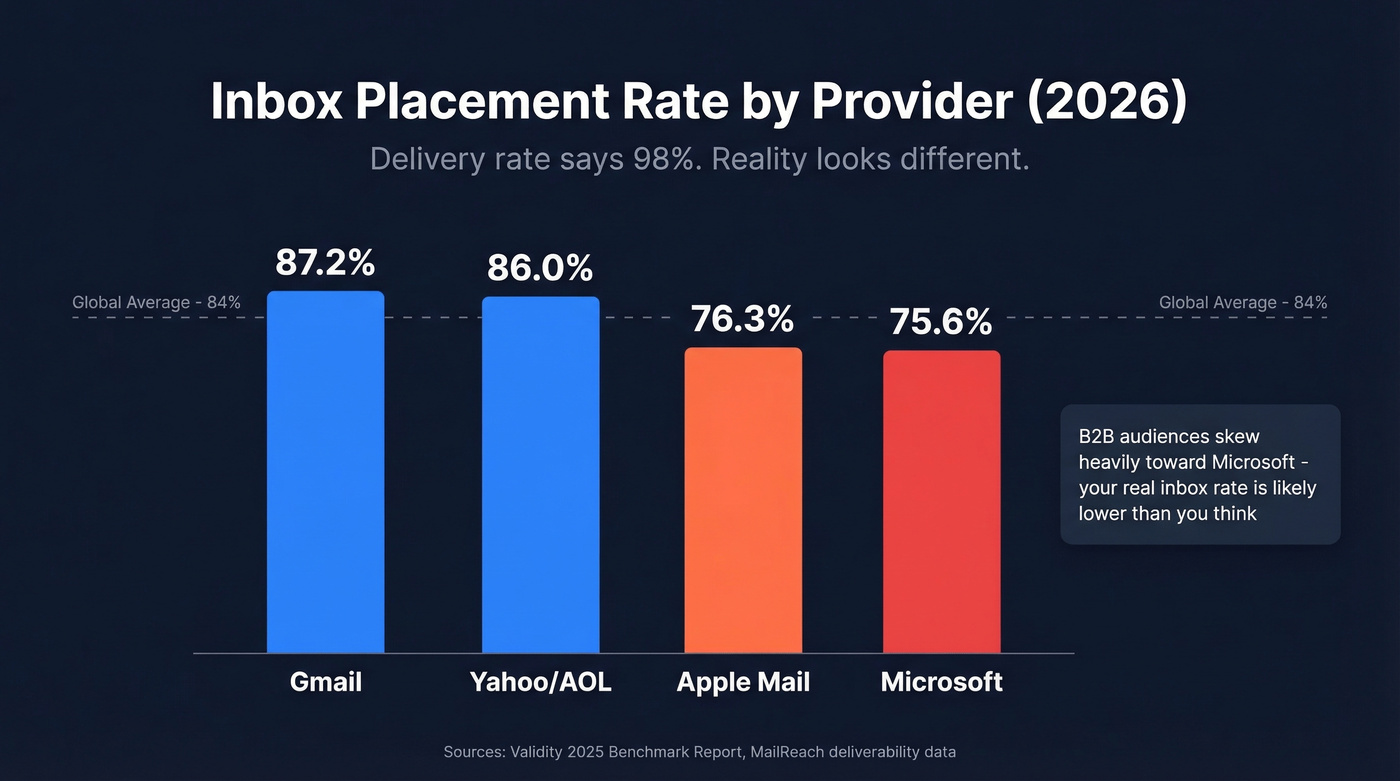
The gap varies wildly by provider. Gmail inbox placement runs around 87.2%, Yahoo/AOL sits at 86.0%, Apple Mail drops to 76.3%, and Microsoft is the toughest at 75.6%. If your audience skews toward Outlook and M365 - which most B2B audiences do - your real inbox rate is lower than your dashboard suggests. Microsoft platforms saw steep year-over-year declines, including Office 365 down 26.73 percentage points and Outlook/Hotmail down 22.56 points.
One nuance worth knowing: emails landing in Gmail's Promotions tab technically count as "inbox placement." Your monitoring tool calls it a win. Your open rate won't.
How Seed-List Testing Works
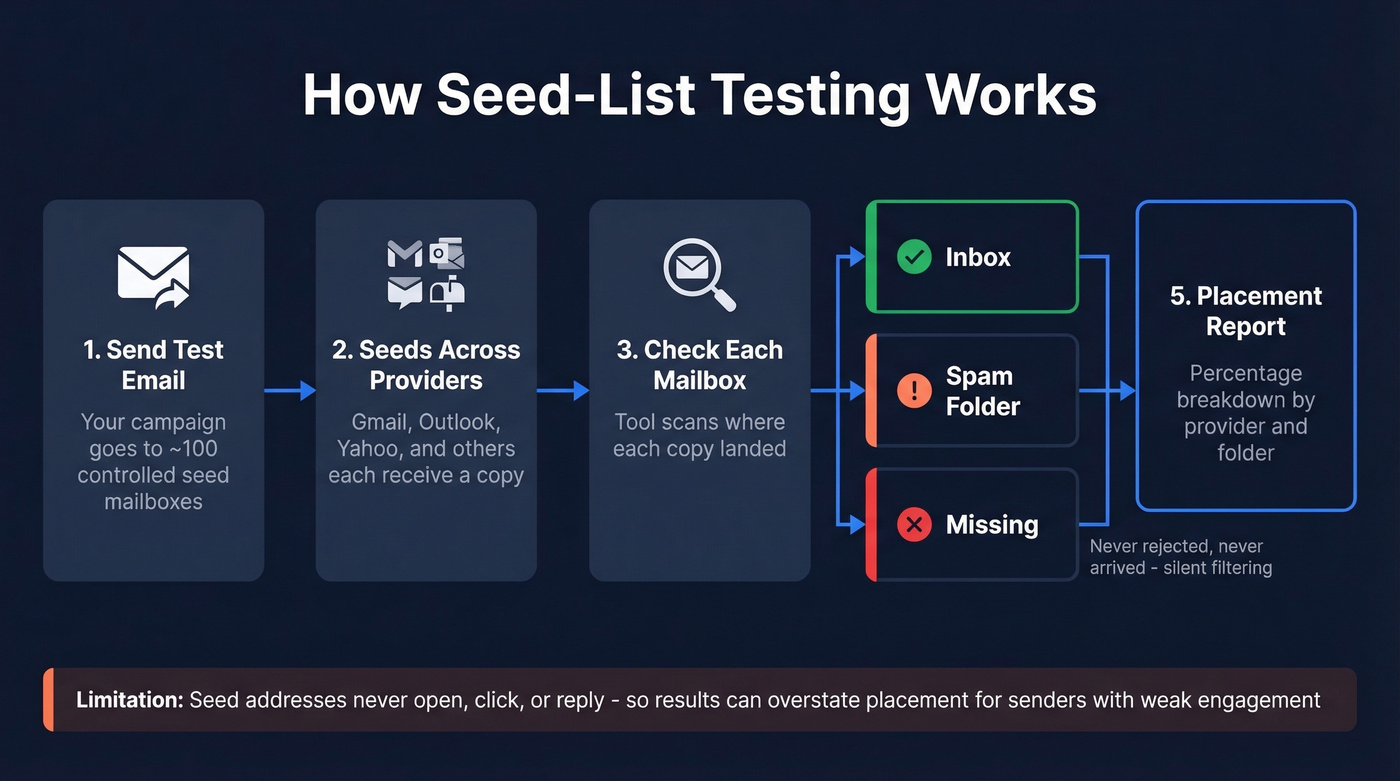
You send your email to a controlled set of mailboxes spread across Gmail, Outlook, and Yahoo, then check whether each copy landed in the inbox, spam, or went missing entirely. That third category matters - "missing" means the email wasn't rejected but never appeared anywhere, a signal of silent filtering that bounce reports completely miss. Tools like GlockApps maintain seed lists of around 100 mailboxes for this purpose.
It's the best method we have. But it breaks in predictable ways:
- Engagement signals are missing. Seed addresses don't open, click, or reply. Providers weigh engagement heavily, so seed results can overstate placement for senders with weak engagement history.
- Sample size is tiny. A hundred mailboxes can't represent billions of inboxes. A single seed flagged as spam swings your score by several percentage points.
- Provider weighting is off. Many seed lists skew toward consumer Gmail. B2B audiences split roughly 60% Google Workspace and 40% Microsoft 365, and consumer-heavy seeds also miss corporate Secure Email Gateways like Mimecast and Proofpoint, which filter differently than standard mailbox providers.
- Test conditions don't match production. Different sending domain, different IP, different volume cadence - any mismatch means you're testing a setup that doesn't exist in the real world.
- Repeated testing trains filters. Same content, same seeds, same schedule. Spam filters recognize the pattern, your test results improve, and actual placement stays flat.
The consensus on r/emaildeliverability leans toward trusting first-party signals from Postmaster Tools over third-party seed tests. The right answer is both: seed tests for placement data, reputation tools for trend lines.

Every bounce chips away at your sender reputation - and tanks your inbox placement. Prospeo's 98% email accuracy and 5-step verification (including catch-all handling, spam-trap removal, and honeypot filtering) means you're only sending to real, verified addresses. At $0.01/email, fixing the upstream problem costs less than one month of placement monitoring tools.
Stop monitoring bad placement. Start preventing it with verified data.
Best Tools for Tracking Placement
Google Postmaster Tools (Free)
Google's free dashboard shows compliance status - authentication and policy checks like SPF/DKIM, DMARC alignment, and more - plus spam rate for anyone sending 100+ daily emails to Gmail. The V2 interface, updated in late 2025, focuses on compliance and removed the old IP/Domain Reputation views.
Here's what most people miss: the spam rate only reflects emails users manually click "Report spam" on. It doesn't capture automatic filtering into spam or Promotions. You can show a 0.1% spam rate while Gmail quietly routes half your emails to spam. Google's key threshold is keeping user-reported spam below 0.3% - exceed it and deliverability drops fast. Data updates with a 24-48 hour lag. Pair this with email reputation signals to cover both major B2B providers.
GlockApps - Best Value
We've tested several seed-list tools, and GlockApps hits the sweet spot for most mid-market teams. The Essential plan at $59/mo includes 360 spam test credits, DMARC monitoring up to 600K messages/month, 10 IP reputation monitors, and 15 uptime monitors. Growth ($99/mo) bumps to 1,080 credits and 10 sending accounts. Enterprise ($129/mo) covers 1,800 credits and 20 accounts. A free tier with 2 test credits lets you run a trial before committing.
The ~100 mailbox seed list is adequate for directional placement tracking but won't give statistically rigorous results for any single provider. For most teams sending under 500K/month, that tradeoff is worth it.

Inbox Monster - Enterprise Pick
G2 reviewers give Inbox Monster 4.9/5 across 47 reviews, and the praise centers on deliverability visibility that goes far beyond ESP reporting. Weighted inbox placement, spamtrap monitoring, blocklist alerts, white-glove support - the full package. The deliverability suite starts at $15K/year.
The top G2 complaint? "Expensive." Fair. For most mid-market teams, GlockApps covers the same core monitoring needs at a fraction of the price. Skip Inbox Monster unless you're sending millions of emails monthly and need the granularity. (If you want the full breakdown, see our Inbox Monster pricing.)
Everest (Validity)
If you're sending 500K+ emails monthly, Everest is the enterprise standard - including the benchmark data Validity publishes annually. No public pricing; expect $20K-$100K+/year depending on volume and modules. For teams under 500K/month, this is overkill.
Other Tools Worth Knowing
MailReach starts around ~$25/inbox/month and bundles warmup with placement testing. Good for cold email teams, though costs scale fast across multiple inboxes. Allegrow ($99/mo to $1,340/mo billed annually) is B2B focused with automated seed testing - effective for sales teams targeting corporate email environments. MxToolbox ($129-$399/mo) handles broader email health monitoring including blacklist checks and DNS diagnostics. Instantly bundles placement checks with its sending platform, which is convenient if you're already using it for cold outreach but limited as standalone monitoring.
| Tool | Starting Price | Best For |
|---|---|---|
| Google Postmaster | Free | Gmail reputation signals |
| GlockApps | $59/mo | Mid-market seed testing (best value) |
| Inbox Monster | $15K/year | Enterprise placement |
| Everest (Validity) | ~$20K+/year | High-volume analytics |
| MailReach | ~$25/inbox/mo | Cold email warmup + test |
| Allegrow | $99/mo | B2B sales teams |
| MxToolbox | $129/mo | Email health monitoring |
| Instantly | Bundled | Cold email all-in-one |
Fix the Problem Upstream
Every tool above tells you where emails landed after you sent them. None prevent the problem.
Bounce rates above 2-3% signal poor list hygiene to mailbox providers, and the damage compounds with every send. If you need a deeper benchmark + remediation guide, start with email bounce rate. Only 18.2% of domains have valid DMARC records, and just 7.6% actually enforce them - most senders haven't locked down the basics.
Let's be honest: if your bounce rate is above 3%, no amount of placement monitoring will save you. You're treating symptoms while the disease spreads. Fix the data first.
Monitoring is detection. Clean data is prevention. In our experience, the teams that maintain 90%+ inbox placement aren't the ones running the most seed tests - they're the ones who never send to a bad address in the first place. Prospeo's 5-step verification with catch-all handling, spam-trap removal, and honeypot filtering delivers 98% accuracy across 143M+ verified emails, with the database refreshing every 7 days instead of the 6-week industry average. Customers like Stack Optimize maintain 94%+ deliverability with bounce rates under 3% and zero domain flags across all clients - the kind of upstream hygiene that makes inbox placement monitoring a confirmation step rather than a fire alarm. For the full foundation, see our email deliverability guide.

Seed-list tests show you the damage after it's done. The real fix is upstream: clean contact data that keeps bounce rates under 2% and your domain off blocklists. Teams using Prospeo cut bounce rates from 35%+ to under 4% - the kind of shift that moves inbox placement from 60% to 95%+. Data refreshed every 7 days, not 6 weeks.
Your inbox placement is only as good as your contact data.
Cold Email vs Marketing Email: Keep Them Separate
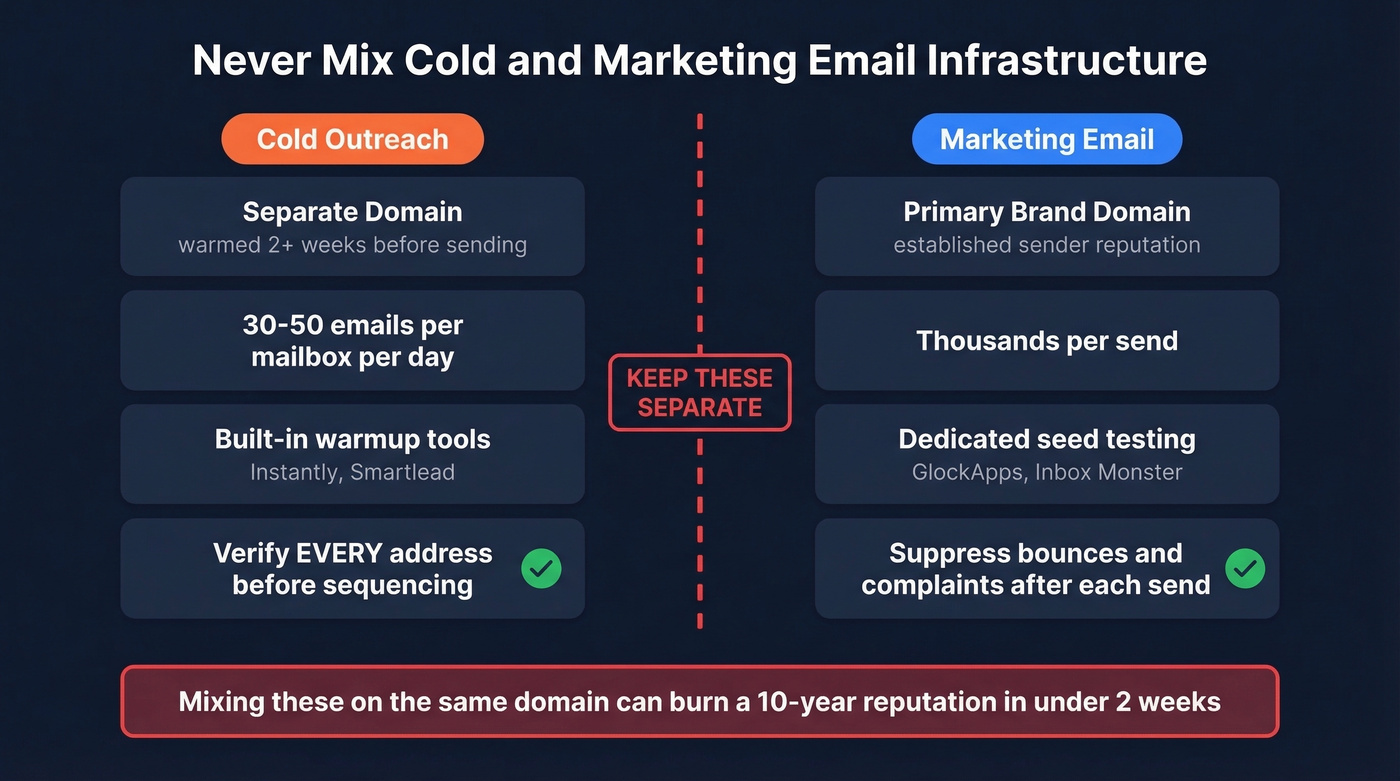
Never run cold outreach and marketing email on the same infrastructure. This isn't a suggestion - it's the single fastest way to torch a domain's reputation. I've seen teams burn a 10-year-old domain in under two weeks by mixing cold sends with newsletter traffic.
| Cold Email | Marketing Email | |
|---|---|---|
| Domain | Separate domain, warmed 2+ weeks | Primary brand domain |
| Volume | 30-50/mailbox/day | Thousands per send |
| Monitoring | Warmup tool with built-in placement checks (Instantly, Smartlead) | Dedicated seed testing (GlockApps, Inbox Monster) |
| List hygiene | Verify every address before it enters a sequence | Suppress bounces and complaints after each campaign |
If you're building outbound at scale, pair this with a B2B cold email sequence and keep an eye on email velocity so you don't spike volume in a way that triggers filtering.
FAQ
What's a good inbox placement rate?
Domains with full SPF, DKIM, and DMARC enforcement on aged infrastructure consistently achieve 85-95%. The global average sits around 84%. Gmail tends toward 87%, while Microsoft hovers closer to 76% - making Outlook the hardest inbox to reach for most B2B senders.
Can I monitor inbox placement for free?
Google Postmaster Tools and Microsoft SNDS show reputation signals at no cost, but neither measures actual inbox-vs-spam placement. You need seed-list testing for that. GlockApps offers a free tier with 2 test credits to start.
How does bad contact data affect placement?
Bounce rates above 2-3% signal poor list hygiene to mailbox providers, directly tanking sender reputation. Verifying addresses before they enter your sequences - catching spam traps, honeypots, and stale contacts - prevents the reputation damage that monitoring tools can only detect after the fact.
How often should I run placement tests?
Test before and after any major change: new IP, new template, new sending domain, significant list growth. For steady-state senders, weekly or biweekly tests catch drift before it becomes a crisis. Daily testing is unnecessary and risks training spam filters on your test patterns.