

Infusionsoft Email Deliverability: What's Actually Going Wrong (and How to Fix It)
One Keap (formerly Infusionsoft) user got blocked from sending after 13 complaints out of 73,000 emails. Thirteen. Another watched open rates drop from 45% to 25% after Gmail's February 2024 changes - set up DKIM and DMARC exactly as Keap instructed, and nothing improved. Keap support blamed content quality. In most cases, it's not the content. It's authentication, reputation, and list quality dragging your Infusionsoft email deliverability into the ground.
Infusionsoft rebranded to Keap years ago, but the deliverability frustrations haven't gone anywhere. At $249/month for 1,500 contacts, every email hitting spam is money burned.
What You Need (Quick Version)
- Verify your DKIM/DMARC setup - especially if you configured it before 12/11/23. Keap changed the process and old setups need reverification.
- Set up Google Postmaster Tools. It's free and the only way to see what Gmail actually thinks of your domain.
- Run your list through a verification tool before your next send. Bad data triggers compliance flags faster than you'd expect.
The 99.5% Deliverability Myth
Keap touts 99.5%+ deliverability. That number measures server acceptance - whether the receiving mail server said "OK, I'll take it." It doesn't tell you whether your email landed in the inbox, the spam folder, or a filtered tab nobody checks.
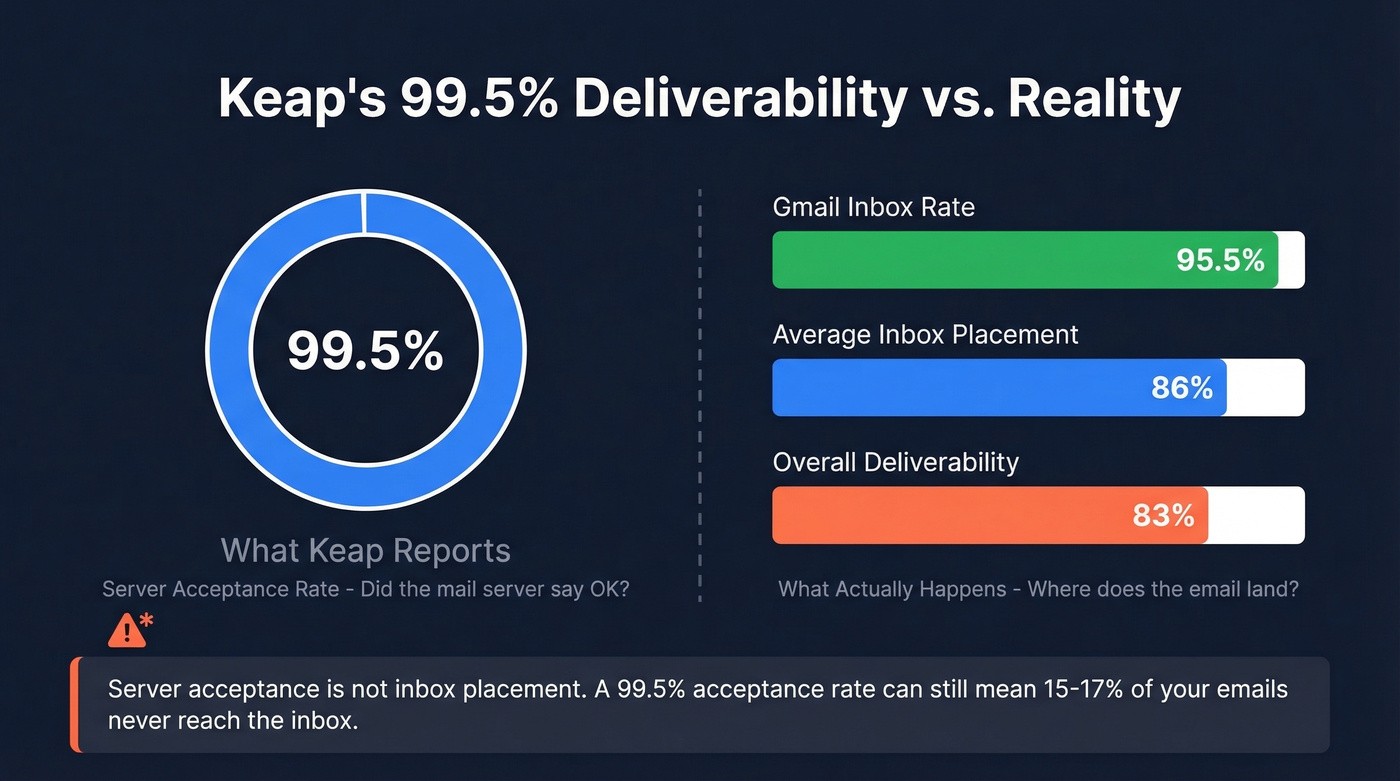
Industry-wide, overall deliverability averages around 83%. Average inbox placement across Gmail, Yahoo, and Microsoft sits around 86%. Keap's 99.5% and your actual inbox rate are measuring completely different things, and conflating them is how people waste months optimizing the wrong stuff. Litmus found 70% of emails show at least one spam-related issue. If your open rates are below 20%, investigate inbox placement first - not your subject lines.
Here's the thing: subject lines and copy matter, but they're not the lever that fixes a broken sender reputation. Around 90% of the factors determining inbox placement come down to sender behavior rather than the email service provider itself. We've seen the same pattern over and over - people tweak copy for weeks while their authentication is misconfigured and their list is full of dead addresses.
Why Your Keap Emails Land in Spam
Authentication Gaps
Gmail and Yahoo's February 2024 requirements tightened the rules hard. Every domain sending through Keap now needs proper DKIM and a basic DMARC record. Free email domains like gmail.com or hotmail.com are dead for marketing sends. If your DKIM was set up before 12/11/23, you need to reverify - Keap updated the process and old configurations don't cut it anymore.
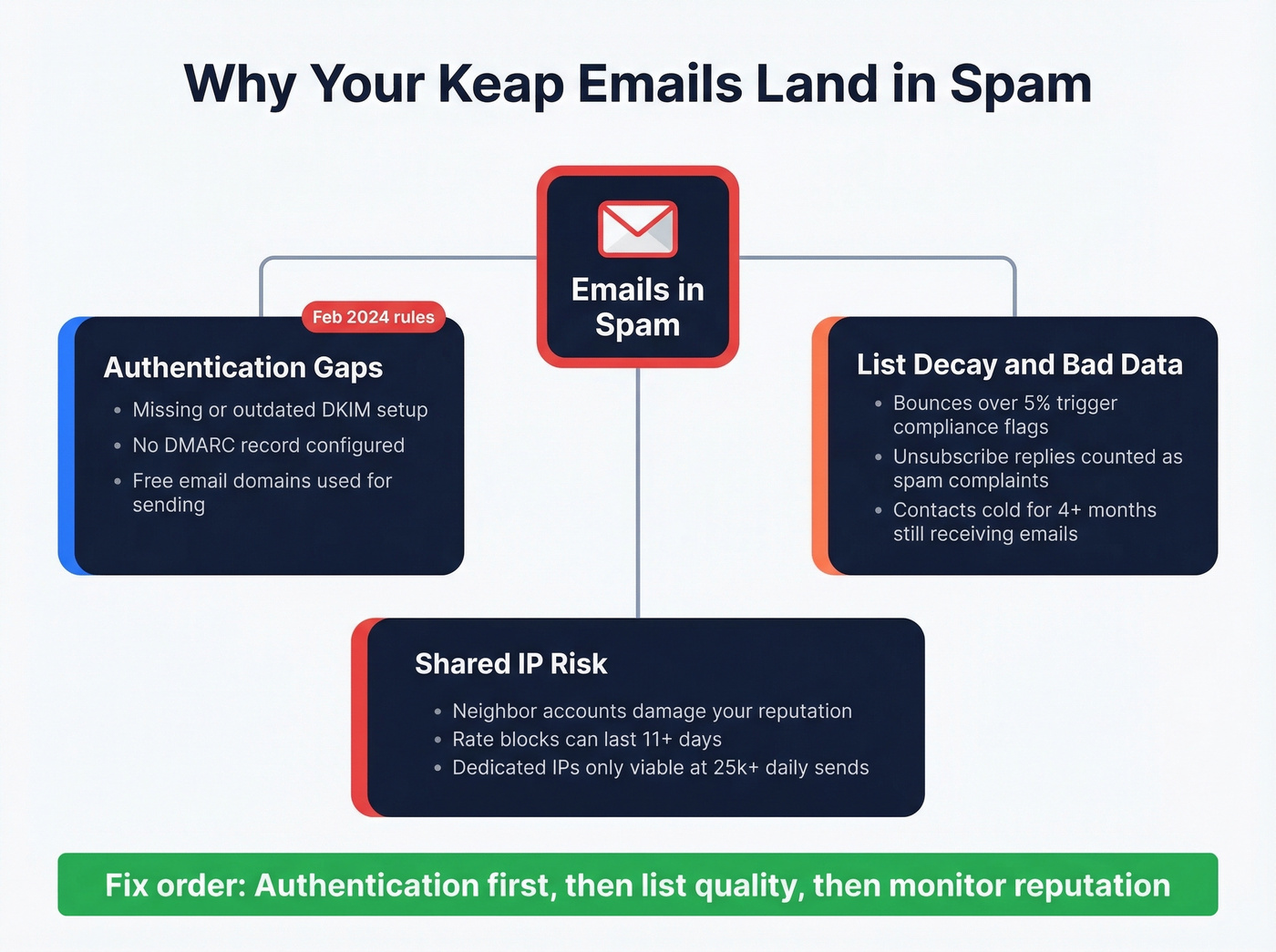
The complaint thresholds are brutally tight: Google recommends staying under 0.1%, and at 0.3% your emails get rejected outright. That's three complaints per thousand emails. Three.
List Decay and Bad Data
Keap flags any account exceeding 5% bounces per email provider as excessive, and their compliance team reaches out. Here's what makes this worse: Keap treats certain unsubscribe-request auto-replies the same as ISP spam complaints. That design choice can punish senders who make unsubscribing easy, which is exactly what Gmail and Yahoo want you to do.
Be ruthless with engagement windows. Contacts engaged in the last 6 months get your campaigns. Contacts silent for 3 months get a re-engagement sequence. Anyone cold for 4+ months gets suppressed. Not "maybe next quarter." Suppressed now.
If you need a deeper baseline on what “good” looks like, start with an email deliverability framework and work backward from inbox placement.
Shared IP Risk
Most Keap users share sending IPs with other customers. When a neighbor on your shared IP gets rateblocked by Yahoo/AOL/Verizon for 11 days, your emails get caught in the blast radius. You can't control this, and it's one of the most frustrating parts of the platform.
Dedicated IPs only make sense at 25,000+ emails daily - that's the volume threshold where you build your own reputation. Below that, you're stuck on shared infrastructure. Expect dedicated IP add-ons to run $50-$500/mo depending on the provider.
If you're ramping volume, keep an eye on email velocity so you don't spike complaints and bounces.

Shared IPs and bad data are a toxic combo. Every bounce on Keap's shared infrastructure damages your reputation - and your neighbors'. Prospeo's 5-step verification catches spam traps, honeypots, and invalid addresses before they ever hit your list, keeping you under Keap's 5% bounce threshold.
Clean your list at $0.01/email before Keap's compliance team cleans it for you.
Authentication Checklist for Keap
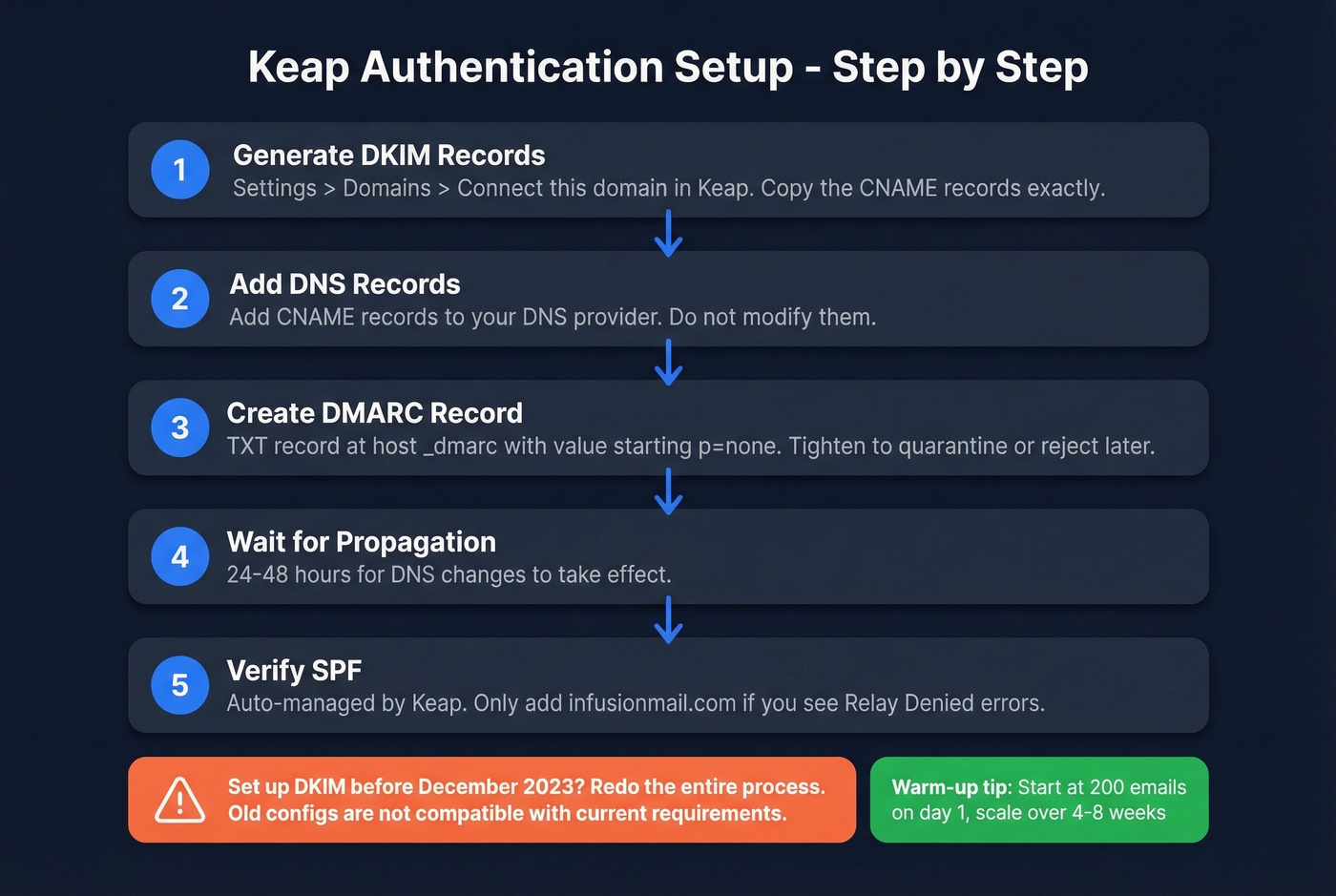
- Go to Settings > Domains > Connect this domain in Keap. The platform generates CNAME records for DKIM and Return-Path.
- Add those CNAME records to your DNS provider exactly as shown. Don't modify them.
- Create a TXT record at host
_dmarcwith a value starting withp=none. Tighten toquarantineorrejectonce you confirm alignment. - Wait 24-48 hours for DNS propagation.
- SPF is auto-managed by Keap - no action needed unless you see "Relay Denied" errors, in which case ensure your SPF includes
infusionmail.com.
If you want to sanity-check your setup, use a quick SPF review and confirm DMARC alignment is actually passing.
If you set up DKIM before December 2023, redo the entire process. The old configuration isn't compatible with current requirements. If you've been blocked and are restarting, warm up gradually: start around 200 emails on day 1, scale up by day 15, and plan for a full warm-up cycle of 4-8 weeks.
Fix Your List Before Anything Else
Authentication gets you to the door. List quality gets you through it.
The chain is simple: bad data leads to bounces, bounces damage reputation, damaged reputation lands you in spam. Break it at the source. Before importing contacts or sending to a stale segment, verify the list. Prospeo's email verification catches the exact problems that trigger compliance flags - spam traps, honeypots, invalid addresses, and catch-all domains. With 98% email accuracy and a 7-day data refresh cycle, it's the preventive layer between your list and Keap's compliance enforcement. We've found that running verification before importing catches the vast majority of problems that trigger account flags. The free tier gives you 75 verifications per month, enough to test the workflow before committing.

If you're seeing repeated issues, it helps to benchmark against standard email bounce rate targets and run a proper spam trap removal process.
For contacts already in Keap, build a re-engagement sequence: two emails over 10-14 days. Opens mean keep. No opens after both mean suppress. Use Keap's built-in spam score tool and target a score under 5 before every broadcast.
Keap's 99.5% deliverability stat means nothing if your contacts are dead addresses. Prospeo refreshes 300M+ profiles every 7 days - not every 6 weeks - so the emails you import into Keap are verified and current. 98% accuracy, catch-all handling included, spam traps removed.
Stop feeding Keap stale data. Start with emails that actually exist.
Monitor Your Sender Reputation
Set up Google Postmaster Tools by adding your domain and verifying via TXT record in DNS. Give it 24-48 hours. Once active, watch three things: spam rate, domain reputation, and authentication pass rates.
One critical blind spot that catches people off guard: Gmail doesn't feed spam-button complaints back to ESPs like Keap, so your platform's complaint metrics undercount actual Gmail spam reports. Google Postmaster Tools is the only way to see the real number.
If you need a structured plan, follow a step-by-step process to improve sender reputation before you scale sends again.
Fair warning - if you're sending fewer than 100-200 emails to Gmail per day, Postmaster Tools won't show data. It needs volume to generate reports. After making fixes, allow up to 7 days for compliance dashboards to update. For quick diagnostics, MXToolbox checks your SPF records, and mail-tester.com scores a test email for spam signals before you send to your real list.
Industry Benchmarks (2026)
| Metric | Target |
|---|---|
| Overall deliverability | ~83% |
| Avg inbox placement | ~86% |
| Gmail inbox rate | ~95.5% |
| Yahoo inbox rate | ~81.3% |
| Complaint rate | <0.1% |
| Bounce rate | <2-5% |
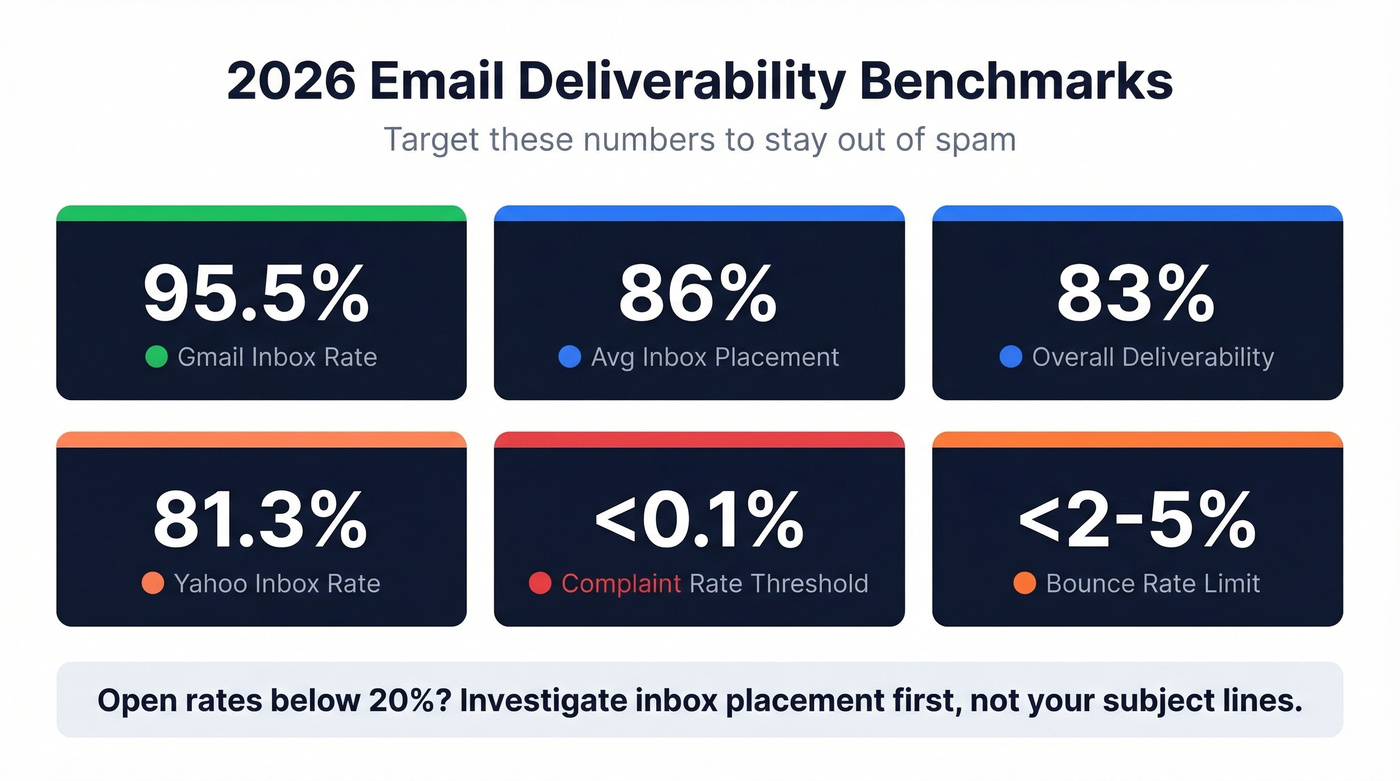
If your Keap open rates are below 20%, treat it as an inbox placement investigation - not a subject line rewrite. Fix authentication and list quality first. Everything else is optimization on top of a broken foundation.
FAQ
Does switching from Infusionsoft/Keap fix deliverability?
Almost never. Deliverability problems follow your domain, not your ESP. Your sender reputation and list quality travel with you to any platform. Fix authentication, list hygiene, and engagement segmentation before considering a migration - otherwise you'll pay for a new tool and land in the same spam folder.
What's Keap's actual inbox placement rate?
Keap's 99.5% figure measures server acceptance, not inbox placement. No independent inbox placement test for Keap is publicly available. Industry average inbox placement is around 86%, and your actual rate depends on your domain reputation, authentication setup, and list quality - not the platform itself.
How do I prevent bounces from triggering Keap's compliance team?
Keap flags accounts exceeding 5% bounces per email provider. Verify your list before importing or sending to stale segments. Remove contacts who haven't engaged in 4+ months and target a spam score under 5 on every broadcast. Let's be honest - most compliance flags are preventable with a clean list and tight engagement windows.