How to Fix Inside Sales Productivity (Without Just "Making More Calls")
It's 9:15 AM. You've updated Salesforce, triaged your inbox, sat through a pipeline review, and you haven't dialed a single prospect. That's not a bad morning - it's a familiar one. Only 43.5% of sales professionals hit quota last year, and 57% of reps say sales cycles are getting longer. McKinsey also found that top-quartile sales orgs generate roughly 2.5x higher gross margin per dollar invested in sales than bottom-quartile orgs. The gap starts with how time gets spent.
Inside sales productivity won't improve until you fix that.
The Playbook (Quick Version)
- Audit your calendar for one week. Most reps discover they sell around 14 hours out of 40.
- Time-block your day and build a repeatable 8-touch outbound cadence. Structure beats motivation every time.
- Verify your contact data before every campaign. Bad numbers and bounced emails silently destroy rep efficiency.
How to Measure It
Sales productivity has a simple formula: Output / Input. Divide total deals closed by total selling hours. If you closed 60 deals in 240 hours of selling time last quarter, that's 0.25 deals per hour.
Pair input metrics with output metrics. Inputs are meetings booked, time selling vs. admin, and lead response time. Outputs are win rate, pipeline velocity, and sales cycle length. Raw activity counts - dials made, emails sent - are vanity metrics unless you tie them to outcomes. A rep who books 12 meetings from 40 dials is outperforming the one who books 8 from 100, and your dashboard should reflect that (see B2B sales KPIs for a clean set).
Where Your Time Actually Goes
A survey of 700+ reps found they spend just 35.2% of their time actually selling. That's roughly 14 hours out of a 40-hour week. Admin tasks eat 14.8%, and manual CRM data entry alone costs many teams 1-2 hours per day (a common theme in CRM productivity).
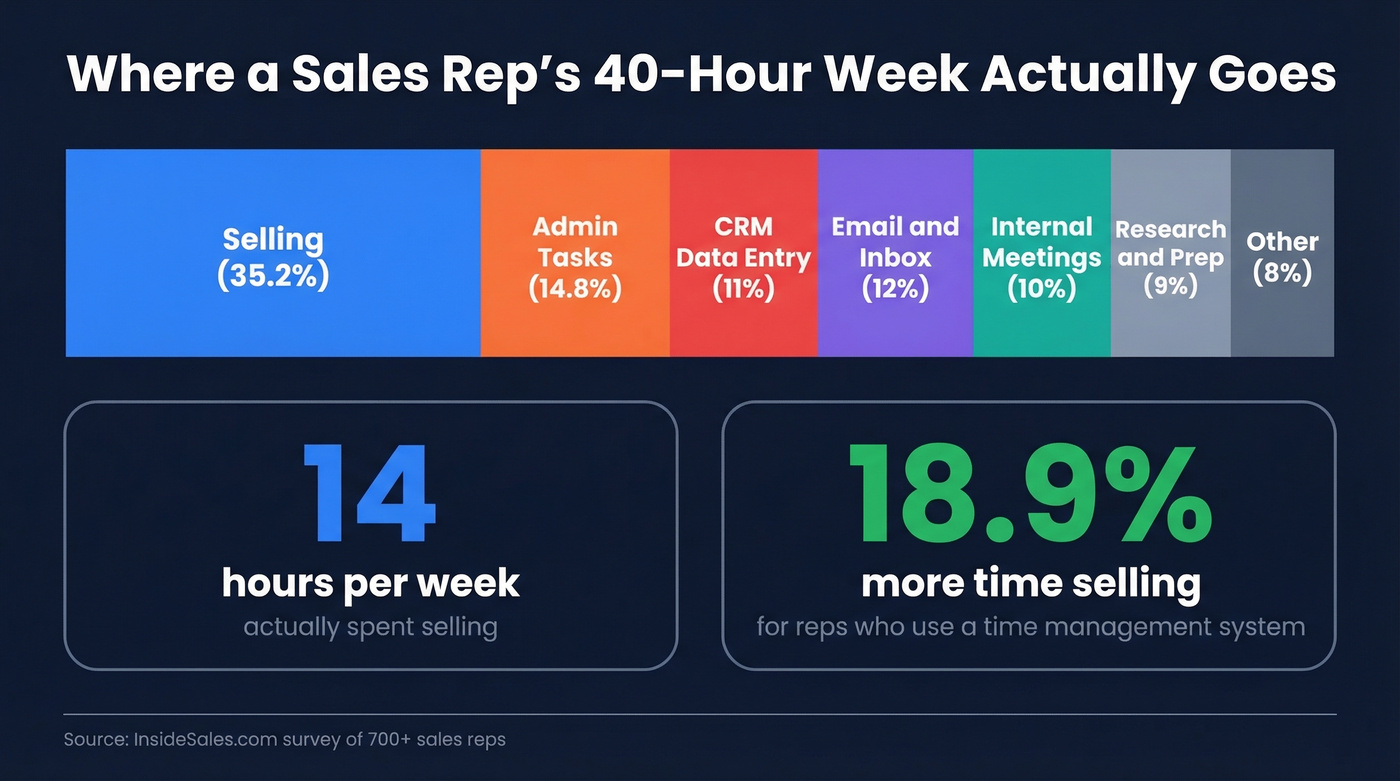
Here's the thing: only 22% of reps actively use any kind of time management system. The ones who do spend 18.9% more time selling - nearly three extra selling hours per week, just from having a structure. Not a new tool. Not a new hire. A system.
A Time-Blocked Inside Sales Day
McKinsey found that top performers offload up to 50% of non-selling tasks to shared services and automation, opening up roughly 20% more sales capacity. You can't hire a shared services team tomorrow, but you can block your calendar today (more frameworks in sales time management).
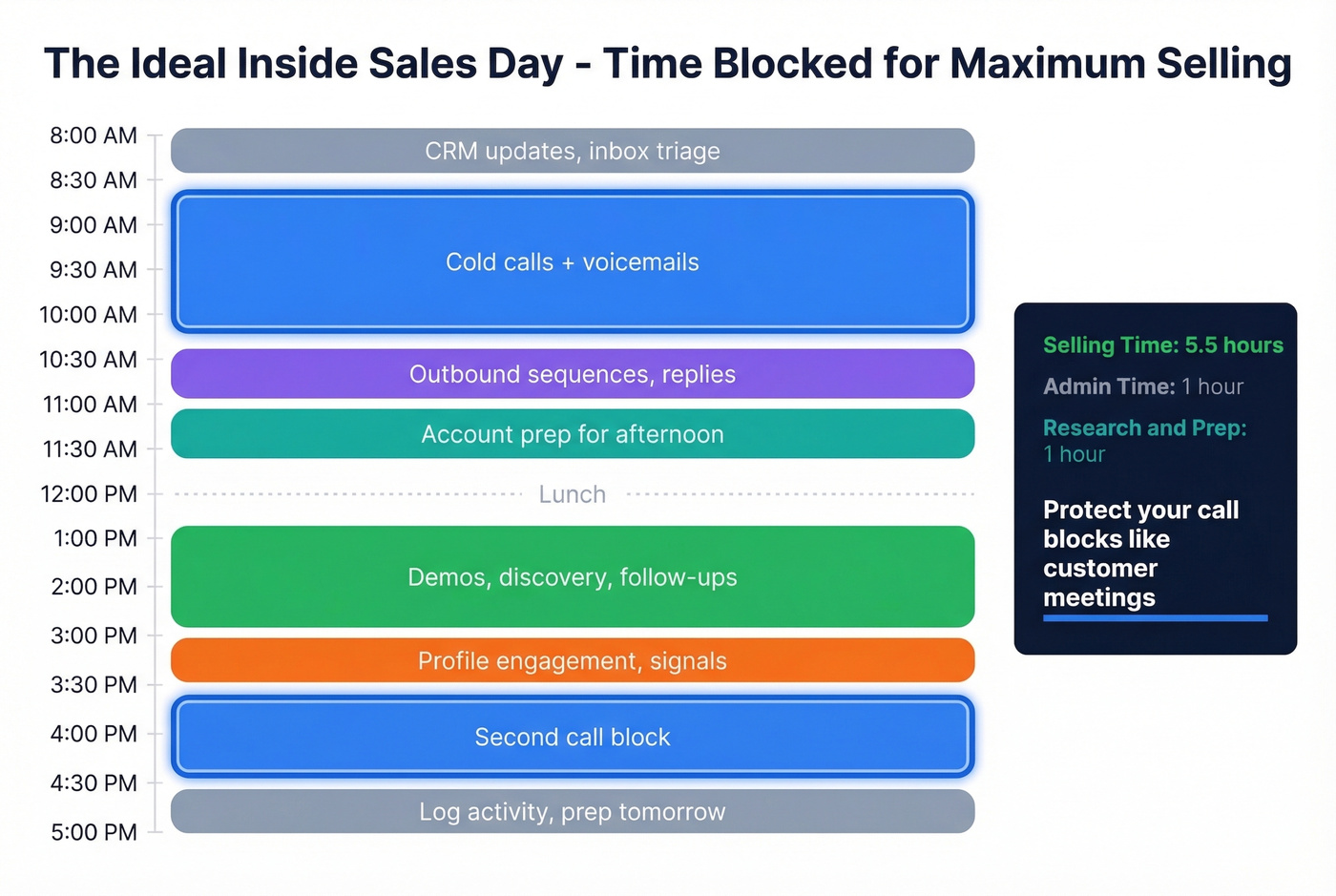
| Time | Block | Activity |
|---|---|---|
| 8:00-8:30 | Admin | CRM updates, inbox triage |
| 8:30-10:30 | Prospecting | Cold calls + voicemails |
| 10:30-11:30 | Outbound sequences, replies | |
| 11:30-12:00 | Research | Account prep for afternoon |
| 1:00-3:00 | Calls | Demos, discovery, follow-ups |
| 3:00-3:30 | Social | Profile engagement, signals |
| 3:30-4:30 | Prospecting | Second call block |
| 4:30-5:00 | Admin | Log activity, prep tomorrow |
In our experience, the reps who protect their call blocks like customer meetings consistently outperform those who don't. Nobody schedules over a demo. Treat your prospecting block the same way (you can also formalize this into a repeatable sales routine).

You just mapped out a time-blocked day with two dedicated call blocks. Now imagine half those dials hitting disconnected numbers. Prospeo's 7-day data refresh and 98% email accuracy mean every minute of your protected prospecting block connects you to real buyers - not voicemail graveyards.
Stop burning selling hours on stale data. Fix your connect rates first.
Build a Repeatable Outbound Cadence
Structure kills procrastination. Here's an 8-touch, 12-day cold cadence adapted from Sybill's framework:
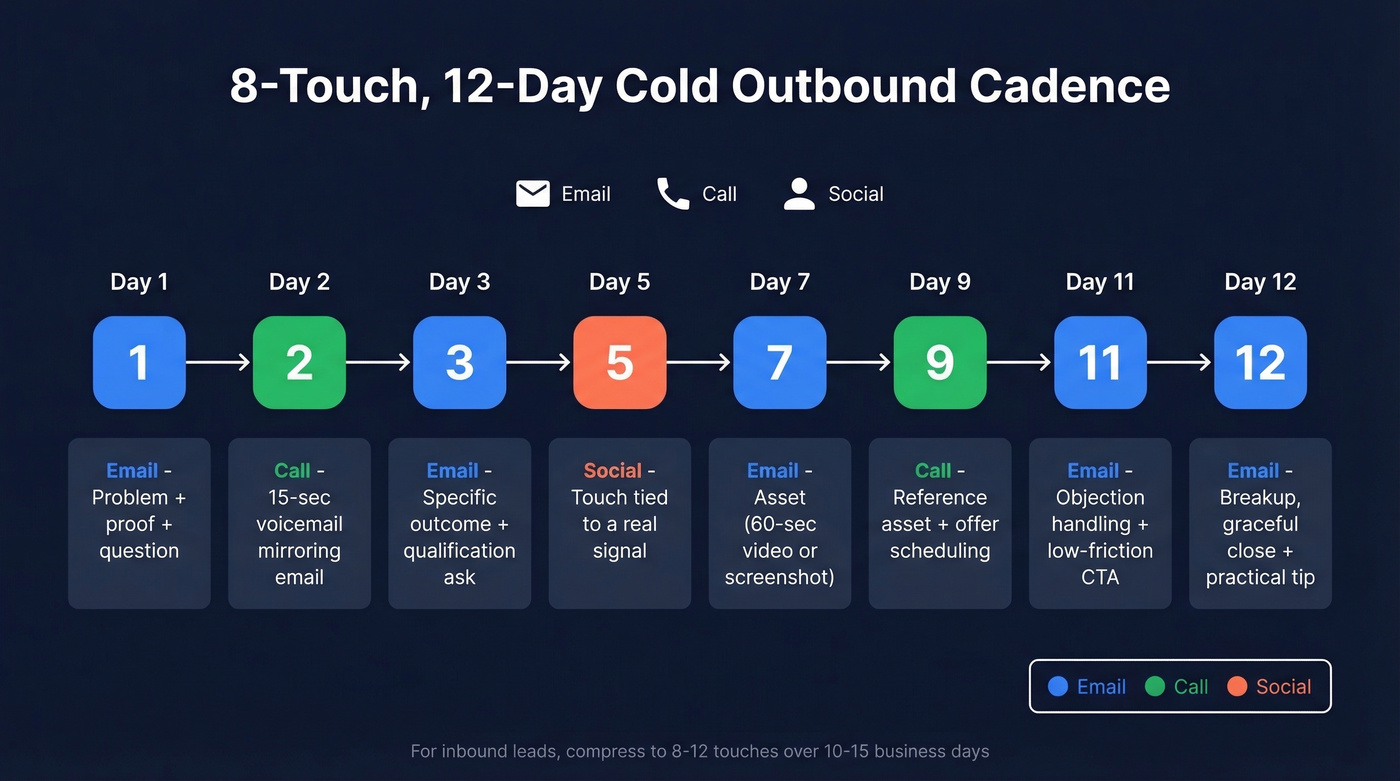
- Day 1 - Email: problem + proof + question
- Day 2 - Call: 15-second voicemail mirroring the email
- Day 3 - Email: specific outcome + qualification ask
- Day 5 - Social touch tied to a real signal
- Day 7 - Email with asset (60-second video or screenshot)
- Day 9 - Call: reference the asset + offer scheduling options
- Day 11 - Email: objection handling + low-friction next step
- Day 12 - Breakup email: graceful close + practical tip
For inbound leads, compress to 8-12 touches over 10-15 business days. Buyers engage across roughly 10 channels during their journey, so multi-channel isn't optional - it's baseline. If you want copy-and-paste follow-ups for the later touches, pull from these sales follow-up templates.
Fix Your Data Before Anything Else
You can time-block perfectly, build the ideal cadence, and still waste half your call block dialing disconnected numbers. Reps blame the pitch when connect rates are the real problem. The pitch isn't the issue. The data is (here’s a deeper breakdown of contact rate vs connect rate).

A 7-day data refresh cycle means contacts stay current - compared to the 4-6 week refresh at most competitors. When your reps are only selling 14 hours a week, every dial that connects matters.
Let's be honest: if your deal sizes sit below five figures, you don't need a $40K/year data platform. You need accurate emails and direct dials at a price that doesn't eat your margin. Most teams are overpaying for data they never use.
The Inside Sales Tech Stack for 2026
You don't need 15 tools. You need the right ones in five or six categories (compare options in sales tech stack examples).
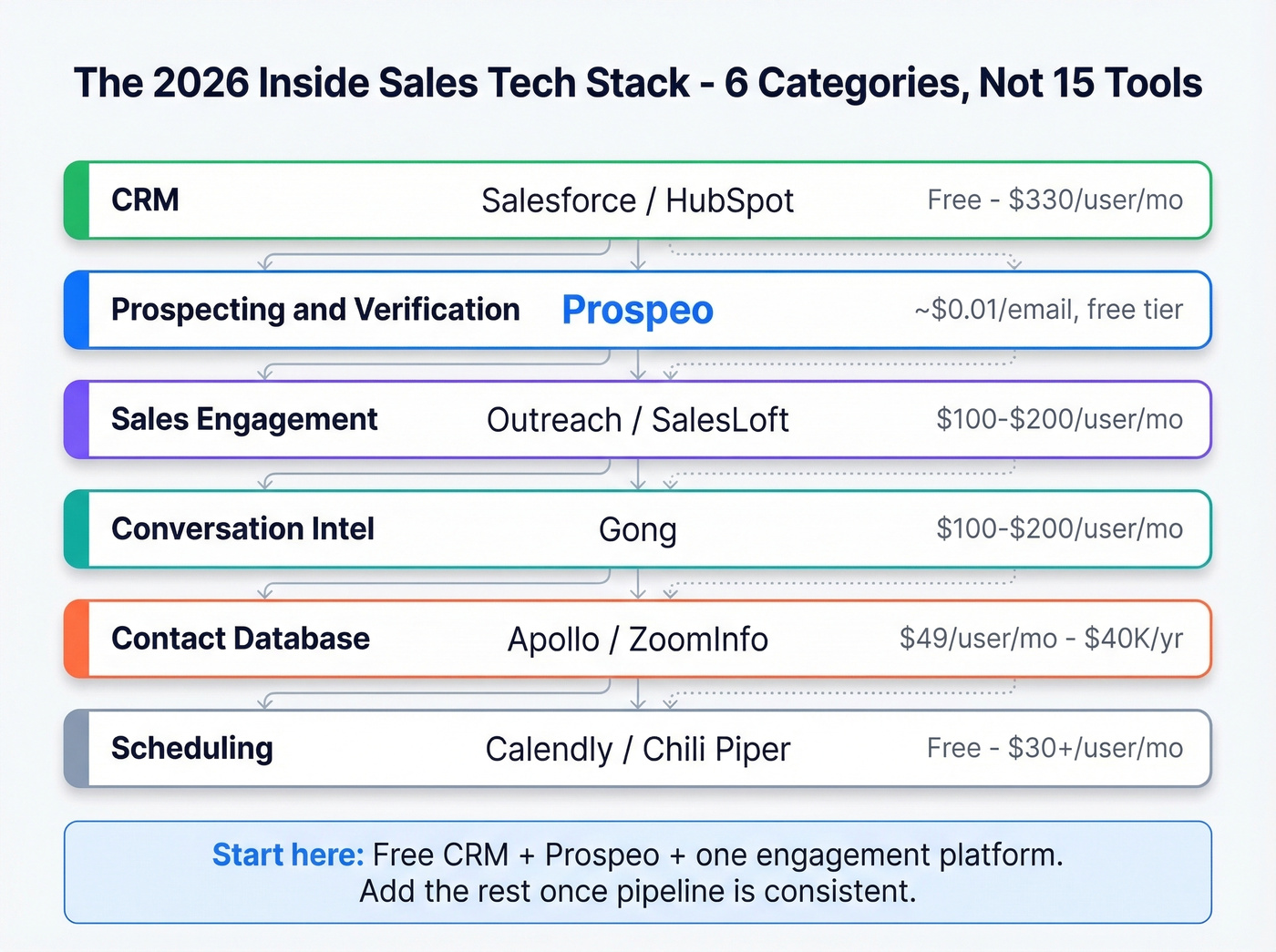
| Category | Tool | Typical Price |
|---|---|---|
| CRM | Salesforce / HubSpot | HubSpot free tier available; paid ~$20-$150/user/mo. Salesforce ~$25-$330/user/mo. |
| Prospecting & Verification | Prospeo | Free tier; ~$0.01/email |
| Sales Engagement | Outreach / SalesLoft | ~$100-$200/user/mo |
| Conversation Intel | Gong | ~$100-$200/user/mo |
| Contact Database | Apollo / ZoomInfo | Apollo ~$49-$99/user/mo; ZoomInfo ~$15K-$40K/yr |
| Scheduling | Calendly / Chili Piper | Calendly free tier; paid ~$10-$20/user/mo. Chili Piper ~$30+/user/mo |
For teams watching budget, start with a free CRM tier, Prospeo for contact data, and one engagement platform. You can add conversation intelligence and scheduling tools once your process is generating consistent pipeline.
Use AI Where It Actually Helps
Among field sales teams surveyed by SPOTIO, 33% aren't using AI at all. Among adopters, the most common use cases are email personalization (30%), conversation intelligence (28%), and content generation (26%). Salesforce reports their internal SDR agent created 3,200 opportunities in four months - impressive, but that's a mature org with clean data and defined processes already in place (if you’re evaluating tools, start with these AI BDR automation tools).
AI won't fix a broken process. If you haven't nailed time-blocking, a repeatable cadence, and clean contact data, an AI copilot is just automating chaos faster. We've tested AI writing tools for outbound sequences and they help once you've already defined your messaging framework. Get the basics right first. Then layer AI on top.
Skip AI tools entirely if your CRM hygiene is a mess or your team doesn't have a documented cadence. You'll spend more time correcting AI output than you save.
At ~$0.01 per email, Prospeo costs less than a single wasted dial. Reps using verified direct dials and emails spend less time chasing dead leads and more of those 14 selling hours actually closing. 75 free verified emails per month, no contract, no sales call.
Reclaim your selling hours with data that actually connects.
FAQ
What's a good dial target for inside sales reps?
Most SDR teams target 50-80 dials per day, but connect rate matters more than volume. With verified, current data, 50 targeted dials outperform 100 dials to stale numbers. Track connects-per-dial, not just total activity.
How do you calculate inside sales productivity?
Divide total deals closed (or revenue generated) by total selling hours. For example, 60 deals in 240 hours equals 0.25 deals per hour. Track this monthly alongside pipeline velocity and win rate to spot trends before they become problems.
What tools save inside sales reps the most time?
A CRM, a sales engagement platform, and a verified contact data tool. These three categories eliminate the biggest time sinks: manual data entry, inconsistent follow-up, and outreach to bad contact information.
How does bad data hurt sales rep efficiency?
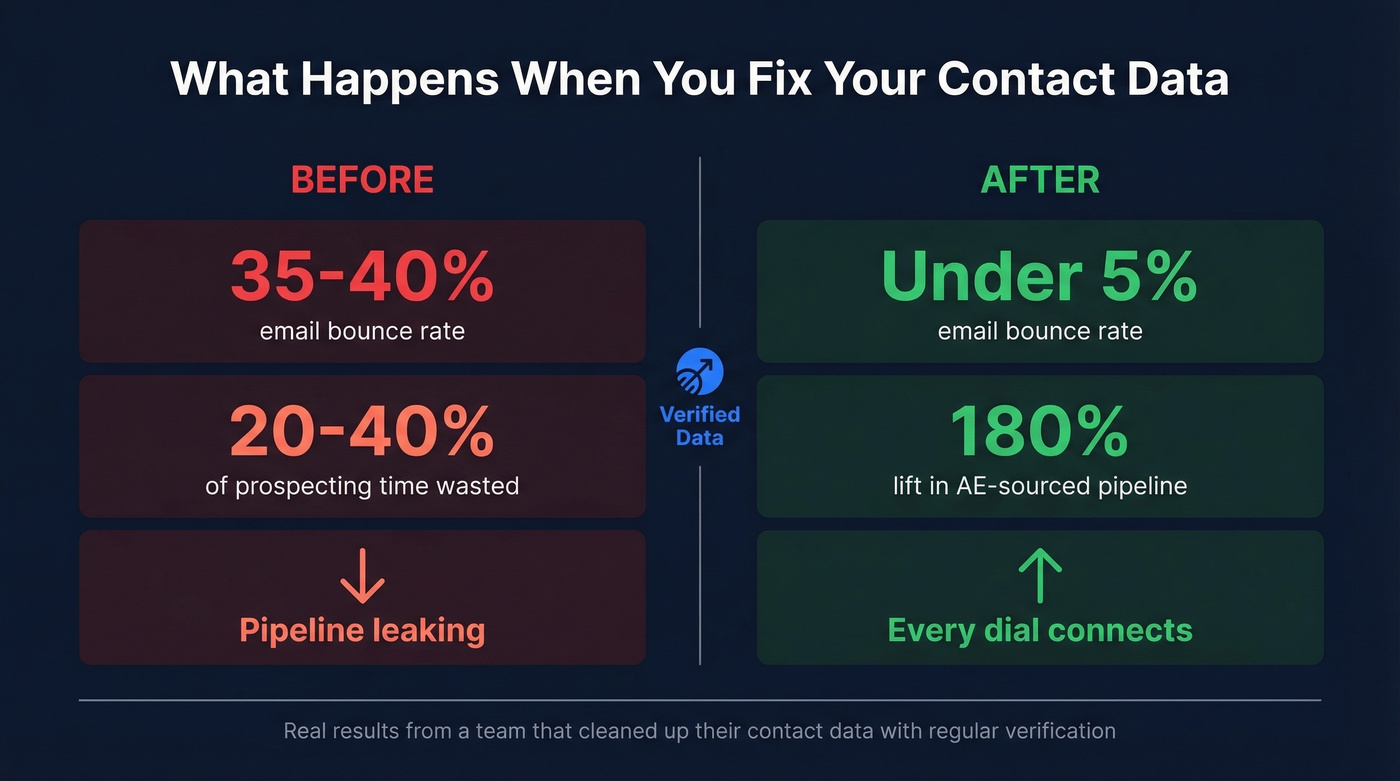
Bounced emails and disconnected numbers waste 20-40% of prospecting time. One team we've worked with saw bounce rates of 35-40% before cleaning up their data, which dropped them under 5% and lifted AE-sourced pipeline 180%. Clean data is the fastest productivity lever most teams ignore.