

The 9 Best Lead Management Software for Small Business in 2026
The average cost per lead across industries is $198.44. That's what you're paying just to get someone into your pipeline. Now picture importing that hard-won list into your shiny new CRM, launching your first outbound sequence, and watching 40% of emails bounce. The lead management software you pick matters - but the data you feed it matters more.
We evaluated each tool below on pricing transparency, data quality, ease of setup for teams under 15, and real-world adoption patterns. Here are nine options worth your time.
Our Picks (TL;DR)
| Use Case | Pick |
|---|---|
| Best for clean data + enrichment | Prospeo |
| Best free starting point | HubSpot CRM |
| Best for sales-focused teams | Pipedrive |
| Best for tight budgets (3 or fewer users) | Zoho CRM |
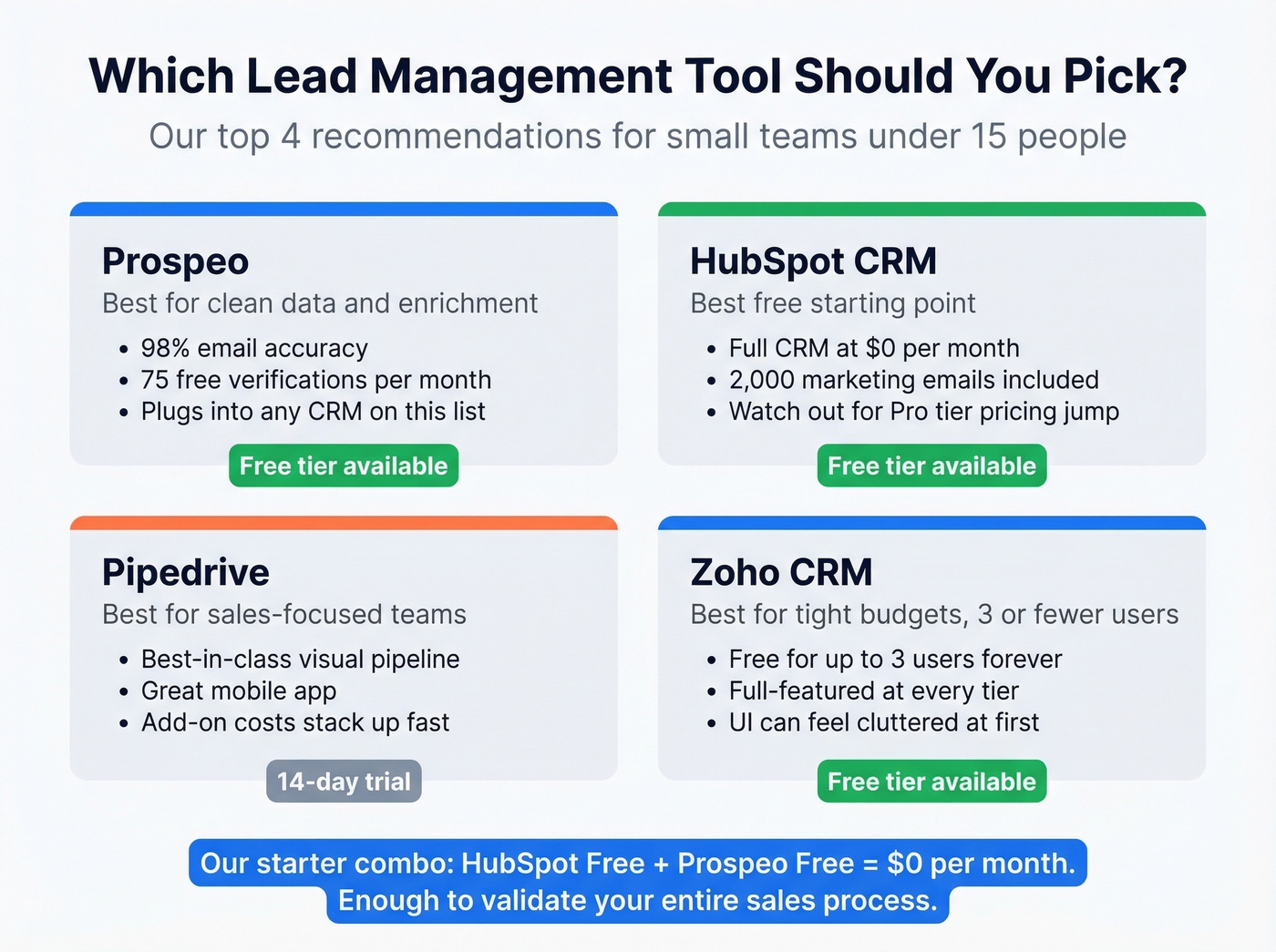
If we had to pick two tools to start with: HubSpot free plus Prospeo. HubSpot handles the pipeline. Prospeo handles the data. Together they cost $0/month - HubSpot's free plan plus Prospeo's free tier of 75 verified emails per month. That's enough to validate your entire sales process before spending a dollar.
What Lead Management Software Actually Does
Lead management isn't just a CRM. It's a stack. Zapier frames it well - you need tools across capture, enrichment, scoring, nurturing, and conversion. A CRM sits at the center, but it's only one piece. For context, organizations generate an average of 1,877 leads per month, and even a fraction of that volume will expose gaps in a disorganized process fast.
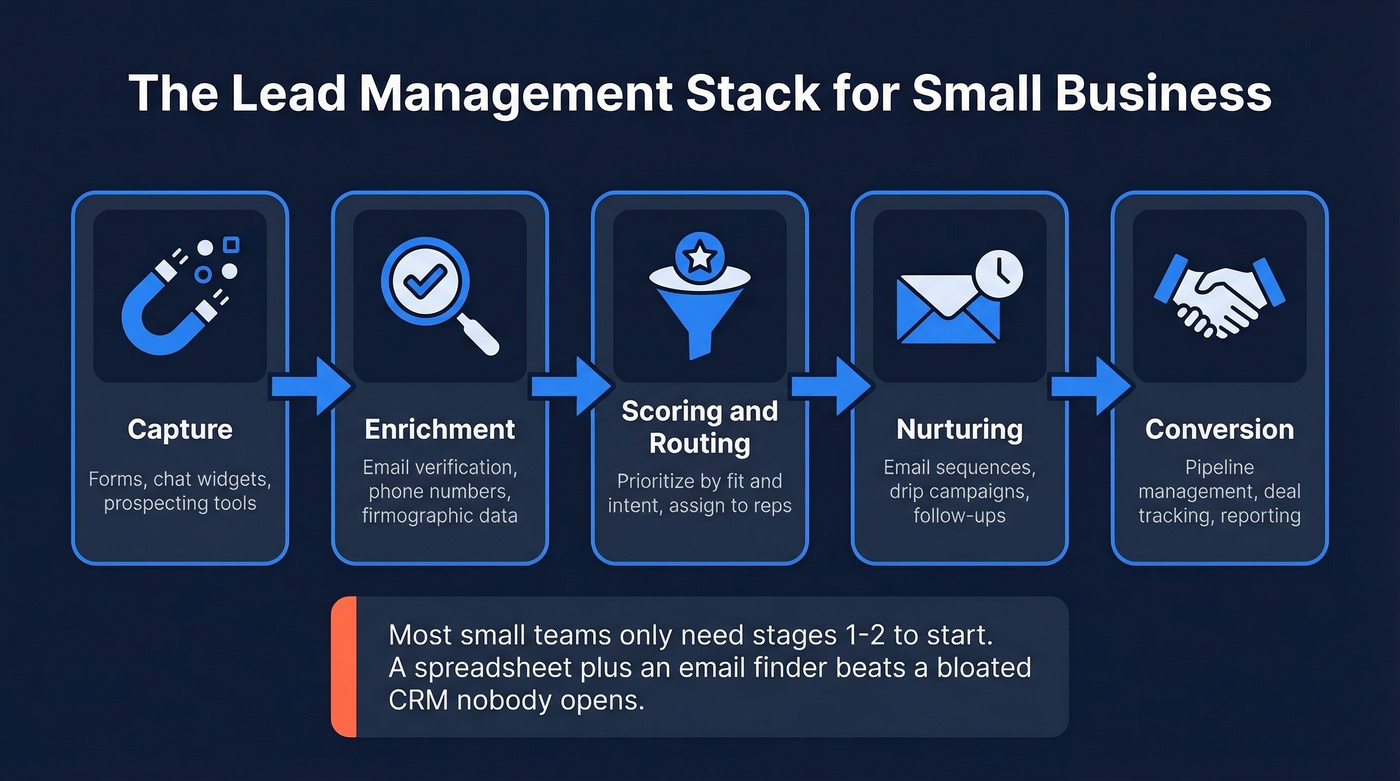
The full stack looks like this:
- Capture - forms, landing pages, chat widgets, prospecting tools
- Enrichment - verifying emails, appending phone numbers, adding firmographic data (see data enrichment)
- Scoring & routing - prioritizing leads by fit and intent, assigning to the right rep (see lead scoring)
- Nurturing - email sequences, follow-up reminders, drip campaigns (use these sales follow-up templates)
- Conversion - pipeline management, deal tracking, reporting
Here's the thing: if you're a solo founder or a two-person team, you probably don't need a CRM yet. A spreadsheet, an email finder, and a disciplined follow-up system will outperform a bloated CRM that nobody opens. Start simple. Add complexity when your pipeline demands it.
The 9 Best Tools for Small Teams
HubSpot CRM
Best for: teams that want a free starting point with room to grow
HubSpot's free CRM is genuinely useful - one deal pipeline, contact management, 2,000 marketing emails per month, and a meeting link. For a team of three running their first outbound motion, it's hard to beat free.
The problem is what happens next. HubSpot has six product hubs, each with Starter, Professional, and Enterprise tiers. Starter runs $15/user/month billed annually - reasonable. But the jump to Professional hits $90-$3,600/month depending on the hub, plus a one-time $1,500 onboarding fee. ZDNET puts it bluntly: costs can quickly escalate past $800/month. Pricing shock at the Professional tier is the most common regret we hear from small teams that started on HubSpot.
Use this if: you're starting from zero and want a CRM that can scale for 12-18 months before you outgrow the free tier.
Skip this if: you need advanced automation now. You'll hit the paywall fast, and the pricing complexity is maddening.
Prospeo
Best for: data accuracy and lead enrichment - the layer that makes every other CRM on this list work
Most tools here manage leads. Prospeo finds and verifies them. Its database covers 300M+ professional profiles with 98% email accuracy and 125M+ verified mobile numbers, all refreshed on a 7-day cycle. The industry average refresh is six weeks, which means most databases are serving you stale data by default.

The enrichment engine returns 50+ data points per contact at a 92% API match rate. Pair it with any CRM on this list and your bounce rate drops below 4%. Meritt proved it - they tripled their pipeline from $100K to $300K/week after switching, with bounce rates falling from 35% to under 4%.
The free tier gives you 75 email verifications and 100 Chrome extension credits per month. Paid plans run ~$0.01 per email with no contracts. Native integrations with Salesforce, HubSpot, Smartlead, Instantly, Lemlist, Clay, Zapier, and Make mean it slots into whatever stack you're already running.
Pipedrive
Best for: sales teams that live in their pipeline and want visual deal tracking
Pipedrive does one thing exceptionally well: it makes your pipeline visible and actionable. The drag-and-drop deal view is the best in class for small sales teams, and the mobile app actually works - which is rarer than it should be.

Pricing starts at $14/seat/month for Lite on annual billing, with a 14-day free trial. But the features most small teams actually need - lead generation, website visitor tracking, email campaigns - are all paid add-ons. LeadBooster costs $32.50/month, Web Visitors runs $41/month, and Campaigns adds $13.33. A realistic setup for a 5-person team lands at $45-90/seat/month once you stack what you need. That add-on creep is the biggest gotcha.
Use this if: your team is sales-first and pipeline visibility is your top priority.
Skip this if: you need built-in lead generation and marketing automation without add-on sticker shock.
Zoho CRM
Best for: budget-conscious teams of 3 or fewer who need a full-featured CRM at zero cost
Zoho CRM is the budget champion. Free for up to 3 users with no time limit - that alone makes it worth testing.
Paid tiers start at roughly $14/user/month for Standard, scaling up through Professional, Enterprise, and Ultimate. Enterprise unlocks Zia, their AI sales assistant, which handles lead scoring and anomaly detection. The tradeoff is interface polish. First-time CRM users often find Zoho's UI cluttered, with more menus and options than a team of three needs. But if you can push through the initial setup, the feature-to-price ratio is unmatched. We've seen teams run Zoho free for a full year before needing to upgrade.
Salesflare
Best for: B2B teams of 2-5 that want the CRM to handle data entry for them
Salesflare is built for teams that hate manual data entry - and it delivers. The CRM automatically pulls contact data from emails, calendars, and social profiles, then logs interactions without you lifting a finger. G2 rates it 4.8/5 across 304 reviews, with ease of use and automation as the top praise themes.
Growth is $29/user/month. Pro is $49/user/month billed annually, or $64/user/month if you go monthly. A 30-day free trial gives you real time to evaluate. Reporting is lightweight and customization options are limited compared to Pipedrive or Zoho - but for a small B2B team that wants zero-effort data logging, it's a strong pick.
Salesforce Starter Suite
Best for: small teams with enterprise ambitions who want to avoid a painful CRM migration later
Enterprise DNA at a small business price point - $25/user/month. Salesforce Starter gives you the core CRM with contact management and deal tracking. PCMag calls it "highly customizable" but also "pricey," and the learning curve is steeper than purpose-built SMB tools.
The real question is trajectory. If you're a 5-person team that plans to be a 50-person team, starting on Salesforce avoids a painful migration later. If you're staying small, the complexity isn't worth it. Pro Suite jumps to $100/user/month, and that's where the enterprise pricing kicks in.
Keap
Best for: established small businesses doing $500K+ revenue that need serious marketing automation
Keap's automation engine is legitimately powerful - lead scoring, landing pages, text marketing, drag-and-drop workflows. The problem is the price tag. Pricing starts at $249/month for two users and 1,500 contacts, with steep increases as you add users or contacts.
Worse, Keap requires paid implementation services - strategy consulting, data migration, done-for-you setup. For a bootstrapped team doing under $300K in revenue, that's a non-starter. Everyone else should look elsewhere.
Less Annoying CRM
$15/user/month. One plan. No tiers, no add-ons, no surprises.
PCMag names it "Best for Budget-Conscious Start-Ups", and the name delivers on its promise. Limited reporting and no built-in marketing automation, but if you need a clean contact database with follow-up reminders, it's the simplest option on this list. Sometimes simple is exactly right.
Bigin by Zoho CRM
PCMag's Editors' Choice for best overall small business CRM. Free plan available, paid from ~$7/user/month. Built specifically for micro-businesses starting from scratch with no IT staff. Pipeline-centric with a Kanban view and no feature bloat - exactly what a 1-3 person team needs. If Zoho CRM feels like too much, Bigin is the lighter alternative.

You just read that the average cost per lead is $198.44. Now imagine 40% of those bouncing because your data is stale. Prospeo's 98% email accuracy and 7-day refresh cycle keep your lead management stack clean - so every dollar you spend on capture actually converts. Free tier included, no contract required.
Stop paying $198 per lead just to watch it bounce.
Pricing Comparison for 2026
Here's what you'll actually pay in year one for a 5-person team - including the costs vendors don't put on the landing page.
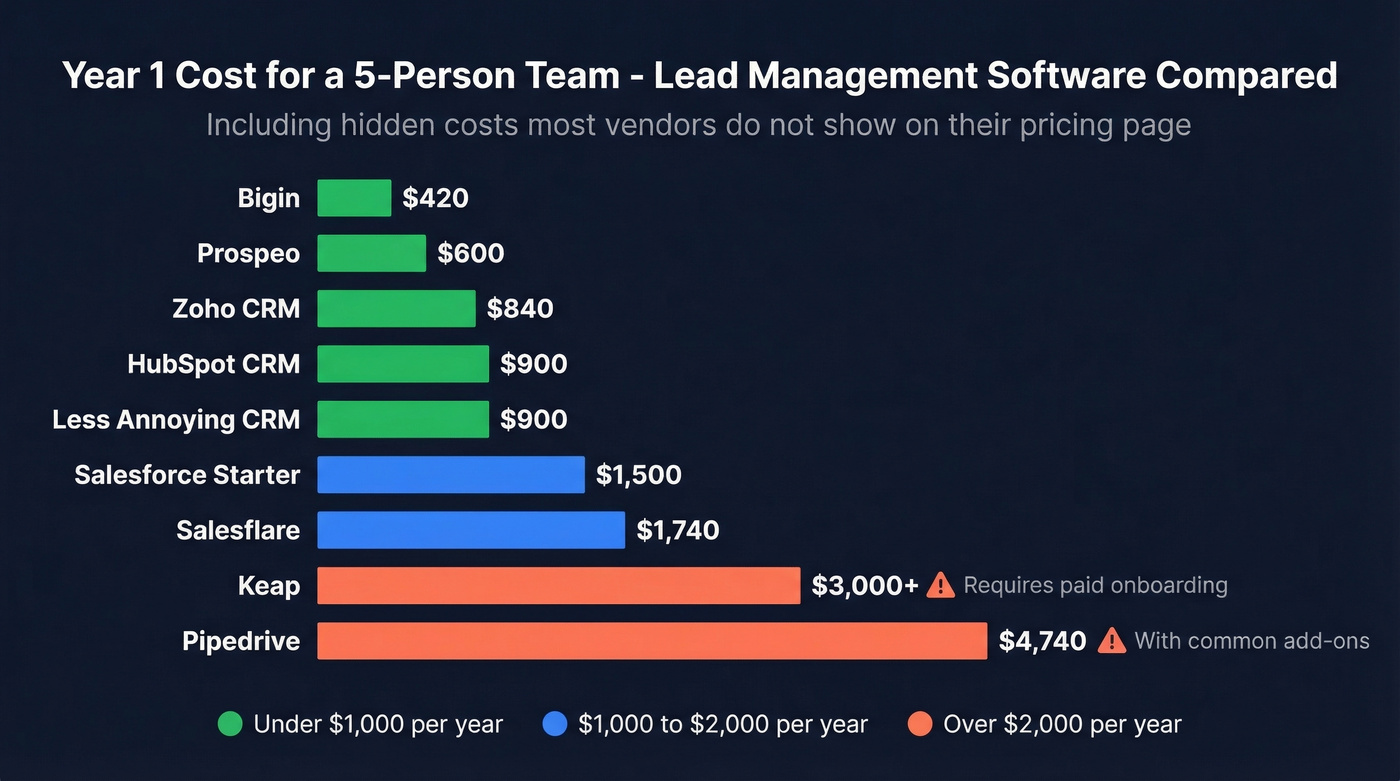
| Tool | Starting Price | Free Tier? | 5-User Year 1 | Hidden Costs |
|---|---|---|---|---|
| HubSpot CRM | $15/user/mo | Yes | $0-$900 | Pro jump: $90+/mo |
| Prospeo | ~$0.01/email | Yes (75/mo) | $0-$600 | None |
| Pipedrive | $14/seat/mo | 14-day trial | $840-$4,740 | Add-ons: $32-$41/mo |
| Zoho CRM | ~$14/user/mo | Yes (3 users) | $0-$840 | AI gated to Enterprise |
| Salesflare | $29/user/mo | 30-day trial | $1,740 | Pro: $49/user/mo |
| Salesforce Starter | $25/user/mo | No | $1,500 | Pro Suite: $100/user |
| Keap | $249/mo (2 users) | No | $3,000+ | Required onboarding |
| Less Annoying | $15/user/mo | No | $900 | None |
| Bigin | ~$7/user/mo | Yes | $0-$420 | None |
5 Mistakes That Kill CRM Adoption
CRM automation can increase lead conversion rates by up to 30% - but only if your team actually uses the tool. Here are the five mistakes that sink most small business CRM rollouts, drawn from Nimble's research on SMB implementation failures.
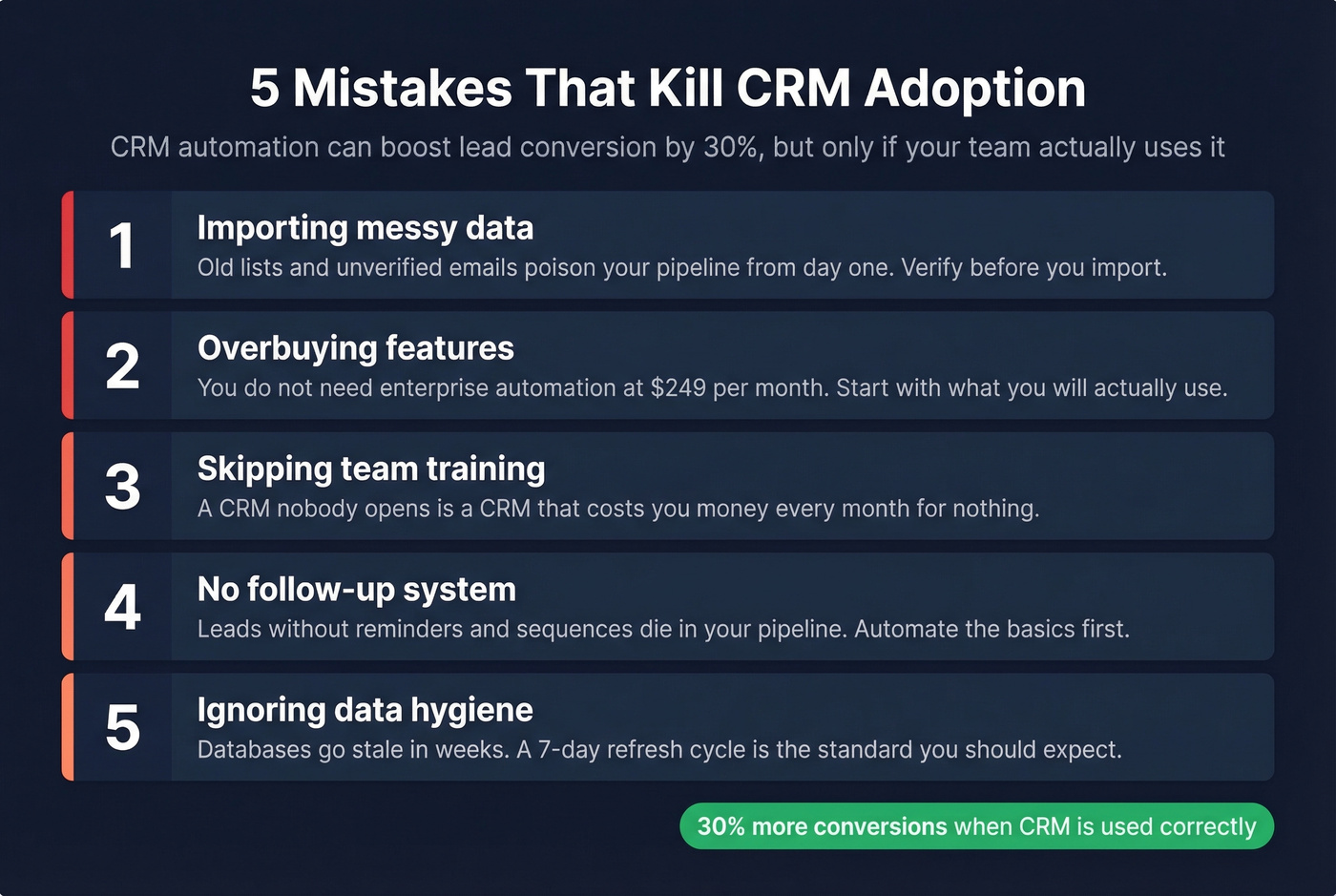
1. Importing messy data. Old lists, unverified emails, and duplicate contacts pollute your CRM from day one. Run your contact list through an email verification tool before importing. Every bounced email erodes your domain reputation, and cleaning a list after import is ten times harder than cleaning it before.

2. Trying to do everything at once. Start with three habits: log notes after every call, set follow-up reminders, and track one pipeline. That's it for month one.
3. Leaving defaults untouched. Customize your pipeline stages, deal fields, and lead sources to match your actual sales process. Default settings match nobody's workflow.
4. Low team adoption. If reps don't see immediate value, they won't log in. Assign a CRM champion - one person who owns the setup, trains the team, and holds people accountable. In our experience, teams that skip this step abandon their CRM within 90 days.
5. Disconnecting sales and marketing data. When your CRM handles deals but a separate tool handles email campaigns and a third handles lead capture, you end up with data silos that nobody reconciles. Pick a CRM that covers both, or at minimum connect your tools through native integrations so lead data flows in one direction without manual exports.
The best lead management software for small business is only as strong as the enrichment layer feeding it. Prospeo returns 50+ data points per contact at a 92% match rate and plugs directly into HubSpot, Pipedrive, Zoho, and every other CRM on this list. At $0.01 per email, it costs less than a single bounced lead.
Enrich your pipeline before your competitors do.
How to Choose the Right Tool
Solo founder or freelancer: Skip the CRM. Use a spreadsheet for your pipeline and a free email verification tool to find and verify contacts. Add a CRM when you're consistently managing 50+ active conversations.
2-5 person team: HubSpot free or Pipedrive Lite as your CRM, paired with a data quality tool for enrichment. Total cost: $0-$70/month per person. This covers 90% of what small sales teams need.
5-15 person team: Zoho CRM Standard, Pipedrive Growth, or Salesforce Starter depending on your complexity needs. At this size, data enrichment pays for itself on the first campaign that doesn't bounce. Let's be honest - if you're sending 500+ emails a week without verification, you're gambling with your domain reputation every single day.
FAQ
What is lead management software?
Software that captures, tracks, scores, and nurtures sales leads through your pipeline - from first contact to closed deal. Most small businesses use a CRM as the core, plus specialized tools for data enrichment and automation. Expect to pair at least two tools for a complete workflow.
What's the best free option for small teams?
HubSpot CRM offers the most complete free plan with pipeline management and 2,000 marketing emails per month. Zoho CRM is free for up to 3 users. Pair either with a free email verification tier to avoid bounce-rate problems from day one.
How much should a small business budget for lead management?
Most small teams spend $15-50/user/month on a CRM, plus $0-30/month for a data quality tool. Avoid platforms requiring $250+/month commitments before you've validated your sales process - that's premature for teams under $500K in annual revenue.
Why do small business CRMs fail?
Dirty data, low team adoption, and overbuying features nobody uses. Import only verified contacts, start with 2-3 core workflows, and pick a tool your team will actually open daily. The best lead management software for small business is the one that gets used consistently.