

Lead Response Email Templates: Reply Fast, Close More Deals
A prospect just filled out your demo request form. In 10 minutes, they'll be in a meeting. In an hour, they'll have forgotten your company name. A fast lead response email template is the difference between a qualified pipeline and a graveyard of missed opportunities.
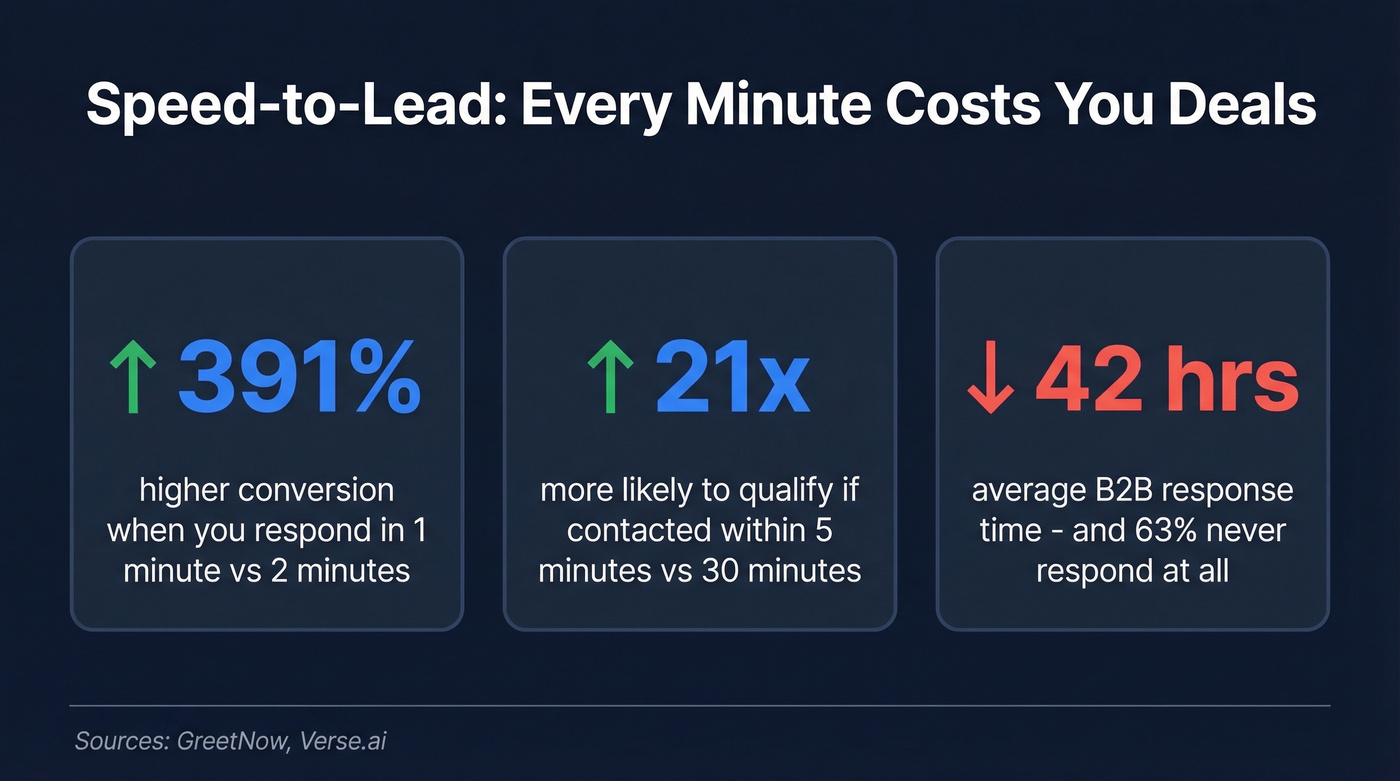
The data is brutal: leads contacted within 5 minutes are 21x more likely to qualify than those contacted after 30 minutes. Responding within the first minute lifts conversions by 391% compared to waiting just two minutes. Yet the average B2B company takes 42 hours to respond - and 63% never respond at all.
Here's the short version: respond in under 10 minutes, use one of the 5 templates below, follow the cadence through Day 14, personalize the subject line in 2-4 words as a question, and verify the email before you hit send.
Inbound Lead Response Templates for 5 Scenarios
Each template includes a subject line, body with placeholders, and a timing note. Customize 20-30% of the template and send.
Demo Request Response
Subject: Quick question, {{FirstName}}
Hi {{FirstName}},
Thanks for requesting a demo of {{Product}}. Before I set anything up, I want to make sure we cover what matters most to you.
What's the main challenge you're trying to solve right now? Happy to tailor the walkthrough to that.
Talk soon, {{YourName}}
Timing: Within 5 minutes of form submission. Treat this like live chat, not a ticket.
This works because it doesn't launch into a pitch. It asks a question, which doubles as qualification and makes the prospect feel heard before the call even happens.
Content Download Follow-Up
Subject: Helpful, {{FirstName}}?
Hi {{FirstName}},
You grabbed our {{ContentTitle}} earlier - hope it's useful. Most teams reading that guide are trying to figure out {{CommonPainPoint}}.
If that sounds like you, I put together a quick breakdown of how {{YourCompany}} handles it. Worth a 10-minute call?
{{YourName}}
Timing: Within 1 hour. The content is still fresh in their mind.
It connects the content to a specific pain point instead of just saying "saw you downloaded our ebook." That specificity signals you actually read what they read.
Pricing Page Inquiry
Subject: Pricing for {{CompanyName}}?
Hi {{FirstName}},
Noticed you were checking out our pricing - happy to help you figure out the right plan for {{CompanyName}}.
Quick context: most teams your size start with {{PlanName}} and scale from there. Want me to send over a custom breakdown?
{{YourName}}
Timing: Within 5 minutes. Pricing page visitors have high intent - don't let them comparison-shop in silence.
Naming their company in the subject line and referencing team size shows this isn't a mass email. The "custom breakdown" CTA gives them a reason to reply beyond "yes, send me pricing."
Free Trial Signup Check-In
Subject: Getting started?
Hi {{FirstName}},
Welcome to {{Product}}! Here's the fastest path to your first win:
- {{QuickStartStep1}}
- {{QuickStartStep2}}
If you get stuck or want a shortcut, reply here. I'll point you in the right direction.
{{YourName}}
Timing: Within 10 minutes of signup. Activation speed determines whether they convert.
No "let's schedule a call" - just a clear path to value. It removes friction instead of adding it.
The Breakup Email
Subject: Should I close your file?
Hi {{FirstName}},
I've reached out a few times and haven't heard back - totally understand if the timing isn't right.
I'll close out your request on my end, but if things change, just reply to this thread and we'll pick up where we left off. No hard feelings.
{{YourName}}
Timing: Day 8-10 after initial outreach. This is your last shot - make it low-pressure.
Loss aversion does the heavy lifting here. "Close your file" implies a door shutting, which prompts action more than another "just checking in." In our experience, the breakup email consistently gets a reply bump compared to standard follow-ups.
Subject Lines That Get Opened
A Belkins study of 5.5 million emails found patterns worth following. We've tested these rules across our own campaigns and the data holds up.
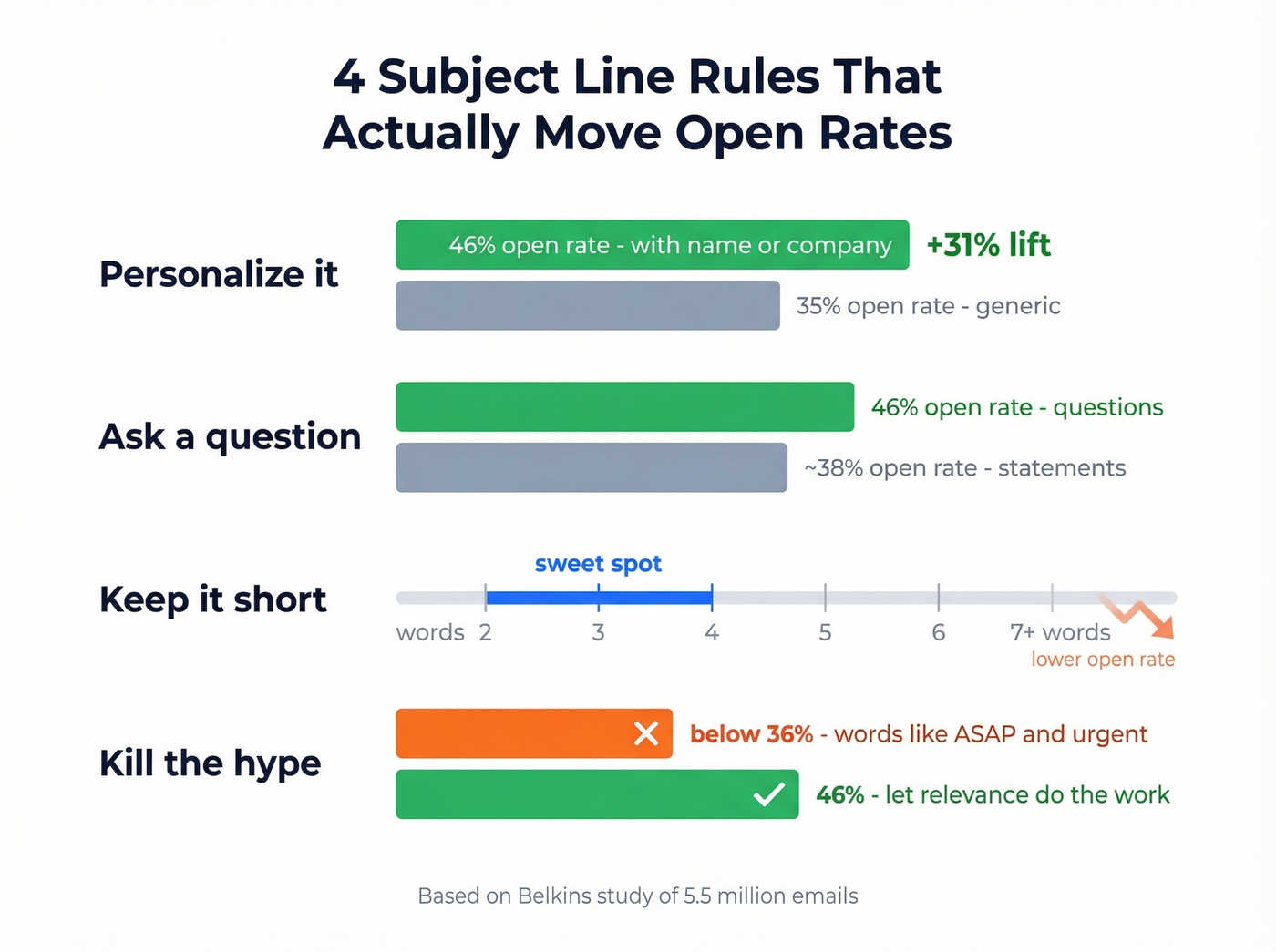
Personalize. Subject lines with the recipient's name or company hit a 46% open rate vs. 35% without - a 31% lift for five seconds of effort.
Ask a question. Questions outperform statements, averaging 46% open rate. "Quick question, Sarah?" beats "Following up on your request" every time.
Keep it short. The sweet spot is 2-4 words. Performance drops steadily past 7.
Kill the hype. Words like "ASAP" and "urgent" suppress opens below 36%. Let the relevance do the work.
If you want more options beyond these patterns, pull from a swipe file of professional email subject line examples and test 2-3 variants per scenario.

You just built the perfect lead response cadence. Now imagine your Day 1 email bouncing because the form submission had a bad address. Prospeo's 5-step email verification catches catch-all domains, spam traps, and typos - delivering 98% accuracy at $0.01 per email.
Don't let bad data kill your speed-to-lead advantage.
Day-by-Day Follow-Up Cadence
80% of sales require 5+ follow-ups, but 44% of reps give up after one. The first follow-up alone increases reply rates by 49%. Here's a day-by-day email sequence adapted from Highspot's inbound framework:
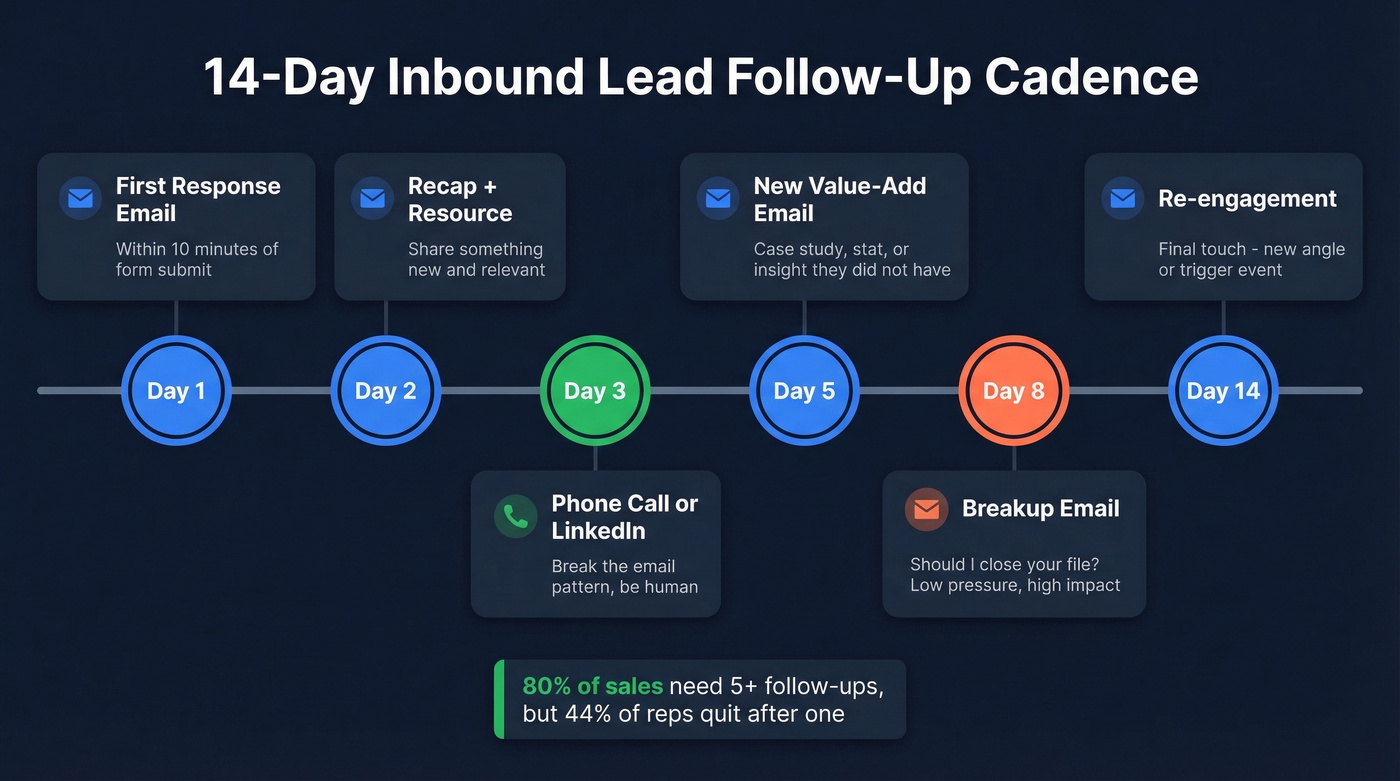
| Day | Touchpoint | Channel |
|---|---|---|
| 1 (within 10 min) | First response email | |
| 2 | Recap + resource | |
| 3 | Phone call or LinkedIn connect | Phone / Social |
| 5 | New value-add email | |
| 8 | Breakup email | |
| 14 | Re-engagement |
Day 1 assumes you've got a verified email address. If the form submission looks suspect - a personal email, a typo, a catch-all domain - run it through a verification tool like Prospeo before your sequence fires. A bounced first touch can derail the entire cadence and hurt your sender reputation.
Space your follow-up emails 2-3 days apart. Next-day nudges feel desperate. Mixing channels matters too - a phone call on Day 3 breaks the email pattern and signals you're a real human, not an automation. If your CRM tracks page visits or content downloads, reference the specific trigger in your follow-up. "Saw you revisited our pricing page" lands harder than "just circling back."
For more copy you can plug into Days 2-14, keep a set of sales follow-up templates handy so every touch adds value.
Let's be honest: avoid "fake speed" replies. Instant, generic responses feel automated and can erode trust faster than a slow reply. The goal is fast and human, not just fast.
Three Mistakes That Kill Replies
1. "Just checking in" with no new value. Every follow-up needs to earn the open. Share a case study, a relevant stat, a resource - something the prospect didn't have before. "Bumping this to the top of your inbox" is the fastest way to get archived.
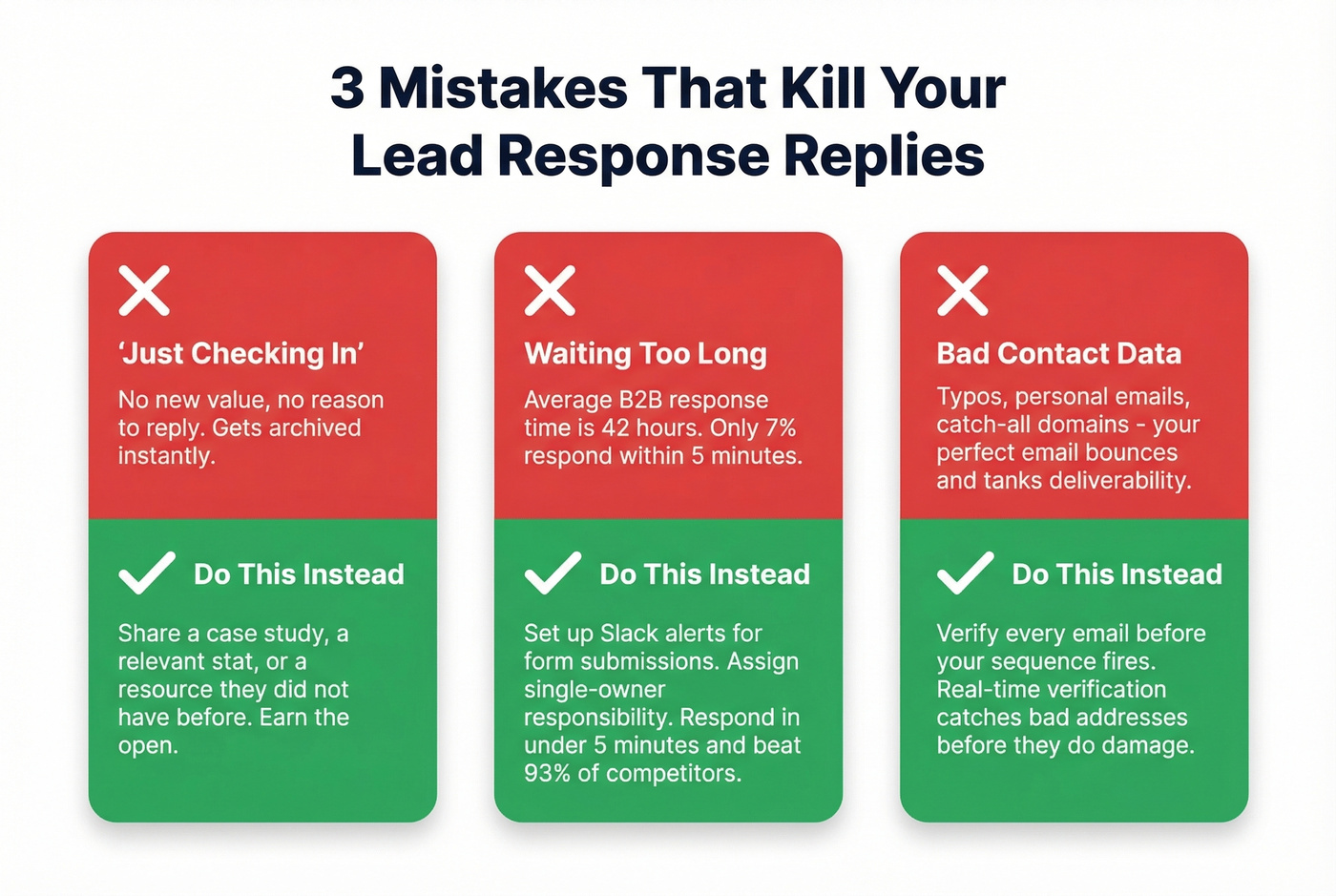
2. Waiting too long. That 42-hour average response time isn't a benchmark. It's a death sentence. Only 7% of companies respond within 5 minutes, which means doing it puts you ahead of 93% of your competitors. Set up Slack notifications for form submissions and assign single-owner responsibility for first response during business hours. This alone will change your numbers.
If you need to formalize this, set an internal SLA using email response time benchmarks so speed-to-lead doesn't depend on heroics.
3. Bad contact data. Even the best lead response email template is worthless if the email bounces. The lead used a personal address, the form had a typo, or the company runs a catch-all domain that accepts everything but delivers nothing. Verify contact data before your sequence fires - a real-time verification step catches bad addresses before they tank your deliverability. Prospeo's free tier covers 75 emails a month, which is enough to validate every inbound lead for most teams.
Speed-to-lead only works when you're reaching real inboxes. Prospeo refreshes 300M+ contact records every 7 days - not every 6 weeks like competitors. That means the email you fire off within 5 minutes actually lands, every time your cadence runs.
Start every lead response sequence with data you can trust.
Personalization That Actually Converts
You don't need 16 templates. You need 4-5 that match real inbound scenarios and the discipline to send them fast. Whether it's a demo request or a pricing inquiry, the same principle applies: speed plus relevance wins.
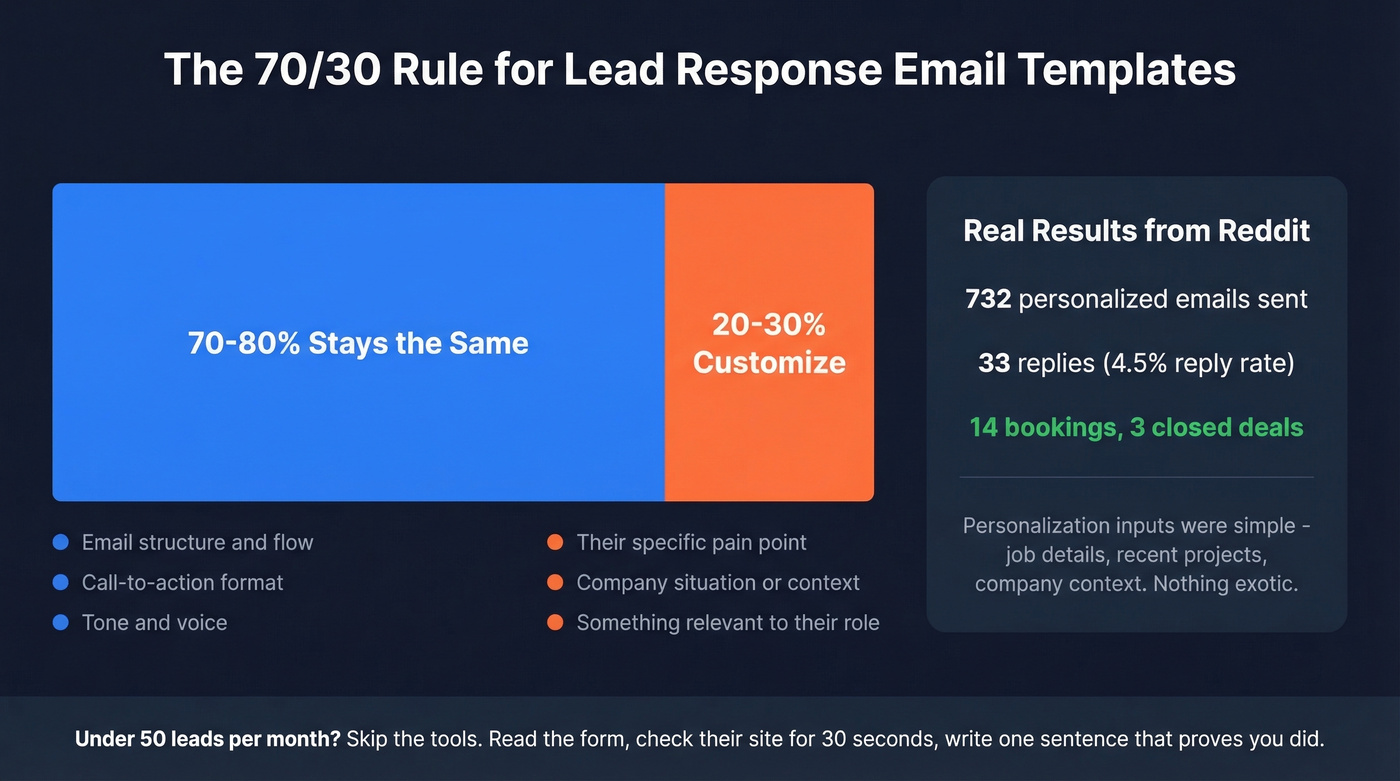
A Reddit case study drove the point home: 732 personalized emails produced 33 replies, 14 bookings, and 3 closed deals in four weeks. The personalization inputs were straightforward - job details, recent projects, company context. Nothing exotic. The consensus on r/b2bmarketing is that even basic personalization outperforms a polished generic email by a wide margin.
The practical rule from Martal's research is to swap out 20-30% of any template with prospect-specific details: their pain point, their company's situation, something relevant to their role. The other 70-80% - your structure, your CTA, your tone - stays consistent across every send. That's what a good lead response email template gives you: a repeatable structure with room for the details that make each message feel personal.
If you want a deeper framework for what to personalize (and what to leave templated), see how to personalize sales emails.
Skip the fancy personalization tools if you're under 50 inbound leads a month. Just read the form submission, check their company site for 30 seconds, and write one sentence that proves you did. That's enough.
If you only take one thing from this article: respond within 5 minutes. Everything else is optimization.