

How to Personalize Sales Emails Without Spending 30 Minutes Per Prospect
The Personalization Time Trap
A poster on r/coldemail described their process: scraping roughly ten professional posts per prospect, reading 40-50 pages of company content, writing fully custom emails from scratch. Volume? Thirty to fifty emails a day. Result? Three replies out of thirty sends, and two of those ghosted after saying yes.
Here's the thing - there's a middle path between that kind of deep research and blasting generic "Hi {{first_name}}, I noticed your company..." templates. Learning how to personalize sales emails efficiently is how you go from 3-4% reply rates to as high as 18%. One relevant signal per email beats thirty minutes of research every time.
2026 Benchmarks: Where You Stand
Instantly's 2026 benchmark report analyzed billions of cold email interactions across thousands of active workspaces. The average reply rate sits at 3.43%. Top quartile hits 5.5%+. The top 10% clear 10.7%.
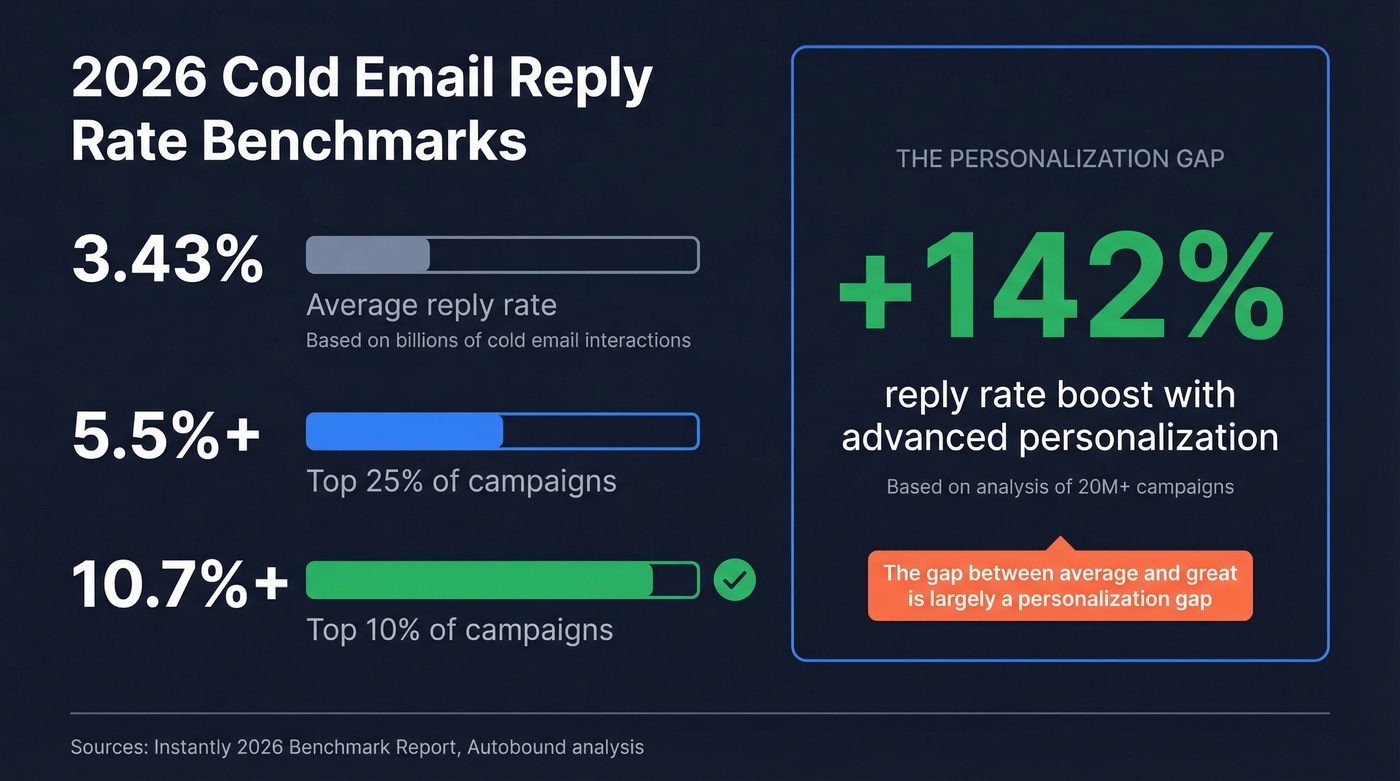
Those top-performing campaigns share one trait: advanced personalization. An analysis of 20M+ campaigns found it boosts reply rates by up to 142%. The gap between "average" and "great" is largely a personalization gap.
The 5-Layer Personalization Framework
Not every prospect deserves the same depth. High-value accounts get all five layers. Volume accounts get layers one and two. This tiered approach drives close to a 75% increase in ACV on average, and the layers apply across channels, not just email.
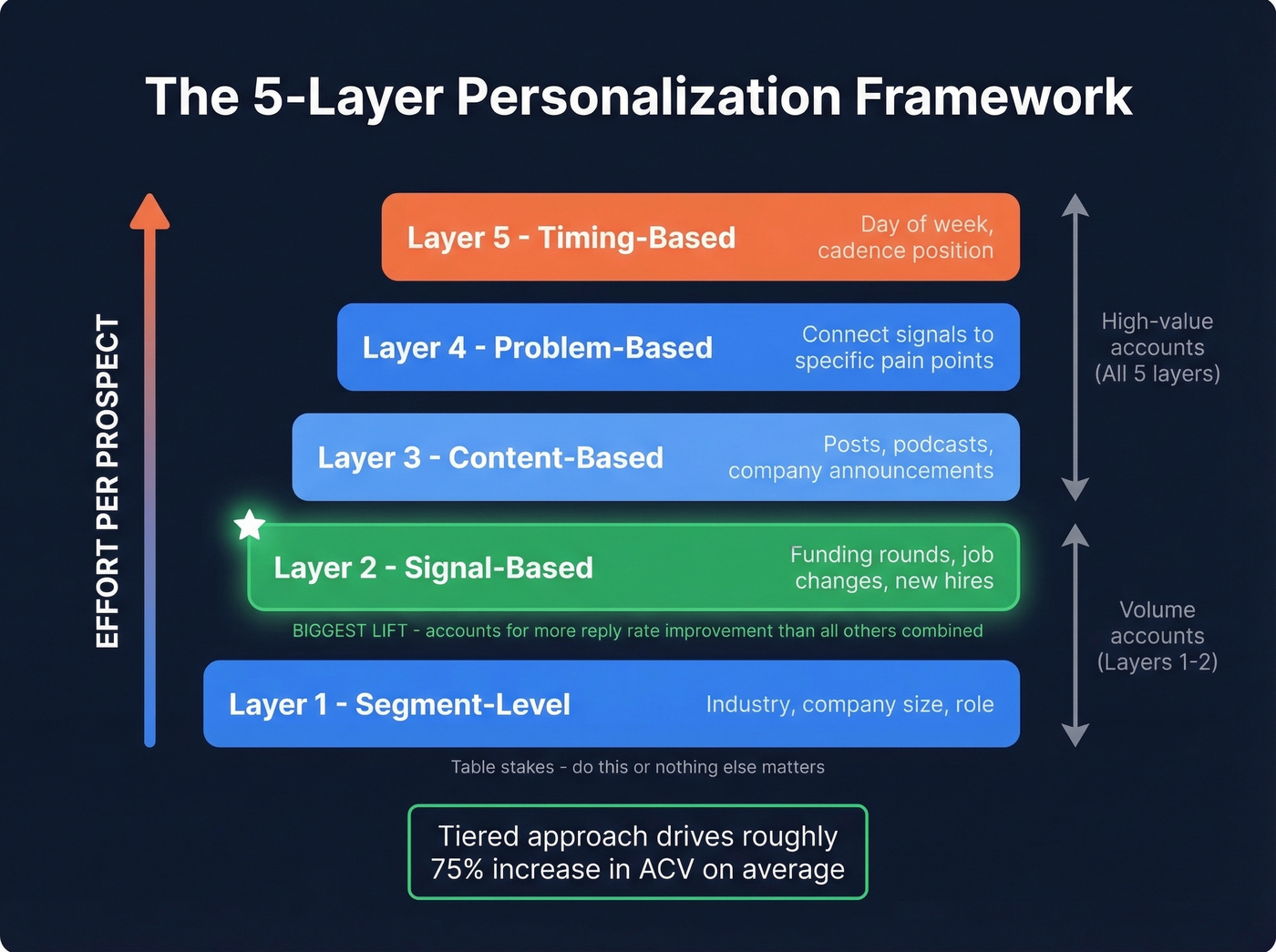
Layer 1 - Segment-Level (Table Stakes)
Industry, company size, role. This isn't personalization - it's segmentation. But it's the foundation everything else builds on. Segmented email campaigns yield $50 for every $1 spent in email marketing broadly, and the principle holds even harder for outbound. If you aren't at least segmenting by persona and vertical, nothing else matters.
If you want a clean way to operationalize this, start with an Ideal Customer Profile and build your segments from there.
Layer 2 - Signal-Based (Biggest Lift)
This is where the real lift comes from. Trigger events - funding rounds, new hires, job changes, product launches - make your email timely instead of random. Referencing a concrete event the prospect will recognize is what separates relevant outreach from noise.
Trigger-based emails outperform batch sends by nearly 5x. The first seller to reach a decision maker after a trigger event is 5x more likely to win the deal. New execs spend 70% of their budget in the first 100 days, so your outreach window is 60-120 days after they start. Miss it and you're competing with an incumbent who's already entrenched.
In our experience, this single layer accounts for more reply-rate lift than all the others combined. It's not even close. If you need a system for collecting these events, use a dedicated process for tracking sales triggers.
Layer 3 - Content-Based
Reference something the prospect actually said or published - a recent post, a podcast appearance, a company announcement. One sentence is enough. You're proving you did homework, not writing a book report.
This is also where B2B content marketing signals (what they publish, how they position, what they prioritize) can give you better angles than generic “nice post” openers.
Layer 4 - Problem-Based
Connect your offer to a specific pain their company likely has based on the signals you've gathered. "Saw you're hiring 5 SDRs - scaling outbound without verified data usually means bounce rates spike" is problem-based. It shows you understand their situation rather than pitching blindly.
If bounce rates are creeping up, it’s usually a deliverability issue first - use these email bounce rate benchmarks and fixes to diagnose it.
Layer 5 - Timing-Based
Wednesday sends peak for engagement. The first email captures 58% of all replies, with follow-ups accounting for the remaining 42%. Get the first touch right and your cadence does the rest.
For a deeper breakdown of timing and send windows, see our data on the best time to send cold emails.

Signal-based personalization only works when your emails actually land. Prospeo's 5-step verification delivers 98% email accuracy on a 7-day refresh cycle - so every custom first line you write reaches a real inbox, not a bounce.
Stop wasting personalized openers on dead email addresses.
How to Personalize Sales Emails at Scale
Here's the workflow that keeps showing up on r/SaaS and in the teams we've worked with:
1. Build a verified list. Before you personalize a single line, verify your contacts. If your data's bad, every custom first line you write is wasted effort and damaged sender reputation. Prospeo verifies emails in real time with 98% accuracy on a 7-day refresh cycle at roughly $0.01 per email. Stack Optimize built to $1M ARR using Prospeo data with bounce rates under 3% and zero domain flags across all clients.
If you’re building lists from scratch, these free lead generation tools can help you source targets before verification.
2. Enrich with signals. Pull trigger events into CRM custom fields - funding rounds, job changes, recent posts. Clay handles this well around $149/month for many setups. The richer your signal data, the easier it is to write personalized content that actually resonates.
If you’re comparing vendors and workflows, start with this roundup of data enrichment services.
3. Generate custom first lines. Feed the signal into GPT-4o mini or Gemini 2.5 Pro for higher quality. Output a one-sentence opener that references the signal. Store it as a {{custom_message}} variable.
To tighten the rest of the message around that opener, use proven email copywriting structure (value prop, proof, ask).
4. Export and send. Push the CSV into your sending tool. Instantly starts around $30/month; Smartlead is in a similar range. The {{custom_message}} variable becomes your first line. The rest of the email is a tight template.
If you’re building a full outbound stack, here are the best SDR tools to consider alongside your sender.
Teams running this workflow report roughly 3x response rate lifts compared to generic outreach. The whole process takes 2-5 minutes per prospect instead of 30. Full stack cost: often under $200/month for a lean setup.
Layer 2 of the framework - signal-based personalization - needs enriched data to work. Prospeo returns 50+ data points per contact including job changes, funding rounds, and hiring signals. At $0.01 per email, your full personalization stack stays under $200/month.
Build signal-rich prospect lists in minutes, not hours.
Templates That Actually Get Replies
The 47-Word Hiring Signal Email
Hi {{first_name}},

Saw {{company}} is hiring {{role}}. When teams scale
that function, {{specific problem}} usually follows.

We help {{similar companies}} {{specific outcome}} without
{{common pain point}}.

Worth a quick conversation?
One signal, one problem, soft CTA. Under 50 words. No fluff.
The Funding Round Template
Hi {{first_name}},

Congrats on the {{round}} raise. Most teams at your
stage hit {{specific bottleneck}} within 90 days.

{{One sentence on how you solve it.}}

Interested?
Subject Line Rules
Keep subject lines under four words, lowercase, zero salesy language. Personalized subject lines hit a 46% open rate versus 35% for generic ones. "quick question" outperforms "Exclusive Opportunity for {{company}}!" every single time.
If you want more options that fit this style, pull from these cold email subject line examples.
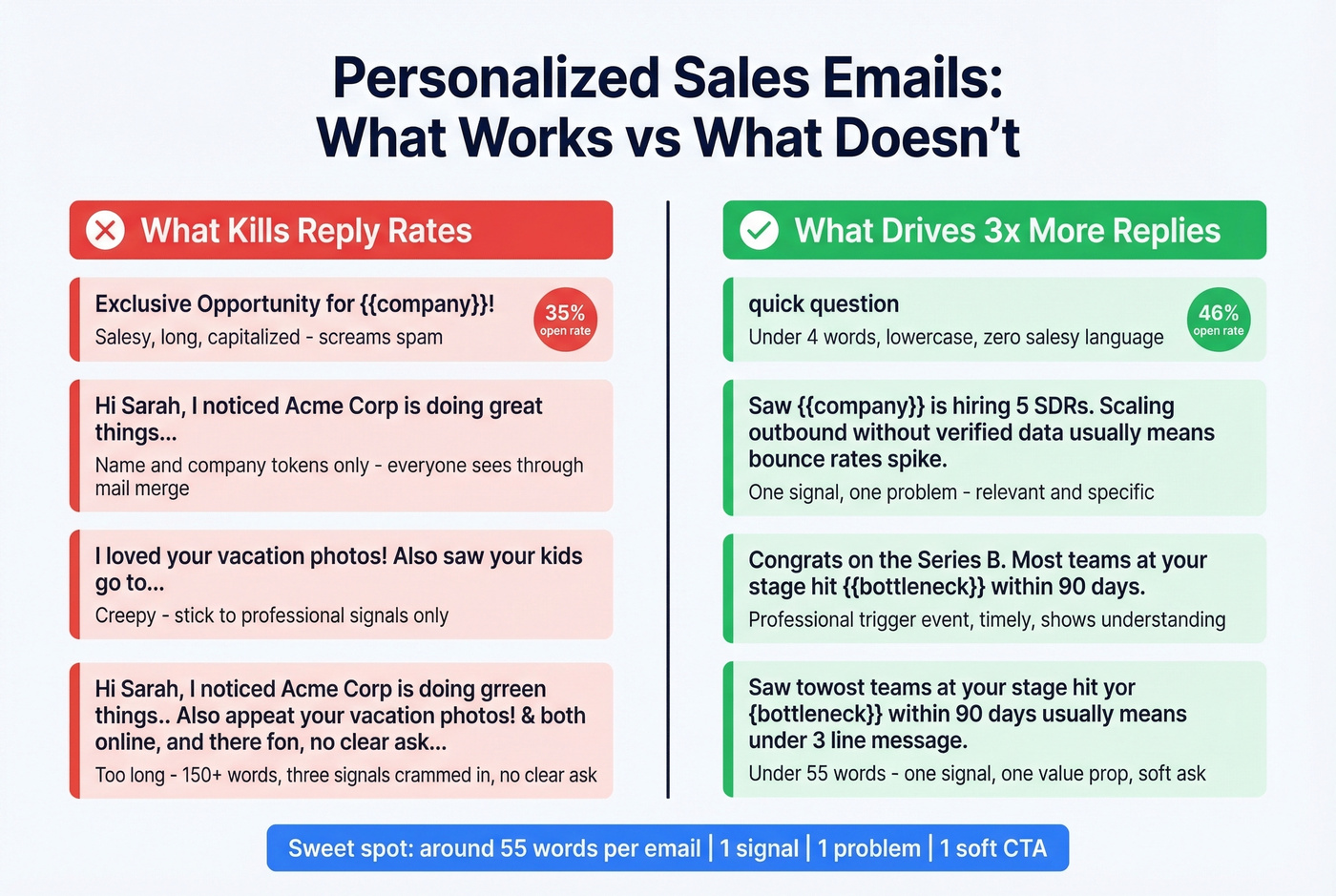
Best-performing first-touch emails stay under 80 words. Practitioners on r/copywriting push even harder at 40-60 words max. We've found the sweet spot is right around 55 - enough room for one signal reference, one value prop, and a soft ask.
Mistakes That Kill Reply Rates
Name-and-company tokens only. "Hi Sarah, I noticed Acme Corp..." isn't personalization. It's a mail merge.
Fake personalization. Referencing something irrelevant just to seem custom hurts more than a generic email. And please - don't reference a prospect's vacation photos or their kids' school. Stick to professional signals.
Cramming three signals into one email. One signal, one problem, one ask. That's it. Personalization boosts open rates by up to 45%, but only when it's relevant and focused.
Skipping the AI review. Always scan AI output before sending. GPT hallucinates. It'll congratulate someone on a funding round from 2019. I've seen it happen more than once, and the prospect always notices.
Personalizing to a dead address. You spend five minutes crafting the perfect opener, hit send, and it bounces. Verify first, personalize second. This is the mistake that frustrates us most because it's the easiest one to fix.
Let's be honest: most teams obsess over the perfect first line when their real problem is data quality. A decent signal-based opener sent to a verified contact outperforms a beautifully crafted custom email that bounces or lands in spam. Fix the foundation before you polish the copy.
FAQ
How many personalized emails can you send per day?
With the signal-plus-AI workflow, 80-150 per day is realistic. Deep manual research caps you at 30-50. The sweet spot is 2-5 minutes per prospect - enough to include a relevant signal without bottlenecking your pipeline.
Does personalizing emails actually improve reply rates?
Yes. Analysis of 20M+ campaigns found personalized messages boost reply rates by up to 142%. The top 10% of campaigns all use advanced personalization beyond basic merge tags. Even a single relevant trigger event in your opener outperforms a fully generic template.
What's the best tool stack for personalized outreach on a budget?
Prospeo for verified contacts (free tier: 75 emails/month), Clay for enrichment around $149/month, Instantly or Smartlead for sending around $30/month, and GPT-4o for custom first lines. Total: often under $200/month. Start with the free plan and manual signal research to prove the workflow before investing further.
What's the single highest-impact personalization tactic?
Signal-based openers referencing a trigger event - funding, hiring surge, job change - outperform every other approach. Teams using trigger events as their primary personalization layer see roughly 3x more replies than those relying on name-and-company tokens alone.