

What Is a Leads Portal? The 2026 Guide
Ask ten sales leaders what a "leads portal" is and you'll get ten different answers - a partner dashboard, a mortgage marketplace login, a CRM add-on, a trade show CSV export. The term covers so many things that the actual concept gets lost.
That matters because the lead generation software market reached $7.4B in 2025 and is projected to hit $16.2B by 2034. Every company with a partner channel, a client-facing workflow, or a distributed sales team needs some version of a leads portal. Most just don't know what to call it.
The Short Version
A leads portal is the external-facing layer where partners, clients, or agents access, claim, and act on leads. It's not the CRM itself - it's the interface sitting on top of your CRM or lead distribution system.
You probably need one of five types:
- Partner or channel sales? PRM portal like Introw or Kiflo
- Client-facing status updates? CRM with a portal add-on like HubSpot or Pipedrive
- Event leads rotting in a CSV? Verification workflow before anything hits your CRM
What Does a Leads Portal Actually Do?
A leads portal gives people outside your core team - partners, resellers, clients, agents - a place to view, claim, update, and act on leads. It's distinct from a CRM, which manages existing customer relationships internally. The portal is the window. The CRM is the house.
The standard industry definition of lead management software - capture, track, and sort leads so you can focus on the ones most likely to convert - describes the engine. A lead management portal is the dashboard your external stakeholders actually see and interact with.
This distinction matters because 91% of marketers say lead generation is their top priority, yet 79% of marketing leads never convert into sales. A big chunk of that gap comes from what happens after lead capture - the handoff, the routing, the follow-up. A well-designed portal closes that gap by giving the right people access to the right leads at the right time, with enough context to act fast.
Your CRM is for your team. Your portal is for everyone else who needs to touch those leads.
5 Types of Lead Portals
Partner / Channel Portals
This is the most common type in B2B. Partner portals give resellers, affiliates, and channel partners a secure space to access leads, register deals, and track pipeline - without handing them the keys to your entire CRM.
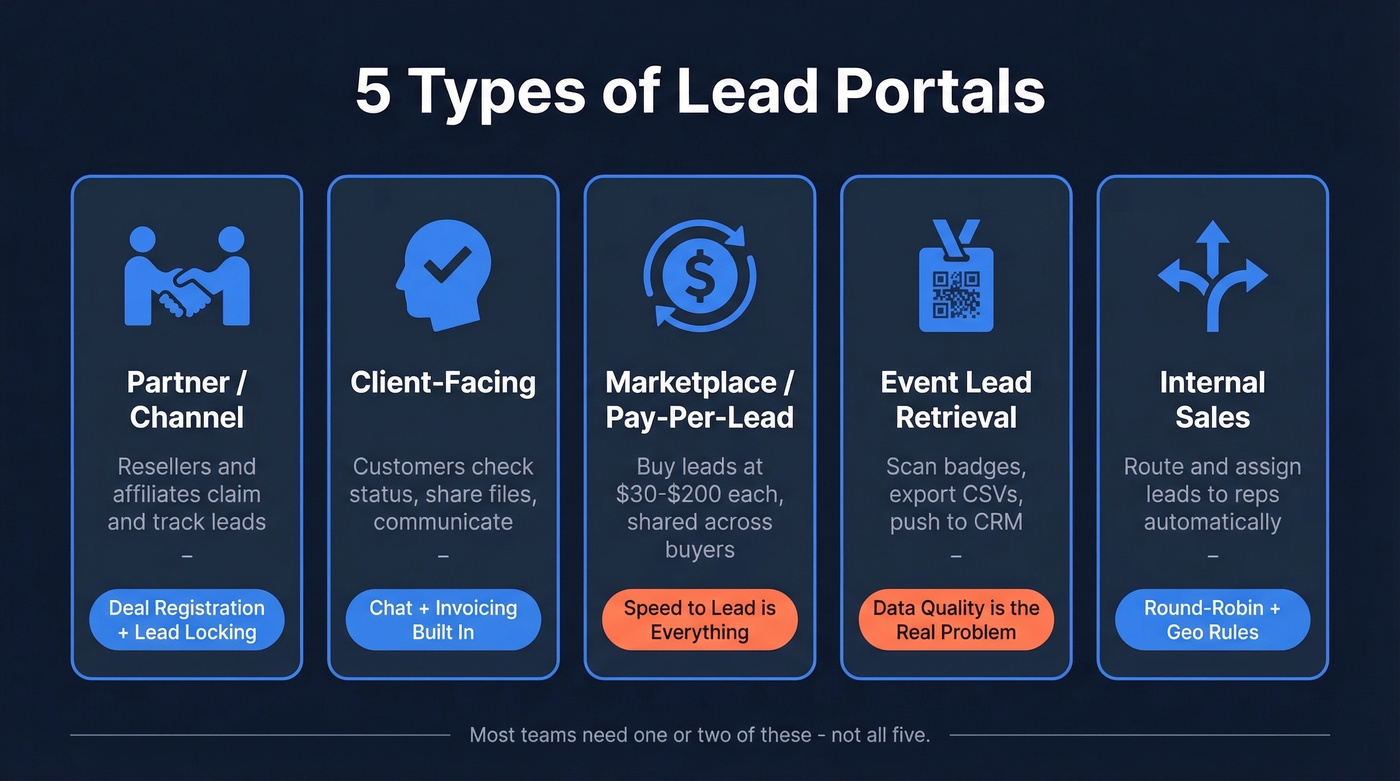
Introw shows what modern partner portals look like: SSO, white-label branding, granular access controls, deal registration, and partner-safe pipeline views that reflect real Salesforce or HubSpot data with permission-based visibility. The critical feature is lead claiming with time-based locking. One Odoo reseller on Reddit put it bluntly: they needed to claim leads and lock them for 48 hours to 30 days, with automatic expiry and admin overrides - without that, you get channel conflict and lead poaching. That thread captures the #1 pain point in every partner portal deployment.
Client-Facing Portals
These pick up after booking and onboarding. A client portal lets your customers check project status, share files, view deliverables, and communicate without drowning in email threads. CRMs often include a basic portal feature, but it's usually an afterthought - clunky, limited, and bolted on rather than designed for external collaboration.
The consensus on r/CRM is clear: teams want chat integration inside the portal experience to kill the email back-and-forth, plus automated invoicing so they aren't juggling three tools for one workflow.
Marketplace / Pay-Per-Lead Portals
$30 to $200 per lead. That's the range for mortgage, insurance, and home services marketplace portals - the ones most people accidentally find when searching for lead portal software. LendingTree charges $30-$100 per lead with a lender portal for capacity planning. Bankrate runs $100-$200 per lead with SMS-verified contacts.
Here's the catch: leads are often shared across multiple buyers, which means speed-to-lead discipline is everything. According to ClickPoint Software's research, responding within five minutes increases conversion chance by 900%. If you're buying marketplace leads and not calling within five minutes, you're lighting money on fire.
Event Lead Retrieval Portals
Badge scans are easy. What comes after is the problem.
Trade shows and conferences use retrieval systems like eShow and Cvent that let exhibitors scan badges and export lead lists. The "portal" here is usually a dashboard where you download CSVs, filter by booth visit, and push contacts into your CRM. Event leads are notoriously messy - outdated emails, wrong titles, personal addresses instead of work emails. The workflow challenge isn't capturing the lead; it's getting a clean, verified contact into your CRM before the trade show buzz fades and the prospect forgets your booth entirely.
Internal Sales Portals
These are lead routing and assignment systems that sit between your lead sources and your reps. They automate distribution using preset rules like geography, lead score, rep availability, or round-robin - and trigger notifications via email, SMS, or Slack.
78% of buyers choose the first company that responds. Automatic assignment clarifies ownership, enables follow-up tracking, and eliminates the "I thought you were handling that lead" problem that kills deals in distributed teams.
Where It Fits in Your Stack
After mapping dozens of sales stacks, here's the framework that actually holds up: lead distribution delivers the lead, lead management engages it, and the CRM stores the result. The portal is the interface layer that spans all three stages.
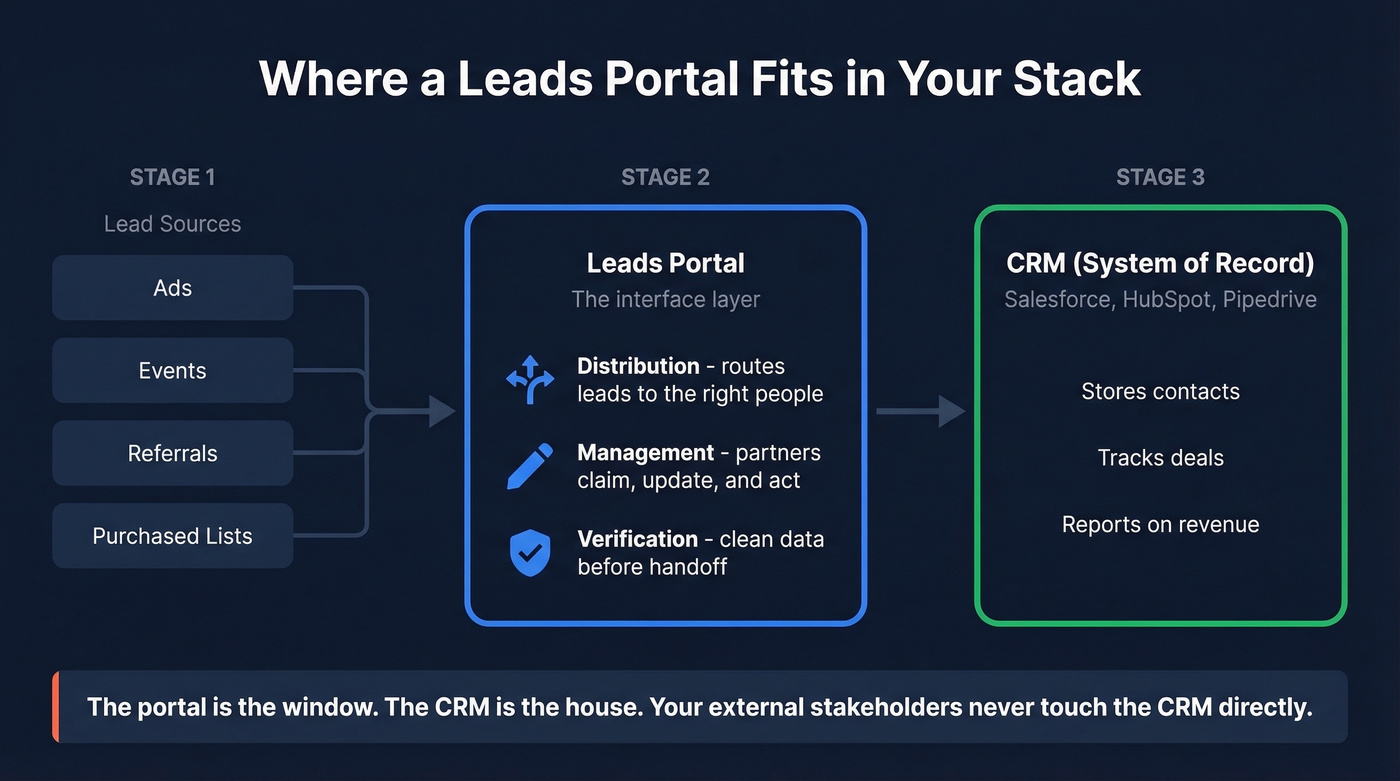
Your lead sources - ads, events, referrals, purchased lists - feed into a distribution system. The portal is where external stakeholders interact with those leads. And the CRM is the system of record underneath.
Let's be honest: most teams don't need "leads portal software" as a standalone category. They need a CRM with good integrations, a data quality layer, and maybe a no-code portal on top. The portal is the interface. The data underneath is what actually determines whether your partners close deals or chase ghosts.
Core Features to Evaluate
Not every portal needs every feature. Lead routing with rules-based distribution by geography, score, or round-robin is table stakes. So is real-time notification via email, SMS, and Slack when leads are assigned or updated. Lead scoring that combines behavioral signals like email opens and page visits with firmographic fit separates serious portals from glorified spreadsheets.

Beyond the basics, here's what to look for based on your portal type:
Partner portals live or die on three features: lead claiming with time-based locks (48 hours to 30 days, with automatic expiry and admin overrides), granular role-based access controls so partners see only their leads, and bidirectional CRM sync with Salesforce and HubSpot at minimum.
Client portals need in-portal chat to replace email threads, file sharing for proposals and contracts, and automated invoicing - especially for agency models.
Marketplace portals need speed-to-lead notifications, analytics with conversion rates and pipeline attribution by source, and white-label branding so the portal feels like your product, not a third-party tool.

79% of marketing leads never convert - and bad data is the biggest reason. Before leads hit your portal, they need to be verified. Prospeo's 5-step verification delivers 98% email accuracy and 125M+ verified mobiles, so your partners and reps act on real contacts, not ghosts.
Feed your leads portal data that actually converts.
Data Quality: The Make-or-Break
Look - your portal is only as good as the data inside it. You can build the most elegant partner portal in the world, but if the leads flowing through it have outdated emails and wrong phone numbers, your partners won't trust it. They'll stop using it.
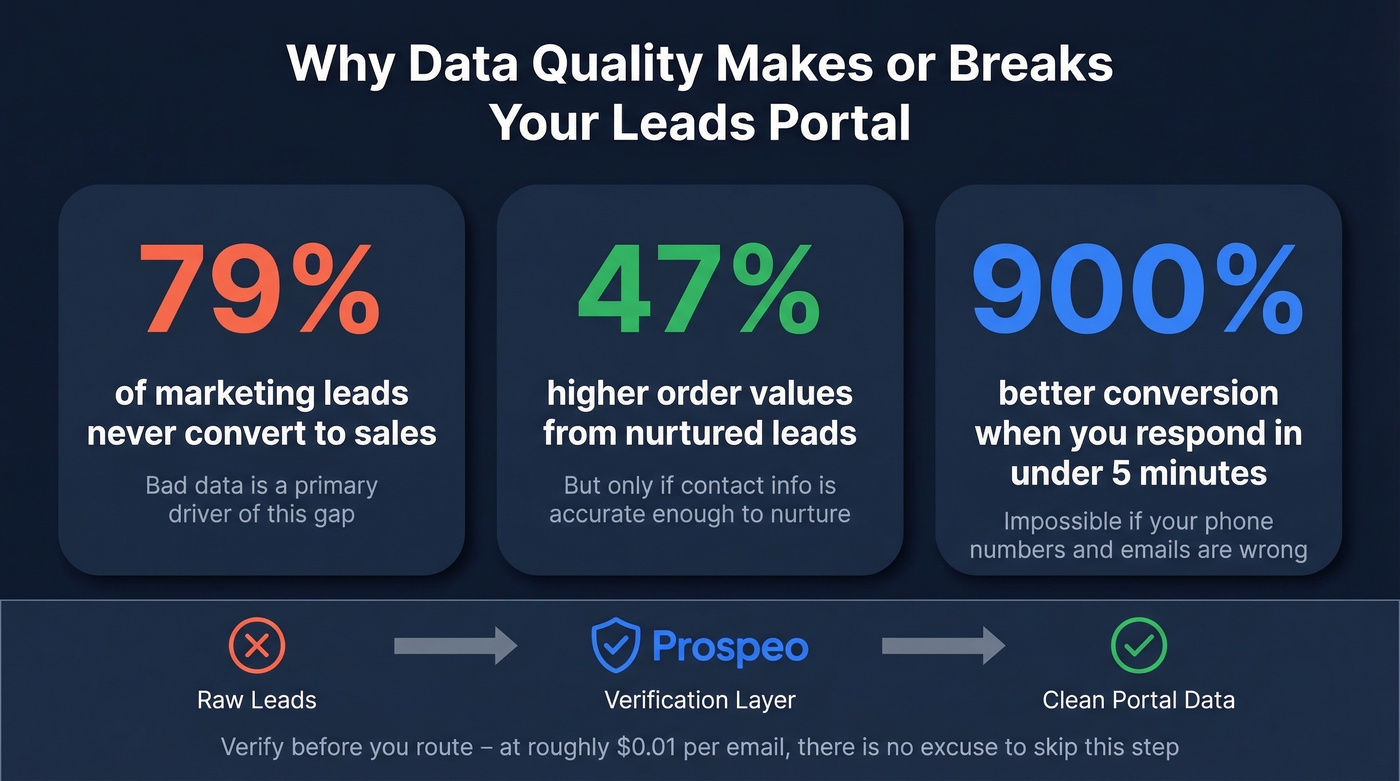
That 79% of marketing leads never converting? Bad data is a primary driver. Nurtured leads produce 47% higher order values - but only if the contact information is actually accurate enough to nurture. We've seen teams import event lead lists and discover that a painful number of emails bounce on the first sequence, torching domain reputation in the process.
This is where a verification layer becomes non-negotiable. Prospeo sits underneath any portal as the data quality engine - 300M+ professional profiles, 98% email accuracy on a 7-day refresh cycle, and 50+ enrichment data points per contact. Before you route a single lead through your portal, verify it. The cost of bad data compounds with every handoff, and at roughly $0.01 per email, there's no excuse to skip this step.
Event leads rotting in CSVs. Partner portals full of outdated contacts. The portal is the interface - the data underneath determines whether deals close. Prospeo refreshes 300M+ profiles every 7 days and returns 50+ data points per contact at $0.01/email.
Stop routing stale leads through an expensive portal.
Security Requirements
Data breaches cost businesses an average of $4.88M per incident. A portal that exposes partner data or client information isn't just embarrassing - it's existential.
The minimum security checklist:
- Encryption - AES-256 at rest, TLS 1.3 in transit
- Access controls - RBAC with granular permissions per role
- Authentication - MFA and SSO mandatory, session timeouts enforced
- Audit trails - full logging of who accessed what and when
- Compliance - SOC 2 Type II at minimum; add GDPR for EU data, HIPAA if you handle health information
- Data loss prevention - DLP policies to prevent unauthorized data export or sharing
- Data retention and deletion - documented policies for secure deletion when data is no longer needed
- Testing - regular penetration testing and vulnerability management
- Incident response - a documented plan, not just "we'll figure it out"
Ask vendors for their SOC 2 report. If they can't produce one, that tells you everything you need to know.
Build vs. Buy
| DIY (No-Code) | Dedicated PRM/Portal Software | |
|---|---|---|
| Timeline | MVP in 1-3 weeks; robust in 4-8 weeks | Days to 2 weeks |
| Cost | $50-$300/mo in tools | $79-$750/mo |
| Customization | Full control | Limited to vendor options |
| Maintenance | You're the product team | Vendor handles updates |
| Best for | <10 partners, unique workflows | 20+ partners, standard needs |
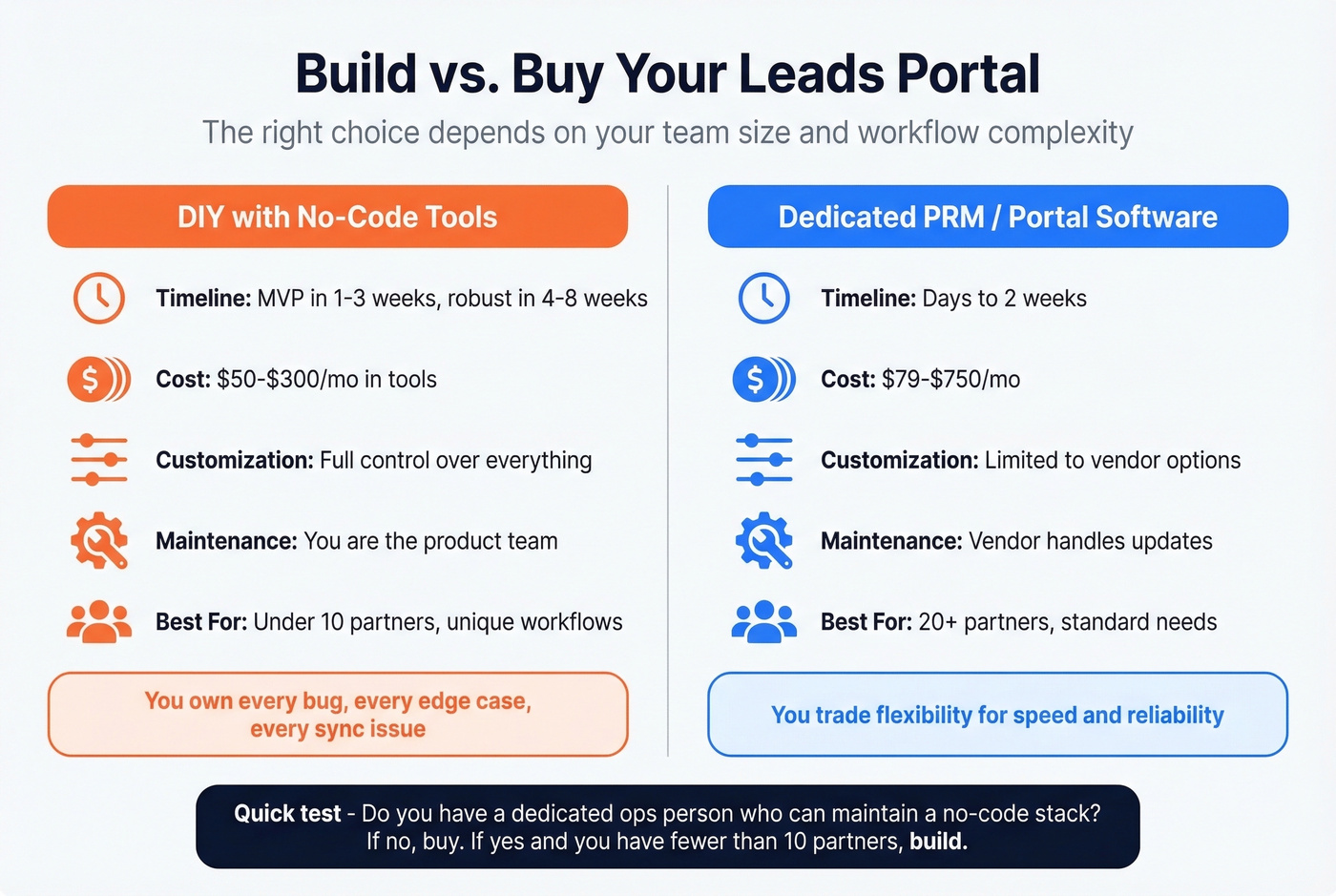
DIY with no-code tools. Platforms like Make + AnyDB and other no-code portal builders let you build a functional portal without writing code. The upside is full customization. The downside is maintenance - you own every bug, every edge case, every "why isn't this syncing" Slack message. In our experience, teams with fewer than 10 partners are better off with no-code builds because the flexibility outweighs the maintenance burden at that scale.
Dedicated PRM or portal software. Tools like Introw ($329/mo), Kiflo ($249/mo), and Everflow ($750/mo) give you a polished portal out of the box with CRM integrations, partner management, and analytics baked in. Faster to deploy, more expensive, less customizable. For teams with 20+ partners, the time savings usually justify the cost.
Skip the dedicated PRM if you have fewer than 10 partners and simple workflows. You'll pay for features you won't use, and the rigidity will frustrate you more than a no-code build would.
Zapier ($19.99/mo paid plans) and Make serve as connective tissue in either approach - automating lead routing, notifications, and CRM syncs between your portal and everything else.
What Does a Leads Portal Cost?
| Category | Tool | Starting Price |
|---|---|---|
| Partner/PRM | Introw | $329/mo |
| Partner/PRM | Kiflo PRM | $249/mo |
| Partner/PRM | Everflow | $750/mo |
| Partner/PRM | Tracknow | $79/mo |
| CRM w/ Portal | Pipedrive | $14/user/mo |
| CRM w/ Portal | HubSpot | Free CRM; portal ~$800+/mo |
| CRM w/ Portal | Salesforce | $150-$300/user/mo |
| Marketplace | LendingTree | $30-$100/lead |
| Marketplace | Bankrate | $100-$200/lead |
| No-Code DIY | Make + AnyDB / Softr | $50-$300/mo + setup |
| Automation | Zapier | Free; paid from $19.99/mo |
| Data Quality | Prospeo | Free (75 emails/mo); ~$0.01/email |
The range is massive because the category covers everything from a $79/month tracking tool to a $300/user/month Salesforce implementation. Identify which type you need first, then price within that category.
How to Choose the Right Portal
For channel partners sharing leads, you need a PRM portal. Introw or Kiflo if you're running Salesforce or HubSpot. Tracknow if budget is tight.
When clients need status visibility, a CRM with portal capabilities works. Pipedrive is the budget option; HubSpot Professional if you need the full marketing stack alongside it.
For marketplace lead buying, the portal comes with the marketplace. Focus your energy on speed-to-lead workflows and data verification instead.
After capturing leads at an event, you don't need portal software - you need a cleanup workflow and a verification tool before those leads hit your CRM. We've watched teams spend weeks evaluating portal vendors when their real problem was 40% of their event contacts having bad email addresses.
For something fully custom, build with no-code tools and connect via Zapier or Make.
Real talk: most teams overthink the portal and underthink the data flowing through it. A $79/month leads portal with verified, accurate contacts will outperform a $750/month portal full of stale data every single time. The interface matters, but the data is what closes deals.
FAQ
What's the difference between a leads portal and a CRM?
A CRM manages existing customer relationships internally; a leads portal is the external-facing layer where partners, clients, or agents access and act on leads before they become customers. Most CRMs include a basic portal feature, but it's typically limited - designed as an add-on, not a core experience.
Can I build a leads portal without coding?
Yes - tools like Make + AnyDB let you build a functional portal in 1-3 weeks without writing code. Budget $50-$300/month in tool costs. For proper RBAC, audit logs, and CRM integrations, expect 4-8 weeks of setup and testing.
How much does lead portal software cost?
Partner/PRM portals range from $79-$750/month. CRM portal features start at $14/user/month with Pipedrive and reach $800+/month for HubSpot. Marketplace portals charge $30-$200 per lead. No-code DIY builds run $50-$300/month in tooling.
How do I keep lead data accurate inside a portal?
Run every contact through a verification layer before it enters your system. Prospeo checks emails at 98% accuracy on a 7-day refresh cycle and enriches contacts with 50+ data points at roughly $0.01 per email. Without verification, bad data compounds with every handoff.
What security features should a leads portal have?
At minimum: AES-256 encryption, TLS 1.3 in transit, role-based access controls, MFA, SSO, audit trails, and SOC 2 Type II compliance. Add HIPAA if you handle health data. The average data breach costs $4.88M - security isn't optional.