


LeadsForge vs MailerCheck: Different Tools, Different Jobs
Comparing LeadsForge to MailerCheck is a bit like comparing a fishing rod to a frying pan. One catches the fish, the other cooks it. They don't compete - they solve different problems at different stages of your pipeline. The fact that people search this tells us there's real confusion about what these tools actually do, so let's clear it up.
30-Second Verdict
- Need leads from scratch? LeadsForge. $49/mo, 100 free credits to start, 500M+ contacts.
- Need to clean an existing list? MailerCheck. $0.01/verification, 10 free credits to test.
Email lists decay by almost 28% every year. You need fresh leads and clean data. LeadsForge handles sourcing. MailerCheck handles verification. But running both means two platforms, two credit pools, and a higher total cost than most teams expect.
LeadsForge Overview
Use this if you're starting from zero and need to build a prospect list fast. LeadsForge isn't a verifier - it's a lead generation engine. You describe your ICP in a chat-like interface with AI-powered filtering (revenue, headcount, keywords), and it searches across 500M+ contacts to pull emails, phone numbers, and profile URLs.
Users on Trustpilot say it "saves 10 hours of manual research a week," and one reviewer found personal emails for "almost 90%" of discovered leads. New accounts get 100 free credits to test before committing. If you're already running sequences in the Salesforge ecosystem, the data flows straight into your workflows.

Here's the thing, though. Don't assume $49/mo for 2,000 export credits is the whole cost. It isn't. Email validation uses separate add-on credits on top of your lead-finding/export credits - a detail that G2 reviewers flag repeatedly. That works out to $0.0245 per export credit before you spend anything extra on validation.
The tool carries a 4.5/5 on G2 (12 reviews) and 4.0 on Trustpilot (11 reviews). Complaints cluster around data export inconsistencies and cancellation friction.
MailerCheck Overview
MailerCheck is a dedicated email verification tool. Nothing more, nothing less. It runs pay-as-you-go at $0.01 per credit - one credit equals one verification, minimum 1,000 credits. New accounts get 10 free credits to test.
A third-party benchmark testing 15 verifiers on the same 10,000-contact list clocked MailerCheck at 97.5% observed accuracy and roughly 9 minutes for the full run. G2 reviewers (4.6/5, 10 reviews) praise the quick implementation and clean interface.
Watch out for a couple of things. First, MailerCheck can't find leads - it only cleans lists you already have. Second, the pricing structure can trip you up. MailerCheck has two completely separate billing surfaces: verification credits (pay-as-you-go) and DMARC/blocklist monitoring subscriptions that range from free to $975/mo. These are different products. Don't mix them up.
One more flag: some G2 reviewers report MailerCheck invalidates more emails than competing verifiers, which can shrink your sendable list aggressively. And on Reddit, one user reported spending $400 on MailerCheck verification and still hitting 50% soft bounces after switching ESPs - a reminder that verification alone doesn't guarantee deliverability. Your sending infrastructure matters just as much as your list hygiene.

LeadsForge charges extra for validation on top of export credits. MailerCheck can't find leads at all. Prospeo does both - 300M+ profiles with 98% verified email accuracy, no add-on fees. Data refreshes every 7 days, so you're not emailing people who left their company last quarter.
One platform, one credit pool, zero stitching - 75 free emails to prove it.
Key Differences at a Glance
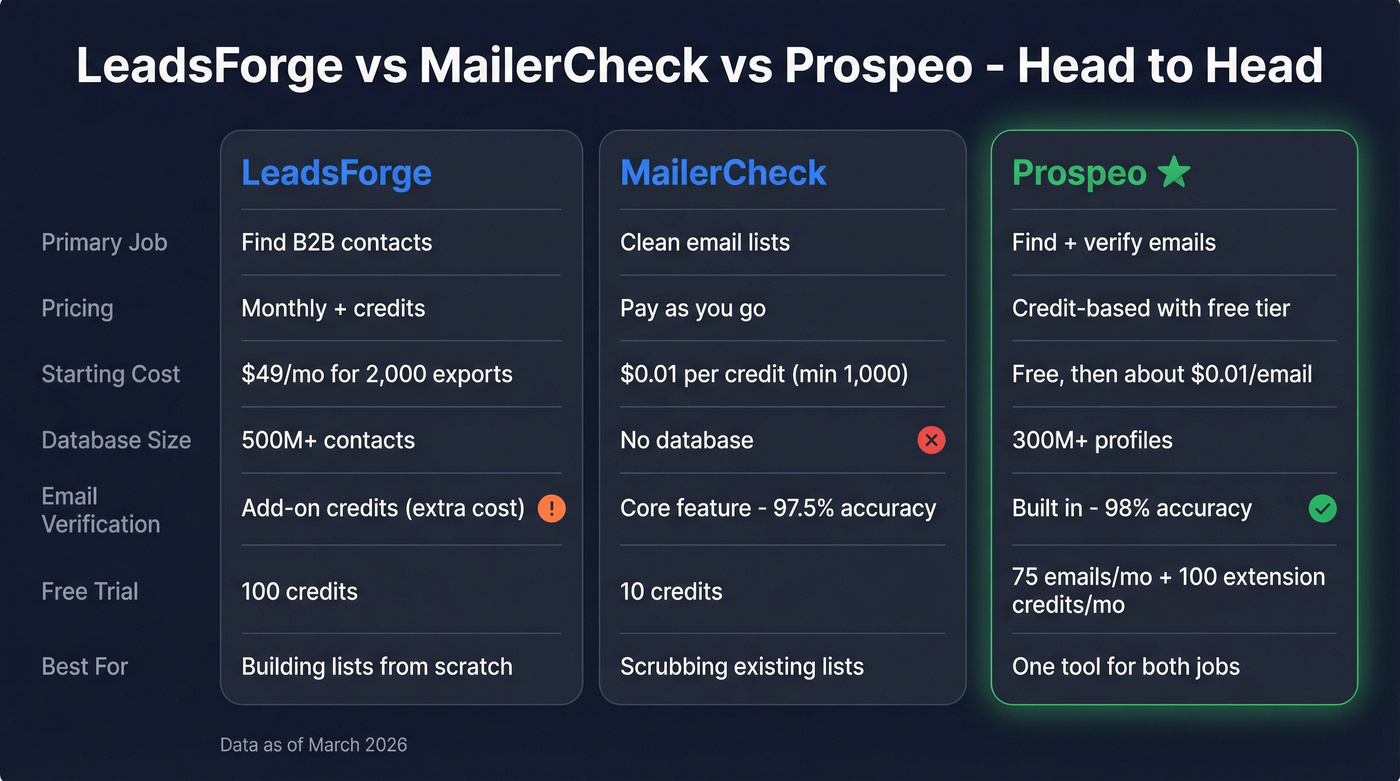
| Category | Lead generation | Email verification | Both in one platform |
| Primary function | Find B2B contacts | Clean email lists | Find + verify emails |
| Pricing model | Monthly + credits | Pay-as-you-go | Credit-based, free tier |
| Starting price | $49/mo (2,000 export credits) | $0.01/credit (min 1,000) | Free; ~$0.01/email paid |
| Coverage | 500M+ contacts | Verification only (no lead database) | 300M+ professional profiles |
| Free trial | 100 credits | 10 credits | 75 emails/month + 100 Chrome extension credits/month |
| Best for | Building lead lists from scratch | Cleaning existing lists before sends | One tool for both jobs |
Which One Do You Need?
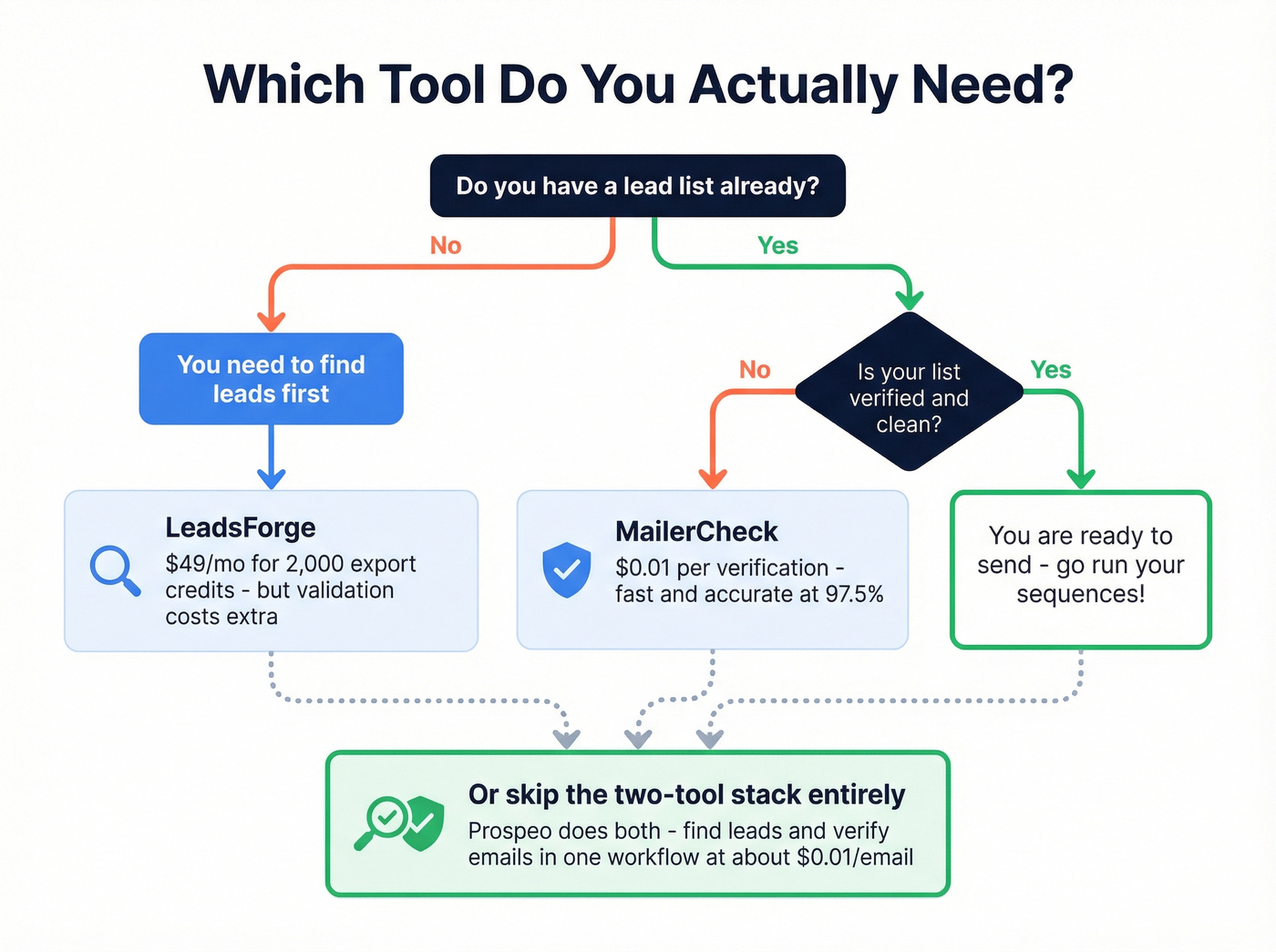
This isn't a "versus" decision. It's a "which problem do I have?" question.
You have no leads yet
You need a sourcing tool. LeadsForge gets you started at $49/mo, but remember that validation uses additional add-on credits beyond your export credits. If you're building lists weekly, that extra line item shows up fast.
If you want a broader view of options, compare other outbound lead generation tools before you commit.
You have a list that needs cleaning
MailerCheck does the job at $0.01/verification. Fast, no frills. Just don't expect it to find new contacts, enrich records, or help you segment by firmographic attributes.
If bounces are a recurring issue, it’s worth tightening your overall email deliverability setup too.
You're tired of paying for two tools
This is where the math gets interesting. If you're buying LeadsForge for sourcing and MailerCheck for verification, you're managing two platforms, two billing cycles, and two sets of credits. We've seen teams cut their per-lead cost in half by consolidating outbound prospecting into a single platform instead of stitching together point solutions.
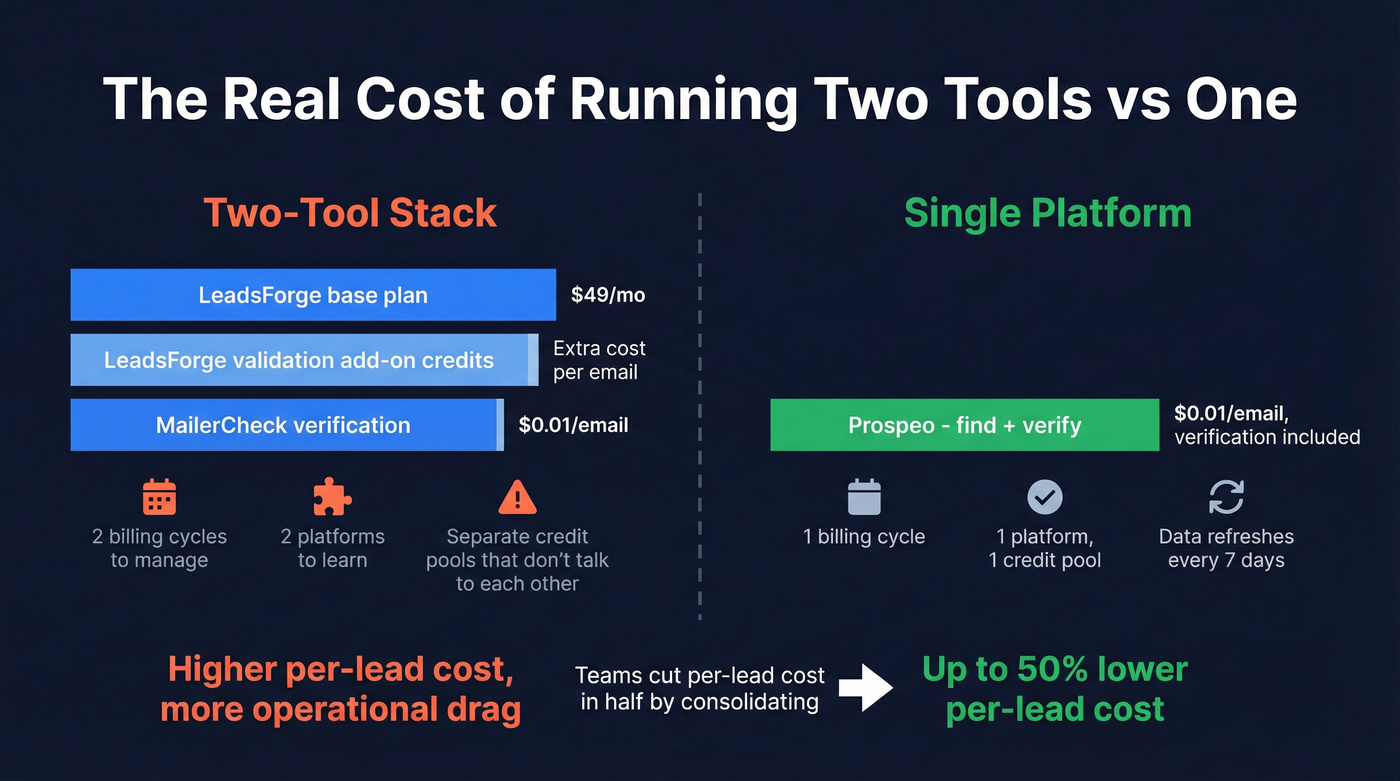
Look - if your average contract value is closer to SMB or mid-market pricing, you almost certainly don't need this two-tool stack. The overhead of managing separate credit pools eats into margins that are already thin. Pick one platform that does both and move on.
One Tool That Replaces Both
Data refreshes every 7 days (the industry average is 6 weeks), so you're far less likely to email someone who changed jobs two months ago. And because it's fully self-serve with transparent pricing, you don't get trapped in "talk to sales" loops just to run a real test. In our experience, that alone saves a week of back-and-forth that most sales teams can't afford.

Pricing runs about $0.01/email with verification included. The free tier gives you 75 emails/month to test before you commit anything. Native integrations with Salesforce, HubSpot, Smartlead, Instantly, Lemlist, and Zapier mean your verified contacts flow straight into whatever sequencer you're already using. No contracts, fully self-serve.
If you’re also enriching records after verification, see how data enrichment services compare across providers.
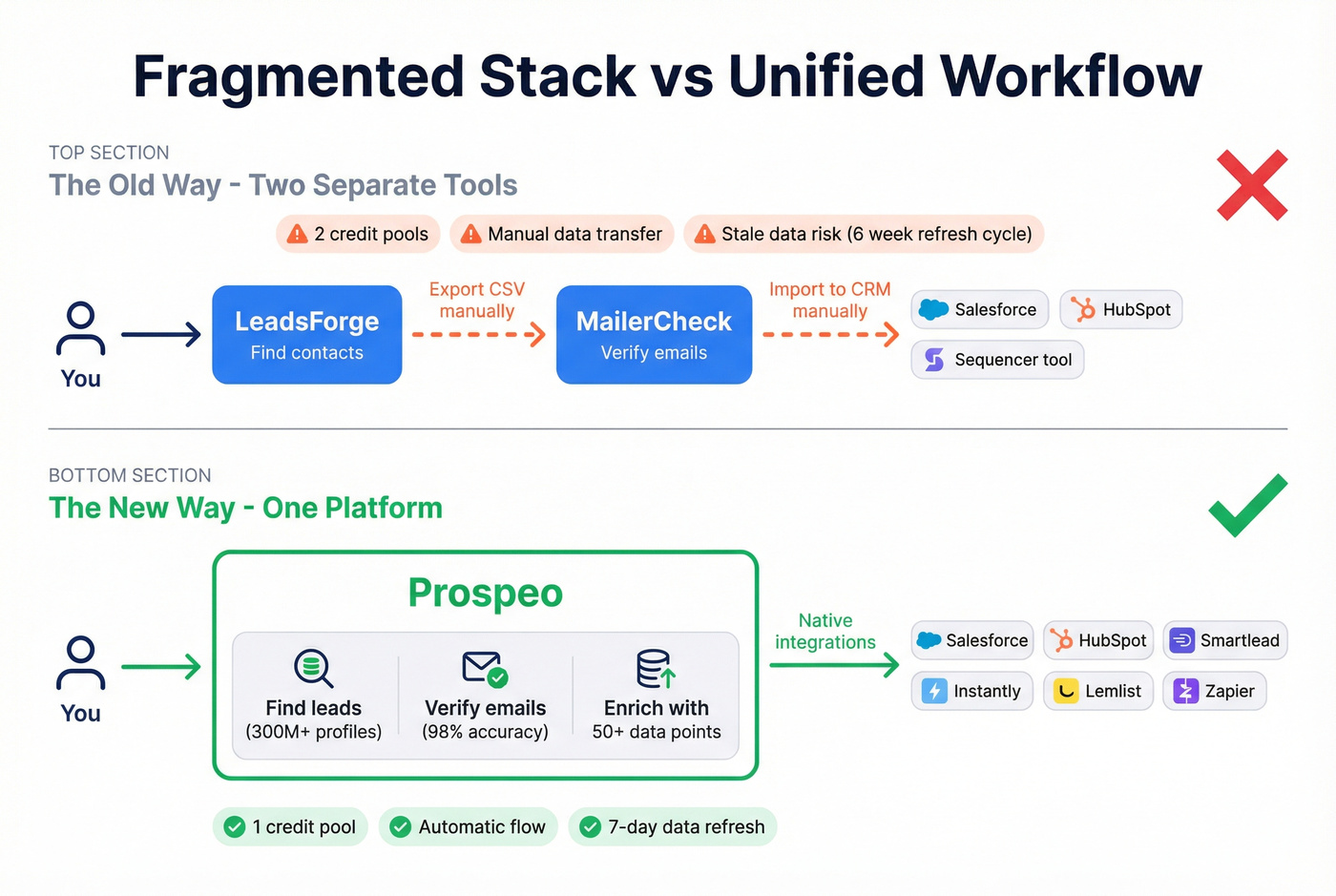
For teams running enrichment workflows, Prospeo also supports CRM and CSV enrichment with 50+ data points per contact, plus API access with a 92% match rate - useful when you want to automate segmentation, routing, and deduping instead of manually cleaning spreadsheets every Monday morning.
If you’re building a full outbound motion, pairing this with proven sales prospecting techniques helps you turn cleaner data into meetings.
Managing two billing cycles and two credit pools for sourcing and verification is overhead your pipeline doesn't need. Prospeo combines lead generation, email verification, and CRM enrichment at ~$0.01/email - with a 92% API match rate and 50+ data points per contact.
Cut your per-lead cost in half and ditch the two-tool stack today.
FAQ
Is LeadsForge an email verification tool?
No. LeadsForge is primarily a lead sourcing platform that pulls contact data from a large database (500M+ contacts). It can validate emails, but validation is an add-on that uses separate credits from your export credits, so your true cost depends on how much cleaning you do.
Can MailerCheck find new leads?
No. MailerCheck only verifies emails you already have, at $0.01 per credit with a 1,000-credit minimum purchase. If you need net-new prospects, you'll still need a lead database or an email finder upstream.
What's a good way to replace both tools?
Prospeo returns verified emails in one workflow at 98% accuracy, with a 7-day refresh cycle and a free tier of 75 emails/month. For teams doing outbound weekly, it's usually simpler and cheaper than managing two credit pools.
Summary
LeadsForge vs MailerCheck comes down to pipeline stage: LeadsForge is for building lists, MailerCheck is for cleaning them. If you're doing both every week, the two-tool setup adds cost and operational drag. Consolidating into a single workflow is often the cleanest way to get fresh leads and verified emails without juggling separate credits.