

LeadsForge vs SalesQL: Which Lead-Gen Tool Wins in 2026?
The LeadsForge vs SalesQL decision isn't really a feature comparison - it's a workflow choice. LeadsForge wants you to describe your ideal customer in plain English and let AI search for matches. SalesQL wants you to browse professional profile pages and pull contacts with a Chrome extension. They're barely competing in the same category, and that matters more than any feature checklist.
30-Second Verdict
Pick LeadsForge if you're already in the Salesforge ecosystem and want AI-driven ICP search that feeds directly into sequences.
Pick SalesQL if you prospect from professional profiles daily and want cheap, fast contact extraction. Recruiters love it.
What Is LeadsForge?
LeadsForge is the lead-generation module inside the Salesforge ecosystem. Instead of traditional filters, you describe your ICP in a conversational AI interface and it searches across 500M+ contacts using waterfall enrichment from multiple databases. Found leads sync to Salesforge sequences with one click - no CSV exports, no manual imports.
You get 100 free credits on signup, and unused credits roll over month to month. If you're running Salesforge for outreach, LeadsForge is the native data layer.
What Is SalesQL?
SalesQL is a Chrome extension that extracts contact data - emails, phone numbers, and 40+ data points - while you browse professional profiles. It's used by 150,000+ professionals across 189 countries, mostly recruiters and SDRs.
The workflow: browse profiles, click the extension, grab contacts. You can scrape roughly 25 profiles at a time, organize contacts into folders, and bulk export to CSV. One recruiter on r/recruiting described setting up folders for each search and downloading CSVs straight into their ATS. Not sophisticated, but fast. There's a free tier with 100 credits per month if you want to test it.
Feature-by-Feature Comparison
| LeadsForge | SalesQL | Winner | |
|---|---|---|---|
| Starting price | $49/mo (2,000 credits) | Free (100 credits/mo); $39/mo or $29/mo annual | SalesQL |
| Cost per credit | ~$0.025 + validation | ~$0.0195 (monthly); ~$0.0146 (annual) | SalesQL |
| Database size | 500M+ (claimed) | Not disclosed | LeadsForge |
| Email verification | Extra credits required | Verified emails included | SalesQL |
| Seats (entry tier) | 1 | Pro: 3 seats; Org: 15 seats | SalesQL |
| G2 rating | 4.5/5 (12 reviews) | 4.5/5 (166 reviews) | SalesQL (14x more reviews) |
| Capterra rating | Not listed | 3.8/5 (46 reviews) | - |
| Trustpilot rating | Not listed | Not listed | - |
| Core workflow | AI chat ICP search | Browser extension | Depends on workflow |
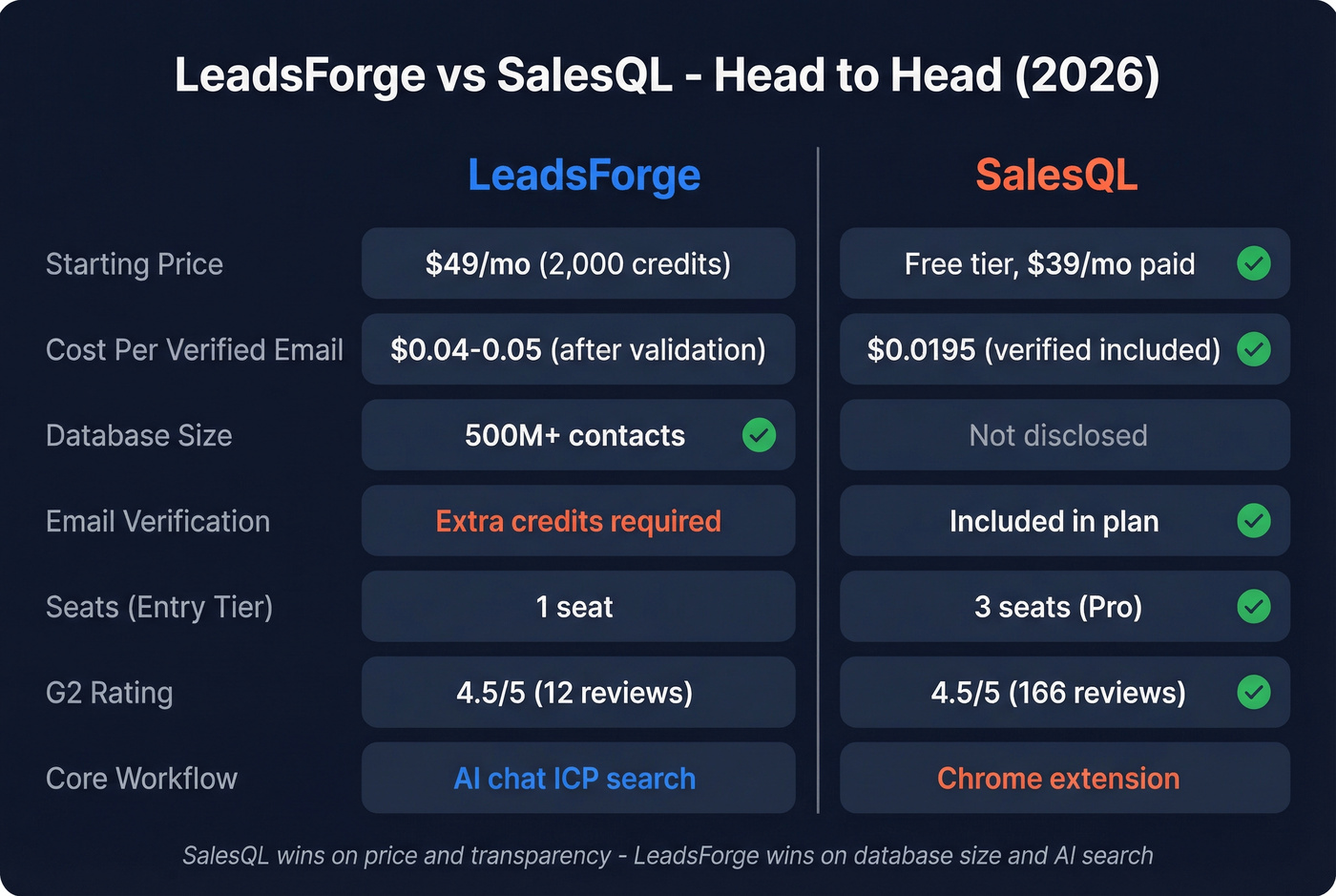
Let's be honest about those identical 4.5 G2 ratings - they're misleading. SalesQL has nearly 14x more reviews, which is a statistically meaningful sample. LeadsForge's 12 reviews barely tell you anything. And SalesQL's Capterra score of 3.8 with a customer service sub-score of 3.3 paints a very different picture than G2 alone.
LeadsForge's $0.025 per credit looks competitive until you factor in validation. The effective cost per verified contact can land around $0.04-$0.05 once you burn credits on email verification. SalesQL includes verified emails in the plan.
SalesQL scales to $119/mo for 12,000 credits; LeadsForge pricing scales by credit tier. If you see different SalesQL pricing on Reddit, those are legacy plans - existing customers can keep them, but the public pricing page shows only the new tiers, and you can't switch back after canceling.

LeadsForge burns credits on validation. SalesQL's accuracy is a coin flip. Prospeo's 5-step verification delivers 98% email accuracy at $0.01/email - no validation tax, no surprises. Teams like Snyk dropped bounce rates from 35% to under 5%.
Stop paying twice - once for data, again to verify it.
How Each Tool Works
LeadsForge's workflow is genuinely novel. You type something like "VP of Engineering at Series B SaaS companies in DACH with 50-200 employees" and the AI translates that into search parameters. You preview results, refine with follow-up prompts, and push leads into Salesforge sequences. Credit rollover is a nice touch.
If you're building a repeatable outbound motion, it helps to map this into a broader lead generation workflow so sourcing doesn't become a bottleneck.
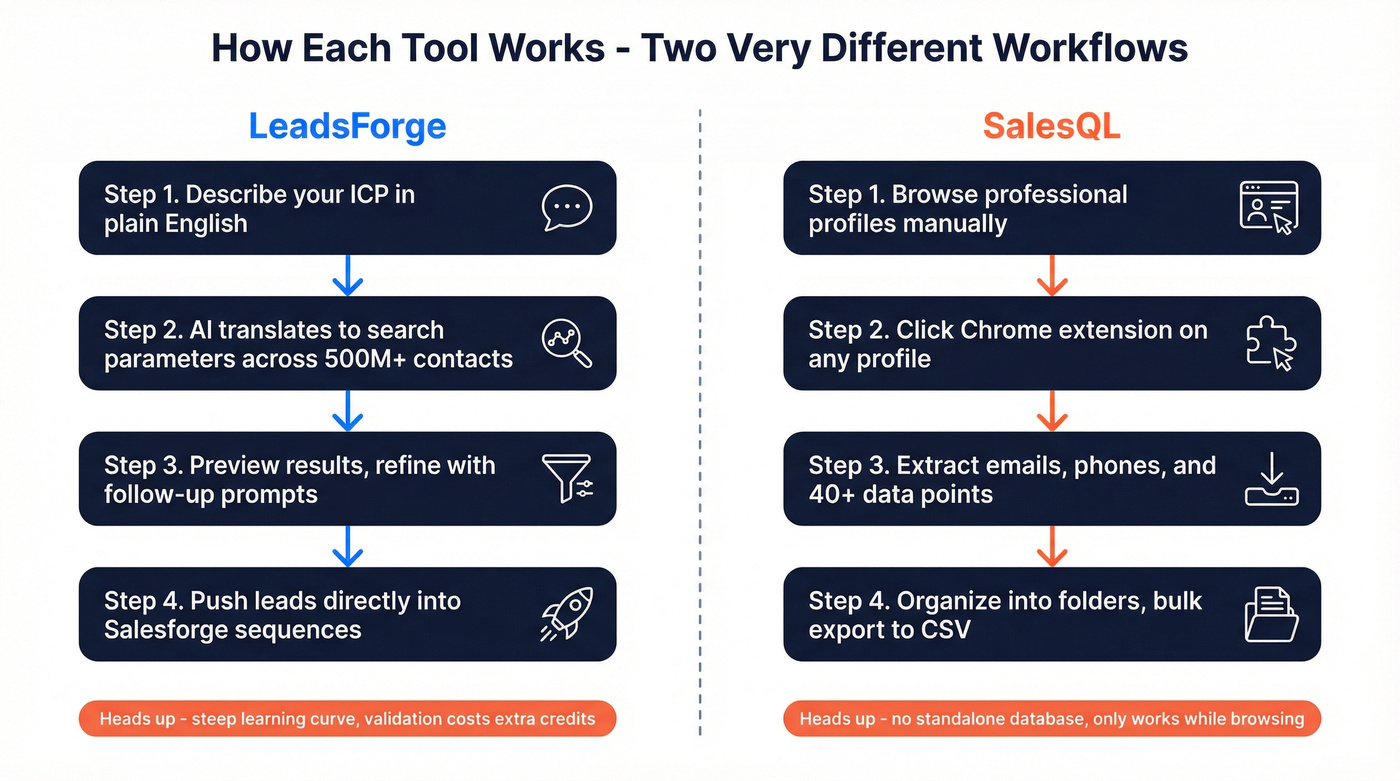
The downside: G2 reviewers consistently flag a steep learning curve, and we've seen similar complaints in community threads. Getting the AI prompts right takes practice - your first few searches won't be your best.
SalesQL works the opposite way. You're already browsing profiles, and the extension sits on top of that experience. It's manual and browser-dependent, but dead simple. The tradeoff is that there's no standalone database. If you aren't actively browsing, SalesQL can't help you.
If you're comparing more options in this category, start with our roundup of outbound lead generation tools and narrow by workflow.
What Users Actually Say
LeadsForge: Trustpilot reviewers praise the time savings - one agency reviewer said it saves 10+ hours of manual research per week. G2 reviewers highlight the granular AI filtering. But the cons are consistent: validation costs extra credits, the learning curve is steep, and multiple reviewers flag "$49 for 2,000 leads feels high." One reviewer called it "cheap and bad" and complained about cancellation difficulty.
If you're trying to reduce the verification tax, compare dedicated data enrichment services and decide whether enrichment or sourcing is your real gap.
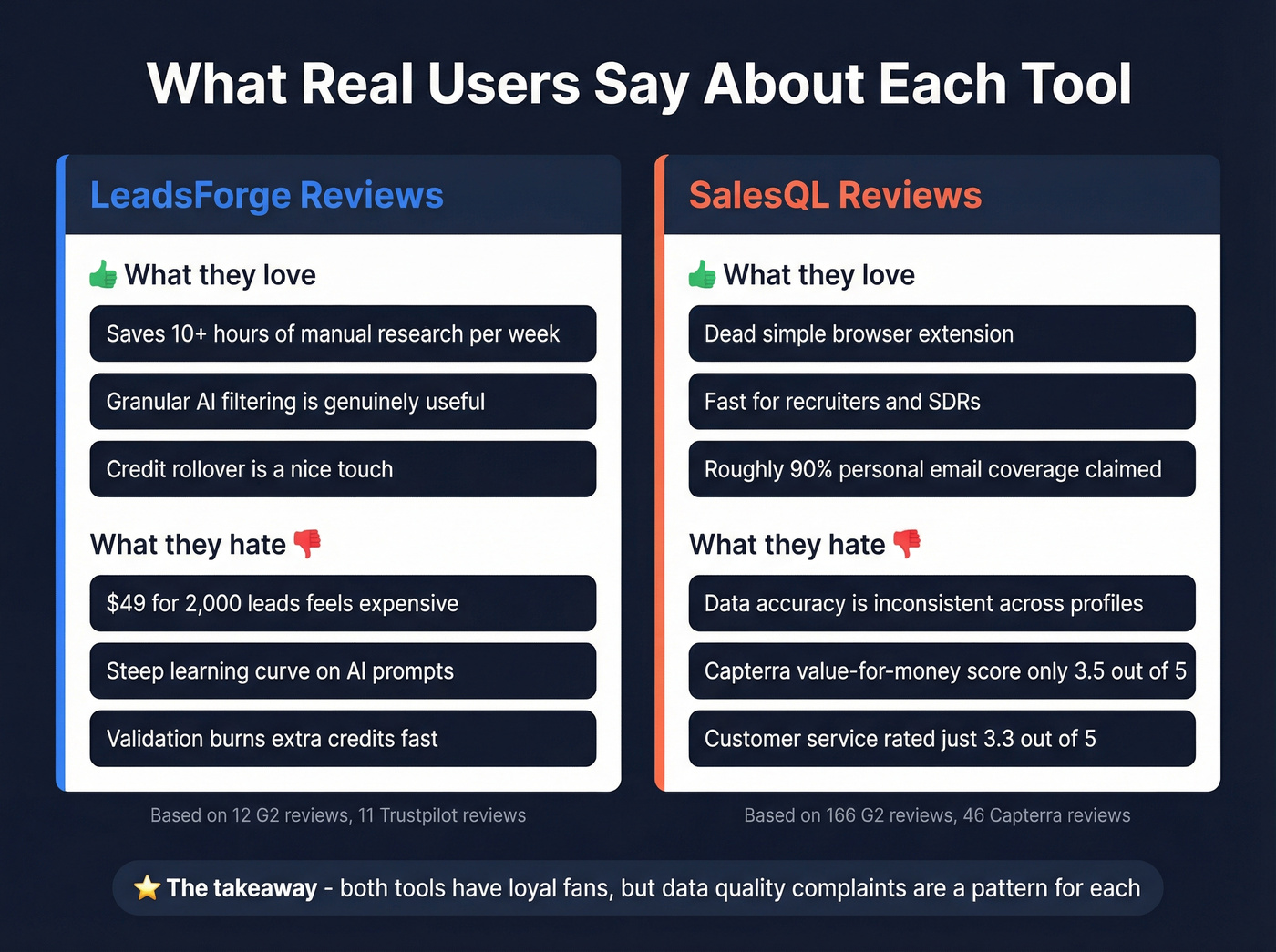
SalesQL: G2's 166 reviews paint it as easy and fast for browser-based sourcing. Recruiters especially appreciate the speed, and one user claimed roughly 90% personal email coverage. But Capterra's value-for-money score sits at just 3.5/5. The Reddit consensus on r/sales and r/recruiting: data accuracy is inconsistent - good results for some profiles, blanks for others. That inconsistency is frustrating when you're building lists at scale and can't predict which contacts will come back empty.
If you're doing this at volume, it's worth reviewing modern sales prospecting techniques so list-building doesn't outpace your ability to convert.
Who Should Pick Which
Go with LeadsForge if you're already paying for Salesforge and want native lead-to-sequence sync. The AI search is useful for teams that hate building manual filter combinations. Just budget for extra validation credits - they add up fast.
Go with SalesQL if you're a recruiter or SDR who prospects from professional profiles daily. The $29/mo annual plan with 24,000 credits is hard to beat on pure volume.
Here's the thing: if your average deal size sits below five figures, neither tool's data quality justifies the time you'll spend cleaning it. You need verified contacts out of the box, not a validation tax on top of your lead-gen spend. (If bounces are already hurting you, use these email bounce rate benchmarks to sanity-check your list quality.)
Consider Prospeo Instead
Both LeadsForge and SalesQL share a core weakness - you're paying for data you then have to verify separately (or hope it's accurate). Prospeo solves this at the infrastructure level. Every email comes back 98% verified through a proprietary 5-step process that includes catch-all handling, spam-trap removal, and honeypot filtering. No separate validation credits, ever.
If you want to compare verification-first options, see our guide to Bouncer alternatives and what “verified” actually means across vendors.
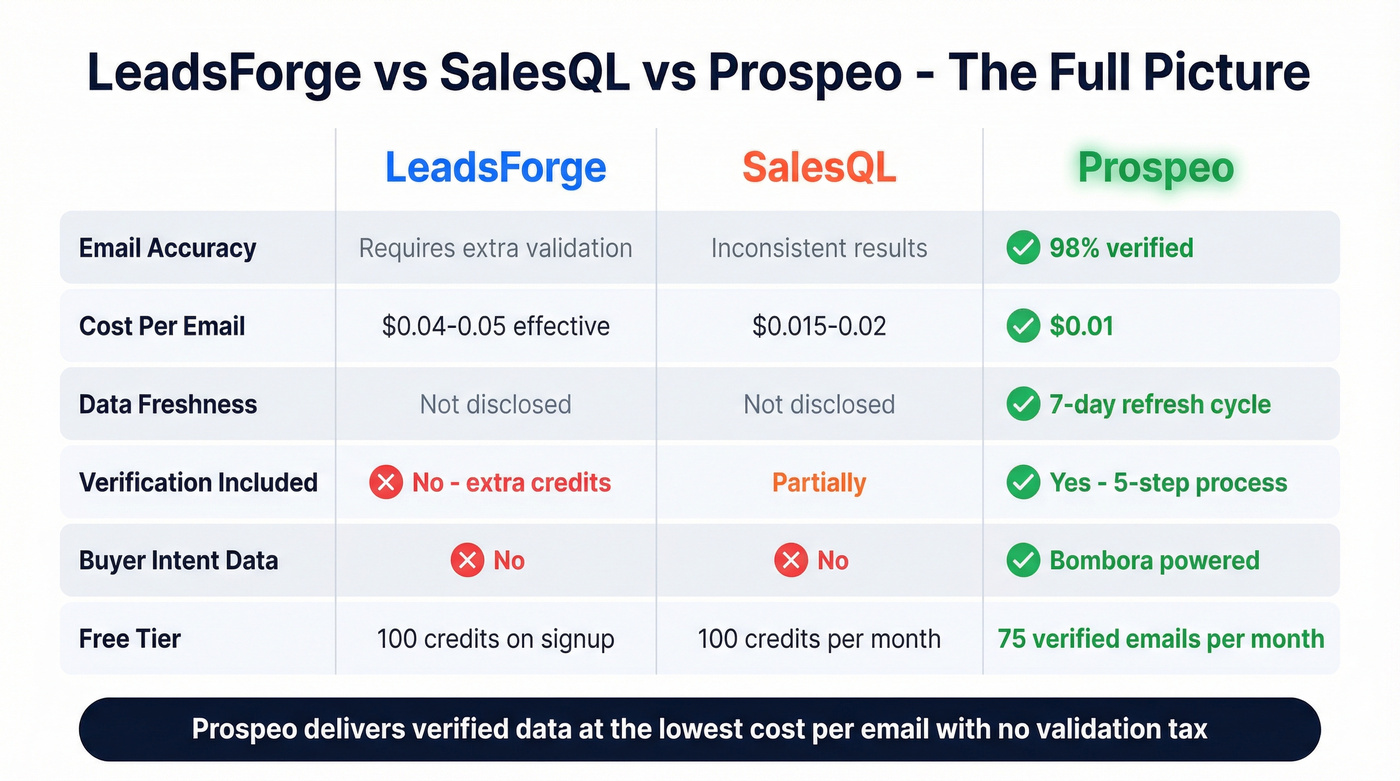
The database covers 300M+ profiles on a 7-day refresh cycle - compared to the 6-week industry average - with 30+ search filters including buyer intent powered by Bombora and technographic signals. We've seen teams like Snyk cut bounce rates from 35-40% down to under 5% after switching, while generating 200+ new opportunities per month across 50 AEs. Free tier starts at 75 verified emails per month, paid plans run about $0.01 per email. Self-serve from day one, no contracts.
If you're building lists from names, this name to email guide can help you validate the workflow end-to-end.

Neither LeadsForge's 500M claimed contacts nor SalesQL's undisclosed database refresh on a 7-day cycle. Prospeo's 300M+ profiles stay current weekly with 30+ filters including buyer intent and technographics - so your lists don't decay before you send.
Fresh data wins deals. Stale data burns domains.
FAQ
Is LeadsForge the same as Salesforge?
No. LeadsForge is the lead-generation module within the Salesforge ecosystem. Salesforge handles email outreach, sequences, and deliverability. LeadsForge finds the contacts that feed into those sequences - it's a $49/mo add-on to the broader Salesforge stack.
Which tool has better data accuracy?
Neither excels here. SalesQL users report inconsistent results across profiles, and LeadsForge requires burning extra credits on verification. In our testing, tools that bake verification into the core product - rather than bolting it on as an upsell - consistently deliver better results at lower total cost.