

Mail Extraction: Methods, Tools, and Mistakes to Avoid
An SDR spends four hours copying email addresses from company websites into a spreadsheet. Half are generic info@ addresses. None are verified. The first outreach sequence bounces at 22%, and the domain takes a reputation hit it'll feel for months.
That's the cost of bad mail extraction - and it happens constantly. We've watched teams repeat this exact mistake dozens of times, always surprised when the consequences land.
There's a smarter way. Here's how the process actually works, which tools earn their keep, and where most people get burned.
What Is Mail Extraction?
Mail extraction is the process of collecting publicly displayed email addresses in bulk - from websites, documents, text blocks, or HTML source code. You're scanning content for anything matching the name@domain.com pattern and pulling it into a structured list.
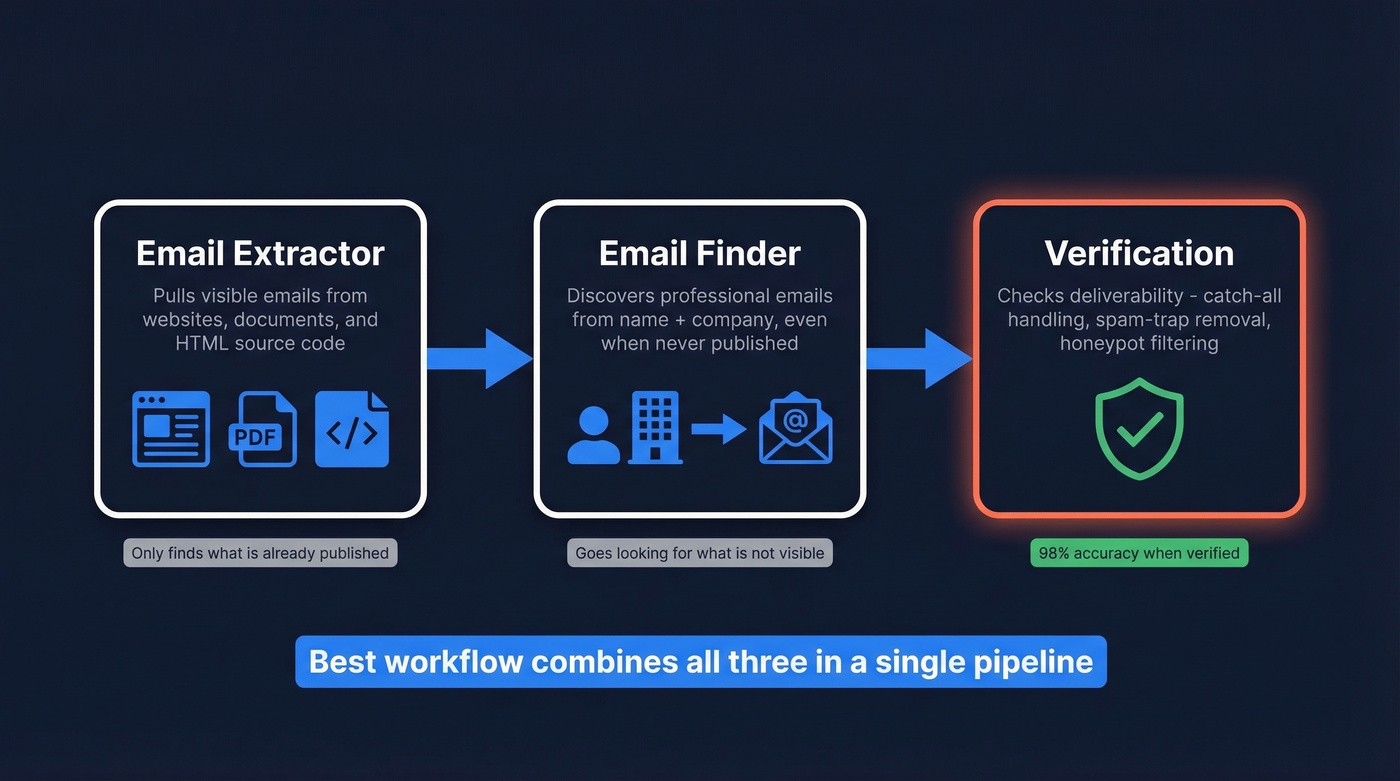
There's a meaningful distinction between an email extractor and an email finder that trips people up. An extractor pulls visible email addresses from existing content. If the email isn't displayed somewhere, the extractor won't find it. A finder discovers someone's professional email from their name and company, even when it's never been published anywhere. Extractors crawl what's already there; finders go looking for what isn't.
Most B2B teams actually need both - extraction for harvesting visible addresses and a finder for reaching decision-makers who don't publish theirs. The best workflow combines extraction, finding, and verification in a single pipeline.
What You Need (Quick Version)
| Use Case | Tool | Why |
|---|---|---|
| One-off text extraction | Browserling or DeBounce | Free, instant, no signup |
| Website crawling | Mailmeteor | Free, handles JS-rendered sites |
One warning: raw extraction without verification means 10-30% of extracted emails are often invalid or disposable, which translates to real domain damage. Every tool below that doesn't verify needs a second step.
How Email Extraction Works
Text Parsing and Regex
Every extraction tool starts with pattern matching. The standard regex:
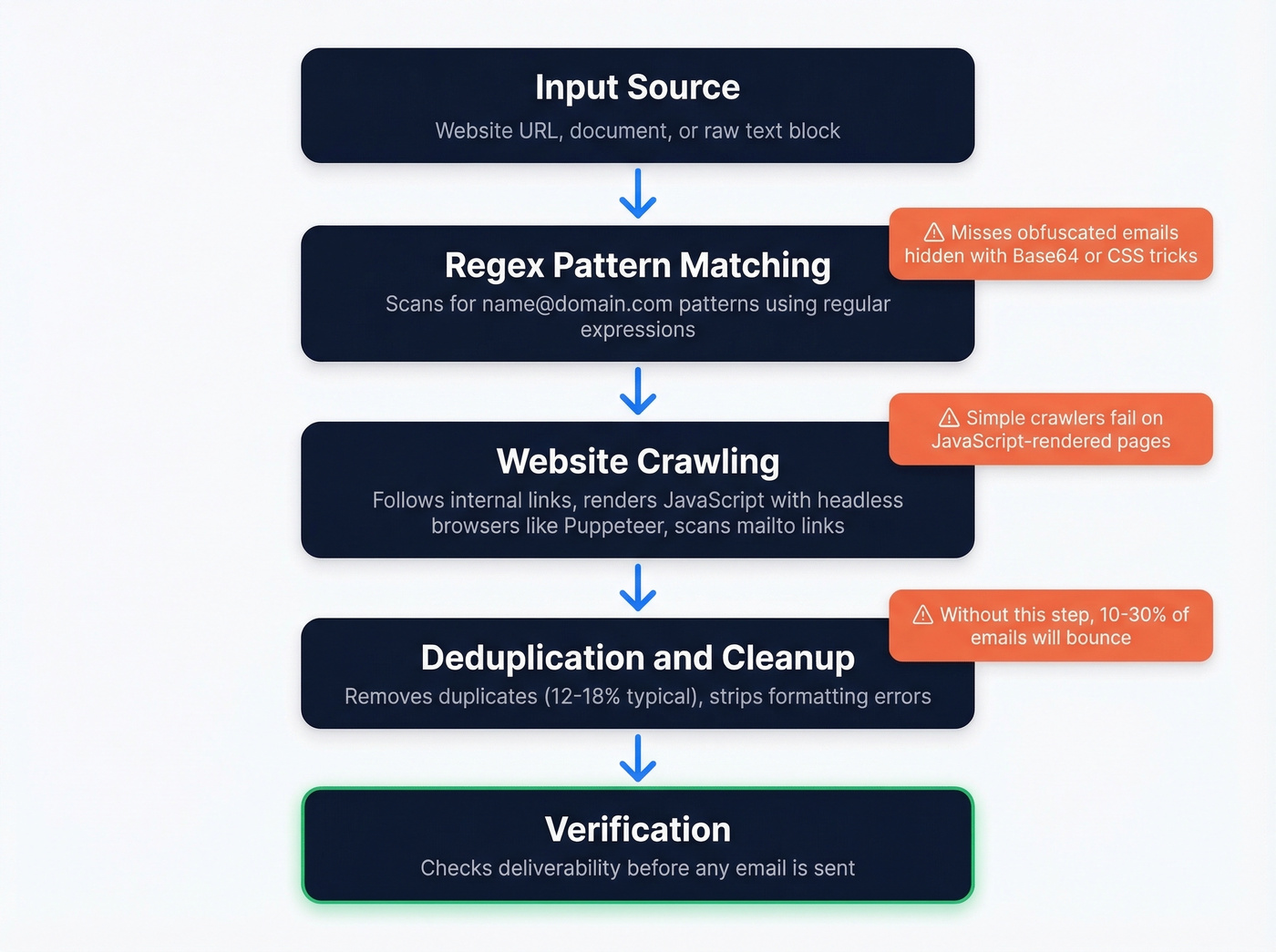
[A-Za-z0-9._%+-]+@[A-Za-z0-9.-]+\.[A-Z|a-z]{2,}
This matches any string with alphanumeric characters before an @, followed by a domain and TLD of at least two characters. The critical follow-up is deduplication - raw extractions from large crawls routinely return 12-18% duplicates.
Website Crawling
Crawling goes deeper. The tool scans HTML, identifies emails in plain text and mailto links, then follows internal links across the site. Modern JavaScript-rendered pages complicate this because simple HTTP requests miss emails that load after the initial page render. Serious crawlers use headless browsers like Puppeteer to render pages as a human would before scanning.
Obfuscation Challenges
Sites increasingly use Base64 encoding, JavaScript-generated strings, and CSS tricks to hide addresses from scrapers. Add CAPTCHAs, rate limiting, and IP blocking, and simple regex-and-crawl tools miss a significant chunk of emails.
This is why dedicated platforms that combine multiple discovery methods consistently outperform DIY scripts.


Raw mail extraction gives you addresses. Prospeo gives you verified contacts. Every email runs through 5-step verification - catch-all handling, spam-trap removal, honeypot filtering - delivering 98% accuracy at $0.01/email. No separate verification tool needed.
Skip the extract-then-verify workflow. Start with clean data.
Best Tools for Extracting Emails
Free Text Extractors
Browserling's email extractor is dead simple - paste text, get emails, done. No signup, no cost. DeBounce offers free extraction with paid verification from $0.00045 per check. Both are fine for one-off jobs where you've got raw text and need addresses pulled out fast.
Website Crawlers
Mailmeteor is free, requires no signup, and handles JavaScript-heavy websites through advanced rendering. If a human can see the email on the page, Mailmeteor can find it. It doesn't verify deliverability, though, so you'll need a separate verification step before sending anything. (If you need a deeper breakdown, see our guide to email crawlers.)
Browser Extensions
Hunter is the most established extension here, carrying a 4.7-star rating from 12.5K Chrome Web Store reviews. Free tier available, paid plans starting around $49/mo. Snov.io edges it on ratings at 4.9 stars from 6K reviews and bundles outreach features alongside extraction, with paid plans from around $39/mo. GetProspect holds a 4.8-star rating from 1.3K reviews and offers a free plan with up to 50 emails, paid plans from $49-$99/mo.
All three handle page-level scanning well but none crawl entire sites the way dedicated web tools do. If you're comparing options, our roundup of the best email scraper Chrome extensions goes deeper.
B2B Data Platforms
This is where extraction meets verification - and where the real ROI lives for outbound teams.
Look, most teams don't need a separate extractor and verifier. If your outbound workflow still involves extracting emails into a CSV, running them through a verification tool, then importing the clean list into your sequencer, you're burning hours on a problem that's already been solved.
Prospeo eliminates that two-tool problem. The database covers 300M+ professional profiles with 143M+ verified emails, and every address runs through a 5-step verification process before delivery - catch-all handling, spam-trap removal, honeypot filtering, the works. The result is 98% email accuracy, which is what teams actually see in production, not just a marketing number. The Chrome extension pulls verified contacts from any website or CRM in one click, and data refreshes every 7 days versus the 6-week industry average. Pricing starts free at 75 emails/month and scales at roughly $0.01 per email with no contracts.

Apollo.io's accuracy problem is the first thing you should know about it: email verification sits around 79%, meaning roughly one in five emails won't land. That said, it's the volume play - the free tier is generous, paid plans run ~$49-$99/mo per user, and the database is massive. If you prioritize breadth over precision, Apollo works as a starting point. Just budget for a verification layer on top. (Related: email bounce rate benchmarks and what they mean.)
Kaspr is the pick for EMEA-heavy ICPs. It focuses on European coverage and a strong extension workflow, with a database of 500M+ email addresses. The free tier gives you 5 emails; paid plans range from $49/mo for 60 emails to $99/mo for 24,000.
Tool Comparison
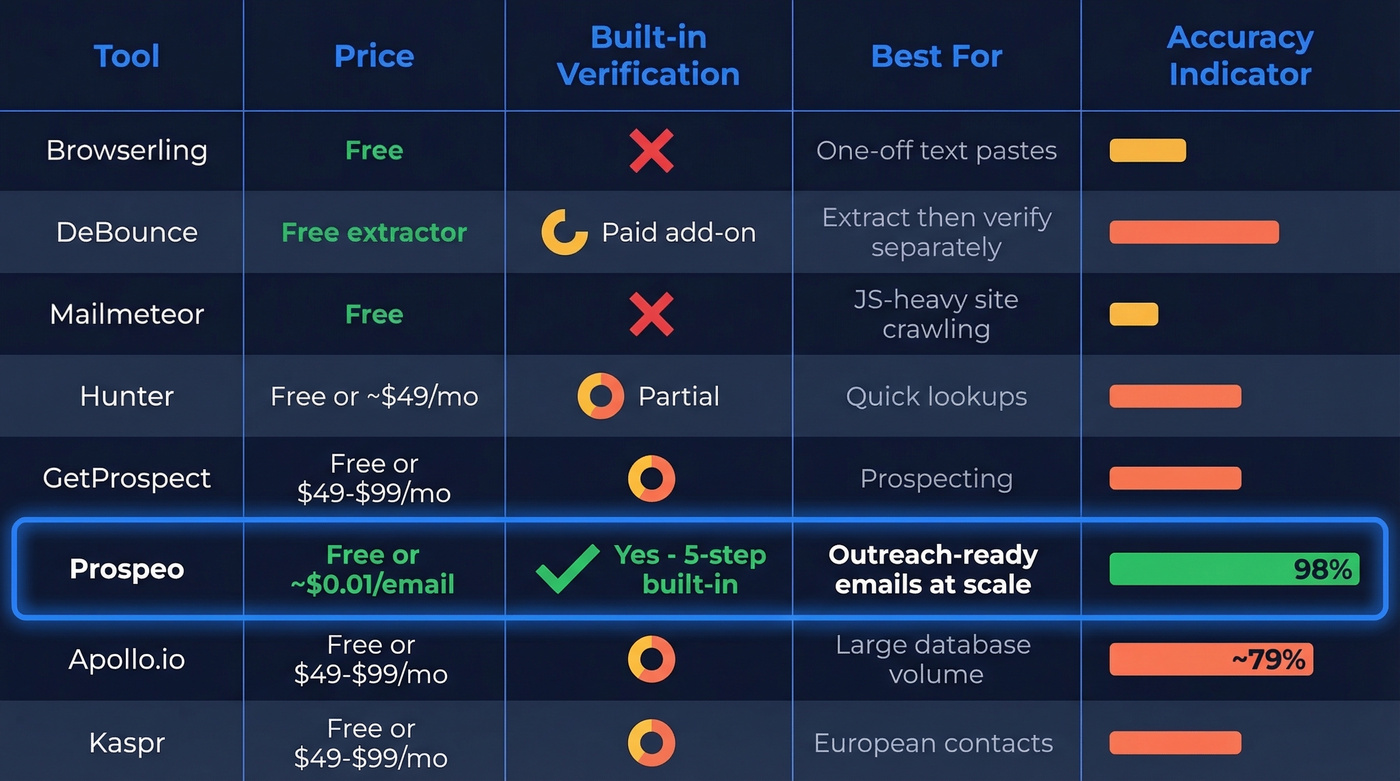
| Category | Tool | Price | Verifies? | Best For |
|---|---|---|---|---|
| Text extractor | Browserling | Free | No | One-off pastes |
| Text extractor | DeBounce | Free (extractor) | Yes (paid) | Extract + verify separately |
| Website crawler | Mailmeteor | Free | No | Crawling JS-heavy sites |
| Extension | Hunter | Free / ~$49/mo | Partial | Quick lookups |
| Extension | GetProspect | Free / $49-$99/mo | Partial | Prospecting |
| B2B platform | Prospeo | Free / ~$0.01/email | Yes (built-in) | Outreach-ready emails at scale |
| B2B platform | Apollo.io | Free / $49-$99/mo | Partial | Large database |
| B2B platform | Kaspr | Free / $49-$99/mo | Partial | European contacts |
Why Verification Isn't Optional
Here's the thing: extracting addresses is the easy part. Verification is where campaigns live or die.
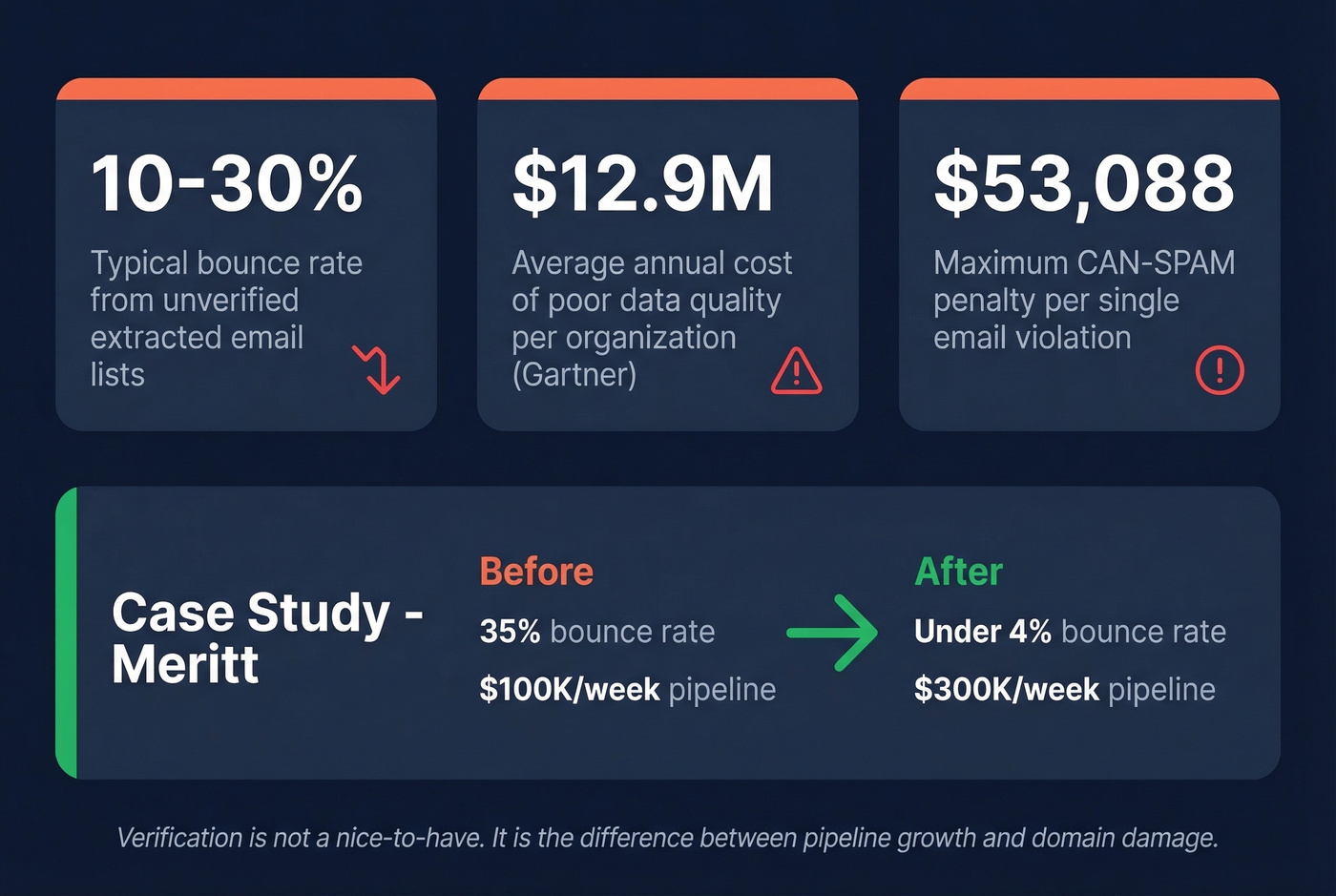
Raw extracted email lists bounce at 10-30%. That's not theoretical - it's what we see consistently when teams skip verification. The consequences compound fast. One Reddit user in r/Emailmarketing described buying a 10,000-contact CSV and sending a few newsletters. Even their 1:1 replies started landing in spam. Domain reputation damage like that takes months to recover from, if it recovers at all. This pattern shows up constantly in r/coldemail too - teams harvest thousands of emails, skip verification, and wonder why their domain gets flagged within a week.
Poor data quality costs organizations $12.9 million per year on average. Most of that waste traces back to acting on unverified information. Platforms with built-in verification - using catch-all handling, spam-trap removal, and honeypot filtering - dramatically reduce this problem. Meritt went from a 35% bounce rate to under 4% after switching to a verified pipeline, and their pipeline tripled from $100K to $300K/week. If you're trying to protect deliverability long-term, use email reputation tools and follow a real email deliverability guide.
Teams using DIY extraction bounce at 10-30% and torch their domain reputation. Prospeo's 143M+ pre-verified emails refresh every 7 days, so you're never sending to stale addresses. One click from the Chrome extension - no crawling, no regex, no cleanup.
Extract, verify, and enrich in one step - not three.
Legal Requirements You Can't Ignore
Extracting emails is one thing. Sending to them is where the law gets involved.
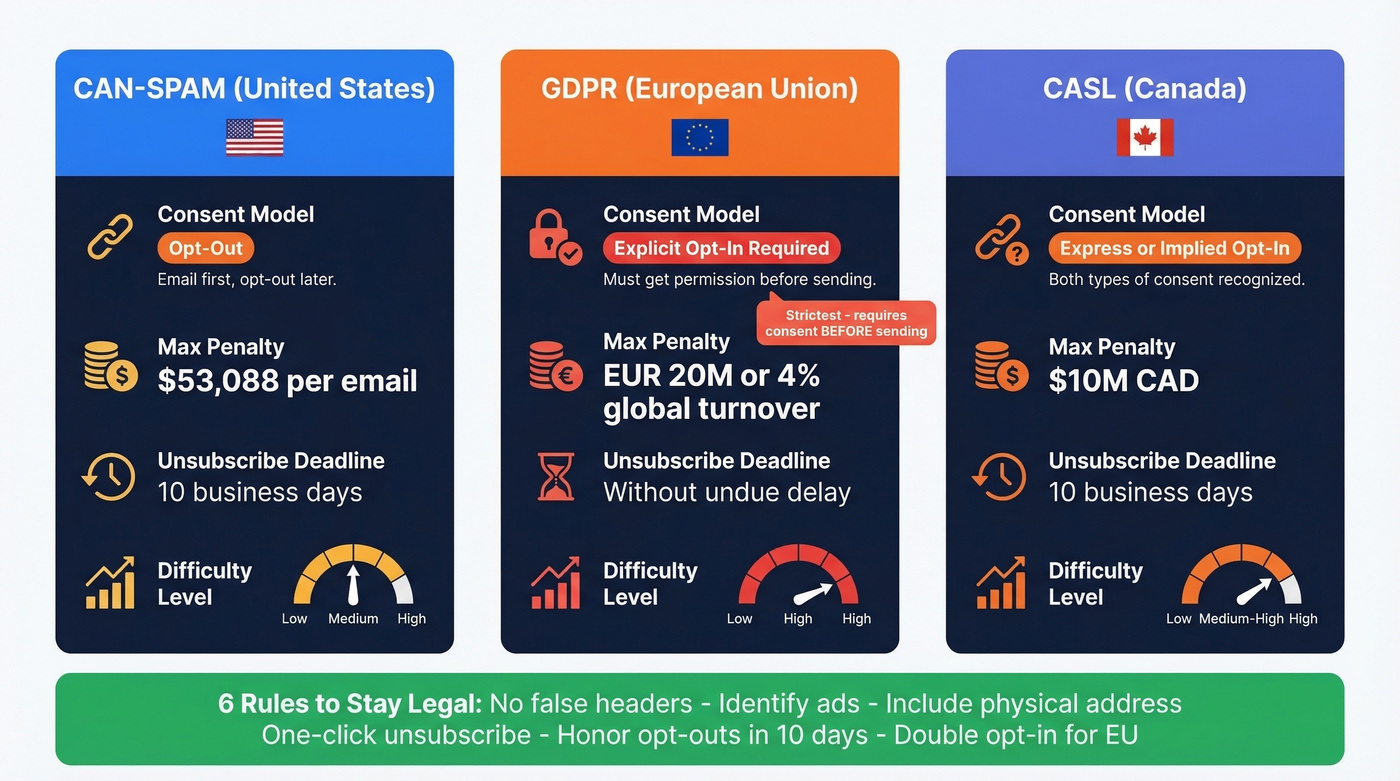
| CAN-SPAM (US) | GDPR (EU) | CASL (Canada) | |
|---|---|---|---|
| Consent model | Opt-out | Opt-in (explicit) | Opt-in (express/implied) |
| Max penalty | $53,088/email | EUR 20M or 4% global turnover | $10M CAD |
| Unsubscribe deadline | 10 business days | Without undue delay | 10 business days |
Those GDPR penalties aren't theoretical - they're actively enforced. And CAN-SPAM's per-email penalty structure means a single bad campaign to 1,000 addresses could theoretically cost $53 million.
Stay legal:
- Never use false headers or deceptive subject lines
- Identify commercial messages as ads
- Include a valid physical postal address
- Provide a clear, one-click unsubscribe mechanism
- Honor opt-outs within 10 business days
- Use double opt-in for EU contacts
Don't buy lists. Extract or find emails from legitimate sources, verify them, and always include an easy unsubscribe. (More: Is It Illegal to Buy Email Lists?)
Choosing the Right Approach
Not every team needs the same solution. If you're pulling addresses from a single document or webpage once a month, a free text extractor is plenty - skip the paid tools entirely.
For teams running outbound at scale, you need a platform that handles discovery, mail extraction, and verification in one workflow. Otherwise you're stitching together three separate tools and losing time at every handoff. Let's be honest: the teams we've seen succeed at cold outreach aren't the ones with the most tools - they're the ones who eliminated the gaps between extraction, verification, and sending. If you're building a full outbound motion, start with proven sales prospecting techniques and a repeatable lead generation workflow.
FAQ
Is email extraction legal?
Extracting publicly displayed emails is generally legal. Using them for outreach requires compliance with CAN-SPAM, GDPR, or CASL depending on your recipients' location - meaning unsubscribe links, honest headers, and explicit consent for EU contacts before the first send.
What's the difference between an extractor and a finder?
Extractors pull visible email addresses from text, websites, or documents in bulk. Finders discover professional emails from a name and company, even when the address isn't published anywhere. For B2B outreach, you typically need a finder - decision-makers rarely display work emails publicly.
How do I avoid bounces from extracted emails?
Run every extracted address through a verification tool before sending. Unverified lists bounce at 10-30%, which damages sender reputation and can push even personal emails to spam. Platforms with built-in multi-step verification keep bounce rates under 4% without adding a separate step to your workflow.