


MailReach Review 2026: Pricing, Pros, Cons, and What Most Reviews Miss
$19.50 per inbox, per month is real - but it's not the whole story. MailReach's pricing is tiered: $25/inbox/month for 1-5 mailboxes, dropping to $19.50/inbox/month once you're warming 6-20 (with lower per-inbox rates at higher volumes). It's one of the better dedicated email warmup tools out there, but the per-inbox model creates a math problem that gets ugly fast once you're managing more than a handful of accounts.
Here's what it actually costs, what users love and hate, and the upstream fix most reviews completely ignore.
30-Second Verdict
MailReach is a solid dedicated warmup tool - autopilot setup, broad ESP support, and a 4.7/5 on G2. But costs stack fast for agencies running 10+ inboxes. If you're already on Instantly or Smartlead, their built-in warmup may be enough. And if your deliverability problems stem from bad contact data, no amount of warmup will save you. Fix the data first, then decide if you still need warmup.
What MailReach Does
MailReach is a dedicated email warmup and spam-testing tool. You connect your inbox, it automatically sends and receives warmup emails across a large network of real inboxes - generating opens, replies, stars, and "not spam" actions that build your sender reputation. No campaign sending, no sequences, no CRM. Pure deliverability infrastructure.
Why does this matter more now? Email deliverability fell off a cliff recently, especially on Microsoft. Office 365 inbox placement dropped 26.73 percentage points year-over-year - from 77.43% down to 50.70%. Outlook and Hotmail fared even worse, cratering to 26.77%. Meanwhile, only 7.6% of domains actually enforce DMARC.
Reddit users on r/coldemail call out Outlook-specific warmup as particularly stubborn, even with full SPF/DKIM/DMARC authentication in place. Your records aren't enough anymore - you need active reputation signals hitting inboxes consistently. (If you want the full framework, start with our email deliverability guide.)
MailReach Pricing Breakdown
Here's what MailReach costs on their pricing calculator:
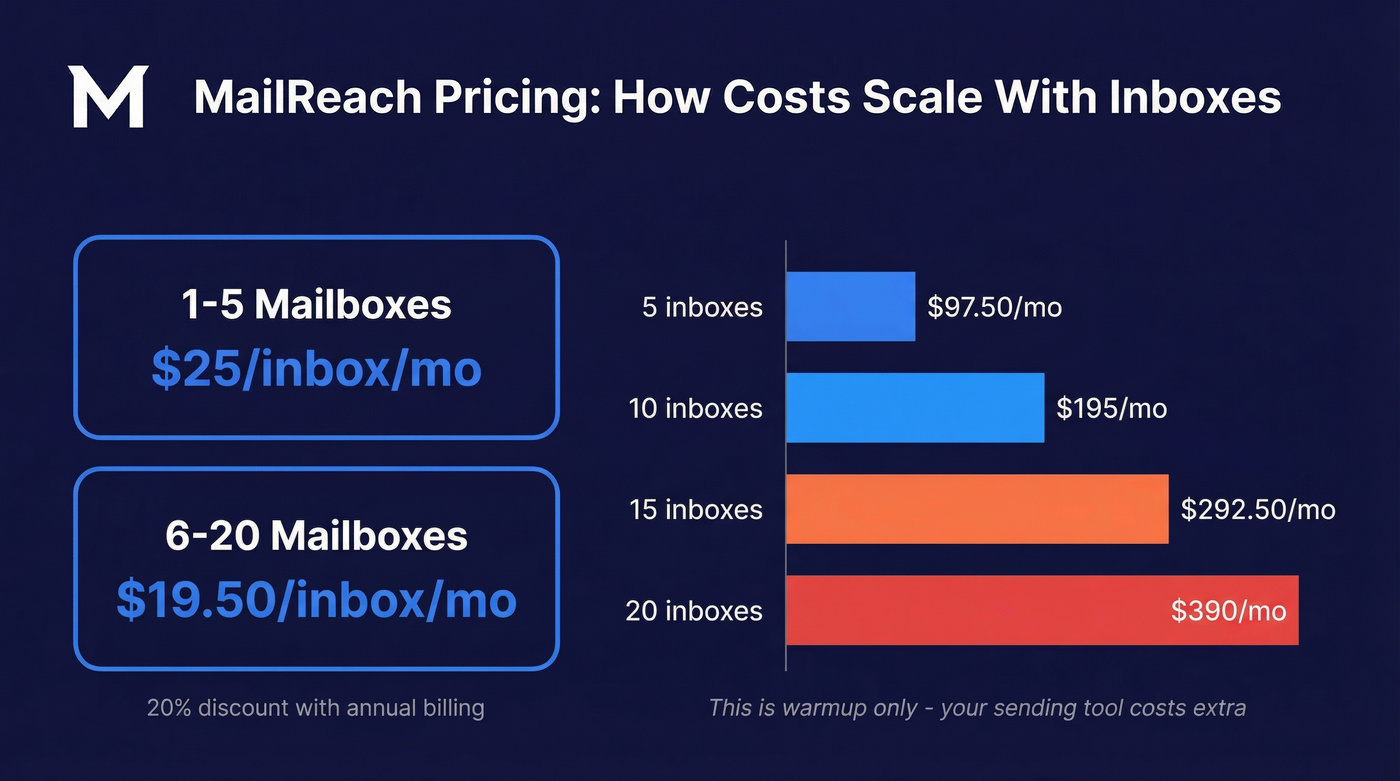
- 1-5 mailboxes: $25 per mailbox/month
- 6-20 mailboxes: $19.50 per mailbox/month
- Annual billing: 20% discount across all tiers
Their All-in-One plan bundles the email warmer and spam tester together, including at least 20 spam test credits. Warmup volume caps at 100 warmup emails per day, and you get 3 free spam tests every 24 hours.
The math gets real when you scale at $19.50/inbox/month:
| Inboxes | Monthly Cost |
|---|---|
| 5 | $97.50 |
| 10 | $195 |
| 15 | $292.50 |
| 20 | $390 |
That's before you pay for your actual sending tool. Older articles cite $25/inbox because that's the 1-5 mailbox tier - once you're warming 6+ inboxes, the calculator drops to $19.50.
There's no free trial for warmup. You're paying from day one, and with a 14-30 day warmup timeline, you're $20-40 deep before you know if it's working for your specific domain.
On features, MailReach includes domain and inbox health checks (blacklist, SPF, DKIM, DMARC, ETS), a reputation tracking dashboard, and the MailReach Co-Pilot AI assistant for deliverability insights. (Related: how to improve sender reputation without burning budget.)
Spam Test Credit Costs
MailReach supports monthly credit packs for inbox placement testing. Third-party breakdowns put credits around $0.18-$0.28 per test depending on pack size, with annual billing running cheaper.
Pros
- Autopilot setup. Connect your inbox, flip it on, done. No manual configuration of warmup schedules or engagement patterns. This is the most consistent praise in reviews.
- Broad ESP support. Works with Gmail, Outlook, and any provider supporting SMTP - useful if you're running a mix of Google Workspace and Microsoft 365 accounts.
- Responsive support. Fast, helpful support is a repeated theme across review platforms.
- Large warmup network. Warmup activity runs across a big pool of real inboxes on Google Workspace and Microsoft 365.
- Proven time-to-value. One reviewer reported warming addresses in about 14 days, then sending to 2,000 inboxes with a spam rate under 1%.
- Co-Pilot AI assistant. Flags domain health issues, blacklist hits, and authentication gaps without you digging through dashboards.
Cons
- Per-inbox pricing scales painfully. An agency running 15 inboxes pays $292.50/month for warmup alone. Add Instantly on top and you're at $400-500/month before a single prospecting email goes out.
- Spam test results can conflict with other tools. One Reddit user ran the same inbox through MailReach and Warmy - MailReach showed positive results while Warmy flagged problems. Treat spam scores as directional signals, not gospel. (If you’re comparing approaches, see our breakdown of email reputation tools.)
- No free trial for warmup. You're committing from day one. Combined with a 14-30 day warmup window, you won't know if it's working for weeks. One reviewer noted it took almost 5 weeks to move to 10/10 inbox placement.
- Billing and cancellation friction. A Trustpilot reviewer reported being charged after cancelling - twice. Trustpilot also flags the profile as "hasn't replied to negative reviews."
- Warmup only - no sending features. You're always pairing MailReach with a separate sending platform, which means another bill.

You're spending $292/mo warming 15 inboxes because bad data torched your sender reputation. Prospeo's 98% verified emails and 5-step verification keep bounce rates under 4% - so you spend less on warmup and more on actually booking meetings.
Stop paying to fix what clean data prevents.
What Users Actually Say
The review picture is unusually split by platform. G2 shows a 4.7/5 from 44 reviews with 90% five-star ratings. Capterra is even higher at 5.0/5 from 24 reviews. Trustpilot tells a different story: 3.8/5 from 5 reviews, dragged down by the billing complaint.
Praise clusters around automation and support. One reviewer described reaching "10/10 inbox placement" - though it took nearly five weeks. The speed-focused crowd highlights 14-day warmup cycles producing sub-1% spam rates on real campaigns.
Reddit is more skeptical. Users on r/coldemail question whether deliverability checkers - MailReach included - give vague or even false results designed to push warmup upsells. The consensus: the tool can work for warmup, but don't over-index on any single spam score.
Who Should Use MailReach?
It's a good fit if:
- You need standalone warmup alongside an existing sending tool
- You're managing multiple client domains and need dedicated reputation repair
- You want set-it-and-forget-it warmup with minimal configuration
Skip it if:
- You're a solo sender - paying per inbox for warmup is hard to justify when an all-in-one sender bundles it free
- You're already on Instantly or Smartlead and haven't tested their built-in warmup first
- You need sending and warmup in one tool
- You're budget-conscious and running 10+ inboxes
Operational Guidance Most Reviews Skip
Here's the part that separates warmup success from wasted money. In cold email communities, the common guidance for MailReach and similar tools is keeping post-warmup sending around ~100 campaign emails per day per inbox. Teams who ignore this and blast 300+ emails on day 15 can undo weeks of reputation building in a single afternoon. (For a deeper look at safe sending limits, see email velocity.)
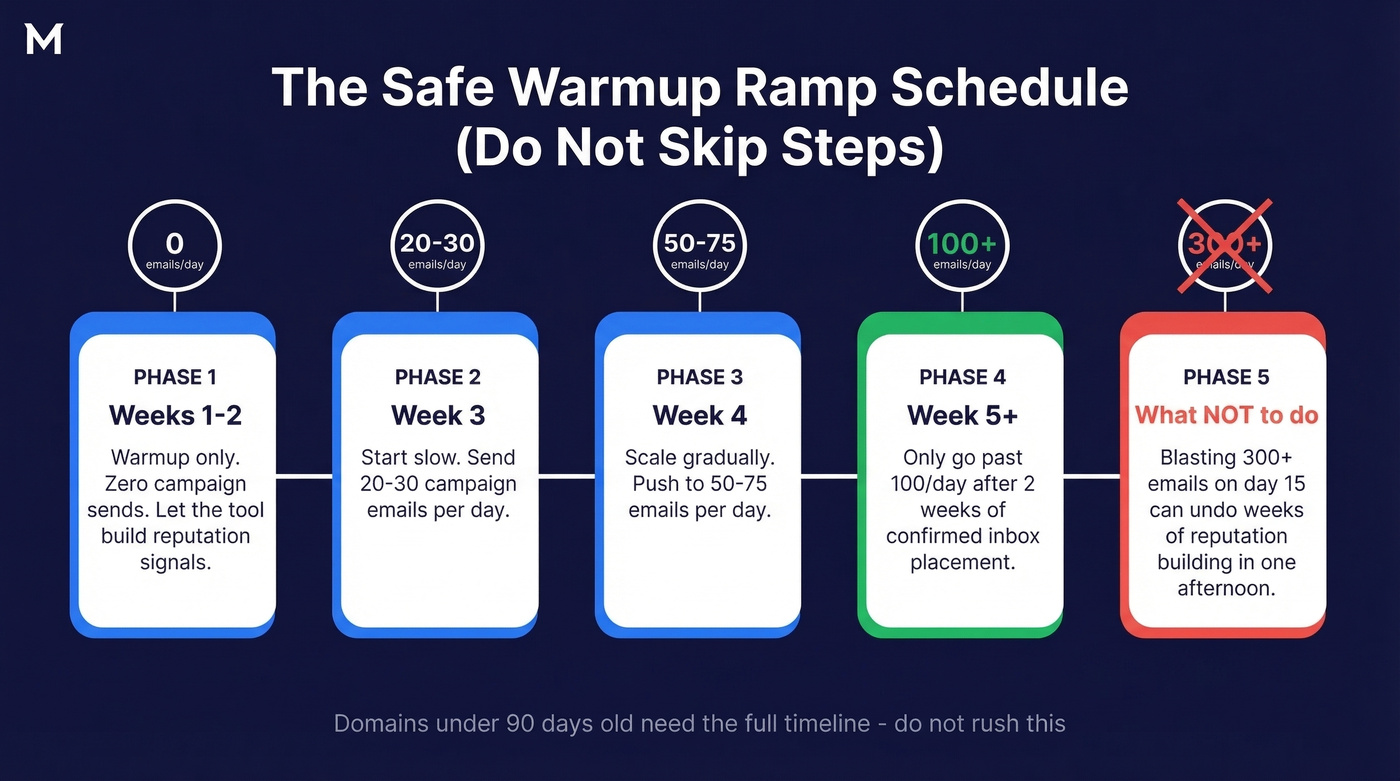
A realistic ramp schedule looks like this: weeks 1-2 are warmup-only with zero campaign sends. Week 3, start at 20-30 emails per day. Week 4, scale to 50-75. Only push past 100/day after you've confirmed consistent inbox placement for at least two weeks. Domains under 90 days old need the full timeline - in our testing, warmup tools show the most impact on these newer domains.
Here's the thing: most teams buying MailReach don't actually have a warmup problem. They have a data problem. They're sending to bad emails, bouncing at 8-15%, torching their domain reputation, and then paying $195/month to warm their way out of a hole they keep digging. Prevention costs less than repair. (Benchmarks + fixes: email bounce rate.)
The Root Cause Most Reviews Miss
The sequence that kills your sender reputation starts upstream - bad contact data leads to bounces, bounces trigger spam traps, and spam traps torch your domain. Then you need warmup to dig yourself out. (If you suspect traps, start with spam trap removal.)
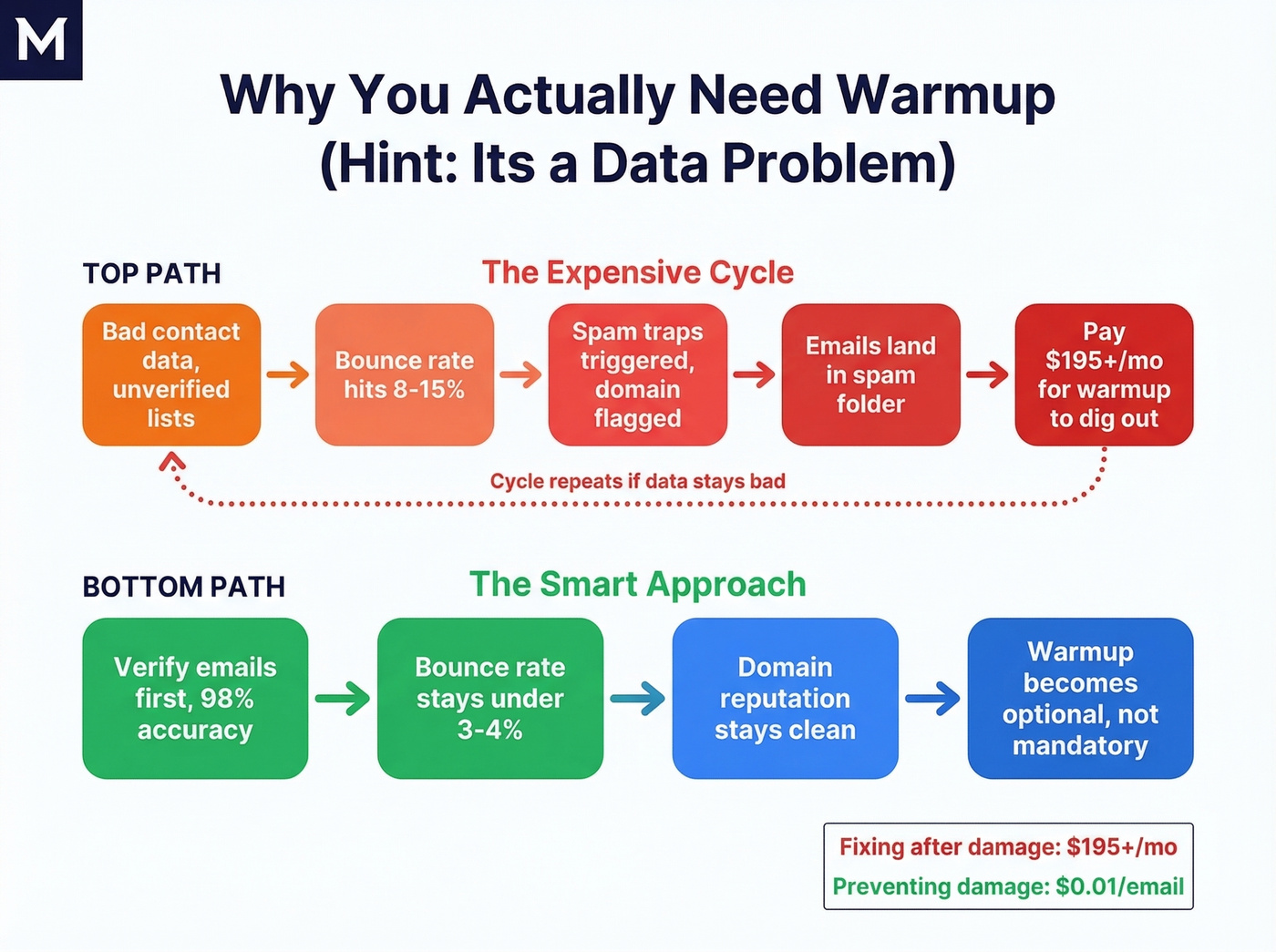
We've found that cleaning your list before warmup cuts the timeline in half. Prospeo's 5-step email verification delivers 98% accuracy with catch-all handling, spam-trap removal, and honeypot filtering built in. Stack Optimize used Prospeo to keep client bounce rates under 3% with zero domain flags across all accounts - the kind of foundation that makes warmup optional rather than mandatory. (If you’re evaluating vendors, compare data enrichment services too.)

MailReach can repair your domain reputation, but it can't fix the root cause. Stack Optimize built a $1M agency on Prospeo data - 94%+ deliverability, sub-3% bounce rates, zero domain flags across every client. At $0.01/email, that's less than a single month of warming one inbox.
Eliminate the bounces that put you in spam in the first place.
Alternatives Worth Considering
Dedicated warmup tools: Warmy (~$49/month, frequently mentioned for Outlook-specific challenges), Warmbox ($15/month), and Warmbase are common alternatives cross-shopped with MailReach. (More options here: unlimited email warmup.)
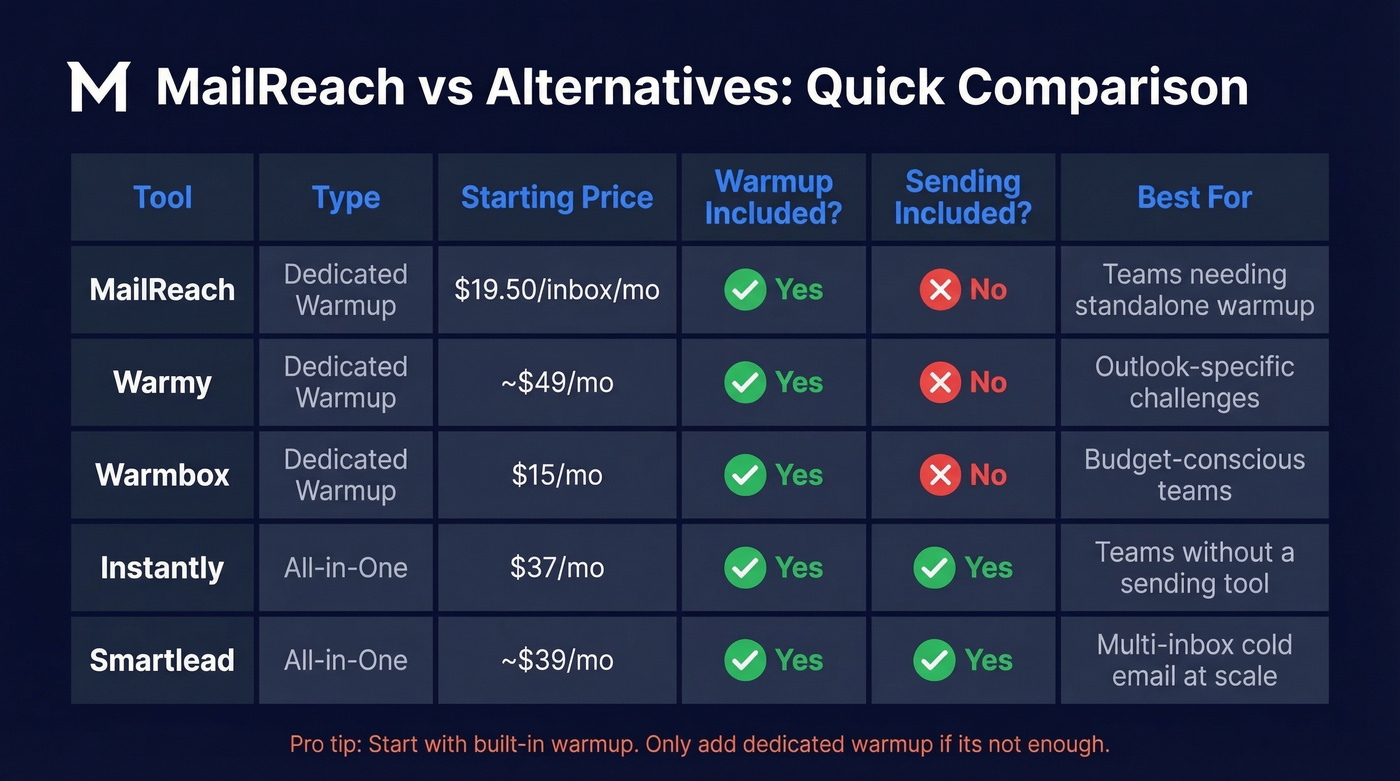
All-in-one platforms with built-in warmup: Instantly ($37/month) and Smartlead (~$39/month) both bundle warmup into their sending platforms. If you don't already have a sending tool, these make the standalone warmup question moot. We've seen teams save $200+/month by consolidating into one platform instead of stacking MailReach on top of a separate sender.
Let's be practical: for most teams, start with the built-in option and only add dedicated warmup if it's not cutting it.
FAQ
Does MailReach offer a free trial?
No. You get 3 free spam tests every 24 hours and at least 20 included test credits, but warmup itself is paid from day one. Budget $25-50 for the first month's evaluation before seeing meaningful results.
How long does warmup take?
Most users report 14-30 days to reach strong inbox placement. One reviewer noted nearly 5 weeks to hit 10/10. Newer domains (under 90 days old) consistently take longer - plan for the full month.
Can I use MailReach with Instantly or Smartlead?
Yes, but both platforms include built-in warmup. Paying for MailReach separately only makes sense if you've tested the bundled warmup and found it insufficient for your domain. Try the free option first - most teams don't need both.
What's a cheaper way to protect deliverability?
Fix your data before paying for warmup. Prospeo's email verification (98% accuracy, free tier with 75 credits/month) catches invalid addresses, spam traps, and honeypots before they trigger bounces. Teams running verified lists often skip dedicated warmup entirely.