


MailReef Review 2026: Pricing, Pros, Cons, and What Nobody Else Tells You
Every detailed MailReef breakdown you'll find is written by a direct competitor. Salesforge, Inframail, Woodpecker, Mailforge - they all publish thorough reviews and conveniently conclude you should use their product instead. That doesn't make their data wrong, but nobody's giving you a neutral read. Let's fix that.
30-Second Verdict
MailReef is solid dedicated SMTP infrastructure for cold email teams sending 50k+ emails per month. The pricing ($240-$249/mo per server) is competitive - you get a dedicated IP, auto DNS setup, and integrations with Smartlead and Instantly. The catch: costs jump in $249 increments once you exceed 50 domains, review-platform visibility is thin, and you should expect to pay at least $249 to properly test it on the month-to-month plan.
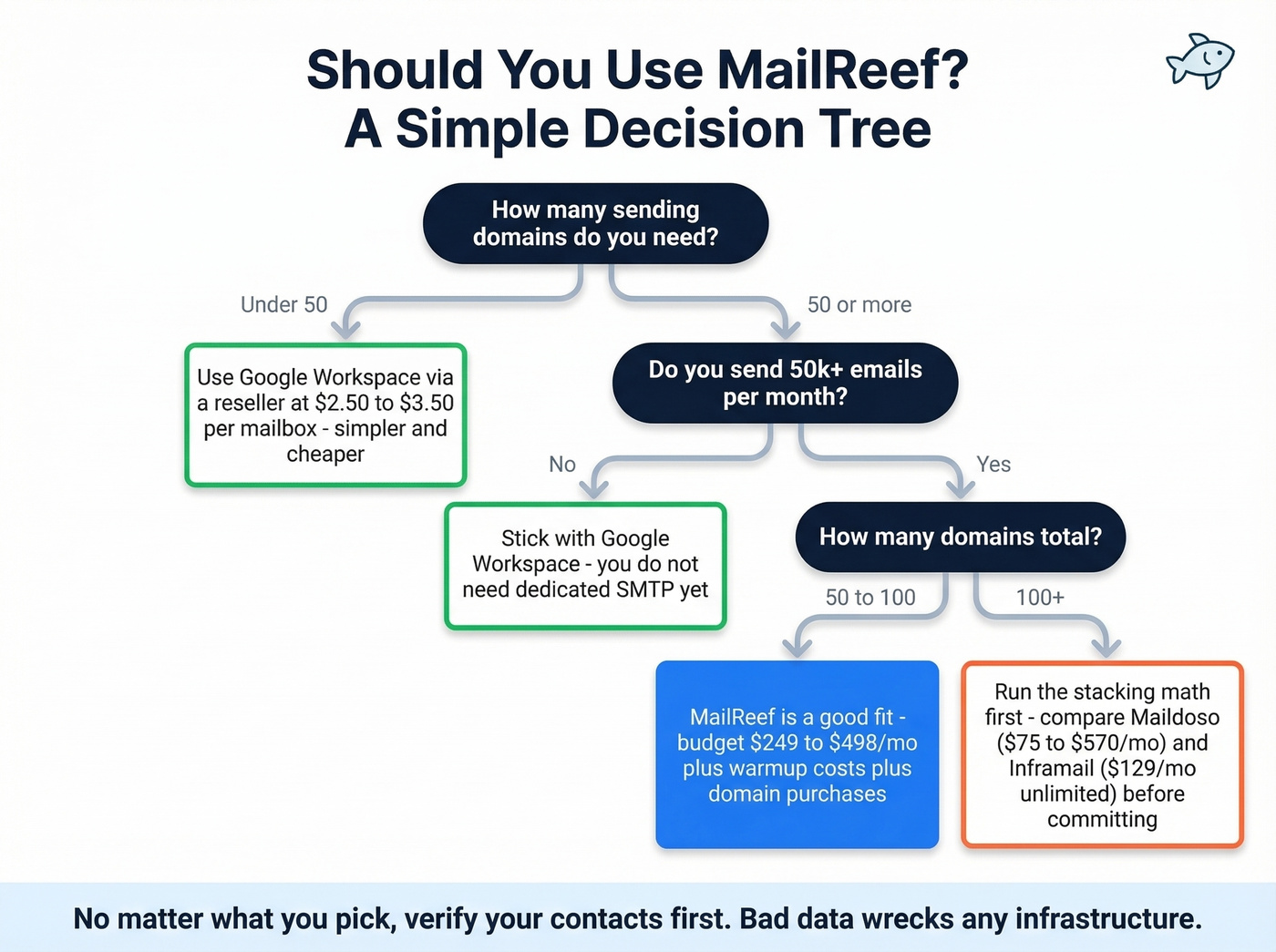
The decision tree is simple. Under 50 domains? Google Workspace via a reseller is cheaper and simpler. Between 50 and 100 domains? MailReef works. Past 100 domains? Run the server-stacking math before committing - it gets expensive fast.
And regardless of which infrastructure you pick, your contact data quality matters more than your server. A verified email list on a $50/month setup outperforms an unverified list on a $500/month dedicated server. Every time.
What MailReef Actually Is
Cold email infrastructure falls into four categories: Google Workspace or Microsoft 365 via resellers ($2.50-$3.50/mailbox), Microsoft Azure inboxes, shared SMTP pools ($3-$15/inbox), and dedicated SMTP like MailReef. Each trades off cost, control, and deliverability differently.
MailReef sits at the high-control end - a dedicated server with a dedicated IP address, meaning your sender reputation depends entirely on your own behavior, not some stranger's spam campaign on a shared IP. The platform handles the tedious parts: 1-click domain purchases, 1-click mailbox creation, and automatic SPF/DKIM/DMARC configuration. It integrates with Smartlead and Instantly, plus Zapier for everything else. Think of it as the plumbing layer beneath your sequencing tool.
MailReef Pricing Breakdown
The pricing looks straightforward until you scale.
| Agency (Annual) | Agency Flex (Monthly) | Enterprise | |
|---|---|---|---|
| Monthly cost | $240 | $249 | Custom |
| Commitment | 12 months | None | Custom |
| Domains/server | 50 | 50 | Custom |
| Inboxes/server | 150-200 | 150-200 | Custom |
| Per-email fee | $0.001 | $0.001 | Custom |
Some sources report 150+ mailboxes per server while others say 200. Either way, the "unlimited mailboxes" language in MailReef's marketing is misleading - you get a large allotment per server, but it's not unlimited.
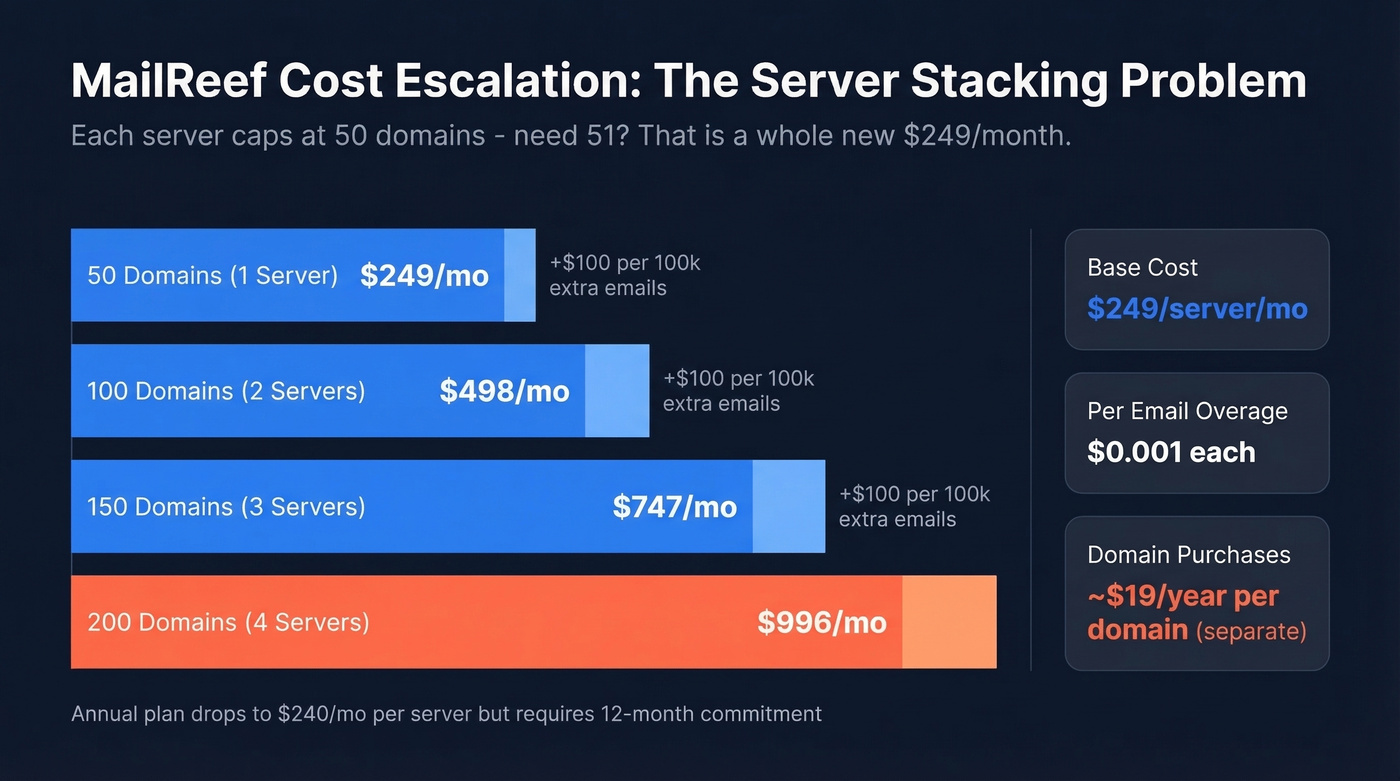
That $0.001 per email adds up, especially once you're past the included monthly allowance (often shown as 100,000 emails/month per server). Send 100k additional emails in a month and you're adding $100 to your bill. Send 250k additional and it's $250 on top. Now layer in the server-stacking problem:
| Domains Needed | Servers Required | Monthly Cost (Flex) | + 100k Extra Emails |
|---|---|---|---|
| 50 | 1 | $249 | $349 |
| 100 | 2 | $498 | $598 |
| 150 | 3 | $747 | $847 |
| 200 | 4 | $996 | $1,096 |
Each server caps at 50 domains. Need 51 domains? That's a second server at another $249/month - no way to buy a partial server. You're also buying domains separately at roughly $19/year per domain, adding $950-$3,800/year depending on your domain count.
For context, Maildoso starts at $75/month for 30 SMTP mailboxes ($2.50/mailbox) versus MailReef's effective ~$1.25/mailbox at 200 inboxes. But MailReef doesn't include mailbox warmup. That hidden cost changes the math significantly.
If you're trying to keep bounces low while scaling, it helps to track email bounce rate benchmarks and fixes alongside your infrastructure costs.

MailReef doesn't include warmup or data verification - and bad contacts will torch your dedicated IP faster than a shared server ever could. Prospeo's 5-step email verification with catch-all handling and spam-trap removal delivers 98% accuracy at $0.01/email. Stack Optimize held bounce rates under 3% across all clients using Prospeo data - no domain flags, ever.
Protect your $249/month server with data that actually works.
Pros and Cons
What works:
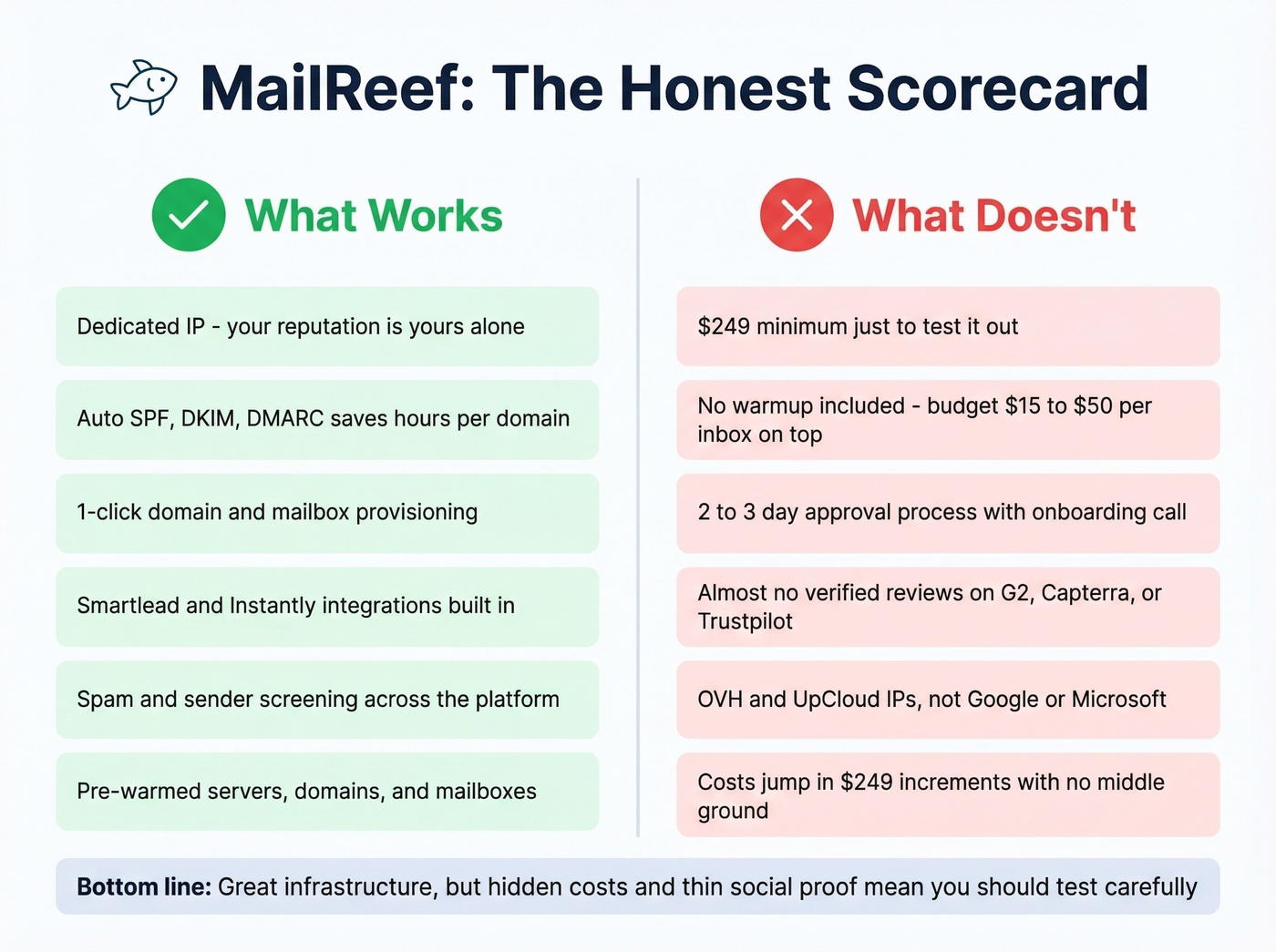
- Dedicated IP means your reputation is yours alone - no shared-IP roulette
- Auto SPF/DKIM/DMARC saves hours of DNS configuration per domain (if you want to sanity-check setup, see how to verify DKIM is working)
- 1-click provisioning for domains and mailboxes is genuinely fast
- Smartlead and Instantly integrations, plus Zapier and API access
- Spam/sender screening helps keep abuse down across the platform
- Pre-warmed servers, domains, and mailboxes so you're not starting cold
What doesn't:
- The minimum entry is $249 to test on the month-to-month plan - and one Reddit thread shows buyers hesitant to pay ~$300/month without proof it'll work for their use case
- No mailbox warmup included, so you still need a third-party warmup tool at $15-50/inbox/month, a hidden cost that can easily double your effective spend (compare options in unlimited email warmup)
- 2-3 business day approval process with an onboarding call, though buying via Smartlead can skip the call
- Review-platform visibility is messy: multiple sources say there are no legitimate reviews on G2, Capterra, or Trustpilot, while other listings claim ratings and review counts - either way, it's not a product with deep, consistent third-party validation
- Servers run on OVH and UpCloud IPs, not Google or Microsoft infrastructure, which some receivers treat with more trust
- Scaling costs jump in $249 increments with no middle ground
Does Dedicated SMTP Actually Perform Better?
The data says yes, with caveats. One detailed Reddit case study compared 500 Google Workspace mailboxes against 500 SMTP mailboxes at 1M+ emails per month. SMTP delivered a 2.3% reply rate versus 1.8% for GWS, and cost per reply dropped from $0.28 to $0.10. That's significant at scale.
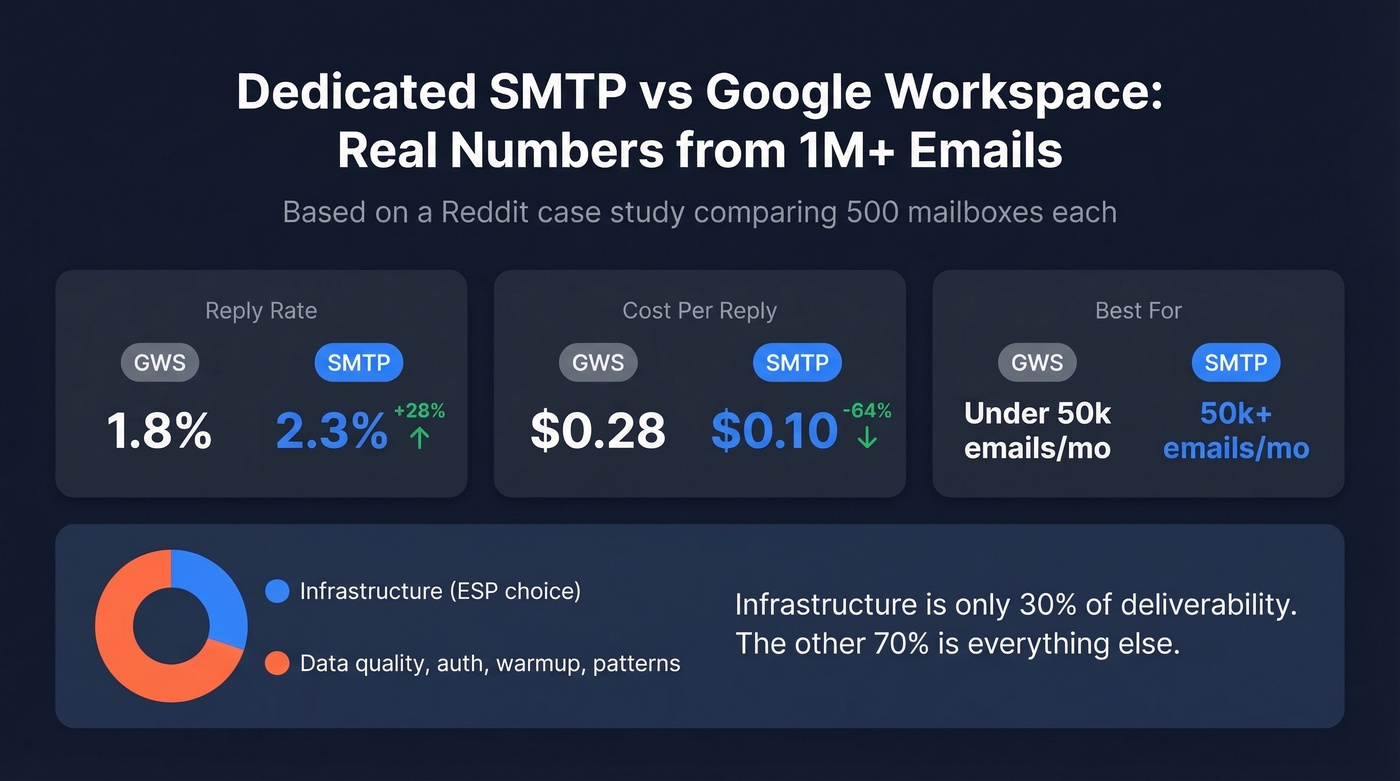
But this is one agency's self-reported data, not a controlled study. The broader consensus among cold email practitioners on Reddit: dedicated SMTP makes sense at 50k+ sends per month when you have the technical expertise to manage IP reputation. Below that threshold, Google Workspace at $2.50-$3.50/mailbox via a reseller is simpler and cheaper.
A transactional email study found that ESP choice accounts for roughly 30% of deliverability - and the principle applies to cold email too. The other 70%? Data quality, authentication, warmup behavior, and sending patterns. (If you want a deeper framework, use an email deliverability guide and monitor email velocity as you scale.)
What Every Infrastructure Review Ignores
Here's the thing: most teams overspend on infrastructure and underspend on data. You can drop $249/month on a pristine dedicated IP and wreck it in a week with bad contacts. A 15-20% bounce rate from unverified email lists will crush deliverability just as fast as a shared setup. We've seen this pattern repeatedly - teams invest in infrastructure, skip the data layer, then wonder why deliverability craters.

Stack Optimize built from $0 to $1M ARR running cold email campaigns and held client deliverability above 94% with bounce rates under 3% and zero domain flags. Their secret wasn't a fancier server. It was verifying every contact before sending, using Prospeo's 5-step verification with catch-all handling and spam-trap removal to maintain 98% email accuracy on a 7-day refresh cycle.
That's the real lesson. Your $249/month server is only as good as the data you feed it. If you're building lists at scale, it’s worth reviewing email list providers and data enrichment services so you’re not sending to stale records.
Infrastructure accounts for 30% of deliverability. The other 70% is data quality, authentication, and sending patterns. Prospeo refreshes 300M+ profiles every 7 days - not every 6 weeks like most providers - so your lists stay clean between sends. Teams using Prospeo book 35% more meetings than Apollo users and keep bounce rates under 4%.
Stop overspending on servers and underspending on data.
Who Should Use MailReef
Use MailReef if you:
- Run 50+ sending domains and need dedicated IP isolation
- Have a technical team comfortable managing warmup tools separately
- Can budget for warmup on top of server costs
- Are okay committing $249/month minimum without deep third-party review validation
- Send 50k+ emails per month and need higher sending limits than GWS allows
Skip MailReef if you run fewer than 50 domains (Google Workspace is cheaper and simpler), want strong social proof from G2 or Capterra before buying, or are scaling past 100 domains. For that last group, run the stacking math against Maildoso ($75-$570/month for 30-300 SMTP mailboxes) or Inframail ($129/month unlimited) before you commit. If you're also tightening your outbound process, pair the infrastructure decision with a solid B2B cold email sequence.
FAQ
Does MailReef offer a free trial?
No public free trial exists. The cheapest entry point is the $249/month Agency Flex plan with no annual commitment. The annual plan drops to $240/month but locks you in for 12 months. You can bypass the onboarding call by purchasing through Smartlead, but pricing stays the same.
Does MailReef include email warmup?
No. MailReef provides pre-warmed servers, domains, and mailboxes at setup, but ongoing mailbox warmup requires a third-party tool like Instantly warmup, Warmbox, or Lemwarm at $15-50/inbox/month. Budget this as a hidden cost - it can double your effective spend.
How does MailReef compare to Google Workspace for cold email?
MailReef gives you dedicated IPs and higher sending limits, which matters at 50k+ emails per month. Below that volume, Google Workspace via a reseller ($2.50-$3.50/mailbox) is simpler and cheaper. At scale, one case study showed SMTP delivering 2.3% reply rates versus 1.8% for GWS - but clean, verified contact data matters more than either infrastructure choice.
What's the best way to protect deliverability on MailReef?
Keep your bounce rate under 3% by verifying every email before sending. Gradual warmup and consistent sending patterns matter too, but data quality is the foundation. Bad data on good infrastructure still equals bad results.