

Mailshake vs QuickMail: Which Cold Email Tool Deserves Your Budget?
Mailshake vs QuickMail looks like a toss-up until you do the math. Both sit at 4.7/5 on G2, both run sequences, and both can send clean, personalized cold email at scale.
The split is simple: QuickMail is priced for teams (flat workspace pricing), while Mailshake is priced for seats (per-user pricing) and bundles more "all-in-one" sales engagement features if you pay for the top tier. If you don't model cost past two reps, it's easy to pick the wrong one and bleed budget every month.
Let's break it down without the fluff.
30-Second Verdict
QuickMail wins for teams of 3+ on cost, and it's built for running lots of inboxes without babysitting sender rotation.
Mailshake wins if you want multichannel in one place, especially if a built-in dialer is central to your outbound motion and you value a guided, rep-friendly setup.
Skip both if your real issue is bad contact data. Sequencers don't fix bounces.
We've watched a team load a "pretty good" list into a brand-new domain, hit 20%+ bounces, and spend the next month wondering why every follow-up landed in spam. The tool wasn't the problem. The inputs were.
If you want to stop that cycle, pair either sequencer with Prospeo to find and verify contacts before you send. Prospeo verifies emails at 98% accuracy, refreshes records every 7 days, and gives you a free tier so you can prove it on your own list before you change your workflow.
Pricing Side-by-Side (2026)
Mailshake charges per user. QuickMail charges per workspace. That one detail matters more than most feature checklists once you're past a couple reps.
Pricing below is from each company's published pricing pages as of March 2026:
Mailshake Plans
| Starter | Email Outreach | Sales Engagement | |
|---|---|---|---|
| Price | $29/mo per user | $49/mo per user | $99/mo per user |
| Email accounts | 1 | 2 | 10 |
| Sends/mo | 1,500 | Unlimited | Unlimited |
| Users | 1 | 1 | 1 |
| Free trial | No | No | No |
Mailshake also sells pre-warmed "Ready to Use Mailboxes" for $12/mo. That's handy if you don't want to warm domains from scratch, but it adds to the per-seat bill fast.
QuickMail Plans
| Starter | Growth | Agency | |
|---|---|---|---|
| Price | $9/mo | $99/mo | $299/mo |
| Email accounts | 1 sender | Unlimited | Unlimited |
| Sends/mo | 3,000 | 100,000 | 300,000 |
| Contacts | 1,000 | 30,000 | 50,000 |
| Users | 1 | Unlimited | Unlimited |
| Free trial | 14 days | 14 days | 14 days |
QuickMail Growth includes 30k contacts; extra blocks cost $10 per 10k, and extra workspaces cost $49 each.
Team Cost Breakdown (Where the Decision Usually Gets Made)
For a solo operator, the "cheapest" answer depends on what you need:
- QuickMail Starter is cheaper than Mailshake Starter
- Mailshake Email Outreach is cheaper than QuickMail Growth
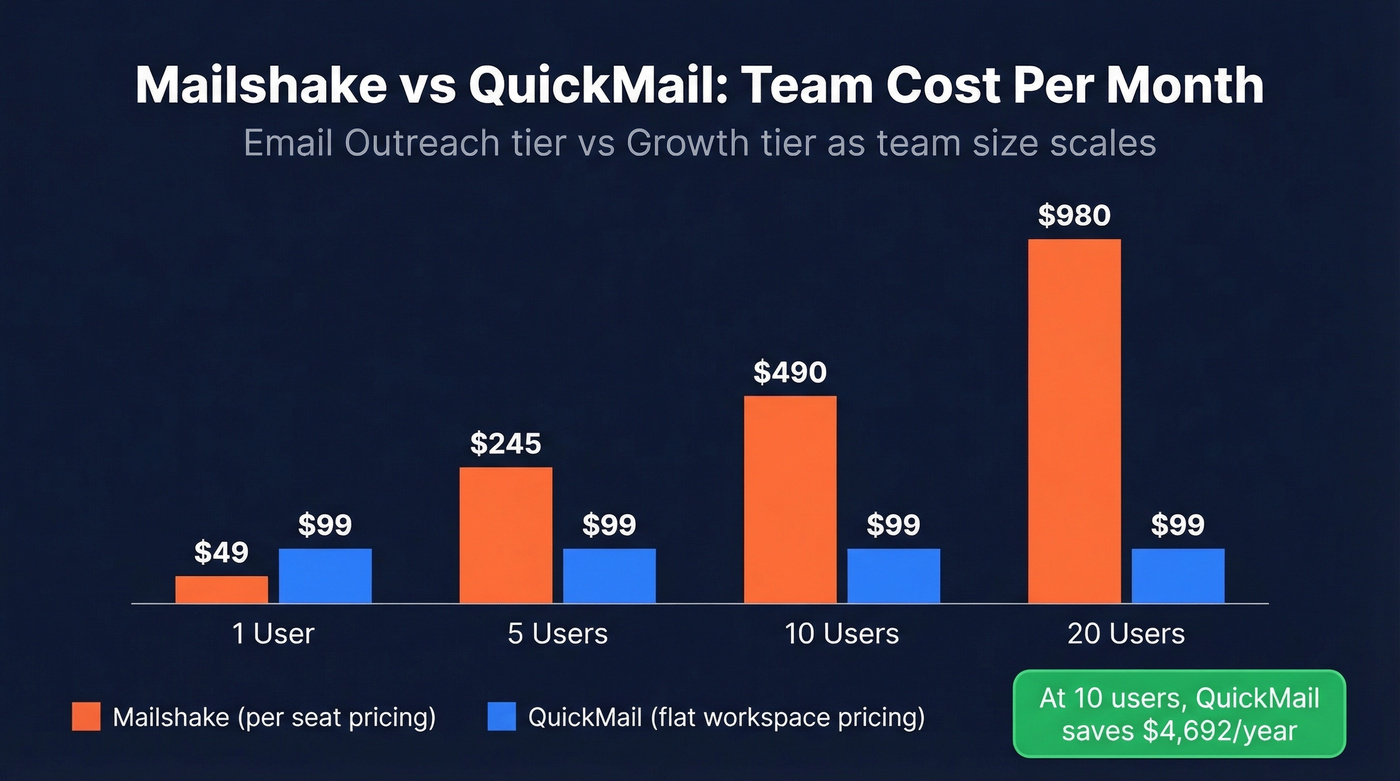
For teams, it stops being close:
| Team size | Mailshake (Email Outreach) | QuickMail (Growth) | Annual savings w/ QuickMail |
|---|---|---|---|
| 1 user | $49/mo | $99/mo | -$600/yr |
| 5 users | $245/mo | $99/mo | $1,752/yr |
| 10 users | $490/mo | $99/mo | $4,692/yr |
| 20 users | $980/mo | $99/mo | $10,572/yr |
Once you hit three users, QuickMail's economics flip in your favor and stay there. In our experience, this is the most common "we picked wrong" mistake: a team buys a per-seat tool early, grows headcount, and never revisits the pricing model until finance complains.
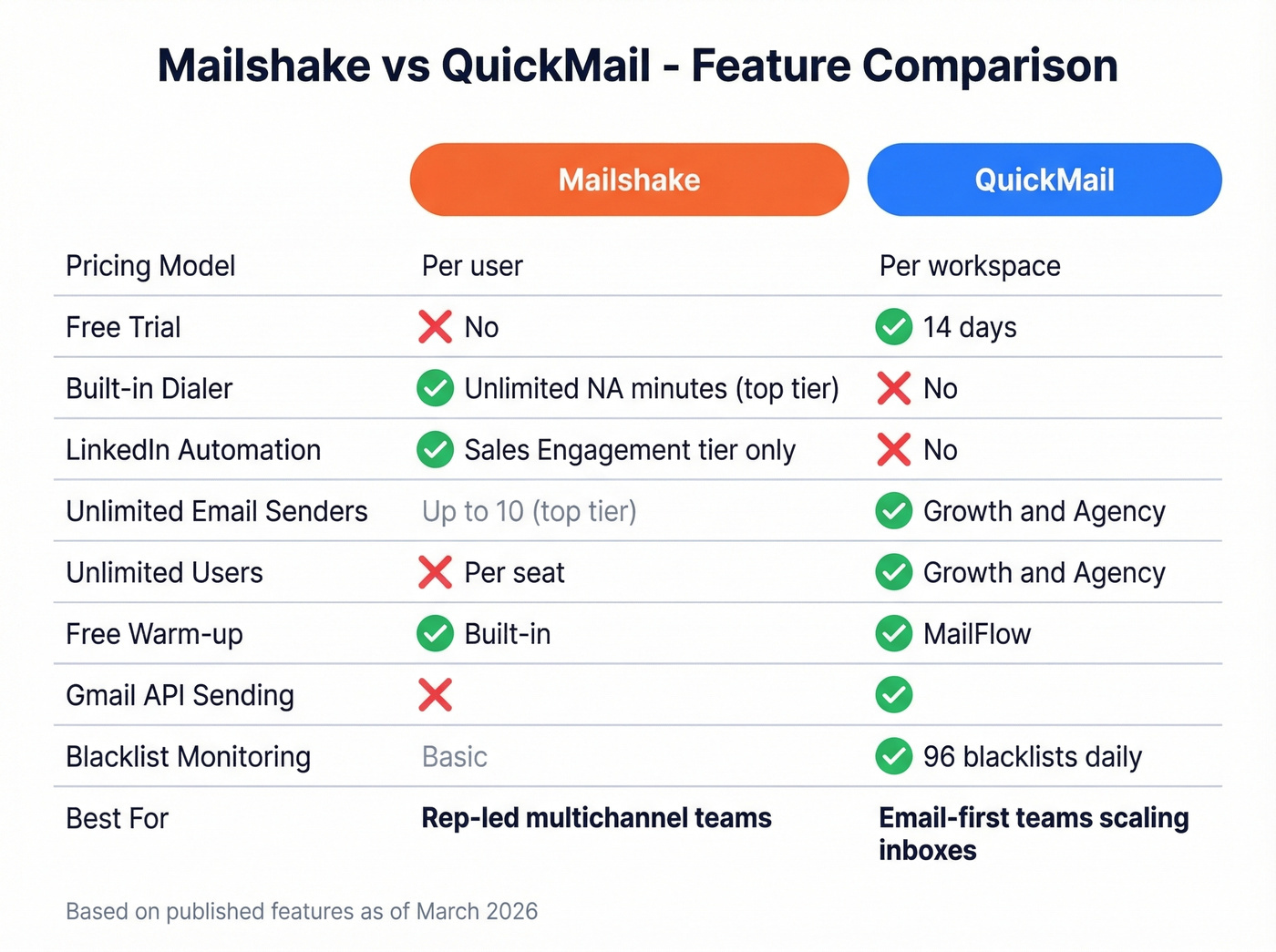
One more thing: Mailshake doesn't offer a free trial. QuickMail does (14 days). Asking for payment before someone can test the product is a hard sell in 2026, and yes, it still annoys buyers.
Features That Actually Differ
Most cold email tools share the same basics: sequences, personalization fields, inbox connections, and analytics. The real differences are about how you work.
Mailshake: Better if you want multichannel in one tab
Mailshake's Sales Engagement tier ($99/user/mo) is the "all-in" option. It bundles:
- A power dialer with unlimited North American minutes
- LinkedIn automation (gated behind the top tier)
- SHAKEspeare AI for writing cold email copy
- Add-ons like Data Finder ($19/mo) if you want prospecting inside the tool
If you run a rep-led motion where people call between email steps and you want everything in one interface, that's the appeal. It's also easier to hand to a new SDR and say, "Use this," without a long onboarding doc.
QuickMail: Better if you're scaling lots of inboxes
QuickMail is built for managing volume across many sending accounts. Growth and Agency include:
- Unlimited email senders
- Unlimited users
- Inbox rotation features designed for multi-inbox setups
That matters when you're running 10+ sending addresses and you don't want a rep (or RevOps) manually juggling which inbox sends what. QuickMail is more "operator" friendly than "rep" friendly: you get more knobs, and you need to know what you're doing.

Here's the thing: if your average deal is under $15k and you don't call, paying a per-seat premium for a dialer you won't touch is frustrating. QuickMail is the better default for email-first teams. Mailshake makes sense when the dialer is a daily habit, not a "nice to have."

You just saw how fast per-seat costs add up. Now imagine paying all that and still bouncing 20% of your sends because the list was stale. Prospeo verifies emails at 98% accuracy with a 7-day refresh cycle - at roughly $0.01 per email. Fix the data before you debate the sequencer.
Stop burning domains. Start with verified contacts.
Deliverability Compared (What Matters in Practice)
There's no credible independent head-to-head inbox placement test for Mailshake vs QuickMail. So we won't pretend there's a single "winner" here.
Both tools can send mail that lands. Both tools can also get you blocked if you blast bad lists or ignore authentication. Deliverability is mostly process.
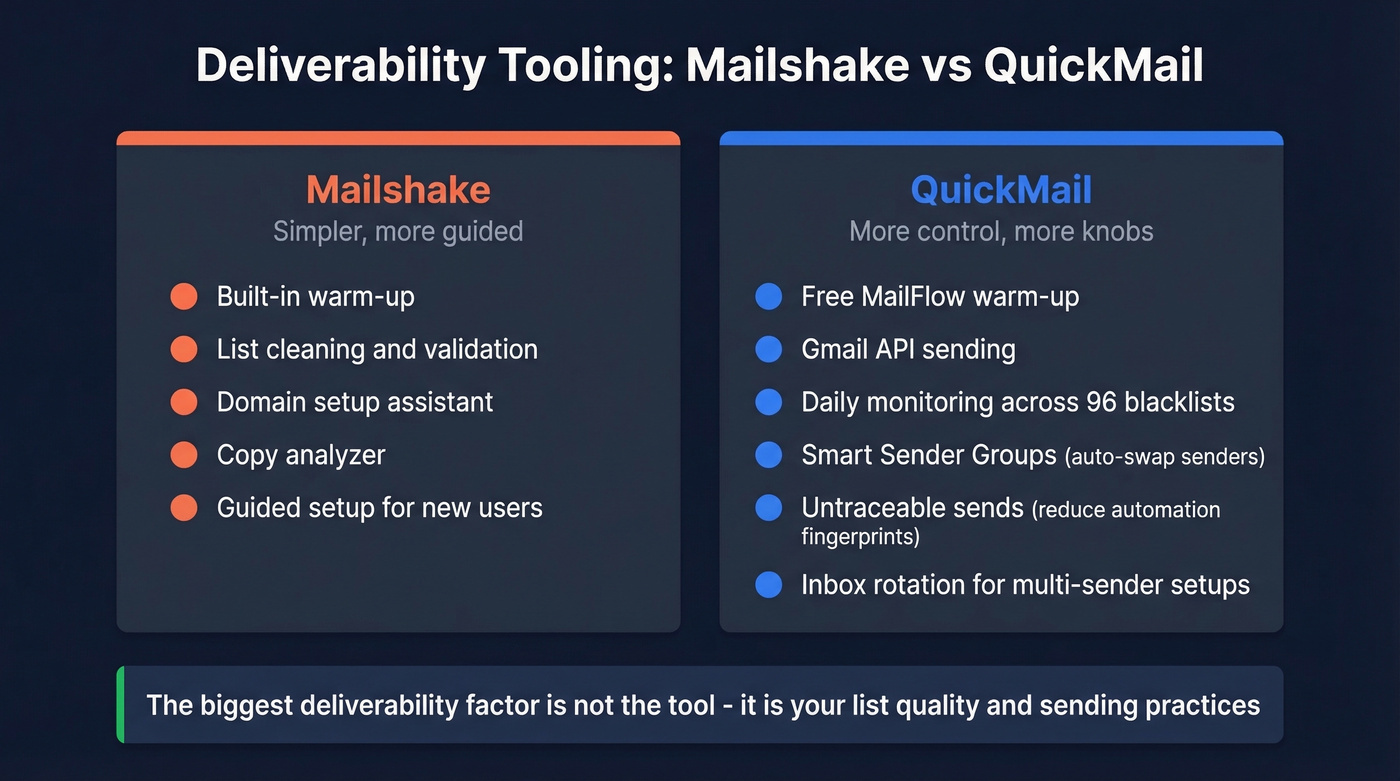
That said, QuickMail has more deliverability infrastructure baked in:
- Free warm-up via MailFlow: https://quickmail.com/email-deliverability
- Daily monitoring across 96 blacklists
- Gmail API sending (often performs better than SMTP for Gmail recipients)
- Smart Sender Groups that can swap away from a sender whose reputation dips
- "Untraceable sends" to reduce automation fingerprints
Mailshake covers the essentials too:
- Built-in warm-up
- List cleaning/validation
- Domain setup assistant and copy analyzer
QuickMail gives you more control when you're running lots of inboxes and want the system to react automatically. Mailshake is simpler and more guided, which is a real advantage for teams that don't want to think about deliverability every day.
For the basics on authentication, Google has a solid overview of SPF/DKIM/DMARC concepts and why they matter: https://support.google.com/a/answer/33786
The Variable Neither Tool Controls: Your Data
This is where most outbound programs quietly fail.
You can have perfect sequences, perfect copy, and perfect sending limits. If your list is wrong, you're still going to bounce, hit spam traps, and burn domains. Neither Mailshake nor QuickMail is a data platform.
A realistic scenario: you import 5,000 contacts from a scraped list. Opens look fine. Replies are dead. Bounces spike. Two weeks later, your "new" domain is already poisoned and you're rotating to the next one like it's normal.
Prospeo is the clean fix upstream. It gives you:
- 300M+ professional profiles
- 143M+ verified emails at 98% accuracy
- 125M+ verified mobile numbers
- A 7-day refresh cycle (not "every month or two")
- A free tier: 75 emails + 100 extension credits per month
Use it to verify before you send, then push clean contacts into Mailshake or QuickMail. Your sequencer should be the last step, not the first.
If you're diagnosing why campaigns are failing, start with email bounce rate benchmarks and root causes before you touch copy.

Neither Mailshake nor QuickMail controls your bounce rate - your data does. Prospeo gives you 300M+ profiles, 143M+ verified emails, and a 7-day data refresh cycle so every contact you load is current. Teams using Prospeo cut bounce rates from 35%+ to under 4%.
Clean data in, clean outreach out. Test it on your next campaign.
What Users Actually Say (G2 + Community Chatter)
Both tools sit at 4.7/5 on G2. Mailshake has more reviews (361) than QuickMail (116), which usually means it's more common in SMB sales teams.
Mailshake feedback tends to cluster around:
- Fast setup and a UI reps don't hate
- People shipping campaigns on day one
- Frustration about paying before testing (no trial)
- Some complaints about the interface feeling dated and certain features missing unless you pay for higher tiers
QuickMail feedback tends to cluster around:
- Strong automation and deliverability tooling
- Helpful support (most of the time)
- A more technical setup experience, especially around domains and security
And yes, Reddit threads in places like r/coldemail regularly mention the same pattern: agencies like QuickMail's multi-inbox control, but when support is slow or an automation feature breaks, they start shopping Woodpecker or similar tools. That's not unique to QuickMail; it's the reality of running high-volume outbound on any platform.
If you're rebuilding your outbound motion, it helps to revisit sales prospecting techniques and tighten targeting before you scale volume.
Verdict: Which One Should You Buy?
- Solo operator, email only, tight budget: QuickMail Starter at $9/mo is hard to beat.
- Mid-market team (5-20 reps), email-first: QuickMail Growth is the cost winner by a mile.
- Mid-market team (5-20 reps), calls are core to your motion: Mailshake Sales Engagement can be worth it, but only if the dialer gets used.
- Agency managing multiple clients: QuickMail Agency at $299/mo (+$49 per extra workspace) is built for that model.
- Data quality layer: Prospeo pairs with either tool. Neither sequencer fixes bad data on its own.
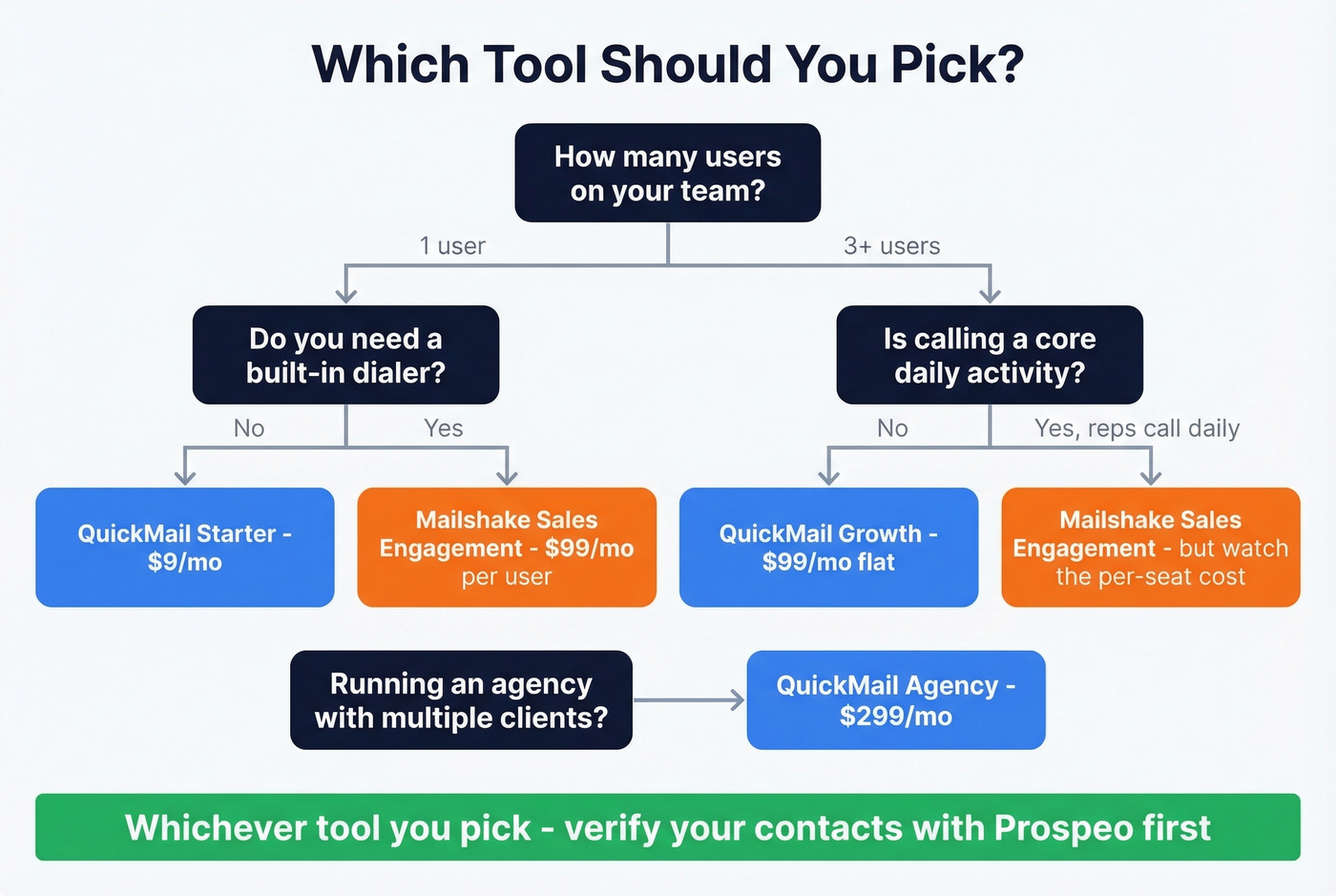
The decision comes down to one question: Do you need a built-in dialer, or do you need unlimited seats?
If you're also trying to improve reply rates, pair the tool choice with better cold email follow-up templates and email subject lines.
FAQ
Is QuickMail really cheaper than Mailshake?
For solo users, not always. QuickMail Growth ($99/mo) costs more than Mailshake Email Outreach ($49/mo) for one seat, but QuickMail Starter ($9/mo) beats Mailshake Starter ($29/mo).
For teams of 3+, QuickMail's flat $99/mo Growth plan usually wins. A 10-person team pays $490/mo on Mailshake Email Outreach vs $99/mo on QuickMail Growth, saving $4,692/year.
Does Mailshake offer a free trial?
No. Mailshake takes payment upfront and doesn't offer a trial. QuickMail offers a 14-day trial.
Which tool has better deliverability?
Neither has a public, independent head-to-head inbox placement benchmark.
QuickMail has more deliverability controls (MailFlow warm-up, Gmail API sending, blacklist monitoring, Smart Sender Groups). Mailshake has warm-up and list validation with a simpler, more guided setup. Your list quality and sending practices will matter more than the tool.
How do I avoid bounces in either tool?
Verify contacts before you load them into sequences. Sequencers aren't data platforms.
Prospeo verifies emails at 98% accuracy, refreshes data every 7 days, and includes a free tier with 75 emails and 100 extension credits per month. Export a clean CSV, then import into Mailshake or QuickMail.