

Meeting Recap Email Templates That Actually Save You Time
You just walked out of a 45-minute strategy call. Before you've refilled your coffee, your manager pings: "Can you send the recap?" Now you're reconstructing what happened from memory and three half-legible bullet points.
A solid meeting recap email template would've saved you - and everyone else - from this exact moment. 44% of meeting action items never reach completion because the recap gets sent late, sent sloppy, or never sent at all. That failure costs $25,000-$55,000 per employee annually in lost productivity.
You don't need 10 templates. You need one structure and the judgment to adapt it. We're giving you 8 anyway - because that's why you're here.
The Structure Every Recap Needs
Every effective recap has five parts. Nail these and the template barely matters.
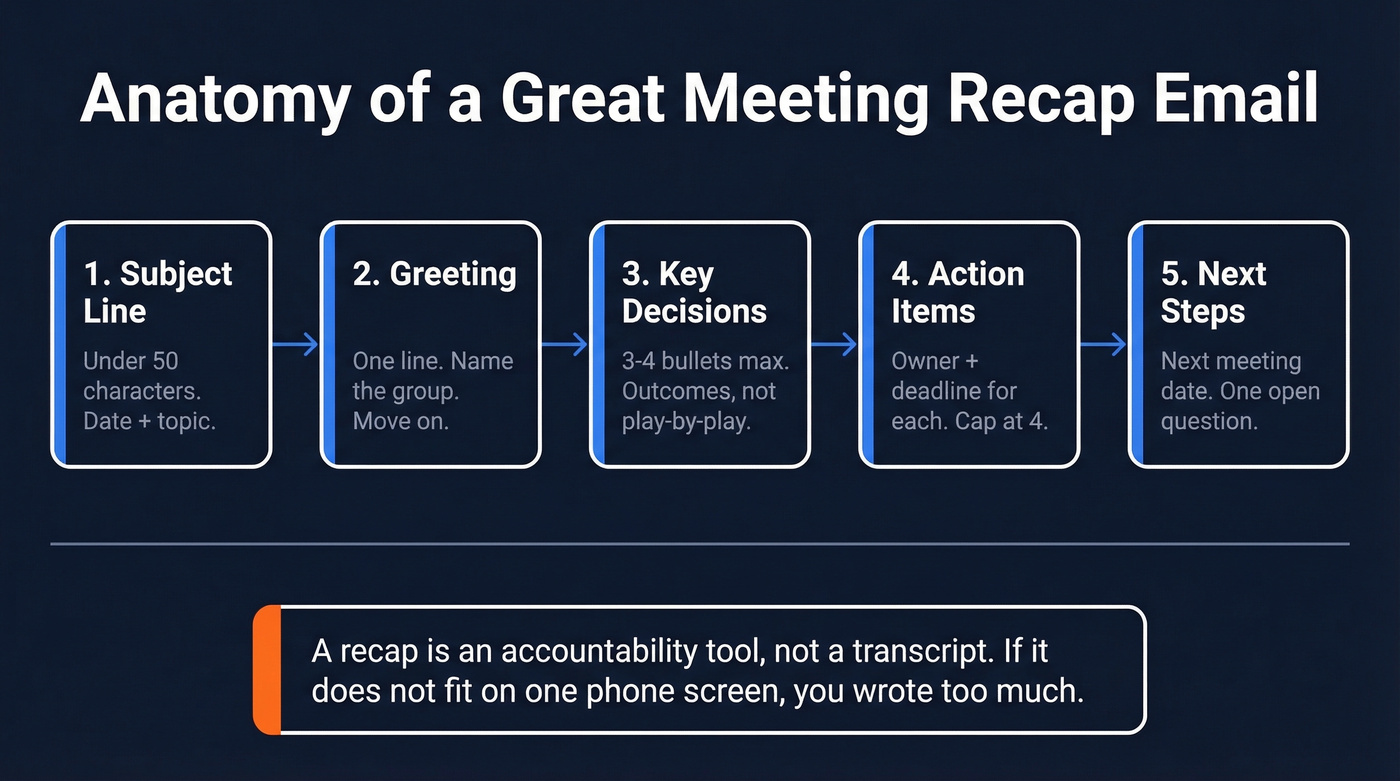
- Subject line - under 50 characters. "Recap: Q3 planning sync 01-15" works. "Following Up On Our Incredibly Productive Meeting About Q3 Planning" doesn't. (If you want more options, borrow from these Subject line patterns.)
- Greeting - one line. Name the group or person. Move on.
- Key decisions - 3-4 bullets max. Outcome language, not play-by-play.
- Action items - each one needs an owner and a deadline. Cap it at 4. If you have more, your meeting had scope problems.
- Next steps - when's the next meeting? What's the open question? One sentence.
A recap isn't a transcript, a legal document, or a thank-you email. Thank-yous are relationship maintenance. Recaps are accountability tools. They get everyone on the same page so work actually happens.
Here's the thing: if it's not clear who owns the recap, claim it. The person who sends it controls the narrative - and gets credit for keeping things moving.
Format for mobile. Keep bullets under 120 characters. If the important stuff doesn't fit on one phone screen, you've written too much.
8 Ready-to-Use Recap Email Templates
All templates below are plain text - copy, paste, and customize. Whether you need a post-meeting follow-up for a standup or a formal board summary, there's one here for you.
Team Standup Recap
Subject: Standup recap - Jan 15
Hi team,
Quick recap from this morning:
What we covered:
- Sprint velocity on track - 34 of 40 story points complete
- Design review for onboarding flow pushed to Thursday
- QA flagged 3 P2 bugs in checkout; Marcus is triaging today
Action items:
- Sara - share updated onboarding mockups by Wed EOD
- Marcus - triage checkout bugs and update Jira by Thu 10 AM
- Priya - confirm staging deploy schedule with DevOps by Fri
Next standup: Thursday 9:30 AM.
- Alex
Sales Discovery Call Recap
Subject: Next steps - Acme + [Your Company]
Hi Jordan,
Great speaking today. Our next call is Thursday, Jan 23 at 2 PM ET - calendar invite incoming.
Key takeaways:
- Your team's running outbound manually across 3 tools - consolidation is the priority
- Budget approved for Q1 if implementation starts by Feb 15
- Legal needs a DPA before any pilot
Action items:
- Me - send DPA + fintech case study by Friday
- Jordan - loop in your IT lead for the technical review on the 23rd
- Jordan - confirm whether SSO is a hard requirement
Looking forward to Thursday.
Best, [Your name]
Send this within 12 hours. The 9-11 AM window on Tuesday through Thursday gets the highest open rates if you're scheduling the send. A quick recap right after the call keeps momentum alive and signals professionalism. (For more options, see these sales follow-up formats.)
Client Kickoff
Subject: Kickoff recap - [Project Name]
Hi [Client Name],
Thanks for kicking things off today. Here's where we landed:
Scope confirmed: [1-sentence summary] Key deliverables: [Deliverable 1], [Deliverable 2], [Deliverable 3] Timeline: [Milestone + date], [Milestone + date]
Action items:
- [Client contact] - [task] by [date]
- [Your team member] - [task] by [date]
Next check-in: [date/time]. Full project brief attached.
1:1 With Your Manager
Subject: 1:1 recap - [Date]
Hi [Manager],
Discussed: [Project status], [blocker], [development topic]
Action items:
- Me - [task] by [date]
- [Manager] - [task] by [date]
Thanks - talk next [day].
Board / Executive Meeting
Board recaps are quasi-legal documents. Sensitive pricing discussions, investor disagreements, and preliminary financials stay out.
Subject: Advice and action summary, BOD meeting [MM-DD-YY]
Board,
Key messages I heard and will move forward on:
- [Decision/direction 1]
- [Decision/direction 2]
Things you suggested we'll think further about:
- [Open question 1]
- [Open question 2]
Action commitments:
- [CEO/exec] - [action] by [date]
- [CFO] - [action] by [date]
Please flag anything I've missed or mischaracterized.
This three-block structure - what I heard, what needs more thought, what we'll do - keeps it high-level and actionable. Have your CFO compare notes before sending.
Performance Review Follow-Up
Subject: Performance discussion follow-up - [Date]
Hi [Name],
Topics covered: [Neutral summary - e.g., "progress on Q4 targets," "development areas," "promotion timeline"]
Agreed next steps:
- [Employee] - [commitment] by [date]
- [Manager] - [commitment] by [date]
Let me know if this doesn't match your understanding.
Keep the language neutral and factual. This email can end up in an HR file.
Cross-Functional Sync
Subject: Cross-team sync recap - [Project Name]
Team,
Decisions made: [Decision 1], [Decision 2] Blockers: [Blocker - owning team + resolution date] Dependencies: [Team A needs X from Team B by date]
Action items:
- [Name, Team] - [task] by [date]
- [Name, Team] - [task] by [date]
Next sync: [date]. Slack #[channel] for async updates.
Stakeholder Update (For People Who Weren't There)
Subject: FYI - [Meeting name] decisions, [Date]
Hi [Name],
You weren't in today's [meeting name], so here's the short version:
What was decided: [Decision 1], [Decision 2] What affects you: [Specific impact or ask] Full notes: [Link to shared doc]
Happy to walk through anything that needs context.
Lead with decisions, not discussion. People who missed the meeting want the "so what," not the play-by-play.

Your sales recap is only as good as the email address it lands in. 35% of teams send follow-ups to outdated contacts and wonder why deals stall. Prospeo's 98% email accuracy means your recap - and every action item in it - reaches the right inbox.
Stop writing perfect recaps that bounce. Start with verified data.
5 Mistakes That Kill Your Recap
Sending too late. After 24 hours, people's memories have diverged. You're no longer aligning - you're debating what happened. (If you're building a process, this sales meeting follow-up email guide helps.)
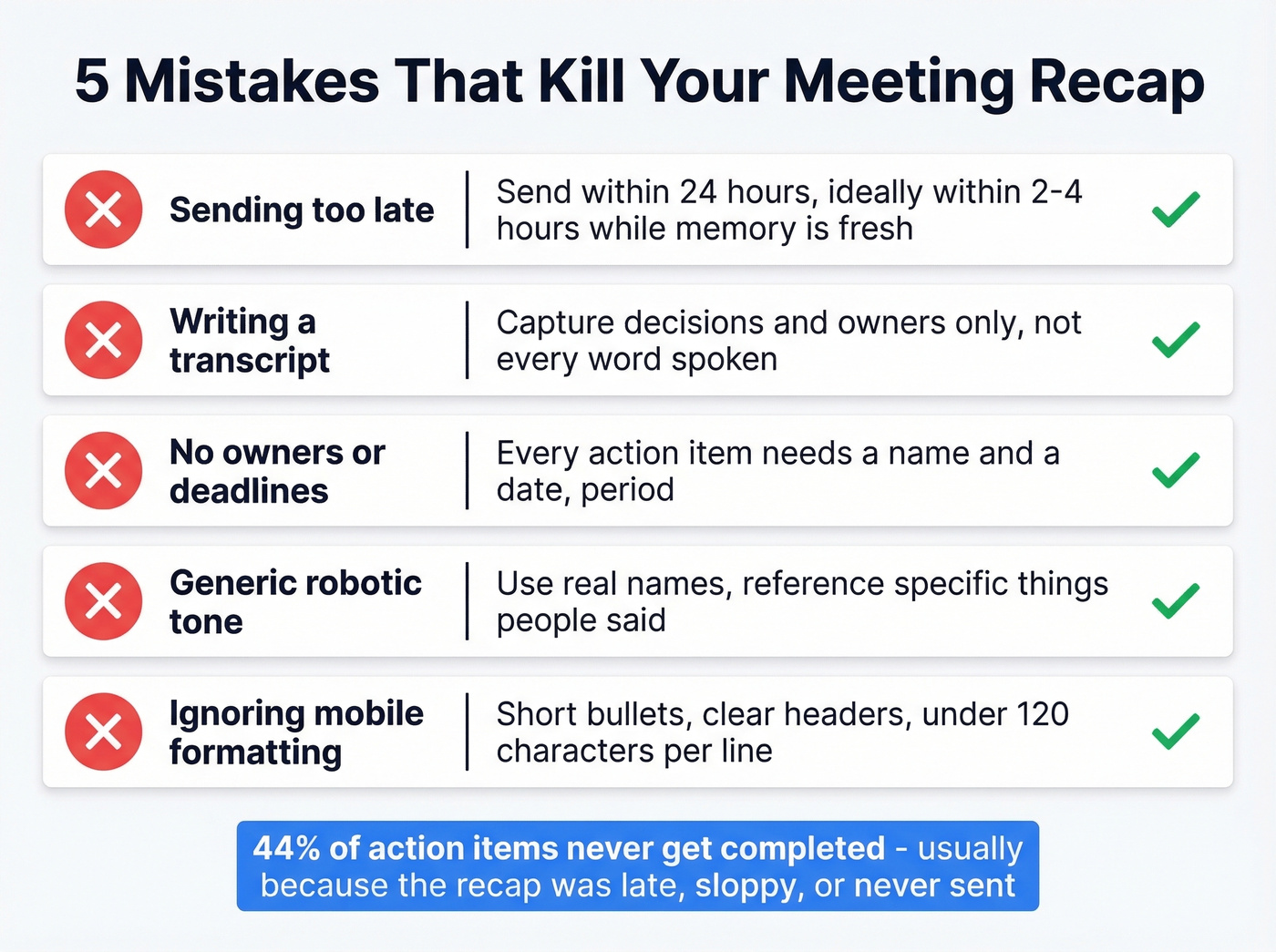
Writing a transcript. If your recap is several hundred words, you've lost the room. The r/ExecutiveAssistants crowd talks about this constantly - leaders who talk fast, ban recording, and expect perfect documentation. The fix isn't capturing every word. It's capturing decisions and owners.
Action items without owners or deadlines. "Follow up on the proposal" isn't an action item. "Sarah - send revised proposal to legal by Friday 1/17" is. (If you're standardizing this, use a simple sequence management rule: owner + date + next touch.)
Generic tone. "Per our discussion" repeated four times makes your recap feel like it was written by a bot. Reference specific things people said. Use names. Make it human. (More on writing like a human: email copywriting.)
Ignoring mobile formatting. Most recipients read on their phone. Long paragraphs and 200-character sentences break on a small screen. Short bullets, clear headers, one screen of content.
AI Tools That Write Recaps
We've tested most of these across a 10-person team. If you're still scribbling in a notebook during meetings, stop - AI notetakers solved most of this problem years ago. (If you're also automating outreach, pair recaps with AI tools for automating sales follow-ups.)
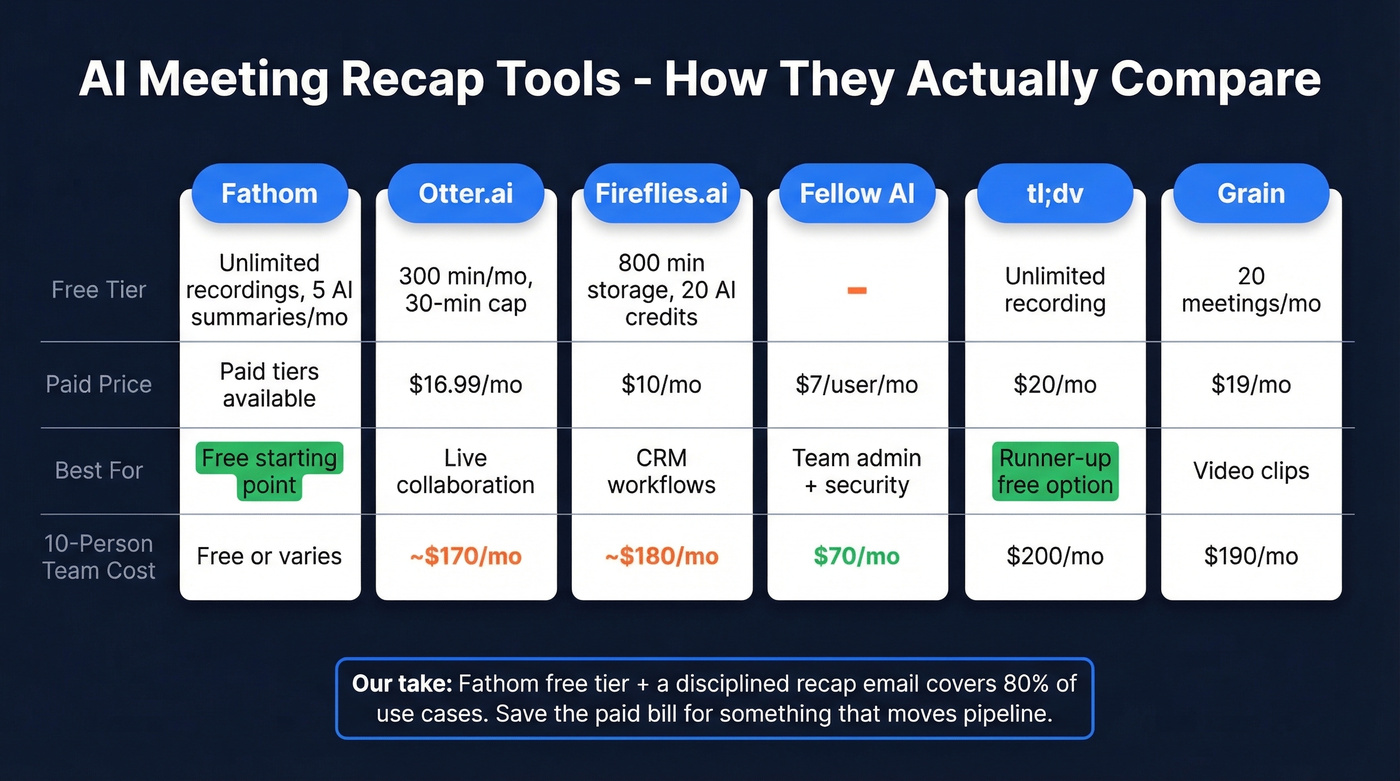
| Tool | Free Tier | Paid Price | Best For |
|---|---|---|---|
| Fathom | Unlimited recordings; AI summaries limited to 5/mo | Paid tiers available | Free starting point |
| Otter.ai | 300 min/mo (30-min cap) | $16.99/mo | Live collaboration |
| Fireflies.ai | 800 min storage, 20 AI credits/mo | $10/mo | CRM workflows |
| Fellow AI | - | $7/user/mo | Team admin + security |
| tl;dv | Unlimited recording | $20/mo | Runner-up free option |
| Grain | 20 meetings/mo | $19/mo | Video clips |
What a 10-person team actually pays: Fellow runs $70/mo, Otter ~$170/mo, Fireflies ~$180/mo. The gap between "free" and "team plan" is real, and it sneaks up on you fast.
Free-tier gotchas worth knowing: Otter caps conversations at 30 minutes. Fathom limits advanced AI summaries and action items to 5 meetings per month. Fireflies gives you just 20 AI credits. For individuals, Fathom and tl;dv are the best free tiers. For teams needing admin controls, Fellow at $7/user is hard to beat. And if your meetings ban recording bots, Krisp runs locally, is bot-free, and includes 60 minutes per day free.
Let's be honest - most teams don't need a paid AI notetaker. Fathom's free tier plus a disciplined recap email covers 80% of use cases. Save the $170/month Otter bill for something that actually moves pipeline.
Skip the paid tier entirely if your meetings are under 30 minutes and you only have 3-4 a week. The free tools handle that volume without breaking a sweat.
From Recap to Action
The recap keeps the conversation alive. But action items don't execute themselves - and half the time, the next step involves reaching someone who wasn't in the room. A new stakeholder, a prospect's legal contact, the VP who needs to sign off.
That's where momentum dies. You know who you need to reach, but you don't have their verified email or direct dial. Prospeo's email finder closes that gap with 98% email accuracy and a Chrome extension that pulls verified contact data from any website in one click. The free tier gives you 75 email lookups per month - enough to turn post-meeting action items into actual conversations without waiting on intros. (If you're comparing options, start with these email search tools.)

That discovery call recap you just templated? It only works if Jordan's email is real. Prospeo verifies 143M+ emails through a 5-step process and refreshes data every 7 days - so your follow-ups land, not bounce.
Great follow-up deserves a real inbox. Get emails at $0.01 each.
FAQ
How long should a recap email be?
Aim for 150-250 words. Focus on decisions and action items, not a play-by-play of the discussion. If it takes more than 60 seconds to read on a phone screen, cut it down.
When should I send a follow-up after a meeting?
Within 24 hours for internal meetings, within 12 hours for sales or client calls. The best engagement window for scheduled sends is 9-11 AM Tuesday through Thursday.
What's the best free AI tool for writing recaps?
Fathom offers unlimited free recordings and transcription across Zoom, Meet, and Teams, with advanced AI summaries limited to 5 meetings per month. For teams needing admin controls, Fellow at $7/user/mo is the strongest budget option.
Do I need a different template for every meeting type?
No. The five-part structure - subject line, greeting, key decisions, action items, next steps - works universally. The eight examples above are starting points; adapt tone and detail level based on your audience and the meeting's formality.
How do I reach stakeholders mentioned in action items if I don't have their contact info?
Use a verified email finder like Prospeo to look up decision-makers directly. With 98% email accuracy and 75 free lookups per month, it's the fastest way to turn a recap's action items into actual outreach without waiting on warm intros.