

Microsoft Sales Pipeline: Setup, Features, Pricing & What's Coming
During a 20-week pilot, Microsoft's Sales Development Agent engaged 70,000+ SMB customers and delivered an 8-percentage-point lift in opportunity conversion. That's the direction the Microsoft sales pipeline is heading - autonomous AI doing the grunt work while sellers close.
But right now, most teams just need to get the basics right.
Here's the short version: Enterprise edition at $105/user/mo is the sweet spot for most orgs. The editable grid matters more than the chart. And if you're already a Microsoft 365 shop, Dynamics 365 is usually the easier integration path compared to Salesforce.
What Is the Dynamics 365 Sales Pipeline?
The pipeline lives inside Dynamics 365 Sales - Microsoft's CRM for opportunity management, forecasting, and deal tracking. You're buying into the Dynamics ecosystem: Power Platform, Dataverse, and deep hooks into Outlook, Teams, and Excel. The pipeline view is the primary interface sellers use day-to-day, combining interactive charts, an editable grid, and a side panel into a single workspace so reps can move deals forward without switching tabs.
Three Things to Learn First
Don't get lost in the feature list. Focus here:
- Editable grid - inline editing, filtering, sorting. This is where reps actually work.
- Copilot summaries - AI-generated deal context that saves five minutes per opportunity review.
- Power Automate stage triggers - automate actions when deals move between stages.
Everything else is a nice-to-have until these three are running smoothly.
How the Pipeline View Works
The pipeline view packs four components into one screen: a bubble chart for tracking risky deals on a timeline, a funnel chart showing stage distribution, a customizable KPI strip, and the editable grid underneath it all.
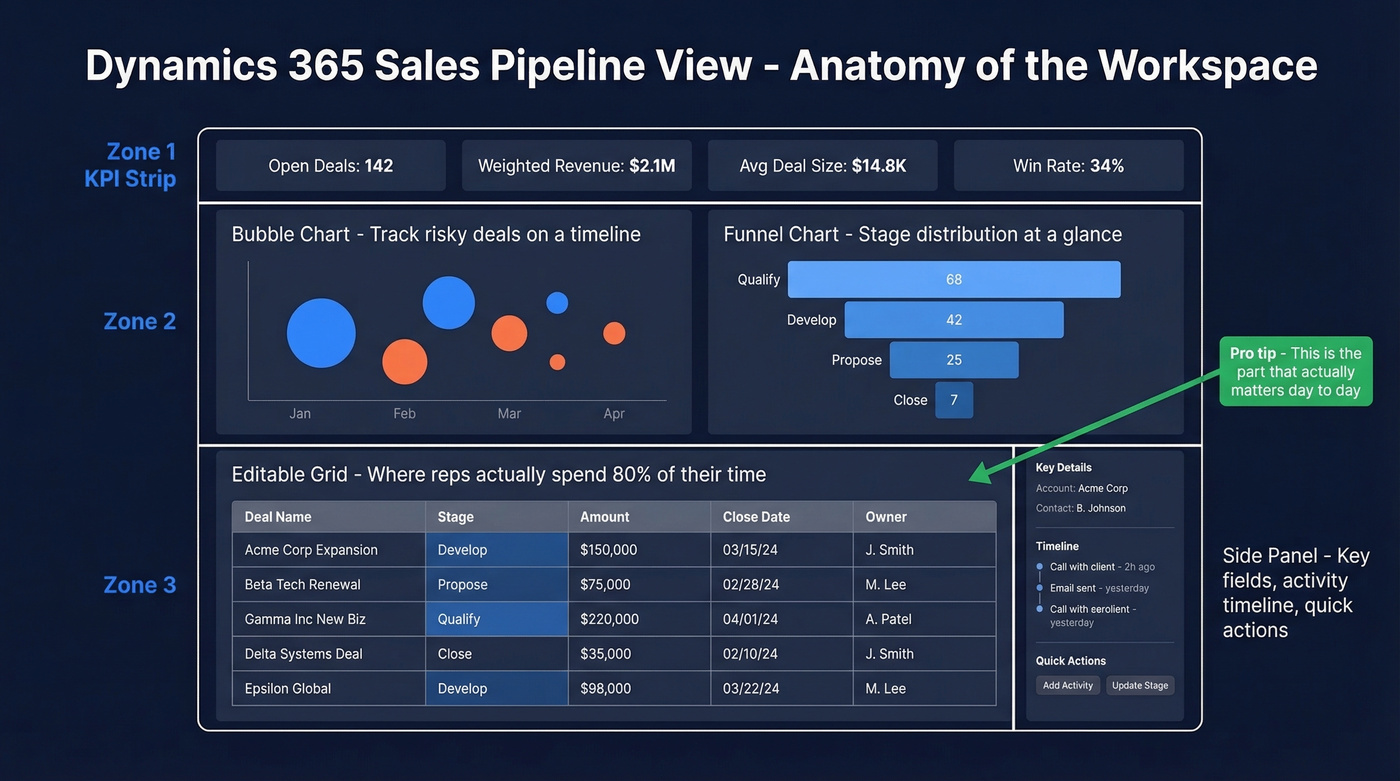
Let's be honest - the charts are the least important part. They look great in screenshots and demos, but most sellers spend the bulk of their time in the editable grid and side panel. The grid behaves like a spreadsheet: inline editing, column reordering, filtering, sorting. Select any record and a side panel opens with key fields, the activity timeline, and quick actions.
Sellers access it through "show as" > "pipeline view." If your reps don't see it, an admin needs to opt into early access or enable the pipeline view directly - they can also set it as the default view or disable it entirely.
How Pipeline Phases Map to BPFs
Pipeline phases aren't arbitrary labels. They're driven by Business Process Flow (BPF) stage categories. Each phase follows the format {StageCategoryIndex} - {CategoryName}, and the pipeline chart pulls its colors and segments directly from these categories.
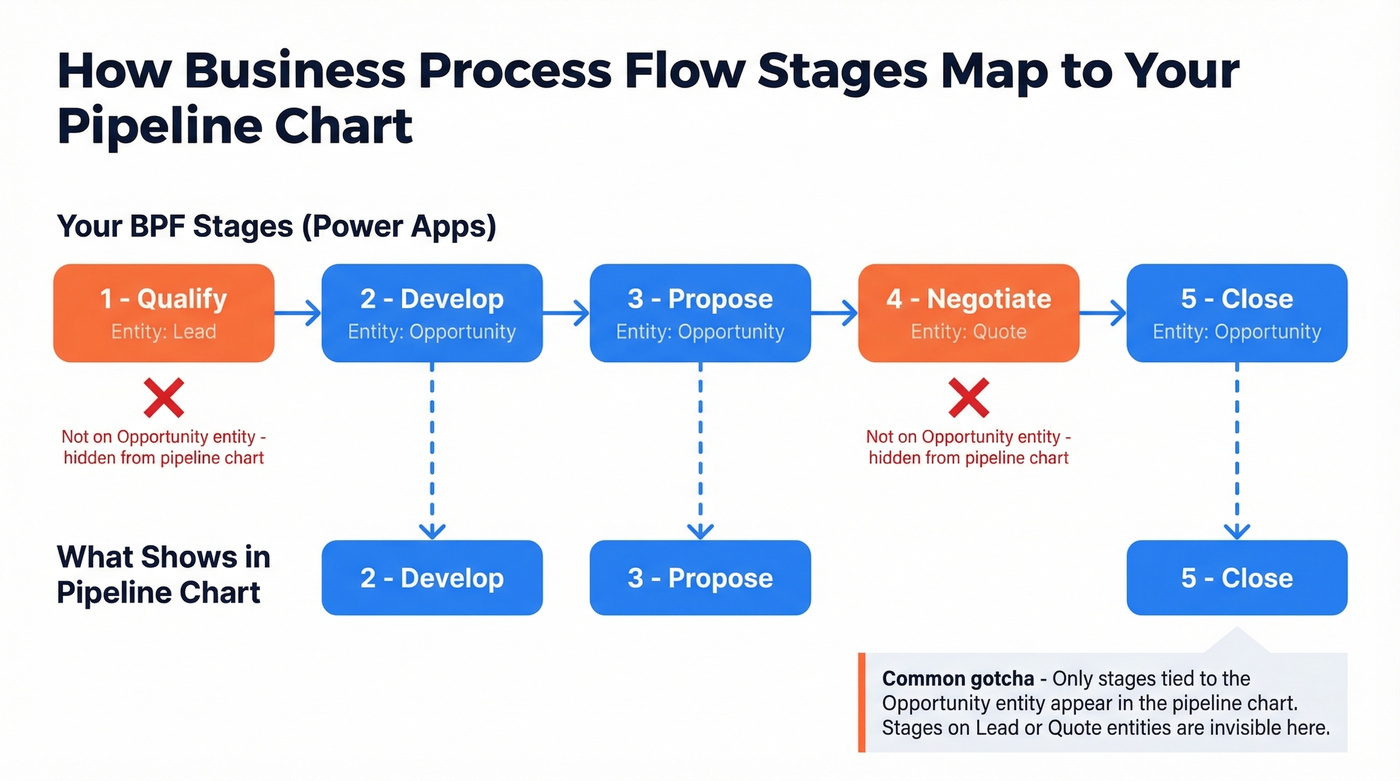
Here's the gotcha that trips up almost every team: if your BPF stages span multiple entities, only stages associated with the Opportunity entity show up in the pipeline chart. We've seen a VP demand a pipeline report and wonder why only 2 of 5 stages appear. The answer is almost always that the missing stages are tied to Lead or Quote entities, not Opportunity. It's a small architectural detail that causes outsized confusion.

A perfectly configured Dynamics 365 pipeline means nothing if your reps are working stale contacts. Prospeo refreshes 300M+ profiles every 7 days - not every 6 weeks - so the emails and direct dials entering your BPF stages are verified and current. 98% email accuracy, 83% enrichment match rate.
Feed your Microsoft pipeline clean data from day one.
Setting Up Your Pipeline
New users access the pipeline through Sales Hub at office.com - you'll need a Sales Professional or Enterprise license. Start by defining your BPF in Power Apps. A common starting point: Qualify > Develop > Propose > Close. Add logic rules where they matter, like requiring a decision-maker contact before a deal can move to "Propose." (If you're formalizing qualification, align it with a lead scoring model early.)
Power Automate is where setup gets interesting. Set up notifications when deals enter "Propose," auto-convert leads on form submission, or trigger quote generation when win probability hits a threshold.
Most teams over-engineer their BPFs on day one. Start with four stages and add complexity after you have 90 days of data showing where deals actually stall. You can always add stages. Removing them from a live pipeline is painful.
One warning from the trenches: solution imports for pipeline view customizations don't always deploy cleanly. Threads on r/Dynamics365 are full of teams who customized the pipeline view in dev, exported a patch solution, and watched it fail silently in production. Test in a sandbox first. Every single time.
AI & Copilot Features
Microsoft is pushing AI hard into the sales pipeline, and the licensing split matters. Copilot in Sales runs inside Dynamics 365 Sales. Copilot for Sales extends into Outlook and Teams and requires a separate add-on license (typically around $50/user/mo). They're complementary, not interchangeable. Copilot features can also consume additional Copilot Credits, so check your tenant usage for any usage-based costs.
Inside the app, Copilot delivers suggested actions, opportunity insights, and deal summaries. In Outlook, it proposes CRM updates - estimated revenue, close dates - with one-click confirmation, and surfaces partner app insights like DocuSign previews. Teams meetings get AI-generated summaries with action items and sentiment analysis.
The bigger story is agents. The Sales Qualification Agent hit GA on Oct 31, 2025, autonomously researching and engaging leads before handing qualified ones to sellers. The Sales Development Agent is more ambitious - an autonomous AI seller with its own mailbox, Teams account, OneDrive, and SharePoint. GA is planned for April 2026. (If you're evaluating tooling here, compare options in best generative AI sales tools.)
2026 Roadmap
Microsoft's release cadence is aggressive. Dates are subject to change:
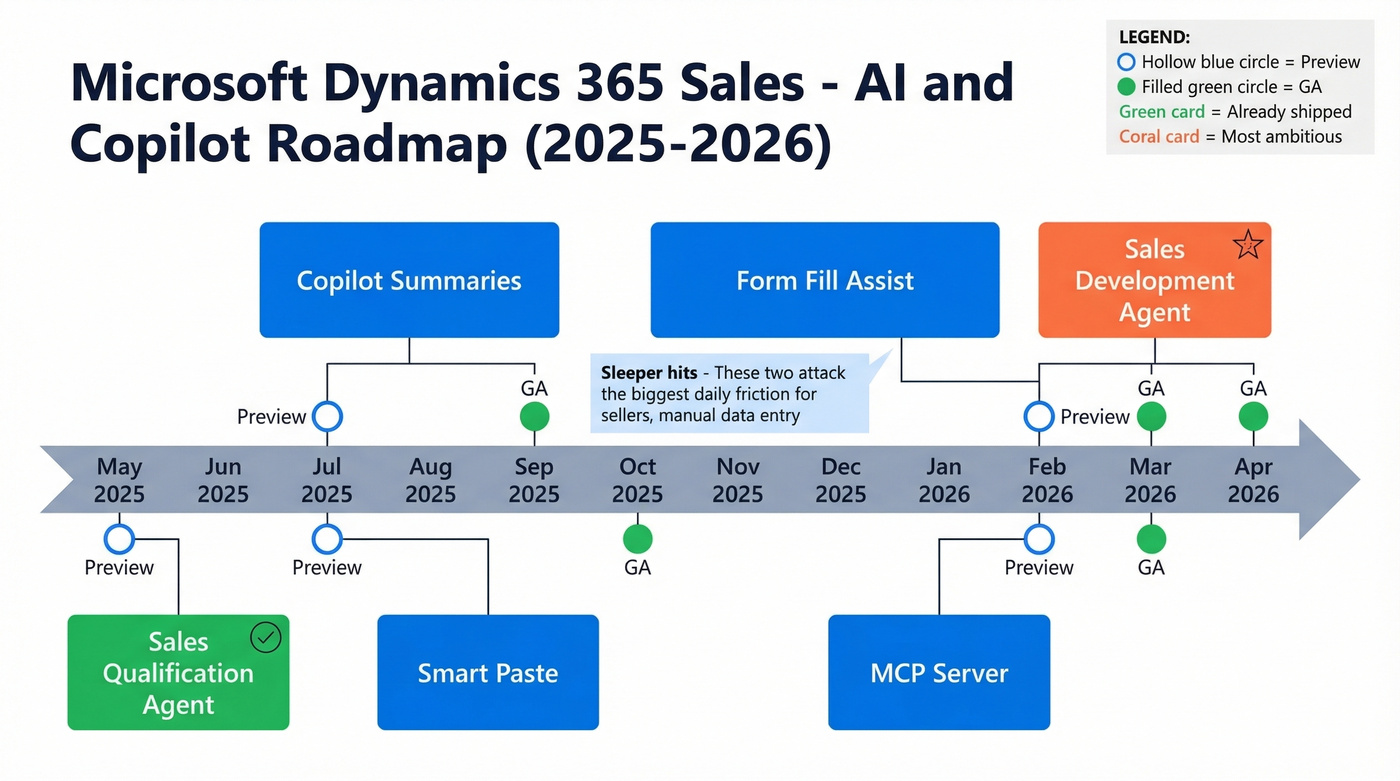
| Feature | Preview | GA |
|---|---|---|
| Copilot summaries | Jul 2025 | Sep 2025 |
| Sales Qualification Agent | May 2025 | Oct 2025 |
| Form fill assist | Jul 2025 | Mar 2026 |
| Smart paste | Jul 2025 | Mar 2026 |
| MCP server | Jun 2025 | Feb 2026 |
| Sales Development Agent | Feb 2026 | Apr 2026 |
Smart paste and form fill assist are the sleeper hits here. Smart paste maps structured info from an email directly into CRM fields. Form fill assist suggests values for you to confirm. Both attack the biggest daily friction point for sellers: manual data entry that nobody wants to do and everybody skips.
Pricing Breakdown
| Tier | Price | Key Limits |
|---|---|---|
| Professional | $65/user/mo | 15 custom tables, 5 BPFs, 5 dashboards |
| Enterprise | $105/user/mo | Advanced customization, Copilot features |
| Premium | $150/user/mo | Includes Sales Insights capabilities |
| Relationship Sales | Custom | 10-seat minimum |
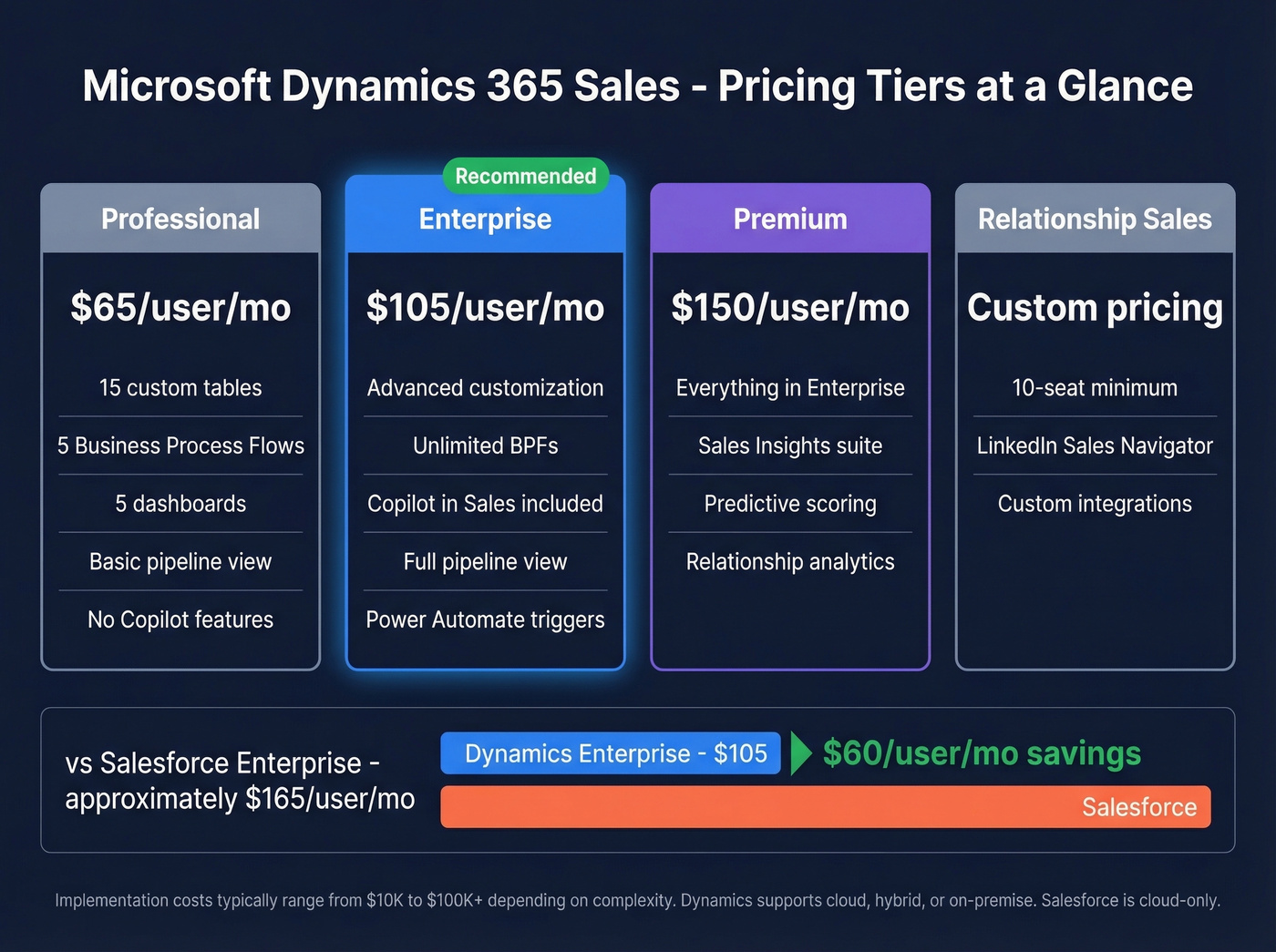
Five BPFs and 15 custom tables sound fine at kickoff. Three months into implementation, your partner will tell you to upgrade. Enterprise is the real starting point for any team that plans to customize beyond the defaults. Premium is only worth the jump if you need the deeper Sales Insights feature set - predictive scoring, relationship analytics, that kind of thing. (For planning, use sales pipeline benchmarks to sanity-check targets.)
Dynamics Enterprise at $105 competes most directly with Salesforce Enterprise, commonly listed around $165/user/mo. Factor in implementation services - expect $10K-$100K+ depending on complexity - and the gap narrows, but Dynamics still wins on sticker price for Microsoft-native orgs. Dynamics 365 also supports cloud, hybrid, or on-premise deployment; Salesforce is cloud-only.
Common Pitfalls & Data Quality
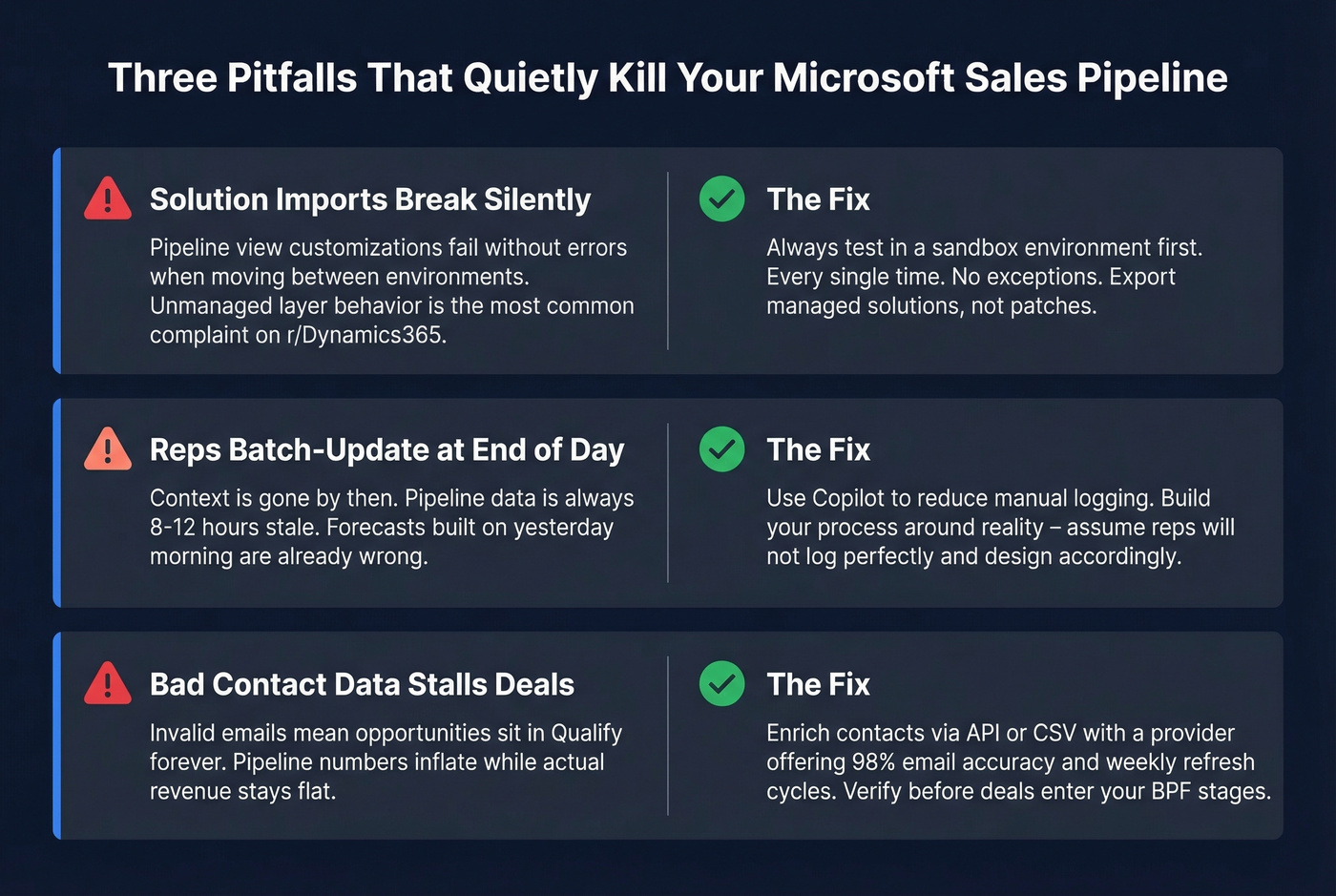
Solution imports break silently
Pipeline view customizations are fragile across environments. The unmanaged layer behavior is one of the most common complaints on r/Dynamics365. Always test in a sandbox before pushing to production. We can't stress this enough.
Reps don't log in real time
They batch-update at end of day, and by then the context is gone. Copilot can reduce manual logging, but teams still need a clear activity hygiene process. Build your process around this reality instead of pretending reps will log perfectly - because they won't. (If you're tightening process, start with sales process optimization.)
Bad contact data stalls deals
Your pipeline is only as good as the data feeding it. Bad emails mean stalled deals sitting in "Qualify" forever, inflating your pipeline numbers while producing nothing. This is where most Dynamics 365 implementations quietly fail - not on the CRM side, but on the data side. (This is one of the most common sales pipeline challenges we see.)
Tools like Prospeo can enrich Dynamics 365 data via API workflows or CSV enrichment, delivering 98% email accuracy with a 7-day refresh cycle so contacts entering your pipeline are real and current. If you're comparing vendors, start with data enrichment services and then drill into lead enrichment.

Spending $105/user/mo on Dynamics Enterprise? Don't waste it on bounced emails. Prospeo delivers verified contacts at $0.01 per email with 125M+ direct dials - so every opportunity your Copilot surfaces actually connects to a real buyer.
Stop paying enterprise CRM prices to store bad contact data.
FAQ
Is Dynamics 365 Sales pipeline free?
No. Pipeline features require a Dynamics 365 Sales license - Professional ($65/user/mo), Enterprise ($105), or Premium ($150). Microsoft offers 30-day trials for all editions.
Can I customize pipeline stages?
Yes. Stages are defined through Business Process Flows in Power Apps. You can create multiple BPFs, add custom stages, set logic rules, and automate transitions with Power Automate. Enterprise removes the 5-BPF cap that limits Professional users.
How do I get clean contact data into my pipeline?
Use a verified data provider with API or CSV enrichment - 98% email accuracy and a weekly refresh cycle will keep deals moving through stages instead of stalling at qualification. A free tier lets you test before committing budget.