

Nymeria vs Tomba: Which Email Finder Is Worth Your Credits?
A RevOps Manager lead we work with imported 5,000 prospects from a new email finder last quarter. Within 48 hours, 19% bounced - not because the tool was broken, but because "found" doesn't mean "verified." If you're weighing Nymeria vs Tomba, the real question isn't which one finds more emails. It's which one wastes fewer credits on garbage data.
Let's get into what's actually true about both tools.
30-Second Verdict
Pick Tomba if you want transparent credit economics and bulk domain search at scale. You only pay for validated emails, and the free tier (25 searches + 50 verifications/month) lets you test before committing.
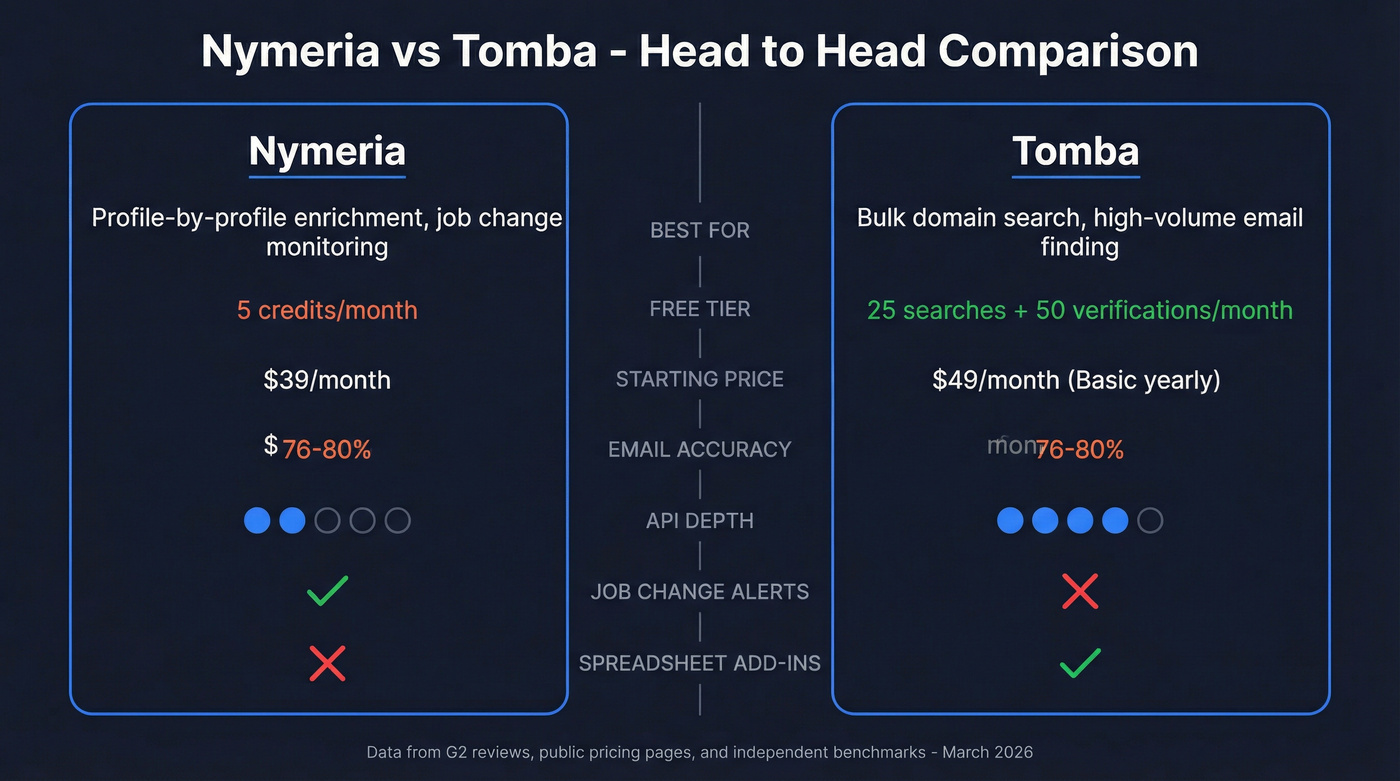
Pick Nymeria if you need people + company enrichment, monitoring for job/title/company changes, and a browser extension for profile-by-profile prospecting.
Here's the thing: stop trialing 8 tools. Trial 2 for 30 minutes each using the same 200 leads, then decide based on cost per usable contact. That single metric tells you more than any feature matrix ever will.
Pricing & Credit Economics
Both tools use credit-based models, but the mechanics differ enough to matter.
Tomba Pricing
| Free | Basic | Growth | Pro | Pro Plus | |
|---|---|---|---|---|---|
| Yearly price | $0 | $588 | $1,068 | $2,388 | $5,388 |
| Searches/mo | 25 | 2,500 | 5,000 | 20,000 | 50,000 |
| Verifications/mo | 50 | 2,500 | 5,000 | 20,000 | 50,000 |
| Team seats | Unlimited | Unlimited | Unlimited | Unlimited | Unlimited |
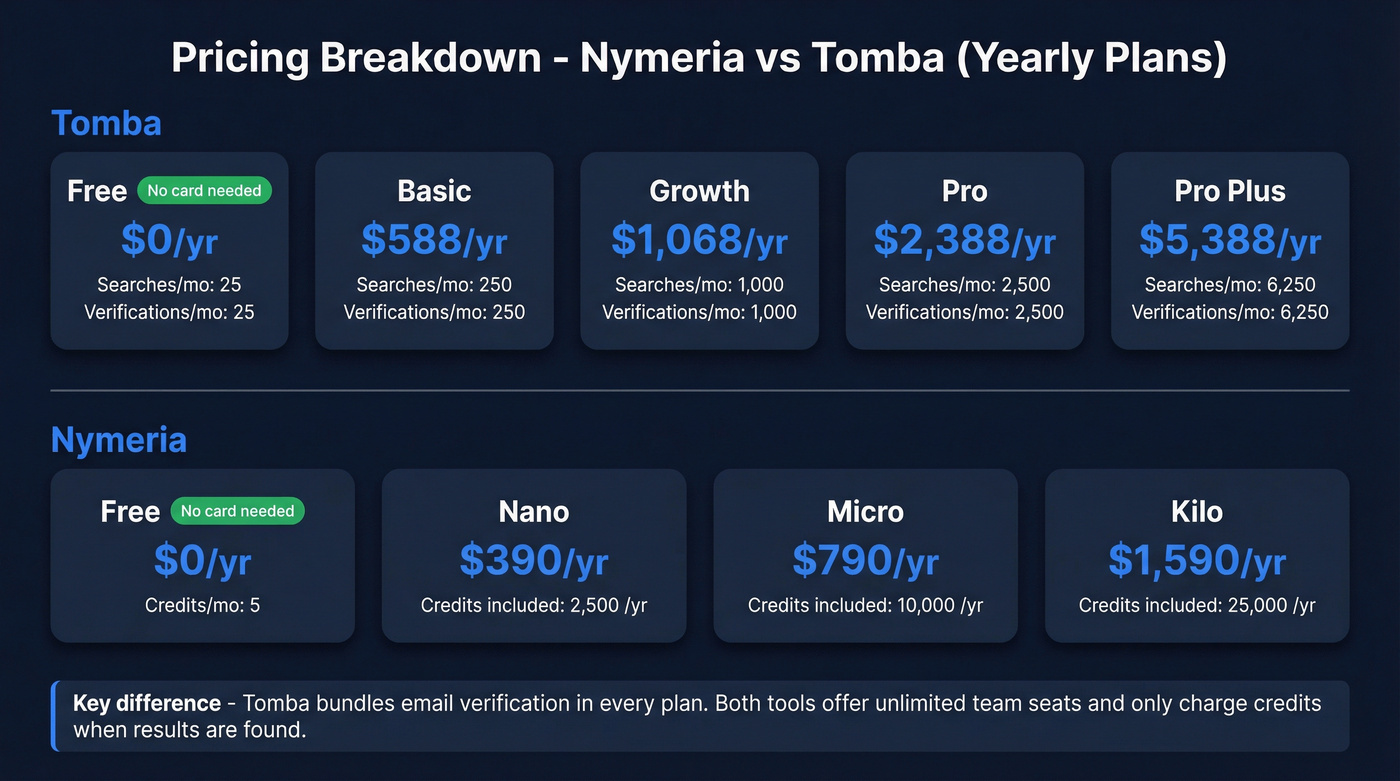
Tomba also offers a custom option for higher quotas, and every plan bundles email verification. Domain searches count 1 request per 10 email addresses returned. No result? No charge. The verifier skips personal emails and disposable addresses without burning a credit, and repeated identical requests within a billing period count once. That's a genuinely fair billing model for teams doing high-volume domain sweeps.
If you want the official plan breakdown, see Tomba Pricing.
Nymeria Pricing
- Nano: $39/month or $390/year
- Micro: $79/month or $790/year
- Kilo: $159/month or $1,590/year
- Enterprise: Custom
Annual billing saves 20%. You also get 5 free credits every month with no credit card required. Credits aren't consumed when nothing is found, and unlimited team members can share the same account quota.
The bottom line: Tomba's more transparent about what you'll pay at higher volumes. Nymeria is straightforward on entry pricing, but you'll want to map credits to your exact workflow before you scale up.
Data Coverage & Accuracy
Tomba claims 450M+ emails across 76M domains. Nymeria's strength is breadth of data type per profile - emails, phone numbers, social links, biographic data, and firmographics - not just email addresses.
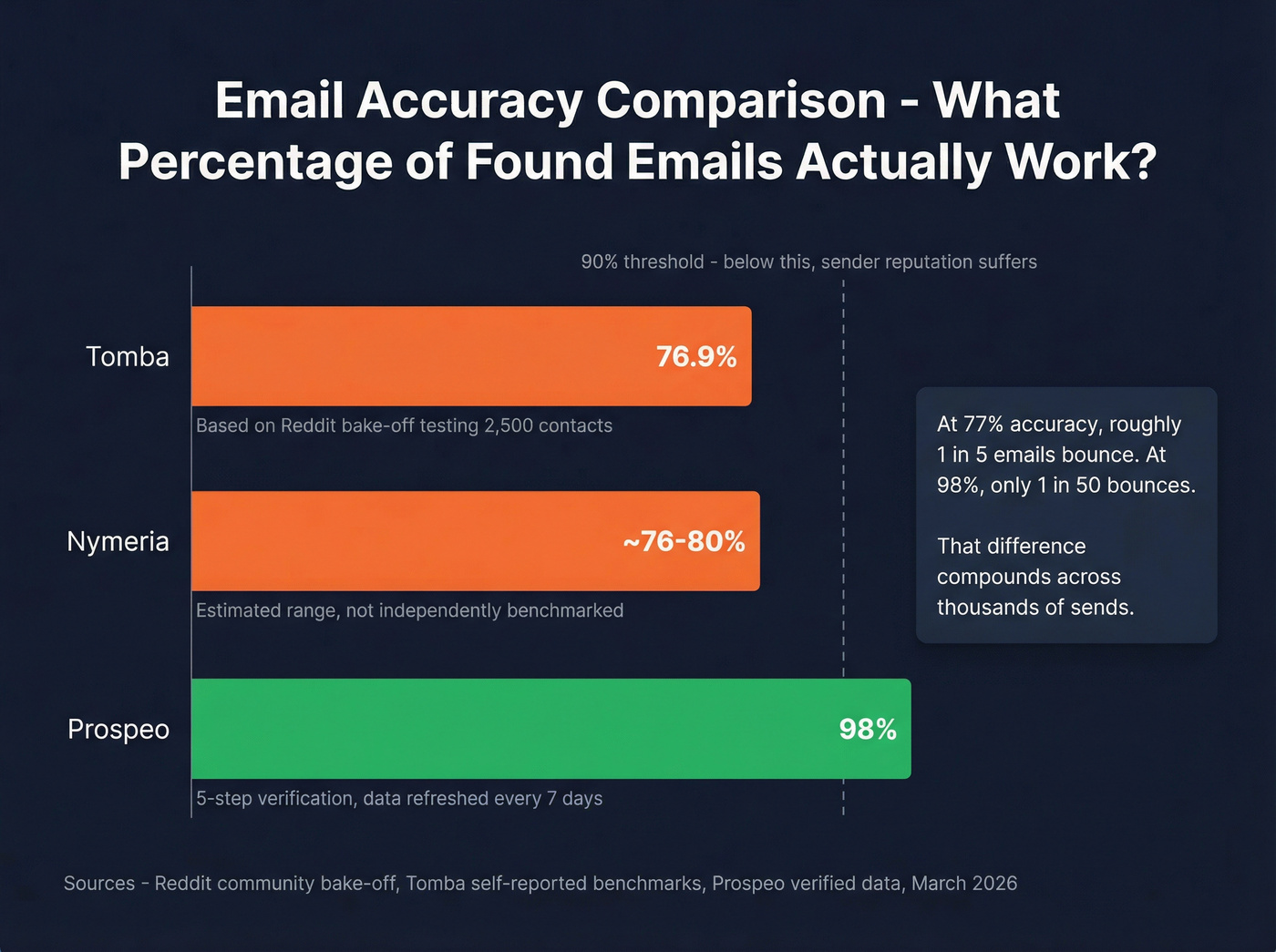
On accuracy, a Reddit bake-off testing 2,500 contacts across 8 tools put Tomba at 76.9% valid emails (1,922 found). Tomba's own benchmark claims 80.3% combined accuracy across 5,000 queries. Neither number is bad, but neither is exceptional by 2026 standards where tools like Prospeo are hitting 98% verified accuracy across 143M+ emails.
We've found that the Dropcontact benchmark - 15 tools tested on 20,000 real contacts with live email delivery and manual wrong-domain checks - is the gold standard for evaluating email finder accuracy. Neither Tomba nor Nymeria appears in that benchmark table, so you won't find an apples-to-apples score for either one there.

Both Nymeria and Tomba hover around 76-80% email accuracy. That means 1 in 5 credits goes to contacts that bounce, tank your sender reputation, and kill reply rates. Prospeo's 5-step verification delivers 98% accuracy across 143M+ verified emails - refreshed every 7 days, not every 6 weeks.
Stop paying for emails that bounce. Start with 75 free verified contacts.
Where These Tools Actually Differ
API & Developer Experience
Tomba wins here. Dual-header authentication, endpoints for domain search, enrichment, phone finder, author finder, technology lookup, and usage logs. Official libraries for Node, Ruby, Python, PHP, Go, C#, and more. Rate limiting returns a clean 429; failed SMTP verifications return a 402.
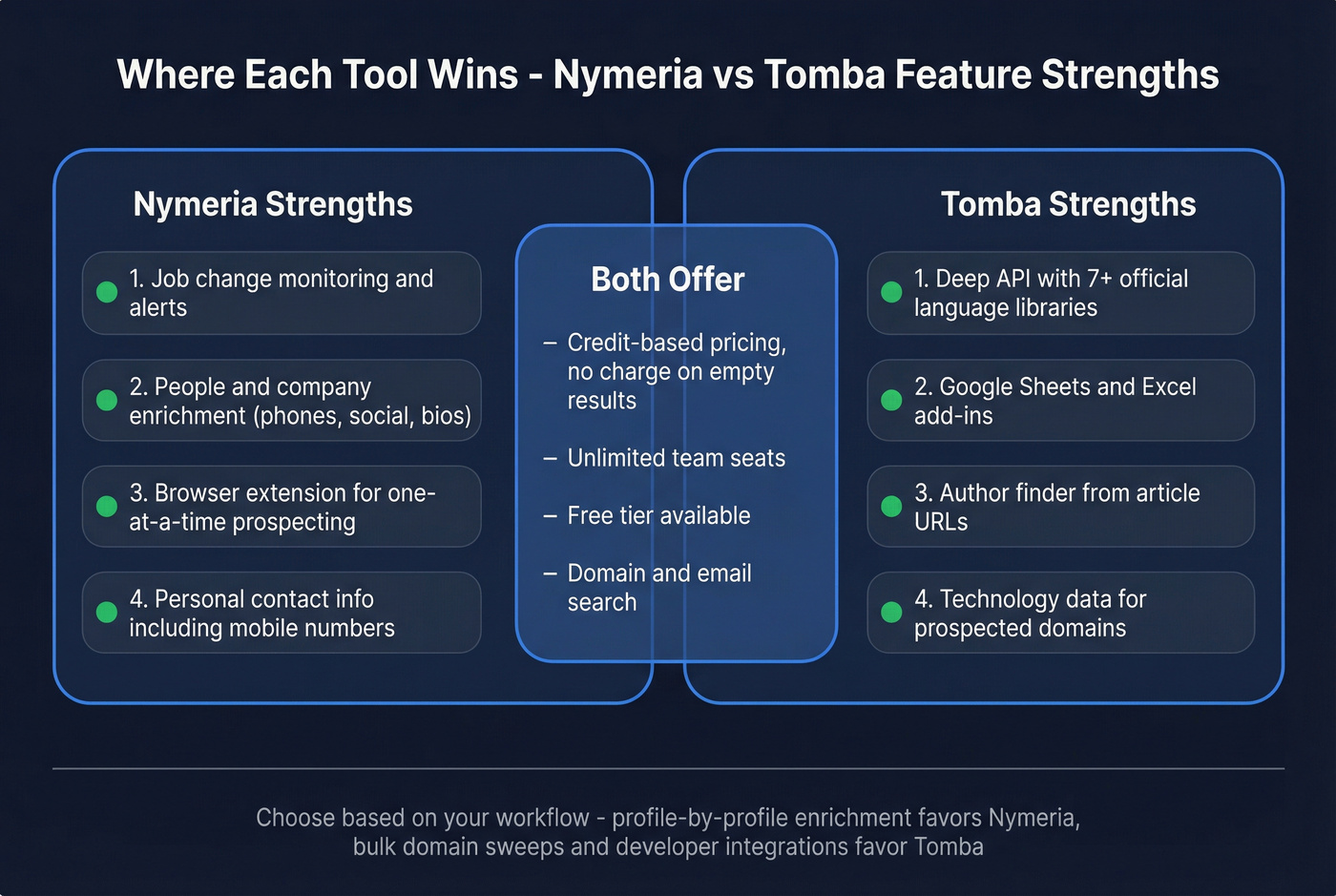
Nymeria offers a REST/JSON API for people and company enrichment plus search. It's functional, and it pairs well with Nymeria's monitoring and alerts for job changes. But if you're building custom integrations or piping data into a warehouse, Tomba gives you significantly more surface area to work with.
Browser Extension & Workflow
Nymeria's browser extension is built for one-at-a-time prospecting and enrichment - fast and focused. Tomba counters with add-ins for Google Sheets and Excel, which is a genuine differentiator for teams that live in spreadsheets rather than CRMs.
Monitoring & Enrichment
Nymeria's monitoring is the feature neither tool's marketing emphasizes enough. Automated alerts for job changes, title moves, and company updates mean you're not just finding contacts - you're tracking them over time. For recruiting teams and account-based sellers, that's a workflow Tomba simply doesn't offer.
Tomba counters with author finding (give it an article URL, get the author's email) and technology data for the domains you're prospecting into. Different strengths for different workflows.
What Users Actually Say
Tomba carries a 4.7/5 on G2 across 25 reviews. Users praise bulk search, value for money, and responsive support. The recurring complaints: plan limits feel low, the UI is inconsistent between sections, and it won't find Gmail addresses even when they're visible on a website. Over on Trustpilot, the score drops to 3.8/5 with "not working" reports and frustration around outdated data.
Nymeria also holds a 4.7/5 on G2 - but with only 6 reviews, that number carries less weight. Users praise speed and access to personal contact info. The concern that surfaces: accuracy isn't always current, and some profiles return outdated data.
With review volume that low on Nymeria's side, you're buying on feature fit rather than social proof.
If Neither Tool Fits
In our experience, teams that switch from a 76-80% accuracy tool to one hitting 98% don't just see fewer bounces. They see reply rates climb because their sender reputation recovers. That's the compounding effect most people miss when they focus only on cost per credit.

At $0.01 per email with 98% accuracy, Prospeo returns more usable contacts per dollar than either Nymeria or Tomba. Layer in 30+ search filters, buyer intent data across 15,000 topics, and 125M+ verified mobile numbers - and you're not just finding emails, you're building pipeline.
Run your same 200-lead test on Prospeo. Compare the bounce rates yourself.
FAQ
Does Tomba have a free plan?
Yes - 25 searches and 50 email verifications per month, no credit card required. Nymeria offers 5 free credits per month, also without a card. Some comparison pages incorrectly claim there's no free option. Both tools do offer one, but neither is enough for production prospecting.
Can my whole team share one account?
Yes, on both. Tomba lets you invite unlimited users who share the plan's search and verification quotas. Nymeria also offers unlimited team members with no per-seat licensing. Neither charges extra for adding collaborators.
What's a good alternative if accuracy matters most?
Prospeo delivers 98% email accuracy with a 7-day data refresh cycle, compared to the 76-80% range from Tomba and unverified claims from Nymeria. The free tier (75 emails/month) lets you benchmark it against either tool on your own prospect list before spending a dollar.