Octoparse vs ParseHub (2026): Which No-Code Web Scraper Wins?
Most Octoparse vs ParseHub comparisons get stuck on the UI. That's the wrong fight.
The tool you'll keep is the one whose first bottleneck matches your workload: pages per run, workers, queued runs, cloud nodes, retention, and what you'll pay the first time a site starts blocking you.
For a few thousand pages a week, either tool works. Once you're pushing 10k+ pages a day, the limits and the "what happens when it breaks" playbook matter more than any feature checklist.
Here's the thing: if your scraping program needs daily, guaranteed delivery into S3 with minimal babysitting, you're already past "no-code hobby" territory. Pick the platform whose throughput math you can explain on a whiteboard, and budget for blocking from day one.
1) 30-second verdict (who wins for what)
Pick Octoparse if...
- You want speed-to-first-data: templates + auto-detect get you from URL to dataset fast.
- You want the cheapest paid entry and you're fine scaling later with cloud nodes and add-ons.
- You like a "tasks + cloud nodes" model and you're happy working in a desktop app that feels Windows-first.
Pick ParseHub if...
- You want a clean throughput model (workers + pages) with limits spelled out.
- You need a Linux desktop app.
- You're building an API-driven workflow and you want scraping to behave like a job runner (run -> webhook -> fetch results).
Skip both if...
- Your real goal is outreach and pipeline, not datasets. Scraping gets you URLs and company names; it doesn't get you verified contacts.

One more blunt point: if Finance is involved, cancellation friction and add-on sprawl become product features whether you like it or not.
2) How to choose: the bottleneck that hits first
Here's the decision rule that saves teams months of churn:
- If your targets are dynamic (scroll, click-to-expand, multi-step navigation), ParseHub's "page" accounting becomes the main constraint. You'll feel it immediately, which is good: costs and limits show up early.
- If your targets are many similar pages (directories, listings, SKU pages) and you want to ship a dataset fast, Octoparse's templates + auto-detect win the first week. The constraint shows up later: cloud throughput, node caps, and add-on spend.
- If you need repeatable daily delivery, treat "local runs" as development mode, not production. Local runs miss days (sleep mode, IP reputation, machine updates). Cloud runs are the only sane default.
Limits checklist (print this before you buy):
- What's the unit of scale (workers vs cloud nodes)?
- What's the hard cap (pages/run, nodes, tasks/projects, queued runs)?
- What's the retention window (14 vs 30 days) and does it break your backfills?
- Is scheduling included, and does it support your cadence (hourly/daily)?
- What's the real anti-blocking bill (IP rotation, residential bandwidth, CAPTCHA)?
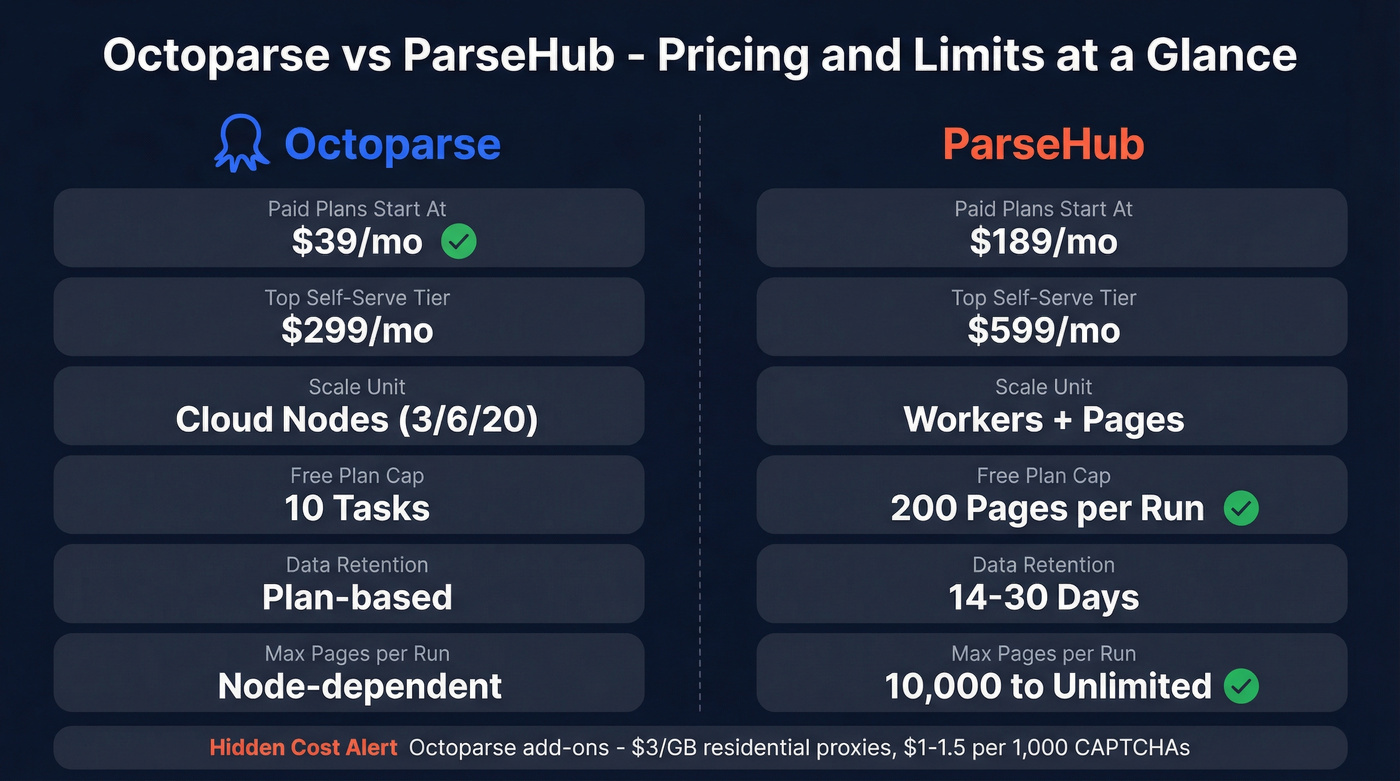
3) Octoparse vs ParseHub comparison table (pricing + limits that matter)
Short cells for mobile; the nuance is right below the table.
| Category | Octoparse | ParseHub | Winner |
|---|---|---|---|
| Free plan | Yes | Yes | ParseHub (clear page cap) |
| Paid plans start at | $39/mo | $189/mo | Octoparse |
| Mid tier | $83-119/mo | $189/mo | Octoparse |
| Top self-serve tier | $299/mo | $599/mo | Octoparse |
| Scale unit | Cloud nodes | Workers | ParseHub (predictable math) |
| Free cap | Tasks (10) | 200 pages/run | ParseHub (explicit) |
| Projects privacy | Private | Free is public | Octoparse |
| Retention | Plan-based | 14-30 days | ParseHub (spelled out) |
| Scheduling | Standard+ | Paid only | Octoparse |
| Cloud scale cap | 3/6/20 nodes | 10,000 pages/run (Standard) / unlimited (Professional) | ParseHub (big runs) |
ParseHub entitlements that matter (privacy + retention):
- Free projects are public. The Free plan includes 5 public projects, 200 pages per run, and 14-day retention.
- Standard includes 20 private projects, 10,000 pages per run, and 14-day retention.
- Professional includes 120 private projects, unlimited pages per run, and 30-day retention.
- Standard also bundles the operational basics teams actually use: scheduling, Dropbox/Amazon S3 delivery, and IP rotation.
Octoparse entitlements that matter (capacity + parallelism):
- Task limits are simple: Free 10, Standard 100, Professional 250.
- Cloud nodes define parallelism: Standard 3 or 6, Professional 20, Enterprise 40+.
- Octoparse pricing looks friendly until you hit hostile targets and start paying for bandwidth + CAPTCHA at volume.
Hidden cost realism (where budgets get wrecked): Octoparse add-ons add up fast at scale: $3/GB residential proxies and $1-1.5 per 1,000 CAPTCHA solves. If your targets fight scrapers, those line items stop being "nice to have" and turn into your actual monthly bill.

You're comparing scrapers, but scraping only gets you URLs and company names - not verified contacts. Prospeo's 300M+ database delivers 98% accurate emails and 125M+ direct dials with zero scraping, zero CAPTCHA bills, and zero broken workflows.
Skip the scraper. Get the contacts directly at $0.01 per email.
4) Performance and scaling (workers vs cloud nodes)
This is the real difference: ParseHub forces throughput math up front; Octoparse lets you sprint to first data and pushes the math to later.
ParseHub throughput: workers + pages
- Each worker scrapes up to 5 pages per minute.
- "Page" is strict: every new content load counts (new URL, pagination click, infinite scroll load, click-to-expand details).

Example: one "human page" that does URL load + 3 scroll loads + 1 details click counts as 5 pages.
Throughput math you can plan around:
- 1 worker ~= 300 pages/hour
- 10 workers ~= 3,000 pages/hour
- 30 workers ~= 9,000 pages/hour
That's why ParseHub worker allocation and page definition matter more than feature checklists.
Octoparse throughput: tasks + cloud nodes
Octoparse scales by running more tasks in parallel via cloud nodes, while task limits cap how many projects you can keep active.
Local concurrency is great for development and quick pulls. Production reliability comes from cloud runs, because they're scheduled, repeatable, and easier to monitor.
In our experience, the practical pattern is consistent: Octoparse wins early velocity; ParseHub wins when you need predictable throughput planning and you don't want surprises on day 45.
5) Automation and integrations (API, webhooks, scheduling, delivery)
Automation checklist (verify before you commit)
ParseHub
- API limits: 6 concurrent connections per IP and 60 requests per 30 seconds. The v2 docs' 5 req/s guidance is the safe steady-state; treat 60/30s + 6 concurrent/IP as the hard ceiling if you don't want 429s.
- Queued runs: 100 queued runs on Free vs 100,000 on paid plans.
- Scheduling: paid-only.
- Delivery: use webhooks; aggressive polling is how teams earn 429s.
Octoparse
- API scope is plan-gated:
- Standard: Get Data
- Professional: Get Data + Control Tasks + Update Task Parameters
- Advanced API requires Professional
- Rate limit: 20 requests/second (leaky bucket: 100 requests per 5 seconds), then 429.
- Export constraint: 1,000 rows per request via offset, so plan to batch.
- Operational gotcha: local extraction data doesn't export via API unless you back it up to the cloud first.
Two workflows that don't break in production
ParseHub: run -> webhook -> fetch
- Start a run from your scheduler (or ParseHub scheduling on paid plans).
- Receive a webhook when the run finishes.
- Fetch results from the run data endpoint.
- Load to S3/warehouse/Sheets and transform downstream.

Octoparse: task -> parameterize -> batch export
- Build the task in the UI.
- On Professional, update parameters (seed URLs, categories, geo) and control runs via API.
- Pull data in 1,000-row batches until the dataset is drained.
After you fetch run results, teams usually hit the next wall: the scrape isn't outreach-ready. That's where an enrichment layer earns its keep. Prospeo, for example, returns 50+ data points per contact, hits a 92% API match rate, and refreshes data every 7 days, so your "list of companies" turns into people you can actually reach.
6) Anti-blocking and reliability (why runs return empty results)
Empty results are the most expensive failure mode because they look like success until someone notices the dataset is blank.
Step-by-step troubleshooting playbook
- Re-run locally with a tiny sample. If it fails locally, it's selectors, timing, or site changes.

If local works but cloud/server returns empty, check ParseHub's Server Snapshot. It shows what the server saw: block page, CAPTCHA, consent wall, geo restriction, or broken rendering.
Don't enable IP rotation by default in ParseHub. It slows runs when you don't need it. Turn it on after you confirm blocking.
Add waits like you mean it. Dynamic sites need human timing. Add waits between click/hover/scroll steps and stop the "works in test, fails in run" loop.
Custom proxies in ParseHub are powerful and finicky. Support has to enable it. Proxies must be
IP:Port:User:Pass. Also, don't use Smartproxy or Oxylabs for that specific custom-proxy feature.For Octoparse, treat anti-blocking as a budget line item. Residential bandwidth and CAPTCHA solving are recurring costs at scale. Octoparse Standard includes Auto IP Rotation, and for tougher targets you'll still pay for residential bandwidth/CAPTCHA.
I've watched a team burn two weeks blaming the tool when the real issue was a consent modal plus missing waits. Fix the interaction model first. Then pay for proxies.
7) Build experience and maintenance (no-code reality on dynamic sites)
"No-code" still means "visual engineering." You still own selector drift, timing, and site changes.
Octoparse (workflow-level pros/cons)
What it does best
- Templates + auto-detect are the fastest path to a usable dataset on common page types (directories, ecommerce listings, simple SERPs).
- It has stronger review volume and higher satisfaction on G2: 4.8/5 (52 reviews) vs 4.3/5 (10 reviews) on the G2 head-to-head page.
Where it bites
- Cloud extraction slows down on large jobs, and teams end up stacking nodes + add-ons.
- Billing and trial cancellation friction shows up repeatedly in user feedback. That becomes your problem the moment Finance gets involved.
ParseHub (workflow-level pros/cons)
What it does best
- It handles JS/AJAX-heavy flows well when you model the project carefully.
- Linux desktop app is a real differentiator for technical teams.
Where it bites
- Page counts explode on dynamic sites because scroll/click loads count as pages. That's the model, not a bug.
- Complex pages take more manual selection work, and when extraction fails it can be hard to understand why without leaning on snapshots and support patterns.
Real talk: both tools will make you feel smart on day one and annoyed on day twenty. The difference is what kind of annoyed you'll be.
8) Which should you choose? Scenarios + a replicable test you can run
Scenario: 10k pages/day with scheduling + delivery
- Winner: ParseHub Standard if you want predictable ops: 10,000 pages/run, scheduling, and S3/Dropbox delivery in the same tier. It costs $189/mo, and it behaves like a production job runner.
- Winner: Octoparse Standard if you're running many smaller tasks and you want the lowest paid entry while still scheduling cloud extraction. You'll hit node caps (3 or 6) before you hit pages/run caps.

Blunt rule: if you need guaranteed daily delivery into S3 with minimal babysitting, don't rely on local runs. Use cloud runs in either tool or you'll miss days.
Scenario: infinite scroll + click-to-load galleries
- Winner: ParseHub if you're willing to model page counts and tune waits. You'll see the cost/limit impact immediately, which keeps projects honest.
- Winner: Octoparse if templates/auto-detect cover your target and you want speed. You'll ship faster early.
Replicable head-to-head test (copy this to validate the "page" vs "node" model)
Pick a site with a search results page and run this exact workflow in both tools:
- Start at a search results URL (capture title + price + rating).
- Paginate 5 pages of results.
- Click into each product detail page (capture SKU + availability).
- Click a "Reviews" tab and paginate 3 review pages.
- Export a single flat table: product fields repeated across review rows.
What you'll learn fast:
- In ParseHub, every pagination click and tab click counts as a new page. A single product can burn multiple pages before you even touch reviews, which means your run limit becomes a math problem you can estimate before you scale.
- In Octoparse, you'll think in tasks and parallelism: one task for results -> details -> reviews, then scale by cloud nodes. The constraint shows up as throughput and stability under cloud execution, not as an obvious page counter.
I've used this test to settle internal debates in one afternoon. It beats arguing from screenshots.
9) FAQ: Octoparse vs ParseHub
What counts as a "page" in ParseHub pricing/limits?
In ParseHub, a "page" is counted every time new content loads: new URLs, pagination clicks, infinite scroll loads, and click-to-expand interactions all count as pages. On dynamic sites, 1 "human page" commonly becomes 3-10 billable pages, so plan runs around that multiplier.
Does ParseHub scheduling work on the free plan?
No. Scheduling is paid-only, and the Free plan is capped at 200 pages per run with 14-day retention. If you need daily unattended runs, budget for Standard (or run your own scheduler and accept the free-tier caps).
What happens when you hit API rate limits (HTTP 429) in each tool?
You'll get 429s and delayed jobs, so design for backoff. ParseHub's practical ceiling is ~5 requests/second (hard cap 60 requests/30s and 6 concurrent/IP), while Octoparse allows 20 requests/second with burst limits. Use webhooks (ParseHub) and batch exports (Octoparse) instead of aggressive polling.
If I'm scraping for sales leads, what should I use after these tools?
Use an enrichment and verification layer because scraped pages rarely include clean contact data; most teams need verified emails and fresh records, not another CSV of URLs. Prospeo is built for that: 98% verified email accuracy, a 7-day refresh cycle, and enrichment that returns 50+ data points per contact.
Summary: the real answer to Octoparse vs ParseHub
If you want fast setup and a low-cost on-ramp, Octoparse is usually the quickest path to first data. Just be honest about cloud throughput and anti-blocking add-ons once you scale.
If you want predictable production operations with explicit throughput math (workers + pages) and built-in delivery options, ParseHub is the steadier choice.
Either way, if the end goal is pipeline, pair your scraper with an enrichment layer so the output becomes verified contacts instead of another dead spreadsheet. If you're evaluating list quality and verification, start with an email verifier website and a repeatable Email Verification List SOP before you send.
Residential proxies at $3/GB, CAPTCHA solves at $1.50/1K, 14-day retention windows - that's a lot of overhead just to build a prospect list. Prospeo refreshes 300M+ profiles every 7 days and returns 50+ data points per contact via API, CRM sync, or CSV enrichment.
Replace your scraping stack with one search that returns verified data.