CRM Analytics for Sales: What to Track, Which Tools to Use, and Why Your Dashboards Are Lying
It's the quarterly business review. The VP of Sales pulls up the pipeline dashboard, reads $4.2M in Stage 3+, and the room nods along - until the CRO cross-references closed-won from the last 90 days and the numbers are off by 40%. Gartner found that only 45% of sales leaders have high confidence in their own forecasts. The other 55% are flying blind with dashboards that look great and mean nothing.
The problem isn't your analytics tool. It's what's underneath it.
The Short Version
- Fix your CRM data before building dashboards. Enrich missing contacts, phones, and firmographics so your reports reflect reality - not gaps. (If you need a system, start with CRM hygiene.)
- Track 5 KPIs per role, not 30. More metrics means more noise.
- You probably don't need a $140/user analytics add-on. For many teams, native HubSpot or Zoho reporting covers what they actually use day to day.
What CRM Analytics Actually Means
CRM analytics is the practice of turning your CRM data into decisions. It spans four levels: descriptive (what happened), diagnostic (why), predictive (what's likely), and prescriptive (what to do about it). Most sales teams live entirely in descriptive mode - running reports on closed deals and pipeline totals - and calling it analytics. That's like checking the rearview mirror and calling it navigation.
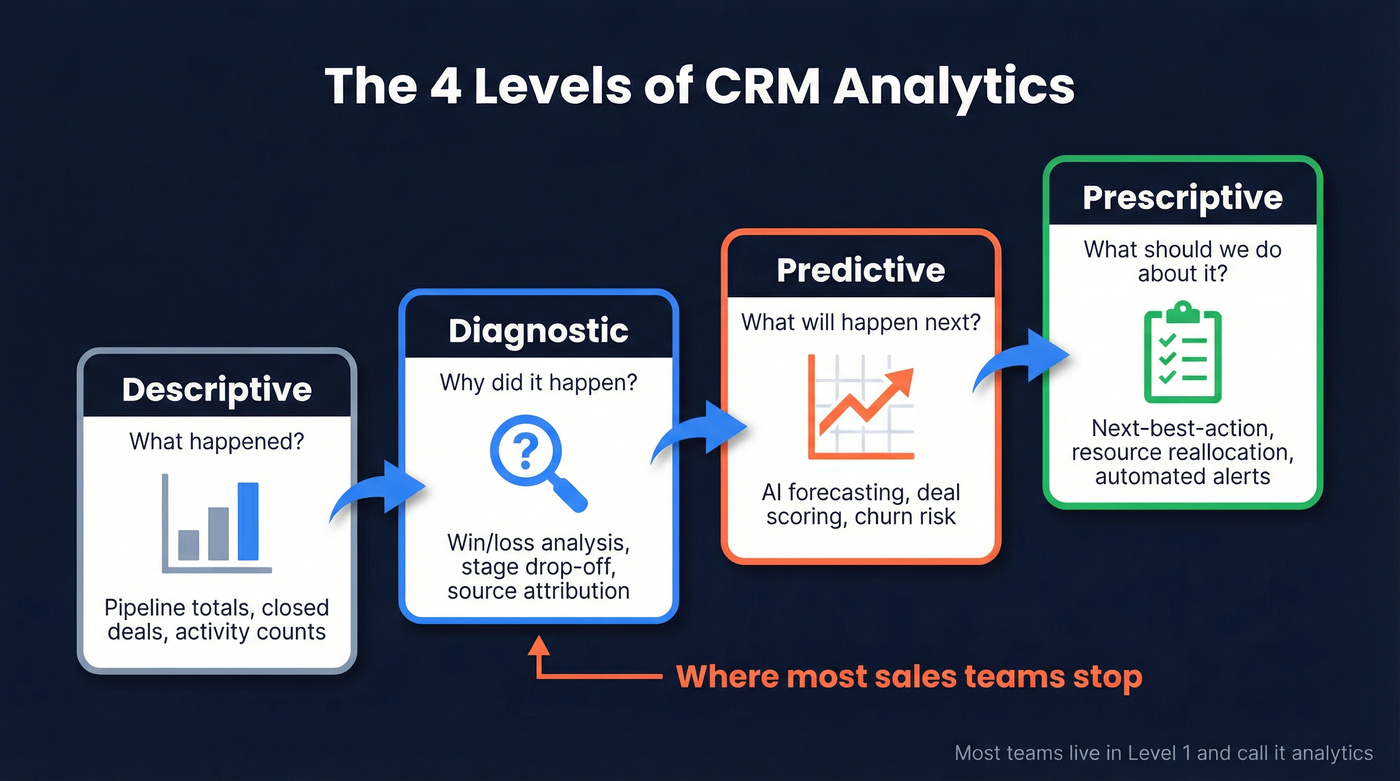
There's a meaningful gap between native reporting features and dedicated analytics layers like Clari or Gong that sit on top of your CRM. Knowing which level you actually need saves you from overspending on tools your team won't touch.
Why It Matters
Invest in analytics if you're making pipeline or hiring decisions based on CRM data. Nucleus Research found CRM still returns $3.10 per $1 spent, though that number has declined 37% over the past decade. Teams using dashboards see a 29% average sales increase. McKinsey data shows AI-driven forecasting reduces errors by 20-50%. Data-driven sales orgs typically see a 5-10% revenue lift on top of those efficiency gains.
Skip the premium tools if you're under 50 reps and your native CRM reporting goes unused. Over half of CRM ROI comes from productivity gains, not revenue lift. If reps aren't logging activities, no analytics tool will save you.

What to Track - KPIs by Role
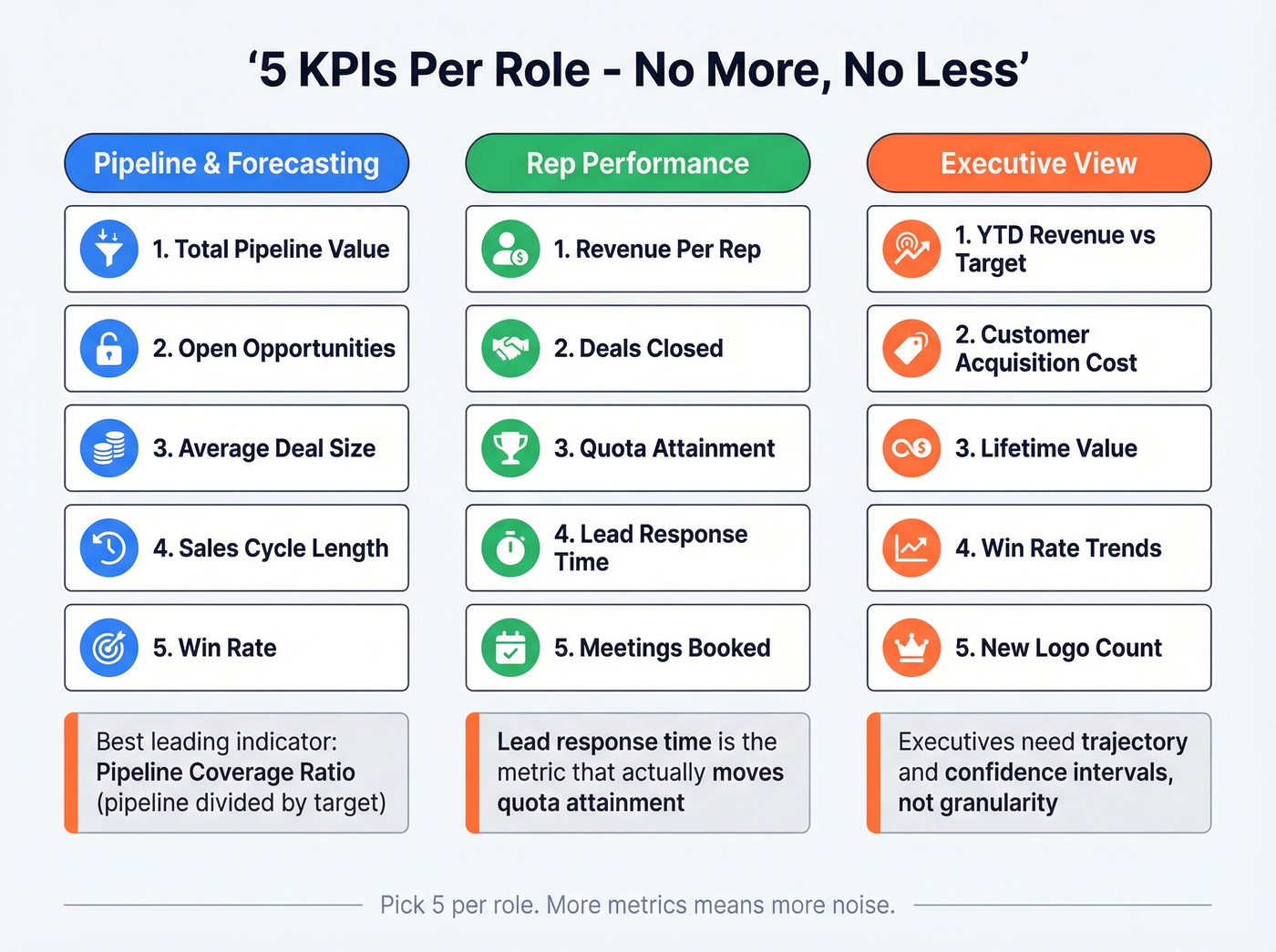
Don't build a dashboard with 30 metrics. Pick five per role and make them matter.
Pipeline & Forecasting
Total pipeline value, number of open opportunities, average deal size, sales cycle length, and win rate. Pipeline coverage ratio - pipeline divided by target - is the single best leading indicator most teams ignore. Reps with mobile CRM access hit targets 65% of the time versus 22% without, so make these KPIs accessible on the go. If your forecast keeps missing, tighten your process around deal forecast accuracy.
Rep Performance
Revenue per rep, deals closed, quota attainment, lead response time, and meetings booked. Quota attainment is the headline number, but lead response time is the one that actually moves it. We've seen teams shave days off their response time just by surfacing it on a shared dashboard - suddenly nobody wants to be the slowest name on the board.
Executive View
YTD revenue vs. target, customer acquisition cost, lifetime value, win rate trends, and new logo count. Executives don't need granularity. They need trajectory and confidence intervals. (If you want a clean exec layout, use a sales management dashboard structure.)

Your KPIs are only as reliable as the contacts behind them. If 35% of your emails bounce and half your phone numbers are dead, every pipeline report is a guess. Prospeo enriches your CRM with 50+ data points per contact at 98% email accuracy - refreshed every 7 days, not every 6 weeks.
Clean data first. Accurate dashboards follow. Start enriching for $0.01 per email.
Best Analytical Tools Compared
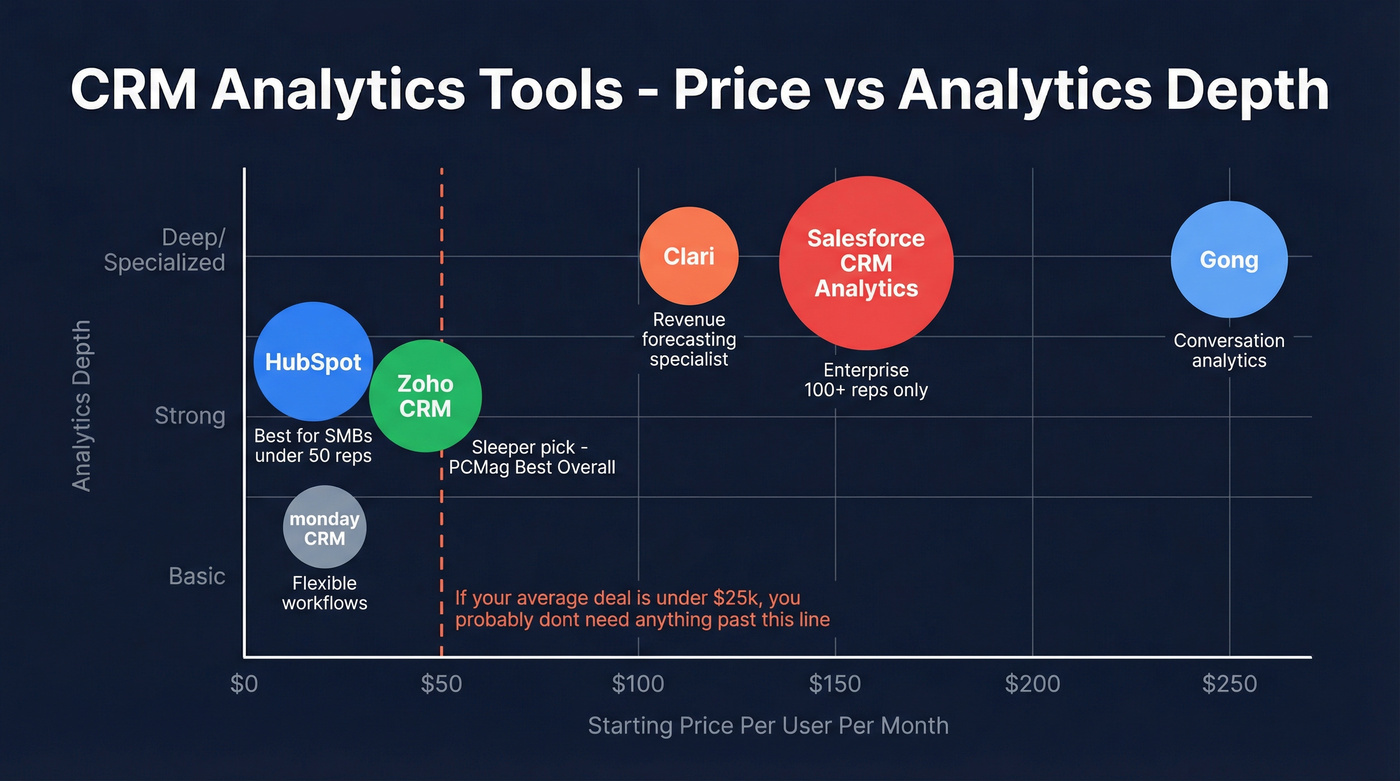
The range here is enormous - from free dashboards to six-figure AI platforms. Let's be honest: Salesforce CRM Analytics is overkill for most sales teams. It's genuinely powerful for enterprise orgs running custom objects and Einstein Discovery, but at $140-165/user/month on top of your CRM license, it only pays off at scale.
| Tool | Best For | Analytics Depth | AI/Predictive | Starting Price |
|---|---|---|---|---|
| Salesforce CRM Analytics | Enterprise, 100+ reps | Deep (custom objects) | Yes (Einstein) | $140/user/mo |
| HubSpot (Customer Platform) | SMBs, <50 reps | Good (free tier) | Basic (AI assistant) | Free-$1,170/mo |
| Zoho CRM | Budget teams | Strong (Zia AI) | Yes (Zia) | $14-40/user/mo |
| monday CRM | Flexible workflows | Moderate (visual) | Limited | ~$10-20/seat/mo |
| Clari | Revenue forecasting | Specialized | Yes (ML) | ~$100-120/user/mo |
| Gong | Conversation analytics | Specialized | Yes (deal intel) | ~$250/user/mo |
HubSpot is the obvious starting point for SMB teams - the free tier gives you real reporting, and you only upgrade when you genuinely need predictive features. Zoho is the sleeper pick: PCMag named it Best Overall CRM at 4.5/5, largely because Zia AI delivers surprising analytics depth at a fraction of Salesforce's price.
Any CRM with sales analytics built in will outperform a standalone spreadsheet, but Salesforce holds 21.8% CRM market share for a reason - enterprise complexity, not SMB analytics. Budget CRMs like Less Annoying CRM have minimal reporting, so analytics maturity varies wildly by platform. If you're actively evaluating platforms, compare HubSpot vs Salesforce before you commit.
Here's the thing: if your average deal size is under $25k, you almost certainly don't need anything beyond native reporting. The teams that get the most from Salesforce CRM Analytics or Clari are running 100+ reps with multi-stage enterprise deals. Everyone else is paying for horsepower they'll never use.
Fix Your Data First
Stop buying analytics tools and start fixing your data.
We've watched this play out dozens of times: a team spends $140/user/month on Salesforce CRM Analytics, builds gorgeous dashboards, and then discovers that 35% of their contact emails bounce and half the phone numbers are dead. The dashboards look authoritative. The underlying data is garbage. CRM data decays continuously - people change jobs, companies get acquired, phone numbers rotate. If you aren't actively enriching, your analytics degrade every quarter. (This is exactly what B2B contact data decay looks like in practice.)
Prospeo's enrichment engine solves this at the source: 83% enrichment match rate with 98% email accuracy, 50+ data points per contact, and a 7-day refresh cycle that keeps records current. It integrates natively with Salesforce and HubSpot, so enrichment runs in the background without reps lifting a finger. Snyk's sales team went from a 35-40% bounce rate to under 5% after switching - that's the difference between dashboards that lie and dashboards that work.

Before you spend another dollar on analytics add-ons, enrich your CRM. It's step zero. If you need a cleanup workflow, follow a CRM verify process first.
Why CRM Analytics Fail
Most implementations underdeliver for the same predictable reasons. Five mistakes we see constantly, and how to fix them:
- No clear objectives. Pick 5 KPIs before you build anything. Dashboards without a question to answer are decoration.
- Wrong CRM fit. A 10-person team on Salesforce Enterprise is paying for complexity they'll never use. Skip this tier if you're under 50 reps.
- No training budget. Plan for 2x the implementation time in adoption. The tool doesn't matter if reps won't use it.
- Dirty, incomplete data. Reps skip fields, so reports are built on partial data. Automate capture where possible and run enrichment before dashboarding. (Use a data quality scorecard so you can measure improvement.)
- No integrations. Connect email, calendar, and phone to your CRM. Every manual entry point is a data gap waiting to wreck your forecast.
Real-World Examples
To make this concrete, here are three CRM analytics examples from real workflows.
A mid-market SaaS team uses win-rate-by-source reporting to discover that partner referrals close at 3x the rate of outbound - and reallocates SDR headcount accordingly. An enterprise team layers Clari's predictive scoring on top of Salesforce to flag at-risk deals two weeks before they stall, giving AEs time to intervene instead of watching deals die in the pipeline review. And a 15-person startup uses HubSpot's free deal-stage funnel report to identify that 60% of deals die between demo and proposal, then builds a follow-up sequence that cuts that drop-off in half. If you're struggling with stage math, start by fixing your sales pipeline challenges.
The consensus on r/sales is that the simplest analytics wins are almost always funnel-stage analysis and lead-source attribution - not the flashy AI features vendors push hardest.
Getting Started: A 30-Day Playbook
Week 1: Audit your CRM data. How many contacts have valid emails? Direct dials? Complete firmographics? Run an enrichment pass to fill the gaps.
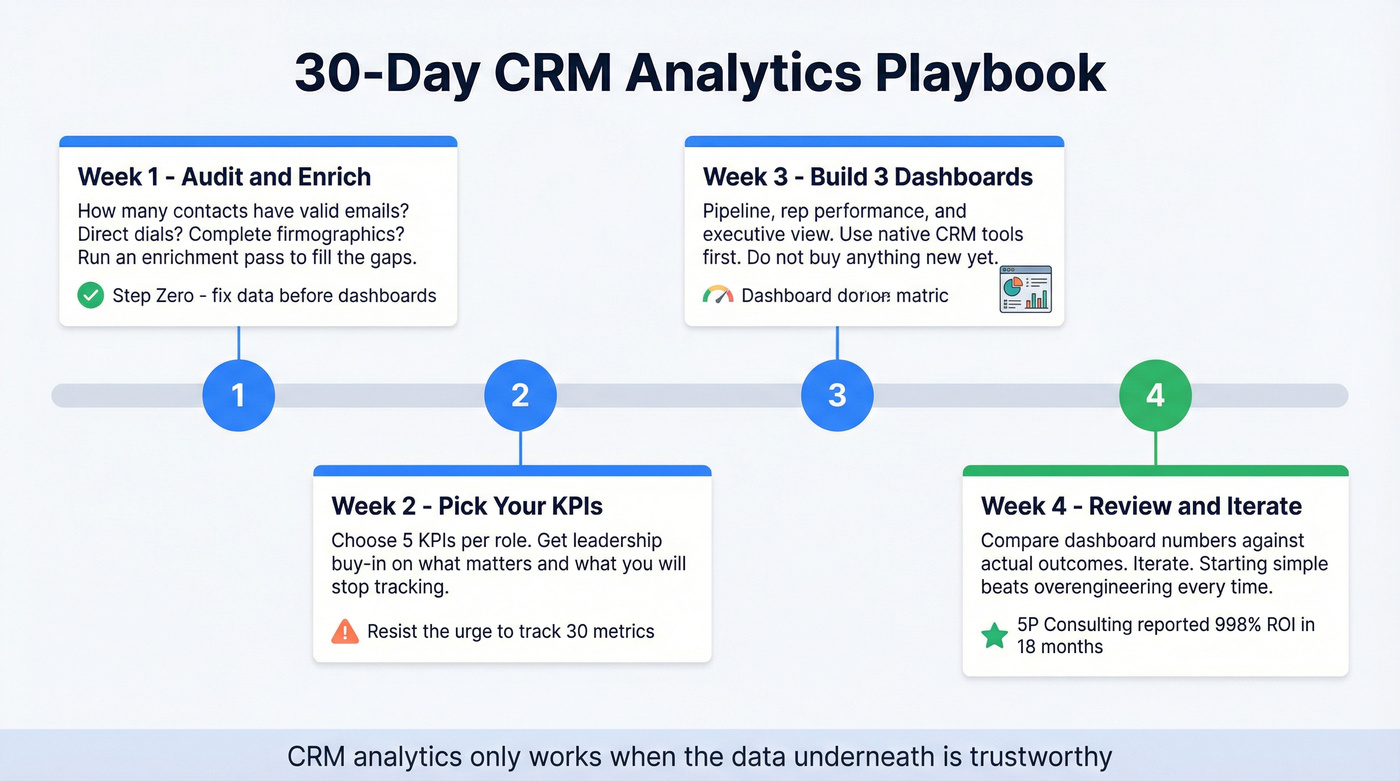
Week 2: Pick 5 KPIs per role using the framework above. Get buy-in from sales leadership on what matters - and more importantly, what you're going to stop tracking.
Week 3: Build three dashboards: pipeline, rep performance, and executive. Use your CRM's native tools first. Don't buy anything new yet. (If you want a template, model it after a sales reporting dashboard.)
Week 4: Review accuracy against actual outcomes. Iterate. A small consulting firm called 5P Consulting reported 998% ROI in 18 months after a 12-hour Salesforce implementation - proof that starting simple and iterating beats overengineering every time.
CRM analytics for sales only works when the data underneath is trustworthy. Get that right and even basic dashboards will outperform the fanciest AI platform sitting on top of garbage records.
Snyk's 50 AEs went from a 35-40% bounce rate to under 5% and generated 200+ new opportunities per month. The difference wasn't a better dashboard - it was better data underneath it. Prospeo's 83% enrichment match rate and native Salesforce/HubSpot integrations make step zero automatic.
Stop spending on analytics tools that report on broken data.
FAQ
What's the difference between CRM reporting and CRM analytics?
Reporting shows what happened - closed deals, pipeline totals, activity counts. Analytics explains why those numbers moved, predicts what's next, and recommends actions. Most teams only use reporting and call it analytics, which is why forecasts miss by 40%+ at many orgs.
Do I need a separate analytics tool on top of my CRM?
Most teams under 50 reps don't. Native HubSpot or Zoho reporting covers pipeline tracking, rep performance, and deal-stage analysis. Invest in Clari or Salesforce CRM Analytics only when you need predictive forecasting across 100+ reps running complex enterprise deals.
How do I improve CRM data quality before building dashboards?
Run an enrichment pass to fill missing emails, phone numbers, and firmographic data across your database. Prospeo's CRM enrichment returns 50+ data points per contact at an 83% match rate, and its 7-day refresh cycle prevents the gradual decay that makes dashboards unreliable over time.
What analytical tools do CRMs provide?
Most modern CRMs include built-in dashboards, pipeline reports, activity tracking, and deal-stage analysis. Higher-tier platforms like Salesforce and Zoho add AI-powered forecasting and anomaly detection. The depth varies significantly by vendor and pricing tier, which is why matching your CRM's analytical capabilities to your team size matters more than chasing the most feature-rich option.