

Office 365 Sending Limits in 2026: Every Cap, Error Code, and Workaround
You migrated from on-prem Exchange to Exchange Online last quarter. Monday morning, your comms team tries to send a partner newsletter to 3,000 external contacts - and it bounces. The admin portal shows a cryptic error code. Nobody knows what the limit actually is, because Microsoft's own Exchange Online limits page covers dozens of categories and half of them require different admin permissions to even view.
Office 365 sending limits aren't complicated once you see them laid out clearly. The problem is that Microsoft scatters them across service descriptions, Defender policies, and tenant-level enforcement systems that didn't exist a couple years ago. The biggest change - a tenant-wide external recipient cap called TERRL - is rolling out in phases that extend into April 2026, and most admins don't know it exists until they hit it.
Quick Reference Table
Here's the cheat sheet. These are the commonly enforced Exchange Online guardrails most admins run into:
- Per-user: 10,000 recipients/day, 500 recipients per message (configurable to 1,000), 30 messages/min
- Tenant-wide (TERRL): Formula-based cap on external recipients, with rollout phases extending into April 2026
- SMTP AUTH: 3 concurrent connections, 30 messages/min, 10,000 recipients/day
- Message size (SMTP): 25 MB
- Non-relationship recipients: 1,000/day - this is the real cold outreach ceiling
If you're consistently bumping against these numbers, you're using the wrong tool for the job. Exchange Online isn't a bulk email platform.
Every Limit at a Glance
| Limit Type | Cap | Window |
|---|---|---|
| Recipients per day | 10,000 | 24 hours |
| Recipients per message | 500 (up to 1,000) | Per message |
| Messages per minute | 30 | Per minute |
| Non-relationship recipients | 1,000 | 24 hours |
| Receiving limit | 3,600 messages | Per hour |
| TERRL (external, tenant) | Formula-based | 24-hr sliding |
| SMTP AUTH connections | 3 concurrent | Ongoing |
| SMTP AUTH rate | 30 messages/min | Per minute |
| Message size (SMTP) | 25 MB | Per message |
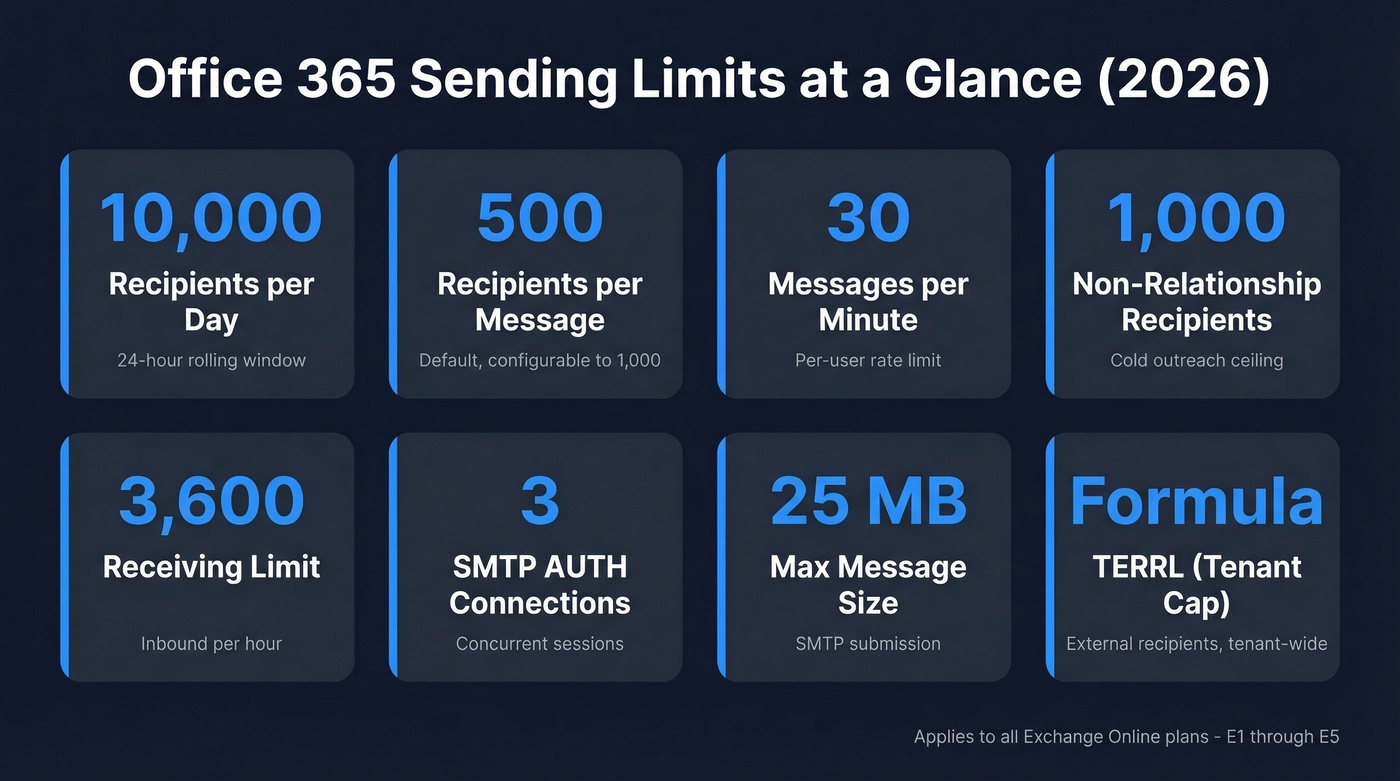
Bookmark this table. You'll come back to it.
Per-User Sending Caps
Whether you're on Office 365 E1 at ~$10/user/month or Microsoft 365 E5 at ~$57/user/month, the per-user sending caps are identical across Exchange Online plans.
| Limit | Value | Notes |
|---|---|---|
| Daily recipients | 10,000 | Rolling 24-hour window |
| Per-message recipients | 500 default, configurable to 1,000 | Admin must change |
| Send rate | 30 messages/min | Rate limit |
| Non-relationship recipients | 1,000/day | Cold contacts only |
| Receiving limit | 3,600/hour | Inbound cap |
The biggest source of confusion we see: "recipients" doesn't mean "messages." If you send one email to 50 people, that's 50 recipients consumed from your 10,000 daily quota - not one. Send 200 emails to one person each, that's 200 recipients. The distinction matters enormously when you're planning a campaign and trying to figure out how many sends you can actually fit into a day.
The 500 recipients-per-message default trips up teams constantly. You can raise it to 1,000 via Exchange Admin Center or PowerShell with Set-Mailbox -RecipientLimits 1000, but you can't go higher. Every article claiming "Office 365 lets you send to 1,000 recipients per message" without mentioning the 500 default is creating confusion - it's 500 unless an admin explicitly changes it.
Here's the one that matters most for outbound teams. The non-relationship recipient limit caps you at 1,000/day for contacts you haven't emailed before. That's your real ceiling for cold outreach from Exchange Online, and it's far lower than the 10,000 headline number suggests. If you're doing cold outreach at any real scale, plan around this number first.
Tenant External Recipient Rate Limit (TERRL)
TERRL is the biggest change to Exchange Online email limits in years. Unlike per-user limits, TERRL caps the total number of external recipients your entire tenant can email in a 24-hour sliding window.
How TERRL Works
The formula for non-trial tenants:
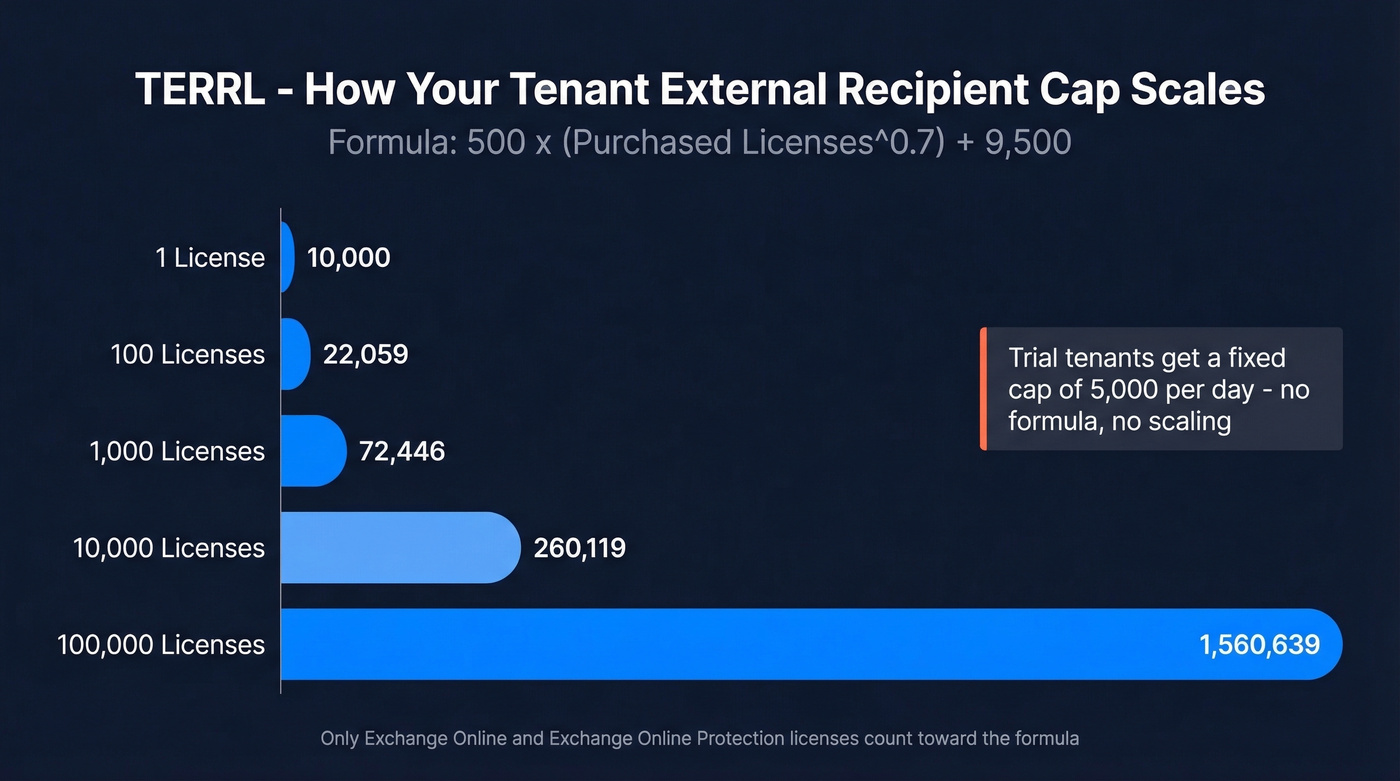
500 x (Purchased Email Licenses^0.7) + 9,500
Only Exchange Online and Exchange Online Protection licenses count. In practice:
| Licenses | Daily External Recipients |
|---|---|
| 1 | 10,000 |
| 100 | 22,059 |
| 1,000 | 72,446 |
| 10,000 | 260,119 |
| 100,000 | 1,560,639 |
Trial tenants get a fixed cap of 5,000 external recipients per day. No formula, no scaling.
That top-end figure - over 1.5 million external recipients per day - only applies to the largest enterprise tenants. Most organizations with a few hundred licenses are working with 20,000-30,000.
What counts toward TERRL: external recipients at domains that aren't configured as accepted domains in your tenant. That includes personal email like Gmail and Yahoo, other Microsoft 365 tenants, and every external member of a distribution list when the DL expands. Send to a 500-person DL where 200 members are external, and that's 200 recipients against your TERRL quota.
Subdomains are treated as external unless you've explicitly added them as accepted domains or set the root domain to Internal Relay with "accept mail for all subdomains" enabled. This catches more organizations than you'd expect.
What doesn't count: journaling, delivery and read receipts (DSNs), Azure Communication Services Email, High Volume Email, and notifications from Microsoft cloud apps like SharePoint, Teams, and Yammer. Email between tenants in a Multi-Tenant Organization also doesn't count.
One edge case worth knowing: if you route outbound mail through a third-party service for signature management or compliance archiving and it comes back to Exchange Online for final delivery, Microsoft can double-count those external recipients. Practical365 documented this issue. If you're using any third-party routing, check whether you can add a mail flow rule using the References header to prevent double-counting.
TERRL Rollout Timeline
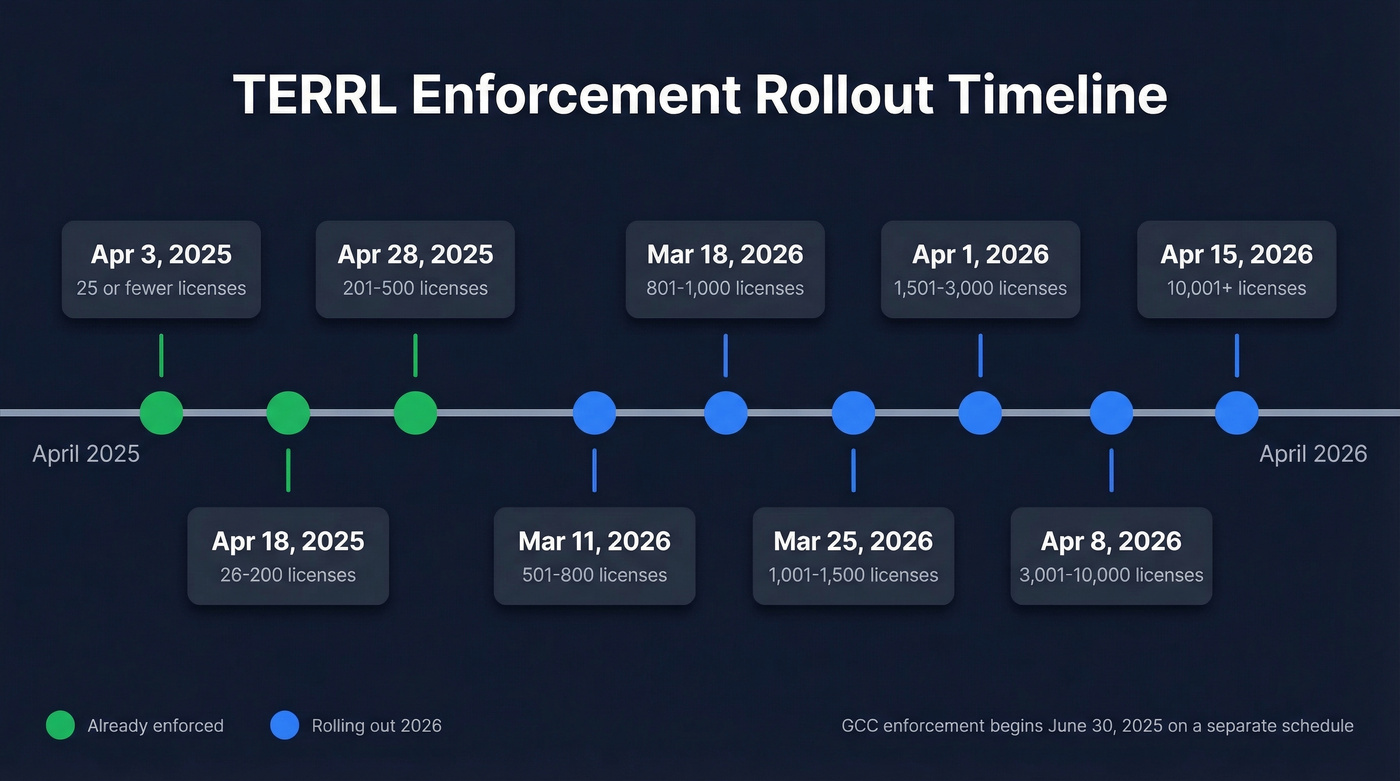
These dates reflect the widely published rollout schedule extending into spring 2026 for larger tenants.
| Tenant Size | Enforcement Date |
|---|---|
| 25 licenses or fewer | Apr 3, 2025 |
| 26-200 licenses | Apr 18, 2025 |
| 201-500 licenses | Apr 28, 2025 |
| 501-800 licenses | Mar 11, 2026 |
| 801-1,000 licenses | Mar 18, 2026 |
| 1,001-1,500 licenses | Mar 25, 2026 |
| 1,501-3,000 licenses | Apr 1, 2026 |
| 3,001-10,000 licenses | Apr 8, 2026 |
| 10,001+ licenses | Apr 15, 2026 |
Government clouds run on a separate schedule: GCC enforcement begins June 30, 2025. GCCH and DoD roll out in the second half of 2025.
When you exceed TERRL, outbound external mail gets blocked with an NDR. Trial tenants see 550 5.7.232; non-trial tenants see 550 5.7.233. There's no soft throttle. It's a hard block until the 24-hour sliding window clears enough headroom.
Monitoring TERRL
In the Exchange Admin Center, navigate to Reports > Mail flow > Tenant Outbound External Recipients Rate. This shows your current usage against the threshold.
For PowerShell, use Get-LimitsEnforcementStatus (requires Exchange Online Management module v3.7 or later). The cmdlet returns your threshold, current observed value, and enforcement status. If you're running automated monitoring, this is the one to script into your daily checks.
SMTP AUTH Submission Limits
If you're sending from applications, devices, or scripts using SMTP AUTH on port 587, you're working with tighter constraints than interactive Outlook users.
| Limit | Value | Error Code |
|---|---|---|
| Concurrent connections | 3 | 432 4.3.2 |
| Messages per minute | 30 | Throttled/delayed |
| Recipients per day | 10,000 | 554 5.2.0 |
| Mailbox full | Blocked | 554 5.2.2 |
The concurrent connection limit catches teams off guard. Three connections per mailbox means three simultaneous SMTP sessions - if your monitoring system, CRM, and ticketing platform all send through the same mailbox, you'll hit 432 4.3.2 regularly. Split sending across multiple mailboxes or consolidate through a relay.
The per-minute throttle is a delay, not a rejection. Microsoft queues excess messages and delivers them as capacity opens. But the daily recipient limit is a hard block - once you hit 10,000, you get 554 5.2.0 and you're done until the window clears.
Here's one nobody expects: SMTP AUTH stores sent messages in the mailbox's Sent Items folder. High-volume senders can fill their mailbox and get blocked with 554 5.2.2. If your app sends thousands of messages daily, either increase the mailbox quota or set a retention policy on Sent Items.
Message Size and Attachments
The 25 MB SMTP limit is the one that matters for programmatic sending. Base64 encoding inflates attachment size by roughly 33%, so a 20 MB file becomes ~27 MB after encoding and won't send. For anything over about 18 MB in raw file size, use a cloud storage link instead of attaching the file directly.

If you're bumping against the 1,000 non-relationship recipient limit, every wasted send on a bad email hurts twice - you burn quota and get nothing back. Prospeo's 98% email accuracy and 5-step verification mean virtually zero bounces eating into your daily caps.
Stop wasting Office 365 sends on unverified emails.
How Distribution Lists Affect Limits
A distribution list in Exchange Online can hold up to 100,000 members. But sending to a large DL doesn't bypass your per-user limits - it expands against them.
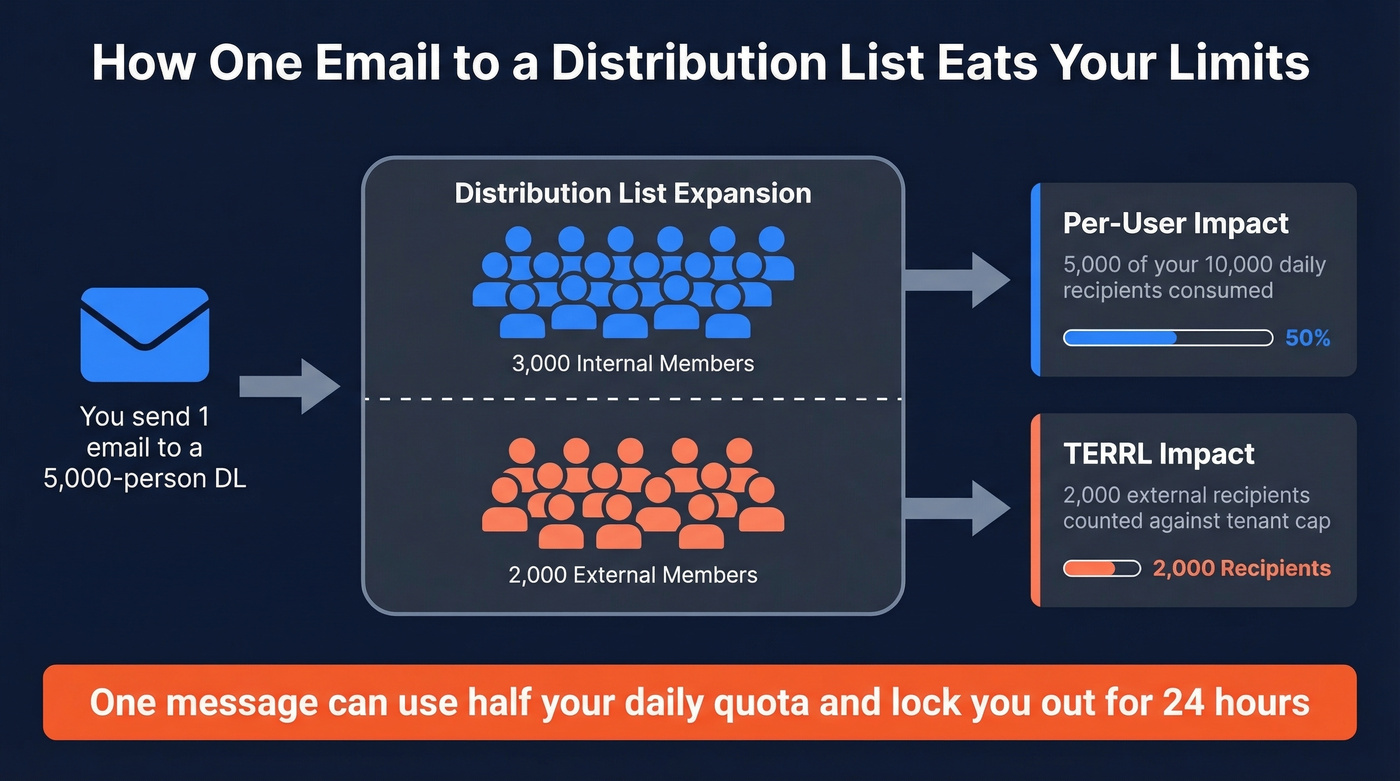
Send one email to a 5,000-person DL, and you've consumed 5,000 of your 10,000 daily recipients. If 2,000 of those members are external, that's 2,000 against your TERRL quota too. For large DLs with mixed internal/external membership, stagger sends across multiple days or split the list into smaller groups. The alternative is hitting your daily cap with a single message and being unable to send anything else for 24 hours, which is exactly the kind of Monday morning surprise nobody wants.
Error Codes for Limit Violations
When something breaks, you need to know what the error code means and what to do about it.
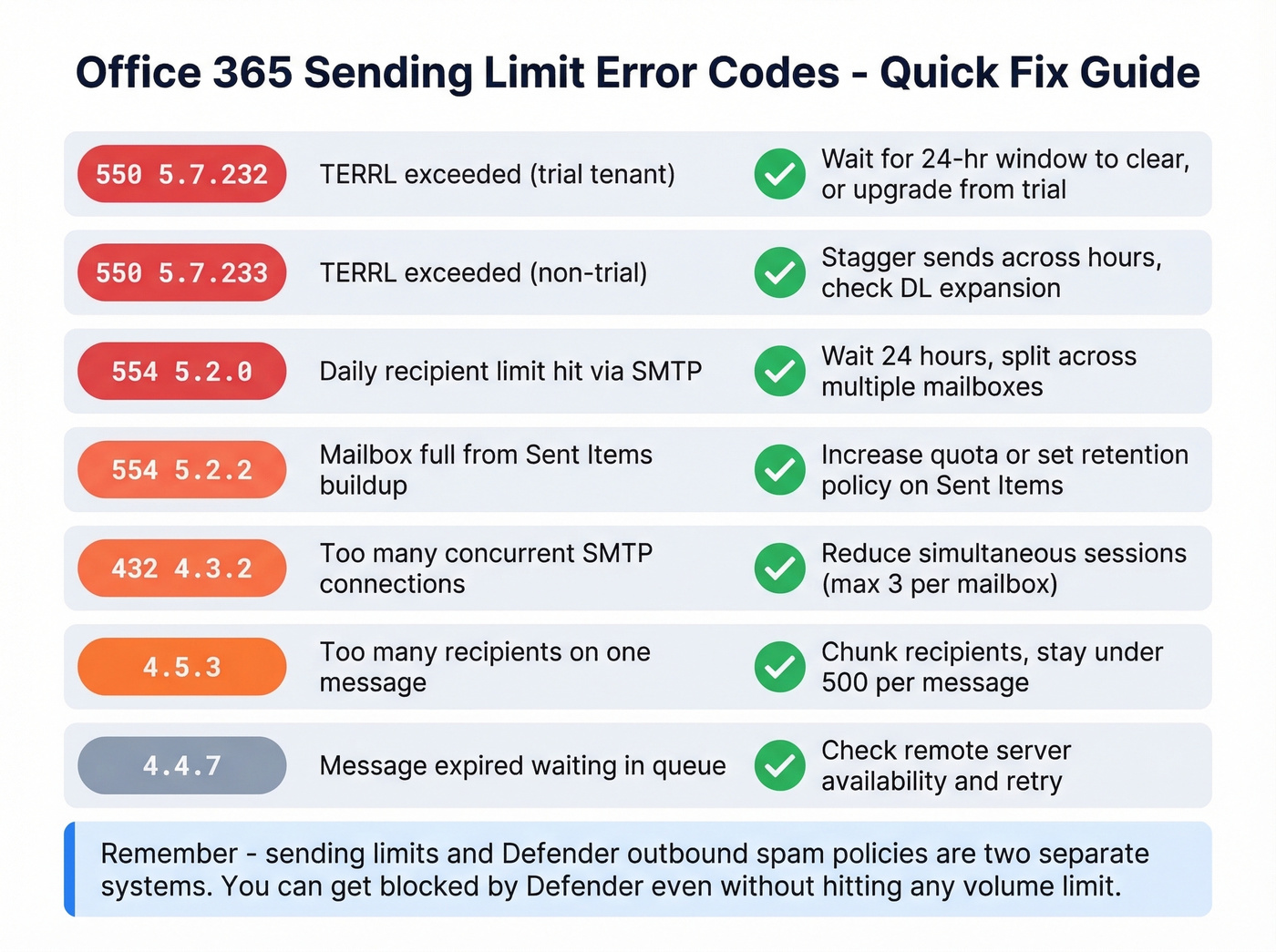
| Error Code | Trigger | Fix |
|---|---|---|
| 550 5.7.232 | TERRL exceeded (trial) | Wait for 24-hr window; upgrade |
| 550 5.7.233 | TERRL exceeded (non-trial) | Stagger sends; check DLs |
| 554 5.2.0 | Daily recipient limit (SMTP) | Wait 24 hrs; split mailboxes |
| 554 5.2.2 | Mailbox full (Sent Items) | Increase quota; purge Sent |
| 432 4.3.2 | Concurrent connections exceeded | Reduce SMTP sessions |
| 4.5.3 | Too many recipients | Chunk recipients per domain |
| 4.4.7 | Message expired in queue | Check remote server; retry |
Let's clear up something that trips up admins constantly: Exchange Online sending limits and Defender's outbound spam policy are two separate systems. This confusion shows up on r/sysadmin all the time. Sending limits throttle or block based on volume thresholds - hit a number, get an NDR or a delay. Defender's outbound spam policy can restrict your entire account if it detects spam-like behavior, even if you haven't hit any volume limit. Different triggers, different consequences, different admin consoles. If you're troubleshooting bounces and placement issues together, it helps to keep an eye on email deliverability and your sender reputation in parallel.
Workarounds When You Hit the Ceiling
It helps to think in terms of the three layers that stack together: per-user caps, tenant-wide TERRL, and the separate SMTP AUTH guardrails.
Transactional and Internal Bulk
Pace your sends to stay under 30 messages/minute. Stagger large sends across hours or days rather than blasting everything at once.
For high-volume internal communications, look at High Volume Email (HVE). For external transactional email like order confirmations and password resets, Azure Communication Services Email is designed for exactly this. Both don't count toward TERRL and run on separate infrastructure from Exchange Online mailbox sending.
Cold Outreach
The non-relationship recipient limit - 1,000/day - is your real ceiling, not the 10,000 headline number. And here's the thing: stop trying to maximize your Microsoft 365 daily email limits. If you're hitting them, you're using the wrong tool for the job. Exchange Online is a business communication platform, not a cold outreach engine. If your deal sizes justify cold email at scale, invest in dedicated sending infrastructure and keep Exchange Online for what it's good at.
What actually matters when you're working within strict daily caps is data quality. Every bounced email wastes a recipient from your quota and damages your sender reputation. We use Prospeo for email verification before any outbound sequence - 98% accuracy with real-time verification and catch-all handling - because when every send counts against a hard daily limit, burning quota on invalid addresses is just painful. If you're building lists from names and domains, name to email workflows can help you generate addresses you can verify before sending. And if you're trying to keep bounce rates down, use an email bounce rate benchmark as your guardrail.

TERRL makes every external recipient count against your tenant quota. Sending to outdated contacts doesn't just bounce - it shrinks your daily headroom for everyone. Prospeo refreshes 300M+ profiles every 7 days, so your lists stay current and your sends actually land.
Make every recipient in your TERRL quota count.
Alternatives for High-Volume Sending
High Volume Email (HVE)
Microsoft's native solution for internal bulk email. HVE is in public preview and supports up to 100,000 internal emails per day per tenant. It doesn't support external sending - strictly company-wide announcements, HR communications, and internal newsletters. You can create up to 20 HVE accounts per tenant. Skip this if you need to reach anyone outside your organization.
Azure Communication Services Email
ACS Email is Microsoft's answer for high-volume external transactional email. Pricing is usage-based at $0.00025 per email plus $0.00012 per MB transferred. To put that in perspective, 1,000 emails at 1 MB each costs $0.37.
The trade-offs: 50 recipients per email max, 10 MB message size limit, and rate limits that include 30 send operations per minute and 100 send operations per 60 minutes. You can request increases through Azure support. ACS Email doesn't count against your Exchange Online limits or TERRL - it's completely separate infrastructure, which is exactly why it exists.
Third-Party Relay Services
When Azure blocks outbound port 25 on your VMs, or when SMTP AUTH retirement forces a change, third-party relay services become the practical answer. This is a common scenario on r/Office365 where admins realize their existing Direct Send setup won't survive a move to a new Azure tenant.
SendGrid and Mailgun both offer free tiers and low-cost starter plans (typically $15-$40/month depending on volume). Both handle authentication, deliverability monitoring, and scale in ways that Exchange Online simply isn't designed for. If you're evaluating tools for safer volume, compare approaches like a dedicated platform vs mailbox sending in an AI bulk email sender stack, and keep an eye on email velocity so you don't torch deliverability.
What's Changing in 2026
Two big shifts are happening right now.
SMTP AUTH Basic Authentication is being retired. The published schedule has gradual rejections starting March 1, 2026, reaching 100% rejections by April 30, 2026. Every device and application using SMTP AUTH with a username and password - MFPs, legacy line-of-business apps, monitoring systems, scan-to-email setups - needs to migrate to OAuth 2.0, switch to ACS Email or HVE, or move to a third-party relay. Legacy devices that can't do OAuth have no path forward within Exchange Online via SMTP AUTH. If you haven't started planning this migration, you're already behind.
TERRL enforcement is extending into 2026 for large tenants. Organizations with more than 10,001 licenses are scheduled for April 15, 2026 enforcement. If you're in that bracket, run Get-LimitsEnforcementStatus now and understand where your tenant sits relative to the threshold - before enforcement goes live and your Monday morning newsletter bounces.
Office 365 Sending Limits FAQ
Are sending limits the same across all Microsoft 365 plans?
Per-user sending limits - 10,000 recipients/day, 30 messages/min, 500 recipients per message - are identical across Exchange Online plans, from Business Basic to E5. TERRL varies by total license count in the tenant, not by plan tier.
Can I increase the 500 recipients-per-message limit?
Yes. Admins can raise it to 1,000 via Exchange Admin Center or PowerShell using Set-Mailbox -RecipientLimits 1000. You can't go above 1,000 - that's a hard ceiling enforced by Microsoft.
Does TERRL apply to internal emails?
No. TERRL only counts recipients at domains not configured as accepted domains in your tenant. Internal mail between users in your organization isn't affected by this limit at all.
What's the difference between sending limits and the outbound spam policy?
Sending limits throttle or block based on volume thresholds - hit the number, get an NDR. Defender's outbound spam policy restricts your account when it detects spam-like patterns, regardless of volume. They're separate systems in different admin consoles.
How do I avoid wasting daily quota on bounced emails?
Verify your contact list before importing it into any outbound sequence. Tools like Prospeo catch invalid addresses, catch-all domains, and spam traps before they burn through your recipient quota - 98% accuracy with a free tier of 75 verifications per month.