

Email Open Tracking: How It Works, Why It's Broken, and What to Measure Instead
Your dashboard says 58% open rate. Your reply rate says 1.2%. Your calendar says zero meetings booked this week.
Something doesn't add up - and open tracking is the reason. The gap between "opened" and "engaged" has never been wider, and it's getting worse every quarter.
What Is Email Open Tracking?
Open tracking works by embedding an invisible 1x1 pixel image into the HTML body of your email. When a recipient's email client renders the message and loads that image, it sends a request back to the sender's server. That request gets logged as an "open."
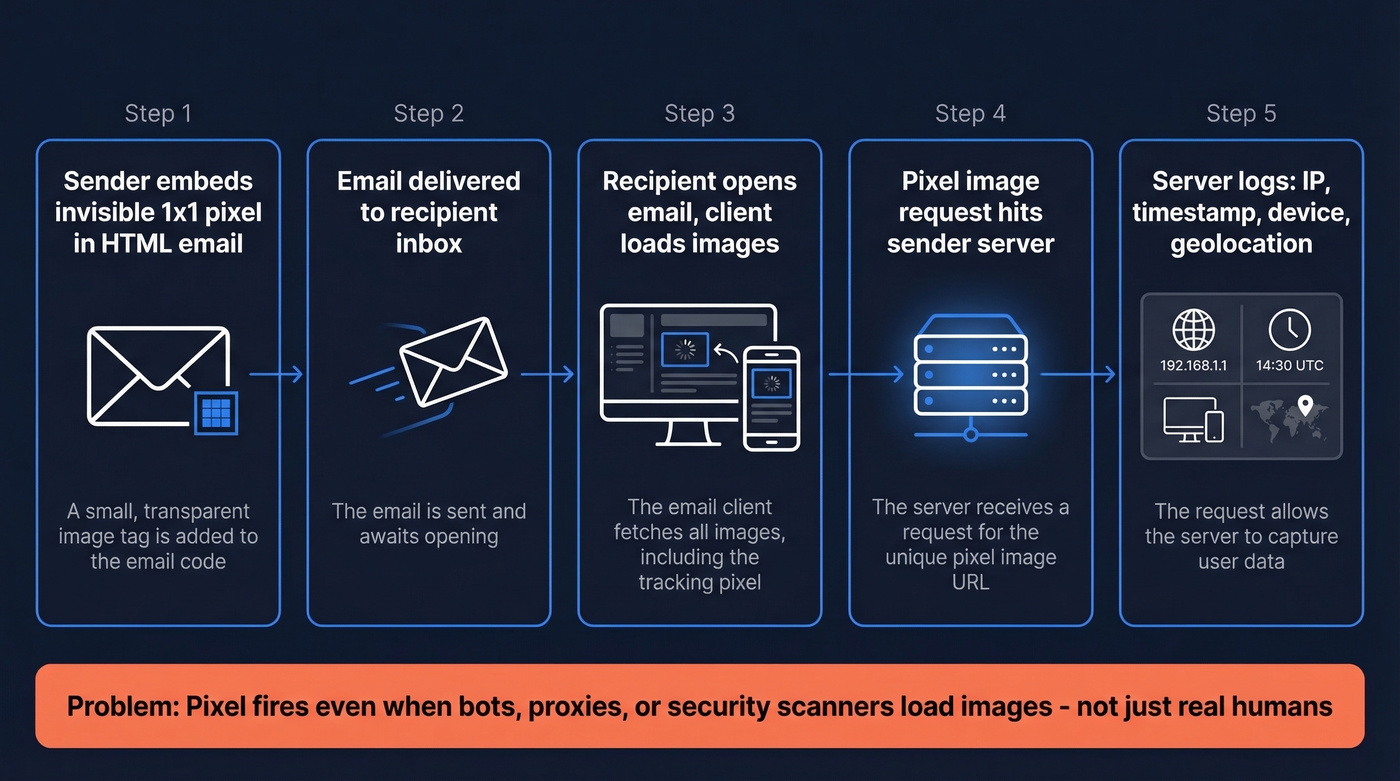
The server captures a handful of metadata with each pixel fire: the recipient's IP address, a timestamp, device type, and rough geolocation. This mechanism has been the default engagement signal in sales and marketing for over a decade.
Here's the thing: the pixel only fires if images load. Plain text emails can't carry a tracking pixel. Emails where images are blocked by default don't trigger it. And emails pre-fetched by a privacy proxy? They fire the pixel whether a human ever reads the message or not. Apple alone accounts for roughly 49% of all email opens, which is why open data can be massively inflated in Apple-heavy audiences.
Why Open Tracking Is Broken in 2026
Apple Mail Privacy Protection
Apple Mail Privacy Protection, launched in September 2021, is the single biggest reason open rates are unreliable. MPP routes email images - including tracking pixels - through Apple's proxy servers. The proxy preloads images regardless of whether the recipient actually reads the email. Your pixel fires. Your server logs an "open." Nobody opened anything.
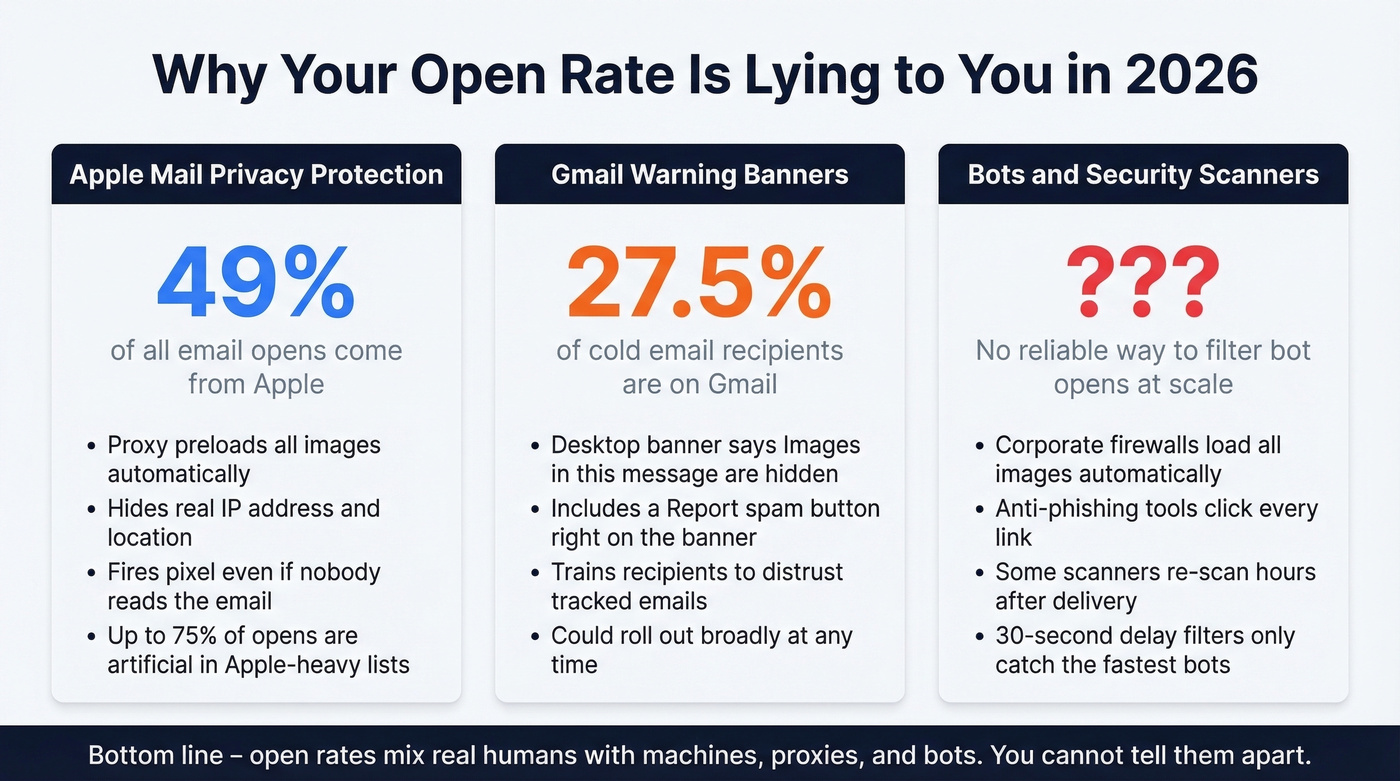
MPP hides the recipient's real IP address and replaces it with proxy data, which breaks geolocation and device-level insights. Timestamps become unreliable too, because many "opens" are machine-generated preloads rather than real reading behavior.
Litmus data shows Apple accounts for about 49% of all email opens. In Apple-heavy audiences, up to 75% of reported opens are entirely artificial. And 77% of marketers believe MPP activates automatically - it's technically opt-in, but adoption rates are high enough that the practical effect is near-universal. If someone reads email in Apple Mail, even if their mailbox is Gmail, MPP applies.
iOS 18 piled on more complications. AI-generated inbox previews, branded sender icons, and digest-style views change how recipients interact with email before they ever "open" it. Link Tracking Protection strips UTM parameters in Mail and Safari, making attribution even murkier.
Gmail's Warning Banner
Since mid-2024, Gmail has tested a prominent banner on some desktop inboxes: "Images in this message are hidden." The banner includes a "Report spam" option - not just a visual annoyance, but an invitation for recipients to flag your email.
QuickMail's aggregate data shows reply rates stayed stable during the experiment window, and the banner doesn't appear on mobile. But the recipient domain split matters: Gmail accounts for about 27.5% of cold email recipients, Outlook 29.9%. If Gmail rolls this out broadly, a quarter of your list sees a warning label on every tracked email you send.
Bots, Scanners, and False Opens
Corporate email security tools - firewalls, link scanners, anti-phishing systems - routinely load all images and click all links in inbound emails before a human sees the message. Every automated load registers as an "open" in your dashboard.
There's no reliable way to distinguish bot opens from real opens at scale. Some tools use a 30-second delay filter, ignoring any open that fires within half a minute of delivery on the theory that humans don't read emails that fast. It helps, but security scanners don't all operate on the same timeline, and some re-scan messages hours later. To make it worse, some tools still log "opens" even with tracking disabled - unsubscribes and replies can trigger an open event in your analytics.
The Deliverability Cost of Tracking Pixels
Open tracking doesn't just give you bad data. It actively hurts your ability to reach inboxes.
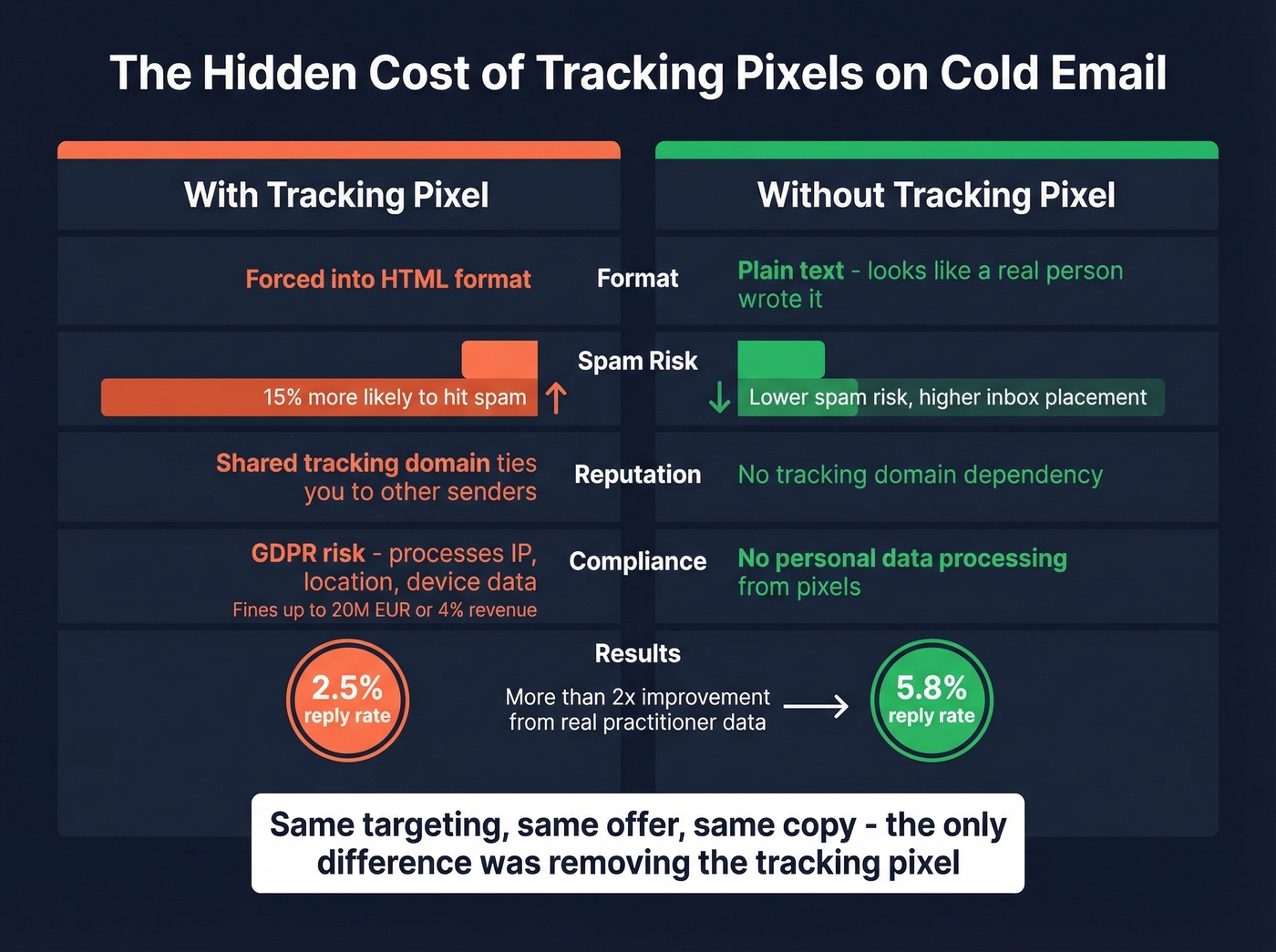
The tracking pixel forces your email into HTML format. Plain text emails - the kind that look like a real person typed them - can't carry a pixel. For cold email, this matters enormously. Email providers interpret the presence of a hidden image as a promotional or sales signal, and research from Lemlist suggests emails with tracking pixels are roughly 15% more likely to be flagged as spam than emails without them.
Then there's the shared tracking domain problem. If you're using your email tool's default tracking domain, your reputation is tied to every other customer on that domain. One bad actor tanks deliverability for everyone.
The compliance angle is real too. Under GDPR, tracking pixels process personal data - IP addresses, location, device info - which requires disclosure or consent. Fines run up to EUR 20M or 4% of global revenue. CCPA carries $7,500 per intentional violation.
A practitioner on r/coldemail reported their reply rate jumped from 2.5% to 5.8% after disabling open tracking and switching to plain text - same targeting, same offer, two consecutive campaigns. That's not a marginal improvement. That's more than double.
Test It Yourself
Don't take our word for it. Split your next campaign: send 500 emails with pixel tracking enabled and 500 without, same copy and targeting. Compare inbox placement rates and reply rates after 48 hours. If the no-tracking cohort outperforms - and in our experience, it almost always does for cold email - you have your answer.

Open tracking is unreliable because most tools optimize for vanity metrics. Prospeo optimizes for the metric that matters: replies. With 98% email accuracy and a 7-day data refresh cycle, your emails reach real inboxes - not spam folders inflated by bot opens.
Replace phantom opens with real pipeline. Start free today.
When Open Tracking Still Makes Sense
Let's be honest: this metric isn't completely useless. It's useless for the thing most people use it for, which is measuring whether individual prospects engaged with a specific email.
Use it when:
- You need trend data over time. If your open rate drops off a cliff week-over-week, that's an early warning you've landed in spam folders. Opens viewed as directional trend data - not absolute numbers - can flag deliverability problems before they become catastrophic.
- You're cleaning your list. Open and click data helps identify truly dead segments. If a cohort shows zero engagement across multiple sends over months, suppress them.
- You're A/B testing subject lines on low-Apple audiences. If your list skews low-Apple, relative open rate differences between variants are still useful (and you can pull ideas from subject lines that consistently perform).
- You're sending marketing email to opted-in lists. Established sender reputation makes the deliverability cost of a tracking pixel minimal.
Skip it when:
- You're sending cold email. The deliverability cost outweighs any data you'd get back (use a proper cold email sequence instead).
- Your audience is 40%+ Apple Mail. The data is too contaminated to act on.
- You're using opens for automation triggers. "If opened, send follow-up" workflows fire on bot opens, Apple proxy opens, and security scanner opens. You'll spam people who never saw your first email.
The hard rule: never use opens for individual-level automation. Period.
Best Practices If You Keep It On
If pixel-based tracking is worth the tradeoff for your use case, do it right.
Set up a custom tracking domain. Create a subdomain like track.yourdomain.com and add a CNAME record in your DNS pointing to your email tool's tracking server. This separates your reputation from the shared default domain (more on tracking domain setup). Align the tracking subdomain with your sending domain - track.acme.com for emails sent from @acme.com - to strengthen legitimacy with spam filters.
Don't share tracking domains across tools. If you're running Instantly for cold email and Mailchimp for newsletters, each needs its own tracking subdomain. Using the same one creates DNS conflicts and muddies your reputation signals.
Enable selectively, not globally. Turn on tracking for specific test campaigns - a subject line A/B test, a deliverability canary - not for every email that leaves your domain.
Use a tracking delay filter. Most modern cold email tools offer a setting to ignore opens that fire within 30 seconds of delivery. This filters out the fastest bot and scanner opens. It won't catch everything, but it removes the most obvious noise.
What to Track Instead of Opens
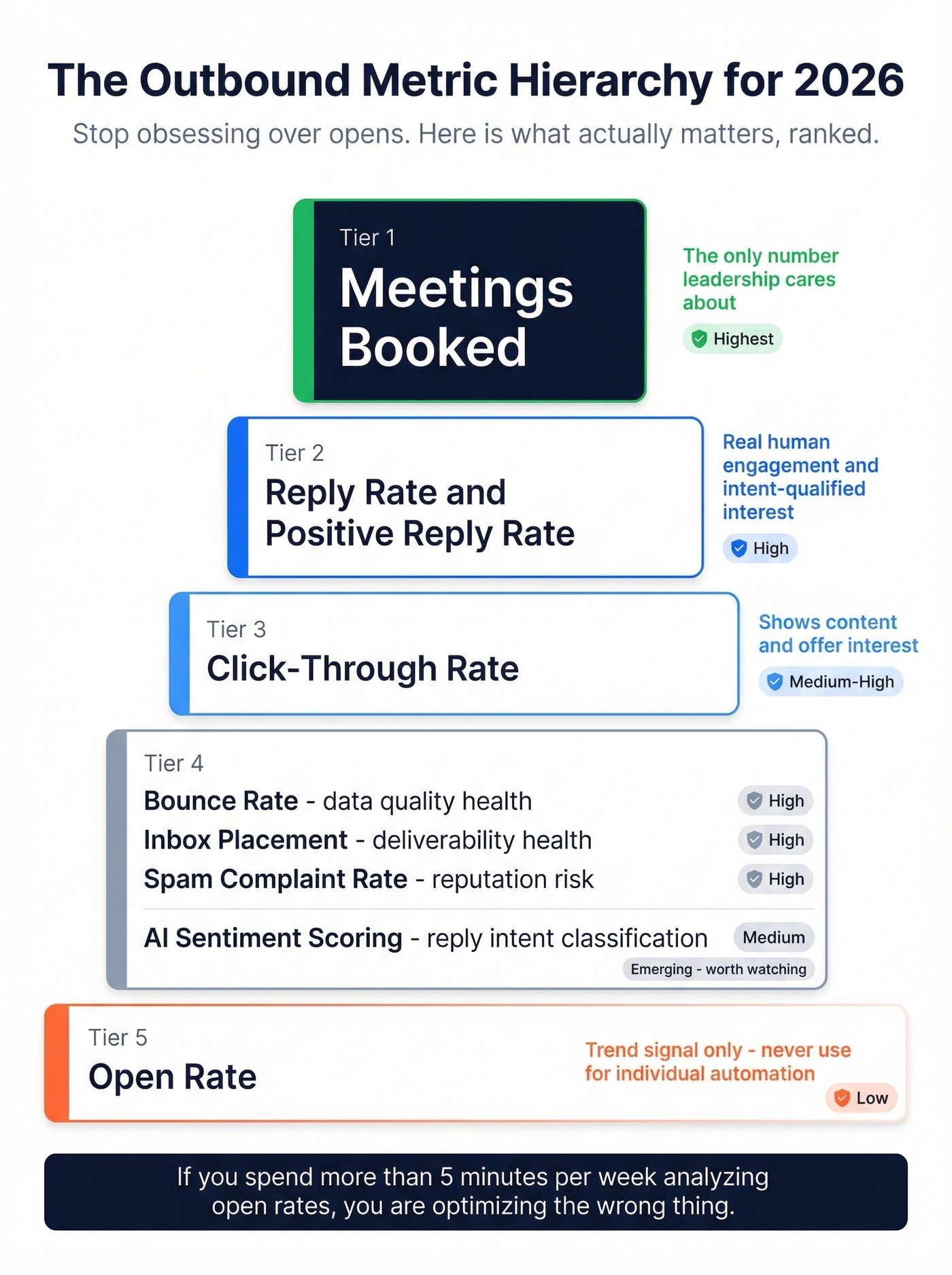
Here's the metric hierarchy for outbound in 2026, ranked by how much you should care:
| Metric | What It Tells You | Reliability |
|---|---|---|
| Reply rate | Real human engagement | High |
| Positive reply rate | Intent-qualified interest | High |
| Meetings booked | Bottom-line outcome | Highest |
| Click-through rate | Content/offer interest | Medium-high |
| Bounce rate | Data quality health | High |
| Inbox placement | Deliverability health | High |
| Spam complaint rate | Reputation risk | High |
| AI sentiment scoring | Reply intent classification | Medium |
| Open rate | Trend signal only | Low |
Reply rate is your north star. Meetings booked is the number your leadership actually cares about. Everything else is diagnostic.
AI sentiment scoring is the emerging metric worth watching. NLP models classify replies by intent - interested, objection, not interested, meeting booked - giving you a qualitative layer that binary open/no-open never could. Tools like Instantly and Smartlead are building this into their analytics. It's still early, but it tells you more than a pixel fire ever will.
We've said it before and we'll keep saying it: most teams don't have an open tracking problem. They have a data quality problem dressed up as a tracking problem. If your bounce rate is in the double digits, no amount of metric optimization matters - you're not reaching enough inboxes for any signal to be meaningful.
The priority stack: reply rate first, meetings booked second, click-through rate third, bounce rate fourth (see bounce rate benchmarks and fixes), and open rate as a distant fifth, useful only as a trend indicator. If you're spending more than five minutes per week analyzing open rates, you're optimizing the wrong thing.
The Real Problem: Your Data
If 1,800 out of 5,000 emails in your last campaign bounced, that's a 35% bounce rate. You're burning sender reputation with every send, and no metric downstream will save you.
Data quality is the upstream fix that makes every downstream metric reliable. We've seen this pattern over and over: teams obsess over open rates while sitting on lists where a huge chunk of contacts are invalid, outdated, or straight-up fake.
Prospeo's 5-step verification - catch-all handling, spam-trap removal, honeypot filtering - delivers 98% email accuracy across 143M+ verified emails, with every record refreshed on a 7-day cycle compared to the 6-week industry average. Snyk cut bounce rates from 35-40% to under 5%, and Meritt went from 35% to under 4%.
When your bounce rate is under 5%, your reply rate becomes a real signal. Your deliverability stays healthy. And you stop needing a tracking pixel to tell you whether your emails are working - because the replies tell you directly (and your follow-ups can be tighter with proven sales follow-up templates).
Bad data forces you to rely on open tracking to guess what's working. When 83% of your leads come back with verified contact data and bounce rates drop below 4%, you don't need a tracking pixel to know your emails are landing.
Ditch the pixel. Fix the data. Book more meetings.
FAQ
Does open tracking work with plain text emails?
No. It requires an embedded HTML image - the tracking pixel. Plain text emails can't load images, so opens go unrecorded. Disabling pixel tracking often means switching to plain text, which improves deliverability for cold outbound.
Can recipients see the tracking pixel?
Not usually. The pixel is a 1x1 transparent image, invisible to the naked eye. But some email clients flag hidden images, and Gmail's warning banner experiment specifically targets emails with invisible image loads. Savvy recipients know to look for them.
Is email open tracking legal?
Under GDPR, tracking pixels process personal data - IP, location, device - requiring disclosure or consent. Fines reach EUR 20M or 4% of global revenue. CCPA carries $7,500 per intentional violation. Most cold email tools don't surface this risk, but the legal exposure is real.
What's a reliable open rate benchmark in 2026?
For cold email, open rates are too unreliable to benchmark meaningfully. Typical dashboards show 40-60%, but with Apple MPP inflating numbers, the real figure could be half that. Focus on reply rate instead - it's the only engagement metric that can't be faked by a proxy server.
How do I reduce bounces before worrying about engagement metrics?
Use a dedicated verification tool that runs multi-step checks including catch-all handling and spam-trap removal. Verifying before you send keeps bounce rates under 5% and protects sender reputation - which matters far more than whether anyone "opened" your message.