

Opt-In Email Lists: Build, Maintain, and Protect Yours in 2026
Email marketing returns $36 for every $1 spent - but only when your messages actually reach inboxes. Most websites capture fewer than 1 email for every 200 visitors. That's a brutal baseline, and it gets worse if the emails you collect bounce, trigger spam complaints, or sit untouched in dead inboxes.
The foundation of every high-performing email program? Opt-in email lists built on genuine subscriber consent.
Here's the short version: double opt-in outperforms single opt-in on the engagement metrics that actually matter - opens and clicks. Use it unless you've got data saying otherwise. The Gmail and Yahoo bulk sender rules mean list quality is now enforced at the infrastructure level. And your list decays 20-30% per year, whether you're paying attention or not.
What Is an Opt-In Email List?
An opt-in email list is a collection of email addresses where every subscriber actively chose to receive your messages. No purchased lists, no scraped directories, no "we added you because you downloaded a PDF in 2019."
The concept traces back to Seth Godin's Permission Marketing (1999), which argued that marketing works better when people actually want to hear from you. Revolutionary then, table stakes now.
Two flavors exist. Single opt-in (SOI): someone enters their email and they're on the list immediately. Double opt-in (DOI): they enter their email, receive a confirmation message, and click a link to verify. That extra step matters more than most marketers think.
Sender Rules Shaping 2026 Deliverability
In February 2024, Gmail and Yahoo began enforcing [bulk sender requirements](https://support.google.com/a/answer/81126?hl=en) that turned opt-in quality from best practice into technical mandate. Two years later, these rules still govern whether your emails reach inboxes. If you send more than 5,000 emails per day to Gmail or Yahoo addresses, you must:
- Authenticate with SPF, DKIM, and DMARC - no exceptions
- Provide one-click unsubscribe and honor it within 2 days
- Keep spam complaint rates below 0.3% - just 3 complaints per 1,000 messages
Here's the thing: 0.3% sounds generous until you realize that a single bad batch - emailing a segment that didn't really opt in - can blow past that threshold in an afternoon. Once your sender reputation drops, clawing it back takes weeks. Gmail doesn't care about your open rates. It cares about complaint rates, and complaint rates are a direct function of consent quality.
Single vs. Double Opt-In
Most businesses default to single opt-in. Most email platforms ship with SOI as the default. But the data tells a different story.
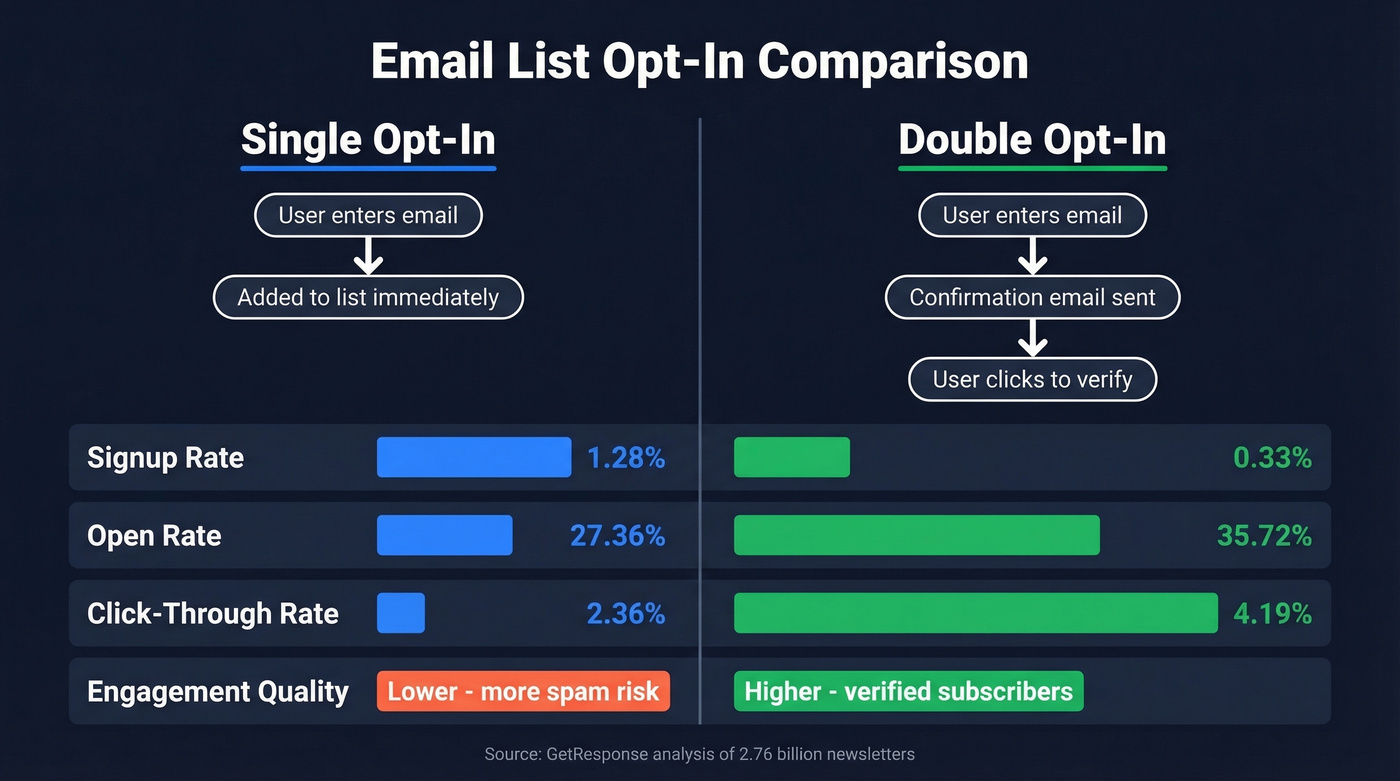
GetResponse analyzed premium SMB accounts across 2.76 billion newsletters and found that while SOI wins on volume, DOI wins on everything that actually matters for revenue:
| Metric | Single Opt-In | Double Opt-In |
|---|---|---|
| Subscription rate | 1.28% | 0.33% |
| Open rate | 27.36% | 35.72% |
| Click-through rate | 2.36% | 4.19% |
| Legal requirement | Never | Germany only |
| Best for | Speed, list size | Engagement, compliance |
DOI cuts your signup rate by roughly 75%, but it nearly doubles your CTR. The subscribers you lose are the ones who would've ignored you anyway - or worse, marked you as spam. In our experience, DOI lists outperform SOI lists by even more than these benchmarks suggest because the quality gap compounds over time. After six months, the engagement difference between a DOI list and an SOI list of the same age isn't 2x - it's closer to 3x, because DOI subscribers stick around longer and click more consistently.
One caveat on open rates: Apple Mail Privacy Protection pre-fetches images, inflating open rate metrics across the board. MailerLite's 2025 benchmark across 3.6 million campaigns shows a 43.46% average open rate - suspiciously high, and largely an Apple MPP artifact. CTR is the more reliable engagement metric, which is why DOI's 4.19% vs. 2.36% gap matters more than the open rate difference.
Germany is the one place where confirmed opt-in is treated as legally required, via courts' interpretation of valid consent. Everywhere else, it's technically optional. Given the engagement gap and the sender rules, treat DOI as your default anyway.
Compliance and Consent by Region
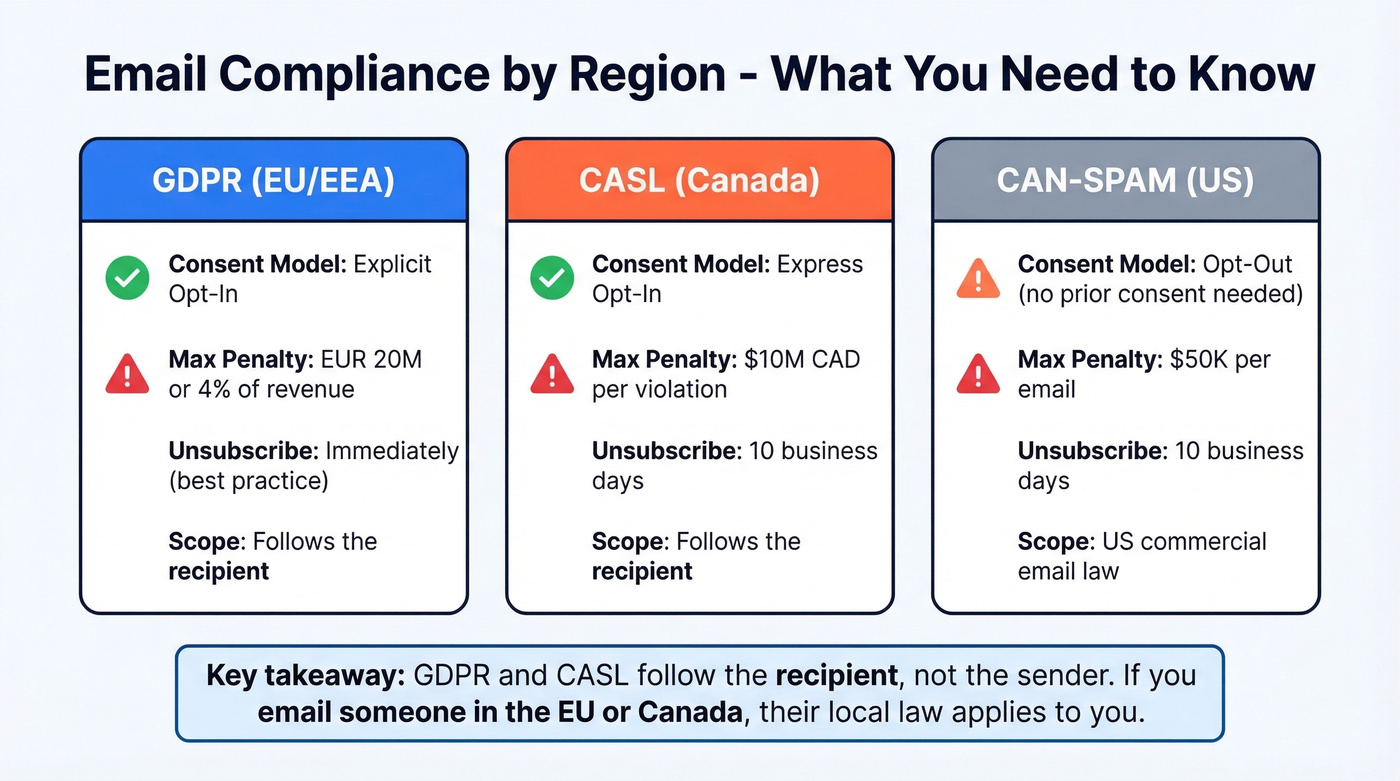
The three major regulatory frameworks differ more than most marketers realize.
| GDPR (EU/EEA) | CASL (Canada) | CAN-SPAM (US) | |
|---|---|---|---|
| Consent model | Opt-in (explicit) | Opt-in (express) | Opt-out |
| Max penalty | EUR 20M / 4% revenue | $10M CAD/violation | $50K/email |
| Unsubscribe timing | Immediately (best practice) | 10 business days | 10 business days |
| Scope | Recipient location | Recipient location | US commercial email law |
The critical distinction: GDPR and CASL follow the recipient. If you're a US company emailing someone in Berlin, GDPR applies. CAN-SPAM is the most permissive, allowing emails without prior consent as long as you honor opt-outs.
One trap to watch: transactional emails like order confirmations and password resets are generally exempt from these rules. But the moment you add promotional content to a transactional email, you lose that exemption under CASL and GDPR. Keep transactional messages clean.

You're building a clean opt-in list - don't ruin it with bad outbound data. Prospeo's 5-step email verification and 7-day data refresh keep bounce rates under 4%, so your sender reputation stays well below that 0.3% complaint threshold.
Start with 75 free verified emails and see the difference clean data makes.
Opt-In Forms That Convert
Over 70% of visitors who leave your site never return. Your opt-in form is often your only shot at capturing them, and not all forms perform equally.
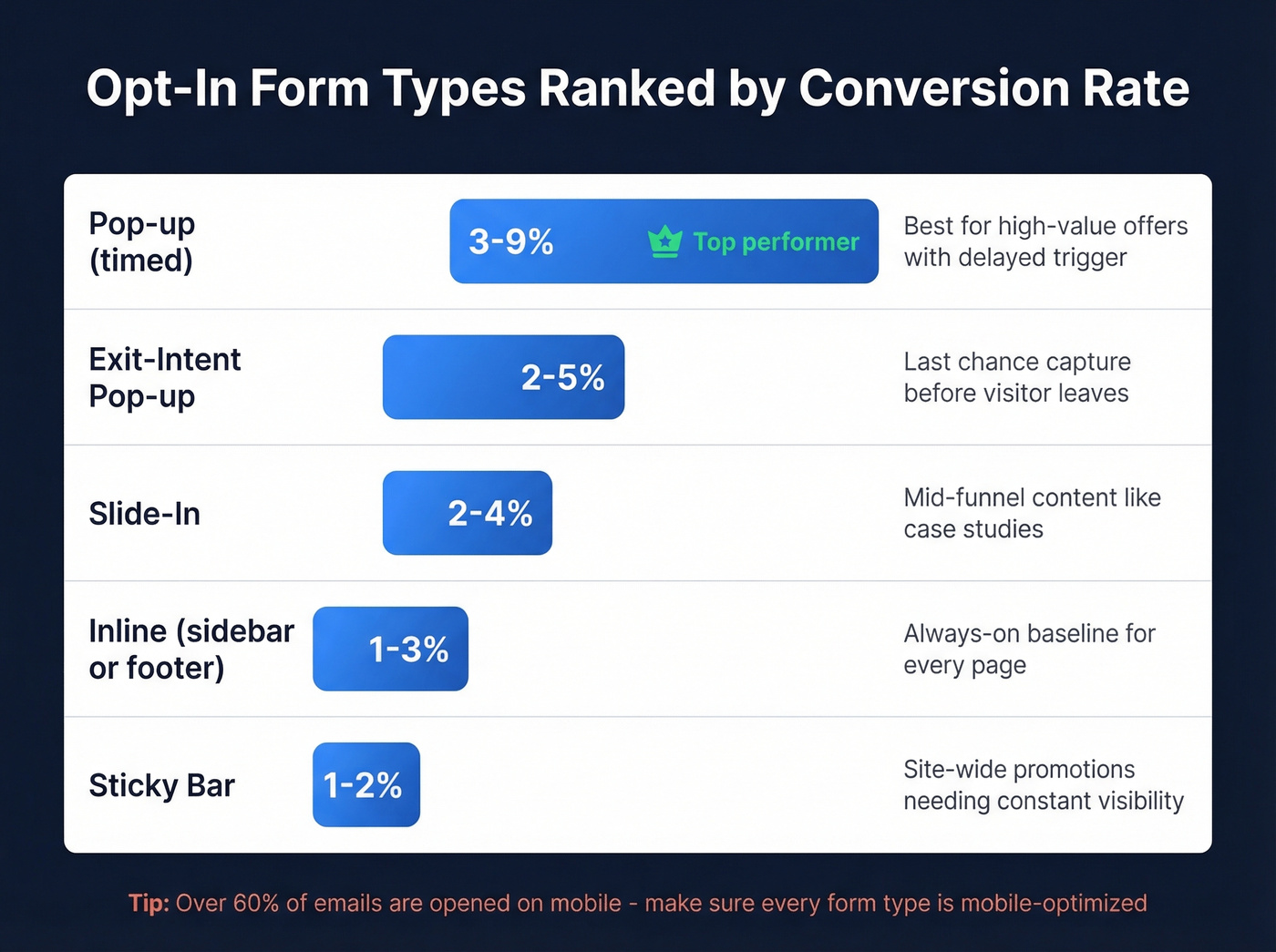
Pop-ups are the clear winner. Well-timed pop-ups convert in the 3-9% range, making them the highest-converting form type by a wide margin. The key is timing - don't trigger on page load. We've tested exit-intent pop-ups across B2B sites and the 2-5% conversion range holds consistently. You've already lost the visitor at that point, so make the offer count.
The rest of your form arsenal fills different gaps:
| Form Type | Conversion Range | Best Use Case |
|---|---|---|
| Inline (sidebar, footer) | 1-3% | Always-on baseline for every page |
| Slide-in | 2-4% | Mid-funnel content like case studies |
| Sticky bar | 1-2% | Site-wide offers needing constant visibility |
| Exit-intent | 2-5% | Last-chance capture with a strong offer |
Something that matters more than form type: over 60% of emails are opened on mobile. If your opt-in forms aren't mobile-optimized, you're losing the majority of your audience before they even see the form.
Copy Templates You Can Steal
The language on your opt-in form matters as much as the form type. Four templates covering the most common scenarios:
Newsletter signup checkbox:
Send me the weekly [Topic] briefing - actionable insights in 5 minutes, every Tuesday. No spam, unsubscribe anytime.
Lead magnet CTA:
Get the [Resource Name] free. Enter your email and we'll send it immediately - plus occasional tips on [topic]. You can opt out with one click.
Double opt-in confirmation email:
Thanks for signing up! Click below to confirm your subscription and start receiving [specific value]. If you didn't request this, just ignore this email. [Confirm My Subscription]
Preference center prompt (post-signup):
Want to customize what you receive? Choose your topics and frequency so we only send what's relevant. [Update Preferences]
Every template follows the same structure: clear value proposition, specific CTA, and privacy assurance. The preference center prompt lets subscribers self-segment, which improves engagement and reduces unsubscribes down the line.
How to Maintain Your List
Building the list is half the job. The other half is keeping it clean.
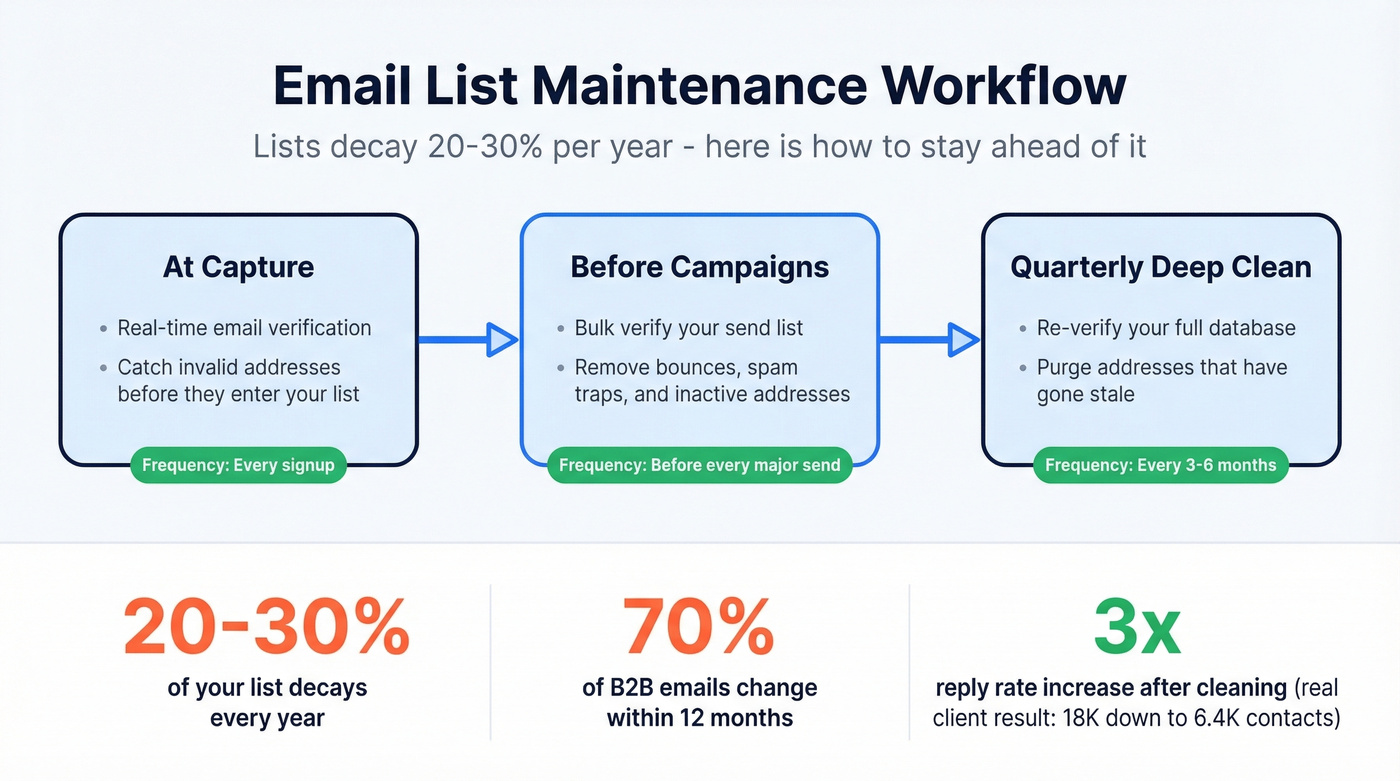
Email lists decay 20-30% per year. For B2B lists, it's worse - up to 70% of job-related email addresses change within 12 months as people switch roles or leave companies. Every invalid address is a potential bounce, and bounces erode the sender reputation you've worked to build.
Let's be honest: if your deals average under $15K, you probably don't need enterprise-grade data tools. But you absolutely need verification. A clean 2,000-person list will outperform a dirty 20,000-person list every single time. We saw this firsthand with a client who cut their list from 18,000 to 6,400 after verification - their reply rate tripled within two campaigns.
The maintenance cadence that works: validate at capture with real-time verification, bulk verify before major campaigns, and re-verify your full list every 3-6 months.
Prospeo's email verification runs a 5-step process at 98% accuracy, including catch-all domain handling and spam-trap removal. A 5,000-person list costs about $50 at $0.01/email - compare that to weeks of blocklist recovery. The free tier covers 75 verifications per month, which is enough to test the workflow before committing.
Lists decay 20-30% per year. Prospeo refreshes every record every 7 days - not the 6-week industry average - so your enriched contacts stay current and your deliverability stays intact. 98% email accuracy at $0.01 per lead.
Stop emailing dead inboxes. Refresh your contact data weekly with Prospeo.
Mistakes That Kill Your Lists
These mistakes are embarrassingly common, and every one of them is avoidable.
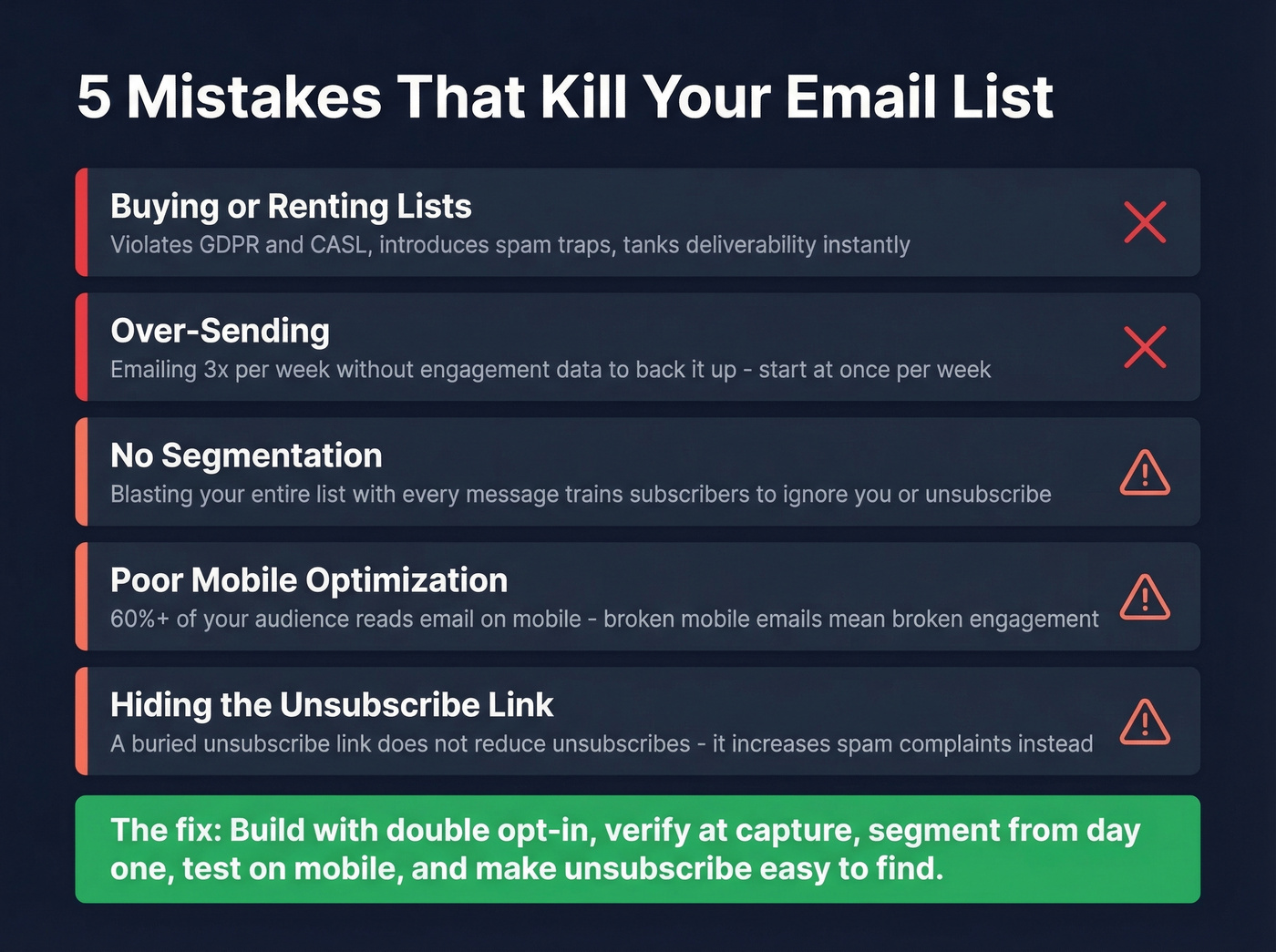
Buying or renting lists. Purchased lists violate GDPR and CASL, tank deliverability, and introduce spam traps. The consensus on r/emailmarketing is unanimous: there's no shortcut here, and anyone selling you a "targeted" list is selling you a deliverability nightmare. If you're tempted, read our breakdown on buying email lists first.
Over-sending. Automation makes it easy to email three times a week. Your subscribers will make it easy to mark you as spam. Start at once per week and increase only if engagement data supports it. If you're scaling volume, keep an eye on email velocity so you don't trip provider limits.
No segmentation. Blasting your entire list with every message trains subscribers to ignore you - or unsubscribe. Even basic segmentation by signup source or content interest cuts unsubscribe rates significantly. For a practical framework, see intent based segmentation.
Poor mobile optimization. If your emails look broken on a phone, 60%+ of your audience sees a broken email. Test on mobile before you hit send. Also consider email copywriting patterns that keep mobile scannability high.
Hiding the unsubscribe link. A buried unsubscribe link doesn't reduce unsubscribes. It increases spam complaints. Make it visible. Skip the tiny grey text at the bottom of a wall of legal disclaimers - put the link where people can actually find it. If complaints are creeping up, use a spam checker and tighten your targeting.
FAQ
Is double opt-in legally required?
Only in Germany, where courts interpret GDPR consent as requiring confirmation. Everywhere else it's a best practice, not a legal mandate. The engagement data - nearly double the CTR - makes a strong case for using it regardless. DOI also gives you a verifiable consent record if a subscriber disputes signing up, which is valuable protection under both GDPR and CASL.
What's a good opt-in rate?
Under 0.5% is typical for inline forms. Well-optimized pop-ups hit 3-9%. If you're above 2% site-wide, you're outperforming most sites. Focus on exit-intent timing and a specific lead magnet to push past average benchmarks.
How often should I clean my email list?
Every 3-6 months minimum, and always before a major campaign. B2B lists decay faster because contacts change jobs frequently. Verification at $0.01/email is far cheaper than recovering a damaged sender reputation after bounces spike past Gmail's 0.3% complaint threshold.