

Outlook Email Checker: What Actually Works (and What Doesn't)
Your SDR uploaded 500 Outlook addresses from a trade show badge scanner. Half bounced. Now your domain reputation is dinged, your sequence is paused, and you need a way to verify Outlook emails that actually works.
Most guides on this topic hand you an SMTP script that Microsoft blocks or a CAPTCHA support page. Neither helps. The real problem is how Outlook handles verification requests behind the scenes - and most tools can't cope with it.
The Short Version
- Outlook.com blocks traditional SMTP mailbox-existence checks. Most tools can't confirm whether an @outlook.com address is real.
- For one-off checks, the Microsoft password-reset trick works. For lists, use a verification tool with catch-all handling.
Can You Actually Verify Outlook Emails?
Standard SMTP verification doesn't work reliably for Outlook.com addresses. The typical flow sends an SMTP SMTP RCPT TO command to check if a mailbox exists, but major webmail providers often return generic "OK" responses regardless of whether the mailbox is real. A tool telling you "this Outlook address is valid" is often just echoing the server's non-answer.
A sysadmin thread on Reddit put it bluntly: "gmail does not return via SMTP if a mailbox exist or no, gmail always return OK 250 no matter what." Outlook.com behaves the same way. The poster questioned how any vendor can claim to validate these addresses via SMTP alone - and they're right.

Tools that stop at the raw SMTP "mailbox exists" step produce false positives on Outlook and webmail addresses. The workaround is catch-all handling: verification that goes beyond SMTP by combining DNS checks, spam-trap detection, and proprietary catch-all analysis to produce a confidence score even when Microsoft's servers won't cooperate.
You'll also find open-source "Outlook checkers" on GitHub. These are credential-checking tools, not email verification. Using them risks violating Microsoft's ToS and potentially breaking laws. Steer clear.
How Email Verification Works (and Where It Breaks)
Most verification workflows follow a similar sequence. Understanding where the chain snaps helps you pick the right tool for Outlook addresses.
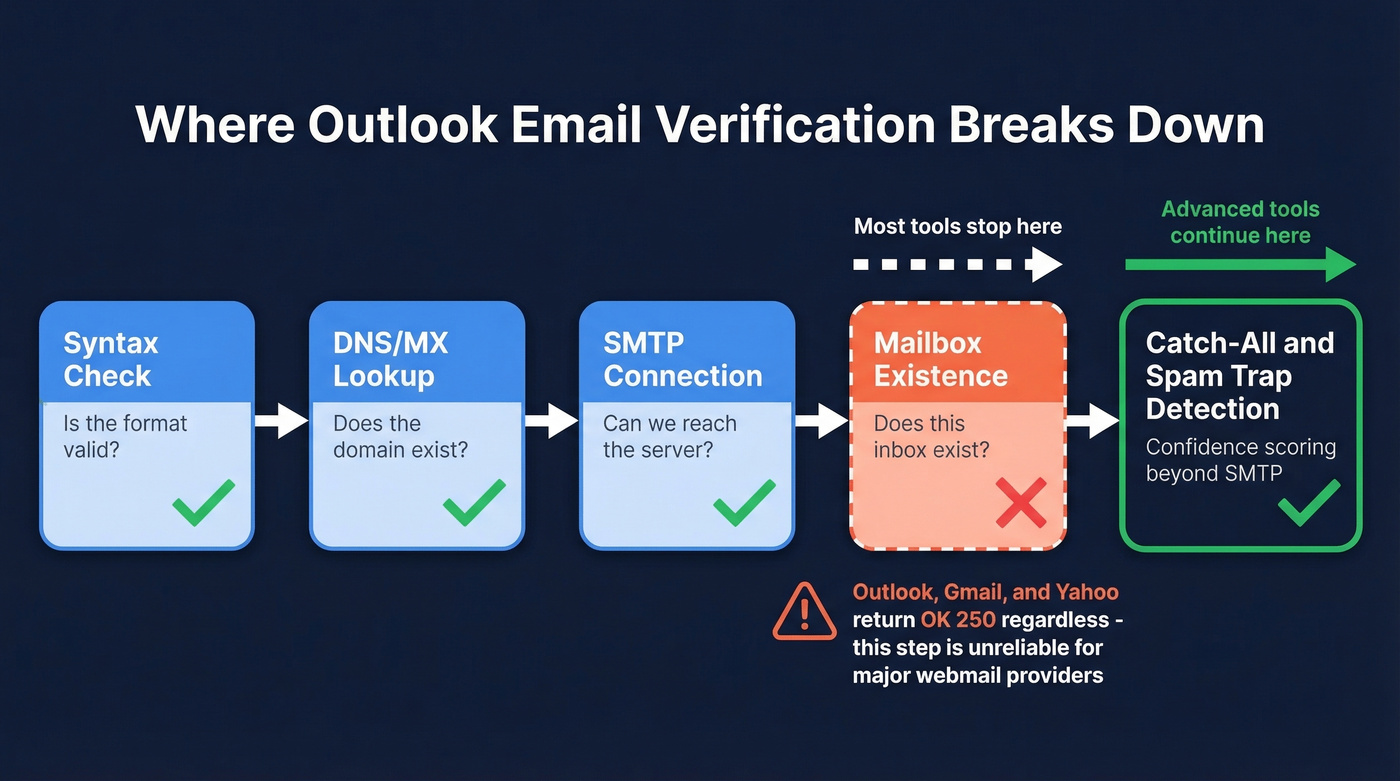
- Syntax check - Is the email formatted correctly? Catches typos like "john@@outlook.com."
- DNS/MX lookup - Does the domain have mail exchange records? Confirms outlook.com is a real mail domain.
- SMTP server connection - Can the tool connect to Microsoft's mail server? Usually yes.
- Mailbox existence - Does the specific mailbox exist? This is where Outlook breaks the chain. Microsoft's servers accept the connection but won't reliably confirm or deny.
- Catch-all and spam-trap detection - Is this a catch-all domain? A known spam trap? A honeypot?
Here's the thing: step 4 - the one most people assume is the whole point - is unreliable for major webmail providers like Outlook, Gmail, and Yahoo. Tools that stop there give you false confidence. Tools that invest heavily in step 5 give you something you can actually act on.
Manual Ways to Check an Outlook Address
If you've got a handful of addresses to check, two manual methods exist. Only one is worth your time.
Password-reset method (works). Go to account.live.com/password/reset, enter the email address, and see what Microsoft says. If you get "We couldn't find an account with that email address," the mailbox doesn't exist. Simple, free, and surprisingly reliable for one-off checks.
Send a test email (don't). You'll get a bounce notification if the address is dead, but as ZeroBounce explains, sending test emails can harm your sender reputation. If the address is a spam trap, you've just flagged your domain.
If you've got more than 10 addresses, stop doing this manually. The password-reset method doesn't scale, and your time is worth more than $0.01 per email.

Outlook's servers won't confirm if a mailbox exists - but Prospeo's 5-step verification doesn't stop at SMTP. Catch-all handling, spam-trap removal, and honeypot filtering deliver 98% email accuracy even on Microsoft domains. One agency dropped bounce rates from 35% to under 4%. Start with 75 free verifications.
Stop guessing which Outlook addresses are real. Verify them for $0.01 each.
Microsoft 365 Throttling Limits
Microsoft throttles SMTP connections aggressively, which is another reason DIY verification scripts fail at scale.
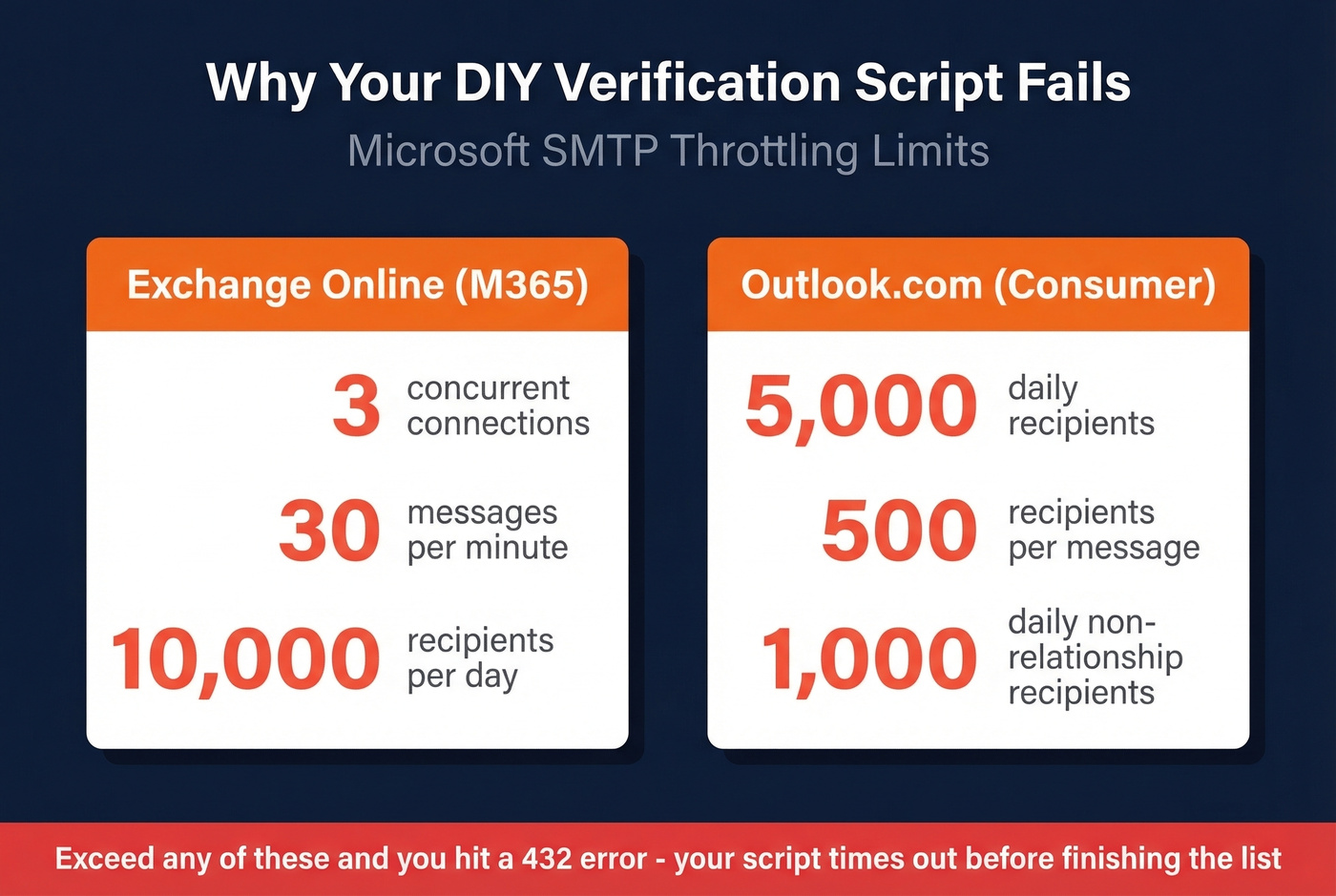
Exchange Online limits: 3 concurrent connections, 30 messages per minute, 10,000 recipients per day. Exceed any of these and you'll hit a 432 error.
Consumer Outlook.com limits: 5,000 daily recipients, 500 per message, 1,000 daily non-relationship recipients.
If you're running a Python script that hammers Microsoft's SMTP servers, you'll get throttled long before you finish your list. We've seen teams burn hours debugging timeout errors that were just rate limits in disguise.
Is There an Outlook Add-In?
We looked. There isn't a dedicated Outlook add-in for verifying whether recipient addresses are deliverable before you hit send. The Outlook add-in marketplace is packed with productivity tools - delay send, encryption, email tracking - but true recipient deliverability verification inside the client is still a gap.
Best Tools for Checking Outlook Emails in 2026
Verification tools can feel overpriced for the volume they offer, so free tiers and per-email pricing matter. Here are six solid options for checking Outlook.com and Microsoft 365 addresses.
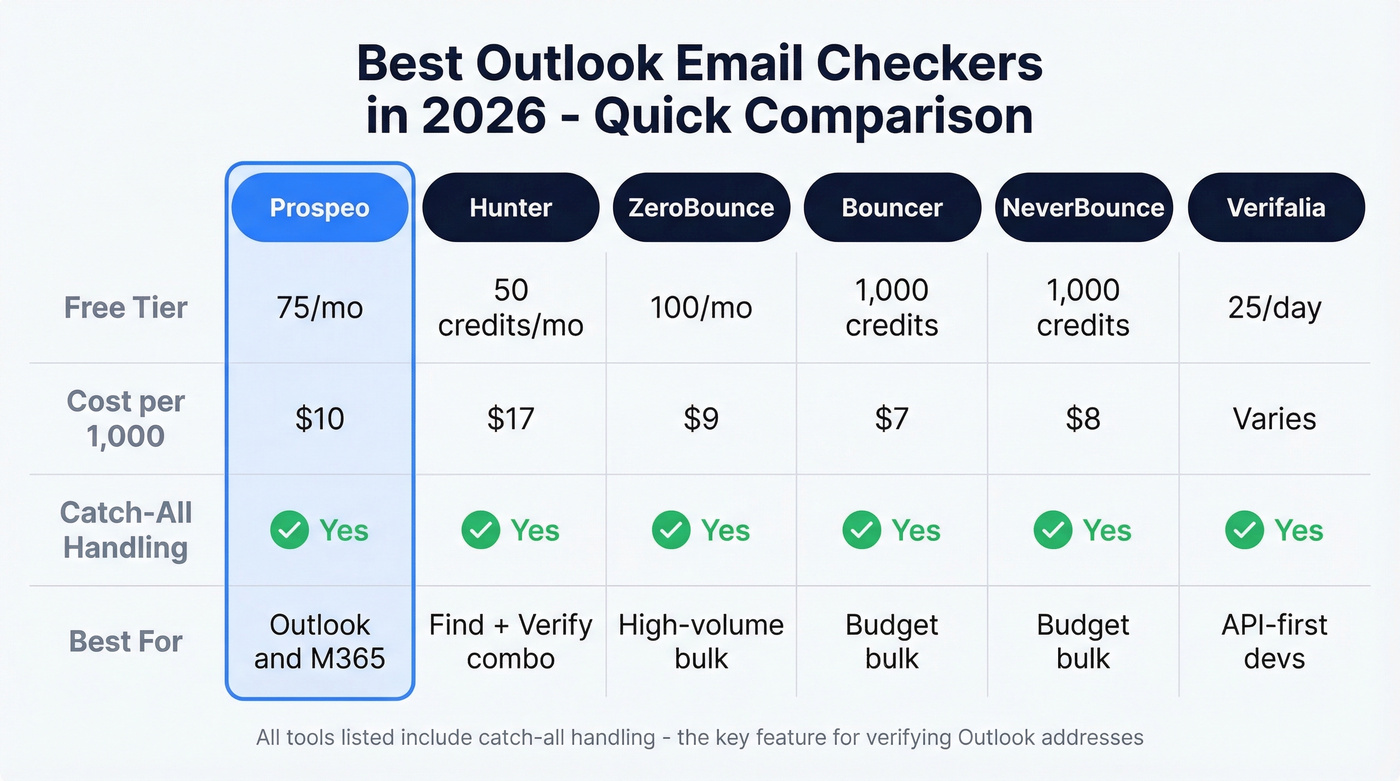
| Tool | Free Tier | Cost per 1,000 | Catch-All Handling | Best For |
|---|---|---|---|---|
| Prospeo | 75 emails/mo | ~$10 | Yes (5-step) | Outlook/M365 addresses |
| Hunter | 50 credits/mo | ~$17 | Yes (proprietary) | B2B find + verify combo |
| ZeroBounce | 100/mo | From ~$9 | Yes | High-volume bulk |
| Bouncer | 1,000 free credits | $7 | Yes | Budget bulk |
| NeverBounce | 1,000 free credits | $8 | Yes | Budget bulk |
| Verifalia | 25/day free | Varies by daily credits | Yes | API-first devs |
If your deals average under $10k and you're sending fewer than 1,000 emails a month, you don't need an enterprise verification platform. A tool with strong catch-all handling and a free tier will outperform an expensive suite you only half-use.
Prospeo
Use this if you're verifying Outlook and M365 addresses specifically. The 5-step verification with catch-all handling directly addresses the SMTP gap that makes Outlook addresses unreliable. Prospeo's proprietary infrastructure - not reliant on third-party email providers - runs syntax, DNS, SMTP, catch-all, and spam-trap checks with data refreshed every 7 days (the industry average is 6 weeks). One agency saw bounce rates drop from 35% to under 4% after switching, which is exactly the kind of improvement you need when dealing with Outlook's catch-all behavior. The free tier gives you 75 emails per month, and paid plans run about $0.01 per email.
Skip this if you only need a one-time check on a single address. The password-reset method is free and instant for that.
The password-reset trick doesn't scale past 10 addresses. Prospeo's proprietary infrastructure verifies Outlook and M365 emails in bulk with data refreshed every 7 days - not the 6-week industry average. No third-party email providers, no false positives from catch-all domains.
Upload your trade show list and get real answers in minutes, not hours.
Hunter
Hunter is the only tool here that bundles email finding with verification, which makes it the natural choice if you're building lists and cleaning them in the same workflow (see sales prospecting techniques). Its proprietary accept-all verification specifically targets major email providers like Outlook. The free tier gives you 50 credits per month, and starter plans run $34/mo billed annually.
Don't pick Hunter for pure bulk speed. Its strength is the find-and-verify combo, and if you're already using it for prospecting, adding verification to the same workflow saves real time.
ZeroBounce
Best for massive lists. ZeroBounce processes 100,000 emails in under an hour, and their "verify without sending" methodology keeps your sender reputation clean (more on email deliverability). The free tier includes 100 monthly verifications with a business/premium domain signup. Pay-as-you-go starts around $9 per 1,000 emails, with minimum packs like $18 for 2,000 credits. Pure verification - no prospecting features bundled in.
Bouncer, NeverBounce, and Verifalia
These three serve different niches at the budget end.
Bouncer gives you 1,000 free credits and charges $7 per 1,000 emails after that - the cheapest option for straightforward bulk cleaning. NeverBounce offers 1,000 free credits at ~$8 per 1,000 with strong deliverability guarantees.
Verifalia is the developer's pick: 25 free credits per day with an API-first workflow and daily-credit plans that scale for higher volume. If you want an API and don't want to commit up front, Verifalia's daily free credits are surprisingly workable for small-volume testing.
How to Verify Outlook Emails in Bulk
The actual workflow takes about five minutes once your list is ready.
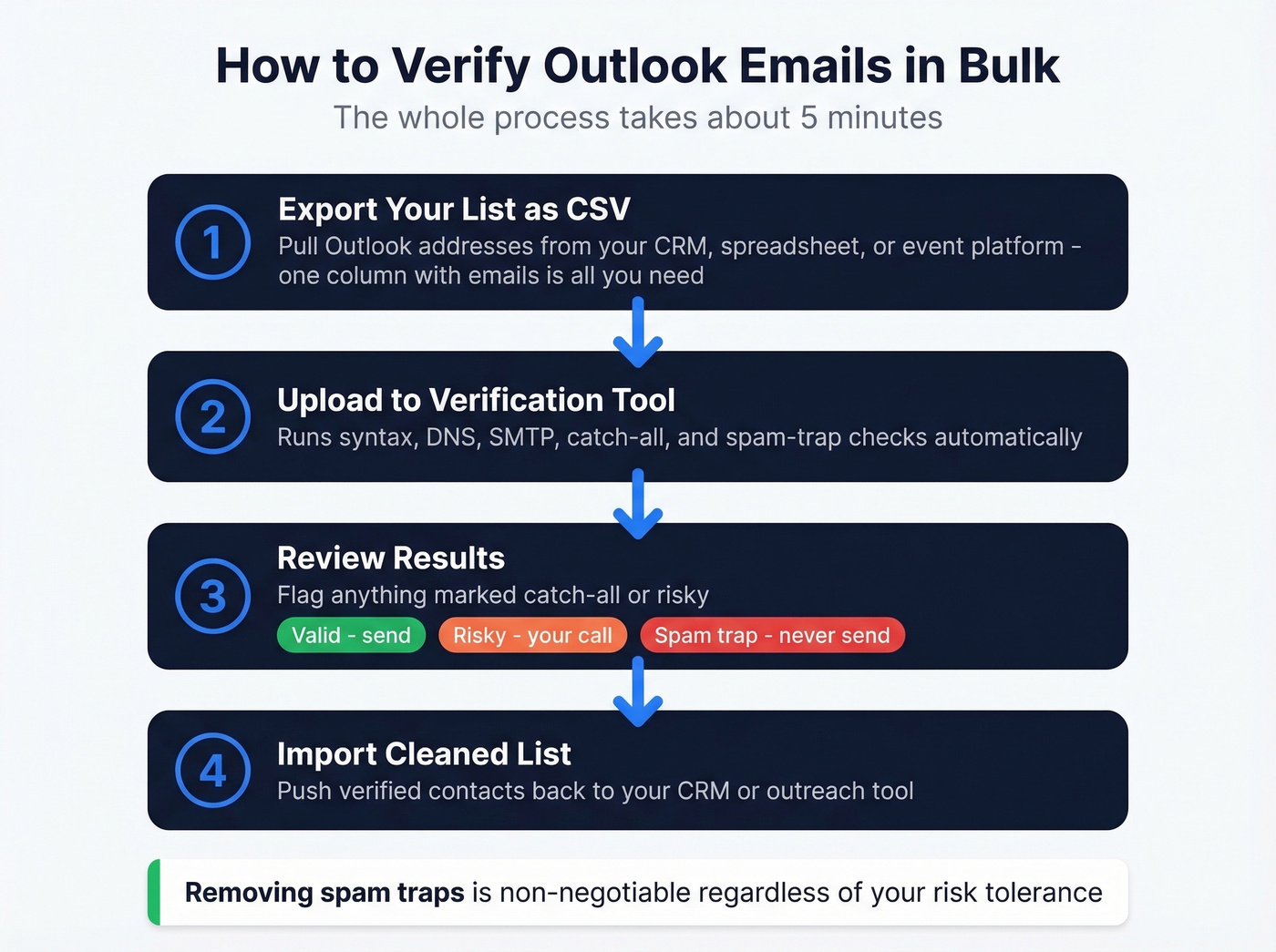
Export your list as CSV. Pull your Outlook addresses from your CRM, spreadsheet, or event platform (if you're standardizing your stack, start with contact management software). One column with email addresses is all you need.
Upload to your verification tool. A 5-step process runs syntax, DNS, SMTP, catch-all, and spam-trap checks automatically.
Review results. Flag anything marked "catch-all" or "risky" - these are the Outlook addresses where Microsoft wouldn't confirm mailbox existence. Conservative teams remove all risky addresses. Aggressive teams send to catch-all but skip spam traps. In our experience, removing anything flagged as a spam trap is non-negotiable regardless of your risk tolerance (and it helps protect your sender reputation).
Import the cleaned list. Push verified contacts back to your CRM or outreach tool (and keep an eye on email bounce rate after the next send).
FAQ
Can you verify @hotmail.com and @live.com addresses the same way?
Yes. Hotmail and Live.com are part of the Outlook.com infrastructure - same SMTP limitations, same verification challenges. Any tool that handles @outlook.com catch-all behavior handles these domains identically.
Why do verification tools show "accept-all" for Outlook addresses?
Microsoft's servers accept incoming SMTP connections without reliably confirming whether a specific mailbox exists. Tools flag these as "accept-all" or "risky" because they can't guarantee deliverability through SMTP alone. Prospeo's 5-step process and Hunter's proprietary accept-all verification both address this with confidence scoring beyond raw SMTP.
What's the cheapest way to verify a large Outlook list?
Bouncer at $7/1,000 and NeverBounce at $8/1,000 are the most budget-friendly for pure bulk verification. Prospeo's free tier (75 emails/month) is the best way to test catch-all accuracy before committing. Let's be practical: compare results across two tools on a sample of 50-75 addresses before buying credits in bulk.