

Outreach and Salesforce: What Every Admin Needs to Know in 2026
Nobody wakes up excited to configure a CRM integration. You inherited this stack - or your VP of Sales bought Outreach at a conference and now it's your problem. Connecting Outreach and Salesforce sounds simple on paper. One Salesforce admin on r/salesforce described it as a "ratchet integration" that made reporting nearly impossible - thousands of leads stuck in ancient sequences, fields polluted with stale data, syncs breaking in ways that are never obvious.
Here's the short version:
- Under 20 reps? Start with Salesforce's native Sales Engagement ($50/user/month) and skip the integration headache entirely.
- Committed to Outreach (~$100/user/month)? Budget 2-4 weeks, assign a dedicated integration user, and verify your contact data before running a single sequence.
- Bad contact data is the #1 reason sequences fail - regardless of which tool you pick.
How the Sync Actually Works
By default, Outreach pulls new and updated records from Salesforce every 10 minutes. You can configure the cadence, but most teams leave it alone.
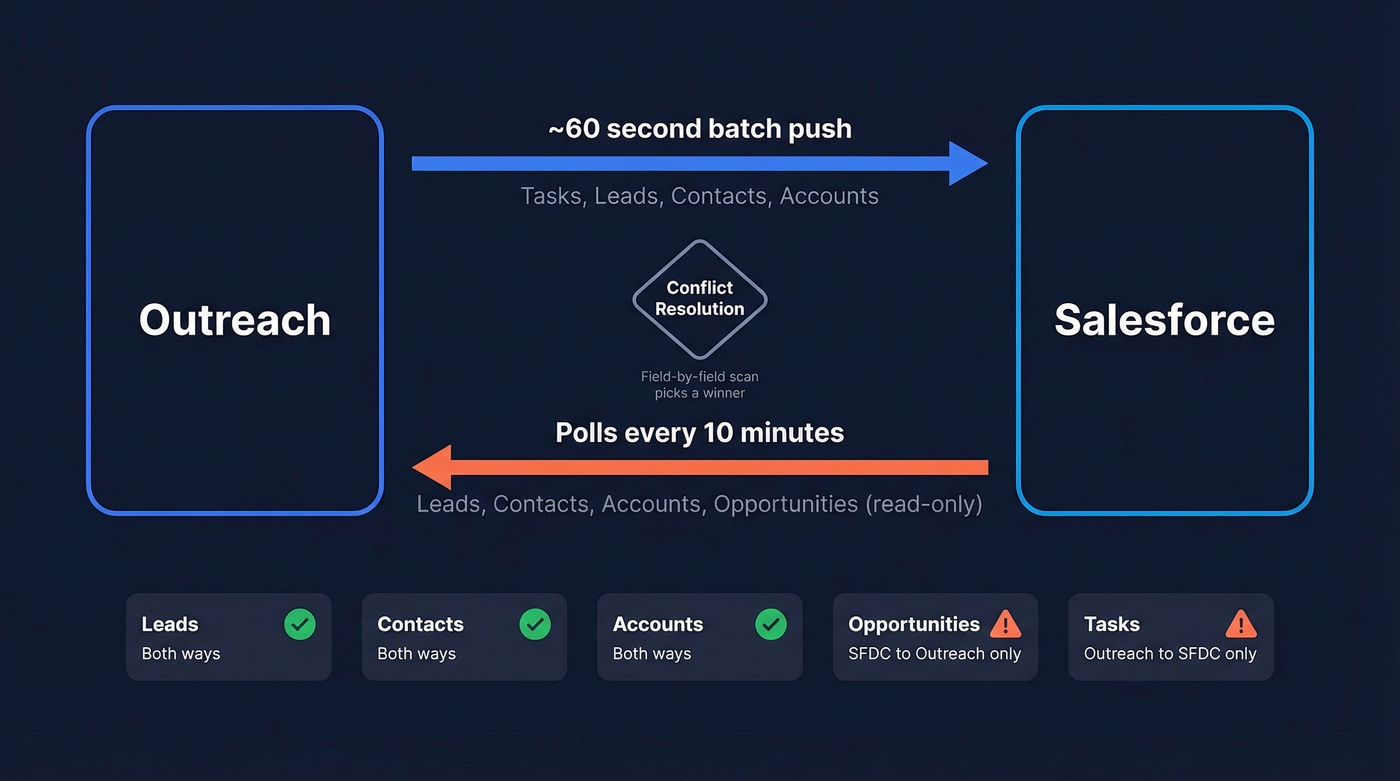
Going the other direction, Outreach waits about 60 seconds before pushing updates to Salesforce so it can batch changes and reduce unnecessary API calls. Once a push fires, changes are usually visible in Salesforce within 30-45 seconds. When both systems update the same record around the same time, Outreach runs a field-by-field conflict resolution scan to pick a winner.
| Object | SFDC → Outreach | Outreach → SFDC |
|---|---|---|
| Lead | ✅ | ✅ |
| Contact | ✅ | ✅ |
| Account | ✅ | ✅ |
| Opportunity | ✅ (read-only) | ❌ |
| Task (activity logging) | ❌ | ✅ |
Two critical gaps worth flagging: tasks created in Salesforce don't sync down into Outreach, and opportunity edits in Outreach don't push back. If your reporting depends on either flow, plan workarounds from day one.
Prerequisites You Can't Skip
In our experience, the dedicated integration user is the single most important setup decision you'll make. Create a user labeled "Outreach Integration" with API Enabled and Manage Connected Apps permissions, plus create/edit on all synced objects. This keeps attribution clean and prevents sync failures when reps change passwords or leave the company.
Other non-negotiables:
- Salesforce edition: Enterprise or Unlimited includes REST API access. Professional requires the Web API Package add-on plus purchased API Call Bundles. Essentials doesn't support REST API access - full stop.
- OAuth connection: Outreach connects via OAuth, not APEX.
- Mapping posture: If Salesforce is your source of truth, deselect "Create" on the Salesforce side and keep "Update." This prevents Outreach from spawning duplicate records that'll haunt you for months. (If duplicates are already creeping in, fix it with a proper Salesforce Deduplication pass before you touch mappings.)
API Limits - The Hidden Bottleneck
Outreach recommends setting your Global API Call Usage threshold to 70-80% and your Outreach-specific threshold to 20-30%. These leave headroom for other integrations and prevent sync pauses.
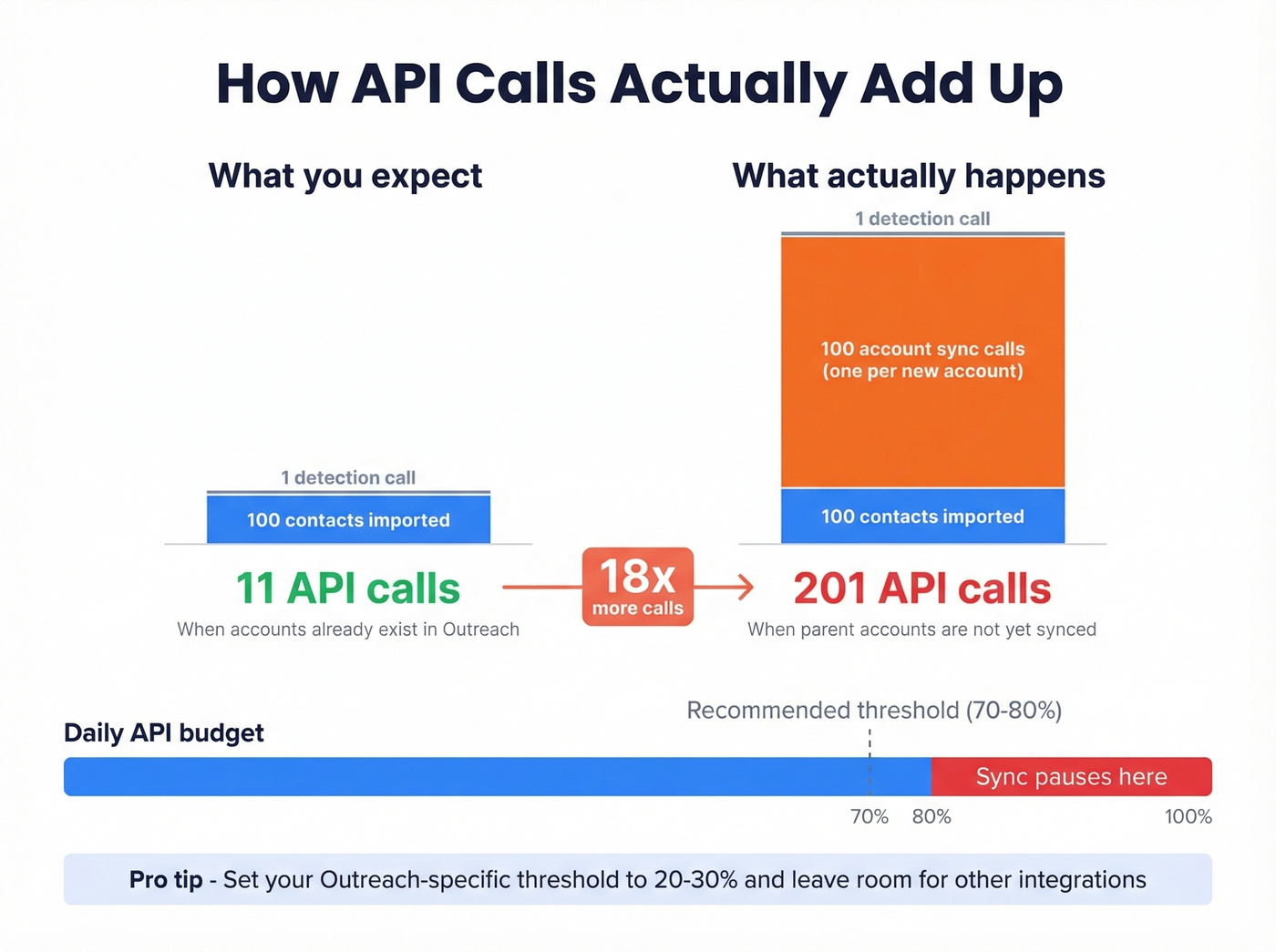
Here's the thing: relationships multiply API calls fast. Import 100 contacts whose accounts aren't already in Outreach, and you'll burn 1 call for the contact batch plus 100 additional calls to sync each new account - 101 total. At scale, the official math says 2,000 new Salesforce records = 1 detection call + 10 import calls = 11 API calls. But a bulk import that looks small can eat your daily budget before lunch if those records carry unsynced parent accounts.
We've watched teams burn through their entire API allocation on day one because nobody accounted for relationship calls. When thresholds are hit, Outreach pauses all push/pull operations until the next rolling 24-hour block frees capacity. You'll see "LIMIT_EXCEEDED" in your plugin logs and wonder why nothing's syncing.

API limits are precious - don't waste them syncing bad data. Prospeo's 98% verified emails mean fewer bounces, cleaner Salesforce records, and sequences that actually connect. Bulk verify before you import and stop burning API calls on contacts that don't exist.
Clean data in, clean sync out. Start verifying at $0.01 per email.
When Things Break
Run through these before opening a ticket:
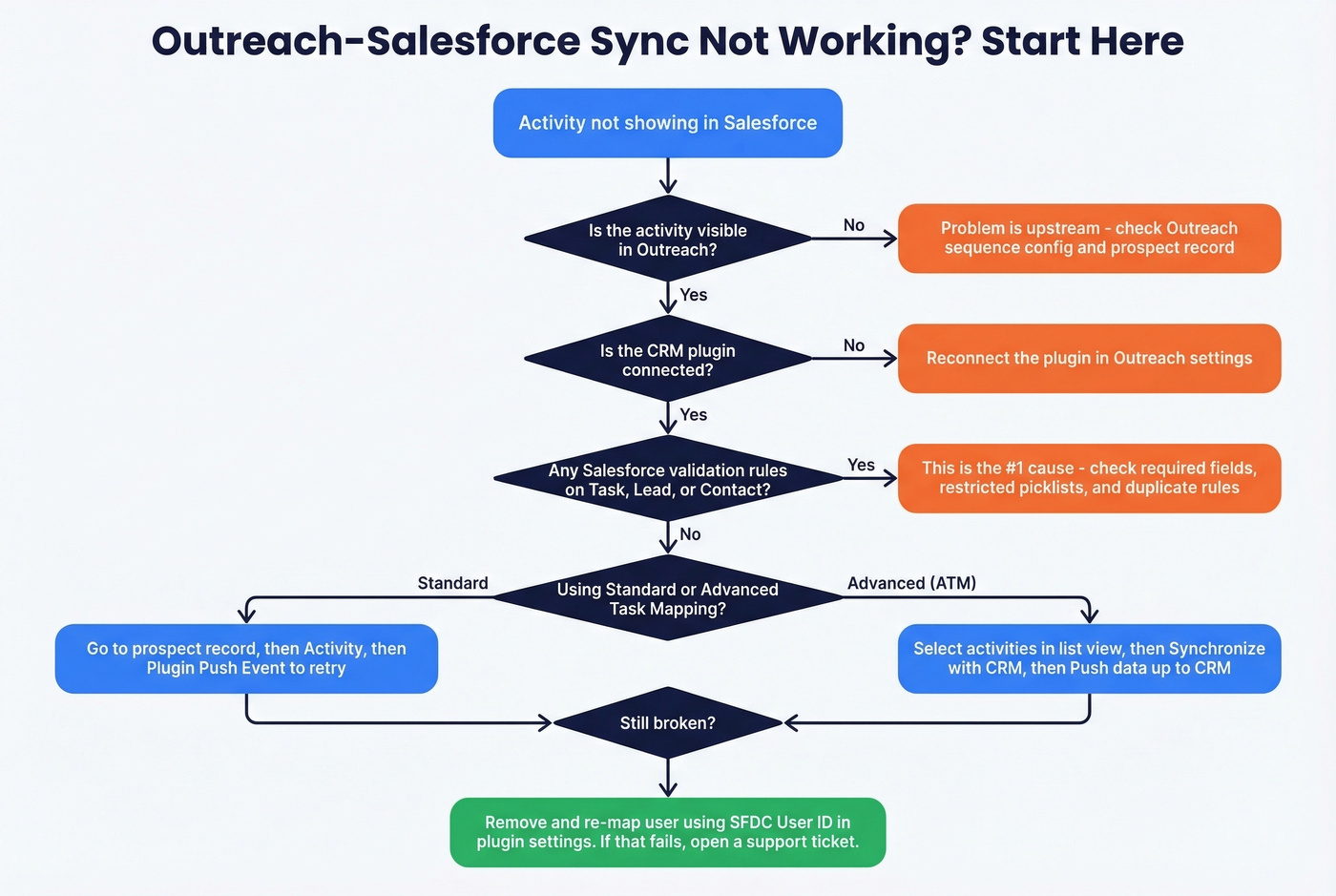
- Check Salesforce validation rules first - required fields, restricted picklists, and duplicate rules on Task/Lead/Contact objects are the most common silent blockers. (If you need a framework, start with a CRM data audit so you’re not guessing.)
- Confirm the activity is visible in Outreach (prospect record, Outbox, or Calls view). If it's not there, the problem is upstream.
- Verify the CRM plugin is connected. Reconnect if needed.
- For Standard Task Mapping: prospect record → Activity → Plugin Push Event to retry. For Advanced Task Mapping (ATM): select activities in list view → Synchronize with CRM → "Push data up to CRM." ATM may require a support ticket to activate, so check before assuming it's available.
- For user mapping issues, remove and re-map using the SFDC User ID in plugin settings.
Let's be honest - most sync failures we've debugged trace back to a validation rule someone added six months ago and forgot about. Start there.
What Outreach Actually Costs
Outreach doesn't publish pricing. Standard plans start around $100/user/month on an annual contract. Implementation runs $1,000-$8,000 depending on complexity.
For a 20-seat team, expect $24,000-$48,000/year before implementation fees. G2 reviews give Outreach a 4.3/5 across 3,500+ reviews. The Reddit consensus is blunter: "expensive and needs a lot of babysitting." (If you’re comparing options, see our breakdown of Outreach software alternatives.)
Do You Actually Need Outreach With Salesforce?
Most teams under 20 reps are overpaying for features they'll never touch. Salesforce's native Sales Engagement handles multi-step cadences across email, phone, and social at $50/user/month - and it runs inside Salesforce, so there's no separate CRM integration to maintain. Nearly 90% of sales leaders are investing in sales engagement technology, but that investment doesn't have to be Outreach.
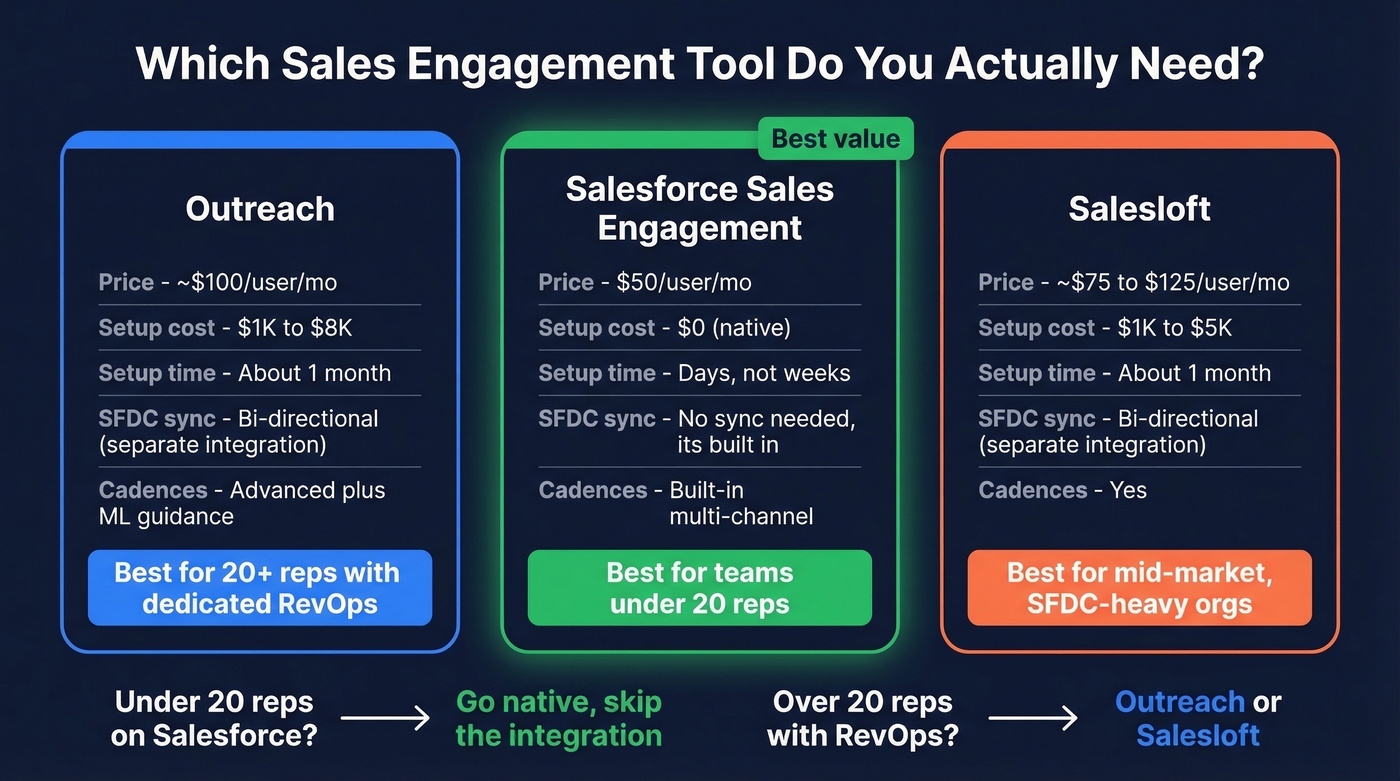
| Outreach | SF Sales Engagement | Salesloft | |
|---|---|---|---|
| Price | ~$100/user/mo | $50/user/mo | ~$75-$125/user/mo |
| Setup | $1K-$8K, ~1 month | Native, no integration | $1K-$5K, ~1 month |
| Cadences | Advanced + ML guidance | Built-in | Yes |
| SFDC sync | Bi-directional | Native (no sync needed) | Bi-directional |
| Best for | 20+ reps, dedicated RevOps | <20 reps on Salesforce | Mid-market, SFDC-heavy |
Outreach earns its cost when you have 20+ reps, a dedicated RevOps team, and advanced sequencing needs that native cadences can't cover. Below that threshold, you're paying double for complexity you don't need. Skip it. (If you’re still building the stack, use a sales tech stack checklist to avoid tool sprawl.)
The Upstream Problem Nobody Talks About
We've seen teams spend weeks perfecting their Outreach-Salesforce sync, then watch sequences fail because 15% of their emails bounce. Bounced emails don't just waste rep time - they pollute Salesforce activity reports, damage your sending domain's reputation, and erode trust in the entire stack. One bad import can tank your deliverability for weeks.
Whatever engagement tool you run, the data layer matters more than the integration layer. Prospeo verifies emails at 98% accuracy on a 7-day refresh cycle and integrates natively with both Salesforce and Outreach - upload a CSV, verify in bulk, and push clean contacts into your sequences before a single email goes out. (If you want the rules behind this, start with email validation rules and a repeatable how to keep CRM data clean process.) Teams like Snyk cut bounce rates from 35-40% to under 5% and added 200+ new opportunities per month after switching their data source.

Snyk's 50 AEs cut bounce rates from 35% to under 5% and generated 200+ new opportunities per month - because they stopped feeding bad data into their sales stack. Whether you run Outreach, Salesloft, or native Salesforce cadences, Prospeo integrates with all of them.
Fix the data layer and every tool downstream works better.
FAQ
How long does Outreach data take to appear in Salesforce?
Outbound pushes from Outreach are usually visible in Salesforce within 30-45 seconds. Inbound polling - Salesforce changes syncing into Outreach - runs every 10 minutes by default. If you need near-real-time inbound sync, consider middleware like Workato to trigger on Salesforce record changes.
Can I use Outreach with Salesforce Professional edition?
Yes, but you'll need the Web API Package add-on and purchased API Call Bundles for REST API access. Salesforce Essentials doesn't support REST API access at all - upgrade to Professional or higher before attempting the integration.
Why don't opportunities sync back from Outreach to Salesforce?
Outreach treats Salesforce opportunities as read-only. Reps can view deal context while sequencing, but edits don't push back. Pipeline changes must happen directly in Salesforce. If your workflow requires bidirectional opportunity sync, you'll need middleware or a custom Salesforce flow.
How do I prevent bounced emails from polluting Salesforce reports?
Verify your prospect list before activating any sequences. Bulk verification catches invalid addresses before they enter your workflow. Run re-verification monthly - email addresses decay at roughly 2-3% per month as people change roles and companies.