

How to Track Your Outreach (And Stop Measuring Noise)
You launched a 2,000-contact cold email campaign last month. Reply rate: 1.2%. But you don't know if the problem is your messaging, your list, or the fact that 400 of those emails bounced. That ambiguity is expensive - and it's why outreach tracking matters more than most teams realize. Only 7% of sales orgs achieve 90%+ forecast accuracy, and reps spend just 28% of their time actually selling. The rest disappears into admin, guesswork, and tools that measure the wrong things.
Tracking your outreach should fix this. Most of the time, it doesn't - because teams chase vanity metrics, skip data hygiene, and build systems that collapse after week two.
The Short Version
- Stop tracking open rates. Apple Mail Privacy Protection broke them. They're noise now.
- Track three things: reply rate, meeting booking rate, and waste rate (the percentage of outreach that generates zero response).
- Start with a 3-tab Google Sheet if you're a small team. It's free and it works.
- Verify your contact list before launching. Bad data corrupts every metric downstream.
- Benchmarks to calibrate against: 3-5% reply rate is normal, ~1% meeting booking rate is average, anything above 5% meeting booking is exceptional.
Why Open Rates Are Dead
If you're still using open rate as your primary outreach KPI, you're measuring noise.
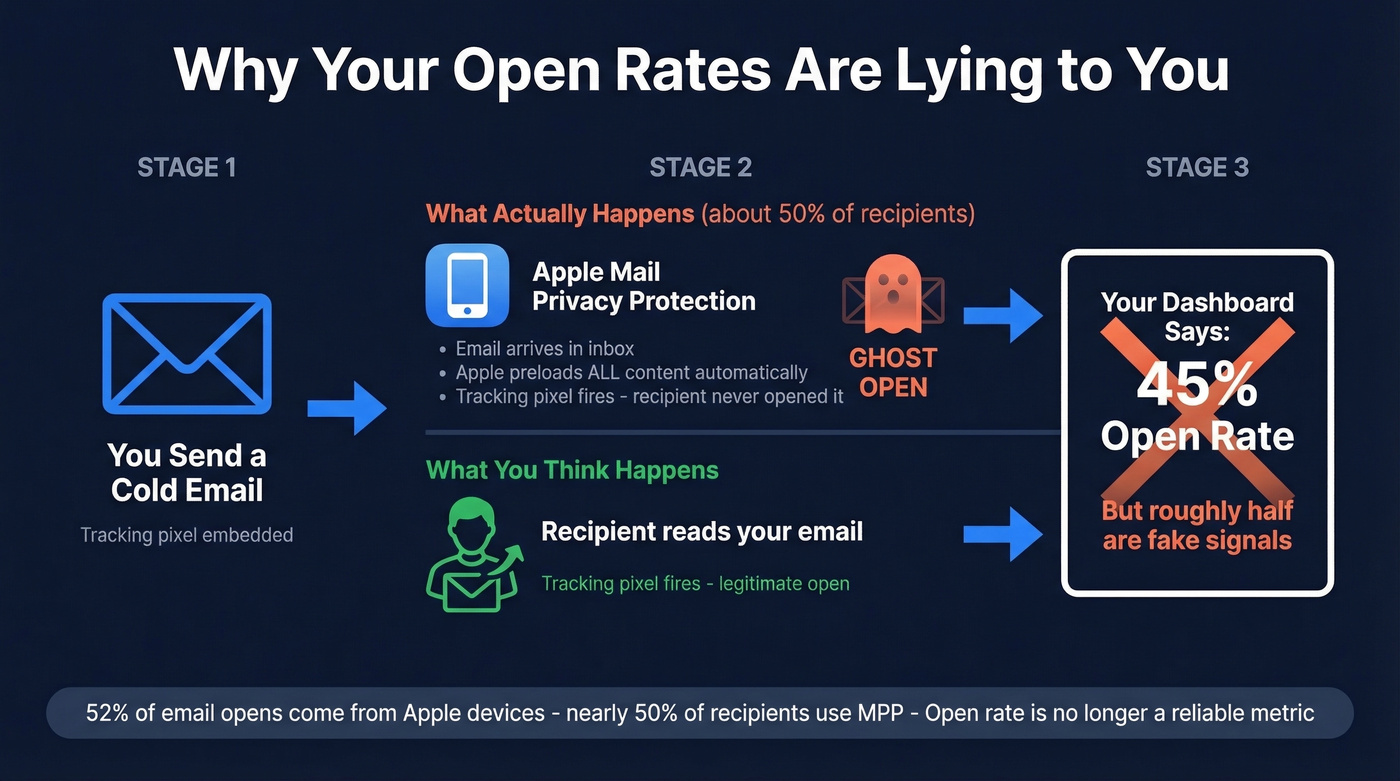
Apple Mail Privacy Protection preloads email content - including tracking pixels - the moment a message hits the inbox. The recipient never has to open the email. The pixel fires anyway. Your dashboard shows a 45% open rate, and you feel great. But half those "opens" are ghosts.
This isn't a minor edge case. Apple devices accounted for ~52% of all email opens as of 2021, and nearly 50% of recipients use MPP. That means roughly half your audience generates fake open signals. Any automation built on open triggers - follow-up sequences, A/B test winners, segment scoring - is running on corrupted data.
Sopro's benchmark analysis puts it bluntly: they don't consider open rates an effective metric anymore, citing bot activity, privacy protections, and pixel preloading. The industry has moved on. Your tracking should too.
Metrics That Actually Predict Meetings
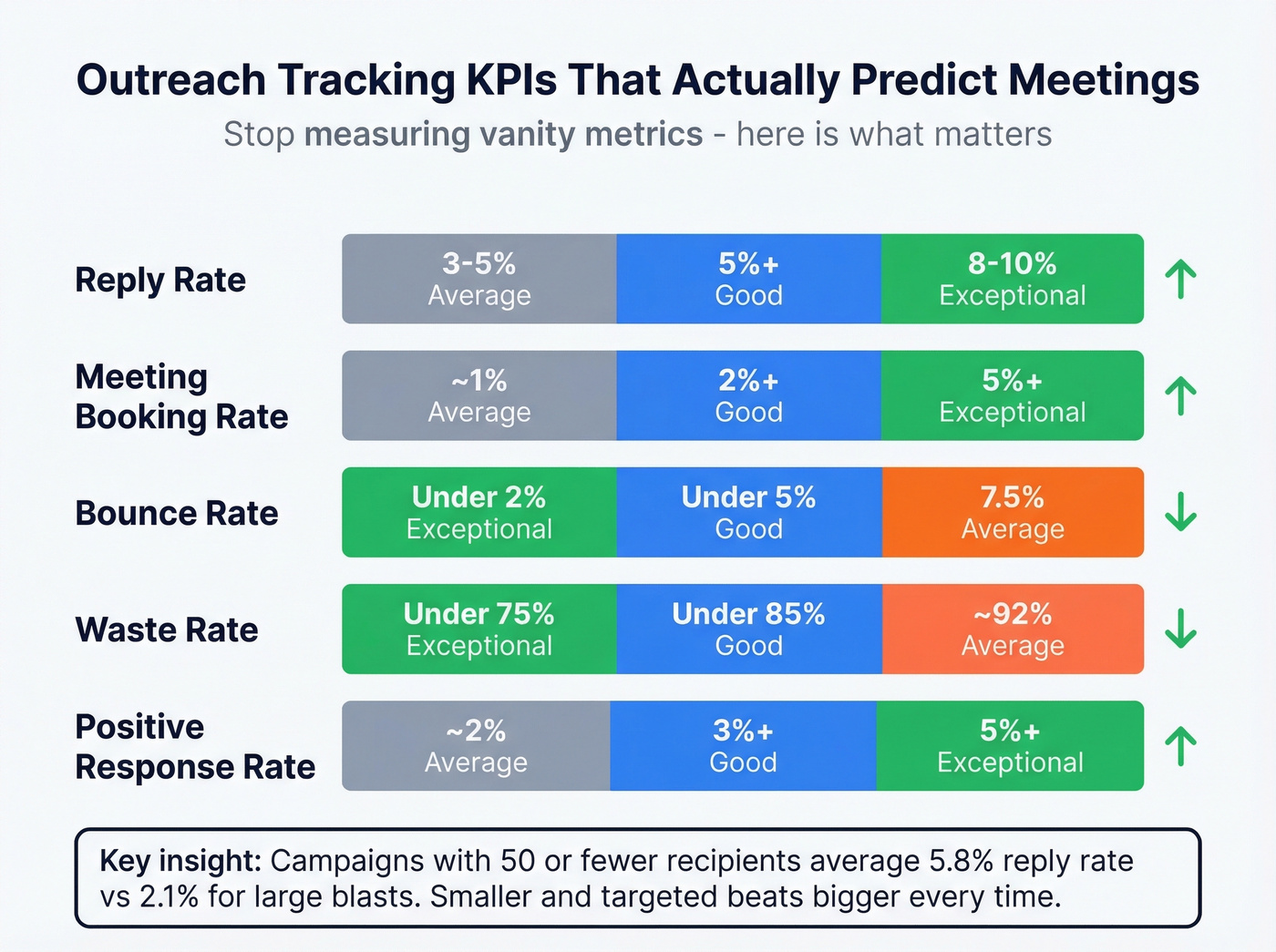
Here's the KPI hierarchy that predicts meetings booked. Everything else is decoration.
| Metric | Average | Good | Exceptional |
|---|---|---|---|
| Reply rate | 3-5% | 5%+ | 8-10% |
| Meeting booking rate | ~1% | 2%+ | 5%+ |
| Bounce rate | 7.5% | <5% | <2% |
| Waste rate | ~92% | <85% | <75% |
| Positive response | ~2% | 3%+ | 5%+ |
Reply rate is your leading indicator. The average falls between 3-5% depending on how you measure - Mailforge pegs it at ~3%, while Sopro's 151-million-touchpoint dataset puts it at 5.1%. Campaign size matters more than most people realize: campaigns with 50 or fewer recipients average a 5.8% reply rate, while larger blasts drop to 2.1%. Smaller and more targeted beats bigger every time.
Industry matters enormously too. Nonprofit outreach can hit 16%+ reply rates, while technology companies often see under 2% and software companies sometimes land below 1%. If you're benchmarking against a single "average," you're probably fooling yourself.
Meeting booking rate is the metric your VP of Sales cares about. The average is roughly 1%. Anything above 2% is solid, and above 5% is exceptional for most B2B industries.
Then there's waste rate - the percentage of outreach that generates zero response. When you see that 92% of your cold emails produce nothing, it reframes the conversation from "how do we send more?" to "how do we waste less?" That's a healthier question.
Deliverability is the other silent killer. Roughly 20% of cold emails get flagged as spam before they ever reach the inbox. If your bounce rate sits above 5%, your list needs cleaning before you can trust any other metric.

You just read that 20% of cold emails get flagged as spam and bounces above 5% corrupt every metric downstream. Prospeo's 5-step email verification delivers 98% accuracy - teams using it cut bounce rates from 35% to under 4%. Your tracking system is useless if the data feeding it is broken.
Clean data in, clean metrics out. Start free with 75 verified emails.
Build a Free Tracker in Google Sheets
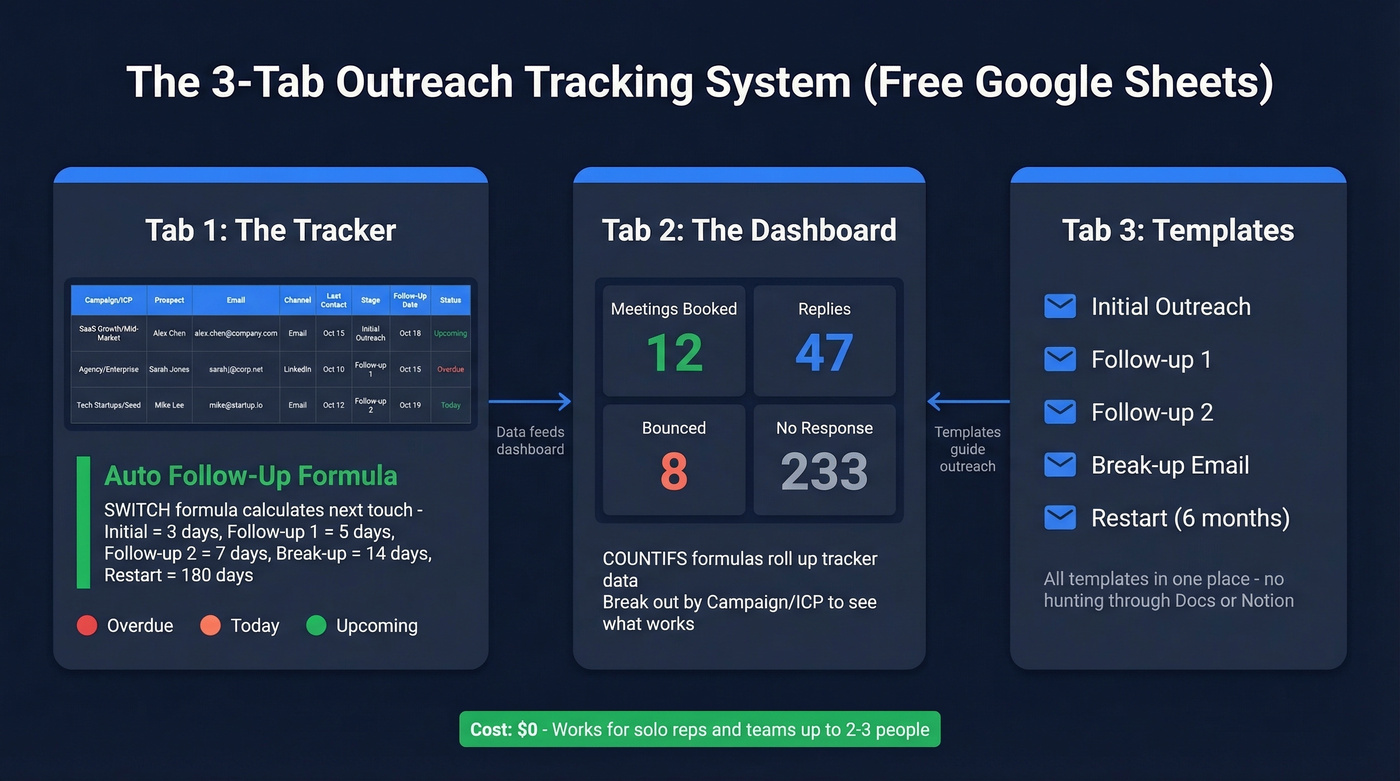
You don't need a $500/month platform to track outreach properly. A well-structured Google Sheet handles everything for solo reps and small teams. Here's the 3-tab system we've used and recommended to dozens of teams.
Tab 1: The Tracker
This is your main log for prospect activity. Set up these columns: Campaign/ICP, Prospect Name, Email, Channel (email, phone, or social), Last Contact Date, Stage as a dropdown, Follow-Up Date with auto-calculation, Status as a dropdown, and Notes.
The magic is in the Follow-Up Date column. Use this SWITCH formula to auto-calculate when your next touch should happen based on the current stage:
=IFERROR(SWITCH(F2,"Initial",E2+3,"Follow-up 1",E2+5,"Follow-up 2",E2+7,"Break-up",E2+14,"Restart",E2+180),"")
"Initial" outreach gets a 3-day follow-up window, "Follow-up 1" gets 5 days, and so on. Add conditional formatting to the Follow-Up Date column: red if the date is before today (overdue), yellow if it's today, green if it's in the future. You'll never miss a follow-up again.
Tab 2: The Dashboard
Use COUNTIFS formulas to roll up your tracker data into a snapshot:
- Meetings booked:
=COUNTIFS(Tracker!H:H,"Meeting Booked") - Replies received:
=COUNTIFS(Tracker!H:H,"Replied") - Bounced:
=COUNTIFS(Tracker!H:H,"Bounced") - No response:
=COUNTIFS(Tracker!H:H,"No Response")
Break these out by Campaign/ICP to see which segments perform. Calculate reply rate and meeting rate right on this tab so you aren't doing mental math every time you check in. One glance tells you what's working and what's dead weight.
Tab 3: Templates
Store your stage-based message templates here: Initial outreach, Follow-up 1, Follow-up 2, Break-up, and Restart. Having them in the same workbook means reps aren't hunting through Docs or Notion for the right copy.
If you want plug-and-play copy for each stage, start with a few proven follow-up templates and adapt them to your ICP.
The Hypothesis-Driven Outreach Test
Here's the thing: most teams would learn more from a 200-lead test than from their last 5,000-contact blast. If your deal size is under $15k, you almost certainly don't need a massive outreach machine - you need a tight feedback loop.
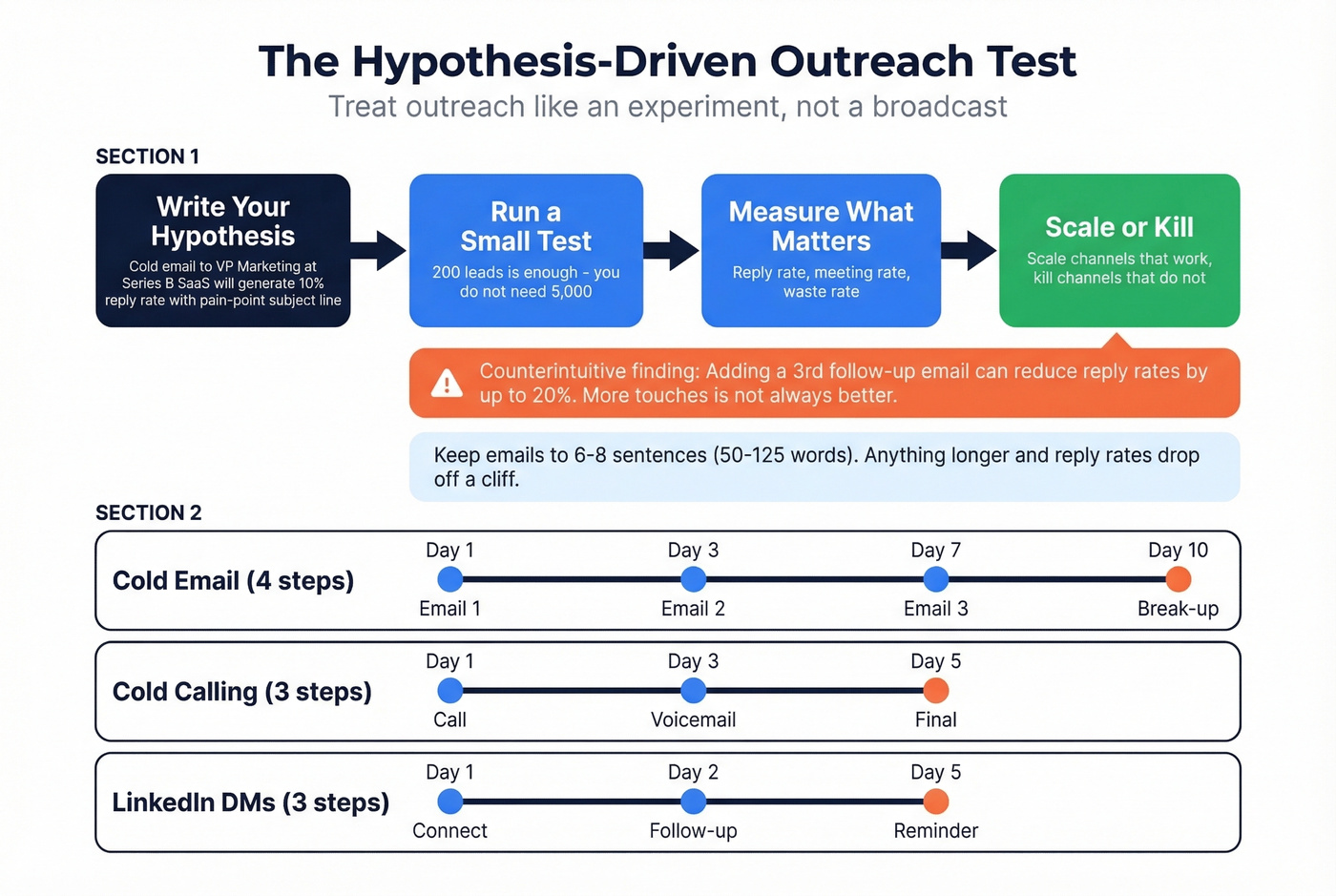
Treat outreach like an experiment, not a broadcast. Structure every test as a hypothesis: "Cold email to VP-level marketing leaders at Series B SaaS companies will generate a 10% reply rate using a pain-point-first subject line." Then run it with a defined cadence. Cold email works well as a 4-step sequence (Day 1, Day 3, Day 7, Day 10 break-up), cold calling as a 3-step (Day 1, Day 3 voicemail, Day 5), and social outreach as a 3-step (Day 1 connect, Day 2 follow-up, Day 5 reminder).
One counterintuitive finding: adding a third follow-up email can reduce reply rates by up to 20%. More touches isn't always better. Test your cadence length, not just your messaging.
Keep your emails short. The data shows 6-8 sentences - roughly 50-125 words - performs best for cold outreach. Anything longer and reply rates drop off a cliff. (If you’re iterating on hooks, keep a swipe file of cold email subject line examples to test quickly.)
Real results from a practitioner who shared their framework on r/sales:
| Channel | Volume | Reply Rate | Meeting Rate | Waste |
|---|---|---|---|---|
| Cold email | 300 | 8% | 2.33% | 92% |
| Cold calling | 200 | 17% | 6.50% | 83% |
| LinkedIn DMs | 100 | 6% | 2.00% | 94% |
The point isn't to copy these numbers - it's to build the muscle of testing, measuring, and iterating. Scale the channels that work. Kill the ones that don't. The spreadsheet makes the decision obvious.
Mistakes That Corrupt Your Data
Five anti-patterns we see repeatedly.
1. Launching on unverified contact data. If your bounce rate is above 5%, your tracking data is unreliable. Every bounced email inflates your waste rate, tanks your sender reputation, and makes it impossible to tell whether your messaging or your list is the problem. Run your list through Prospeo's email verification before launching - 98% accuracy with a 5-step verification process, and data refreshes every 7 days. Meritt dropped their bounce rate from 35% to under 4% after switching, and their pipeline tripled from $100K to $300K/week.

2. Tracking opens as a primary KPI. Already covered. MPP broke this. Switch to reply rate and meeting rate.
3. No pre-defined goals. If you don't set a target reply rate before launching, you can't evaluate whether a campaign succeeded. Define the hypothesis first. (If you need a simple scoring model, use an ideal customer profile template to keep targeting consistent.)
4. Ignoring bounces and unsubscribes. Every ignored bounce hits your sender reputation. Every ignored unsubscribe is a compliance risk. Track both, clean both, weekly. If you’re unsure what “good” looks like, use bounce rate benchmarks to set thresholds.
5. Blasting large lists without segmentation. A 5,000-contact blast with mixed ICPs produces a blended metric that tells you nothing useful. Segment by persona, industry, or company size so your engagement data is actually actionable. (For a practical approach, start with intent based segmentation and firmographics.)
When to Upgrade Your Stack
Google Sheets works until it doesn't. The failure modes are predictable: version conflicts when multiple reps edit the same file, leads buried in rows that nobody scrolls to, and zero pipeline visibility for managers. We've watched teams waste months on tools they don't need - and equally waste months refusing to upgrade when the spreadsheet is clearly breaking. Here's a solid decision framework if you're on the fence.
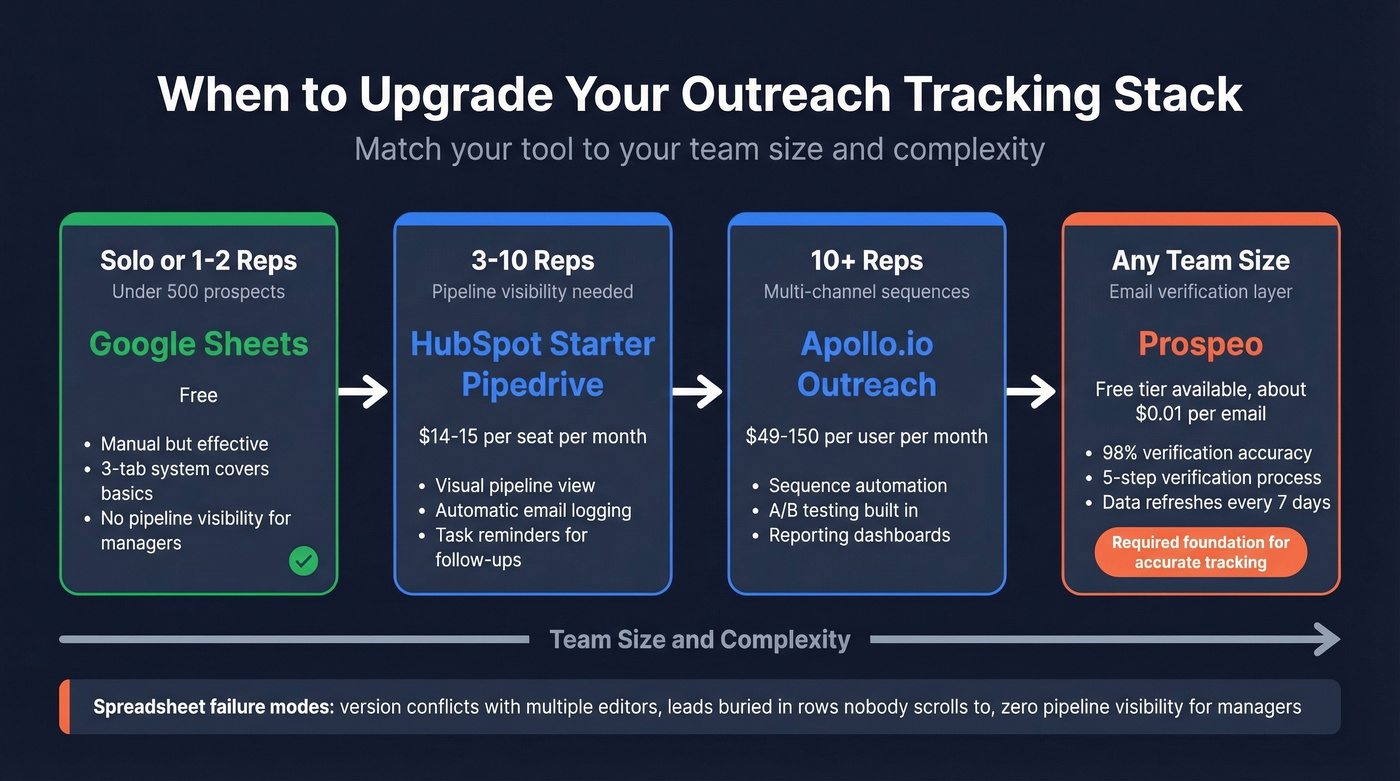
| Scenario | Recommended Tool | Approx. Cost |
|---|---|---|
| Solo / 1-2 reps, <500 prospects | Google Sheets | Free |
| 3-10 reps, pipeline needed | HubSpot Sales Hub Starter or Pipedrive | ~$14-15/seat/mo |
| 10+ reps, multi-channel | Apollo.io or Outreach | ~$49-150/user/mo |
| Any size - email verification | Prospeo | Free tier; ~$0.01/email paid |
HubSpot Sales Hub Starter and Pipedrive both give you a visual pipeline, automatic email logging, and task reminders that prevent missed follow-ups - the exact things spreadsheets can't do well. For larger teams running multi-channel sequences, Apollo.io runs ~$49-99/mo per user and Outreach runs ~$100-150/user/mo. Both add sequence automation, A/B testing, and built-in reporting dashboards. Salesloft sits in the same $100+/user/mo enterprise tier as Outreach, with comparable sequence and analytics capabilities - the choice between them usually comes down to which UI your team prefers.
The biggest advantage of dedicated platforms over spreadsheets is real-time visibility. Instead of waiting until Friday to update your sheet, you see replies, clicks, and meeting bookings as they happen - which means reps can follow up while the conversation is still warm. (If you’re evaluating options, compare categories like SDR tools and contact management software before you buy.)
Over on r/salesdevelopment, reps also recommend ReachInbox for inbox rotation and ManyReach for combined email and social outreach. Mixmax and Yesware remain solid picks for Gmail-native tracking if you don't need a full platform.
Let's be honest: you don't need 10 tools. You need a system. A Google Sheet with the right structure beats a $500/month tool used inconsistently. For email verification and list cleaning, Prospeo's database of 143M+ verified emails covers any team size - the free tier gives you 75 emails/month, paid plans run about $0.01/email, and it integrates natively with HubSpot, Salesforce, Smartlead, Instantly, and Lemlist. If deliverability is a recurring issue, follow a dedicated email deliverability guide to fix root causes.
Running a 200-lead hypothesis test? The list quality decides whether you're measuring real signal or noise. Prospeo's 300M+ profiles with 30+ filters let you build hyper-targeted segments - the kind that hit 5%+ reply rates instead of 2.1% blast averages.
Stop wasting 92% of your outreach. Target the right people first.
FAQ
What's a good reply rate for cold outreach?
The average cold email reply rate falls between 3-5%. Personalized campaigns targeting a tight ICP can reach 8-10%. Smaller campaigns consistently outperform larger blasts - campaigns under 50 recipients average 5.8% reply rates versus 2.1% for bigger sends.
Is email open tracking still reliable in 2026?
No. Apple Mail Privacy Protection preloads tracking pixels for roughly half of all recipients, inflating open rates regardless of actual engagement. Reply rate and meeting booking rate are the only reliable engagement signals for outreach tracking in 2026.
How do I reduce bounce rates before launching a campaign?
Run your contact list through an email verification tool before any send. Aim for a bounce rate under 5% - anything higher corrupts your metrics and damages sender reputation. Prospeo's 5-step verification process (98% accuracy, 7-day refresh cycle) catches invalid addresses, spam traps, and honeypots. List cleaning takes minutes and is the highest-ROI step in any campaign.