


Pipeline CRM Alternatives: What to Switch To (and Why)
One Capterra reviewer described spending roughly $1,000 on Pipeline CRM's expert consulting sessions without getting their issues resolved. At $25/user/mo (Start), $33/user/mo (Develop), and $49/user/mo (Grow), that's a lot of money on top of a CRM that's already hitting its ceiling. If you're exploring Pipeline CRM alternatives, we've tested most of the options below - here's an opinionated shortlist with no filler and no 15-tool dump.
Our Top Picks
- Best overall replacement: Nutshell - similar ease of use, more room to grow. From $13/user/mo.
- Best for phone-heavy teams: Close - built-in calling and SMS in every plan. From $35/seat/mo for teams.
- Best budget pick: Less Annoying CRM - $15/user/mo flat. No tiers, no surprises, no feature gating.
Here's the thing: if your average deal hovers around $3-5K, you probably don't need anything more complex than Less Annoying CRM. Most teams over-buy their CRM and under-use 80% of the features.
If you're pressure-testing your process before switching tools, it helps to map the sales pipeline challenges that are actually causing the churn.
Why People Leave Pipeline CRM
Three patterns show up again and again in G2 and Capterra reviews.
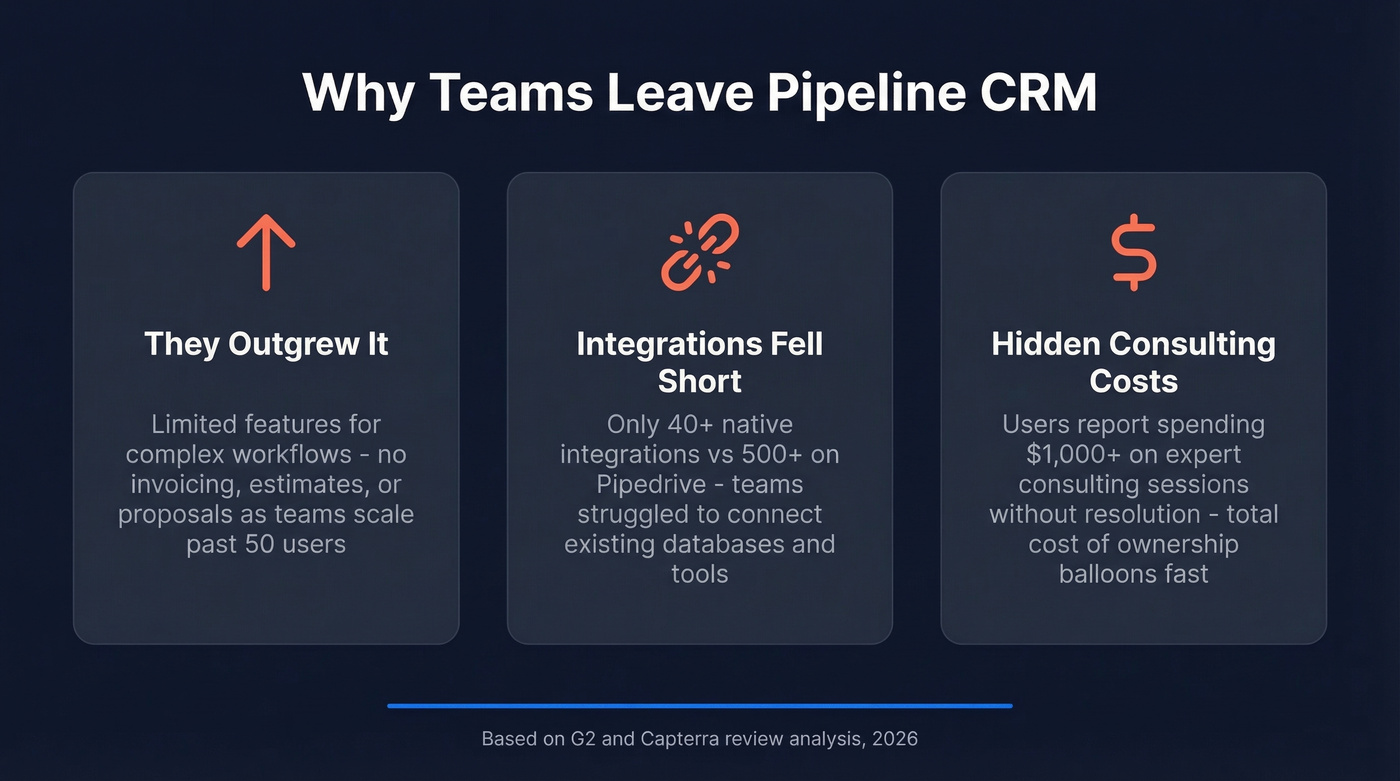
They outgrew it. "Limited features" is a recurring theme. Several reviews call out missing pieces teams expect once their process gets more complex - invoicing, estimates, proposals. Pipeline CRM works great for a 5-50 person team running a straightforward sales process. Add complexity and the cracks show fast.
Integrations frustrated them. Multiple reviewers describe integration pain, including not being able to connect their existing database. Pipeline offers 40+ native integrations. Compare that to Pipedrive's 500+.
The consulting costs stung. That $1,000 consulting story isn't an outlier. When a CRM charges premium rates for help you shouldn't need, the total cost of ownership balloons well beyond the sticker price.
If the real issue is lead quality (not the UI), you’ll get more leverage from data-driven selling than from another migration.

A new CRM won't fix your pipeline if the data going into it is bad. Prospeo gives you 300M+ verified contacts with 98% email accuracy and 125M+ direct dials - so your new CRM actually has deals to track.
Stop switching CRMs and start filling them with contacts that convert.
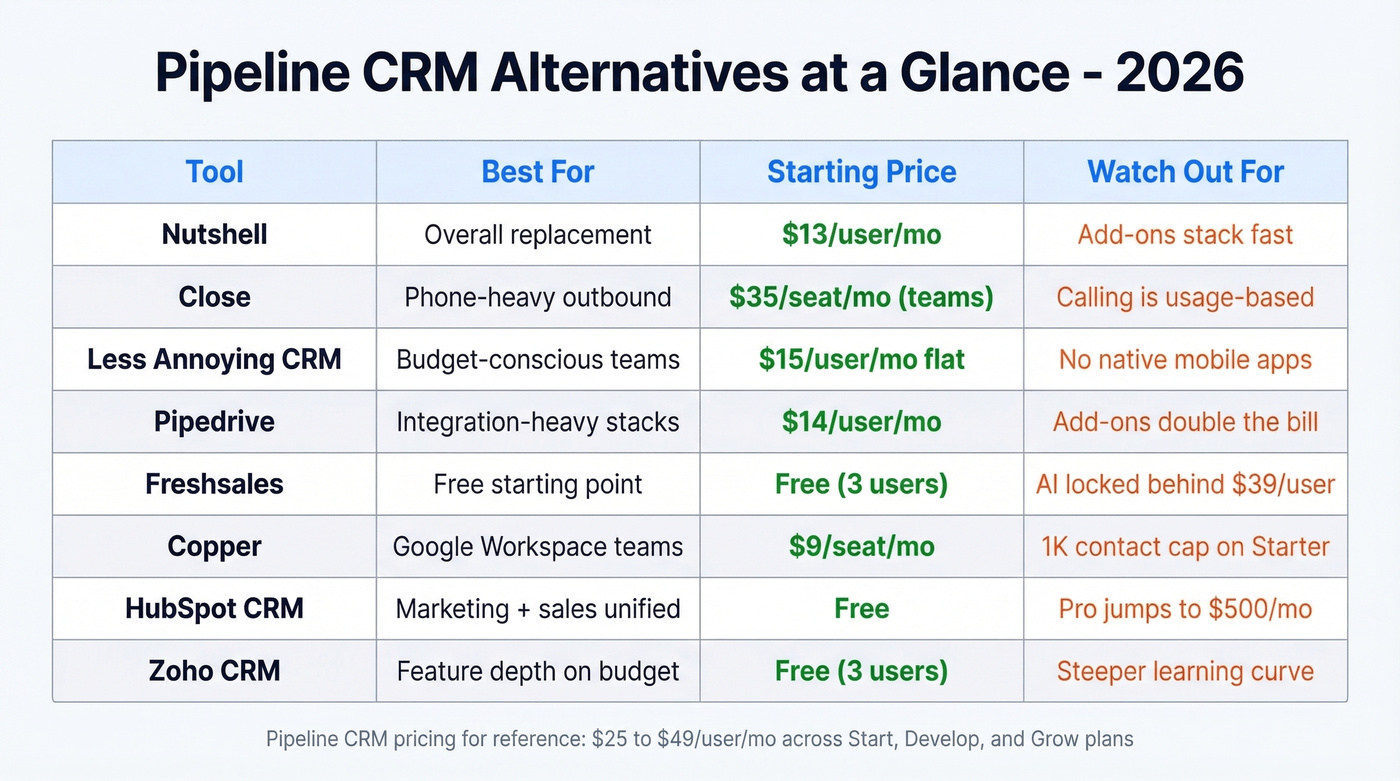
Best Pipeline CRM Alternatives Compared
| Tool | Best For | Starting Price | Key Limitation |
|---|---|---|---|
| Nutshell | Overall replacement | $13/user/mo | Add-ons stack fast |
| Close | Phone-heavy outbound | $35/seat/mo (teams) | Calling is usage-based |
| Less Annoying CRM | Budget-conscious teams | $15/user/mo flat | No native mobile apps |
| Pipedrive | Integration-heavy stacks | $14/user/mo | Add-ons double the bill |
| Freshsales | Free starting point | Free (3 users) | AI locked behind Pro ($39/user) |
| Copper | Google Workspace teams | $9/seat/mo | 1K contact cap on Starter |
| HubSpot CRM | Marketing + sales unified | Free | Pro jumps to $500/mo |
| Zoho CRM | Feature depth on budget | Free (3 users) | Steeper curve than Pipeline CRM |
Nutshell
Use this if you want the closest thing to Pipeline CRM's simplicity but with more headroom. Nutshell's Foundation plan starts at $13/user/mo on an annual contract, and tiers climb through Growth ($25), Pro ($42), Business ($59), and Enterprise ($79). The UI feels familiar - clean pipeline views, drag-and-drop deals, minimal onboarding friction.

Skip this if you're cost-sensitive about add-ons. Nutshell's base plans are affordable, but the extras add up quickly. Marketing Pro runs $49/mo, the IQ prospecting add-on taps a 200M+ contact database starting at $37/mo, and Advisor consulting costs $199/mo on an annual plan. A team of five on Pro with Marketing and IQ will hit $350+/mo before they realize it. The 14-day free trial requires no credit card, so at least the testing is painless.
If you’re comparing CRMs broadly (not just Pipeline), it can help to scan a few examples of a CRM to sanity-check what “standard” features look like at each price point.
Close
Pros:
- Built-in calling and SMS on every plan - no third-party dialer needed
- Unlimited contacts and leads across all tiers
- Solo plan at $9/seat/mo is genuinely cheap for a single founder Cons:
- Calling is usage-based, so high-volume dialers will see extra charges
- Solo plan caps you at 1 user and 10,000 leads - it's a starter, not a team plan
- SMS to US numbers requires A2P 10DLC registration, which adds setup friction
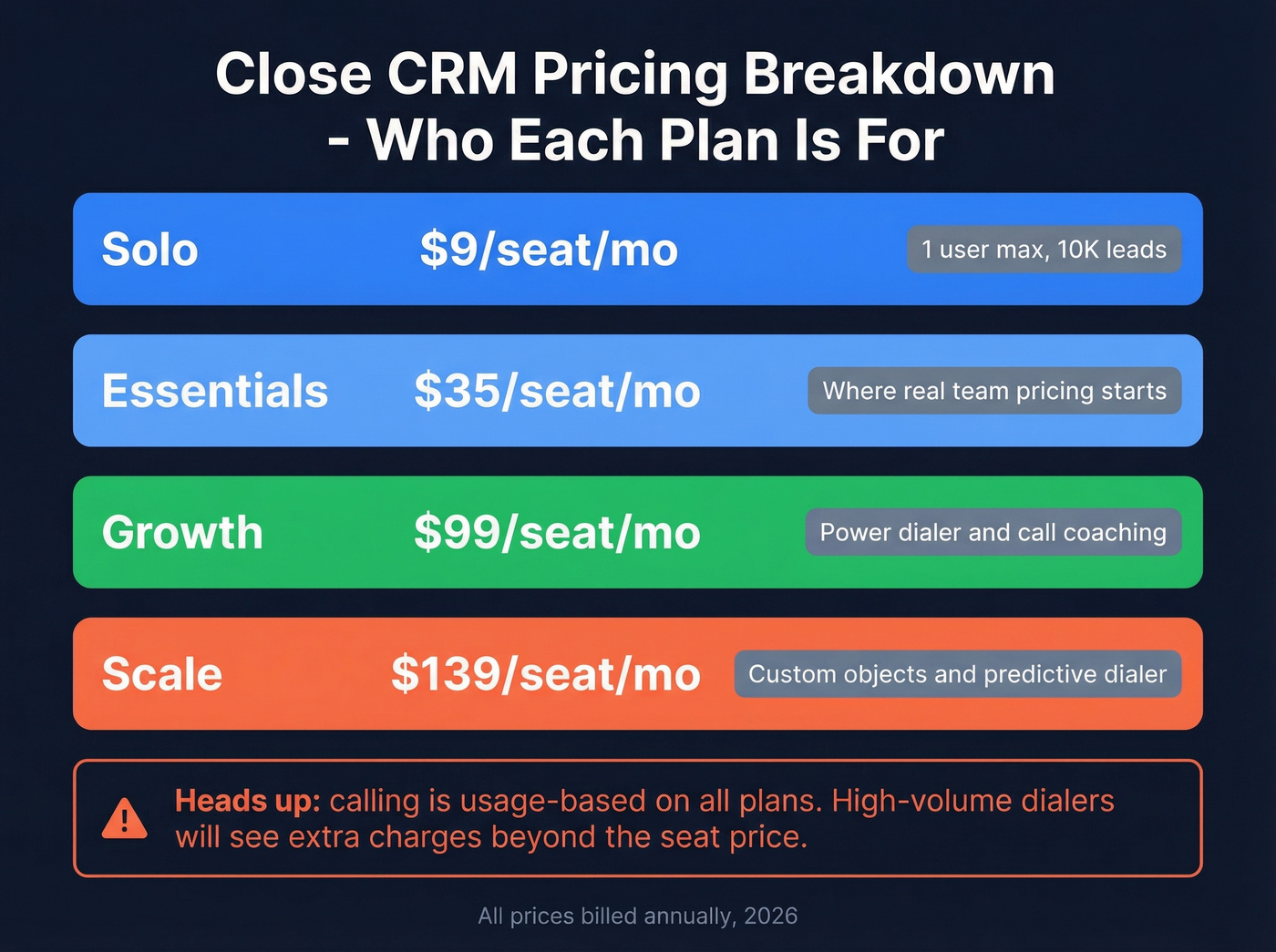
The real team pricing starts at Essentials ($35/seat/mo annual), with Growth at $99 and Scale at $139. For outbound-heavy teams that live on the phone, Close is the most natural replacement. For teams that mostly email, it's overkill.
If your team is building a calling motion from scratch, a tighter cold calling system matters more than which CRM you pick.
Less Annoying CRM
In our experience, this is the most underrated CRM on this list. $15/user/mo. That's it. No tiers, no feature gating, no "upgrade to unlock pipelines." You get unlimited contacts, unlimited pipelines, unlimited custom fields, and 25GB of storage per user. The 4.8/5 rating on Software Advice across 645 reviews isn't an accident - people genuinely love this thing.
The tradeoffs are real, though. There are no native iOS or Android apps, so you're stuck with the mobile browser. There's no built-in marketing automation, and integrations beyond Zapier are limited. If you need a CRM that does CRM and nothing else, Less Annoying is perfect. If you need a platform, look elsewhere. The 30-day free trial gives you plenty of time to decide.
If your main need is simply tracking people and conversations, you may be better served by contact management software than a full “platform” CRM.
Pipedrive
Pipedrive's base tiers look reasonable - Lite at $14/user/mo, Growth at $39, Premium at $59, Ultimate at $79, all billed annually. The 500+ integrations blow Pipeline CRM's 40+ out of the water, and the visual pipeline builder is best-in-class.
But the add-on pricing is where it gets painful. LeadBooster adds $32.50/mo, Web Visitors tracking adds $41/mo, and Campaigns adds $13.33/mo. The consensus on r/CRM nails it: Pipedrive "nickel and dimes you for everything." Budget accordingly.
If you’re trying to keep reps consistent during a tool change, pair the switch with a few sales activities examples so the team doesn’t lose momentum.
Freshsales
Use this if you're a micro-team that wants to test a real CRM for free. The free plan supports 3 users with core CRM features. Growth starts at $9/user/mo, Pro at $39, and Enterprise at $59. The 21-day trial is generous.
Skip this if you want AI features. Freddy AI contact scoring doesn't unlock until Pro ($39/user/mo), which puts you right back in Pipeline CRM's price range. At that point, you're paying similar money for a less proven ecosystem.
If you’re in “free tools first” mode, stack this with a few free lead generation tools so the CRM actually has new leads to work.
Copper
Copper only makes sense if your team lives in Google Workspace. The Gmail and Calendar integration is genuinely native - not a bolt-on. Starter pricing looks attractive at $9/seat/mo, but that tier caps you at 1,000 contacts. Pipelines require the Basic plan ($23/seat/mo), workflow automation needs Professional at $59/seat/mo, and Business at $99/seat/mo finally removes contact limits. The real starting price for most teams is $59, not $9.

If you’re deciding between these two specifically, see our Copper vs Pipedrive breakdown.
HubSpot CRM
The free tier is legitimately useful for small teams - we've seen founders run on it for a full year before upgrading. But the jump from free to Starter ($20/mo) to Professional ($500/mo) is one of the steepest cliffs in SaaS. Best for teams that want marketing and sales unified from day one and know they'll eventually invest in the ecosystem.
If you’re planning to run outbound alongside HubSpot, having a repeatable set of sales follow-up templates prevents the “we bought a CRM and nothing changed” problem.
Zoho CRM
Free for 3 users, then $14 (Standard), $23 (Professional), $40 (Enterprise), and $52/user/mo (Ultimate). It's the most feature-dense budget option on this list, but the learning curve is noticeably steeper than Pipeline CRM's. If you're comfortable with configuration and don't mind spending a weekend on setup, Zoho is hard to beat on raw value per dollar.
Clean Your Data Before You Switch
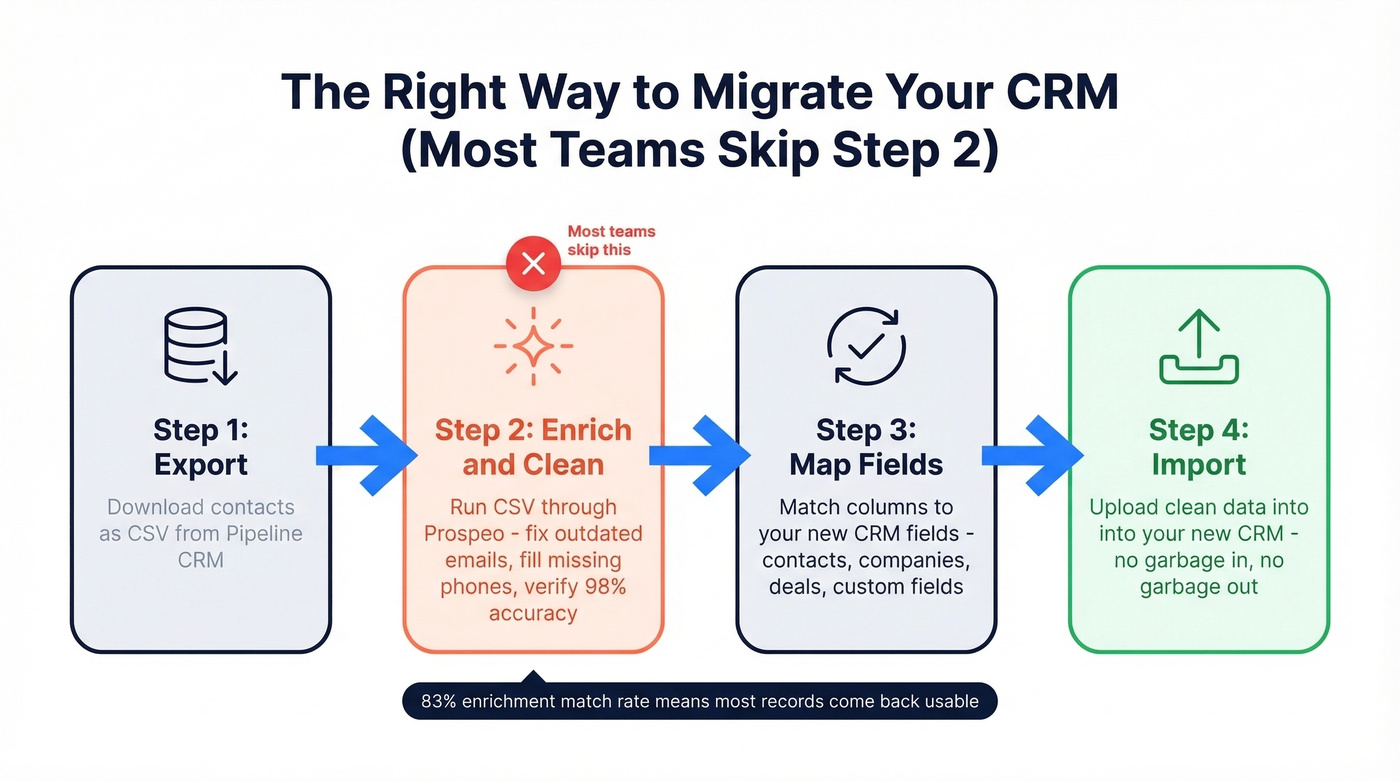
This is the step most people skip, and it's the one that matters most. Every CRM migration involves a CSV export. That file is full of outdated emails, missing phone numbers, and contacts who changed jobs two years ago. I've watched teams waste entire migrations by importing garbage data into a shiny new system, then blaming the new CRM for low deliverability.
If you want a deeper rundown of vendors and approaches, start with our guide to data enrichment services.

Prospeo's enrichment tool handles this in minutes. Upload your CSV and get back 50+ data points per contact at 98% email accuracy, refreshed on a 7-day cycle so you're not working with stale records. Native integrations with HubSpot and Salesforce mean enriched records flow straight into your new CRM. The free tier gives you 75 emails/month to test - no contracts, no sales calls.
Your new CRM is only as good as the data inside it.
Nutshell's IQ add-on charges $37/mo for 200M contacts. Prospeo gives you 300M+ profiles with 30+ filters - buyer intent, technographics, funding, headcount growth - starting at $0.01 per verified email. No annual contracts.
Get better prospecting data than any CRM add-on for a fraction of the cost.
FAQ
Is Pipeline CRM the same as PipelineDeals?
Yes - Pipeline CRM was formerly called PipelineDeals. Same product, rebranded. If you see "PipelineDeals alternatives" on review sites, they're referencing the same tool.
What's the cheapest alternative to Pipeline CRM?
Freshsales and HubSpot CRM both offer genuinely free plans for up to 3 and unlimited users respectively. For a paid option with zero feature gating, Less Annoying CRM at $15/user/mo is the simplest flat-rate choice on the market.
How do I migrate contacts without losing data?
Export your contacts as a CSV from Pipeline CRM, then run the file through an enrichment tool to catch outdated emails and fill missing fields before importing. This prevents starting your new CRM with a dirty database - an 83% enrichment match rate means most records come back with usable contact data.
Which CRM has the best integrations compared to Pipeline?
Pipedrive leads with 500+ native integrations versus Pipeline CRM's 40+. HubSpot and Zoho also offer extensive app marketplaces. If integrations are your primary pain point, any of these three will be a significant upgrade.