

Pipeline Tracker: How to Build and Choose the Right One
It's Monday morning. Your VP asks for a pipeline number. You open the spreadsheet, scan 47 rows of deals in various states of decay, and give a number you don't actually believe.
That's the pipeline fiction most sales teams live with - and it's exactly why a proper pipeline tracker matters more than most realize. Over 70% of small businesses still rely on spreadsheets or notebooks to track sales. That's not inherently wrong. But without the right structure, your pipeline is just a list of names with optimistic close dates.
Quick recommendation by deal volume
- Under ~20 active deals - Google Sheets with a proper template (free)
- ~20-40 active deals - HubSpot free tier or Pipedrive (~$14/user/mo)
- 40+ active deals - Salesforce Starter ($25/user/mo) or HubSpot Professional ($100/user/mo)
What Is a Sales Pipeline Tracker?
A pipeline tracker is the operational tool you use to monitor each deal's progress through your sales process. It's not the same as a funnel. A sales funnel describes the customer's buying journey - awareness, consideration, decision. A pipeline tracker is where you watch specific deals move (or stall) across defined stages.
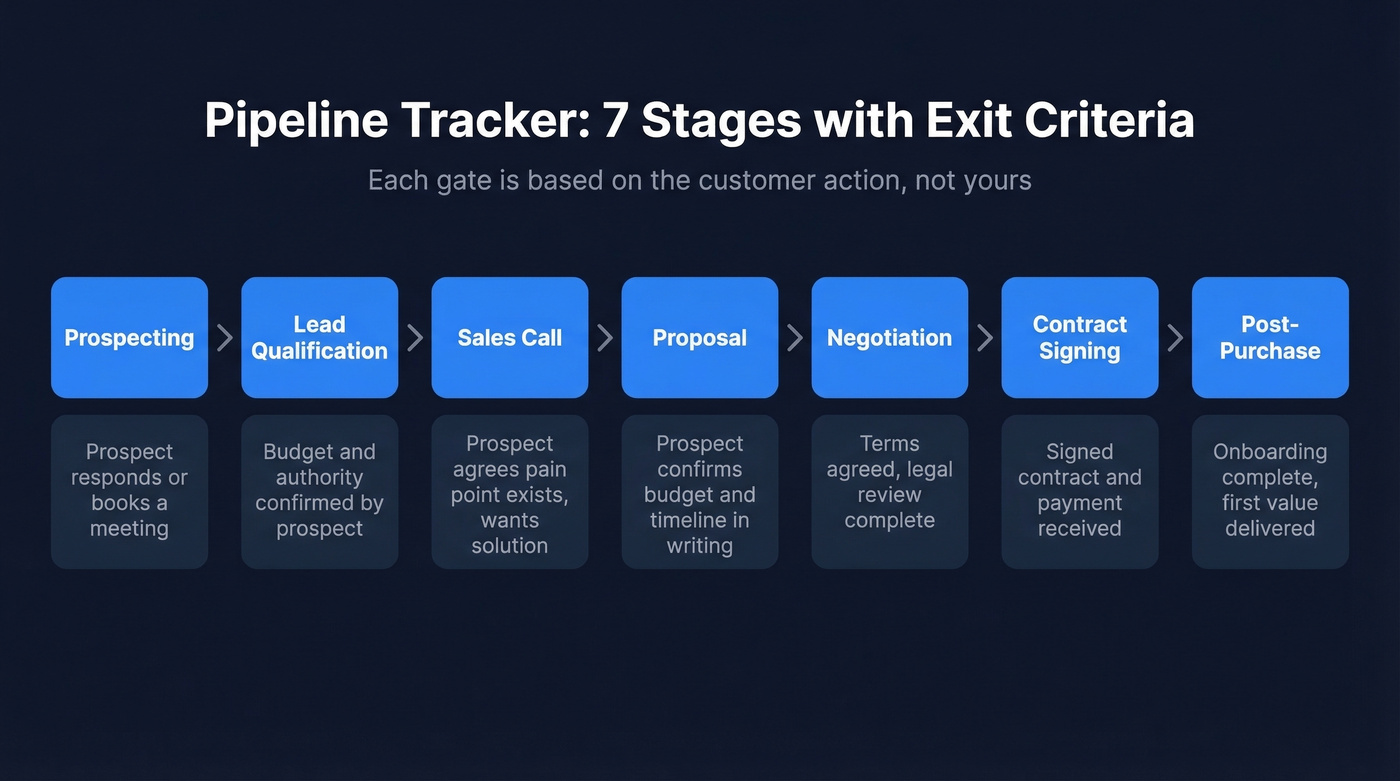
The standard framework runs seven stages: Prospecting, Lead Qualification, Sales Call, Proposal, Negotiation, Contract Signing, Post-Purchase. Your business might collapse a few of these or add stages for complex enterprise cycles, but this skeleton works for most B2B teams.
Exit criteria are what separate useful trackers from glorified to-do lists. Each stage needs a specific, measurable condition - based on the customer's action, not yours - that gates movement to the next stage. "Sent the proposal" isn't an exit criterion. "Prospect confirmed budget and timeline in writing" is. Without these gates, deals drift forward on optimism alone, and your forecast becomes fiction.
Benchmarks Worth Tracking in 2026
Numbers without context are useless. Here's what "good" actually looks like for B2B SaaS teams, based on funnel benchmarks compiled across 40+ studies.
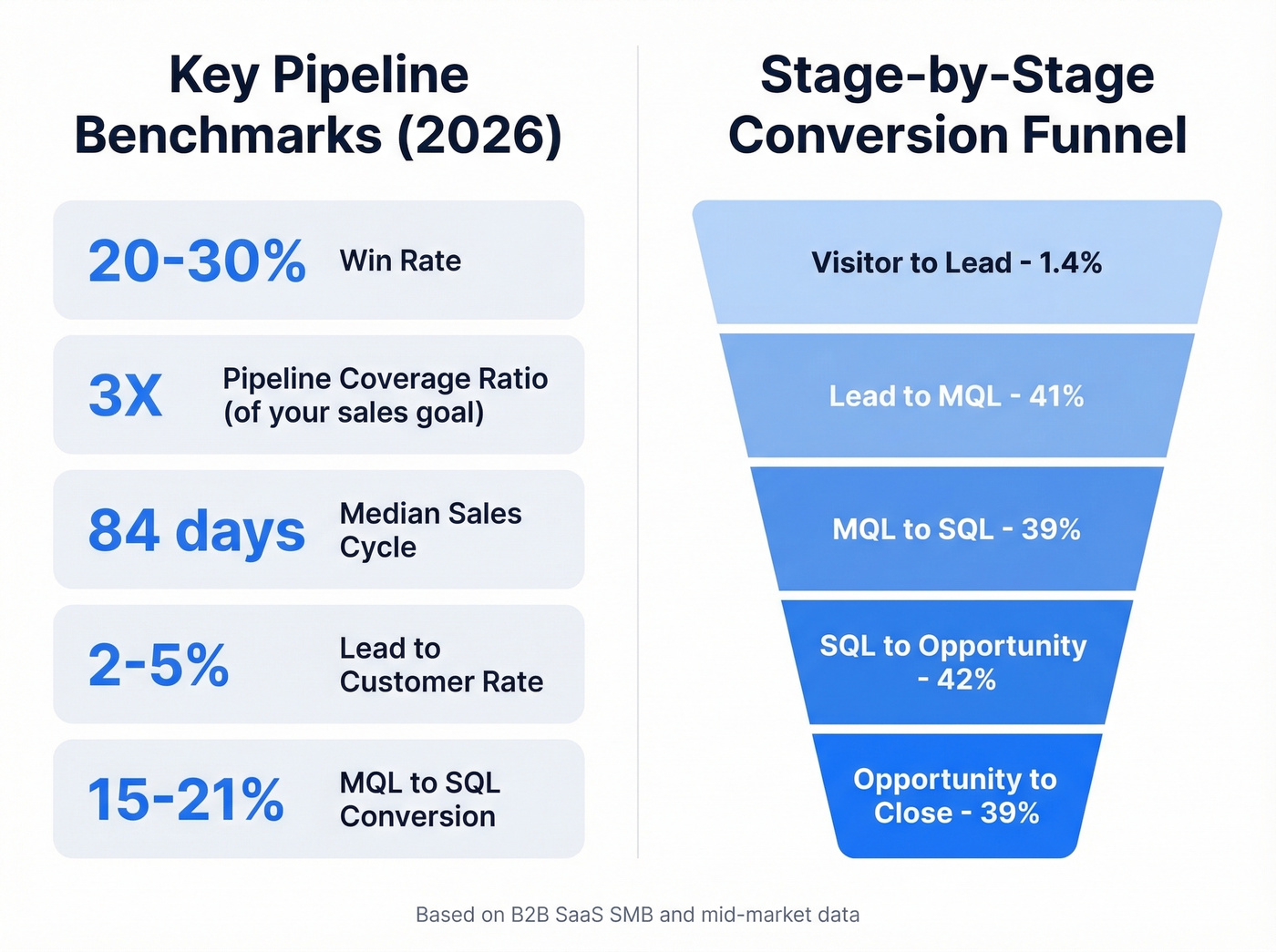
| Metric | Benchmark |
|---|---|
| Win rate | 20-30% |
| Pipeline coverage ratio | 3X your sales goal |
| Median sales cycle | 84 days (optimal: 46-75) |
| Lead-to-customer | 2-5% |
| MQL to SQL conversion | 15-21% (cross-industry avg) |
The pipeline coverage ratio is the one number every sales leader should have tattooed somewhere visible. If your quarterly target is $500K, you need $1.5M in pipeline. Anything less and you're hoping, not forecasting.
Here's the stage-by-stage breakdown for SMB and mid-market teams specifically, where tighter qualification pushes conversion rates higher than the cross-industry averages above:
| Stage | Conversion Rate |
|---|---|
| Visitor to Lead | 1.4% |
| Lead to MQL | 41% |
| MQL to SQL conversion | 39% |
| SQL to Opportunity | 42% |
| Opportunity to Close | 39% |
Channel matters too. SEO-sourced leads convert from Visitor to Lead at 2.1% with a 51% MQL-to-SQL rate. PPC? Just 0.7% and 26% respectively. Your tracking system should let you slice by source so you can see these differences, not just the aggregate.
Build a Simple Tracker in Google Sheets
A spreadsheet pipeline tracker isn't a compromise - it's the right tool for teams with fewer than 20 active deals. It just needs structure.
Essential Fields
Every row (deal) needs these columns:
- Deal stage/status (use drop-down menus - free-text turns into chaos within a week)
- Expected close date
- Deal size
- Probability/win confidence
- Weighted forecast value
- Sales rep owner
- Notes/next steps (drop-down for next actions too)
Weighted Forecast Formula
This is the formula that turns a wish list into a forecast:
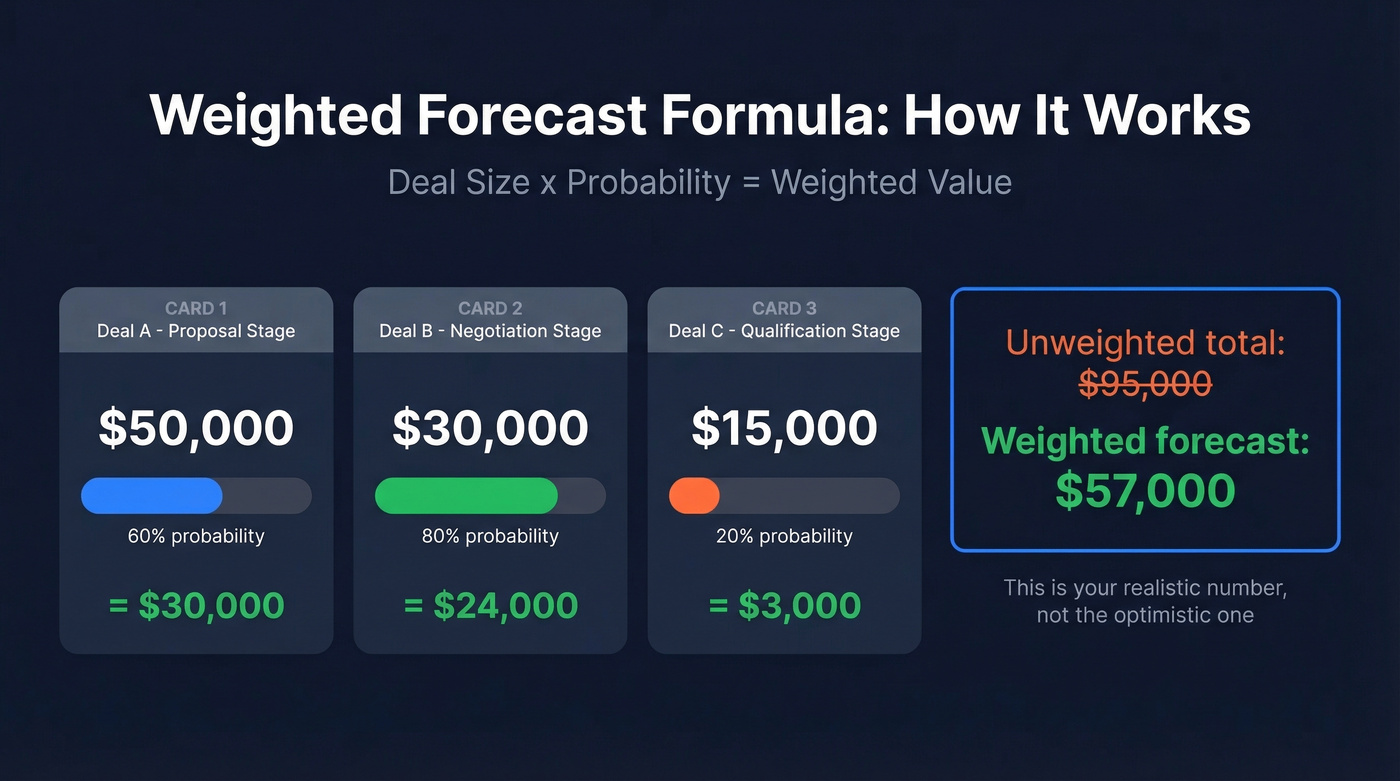
Deal Size x Probability = Weighted Value
Three deals in your pipeline: a $50K deal at Proposal stage (60% probability), a $30K deal at Negotiation (80%), and a $15K deal at Qualification (20%). Your weighted pipeline is $30K + $24K + $3K = $57K. That's your realistic forecast, not the $95K your unweighted total suggests.
Google Sheets Power Move
For teams already in Salesforce but wanting spreadsheet flexibility, the Coefficient workflow is worth knowing. Pull live Salesforce Opportunity data into Google Sheets, build a pivot by Forecast Category and Close Date grouped by month, use INDEX/MATCH formulas to populate monthly totals, then layer a combo chart with a target line on top.
You get the real-time data of a CRM with the flexibility of a spreadsheet - and anyone on the team can read it without a Salesforce license.
When to Ditch the Spreadsheet
Spreadsheets break at a predictable point: somewhere between 20 and 40 active deals. The symptoms are unmistakable.
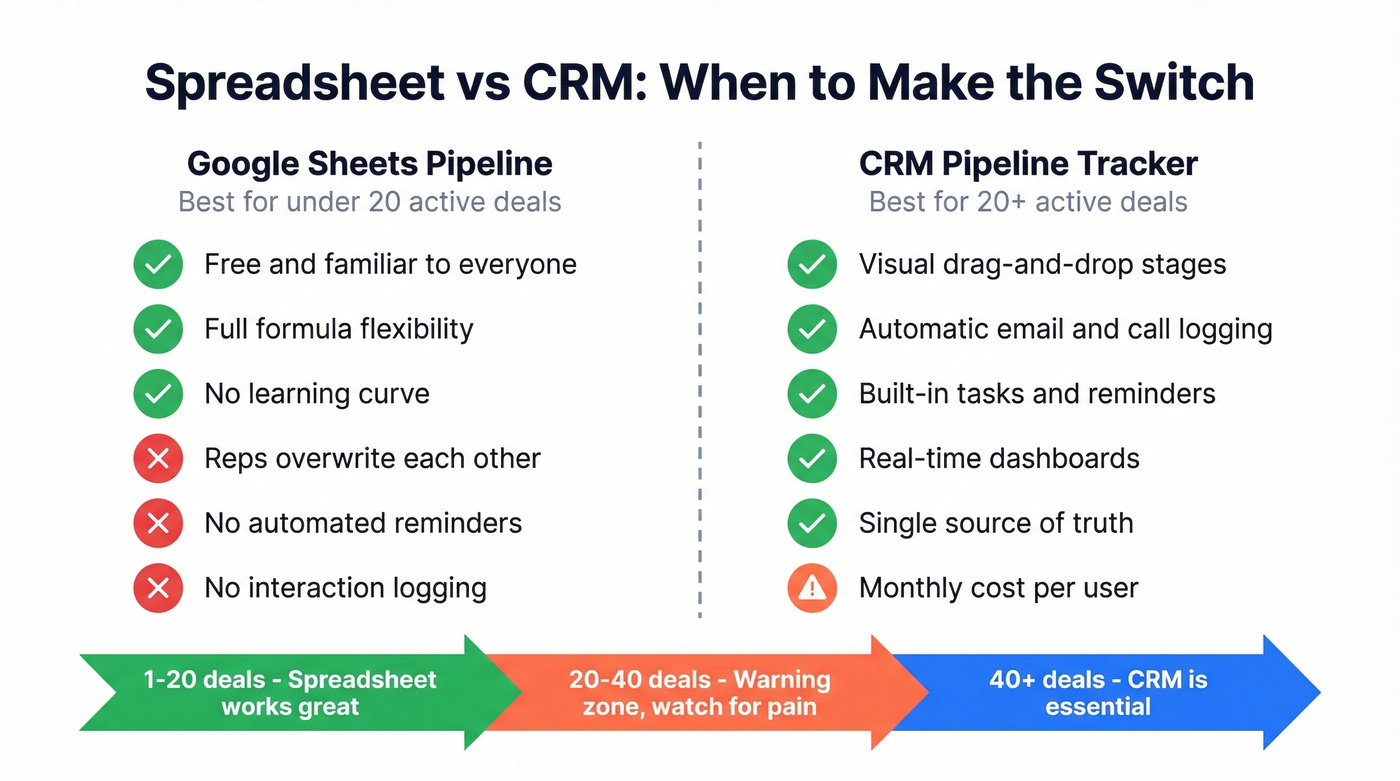
Two reps overwrite each other's notes. Deals past row 30 vanish from memory. You can't see pipeline health without building a chart every time. Follow-ups slip because there are no automated reminders. New reps can't figure out the spreadsheet's logic without a walkthrough. And emails, calls, and meetings live in scattered tools with no connection to the deal record. We've seen teams limp along with duct-taped spreadsheets for months past this breaking point, and the cost in lost deals is always worse than the cost of a CRM license.
If you're hitting three or more of those, it's time to migrate. A CRM replaces that chaos with visual drag-and-drop stages, automatic interaction logging from email and calendar, built-in tasks and reminders, real-time dashboards, and a single source of truth that doesn't require a "please don't edit column F" Slack message.

A pipeline tracker without accurate contact data is just a board of stalled deals. Prospeo fills your pipeline with 98% verified emails and 125M+ direct dials - refreshed every 7 days so your reps always reach real buyers, not dead ends.
Stop tracking deals that never had the right contact data to begin with.
Best Pipeline Tracking Tools for 2026
Look, most teams overthink the CRM decision. If your average deal size is under $10K, you don't need Salesforce-level infrastructure. Pick a tool you'll actually use daily, and spend the savings on better data.
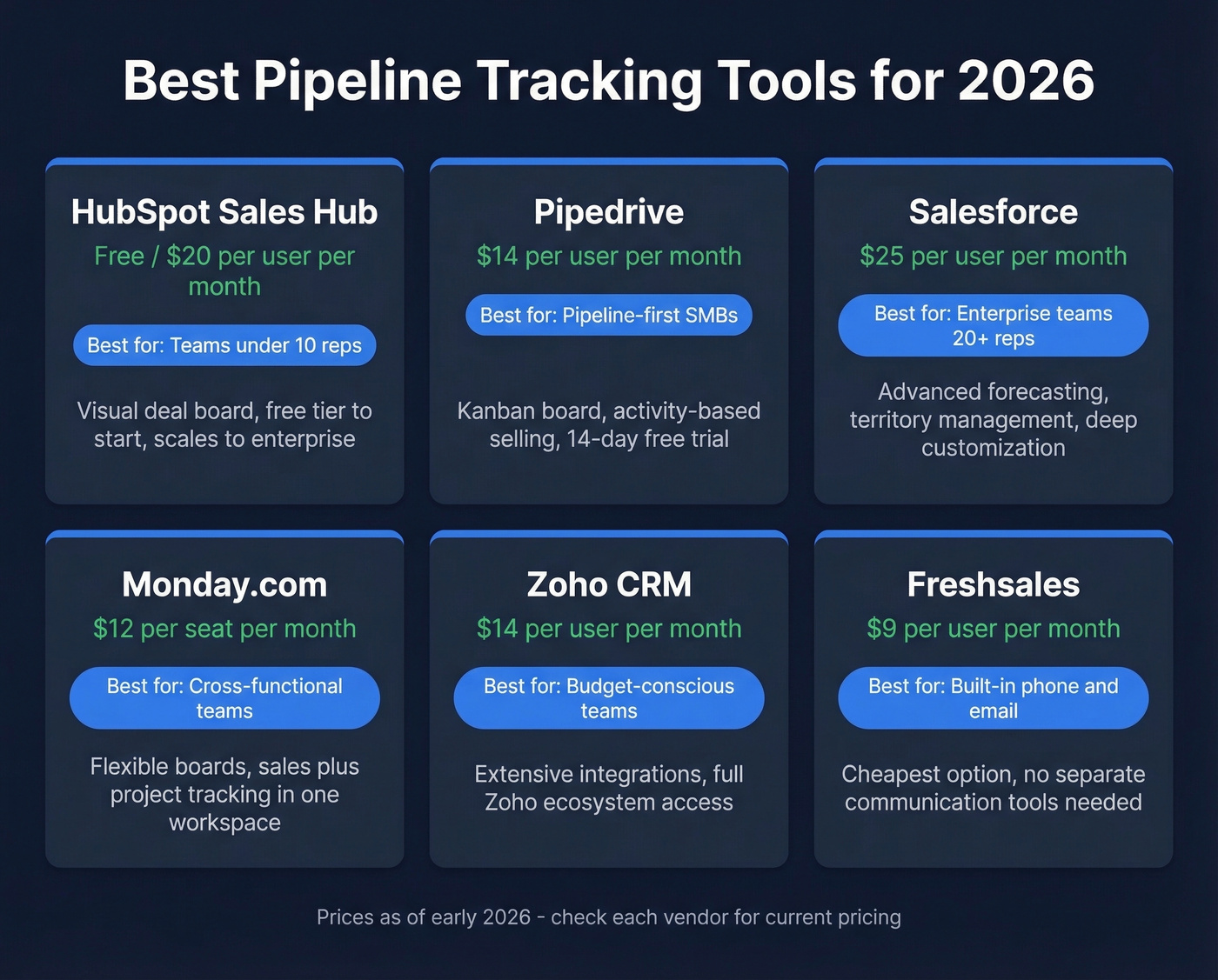
| Tool | Best For | Starting Price | Key Pipeline Feature |
|---|---|---|---|
| HubSpot Sales Hub | Free start that scales | Free / $20/user/mo | Visual deal board |
| Pipedrive | Pipeline-first SMB CRM | ~$14/user/mo | Kanban + activity selling |
| Salesforce | Enterprise ecosystem | $25/user/mo | Forecasting + territory |
| Monday.com | Cross-functional teams | ~$12/seat/mo | Flexible boards |
| Zoho CRM | Budget-conscious teams | ~$14/user/mo | Extensive integrations |
| Pipeliner CRM | Visual reporting | ~$65/user/mo | Built-in analytics |
HubSpot Sales Hub
Use this if you're a team under 10 reps and want to start without spending a dollar. Skip this if you need advanced forecasting or territory management out of the gate.
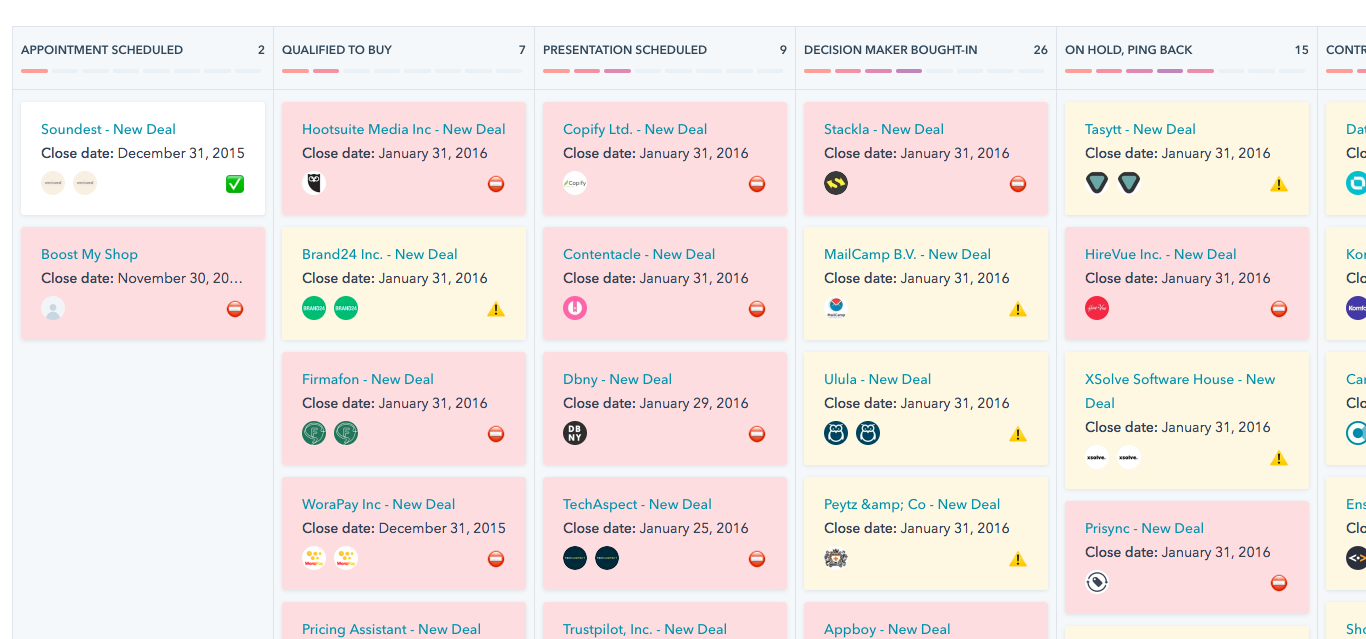
HubSpot's free tier includes basic pipeline management, deal tracking, and contact management - enough to replace your spreadsheet and buy you 6-12 months before you need to pay. The visual deal board is intuitive, and the upgrade path is clear: Starter at $20/user/mo adds automation, Professional at HubSpot Professional ($100/user/mo) unlocks custom reporting and sequences. The trap is that HubSpot gets expensive fast once you need the features that actually matter. But as a starting point, nothing beats free.
Pipedrive
Pipedrive is the best pure pipeline tracking CRM for SMBs who don't need a full platform. The entire product is built around one idea: a drag-and-drop kanban board where every deal has a clear stage, a next action, and a deadline. Activity-based selling methodology is baked into the workflow - Pipedrive nudges reps to schedule the next step, not just update a status.
Pricing runs ~$14/user/mo on the low end up to ~$99/user/mo on the high end, with a 14-day free trial and no credit card required. For teams between 5 and 20 reps who want deal visibility without the overhead of Salesforce or the upsell pressure of HubSpot, Pipedrive does one thing extremely well.

Salesforce Sales Cloud
Overkill for any team under 20 reps unless you're already in the ecosystem. Starter Suite runs $25/user/mo; Unlimited hits $330/user/mo. The setup cost and admin burden aren't worth it for small teams. But if you need advanced forecasting, territory management, and deep customization - nothing else competes.
Here's the thing: Salesforce is a platform, not a product. Budget for an admin or consultant on top of the license cost.
If you're comparing options, it helps to look at a few examples of a CRM side by side before you commit.
Monday.com
Good for teams that track sales alongside project management. Monday.com isn't a dedicated CRM, but the board flexibility is unmatched - you can build a pipeline view, a project tracker, and a client onboarding workflow in the same workspace. Starts around $12/seat/mo.
Other Notable Options
Zoho CRM has paid plans from ~$14/user/mo - a strong budget option with extensive integrations across the Zoho ecosystem. Pipeliner CRM runs ~$65/user/mo with visual pipeline views and built-in reporting; pricey for what you get unless you're sold on the visual analytics. Freshsales starts around ~$9/user/mo and stands out for built-in phone and email, eliminating the need for separate communication tools. Microsoft Dynamics 365 Sales is $65/user/mo for Sales Professional and $95/user/mo for Sales Enterprise, best for teams already deep in the Microsoft stack.
Pipeline Data Quality
Everyone obsesses over which CRM to buy. Nobody talks about the fact that your pipeline is only as good as the data feeding it.
Here's a scenario we've seen play out dozens of times: a team imports 500 leads into their shiny new tracking tool, launches sequences, and watches 38% of emails bounce. Domain reputation tanks. Deliverability craters. The pipeline shows $500K in opportunity value, but if 30% of those contacts have invalid emails, your real pipeline is closer to $350K.

This isn't hypothetical. Meritt tripled their pipeline from $100K to $300K per week after fixing their data quality and dropping their bounce rate from 35% to under 4%. Snyk's 50-person AE team cut bounce rates from 35-40% to under 5% and generated 200+ new opportunities per month - AE-sourced pipeline jumped 180%. Before you spend a dollar on CRM software, make sure the contacts entering your pipeline are real. Prospeo's free tier gives you 75 verified emails per month to test this - enough to see the difference in your first outbound batch.
If you want to go deeper on keeping lists clean, start with email bounce rate and email deliverability.
5 Forecast Killers to Avoid
1. No objective exit criteria per stage. If reps can drag a deal from "Qualification" to "Proposal" without the prospect confirming budget, your stages are meaningless. Define customer-action-based criteria for every transition.
2. Pipeline bloat. Dead and stalled opportunities inflate your numbers and destroy forecast accuracy. If a deal hasn't progressed in 30 days, it's not a deal - it's a wish. Remove it or move it to a "nurture" stage that doesn't count toward your forecast.
3. Inconsistent prospecting. Pipeline is a lagging indicator. If reps stop prospecting during a busy close month, you'll feel it 60-90 days later when the top of the pipeline dries up. The consensus on r/sales is pretty clear on this: the teams that prospect consistently, even when pipeline looks healthy, are the ones that avoid the feast-or-famine cycle. Prospecting cadence is non-negotiable. (If you need a system, steal from these sales prospecting techniques.)
4. Letting leads go cold. A qualified prospect who doesn't hear from you within 48 hours is already talking to your competitor. Your tracker should surface aging deals automatically - if it can't, set a manual reminder cadence. When you do follow up, use proven sales follow-up templates instead of improvising.
5. Skipping pipeline reviews. The right cadence:
- Daily: 5-minute scan of your own deals
- Weekly: 30-minute team review, stage by stage with your manager
- Monthly/quarterly: Trend analysis for leadership
Regular reviews are the fastest way to catch status changes that reps forget to log, keeping your forecast grounded in reality rather than stale data.
You just built the tracker. Now fill it with deals that actually close. Prospeo's 30+ search filters - buyer intent, technographics, headcount growth - let you prospect the accounts most likely to convert, at $0.01 per verified email.
Teams using Prospeo book 35% more meetings than Apollo users.
Use Cases Beyond Sales
Fundraising Pipelines
Nonprofits and universities use pipeline trackers too - they just call the stages different things. The fundraising pipeline runs five stages: Identification, Qualification, Cultivation, Solicitation, Stewardship. The pipeline coverage equivalent is a 4:1 prospect-to-gift ratio. Data cleanliness is arguably even more critical here, since fundraising databases are plagued by manual entry and outdated records.
Recruiting Pipelines
Recruiting pipelines follow similar logic: Identify Needs, Sourcing, Screening, Interviewing, Final Decisions, Ongoing Nurturing. The key shift is from reactive recruiting (posting a job and waiting) to proactive pipeline building - maintaining a warm bench of candidates before you have an open role. Same principles apply: defined stages, exit criteria, regular reviews.
FAQ
How many stages should a sales pipeline have?
Most B2B pipelines use 5-7 stages. The standard model runs Prospecting through Post-Purchase. Shorter sales cycles can collapse stages; complex enterprise deals may add gates for technical evaluation or procurement review.
What KPIs should I track in my pipeline?
Four essentials: win rate (benchmark 20-30%), average sales cycle length (median 84 days), pipeline coverage ratio (target 3X your sales goal), and stage-by-stage conversion rates. Track weighted pipeline value - deal size multiplied by probability - to forecast revenue accurately.
Is a spreadsheet good enough for pipeline tracking?
Yes, until you hit 20-40 active deals. Below that threshold, a Google Sheets tracker with deal stage, close date, probability, and weighted forecast columns works fine. Beyond that, version conflicts and missed follow-ups make a CRM worth the $14-25/user/mo investment.
How do I keep my pipeline data accurate?
Verify contact data before it enters your pipeline - validate emails and phone numbers in real time. Enforce objective exit criteria per stage, run weekly reviews, and purge stale deals that haven't progressed in 30+ days.
What's the difference between a pipeline and a funnel?
A sales funnel describes the customer's buying journey from awareness through decision. A pipeline tracker is the operational tool monitoring each deal's progress through your sales stages. The funnel is the concept; the pipeline is the working view your reps live in every day.