

SMTP Ports Explained: Which Port to Use and Why
Your app won't send email. The logs show a timeout, no error message, nothing useful. You've triple-checked the credentials, the hostname looks right, and you're about to start questioning your career choices.
Nine times out of ten, it's the SMTP port.
Quick Reference
| Port | Use Case | Encryption | Recommendation |
|---|---|---|---|
| 25 | Server-to-server relay | STARTTLS (optional) | Relay only |
| 465 | Email submission | Implicit TLS | Alternative |
| 587 | Email submission | STARTTLS | Default |
| 2525 | Fallback submission | STARTTLS | Fallback |
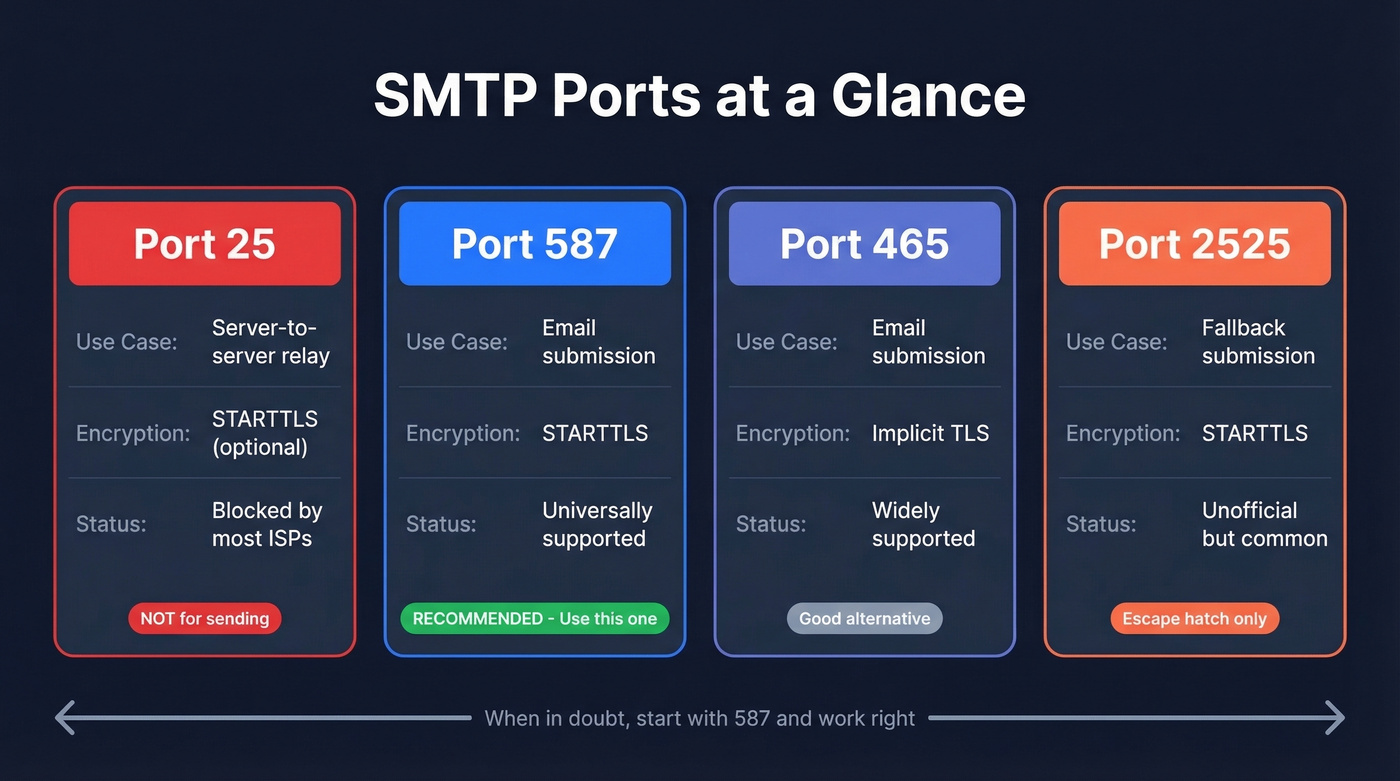
Use port 587 for SMTP submission. That's the answer for 95% of you. Keep reading if it's not working or you want to understand why.
What Is an SMTP Port?
SMTP runs over TCP - never UDP, since every message requires a reliable, ordered connection - and a port is just a numbered endpoint on a server. Think of it as a door number on an office building. The building (server) has one IP address, but different services listen behind different doors.
The distinction that matters most: submission vs relay. Submission is your email client or app handing a message to your mail server. Relay is one mail server passing that message to another. These are different jobs, and they use different ports. Mixing them up is where most configuration headaches start.
One thing to clarify upfront: TLS on any SMTP port encrypts the connection between your client and the mail server. It doesn't provide end-to-end encryption of the message itself. If you need true end-to-end encryption where even the mail server can't read the content, you need PGP or S/MIME on top of TLS. For the vast majority of use cases, transport-level TLS is sufficient.
SMTP Ports Breakdown
Port 25 - Don't Use This for Sending
Port 25 dates back to SMTP's original publication in 1981 and was designed for everything - submission, relay, the whole pipeline. That era didn't end well. By 1998, the Internet Mail Consortium reported roughly 55% of mail servers were open relays, happily forwarding spam for anyone who asked. That number dropped below 1% by 2002, but port 25's reputation never recovered.
Today, port 25 is reserved for MTA-to-MTA relay - one mail server talking to another. It's not meant for client submission, and you shouldn't use it that way. Most residential ISPs block outbound port 25 to curb spam from compromised machines. AWS and Azure also restrict it on cloud instances by default.
If you're reading this because your email won't send, port 25 is almost certainly not the answer. The only legitimate use case is configuring server-to-server relay on infrastructure you control where your provider hasn't blocked it. Everyone else should skip to port 587.
Port 587 - The Default
Port 587 is the current standard for email submission, formalized in RFC 6409. When your app or email client needs to hand a message to your mail server, this is the port.
It works with STARTTLS encryption - your client connects in plaintext, then upgrades to TLS before sending credentials or message data. As the designated SMTP TLS port for submission, 587 is typically used with SMTP AUTH, meaning you authenticate before the server accepts your message. This separation of authenticated submission from unauthenticated relay is exactly the design choice that helped kill the open relay problem.
Most major ESPs default to 587. Gmail, Outlook, SendGrid, Mailgun - they all point you here first.
Use port 587 if: you're doing anything involving email submission - app sending transactional email, marketing platform, mail client configuration. 587 first, always.
Skip port 587 if: your ISP or firewall blocks it (rare, but it happens). In that case, try 465 or 2525.
Port 465 - Implicit TLS
Port 465 has the most confusing history of any SMTP port. It was originally used for SMTPS (SMTP over SSL) in the mid-1990s, then IANA reassigned the port number entirely. For years, vendors kept using 465 as the de facto SMTP SSL port anyway. Then in 2018, RFC 8314 reignited the "465 vs 587" debate by recommending that connections "be made using 'Implicit TLS' in preference to connecting to the 'cleartext' port and negotiating TLS using the STARTTLS command."
That RFC language is why the debate exists. Some ESP documentation calls 465 non-compliant. Cloudflare calls it the recommended port for secure transmission. They're both reading the same standards and reaching different conclusions.
The difference from 587 is the encryption model. Port 465 uses implicit TLS - the connection is encrypted from the first byte. Port 587 uses STARTTLS - the connection starts unencrypted and upgrades. Both end up encrypted, but they get there differently.
Use port 465 if: your provider recommends it, 587 is blocked, or you want implicit TLS.
Skip port 465 if: you have no strong reason to deviate from 587. Most documentation and troubleshooting guides assume 587.
Port 2525 - The Escape Hatch
Port 2525 isn't an official standard. It has no RFC. It exists purely as a pragmatic workaround for situations where ISPs or firewalls block the standard ports. It behaves like 587 - STARTTLS encryption, SMTP AUTH, same protocol on a different door number.
SendGrid and many transactional ESPs support 2525 alongside their standard ports. If you've tried 587 and 465 and both time out, 2525 is your next move. There's no advantage to it over 587 - it's purely a fallback.
465 vs 587 - The Debate
This argument has been running on r/sysadmin for years. A popular thread from 2022 argued that submission should be on 465, citing RFC 8314. The comments were split. The debate hasn't settled since.
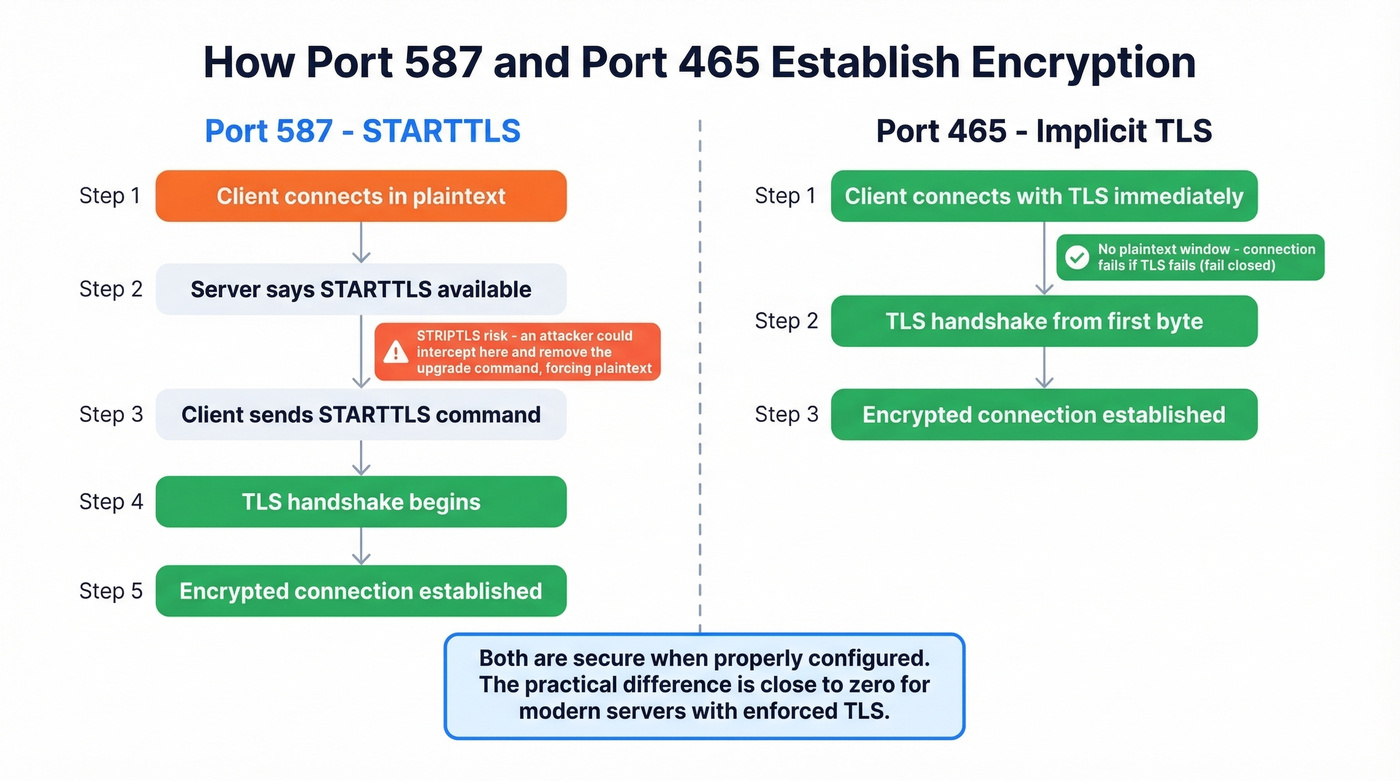
Here's what actually matters. STARTTLS on port 587 has a theoretical vulnerability called STRIPTLS - a man-in-the-middle can intercept the connection before the TLS upgrade and strip the STARTTLS command, forcing the connection to continue unencrypted. In practice, this requires an active attacker on the network path, and most modern servers refuse to proceed without TLS. But the vulnerability exists in the protocol design.
Implicit TLS on port 465 doesn't have this problem. The connection is encrypted from the start. If TLS negotiation fails, the connection fails - it doesn't fall back to plaintext. This "fail closed" behavior is why RFC 8314 prefers it.
Here's the thing: both ports are secure when properly configured. The STRIPTLS risk is theoretical for most environments, and the practical difference between 465 and 587 is close to zero for anyone running a modern mail server with enforced TLS.
Let's be honest - the 465 vs 587 debate is the "tabs vs spaces" of email infrastructure. It generates heat but almost never matters in production. Use 587 as your default. Switch to 465 if 587 is blocked or your provider recommends it. Stop losing sleep over this.

Getting your SMTP port right is step one. Step two is making sure you're sending to valid addresses. Prospeo's 5-step email verification delivers 98% accuracy - with spam-trap removal and catch-all handling built in. Bad data tanks deliverability faster than a misconfigured port.
Stop debugging bounces. Start with emails that actually exist.
Cloud Provider Restrictions
You deploy on AWS EC2, configure your app to send email on port 25, and the connection times out with zero error context. You spend two hours checking credentials, hostnames, and firewall rules before discovering that AWS blocks port 25 by default. We've watched this exact scenario play out dozens of times - it's the single most common SMTP debugging dead end for cloud-hosted apps.
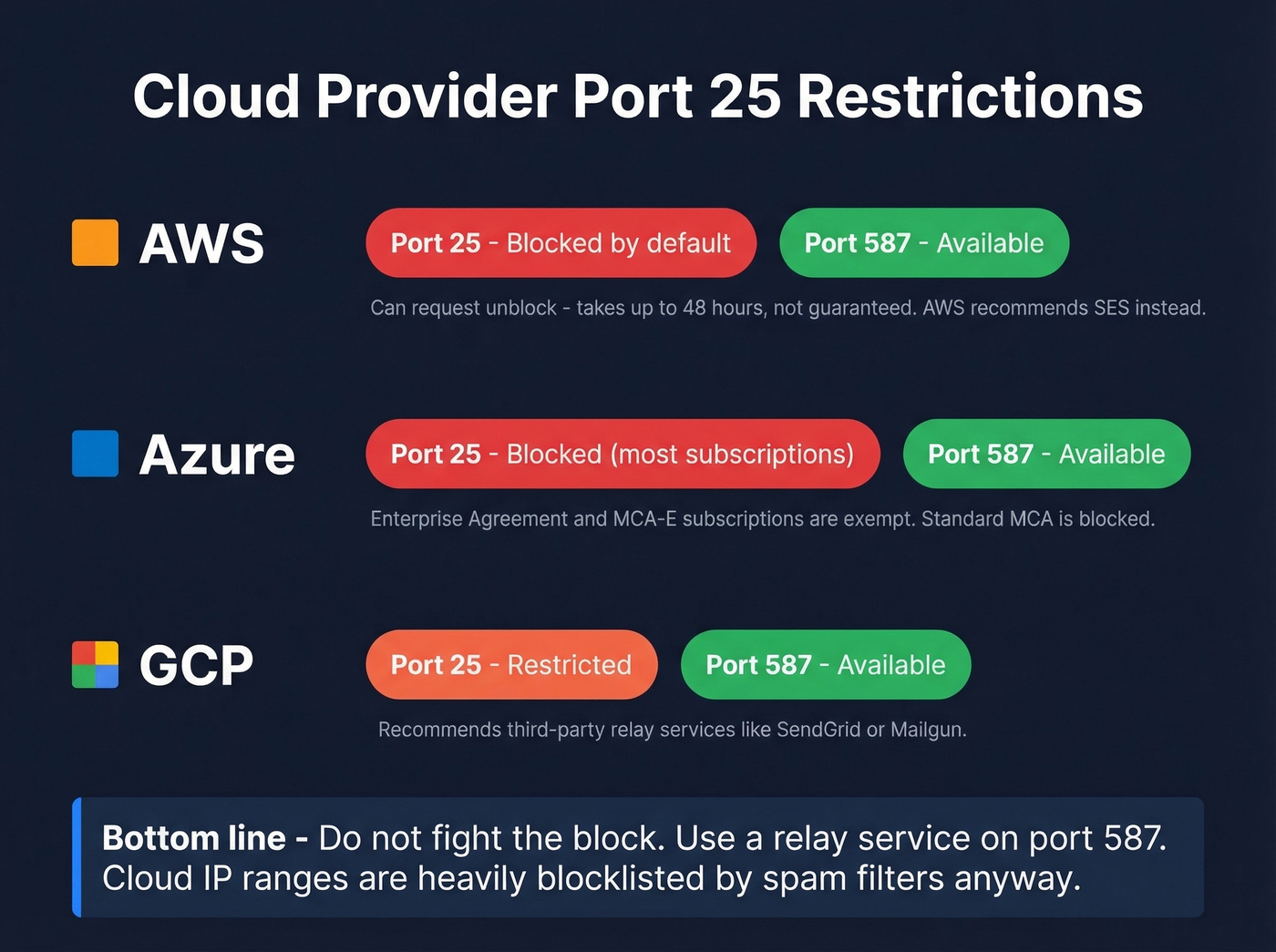
| Provider | Port 25 Policy | Unblocking | Port 587 |
|---|---|---|---|
| AWS | Blocked by default | 48-hour request | Available |
| Azure | Blocked (most subs) | EA/MCA-E exempt | Available |
| GCP | Restricted | Third-party relay | Use 587/465/2525 |
AWS blocks outbound port 25 on all EC2 instances and Lambda functions by default. You can submit a request to remove the restriction, but approval takes up to 48 hours and isn't guaranteed. For Lambda, you need to attach the function to a VPC first. AWS recommends using Amazon SES instead.
Azure blocks outbound port 25 for most subscription types. Enterprise Agreement and MCA-E subscriptions are exempt - everyone else is blocked. This catches people off guard. A thread on r/AZURE highlights the frustration: users discover mid-project that their standard MCA subscription doesn't qualify for the exemption. Port 587 isn't blocked regardless of subscription type.
GCP restricts outbound port 25 and recommends using third-party relay services. The pattern is the same across all three providers: don't fight the block. Use a relay service on port 587 (or 465/2525 if needed). It's better for deliverability anyway - cloud IP ranges are heavily blocklisted by spam filters.
Provider SMTP Settings
Bookmark this.
| Provider | Server | Port | Encryption | Auth |
|---|---|---|---|---|
| Gmail | smtp.gmail.com | 587 | STARTTLS | App password/OAuth2 |
| Outlook | smtp-mail.outlook.com | 587 | STARTTLS | OAuth2 (Modern Auth) |
| Yahoo | smtp.mail.yahoo.com | 465 or 587 | SSL/TLS | App password |
| SendGrid | smtp.sendgrid.net | 587/465/2525 | STARTTLS or TLS | API key |
| Mailgun | smtp.mailgun.org | 587 | STARTTLS | Domain credentials |
A few things worth flagging. Outlook no longer supports basic password authentication - you need OAuth2 or Modern Auth. If your app is hardcoded with a username and password for Outlook SMTP, it won't work. Yahoo requires an app-specific password generated in your account settings, not your regular login password. Both of these trip people up constantly.
For transactional email, Amazon SES is hard to beat on cost at around $0.10 per 1,000 emails. Make sure you have SPF/DKIM and ideally DMARC configured regardless of which provider you choose - port configuration without proper DNS authentication is only half the job. If you want to go deeper on authentication and policy, see DMARC alignment and these SPF record examples.
How to Test Connectivity
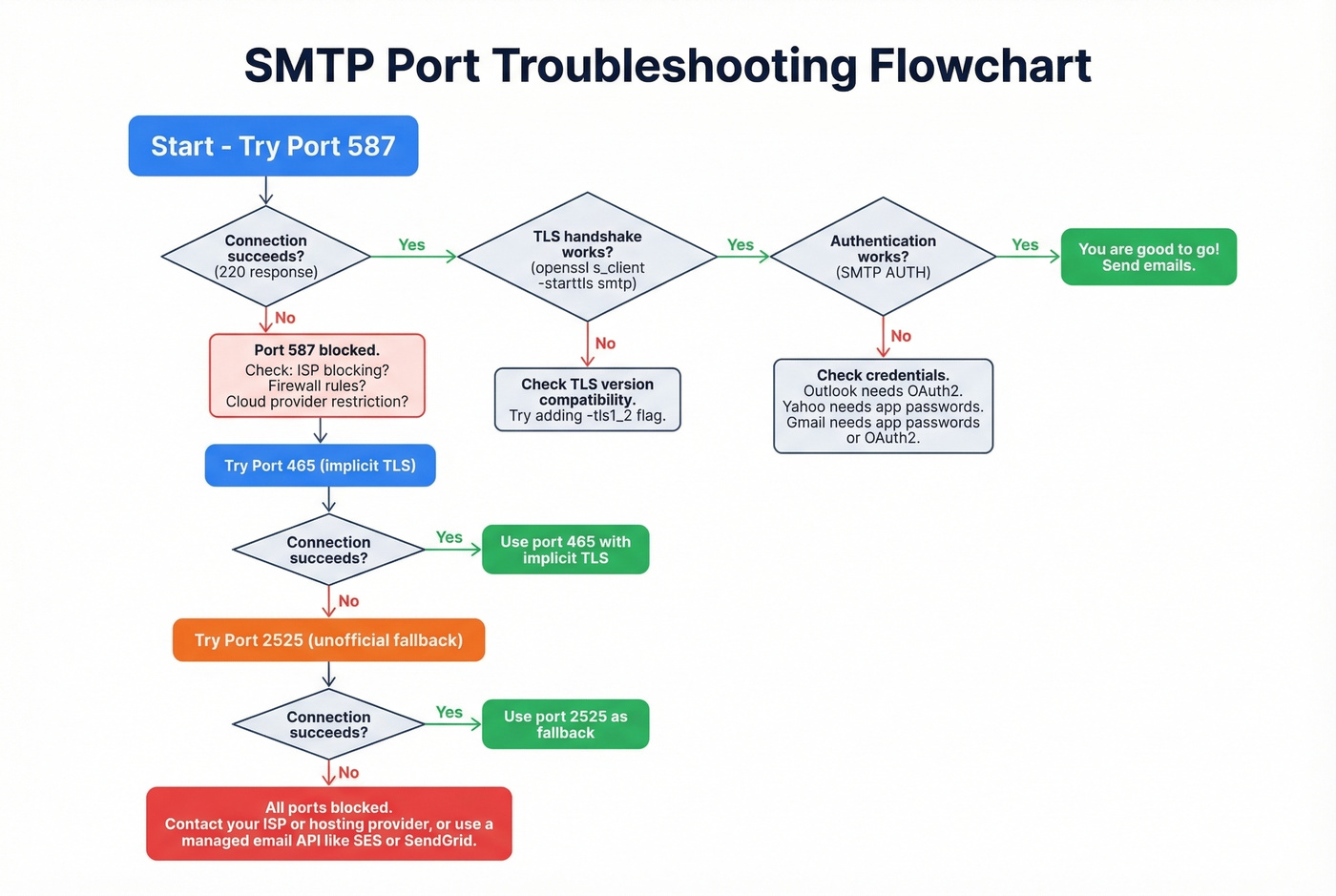
Start with basic reachability, then layer on TLS verification and authentication checks.
Basic Reachability (Telnet)
Before debugging encryption or authentication, confirm you can reach the server at all:
telnet smtp.example.com 587
If the connection succeeds, you'll see a 220 response - something like 220 smtp.example.com ESMTP ready. That means the server is listening and reachable on that port.
"Connection timed out" means the port is blocked by your ISP, cloud provider, or firewall. "Connection refused" means the server isn't listening on that port - double-check the hostname and port number.
TLS Verification (OpenSSL)
Once you've confirmed basic connectivity, verify that TLS works. If you suspect a TLS version mismatch, add -tls1_2 to force a specific version and narrow down the issue.
For STARTTLS on port 587:
openssl s_client -connect smtp.example.com:587 -starttls smtp
For implicit TLS on port 465:
openssl s_client -connect smtp.example.com:465
After the TLS handshake completes, send an EHLO command to see what the server advertises. Look for STARTTLS and AUTH in the response - these confirm the server supports encryption and authentication.
Key response codes:
- 220 - service ready
- 250 - command accepted
- 4xx - temporary failure (retry later)
- 5xx - permanent failure (check config, credentials, or policy)
If the TLS handshake fails entirely, you're likely dealing with a TLS version mismatch or an expired certificate on the server side. The SSL Labs server test can help diagnose certificate issues.
Common Errors and Fixes
| Error | Likely Cause | Fix |
|---|---|---|
| Connection timed out | Port blocked | Try 587 -> 465 -> 2525; check firewall rules |
| Connection refused | Server not listening | Verify hostname and port number |
| Authentication failed | Wrong credentials or OAuth required | Check auth method - password vs app password vs OAuth2 |
| TLS handshake failure | TLS version mismatch or expired cert | Test with OpenSSL; verify server TLS support |
| 550 relay not permitted | Server won't relay for your domain | Authenticate first (SMTP AUTH on 587) |
Look, the most common "port problem" isn't actually a port problem. In our experience, authentication issues are more frequent than people expect. Your marketing team tries to configure Outlook SMTP, all three ports fail, and everyone assumes it's a firewall issue. The actual problem? Outlook requires OAuth2 now, and the app is sending a plain password. Always check the authentication method before blaming the port.
If you're troubleshooting bounces after you get connectivity working, it helps to understand email bounce rate benchmarks and what they signal.
Protecting Deliverability After Setup
Getting the right port SMTP configuration ensures your emails leave your server. That's step one. But sending to invalid addresses damages your sender reputation faster than any port misconfiguration ever will.
A high bounce rate - anything above 2-3% - signals to mailbox providers that you aren't maintaining your list. That leads to IP blocklisting, spam folder placement, and eventually delivery failures even for legitimate recipients. Spam traps and honeypots are even worse; hitting one can tank your reputation overnight.
Email verification catches these problems before they compound. Prospeo's 5-step verification process removes invalid addresses, spam traps, and honeypots before they ever hit your SMTP server, with 98% email accuracy across 143M+ verified emails. The verification runs against proprietary infrastructure and includes catch-all domain handling, which most verification tools skip entirely. If you're building a broader deliverability checklist, start with an email deliverability guide and then focus on how to improve sender reputation.
Before you send your next campaign or flip on that transactional email flow, verify the list. It takes minutes and saves months of reputation repair.
If you're sending cold outreach at scale, you’ll also want to manage email velocity and follow a safer playbook for the best way to send bulk email without getting blacklisted.
You just spent hours fixing port configs to protect your sender reputation. Don't wreck it by emailing unverified contacts. Prospeo refreshes 143M+ verified emails every 7 days - not every 6 weeks like competitors. At $0.01 per email, clean data costs less than a single bounce.
Your SMTP setup is solid. Now send to addresses that won't bounce.
FAQ
Is port 25 secure?
Port 25 supports STARTTLS but is primarily used for server-to-server relay, not client submission. Most ISPs and cloud providers block it outbound. Use port 587 or 465 for any submission workflow requiring authentication and encryption.
Why is my SMTP connection timing out?
Your ISP or cloud provider almost certainly blocks the port you're using - especially port 25. Try 587 first, then 465, then 2525. If all three time out, check your firewall rules and verify the server hostname is correct.
Do I need TLS for SMTP in 2026?
Yes. Use STARTTLS on port 587 or implicit TLS on port 465. Every major ESP requires encryption, and unencrypted SMTP is both a security and deliverability liability. Don't send credentials or message data over a plaintext connection.
Can I use port 465 instead of 587?
Yes. RFC 8314 prefers implicit TLS for submission connections. Both ports are secure when properly configured. Most ESPs default to 587, but 465 works with modern mail servers and eliminates the theoretical STRIPTLS attack surface.
How do I verify emails before sending through SMTP?
Use an email verification service to remove invalid addresses, spam traps, and honeypots before they reach your mail server. Prospeo's 5-step verification with catch-all handling keeps bounce rates under the 2-3% threshold that mailbox providers use to evaluate sender reputation.