

5 Pre-Meeting Email Templates That Prevent No-Shows
You're staring at an empty Zoom room. The prospect booked three days ago, confirmed via email, and just... didn't show. Meetings cost roughly $29,000 per employee per year, and 25% of no-shows happen simply because people forgot. Even well-run B2B sales teams see only 70-80% show rates on booked discovery calls.
The fix isn't a better calendar tool. It's a better pre-meeting email template.
There are three distinct pre-meeting emails - confirmation, pre-read, and reminder. If you only send one, send a pre-read 24-48 hours before the meeting so people have time to prepare. Below: five scenario-specific templates you can copy in 30 seconds, plus timing and subject line data to make them land.
The 3 Types of Pre-Meeting Emails
- Confirmation - Sent immediately after booking. Locks in logistics: date, time, platform, attendees. Eliminates ambiguity.
- Pre-read - Sent 24-48 hours before. Includes the agenda, context, and materials to review. This is the one that prevents unprepared meetings.
- Reminder - Sent morning-of or 1-2 hours before. A short nudge with the meeting link and a one-line agenda recap.
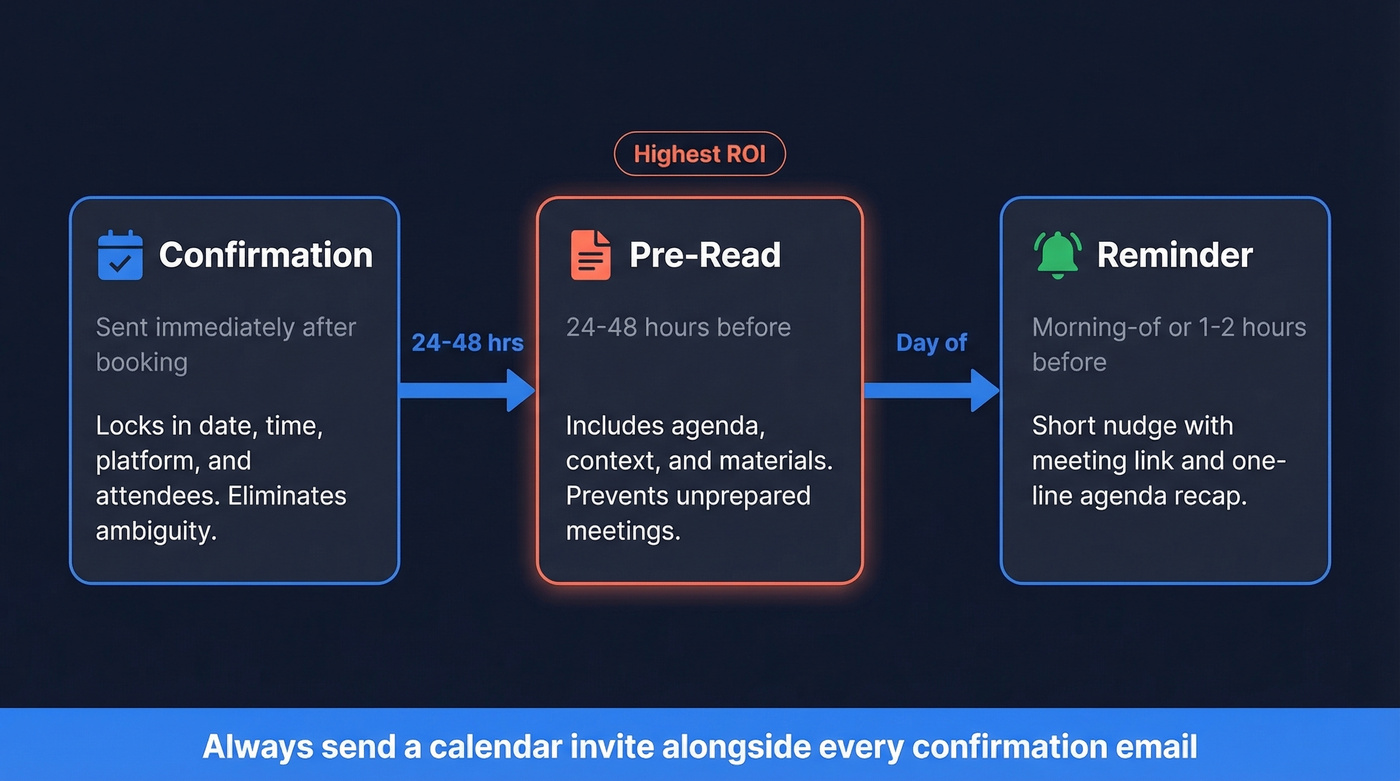
A confirmation email is NOT a calendar invite. Prospects who only get a confirmation email often can't find the meeting because there's nothing to accept. Always send both.
5 Copy-Paste Templates
Sales Discovery Pre-Read
When to use: 24-48 hours before a discovery or demo call.
Subject line: [Company] + [Your Company] - Discovery Agenda for [Date]
Hi [First Name],
Looking forward to [Day, Date] at [Time] [Time Zone]. Here's a quick overview so we make the most of our time:
Context: [1-2 sentences on how you connected and what prompted the meeting.]
Agenda:
- Your current workflow and priorities (10 min)
- Discovery questions (10 min)
- [Product] walkthrough (25 min - I'll do a time check at 20)
- Next steps (10 min)
On our side: [Your name] leads; [Colleague] joins for technical questions.
Meeting link: [Link]
If anything's changed, just reply.
This timed agenda structure signals professionalism and gives the prospect a reason to show up - they know exactly what they're getting. A pre-read with time allocations also triggers a subtle sense of reciprocity: you've invested effort, so they feel obligated to match it.
Internal Team Sync Confirmation
When to use: Immediately after scheduling an internal meeting with 3+ attendees.
Subject line: Team Sync - [Topic] | [Date] at [Time]
Hi team,
Confirming our sync on [Day, Date] at [Time] [Time Zone] via [Platform].
Attendees: [Names/roles] Purpose: [One sentence - what we need to decide or align on]
Full agenda coming 24 hours before. If you can't make it, let me know by [deadline].
[Meeting link]
Short and functional. Skip this template if your team already has a standing meeting cadence with a shared doc - you'd just be adding noise.
Client QBR Pre-Read
When to use: 48 hours before a quarterly business review.
Subject line: QBR Prep - [Client Name] | [Date]
Hi [First Name],
Our QBR is set for [Day, Date] at [Time]. Agenda framed as discussion questions:
- Are we on track against [specific KPI]? (15 min)
- What's blocking progress on [initiative]? (15 min)
- Should we adjust scope for Q[X]? (15 min)
- Open discussion + next steps (15 min)
What we won't cover: [Topic] - scheduled for [other meeting/date].
Attached: [performance summary / dashboard link]
The "what we won't cover" line is underrated. It prevents tangents before they start and signals you've thought about the meeting's boundaries, which is exactly the kind of detail that makes clients trust you're running a tight ship.
Interview Confirmation
When to use: 24 hours before a candidate interview.
Subject line: Your Interview with [Company] - [Date] at [Time]
Hi [First Name],
Confirming your interview on [Day, Date] at [Time] [Time Zone].
Interviewers: [Name, Title] and [Name, Title] Format: [Video call / In-person at address] Duration: [X] minutes Prep: Please be ready to discuss [specific topic]. No formal presentation needed.
Meeting link: [Link]
Need to reschedule? Reply here or call [phone number].
Morning-Of Reminder (Universal)
When to use: Morning of any meeting, or 1-2 hours before virtual meetings.
Subject line: Reminder: [Meeting Topic] today at [Time]
Hi [First Name],
Quick reminder - we're meeting today at [Time] [Time Zone].
Agenda recap: [One sentence] Link: [Meeting link]
See you shortly.
Don't overthink this one. Three lines. The meeting link. Done.

A perfect pre-meeting email means nothing if it bounces. Prospeo delivers 98% email accuracy across 143M+ verified addresses - so your confirmation, pre-read, and reminder actually reach the prospect's inbox.
Stop sending pre-meeting emails to dead addresses.
When to Send Each Email
| Meeting Type | When to Send | Why |
|---|---|---|
| Complex (pre-reads) | 2-3 days before | Recipients need prep time |
| Routine (familiar team) | 1 day before | Quick context refresh |
| Urgent / under 30 min | A few hours before | Just a nudge |
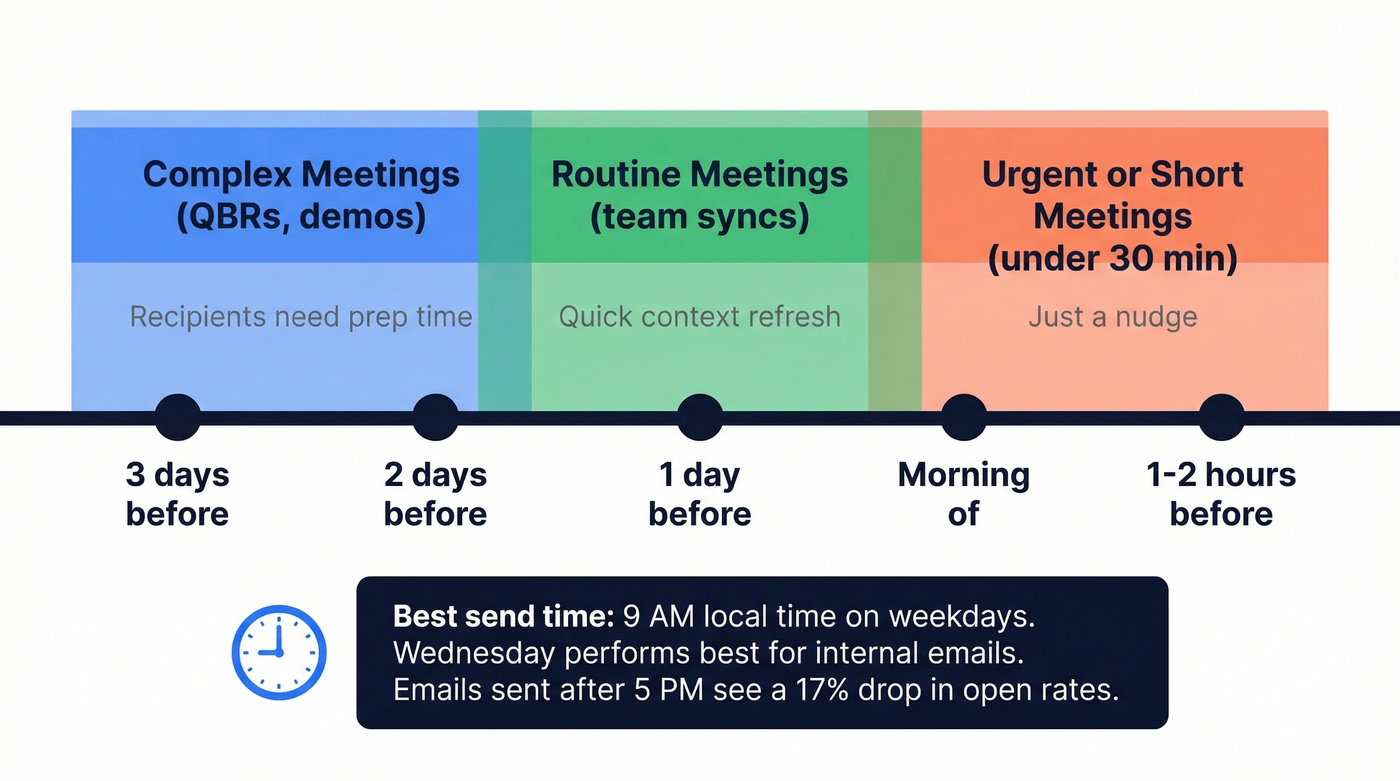
For all types, 9 AM local time on a weekday is the sweet spot. Wednesday performs best for internal emails. Emails sent after 5 PM see a 17% drop in open rates - your carefully crafted pre-read gets buried under the next morning's inbox avalanche.
In our experience, the 24-hour pre-read is the single highest-ROI email in any meeting cadence. One practitioner we spoke with cut meeting prep from roughly 30 minutes to 5 by using structured agenda templates sent the day before - attendees showed up ready to go, and the meetings themselves ran 15 minutes shorter on average.
Subject Line Rules
Keep subject lines to 21-40 characters - 60% of internal emails are opened on phones. Include the meeting date and topic, something like "QBR Prep - Acme | June 12." Personalized subject lines lift open rates by about 22%, so add the recipient's company or name when you can. We've tested both approaches, and short subject lines with the date consistently outperform clever ones. If you want more options, pull from these subject lines.
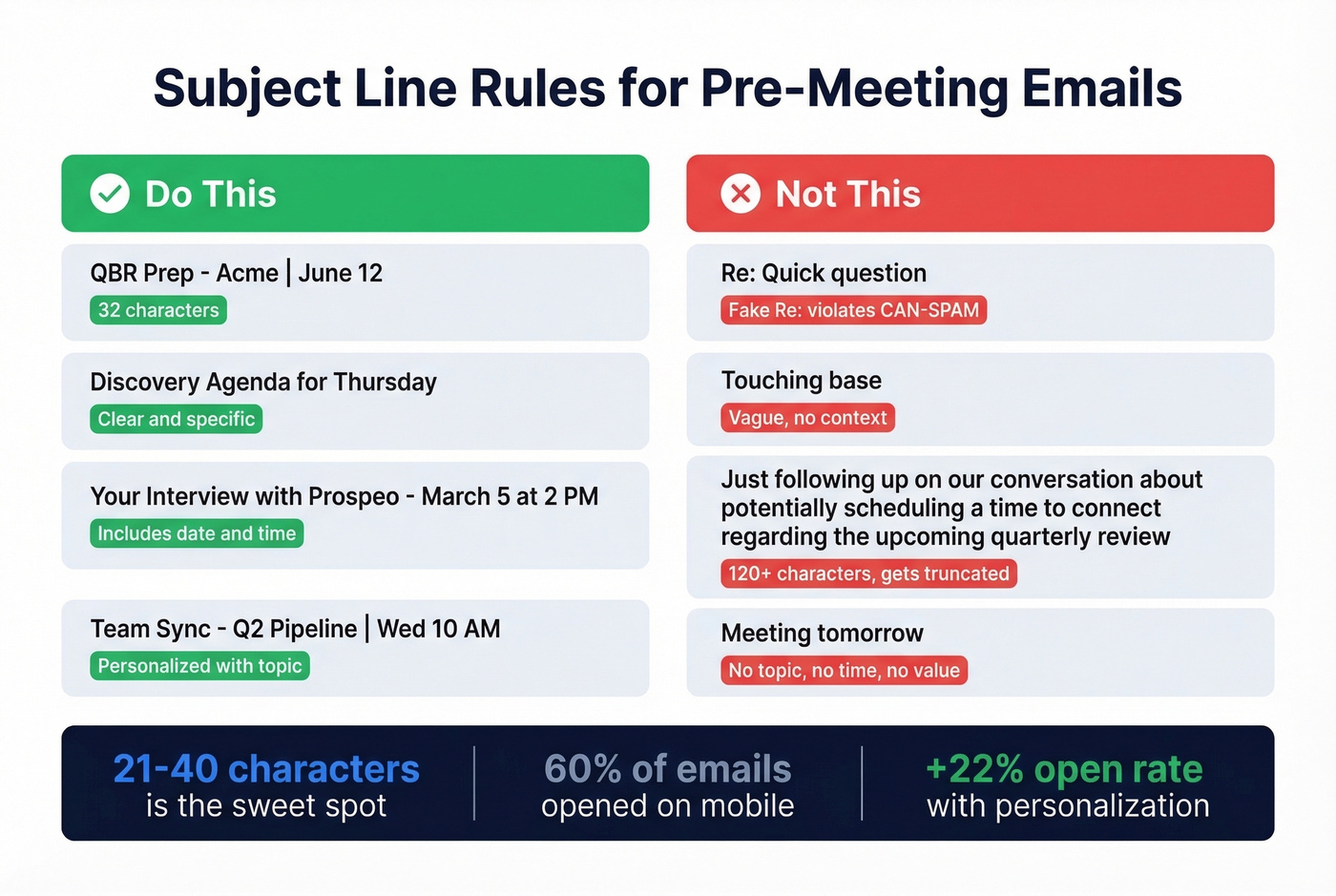
Here's the thing: avoid fake "Re:" or "Fwd:" prefixes. This violates CAN-SPAM and kills trust. Skip vague openers like "Quick question" or "Touching base." And keep it under 80 characters total - open rates drop noticeably past that threshold.
3 Mistakes That Cause No-Shows
1. Sending a confirmation without a calendar invite. A confirmation email confirms details. A calendar invite puts the meeting on their calendar. You need both. We've seen this single mistake account for more no-shows than anything else on our team.
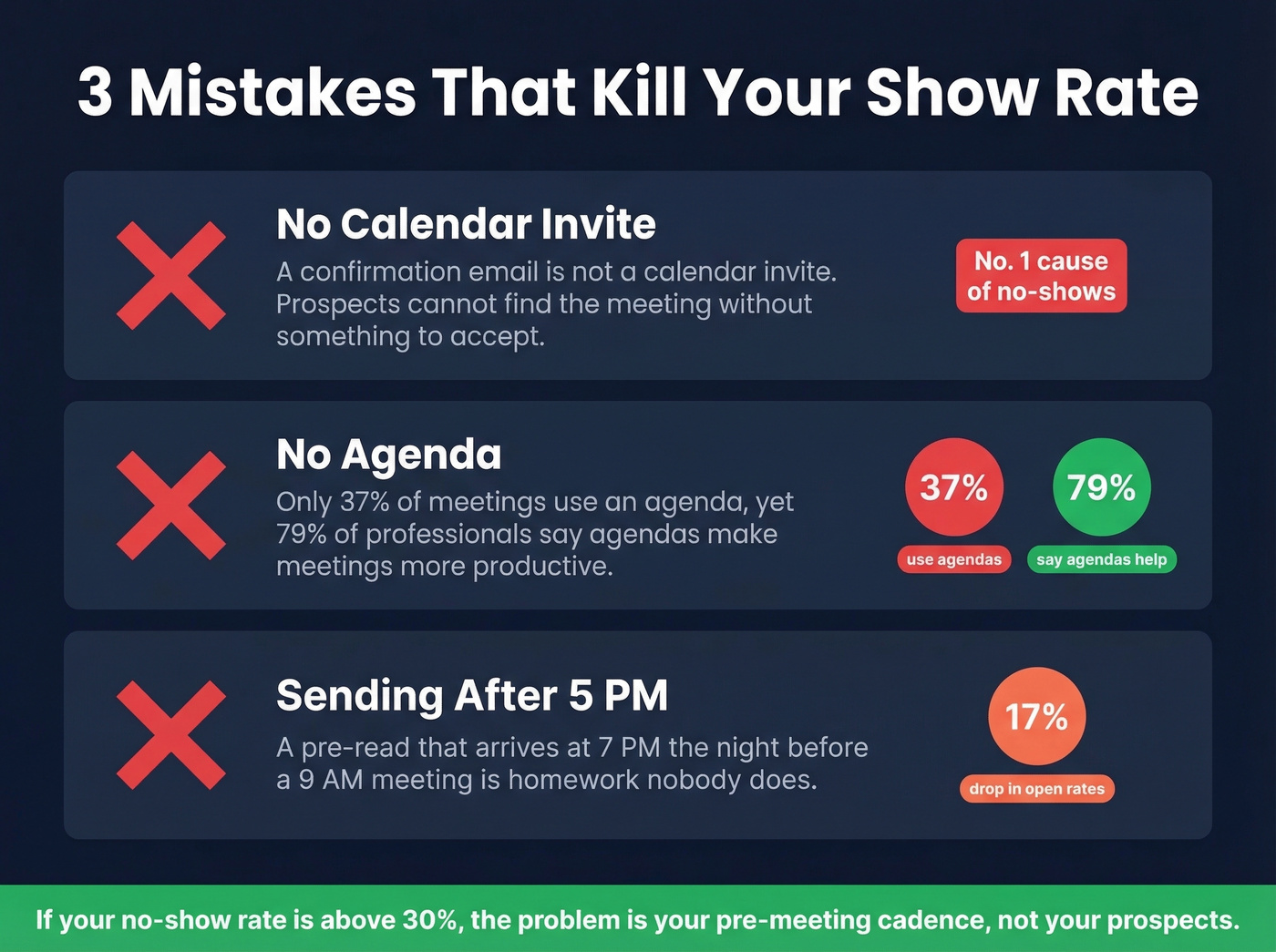
2. No agenda. Only 37% of meetings use one, yet 79% of professionals say agendas make meetings more productive. If people don't know what to expect, they deprioritize showing up. It's that simple. If you're running discovery calls, a tighter set of discovery questions makes the agenda easier to commit to.
3. Sending after 5 PM for complex meetings. A pre-read that arrives at 7 PM the night before a 9 AM QBR isn't a pre-read - it's homework nobody does. Schedule the send for the morning before. (This is the same logic behind the best time to send cold emails data.)
Let's be honest: if your no-show rate is above 30%, the problem isn't your prospects. It's your pre-meeting cadence. Most teams send a calendar invite and nothing else. That's not a cadence; it's a coin flip. If you're building a repeatable process, pair this with a simple sales follow-up system and a consistent sequence management workflow.
No-shows spike when you're emailing outdated contacts. Prospeo refreshes every record every 7 days - not the 6-week industry average - so the email you're sending that discovery agenda to is still active.
Send your pre-read to emails verified this week, not last quarter.
FAQ
What's the difference between a pre-meeting email and a meeting request?
A meeting request asks for time. A pre-meeting email prepares people for time that's already booked - it includes the agenda, context, and logistics so attendees arrive ready to contribute.
How far in advance should I send a pre-meeting email?
Send complex pre-reads 2-3 days before, routine reminders 1 day before, and short-meeting nudges a few hours prior. Aim for 9 AM local time regardless of type - emails sent after 5 PM see a 17% drop in open rates.
Can I see a pre-meeting email example for a sales call?
The Sales Discovery Pre-Read template above is a complete example designed for discovery and demo calls. It includes a timed agenda, attendee roles, and a meeting link - the three elements that most reduce no-shows on sales calls.
Should I verify the recipient's email before sending?
For external prospects, absolutely. A bounced pre-read means a missed meeting and a wasted calendar slot. Tools like Prospeo handle real-time verification so you're not sending into the void.