

How to Create Professional Email Addresses That Actually Build Credibility
You're about to send a cold pitch to a VP of Marketing, and your sending address is xXDarkKnight2003Xx@hotmail.com. You don't send it. You know better. But somewhere between that extreme and a polished custom domain, most people pick an email address without thinking much about it - and that's the mistake.
Most advice on professional email addresses skips the parts that don't make someone money. Here's the honest version, including when you don't need to spend a dime.
What Makes an Email Address Professional?
A study published in Frontiers in Psychology tested 480 managers and HR specialists in a recruitment context and found that digital signals like social media content significantly influence perceptions of competence and person-organization fit, which directly changes hiring intention. Your email address is one of those cues. And 97% of people say errors and sloppy details affect how they perceive a company or individual.
I watched a freelancer lose a $15,000 consulting gig because the client "couldn't take seriously" someone emailing from a Hotmail address with numbers in it. Was that fair? No. Did it happen? Absolutely.
A credible email address isn't about vanity - it's about removing friction before a conversation even starts. People form judgments about your competence within seconds of seeing your address, and a custom domain signals investment while a clean Gmail signals basic professionalism. A Yahoo address with your birth year? That signals you haven't updated anything since 2009.
Here's the good news: fixing this takes about ten minutes and often costs nothing.
What You Need (Quick Version)
Before we get into formats, providers, and DNS records, here's the decision in 30 seconds:
- Personal or career use -
firstname.lastname@gmail.com. Free, universally trusted, done. Don't overthink it. - Freelancer or small business - Custom domain email via Google Workspace ($7/mo) or Microsoft 365 ($6/mo). You'll look established without spending much.
- Privacy-first - Proton Mail at ~$6.99/mo for business plans. End-to-end encryption, and you'll get a cleaner username since fewer people compete for names there.
Best Business Email Formats, Ranked
Not all name combinations are equal. Let's rank them by what actually matters: professionalism, clarity, and first-impression value.
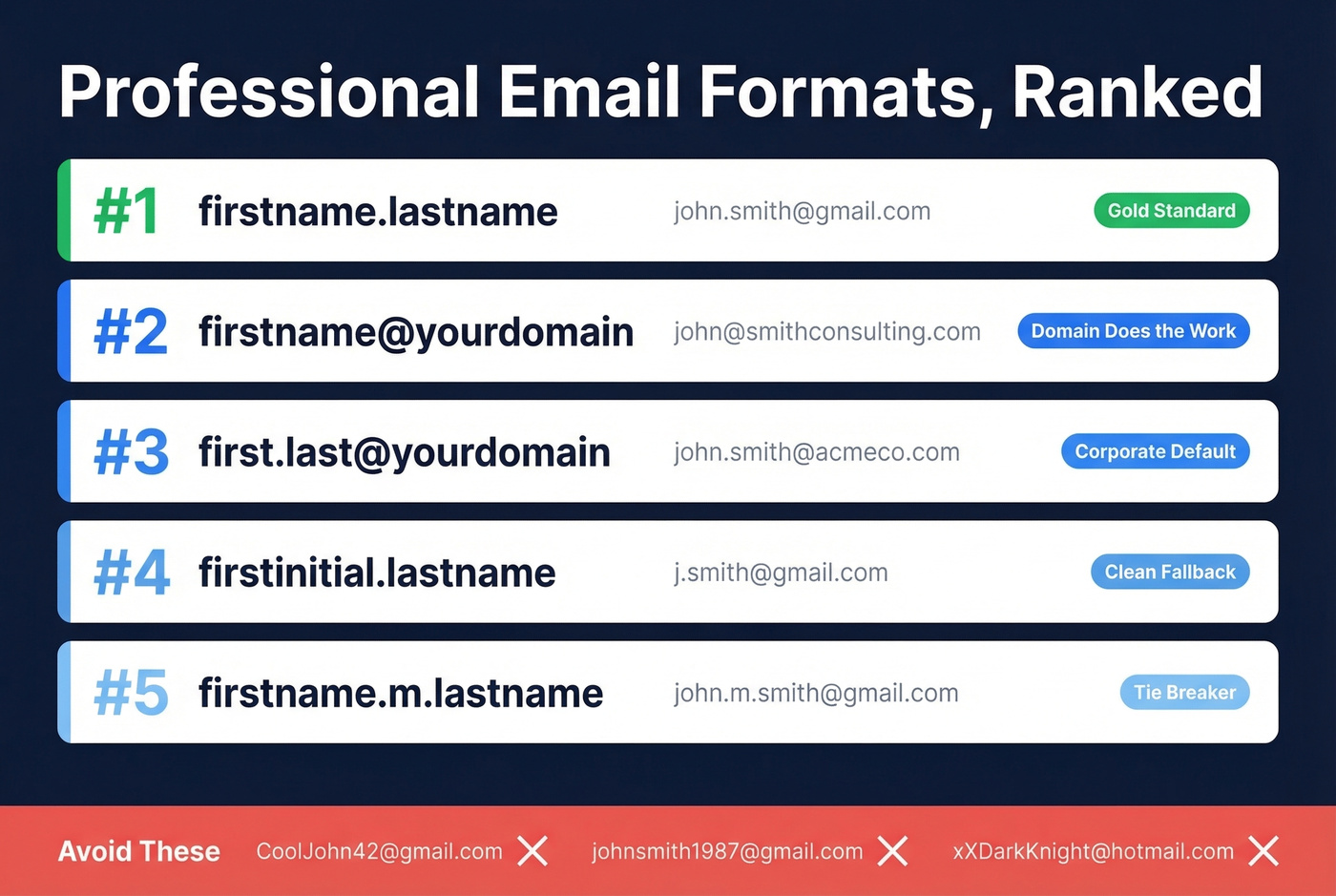
Top Formats
| Rank | Format | Example | Verdict |
|---|---|---|---|
| 1 | firstname.lastname | john.smith@gmail.com | Gold standard. Clear and memorable. |
| 2 | firstname@yourdomain | john@smithconsulting.com | Domain does the heavy lifting. |
| 3 | first.last@yourdomain | john.smith@acmeco.com | Corporate default. Scales well. |
| 4 | firstinitial.lastname | j.smith@gmail.com | Clean fallback when full name is taken. |
| 5 | firstname.m.lastname | john.m.smith@gmail.com | Middle initial breaks ties cleanly. |
Each of these works as a reliable template you can adapt to your own name. The pattern is obvious: your real name, minimal punctuation, no numbers. On a custom domain, the domain itself carries credibility, so even john@ works beautifully.
Formats to Avoid
Nicknames and handles. CoolJohn42@gmail.com tells a recruiter nothing except that you made this account in middle school. Same goes for hobby references - guitarjohn@ or fitnessjane@ belong on forum accounts, not resumes.
Birth years and graduation years. Adding 97 to your email tells every recruiter your age. Adding dev ties you to a role you might outgrow. A middle initial or alternate provider solves the availability problem without broadcasting personal details.
Outdated providers. AOL and Hotmail addresses on a resume are the digital equivalent of faxing your application. The address itself works fine technically, but the perception hit is real. Outlook.com is the modern Microsoft option if you want to stay in that ecosystem.
Excessive symbols and length. Twilio's guide specifically warns that too many symbols can look spammy and trigger spam filters. Periods between name parts are fine. Underscores, hyphens, and plus signs start looking messy fast.
When Your Name Is Already Taken
This is the most common frustration people hit. You try john.smith@gmail.com, johnsmith@gmail.com, smith.john@gmail.com - all taken. One Reddit user in r/careerguidance described trying every combination they could think of and hitting a wall every time.
Ranked workarounds, from best to worst:
- Middle initial.
john.m.smith@gmail.comis clean and professional. This is almost always available. - Try an alternate provider. Proton Mail and Outlook.com have far less username competition than Gmail. You'll likely get
firstname.lastnameon your first try. - Area code or city suffix.
john.smith.nyc@gmail.comreads better than random numbers, though it's not ideal. - Register a personal domain. For about $10-$15/year, you can own
johnsmith.comand usejohn@johnsmith.com. More effort upfront, but the most future-proof option - and the strongest business email name example you can put on a card.
What you should never do: tack on your birth year, graduation year, or a string of random digits. johnsmith1987@gmail.com ages you. johnsmith8472@gmail.com looks like a bot.

Creating a professional email address is step one. Finding your prospect's professional email address is where revenue starts. Prospeo gives you 143M+ verified emails at 98% accuracy - so your perfectly formatted outreach actually lands in real inboxes, not bounce logs.
Stop guessing email formats. Get verified addresses for $0.01 each.
Do You Actually Need a Custom Domain?
Here's the thing: if you're a freelancer or small business under 10 people, a @gmail.com address is fine. Stop letting GoDaddy ads guilt you into spending money you don't need to spend.
One small business owner on Reddit - a caterer with about 10 employees - put it perfectly: they've been "doing just fine" on Gmail but keep getting bombarded with ads pushing "professional" email. That skepticism is healthy.
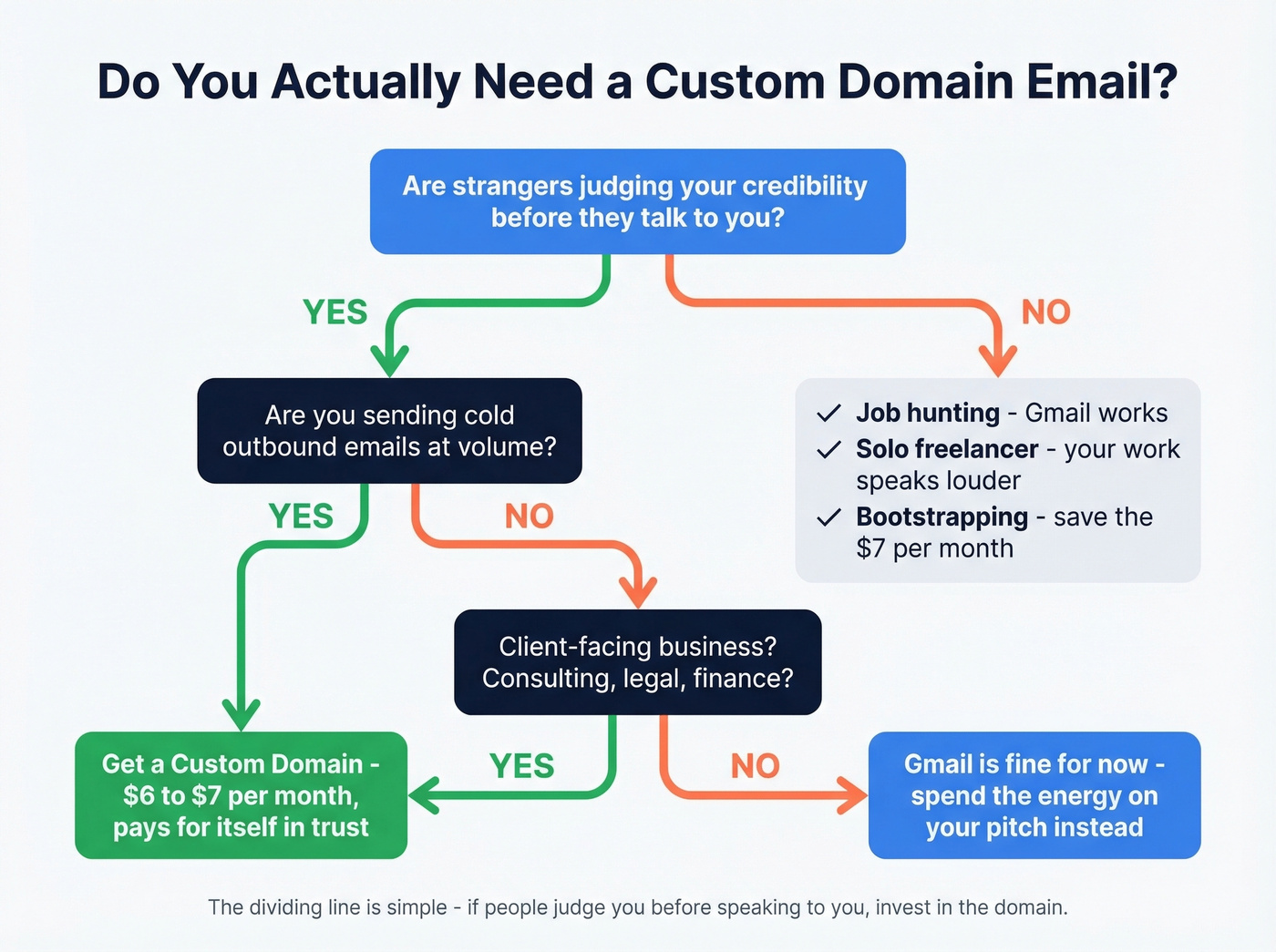
You need a custom domain when:
- You're sending outbound sales emails at any volume
- You have a client-facing business where trust is the product - consulting, legal, finance
- You're building a brand that needs to look established
- Your team is growing past 5-10 people and you need consistent naming
You don't need one when:
- You're job hunting (Gmail is universally accepted)
- You're a solo freelancer whose work speaks louder than your email domain
- You're bootstrapping and every $7/month matters
The dividing line is simple: are strangers judging your credibility before they've spoken to you? If yes, the custom domain pays for itself. If your clients already know and trust you, Gmail is perfectly fine.
For teams closing five-figure deals with cold prospects, the domain becomes table stakes. Below that threshold, spend the energy on your pitch instead.
Email Hosting Providers Compared
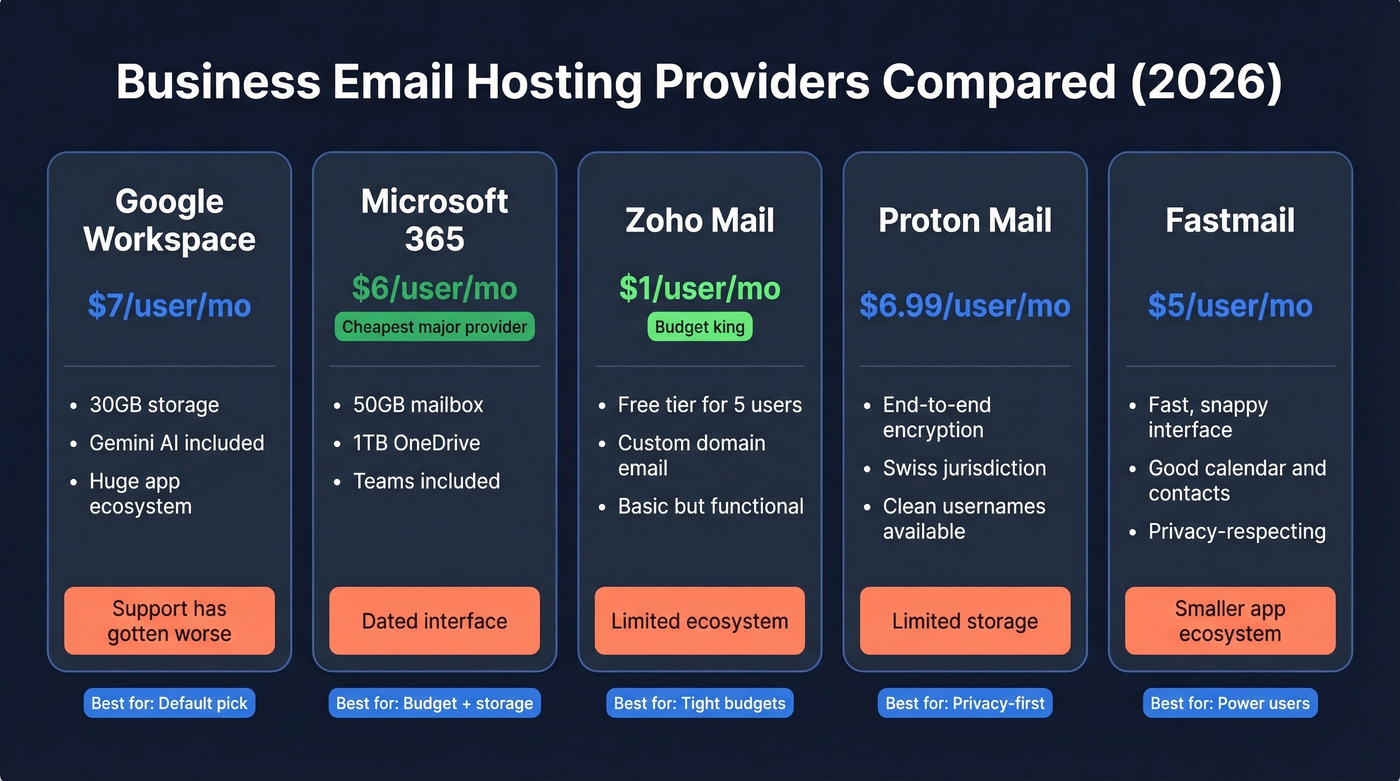
Google Workspace is the default, but Microsoft 365 Business Basic at $6/user/month is genuinely cheaper and includes 50GB mailboxes plus 1TB OneDrive. Most people don't even consider it.
| Provider | Starting Price | Biggest Complaint | Best For |
|---|---|---|---|
| Google Workspace | $7/user/mo | Unresponsive support | Default pick |
| Microsoft 365 | $6/user/mo | Dated interface | Budget + storage |
| Zoho Mail | ~$1/user/mo | Limited ecosystem | Tight budgets |
| Proton Mail | ~$6.99/user/mo | Limited storage | Privacy-first |
| Fastmail | ~$5/user/mo | Smaller app ecosystem | Power users who want speed |
Google Workspace
The $7/user/month annual plan (Business Starter) gets you custom domain email and 30GB storage, with Gemini AI included across business tiers. Standard bumps to $14/mo, and Plus hits $22/mo. In our experience, Google Workspace support has gotten noticeably worse over the past two years - "unresponsive support" is a common complaint in provider roundups and across Reddit threads. If you're already in the Google ecosystem, this is still the path of least resistance. Just don't expect white-glove service.
Microsoft 365
At $6/user/month paid yearly, Business Basic is the cheapest custom domain email from a major provider. You get a 50GB mailbox, 1TB OneDrive, and Teams. Business Standard at $12.50/mo adds desktop Office apps. The interface feels dated compared to Gmail, and users report occasional performance lags, but the value per dollar is hard to beat - you'll save $12 per user per year compared to Google's Starter plan. If your team already lives in Excel and Word, this is the obvious choice.
Zoho Mail
Plans start around $1/user/month, and there's even a free tier for up to five users. Storage is limited and the app ecosystem isn't as polished, but if you need a custom domain email and you're watching every dollar, Zoho gets the job done. The tradeoff is real: you'll hit storage limits fast and the mobile apps feel a generation behind.
Proton Mail
End-to-end encryption, Swiss jurisdiction, and a business plan at ~$6.99/user/month. Storage is more limited than Google or Microsoft. But if data privacy is a genuine requirement - not just a preference - Proton is the clear choice. It's also a great fallback when your preferred Gmail username is taken, since the user base is smaller and clean names are still available.
Fastmail
A favorite among power users who want fast, no-nonsense email without Google's data practices. Plans run ~$5/user/month with solid calendar and contacts integration. The app ecosystem is smaller, so you'll miss some third-party integrations. But the interface is snappy and the company has a strong reputation for respecting user privacy. Skip this if you need deep CRM integrations or team collaboration tools built in.
How to Set Up a Custom Domain Email
The whole process takes about 10 minutes if you know what you're doing.
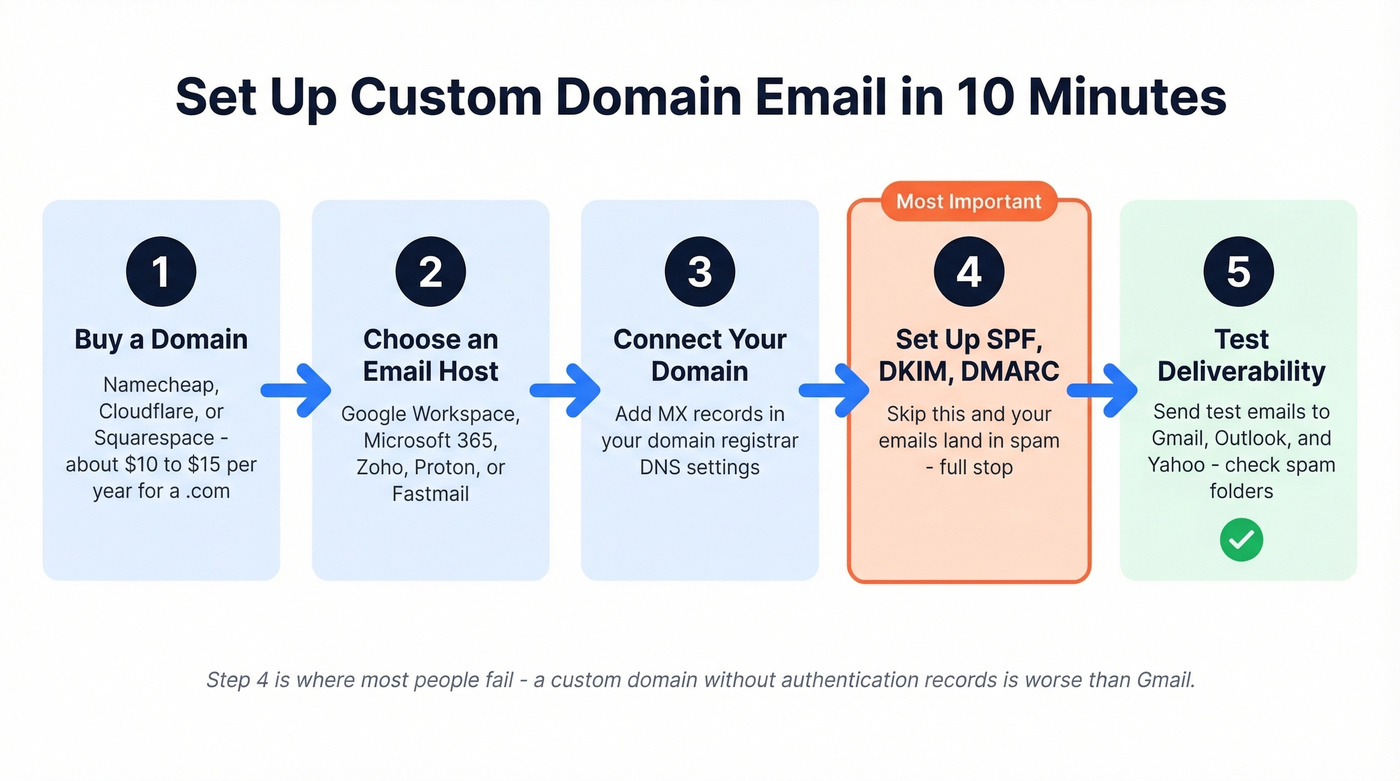
- Buy a domain. Namecheap, Cloudflare, or Squarespace Domains - pick one. Expect about $10-$15/year for a .com.
- Choose an email host. Google Workspace, Microsoft 365, or any provider from the table above.
- Connect your domain. Your host will give you MX records to add in your domain registrar's DNS settings. This tells the internet where to deliver your mail. (If you want the exact steps, see our MX records guide.)
- Set up SPF, DKIM, and DMARC. This is the step most people skip - and it's the most important one.
- Test deliverability. Send test emails to Gmail, Outlook, and Yahoo accounts. Check spam folders. Use an inbox checker to confirm placement.
Why SPF, DKIM, and DMARC Matter
A custom domain email without SPF, DKIM, and DMARC is worse than Gmail. Your messages will land in spam. Full stop.
SPF validates which servers can send from your domain. DKIM ensures messages aren't altered in transit. DMARC tells receiving servers what to do when SPF or DKIM fails. All three are required for reliable inbox delivery - Gmail and Yahoo now mandate DMARC for bulk senders.
For Google Workspace, your SPF record looks like this:
v=spf1 include:_spf.google.com ~all
DMARC adoption hit 53.8% as of 2024, up from 42.6% in 2023, which means nearly half of domains still don't have it configured properly. If you're not technical, tools like EasyDMARC automate the setup and monitor your records over time.
Email Formats for Growing Teams
Once you're past the solo setup, teams need conventions. The two most common patterns:
- firstname@company.com - Clean, personal, works well for smaller teams. Breaks down when you have two Johns.
- first.last@company.com - Scales better. Handles name collisions. The corporate default for a reason.
You'll also want role-based addresses like info@, support@, sales@, and billing@. These shouldn't go to one person - set up distribution groups or a shared inbox.
For teams sending outbound, consider a catch-all domain configuration. It ensures any email sent to anything@yourdomain.com gets captured rather than bouncing. We've seen teams miss inbound replies because a prospect typed the wrong name - a catch-all prevents that.
Your sending address format matters for outbound campaigns. But so does the quality of the addresses you're sending to. That's the piece most guides on professional email addresses completely ignore.
Make Sure Your Emails Actually Land
Your email address protects your credibility. Email verification protects your domain reputation. These are two halves of the same problem.
When you skip verification, you send a campaign from your shiny new jane@smithconsulting.com, 15% of those emails bounce, and your domain starts building a negative sender reputation. A few more campaigns like that and your emails - even the legitimate ones - start landing in spam. We've watched teams destroy brand-new domain reputations in a single week of unverified sends. Domain blacklisting is real, and recovering from it is painful. (If you’re troubleshooting, start with a free blacklist checker.)
Before you send your first outreach campaign from that new business email address, run your recipient list through a verification tool. Prospeo's 5-step verification process checks against 300M+ professional profiles at 98% email accuracy, catching invalid addresses, flagging catch-all domains, and removing spam traps and honeypots before they can damage your sender reputation.
Stack Optimize, an outbound agency, maintains client deliverability above 94% with bounce rates under 3% and zero domain flags across all their clients. The free tier covers 75 email verifications per month with no credit card required - enough to test the workflow before committing.
If you’re also tightening the copy itself, use our how to format a professional email guide and a few proven email templates for lead generation to keep outreach clean and consistent.
You just learned how bad email formatting kills credibility. Bad email data kills campaigns. Teams using Prospeo cut bounce rates from 35% to under 4% and book 26% more meetings - because every professional email address they send to is verified in real time on a 7-day refresh cycle.
Your outreach deserves data as polished as your sending address.
FAQ
Is Gmail Professional Enough for a Resume?
Yes - firstname.lastname@gmail.com is widely accepted by recruiters and hiring managers. It's only a problem if your address contains nicknames, random numbers, or outdated providers like AOL. For most job seekers, a clean Gmail address checks every box.
How Much Does a Custom Domain Email Cost?
Expect $6-$8/user/month for Google Workspace or Microsoft 365, plus $10-$15/year for the domain itself. Zoho starts around $1/user/month. Total first-year cost for a single user: roughly $82-$111.
Should I Put My Birth Year in My Email?
No. It broadcasts your age and adds zero professional value. Use a middle initial instead, or try a provider like Proton Mail or Outlook.com where your preferred firstname.lastname is likely still available.
What's the Difference Between SPF, DKIM, and DMARC?
SPF checks who's allowed to send from your domain. DKIM confirms the message wasn't tampered with in transit. DMARC sets the rules for what happens when SPF or DKIM fails. You need all three - without them, your custom domain emails are more likely to hit spam than a free Gmail address.
How Do I Verify Email Addresses Before Sending Outreach?
Upload a CSV or paste addresses into a verification tool like Prospeo, which checks them in real time against 300M+ profiles at 98% accuracy. Invalid addresses, spam traps, and honeypots get flagged before they can damage your sender reputation. The free tier covers 75 verifications per month.