

How to Format a Professional Email That Actually Gets Read
88% of office workers have regretted an email the moment they hit send. A Babbel survey of 2,000 U.S. workers found that nearly nine out of ten professionals have fired off something they immediately wished they could claw back. Worse, 28% say an email has actively hurt their career.
Knowing how to format a professional email is the difference between building credibility and quietly eroding it - and it has nothing to do with brilliance. It's structure. Let's break it down.
Why Email Formatting Matters
48% of workers judge typos in email more harshly than typos in Slack or Teams, and 60% say email volume alone adds stress to their day. A sloppy email doesn't just look bad - it signals you don't sweat the details. In business, details are everything.
The good news: the professional email format is a repeatable structure you can learn in ten minutes and use for the rest of your career.
The Quick Version
Every professional email follows the same six-part anatomy:
Subject line → Greeting → BLUF opening → Body → Closing → Signature
Keep the body between 50-125 words. That's the sweet spot for getting responses. Lead with the bottom line (BLUF) - state your ask, the owner, and the deadline in the first sentence.
Think of this as your professional email outline, a skeleton you fill in every time you compose a new message.
The Anatomy of a Professional Email
Subject Line
33% of recipients decide whether to open an email based on the subject line alone. That makes it the single highest-impact line you'll write.
If you want swipeable ideas, start with these email subject line examples.
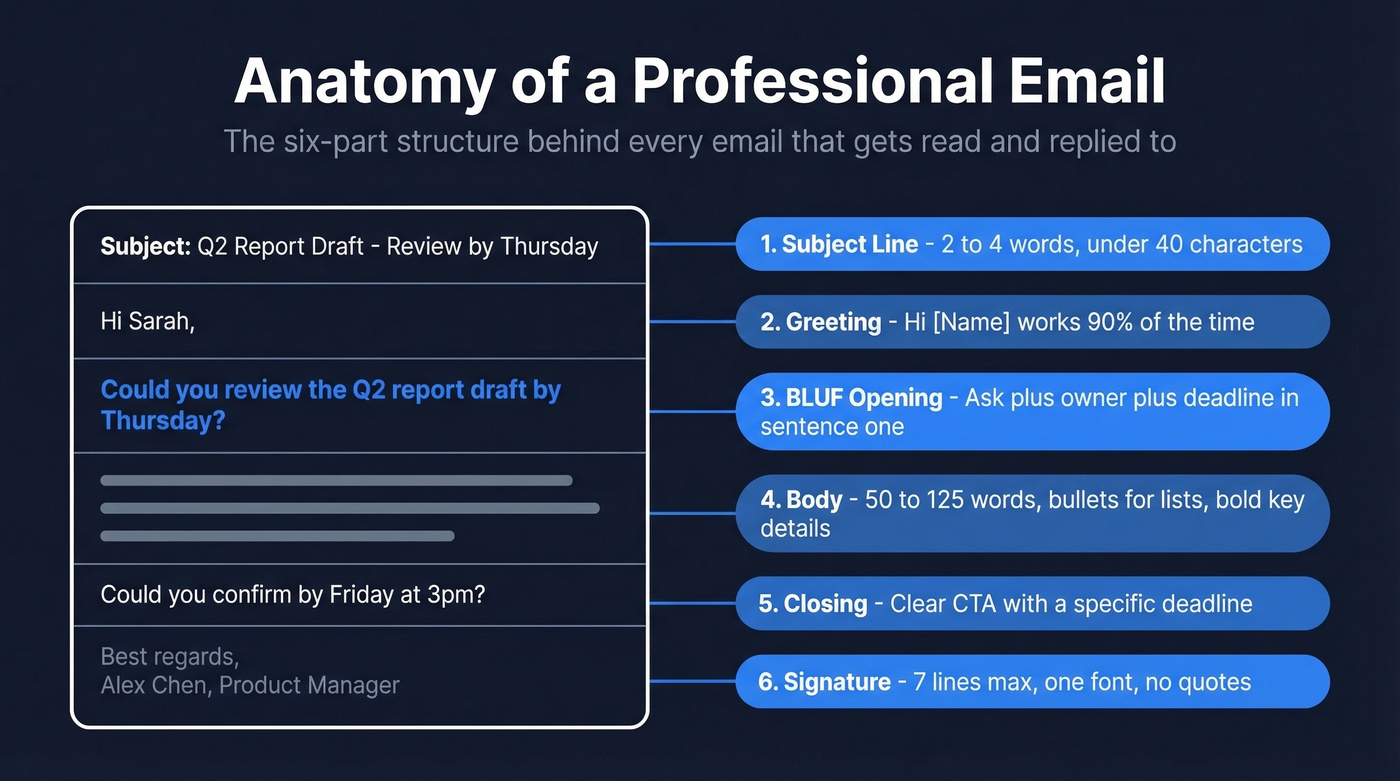
The best-performing subject lines run just 2-4 words. The average is six words, but shorter consistently wins. Be specific, front-load the key information, and skip the ALL CAPS and exclamation marks.
Brevity matters even more now because of mobile truncation. A majority of emails are opened on a phone, and every email client cuts your subject line at a different point:
| Client / Device | Characters Shown |
|---|---|
| Gmail (desktop) | ~70 |
| Outlook (desktop) | 50-70 |
| Yahoo Mail | ~46 |
| iPhone | 33-41 |
| Android | 35-50 |
If your subject line is "Following Up on Our Q3 Budget Discussion from Last Tuesday's Meeting," an iPhone user sees "Following Up on Our Q3 Budge..." - and that's generous. Write for ~35-40 characters. Everything after that is bonus.
Greeting
Stop overthinking this. "Hi [Name]" works for most professional emails.
| Context | Greeting | When to Use |
|---|---|---|
| Formal | Dear Mr./Ms. [Last Name] | Job apps, government, formal first contact |
| Standard | Hello [Name] | Client emails, cross-team |
| Casual | Hi [Name] | Colleagues, ongoing threads |
| Unknown | To Whom It May Concern | Last resort - find a name first |
"To Whom It May Concern" is a white flag. It tells the recipient you didn't bother to figure out who they are. Spend thirty seconds finding their name before you default to it.
One note on formality: avoid assuming gendered honorifics. If you don't know how someone identifies, use their full name - "Dear Alex Chen" is always safe. Mirror whatever the recipient uses in their own signature. Getting someone's name right is basic respect; getting their title wrong is an unforced error.
Opening Line (BLUF Method)
BLUF stands for Bottom Line Up Front). Put your ask, the owner, and the deadline in the very first sentence - not buried in paragraph three.
This is especially important in cold email outreach, where attention is scarce.
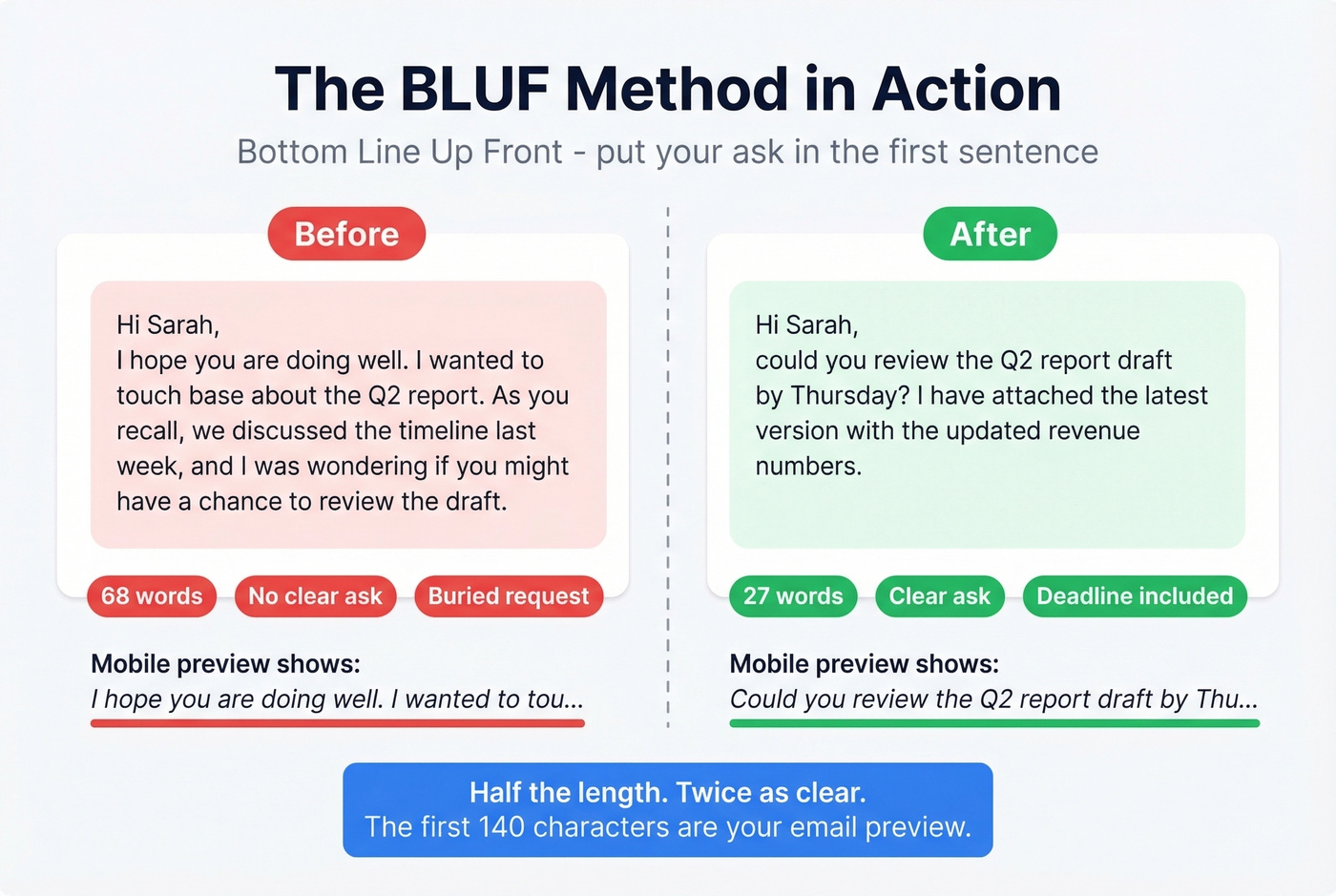
Why the first sentence specifically? Mobile previews and AI email summaries show roughly the first 140 characters. If your opening line is "I hope this email finds you well," you've wasted your preview on nothing.
Before: "Hi Sarah, I hope you're doing well. I wanted to touch base about the Q2 report. As you recall, we discussed the timeline last week, and I was wondering if you might have a chance to review the draft."
After: "Hi Sarah, could you review the Q2 report draft by Thursday? I've attached the latest version with the updated revenue numbers."
Half the length. Twice as clear.
Body
The optimal email body length is 50-125 words. We've found this range holds up in our own outreach testing too - anything longer and reply rates drop off a cliff.
Keep paragraphs to 2-3 sentences. Use bullets when listing more than two items. Bold key details like names, dates, and dollar amounts so a skimmer can catch the essentials without reading every word.
If you're consistently over 125 words, consider a call or a shared doc. You're not writing an email anymore - you're writing a memo that nobody asked for.
If you're writing to book time, use proven email wording to schedule a meeting.
Closing and Sign-Off
End with a clear call to action that includes a deadline. "Let me know your thoughts" is vague. "Could you confirm by Friday at 3pm?" is actionable.
For the sign-off, match the formality of your greeting. "Best regards" is the safe all-purpose choice. "Thanks" works when you've actually asked for something. "Cheers" is fine among colleagues you know well - just don't use it in a job application.
If you need stronger asks, borrow patterns from these email call to action examples.
Email Signature
33.1% of people say email signatures are a key factor in building trust with a sender. And yet over 30% of business signatures don't even include a name.
Your signature isn't a billboard. Seven lines. One font. No inspirational quotes:
- Full name
- Job title
- Company
- Phone number
- Email address
- Website
- Social icons (max 4)
If your team uses pronouns in signatures, include them on the same line as your name. Don't rely on images for critical information - many email clients block images by default. If your phone number is embedded in a graphic, it won't show up for a lot of recipients.
The 5 Cs Pre-Send Check
Before you hit send, run your email through this five-point framework:
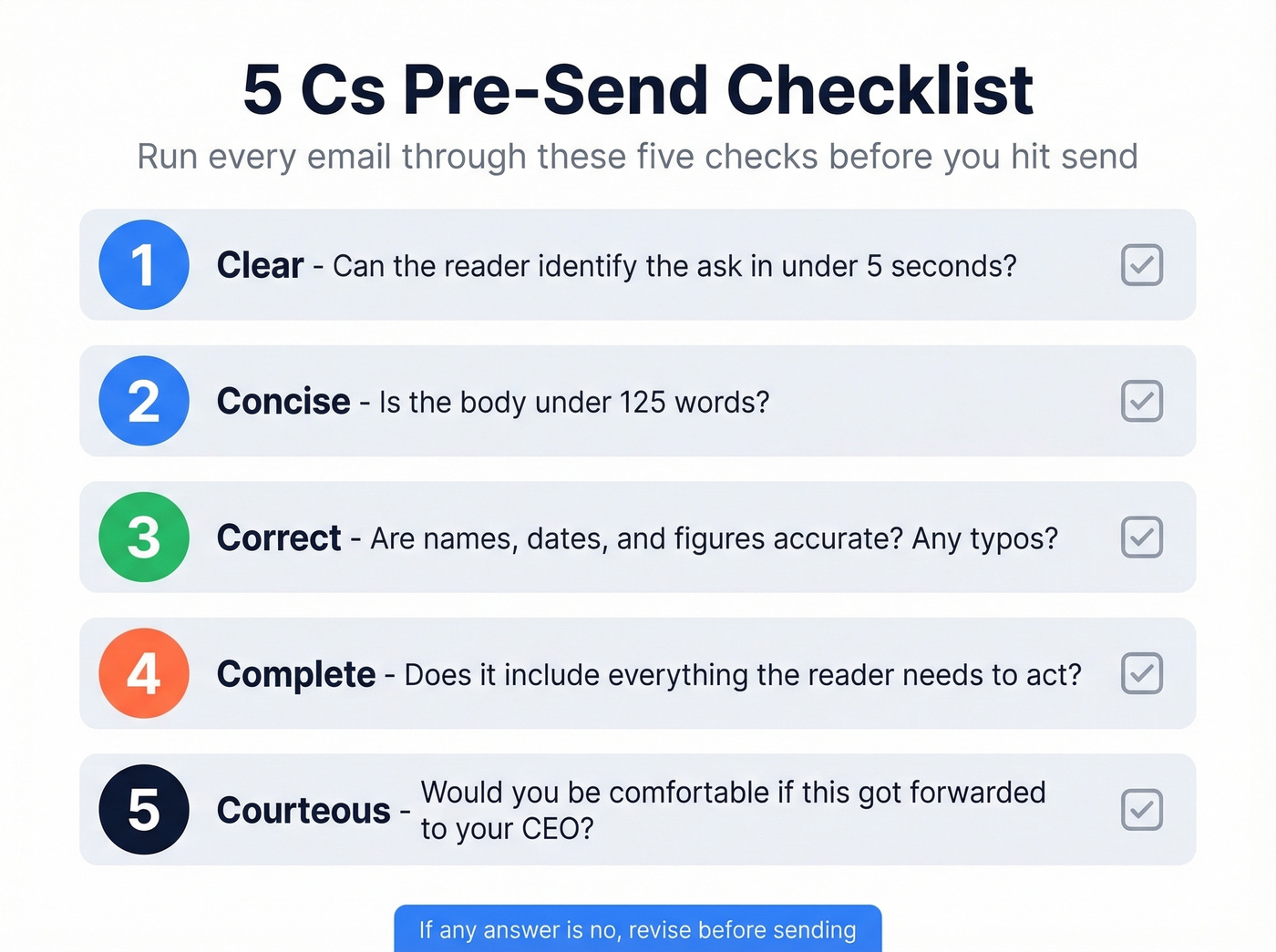
- Clear - Can the reader identify the ask in under five seconds?
- Concise - Is the body under 125 words?
- Correct - Are names, dates, and figures accurate? Any typos?
- Complete - Does it include everything the reader needs to act?
- Courteous - Would you be comfortable if this got forwarded to your CEO?

You just learned how to format emails that get read. But "To Whom It May Concern" isn't just bad formatting - it means you don't have the right contact. Prospeo gives you verified emails for 300M+ professionals so every perfectly crafted message lands in the right inbox.
Stop formatting emails to people who'll never see them.
Formatting for Mobile Readers
Over 70% of emails are now opened on mobile devices. That single stat should change how you write.
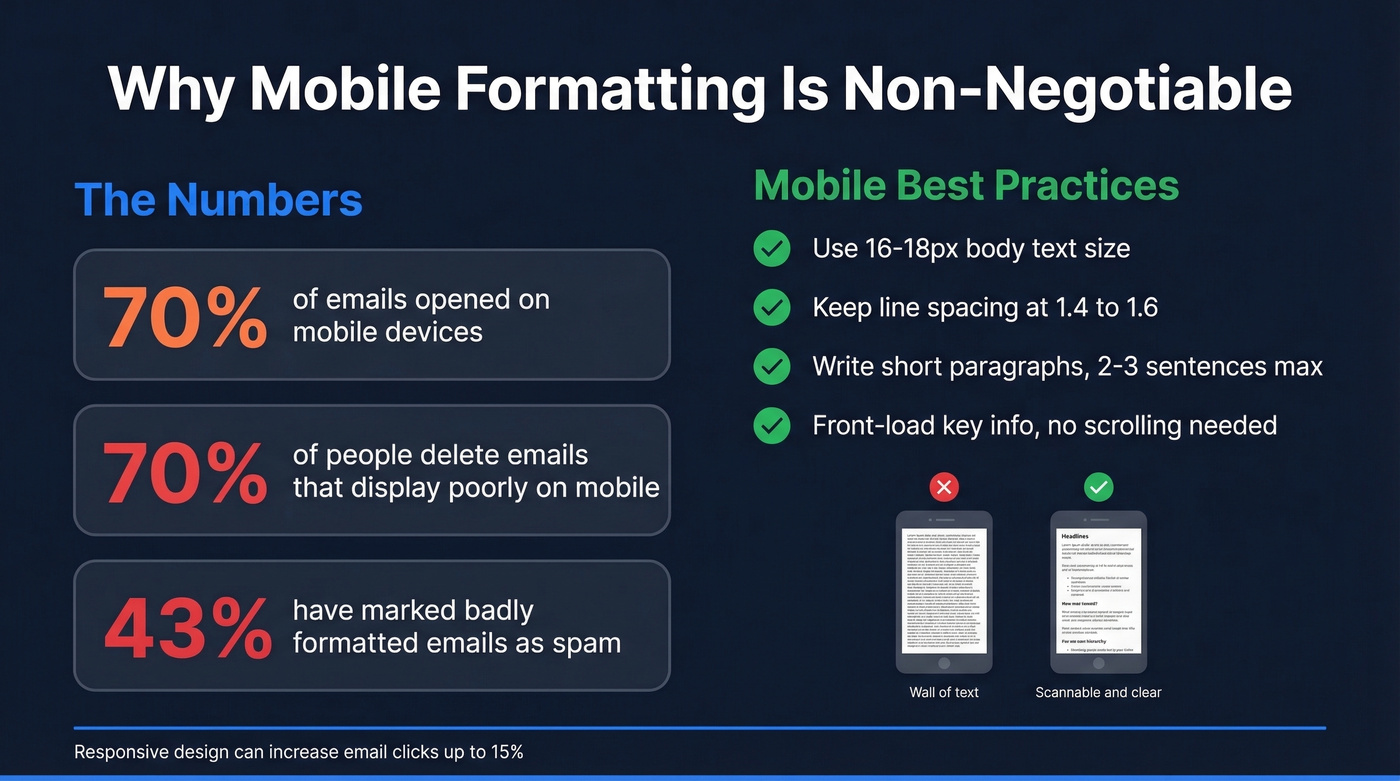
The penalties for poor mobile formatting are brutal: 70% of people delete emails that don't display correctly on mobile, and 43% have marked poorly formatted emails as spam. You're not just losing attention - you're training their inbox to filter you out. Responsive design alone can increase email clicks up to 15%.
Here's the thing: if you only change one habit after reading this article, make it paragraph length. Short paragraphs aren't a style preference on mobile - they're a readability requirement. Use 16-18px body text, keep line spacing at 1.4-1.6, and front-load your key information so it's visible without scrolling.
Email Etiquette Rules
CC is for transparency - you're keeping someone in the loop, not asking them to act. If you CC your manager, say why in the body so they know whether to read closely or skim.
BCC is for privacy and mass sends. Never use BCC to secretly loop someone in. That's a trust destroyer if it surfaces.
Reply-All only when your response is genuinely relevant to every recipient. "Thanks!" to 47 people is how you become the person everyone silently resents.
For response times: same day or within 24 business hours for most workplace email, faster for client-facing messages, and 48 hours is fine for non-urgent external threads. If you can't give a full answer, a quick "Got it - I'll have a detailed response by [date]" buys you time without leaving the sender in limbo.
If you're chasing a reply, use a polite chaser email instead of “just checking in.”
Professional Email Templates
Here are eight templates you can copy, paste, and customize. Each one follows the business email format we've covered, so adapt them to fit your situation.
Job Application
Subject: Application - [Role Title], [Your Name] Hi [Name], I'm applying for the [Role] position. My background in [relevant skill] aligns with what you've described. Resume attached. Best regards, [Your Name]
Meeting Request
Subject: Meeting - [Topic], 30 min Hi [Name], could we schedule 30 minutes this week to discuss [topic]? I'm available [two specific times]. Thanks, [Your Name]
Follow-Up
Subject: Following up - [Topic] Hi [Name], following up on my [date] email about [topic]. Anything you need from me to move forward? Thanks, [Your Name]
For more options, keep a set of sales follow-up templates handy.
Cold Outreach
Subject: [Specific benefit] for [Company] Hi [Name], I noticed [specific observation about their company]. We help [type of company] achieve [specific outcome]. Would a 15-minute call next week make sense? Best, [Your Name]
Keep cold emails under 150 words. Plan 2-4 follow-ups every few days - as one Reddit thread on cold email mistakes puts it, most beginners write too much and give up too early.
Of course, formatting a perfect cold email is wasted effort if the address bounces. Prospeo's Email Finder verifies addresses in real time with 98% accuracy, and the free tier covers 75 emails per month - enough to test before you commit.
If you’re building lists from names, this name to email guide helps.

Your subject line is tight, your BLUF is dialed, and your body is under 125 words. Now make sure it actually delivers. Prospeo's 98% email accuracy and 5-step verification means your polished emails don't bounce - they land and get replies.
Great formatting plus verified data equals meetings booked.
Introduction
Subject: Introducing [Name] - [Context] Hi [Name], meet [Name], who [reason for intro]. I'll let you two take it from here. Best, [Your Name]
Pro tip: always ask both parties before making an intro. An unsolicited introduction puts the recipient on the spot.
If you need more variations, use these company introduction email examples.
Apology
Subject: Apology - [What happened] Hi [Name], I want to apologize for [specific issue]. Here's what I'm doing to fix it: [one sentence]. I'll follow up by [date]. Sincerely, [Your Name]
Thank-You
Subject: Thank you - [Context] Hi [Name], thank you for [specific thing]. It made a real difference in [outcome]. Best regards, [Your Name]
Reminder
Subject: Reminder - [Action needed] by [Date] Hi [Name], friendly reminder that [deliverable] is due by [date]. Let me know if you need anything from my end. Thanks, [Your Name]
Pro tip: send reminders 24-48 hours before the deadline, not the day of. It gives people time to actually act.
Pre-Send Checklist
Run through this before every email:
- ☐ Subject line is clear, specific, and under 40 characters
- ☐ Recipients are correct (no accidental reply-all)
- ☐ BLUF in the first sentence - ask, owner, deadline
- ☐ Body is under 125 words
- ☐ Proofread for typos (remember, 48% judge email typos harshly)
- ☐ Attachments are named clearly and actually attached
- ☐ Tone matches the audience and context
- ☐ Formatting is mobile-friendly - short paragraphs, no walls of text
- ☐ For cold outreach: email address verified before sending
FAQ
How long should a professional email be?
The ideal body length is 50-125 words - the range that drives the highest response rates. If you need more space, the message probably warrants a call or a shared document instead.
Is "Hi [Name]" too casual for business email?
No. "Hi [Name]" works for most workplace and client emails. Reserve "Dear Mr./Ms. [Last Name]" for formal contexts like job applications, government correspondence, or first contact with senior executives.
Should I use "Sent from my iPhone" as an excuse for typos?
Absolutely not. 48% of workers judge email typos more harshly than chat typos regardless of the device. If you're composing something important on mobile, proofread it or draft it and finish at your desk.
How do I format an email for a job application?
Use a specific subject line ("Application - [Role], [Your Name]"), a formal greeting, a BLUF opening stating the role, a two-sentence body connecting your experience to the job, and a polished signature. Keep it under 100 words - recruiters skim.
How do I verify an email address before sending cold outreach?
Use a verification tool like Prospeo's Email Finder, which checks addresses in real time with 98% accuracy. The free tier covers 75 verifications per month - enough to validate a prospect list before you launch a sequence.