

How to Write Professional Email Subject Lines That Actually Get Opened
You spend 20 minutes crafting the perfect cold email. You agonize over the opening line, the value prop, the CTA. Then you type "Quick question" in the subject field and hit send. Nobody opens it. The professional email subject - the thing you spent five seconds on - killed the whole effort.
The fix: one framework, real data from 5.5 million emails, and device limits most guides get wrong.
The Only Rule You Need: Topic + Purpose
You don't need 120 templates. You need one rule.
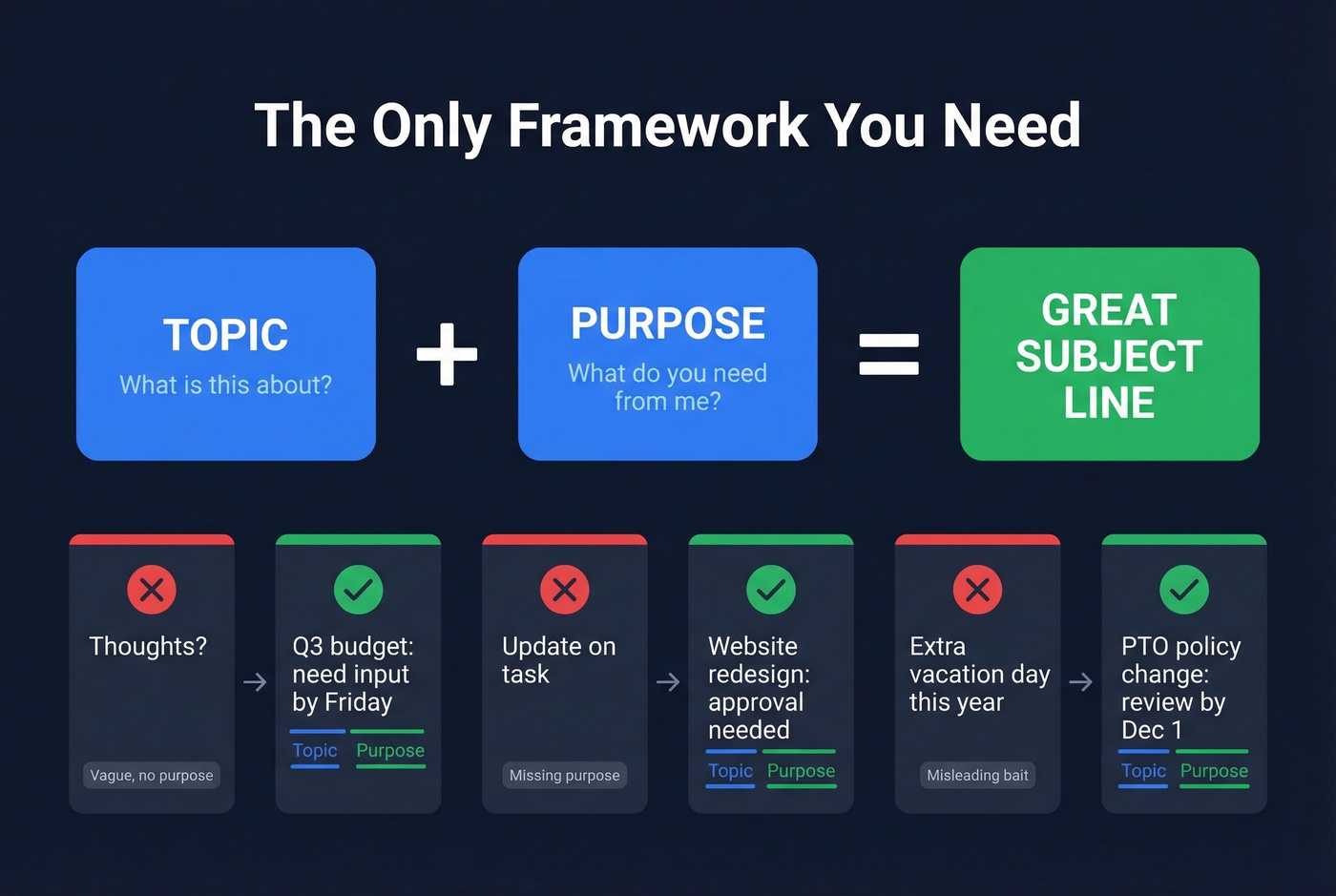
Chris Fenning's framework boils every subject line down to two components: the topic - what's this about - and the purpose - what do you need from me. When both are present, the recipient can prioritize the email before opening it. When either is missing, you get ignored or misunderstood. It's that simple.
Three common failures and their fixes:
Too short and vague: "Thoughts?" becomes "Q3 budget: need input by Friday"
Unclear purpose: "Update on task" becomes "Website redesign: approval needed"
Misleading bait: "Extra vacation day this year" (which leads to an unrelated ask) becomes "PTO policy change: review by Dec 1"
Every rewrite follows the same pattern. Name the thing, then name the action. Once you internalize this, subject lines take seconds instead of minutes.
What 5.5 Million Emails Reveal
Belkins analyzed 5.5 million emails from Jan 2024 through Dec 2024, and the findings are sharper than the usual "keep it short" advice.
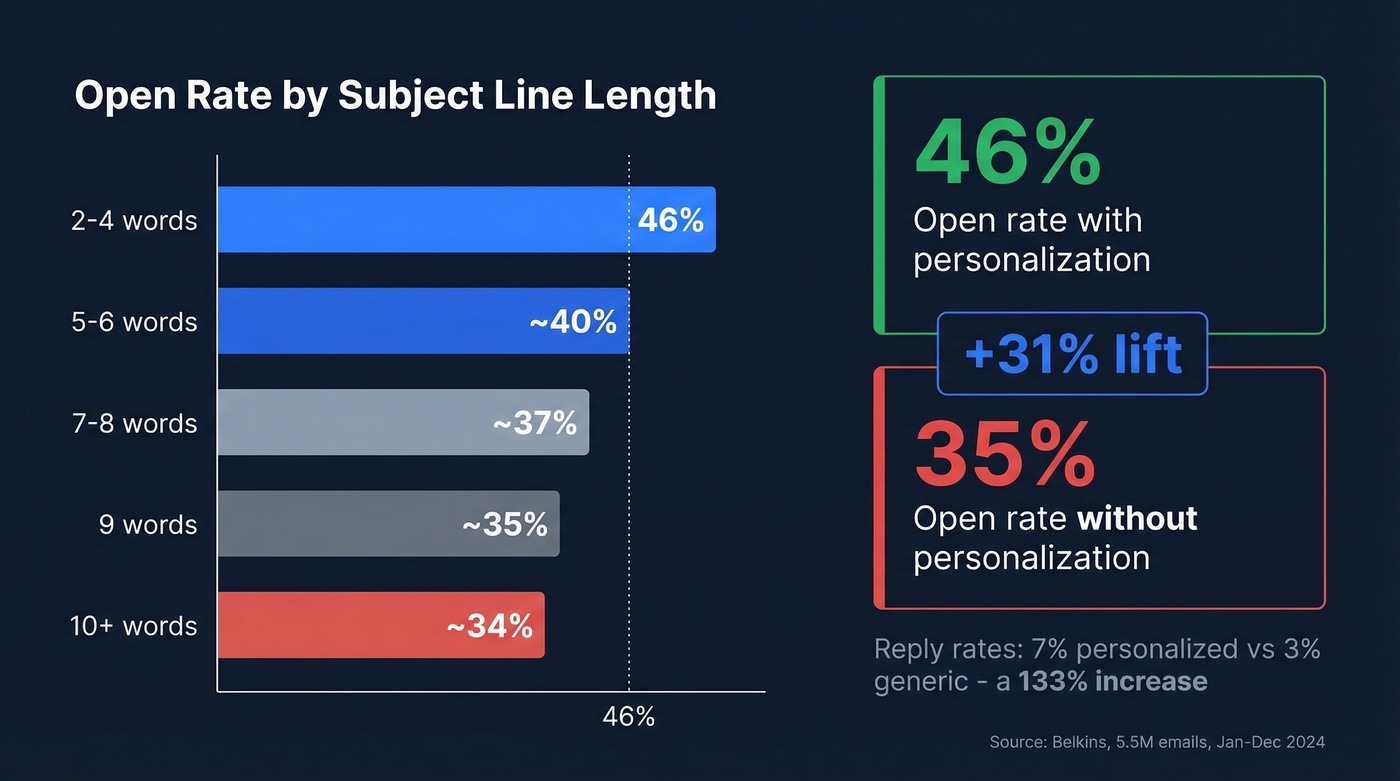
The length sweet spot is 2-4 words, which hit a 46% open rate. Performance drops steadily after 7 words - 9-word subjects fall to around 35%, and 10-word subjects to around 34%. Twilio SendGrid's Cyber Week analysis confirmed the same pattern: the best-performing subjects were 2-4 words even though the average was 6.
Personalization is the single biggest lever. Personalized subject lines pulled a 46% open rate vs. 35% without - a 31% lift. Reply rates told an even sharper story: 7% with personalization vs. 3% without, a 133% increase. That's not a marginal improvement. That's the difference between a campaign that works and one that doesn't.
Question-based subjects matched that 46% open rate, making them the top-performing format. Hype language and urgency words like "ASAP" dragged opens below 36%. Numbers in subject lines didn't help either - 27% open rate with numbers vs. 28% without. Clarity beats cleverness every time.
Character Limits by Device
The 50-character rule is everywhere. It's incomplete.
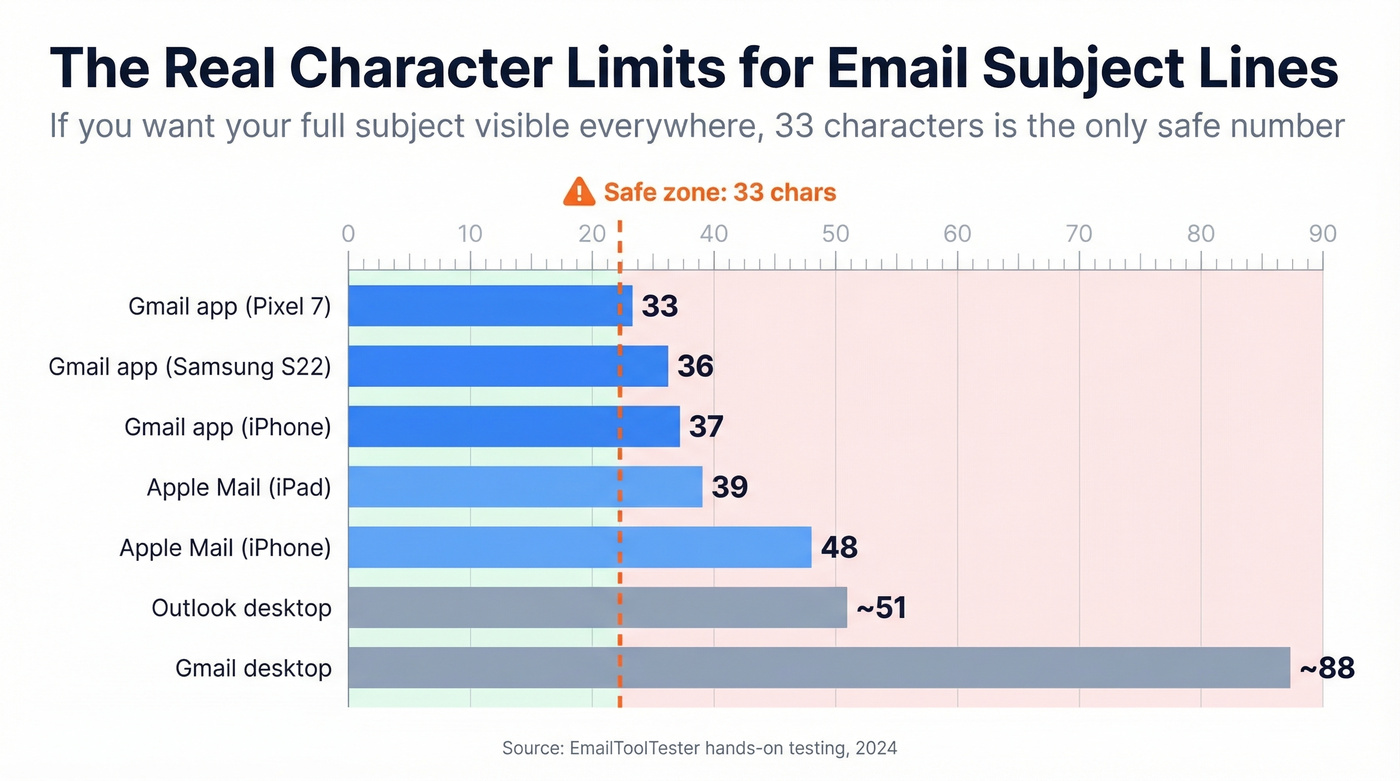
EmailToolTester ran hands-on tests across six device and client combinations, and the real safe zone is tighter than most people think.
| Device / Client | Subject Chars | Preheader Chars |
|---|---|---|
| Gmail app (Pixel 7) | 33 | 37 |
| Gmail app (Samsung S22) | 36 | 40 |
| Gmail app (iPhone) | 37 | 39 |
| Apple Mail (iPad) | 39 | 75 |
| Apple Mail (iPhone) | 48 | 99 |
| Outlook desktop | ~51 | - |
| Gmail desktop | ~88 | - |
If you want your full subject line visible on every major device, 33 characters is the only safe number. Not 50. Not 60. Thirty-three.
This doesn't mean longer subjects are forbidden - it means the first 33 characters need to carry the entire message. Anything after that is bonus context for desktop users. Think of the preheader as your second sentence: the subject line hooks, the preheader delivers the detail.

Personalized subject lines lift reply rates 133%. But personalization requires accurate contact data. Prospeo's 300M+ database lets you find verified emails, company names, and trigger events - the exact details that make subject lines impossible to ignore.
Stop writing great subject lines to wrong email addresses.
Examples by Situation
Let's apply Topic + Purpose across the scenarios you'll actually face. Most stay under 33 characters. When they run longer, the key info is front-loaded.
Cold Outreach
- "SDR hiring? 3 sourcing ideas" (29 chars)
- "[Company] + [Your Company]: intro" (varies)
- "Quick win for your Q2 pipeline" (30 chars)
Personalization more than doubles reply rates in cold email. Even swapping in the company name or referencing a recent trigger event - new funding, a job posting, a leadership change - moves the needle dramatically. Vague subjects like "Quick question" are overused and easy to ignore.
Your subject line gets the open. But if the email bounces, none of this matters. Prospeo verifies emails in real time with 98% accuracy, and the free tier covers 75 verifications per month - enough to test any campaign before scaling.

Internal Requests
- "Budget approval: need by Thurs" (30 chars)
- "Q2 report: your section due 4/15" (33 chars)
- "Laptop replacement: IT ticket #412" (35 chars)
The University of Minnesota's comms team recommends keeping internal subjects under 40 characters. And please stop using "Important Update" as a subject line. Workshop's research found it's one of the most fatiguing phrases in internal comms. If everything is "important," nothing is.
Meeting Invites and Follow-Ups
- "1:1 sync: Wed 2pm ET" (20 chars)
- "Design review: Sprint 14 mockups" (33 chars)
- "Next steps from Tuesday's call" (30 chars)
- "Proposal follow-up: questions?" (30 chars)
Front-load the meeting type and include the date or time. For follow-ups, avoid the naked "Following up" - attach it to a specific topic so recipients can prioritize without opening.
If you need more options, see our subject line examples for different contexts.
Job Applications
- "Marketing Manager role: [Name]" (varies)
- "Application: Sr. Engineer, Ref #204" (35 chars)
- "Referred by [Name]: PM opening" (varies)
Match the job title exactly as posted. Recruiters filter by keywords, and a mismatched title gets your email buried.
Escalation and Urgent
- "Server down: need response now" (30 chars)
- "Client escalation: Acme contract" (33 chars)
Here's the thing: urgency only works when it's rare. If you flag every email as urgent, your team stops believing you. The UMN guidance is right - reserve urgency language for situations that genuinely can't wait. Otherwise you're the person who cried wolf, and your actual emergencies get ignored.
What Bad Subject Lines Cost You
A bad subject line isn't just a missed open. It's the first domino in a deliverability spiral.
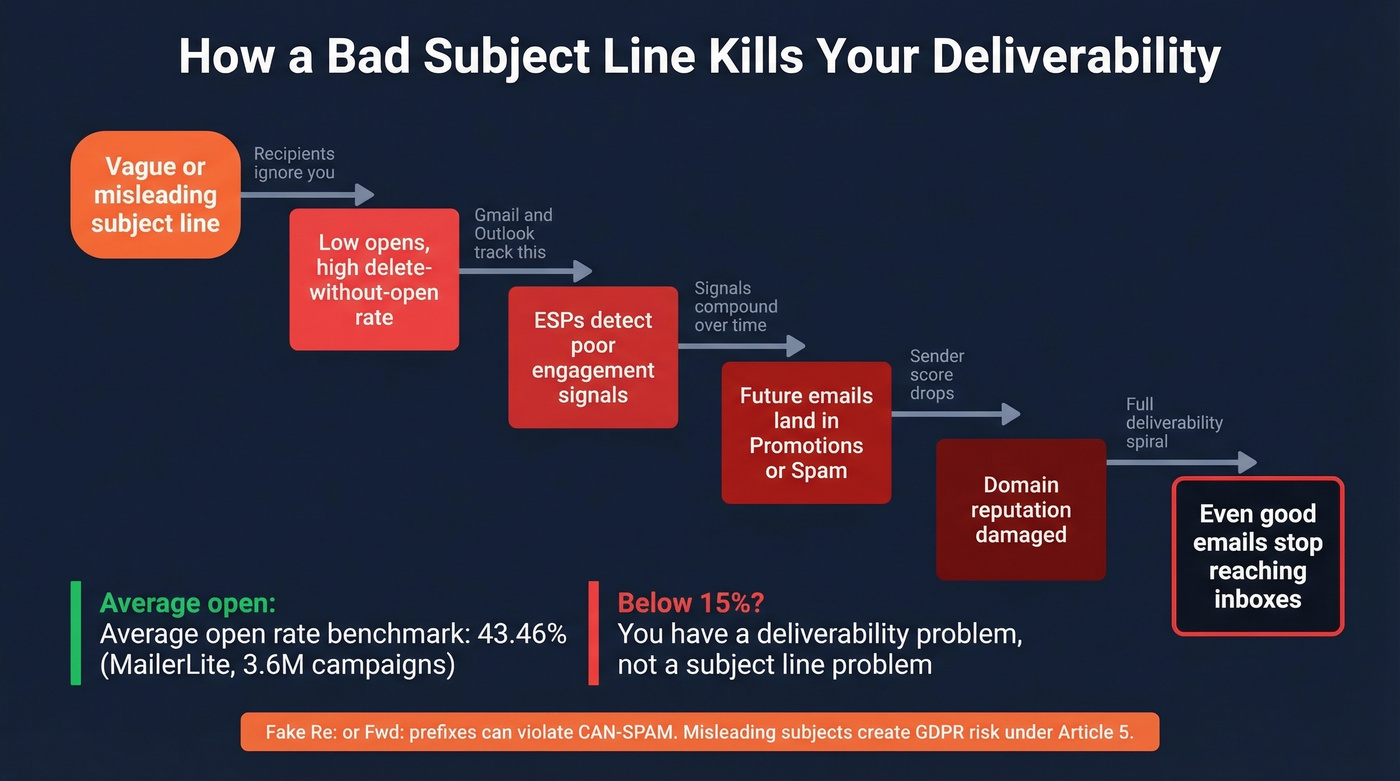
ESPs like Gmail and Outlook track engagement signals - delete-without-open rates, spam complaints, how quickly recipients engage. When your subject lines consistently get ignored or flagged, those signals compound. Future emails from your domain start landing in promotions tabs or spam folders, even if the content improves. For context, MailerLite's 2026 benchmark across 3.6 million campaigns puts the average open rate at 43.46%. If you're consistently below 15%, you've got a deliverability problem, not a subject line problem.
Then there's the compliance angle. Fake "Re:" or "Fwd:" prefixes can violate CAN-SPAM. Misleading subject lines create GDPR transparency risk under Article 5. It's not worth the marginal open-rate bump when the downside is legal exposure. Specific spam-trigger words to avoid: "free," "guarantee," "act now," "limited time," and "congratulations." (If you're worried about flags, run a quick spam check before sending.)
Bad data compounds the problem. In our experience, sending to unverified addresses means even a perfect subject line won't save you - bounces accelerate the deliverability damage that poor engagement started. We've seen teams fix their copy, fix their targeting, and still watch campaigns fail because 15% of their list was dead addresses. If you're seeing this, start with email bounce rate diagnostics and list hygiene.
Subject Lines for Global Teams
Most subject line advice is written for American audiences. If you're emailing across borders, the rules shift.
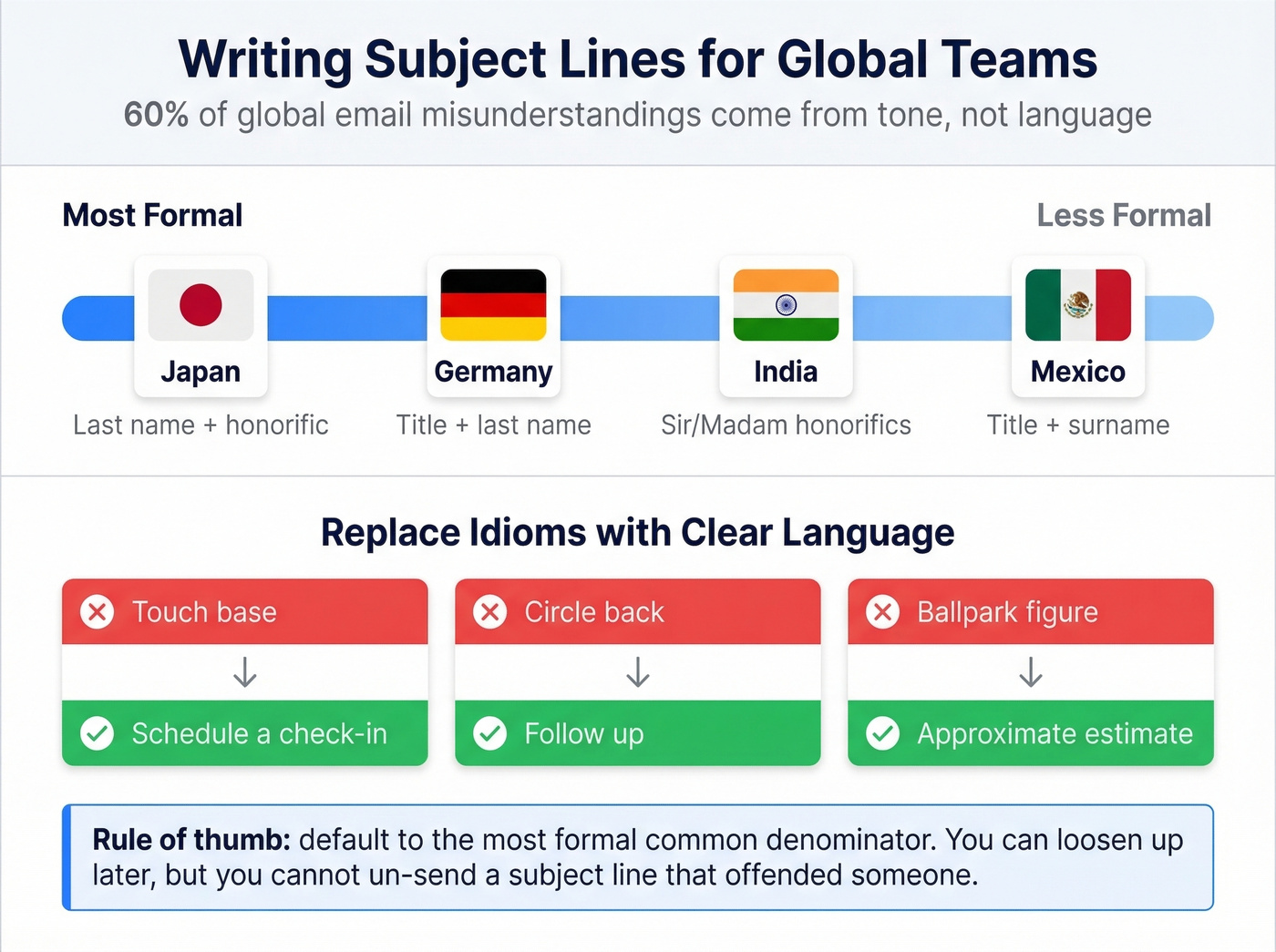
60% of global email misunderstandings stem from tone interpretation rather than language barriers. A subject line that reads as efficient in New York reads as blunt in Tokyo. Here's my take: if your average deal involves anyone outside the US, default to the most formal common denominator. You can always loosen up once a relationship is established. You can't un-send a subject line that offended someone.
| Region | Formality | Addressing Convention |
|---|---|---|
| Japan | Very formal | Last name + honorific |
| Germany | Formal | Title + last name |
| India | Respectful | Sir/Madam honorifics |
| Mexico | Professional | Title + surname |
Idioms kill clarity across borders. Replace "touch base" with "schedule a check-in," "circle back" with "follow up," and "ballpark figure" with "approximate estimate."
Power User Techniques
The EOM email. For one-sentence messages, put the entire content in the subject line and leave the body blank. Add "EOM" at the end so the recipient knows there's nothing to open. Example: "Team lunch moved to 1pm Thursday - EOM." We've used this internally for years and it saves everyone time.
Project prefixes for searchability. Kent State's productivity team recommends consistent prefixes like "P3:" for Phase 3 of a project. Six months later when you're searching your inbox, "P3: Innovation Course Pilot" is infinitely easier to find than "Quick update."
Preview text as your second headline. Your subject line and preheader text work together - write them as a pair. On mobile, they display side by side. Wasting the preheader on "View this email in your browser" throws away your best mobile hook. (If you want to test variations, use preview text A/B testing to validate what actually lifts opens.)
Skip all of this if you're sending fewer than 50 emails a month. At that volume, just follow Topic + Purpose and you're fine. These techniques pay off when you're running campaigns at scale and every percentage point of open rate translates to real pipeline. If you're building a full outbound motion, pair this with a B2B cold email sequence so the subject line supports the whole flow.
You just learned the 33-character rule, the 2-4 word sweet spot, and the Topic + Purpose framework. None of it matters if your emails bounce. Prospeo verifies every email through a 5-step process - 98% accuracy, refreshed every 7 days. Your first 75 lookups are free.
Great subject lines deserve inboxes that actually exist.
FAQ
What's the ideal length for a professional email subject line?
Two to four words - or under 33 characters - for universal mobile visibility. An analysis of 5.5 million emails found this range hits a 46% open rate. Performance declines steadily after 7 words, dropping to around 34% at 10 words.
Should I use emojis in business email subjects?
No, not in most professional contexts. Screen readers struggle with emojis, creating accessibility issues. In formal or global communication, emojis undermine credibility. If you use them in casual internal comms, always pair with clear text so the meaning isn't lost if the emoji doesn't render.
How do I write a subject line that avoids spam filters?
Skip ALL CAPS, fake "Re:" prefixes, and hype words like "ASAP" or "free." Keep subjects short with the key message front-loaded. Verify the recipient's email address before sending - bounces damage your domain reputation faster than almost anything else.
Does personalization actually improve open rates?
Yes. Personalized subject lines hit 46% open rates vs. 35% without - a 31% lift. Reply rates jump even more: 7% with personalization vs. 3% without, a 133% increase. Even adding the company name or referencing a trigger event like recent funding makes a measurable difference.