

Proposal Tracking: What to Measure, How to Follow Up, and Which Tools Actually Help
You sent the proposal Tuesday. It's Friday. Radio silence. You don't know if the prospect opened it, forwarded it to their CFO, or let it rot in a spam folder.
This visibility gap kills deals - and with 80% of B2B sales interactions happening digitally, you can't afford to operate blind. Proposal tracking closes that gap by showing you exactly who opened your document, what they read, and how long they lingered on each section. A full 33% of sales teams still don't use proposal software at all, sending PDFs into the void and hoping for the best.
What You Need (Quick Version)
Tracking proposals effectively comes down to three pillars:
- The right metrics - win rate, section-level engagement, and cost per proposal matter more than raw open counts.
- A follow-up playbook tied to engagement signals - knowing when and what to say based on how prospects interact with your document.
- Verified contact data - analytics are useless if the proposal bounces or lands in a junior inbox (see Email Bounce Rate).
Quick tool picks: PandaDoc for best overall value, Proposify for deepest analytics, Better Proposals if you're budget-constrained. Most small teams try to cap a proposal tool at around $100/month, and every tool on this list can fit that budget depending on seats and plan.
Metrics That Actually Matter
Most teams track opens and call it a day. That's like judging a restaurant by the number of people who walk past the door.
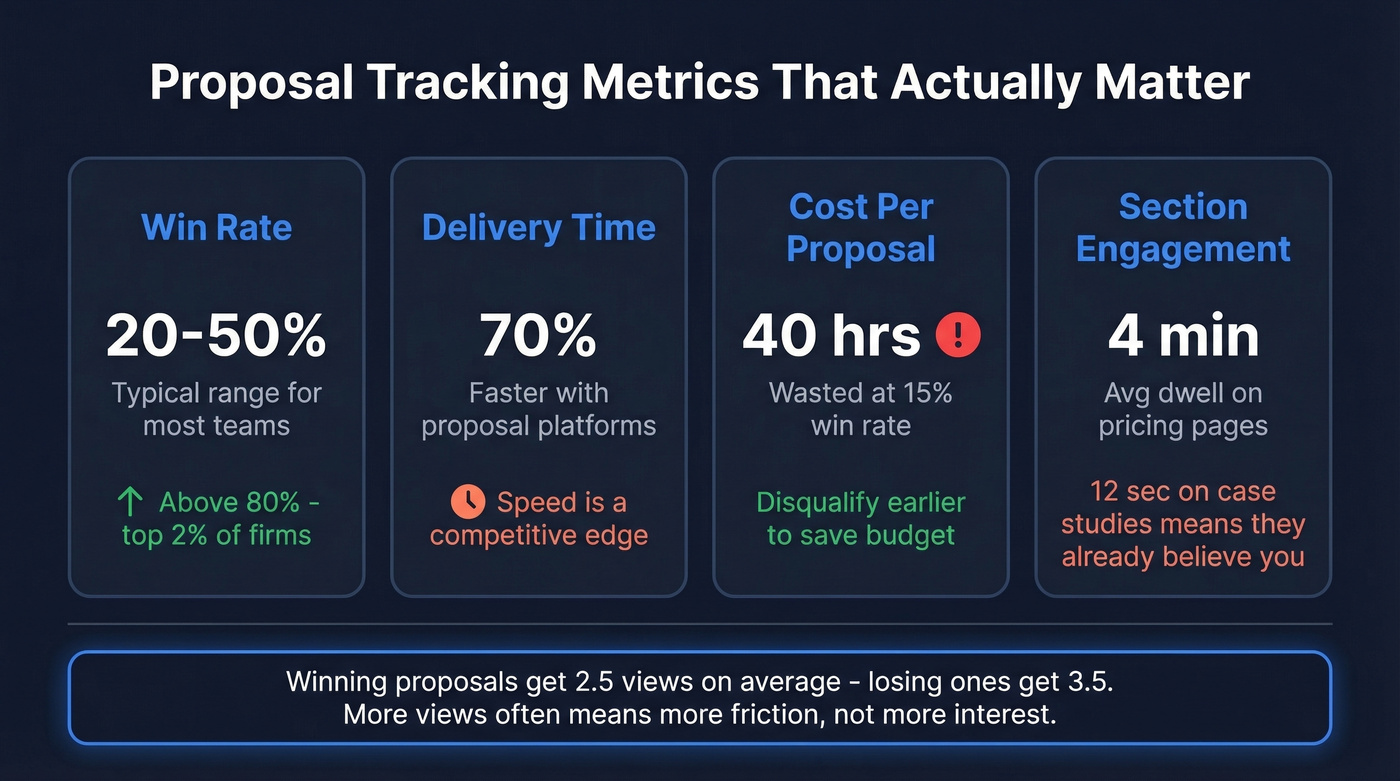
Win rate (overall + by deal type). This is your headline number, but segment it. Win rate on inbound RFPs vs. outbound proposals tells you where your process is strong and where it's leaking. For context, only 2% of firms report win rates above 80%, and most teams cluster between 20-50%.
Proposal delivery time. How fast you get a proposal out after a prospect requests one is a competitive differentiator. Buyers notice responsiveness, and dedicated proposal platforms can cut creation time by up to 70%. This is one of the simplest ways to outpace competitors who are still assembling documents manually in Google Docs.
Cost per proposal and revenue per RFP won. These force you to think about quality over quantity. If you're spending 40 hours on proposals you win 15% of the time, the math doesn't work - and you'd be better off disqualifying earlier.
Section-level engagement. This is where modern analytics earn their keep. Knowing that a prospect spent four minutes on your pricing page and twelve seconds on your case studies tells you exactly what to address in follow-up.
One benchmark worth internalizing: Proposify's State of Proposals Report found that winning proposals are viewed 2.5 times on average, while unsuccessful ones get viewed 3.5 times. More views often means more friction, not more interest.
How to Read Engagement Signals
Opens are table stakes. Re-opens are where the story gets interesting.
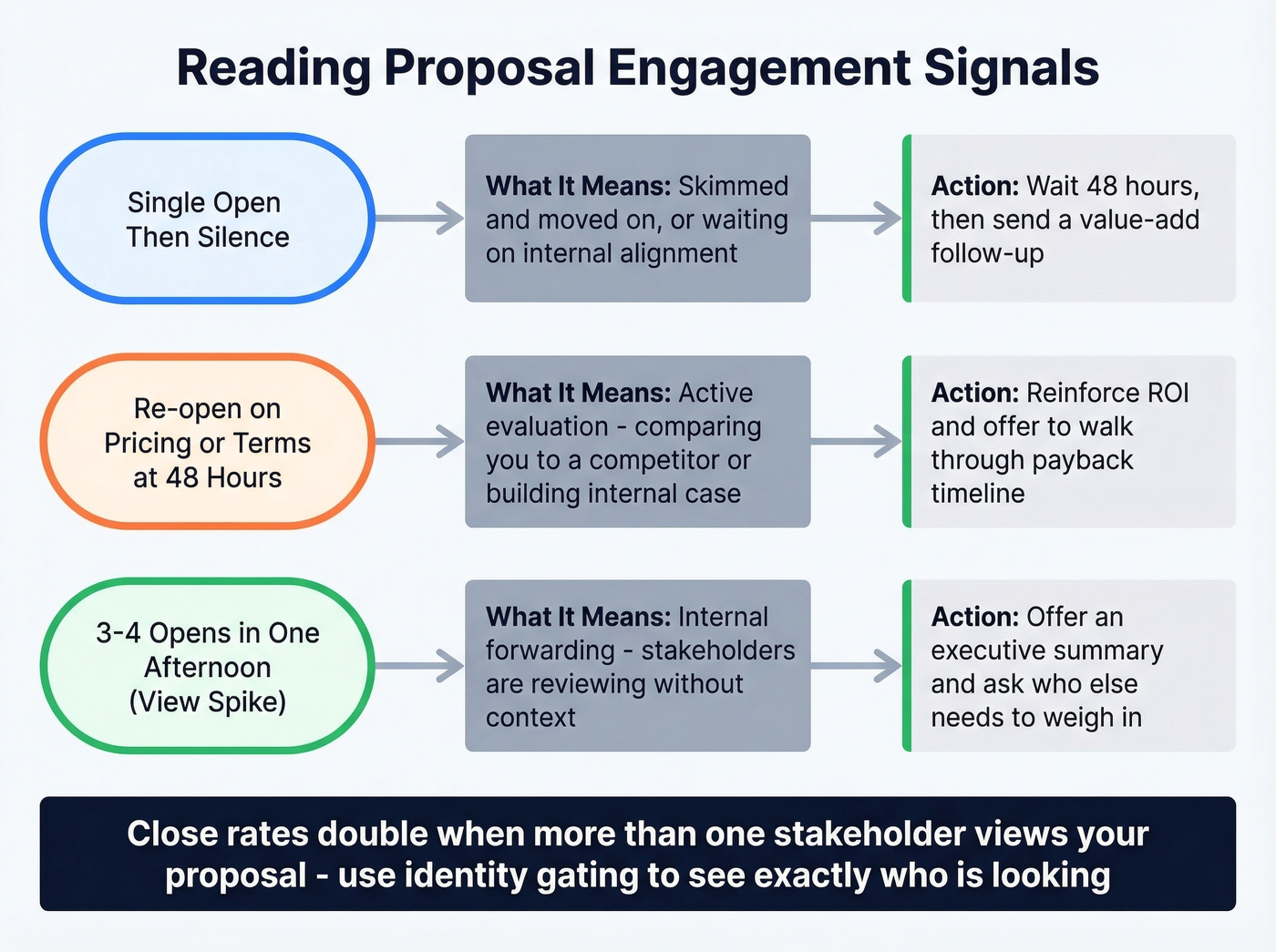
A single open followed by silence usually means your prospect skimmed and moved on - or they're waiting on internal alignment. A re-open 48 hours later, especially on the pricing or terms section, signals active evaluation. They're comparing you to someone else or building an internal case.
Section dwell time is the most underused signal in document analytics. If someone spends three minutes on your implementation timeline and skips your testimonials entirely, they're past the "should we buy" question and into "can we actually do this." Your follow-up should address logistics, not value props.
View spikes - three or four opens in a single afternoon - almost always mean internal forwarding. Someone's circulating your proposal to stakeholders. This is a buying signal, but it's also a risk: people you've never spoken to are forming opinions about your offer without context. Proposify's data shows close rates double when more than one stakeholder views a proposal. Use identity gating to see exactly who's looking - require viewers to enter their email before accessing the document.

Tracking engagement signals only works when your proposal reaches the right person. Prospeo's 98% verified emails ensure your proposals land in decision-maker inboxes - not spam folders or junior staff. With 30+ filters including job title, department, and buyer intent, you'll send proposals to the people who actually sign contracts.
Stop tracking proposals that never reached the buyer.
The Follow-Up Playbook
Here's the thing: 75% of buyers expect 2-4 follow-ups before making a decision, but 48% of reps quit after one attempt. That gap is enormous. If you need copy you can deploy fast, keep a set of sales follow-up templates handy.
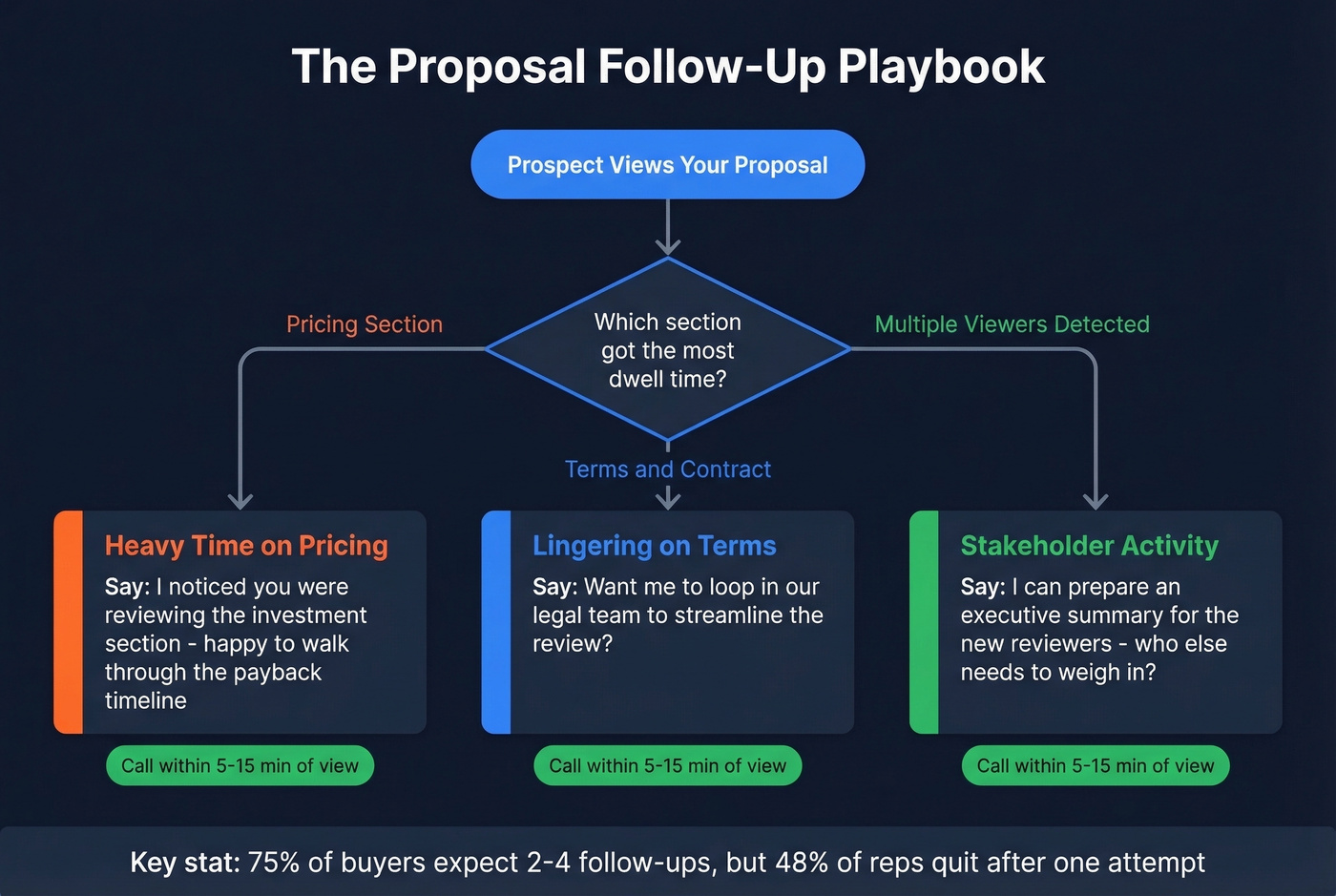
Timing matters more than message. DocBeacon's guidance is to call within 5-15 minutes of a fresh view. That's not aggressive - it's responsive. The prospect literally has your proposal open in front of them.
What to say depends on what they read:
- Heavy time on pricing - Reinforce ROI. "I noticed you were reviewing the investment section - happy to walk through the payback timeline."
- Lingering on terms/contract - Clarify next steps. "Want me to loop in our legal team to streamline the review?"
- Multiple stakeholders viewing - Offer an executive summary for the new viewers. Ask who else needs to weigh in.
Reference the longest dwell-time section in every follow-up. It shows you're paying attention without being creepy about it. If you're scaling this, consider AI tools for automating sales follow-ups.
Mistakes That Kill Win Rates
Sending proposals before value is established. RAIN Group's research makes this clear - a proposal should formalize what's already been agreed upon, not introduce your solution for the first time. If the prospect doesn't understand your value, ballpark fees, and decision timeline before receiving the document, no amount of engagement data will save the deal.
Tracking opens but not acting on signals. We've seen teams invest in proposal software, watch the dashboards light up, and still follow up with generic "just checking in" emails. The whole point of section-level analytics is to make your outreach specific. Use the data or don't bother collecting it. (If you need better language, see How to Say Just Checking In Professionally.)
Not knowing who else is viewing. Without identity gating, you're flying blind on the buying committee. That VP of Finance who opened your proposal at 11 PM? You'll never know unless you require identification before viewing.
Best Tools for 2026
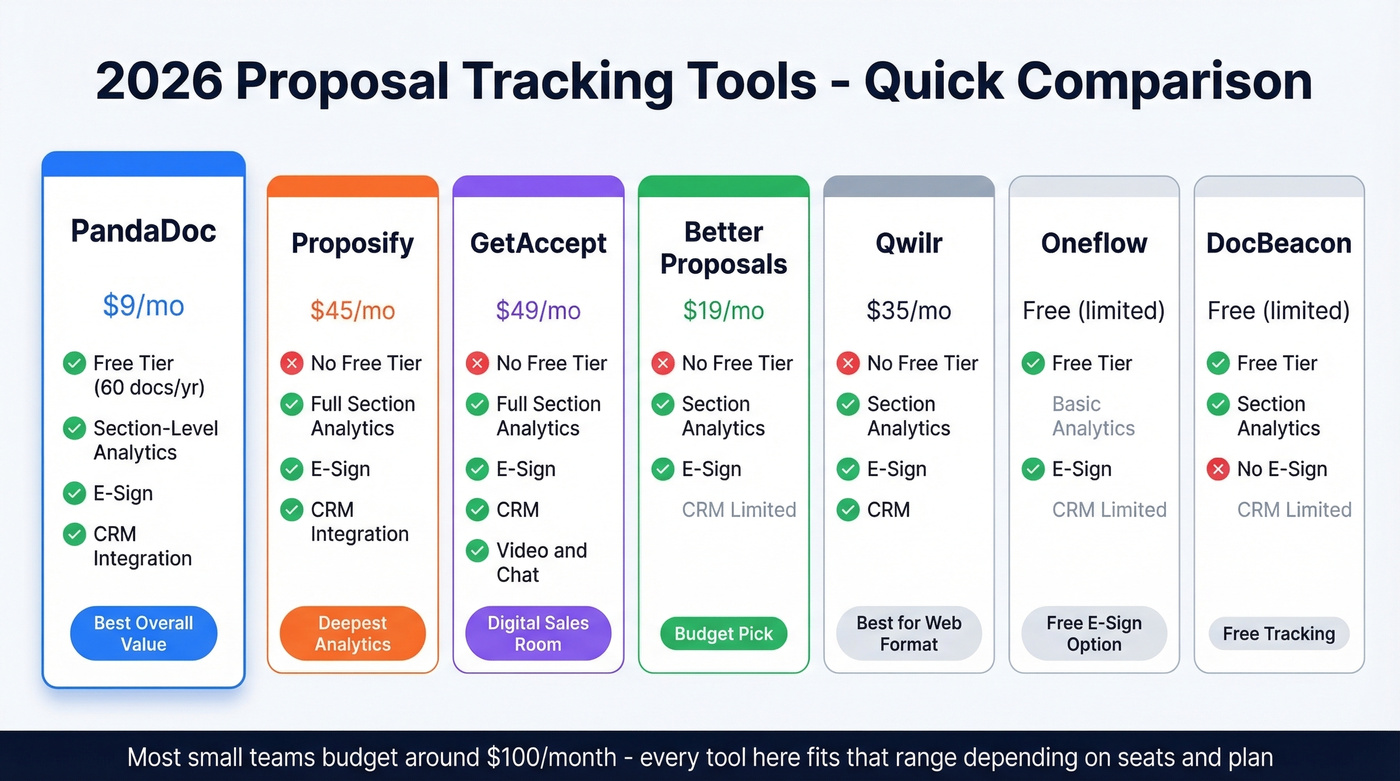
| Tool | Starting Price | Free Tier | Analytics Depth | E-Sign + CRM |
|---|---|---|---|---|
| PandaDoc | $9/mo (Launch) | Yes (60 docs/yr) | Section-level (Business+) | Both (Business+) |
| Proposify | $45/mo | No | Full section-level | Both |
| GetAccept | $49/mo | No | Full section-level | Both |
| Better Proposals | $19/mo | No | Section-level | E-sign yes, CRM limited |
| Qwilr | $35/mo | No | Section-level | Both |
| Oneflow | Free (limited) | Yes | Basic | E-sign yes, CRM limited |
| DocBeacon | Free (limited) | Yes | Section-level | No e-sign, CRM limited |
PandaDoc
PandaDoc is the default for a reason. The free tier gives you 60 documents per year with unlimited seats - enough for a small team to test whether document analytics actually change their close rate before committing budget. Plans start at $9/month on the Launch tier, but the Starter tier at $19/seat/month is where tracking features become useful, covering templates, real-time notifications, and e-signatures. The Business plan at $49/seat/month unlocks CRM integrations and deeper analytics.
The Reddit complaint about PandaDoc branding on proposals is valid - free and lower-tier plans plaster PandaDoc's logo on your documents, which looks unprofessional on a six-figure deal. You'll need the Business plan for custom branding. But for the price-to-feature ratio, especially if cross-device compatibility matters to your team, it's the obvious starting point.
Proposify
Proposify is the analytics-first option. At $45/month with no free tier, you're paying from day one - a harder sell for solo founders or freelancers testing the waters. For teams running 20+ proposals a month, though, the depth of analytics justifies the cost. Their identity gating and stakeholder tracking are best-in-class, and the consensus in practitioner communities like r/sales is that it's the second-best option behind PandaDoc for pure proposal management.
GetAccept
Use this if you want a digital sales room that goes beyond proposals - GetAccept bundles video, chat, and document tracking into a single buyer experience. Skip this if you only need proposal analytics and e-signatures. You'd be paying for capabilities you won't use.
Better Proposals
The budget play at $19/month. CRM integrations are more limited than PandaDoc or Proposify, but if you're a freelancer or small agency sending 5-10 proposals a month, it covers the essentials. The template library is polished enough that you won't need a designer.
Qwilr, Oneflow, and DocBeacon
Qwilr ($35/month) is worth a look if your proposals are content-heavy and benefit from a modern, scrollable web format rather than a traditional PDF. Oneflow offers a free tier with basic contract management and tracking - a legitimate option for teams that need e-signatures without spending anything. DocBeacon is a free tracking-focused tool with strong section analytics and real-time view alerts but no e-signatures; pair it with a separate e-sign tool if you need both.
Tracking Fails Without Clean Data
Let's be honest about the biggest proposal tracking problem: it isn't software. It's sending proposals to the wrong people. In our experience, teams obsess over section analytics while 15%+ of their proposals bounce because the contact data was stale.
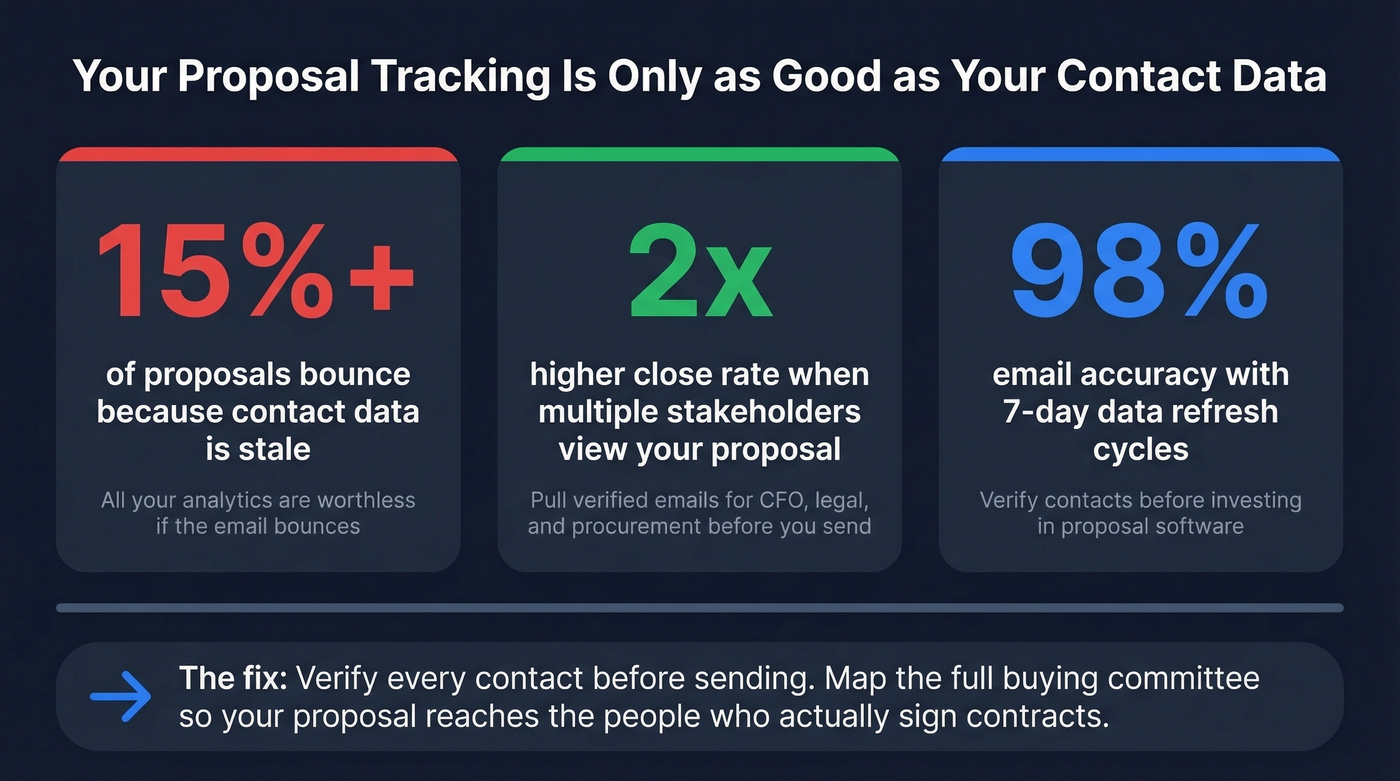
Before you invest in proposal software, verify your contacts. Prospeo's email finder delivers 98% email accuracy on a 7-day data refresh cycle, and the free tier gives you 75 verified emails per month - enough to validate your highest-priority deals before sending. If you're building lists at scale, use data enrichment services to keep records current.
Remember the multi-stakeholder insight from earlier: close rates double when more than one person views your proposal. Pull verified emails for the CFO, legal counsel, and procurement lead before you send, so you can share directly with the full buying committee instead of hoping your champion forwards it. This is also where a solid contact management software setup pays off.
You spotted three stakeholders viewing your proposal - but who's the CFO you've never met? Prospeo gives you verified emails and direct dials for every member of the buying committee. 125M+ mobile numbers with a 30% pickup rate means you can call that VP of Finance who opened your pricing section at 11 PM.
Map the entire buying committee before your next follow-up.
FAQ
What is proposal tracking software?
Proposal tracking software shows when a prospect opens your document, which sections they read, how long they spend on each page, and whether they forward it to colleagues. Most tools also include e-signatures and CRM integrations at paid tiers, with section-level analytics starting around $19-$49/seat/month.
How much does proposal tracking cost?
Most tools run $19-$49/seat/month. Free tiers exist from PandaDoc (60 docs/year), Oneflow, and DocBeacon, though they typically cap document volume or require paid plans for custom branding and CRM integrations.
What's a good proposal win rate in 2026?
Most teams cluster between 20-50%. Only 2% of firms exceed 80%, and 4% fall below 10%. If you're under 20%, your engagement data and follow-up process likely need attention before you blame the product or pricing.
Can I track proposals inside my CRM?
Most proposal tools integrate with Salesforce and HubSpot at mid-tier plans ($35-$49/month). CRM-native tracking exists but lacks the section-level analytics that dedicated software provides. For accurate CRM data, pair your proposal tool with verified contact data to ensure proposals reach decision-makers in the first place.