

6 Quarterly Business Review Examples You Can Steal (With Real Numbers)
Your QBR is 47 slides. Your champion is checking Slack. You're 20 minutes over time, and the VP who actually controls the budget left at minute 35.
A common complaint on r/CustomerSuccess? QBRs are too long, built from scratch every time, and have no clear goals. What follows are six quarterly business review examples with real numbers - not another blank framework you'll never use.
Quick version:
- Structure: 60 minutes, 10 slides, 70% future-focused.
- Examples: 6 filled-in QBRs below - SaaS, internal, agency, financial, executive dashboard, supplier.
- The rule: Every metric needs a "so what" and a "what's next." If it doesn't have both, cut it.
What Is a QBR?
A quarterly business review is a structured meeting held every three months to assess performance, align on priorities, and plan what's next. For customer-facing QBRs, bring the people who can speak to outcomes and make decisions: your CSM or account manager (plus a solutions lead if needed), the customer champion, and a budget holder or executive stakeholder.
Internal QBRs look different. It's department leads and cross-functional stakeholders reviewing OKRs, budgets, and blockers.
One distinction worth clarifying: a QBR is quarterly and operational. An EBR (Executive Business Review) happens once or twice a year and focuses on strategic alignment at the C-level. Both matter - they serve different purposes. (If you want the full breakdown, see QBR vs EBR.)
Why QBRs Are Worth the Effort
Teams running consistent QBRs maintain net retention rates 15-20 points higher than teams relying on reactive support. Over 9-12 months, structured QBRs correlate with an +11% retention impact. And expansion is cheaper than acquisition - $0.61 per ACV dollar versus $1.78 for a net-new customer.
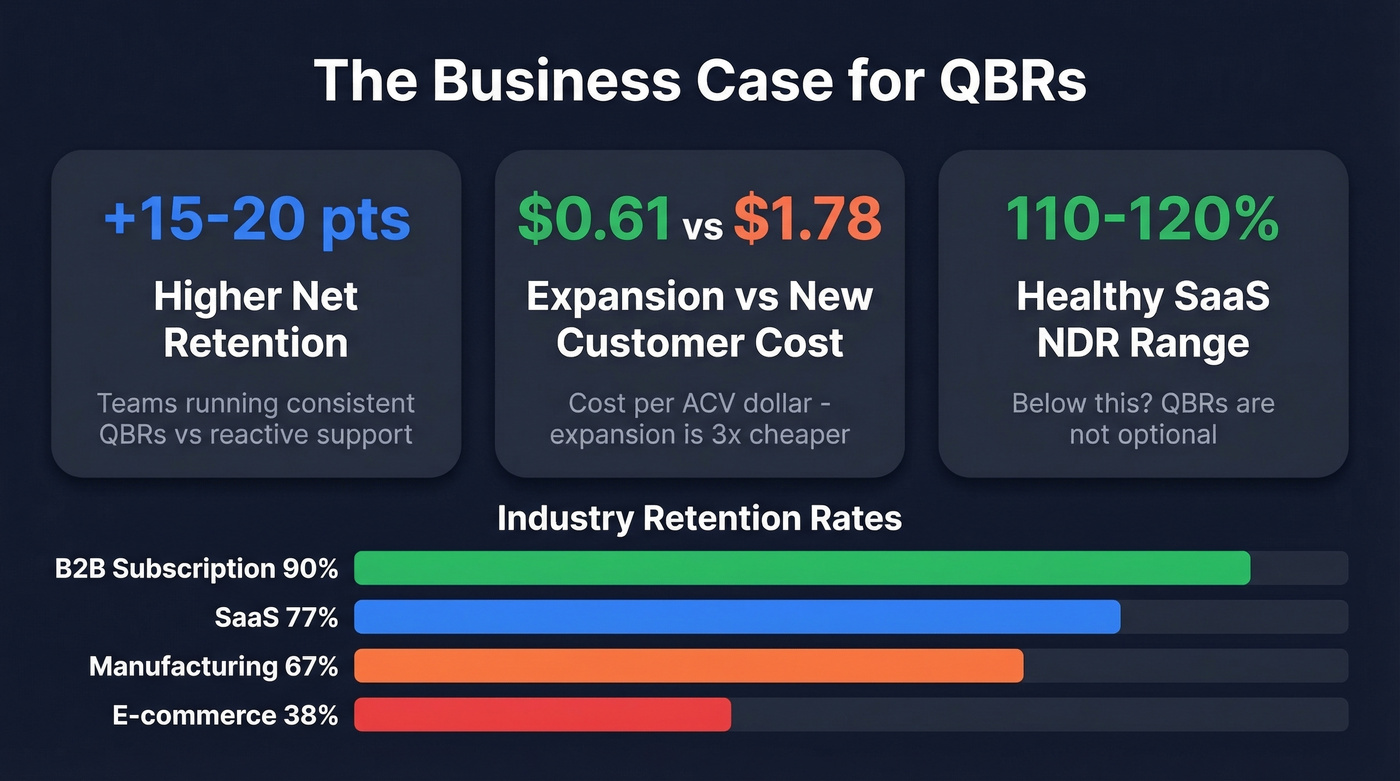
Retention rates vary by industry: SaaS sits around 77%, manufacturing 67%, e-commerce 38%, B2B subscription 90%. Healthy SaaS net dollar retention lands in the 110-120% range. If your NDR is below that, QBRs aren't optional - they're the mechanism that surfaces expansion opportunities before renewal conversations get awkward. (More on the math in our renewal rate guide.)
6 QBR Examples You Can Steal Today
You can mix and match elements from multiple formats depending on who's in the room. Here are six filled-in examples.
SaaS Customer QBR
This is the one most CSMs need. Here's a filled-in version.
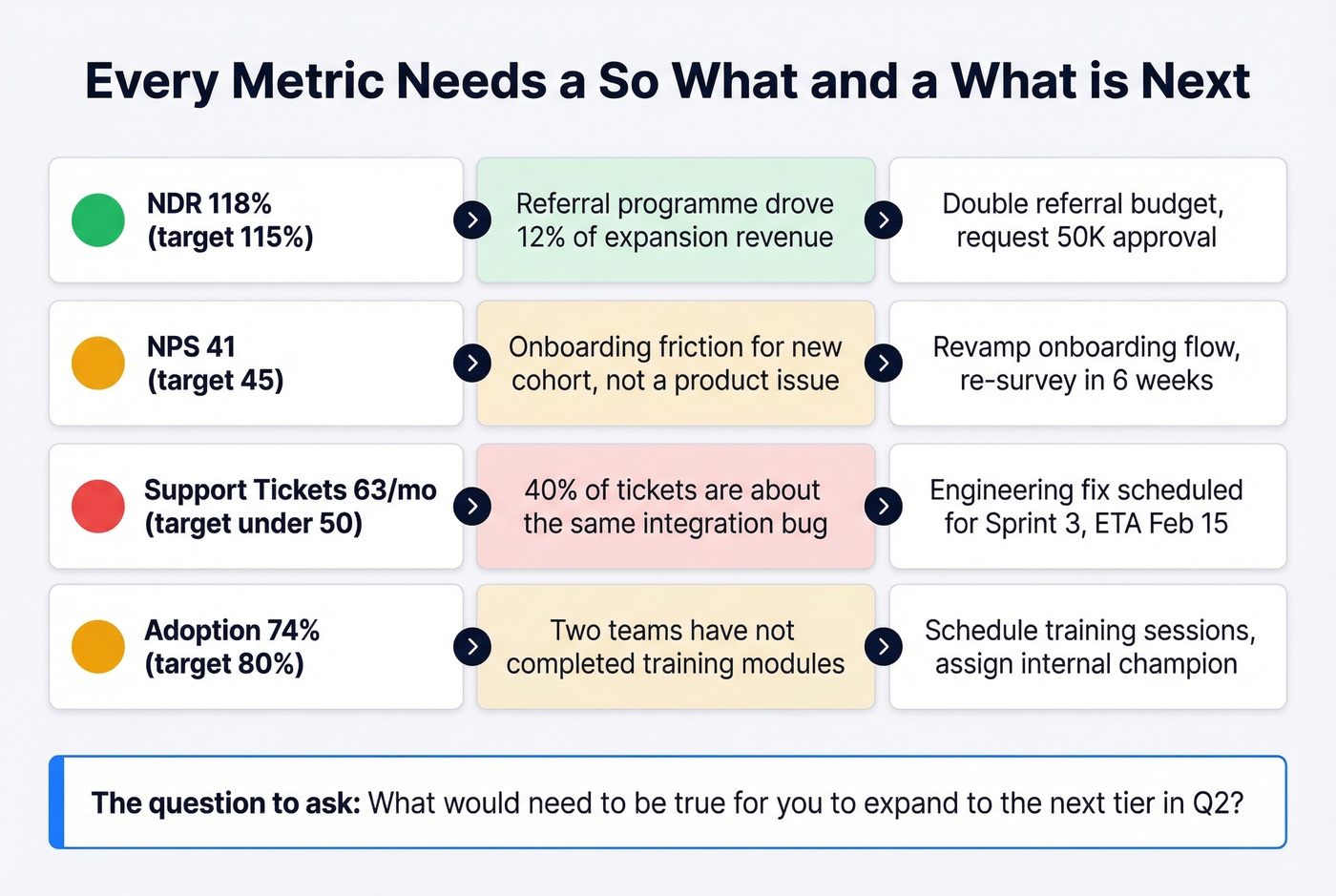
Executive Summary (Slide 1): "Q4 exceeded target by 12% - £2.4M vs £2.1M goal. CAC dropped 23% due to referral programme expansion. We recommend doubling the referral budget in Q1. Need approval for £50K incremental spend."
That's the template: result, driver, recommendation, ask.
Scorecard (Slide 3):
| Metric | Target | Actual | Variance | Status |
|---|---|---|---|---|
| NDR | 115% | 118% | +3% | 🟢 |
| NPS | 45 | 41 | -4 | 🟡 |
| Support tickets | <50/mo | 63/mo | +26% | 🔴 |
| Adoption rate | 80% | 74% | -6% | 🟡 |
Each row needs a "so what" and a "what's next." NDR is green - great, but what drove it? NPS dipped - is that a product issue or an onboarding gap? Support tickets spiked - what's the top theme, and what's the fix?
The question to ask in the room: "What would need to be true for you to expand to the next tier in Q2?" That single question turns a status update into a pipeline conversation. (If you want more prompts like this, use these QBR questions.)
End with a clear ask: budget approval, executive sponsor introduction, or timeline commitment for the next phase. We've found this SaaS QBR format is the most common you'll encounter, so it's worth getting right before adapting it to other contexts.
Internal OKR-Based QBR
Internal QBRs skip the commercials slide and go heavier on resource allocation:
- Review last quarter's OKR scores (15 min)
- Discuss blockers and misses (15 min)
- Adjust strategy based on learnings (15 min)
- Draft next-quarter priorities (15 min)
- Assign owners and resources (10 min)
Budget 1-2 hours. The biggest difference from a customer QBR: nobody's selling anything. The goal is honest assessment and forward planning. If your OKRs scores are all green, either your targets are too soft or someone's not being honest.
Agency Client QBR
Agency QBRs live or die on the "keep / stop / start" framework. Instead of dumping channel metrics on a client, translate every data point into a recommendation.
Bad: "Bounce rate decreased 14% this quarter."
Good: "Bounce rate decreased since new content launched. We recommend revamping an additional 20 pages in Q2 - here's the projected impact on organic traffic."
Include a channel performance summary showing spend versus return for each active channel. End with a clear "keep doing / stop doing / start doing" slide with rationale for each. Clients don't want data - they want decisions. The prompt that works here: "Of these three recommendations, which one would move the needle most for your team this quarter?"
Financial Performance QBR
This one's for the CFO and board audience. Keep it tight:
- Revenue vs. forecast (with variance explanation)
- Gross and net margin analysis
- Rule of 40 score
- Cash runway in months
- Top 3 risks to next quarter's forecast
No product updates, no feature roadmaps. Financial QBRs are about the business model, not the product. If your Rule of 40 score is below 40, that's the conversation - everything else is noise.
Executive Dashboard QBR
If you're a CSM preparing your first QBR deck, start here. This is the simplest format that still works.
Pick 5-7 KPIs. Assign each a traffic-light status. Fit it on one page.
| KPI | Status | Note |
|---|---|---|
| NDR | 🟢 | 118%, above 115% target |
| NPS | 🟡 | 41, down from 45 |
| Adoption | 🟡 | 74%, 6pts below target |
| Support volume | 🔴 | 63 tickets, up 26% |
| Time-to-value | 🟢 | 14 days, under 21-day SLA |
This format forces you to be reductive - which is exactly what executives want. Skip this format if your account is above $100K ARR and the stakeholders expect a full strategic conversation. For everything else, it's gold.
Supplier / Vendor QBR
Supplier QBRs focus on operational performance:
- SLA compliance (uptime, response time, delivery windows)
- Delivery timeline adherence (on-time rate)
- Quality metrics (defect rate, return rate)
- Cost variance vs. contract terms
- Escalation log and resolution times
Smartsheet offers a free supplier QBR template in Excel that covers these categories. It's basic, but it's a solid starting point for building a vendor management cadence from scratch.
Choosing the Right QBR Format
| Format | Best For | Complexity | Time | Key Output |
|---|---|---|---|---|
| SaaS Customer | CSMs, AMs | Medium | 60 min | Expansion ask |
| Internal OKR | Dept leads | Medium | 1-2 hrs | Priority alignment |
| Agency Client | Agency teams | Low | 45-60 min | Keep/stop/start |
| Financial | CFO, board | High | 60 min | Forecast + risks |
| Executive Dashboard | First-time QBRs | Low | 30-45 min | Health snapshot |
| Supplier/Vendor | Procurement | Low | 45-60 min | SLA compliance |
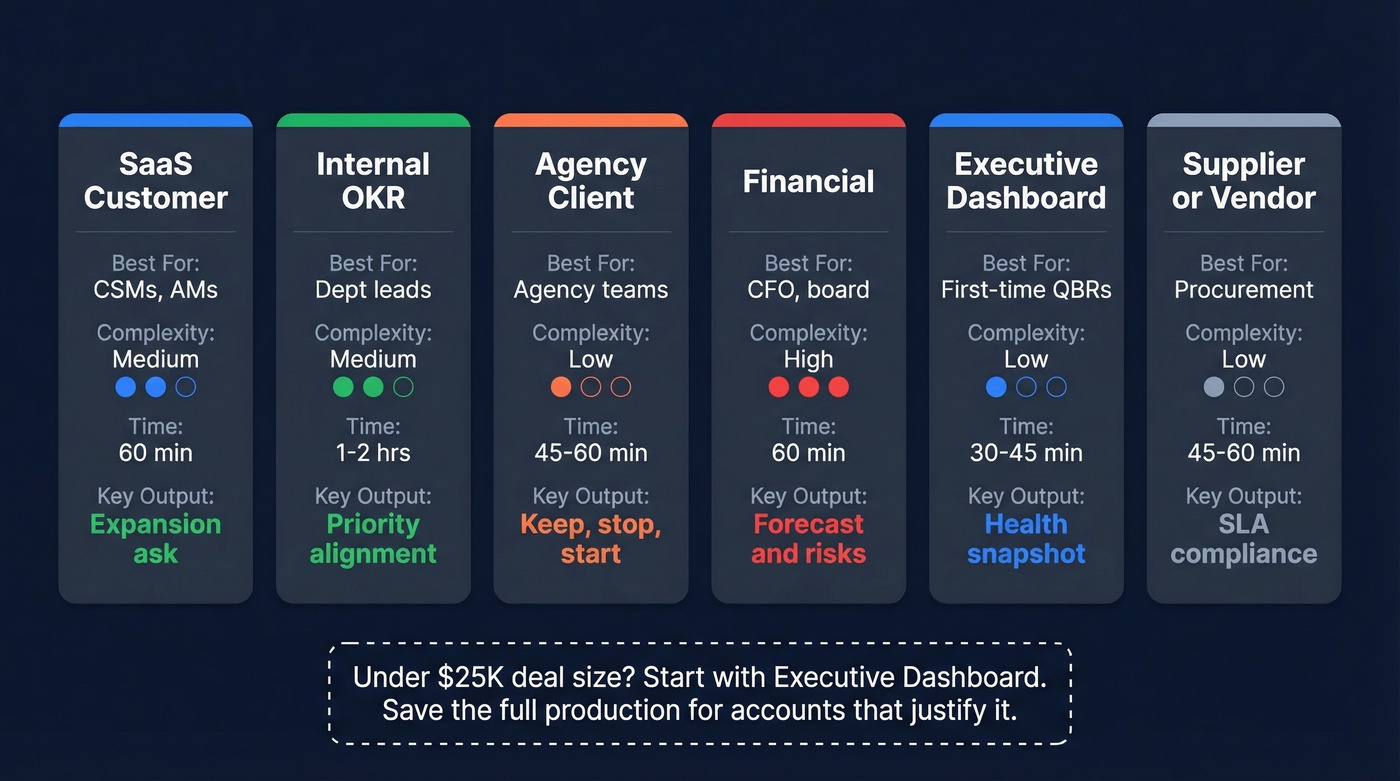
Here's the thing: most teams default to the SaaS Customer format because it looks impressive. But if your deal size is under $25K, the Executive Dashboard format will get you 80% of the value in half the prep time. Save the full production for accounts that justify it. Pick the format that matches your audience - not your ego.

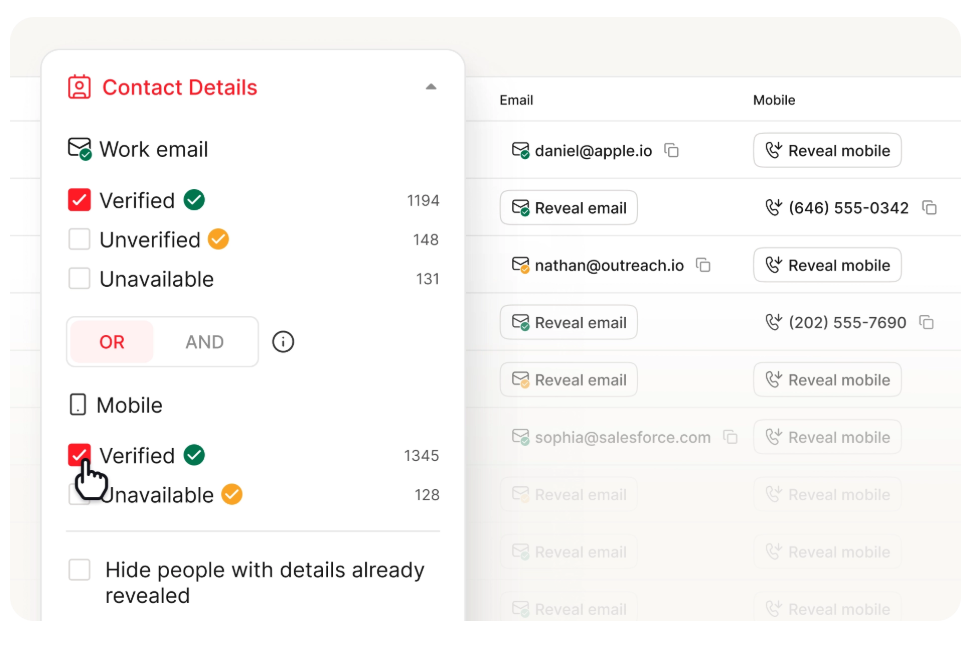
That expansion ask on slide 10 only works if your team can actually reach the new stakeholders. Prospeo gives you 98% accurate emails and 125M+ verified mobiles so your post-QBR action items turn into booked meetings, not bounced outreach.
Turn every QBR expansion opportunity into pipeline that closes.
The 60-Minute QBR Agenda
| Time | Block | Focus |
|---|---|---|
| 0-5 min | Context | Meeting outcomes, agenda |
| 5-15 min | Last quarter | One-page summary |
| 15-30 min | Value/outcomes | Customer lens, metrics |
| 30-45 min | Next quarter | Mutual commitments |
| 45-55 min | Commercials | Stakeholders, renewal |
| 55-60 min | Decisions | Actions, owners, next date |
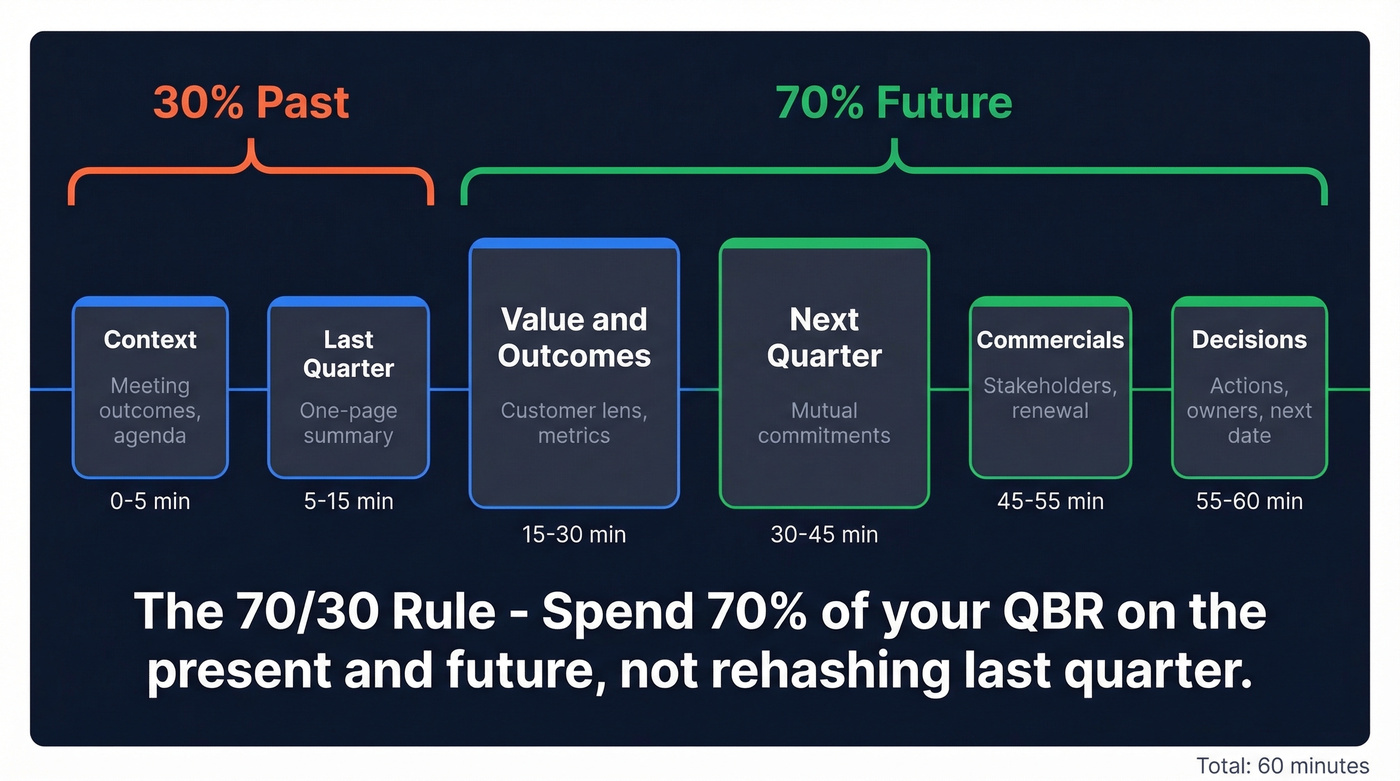
Only 15 minutes on the past, 45 minutes on the present and future. That 70/30 ratio is deliberate. We've run QBRs both ways - the ones that spend 40 minutes reviewing last quarter's dashboards lose the room every single time.
Pre-work timeline:
- 2-4 weeks out: Identify stakeholders and send calendar invites. No decision-maker means no expansion conversation.
- 5-7 days out: Send customer pre-work - outcomes, agenda, open questions.
- 48 hours out: Pull 3 usage metrics max, review support themes, update your stakeholder map.
- Day-of: Confirm attendees. If the VP dropped, consider rescheduling.
- Post-QBR: Follow up within 48 hours with an action log. No exceptions. (Use these sales follow-up templates to speed it up.)
Between QBRs: Run a monthly 15-minute check-in on action items and a mid-quarter health check on the 3-5 KPIs from your scorecard. This keeps momentum alive and prevents the next QBR from becoming a surprise party nobody enjoys.
The 10-Slide QBR Deck
If your QBR is longer than 10 slides, you're presenting a report, not running a strategic meeting.
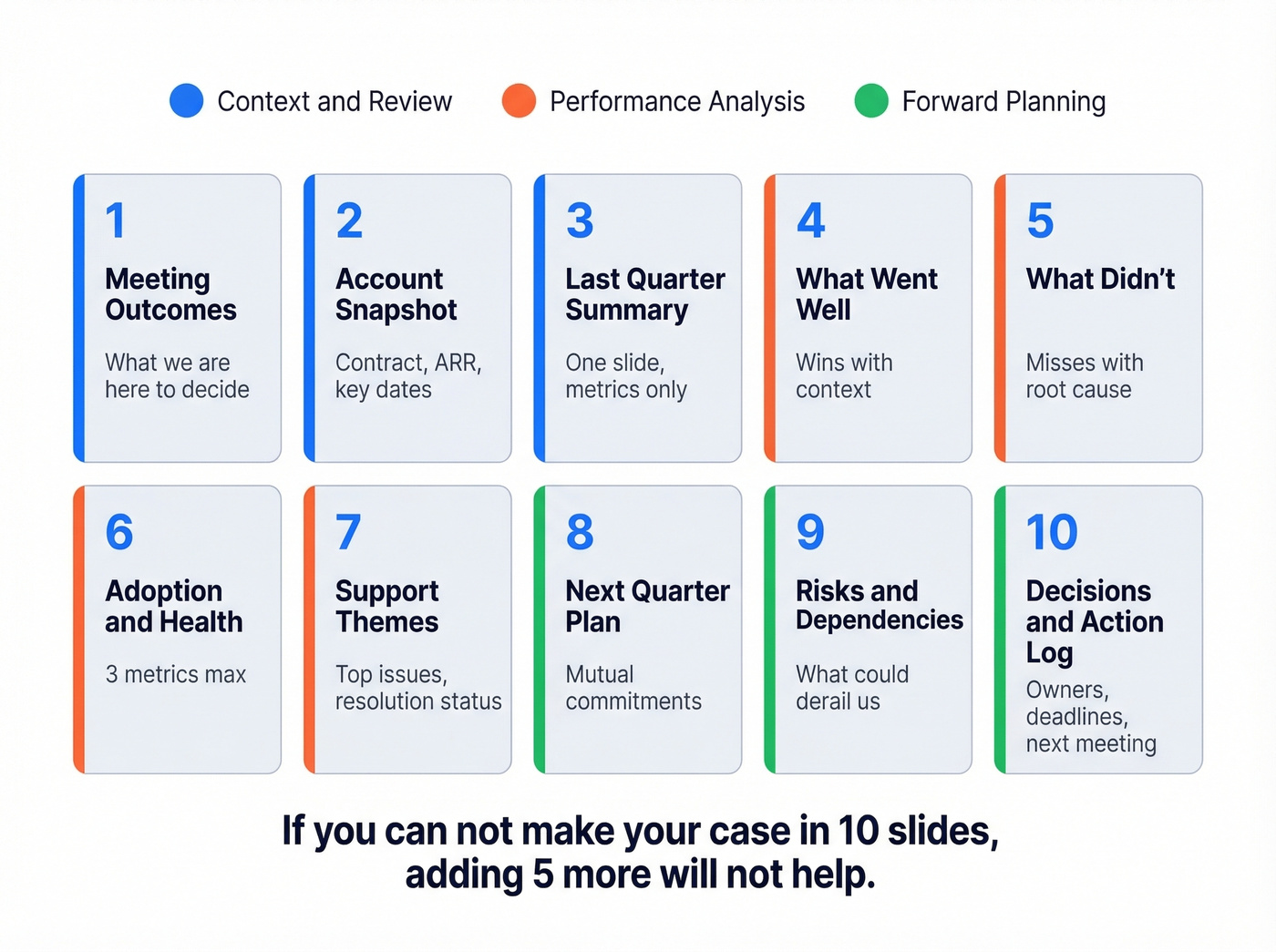
- Meeting outcomes - what we're here to decide
- Account snapshot - contract, ARR, key dates
- Last quarter summary - one slide, metrics only
- What went well - wins with context
- What didn't - misses with root cause
- Adoption/health - 3 metrics max
- Support themes - top issues, resolution status
- Next quarter plan - mutual commitments
- Risks/dependencies - what could derail us
- Decisions/action log - owners, deadlines, next meeting
Roadmap and product updates go in an appendix unless they're directly tied to a current goal. Ten slides is the sweet spot: fewer feels incomplete, more invites scope creep. Let's be honest - if you can't make your case in 10 slides, adding five more won't help.
9 Mistakes That Kill QBRs
Spending too long on the past. Cap retrospective at 15 minutes. Move detail to an appendix. In our experience, this is the single most common QBR failure mode - teams treat the meeting like a history lecture instead of a planning session.
Not tailoring to the customer. Reference their specific goals, not your generic playbook.
No clear next steps. Every QBR ends with an action log - owner, deadline, deliverable. A QBR that doesn't end with a specific dollar ask or resource request is leaving value on the table, even if the ask is small ("complete onboarding for the new module by March 15").
Too much data. 5-7 KPIs max. Visualize, don't tabulate.
Wrong stakeholders in the room. Confirm decision-maker attendance 48 hours before. No decision-maker, no meeting. Period. (If you're mapping buying roles, this MEDDPICC economic buyer guide helps.)
Making it about you. Frame every slide around customer outcomes, not your product. This is frustrating to watch in real time - I've sat through QBRs where the vendor spent 30 minutes on their roadmap and zero minutes asking what the customer actually needed next quarter.
No automation. Stop screenshotting dashboards into PowerPoint. Use tools that pull live data, or build a reusable template with linked data sources. CSMs on r/CustomerSuccess call this a major time sink, and they're right.
No templates. Build once, reuse quarterly. Rebuilding from scratch every time is a massive waste.
No explicit goals. Write down the QBR's purpose before you build a single slide - expansion, retention, rapport, escalation. This kills scope creep before it starts.
Free QBR Templates
You don't need to build from zero. These are worth grabbing:
- Smartsheet - free collection including executive QBR (PowerPoint), sales QBR, supplier QBR (Excel), and a customer QBR prep checklist. Best free option we've found.
- Mural - sign up free (no credit card required), great for collaborative QBRs where you want a shared workspace for next steps.
- Beautiful.ai - 14-day free trial, strong if design quality matters for investor-facing or board QBRs.
- WinningPresentations - £39 paid template with a strong executive summary format. Worth it if you're presenting to C-suite regularly.
Your QBR scorecard tracks NDR and adoption - but expansion revenue depends on reaching the right buyers fast. Prospeo's 300M+ profiles with 30+ filters let you identify and contact upsell targets at $0.01 per verified email.
Stop leaving expansion revenue on the table after every QBR.
FAQ
How long should a QBR be?
60 minutes for customer-facing QBRs; internal reviews can run 1-2 hours. If you're consistently going over, your deck has too many slides - move supporting data to an appendix and stick to 5-7 KPIs on screen.
How many slides belong in a QBR deck?
10 slides maximum. Anything over 15 means you're presenting a report, not running a strategic conversation. Use an appendix for supporting data and keep the main deck focused on decisions.
Who should attend a customer QBR?
Your side: CSM, solutions lead, executive sponsor. Their side: champion, budget holder, and at least one executive decision-maker. No decision-maker means no expansion conversation - confirm attendance 48 hours out.
What's the difference between a QBR and an EBR?
QBRs are quarterly and operational - metrics, alignment, next steps. EBRs happen once or twice a year and focus on strategic vision and executive relationships. Most mid-market accounts need QBRs; enterprise accounts above $100K ARR benefit from both.
How do I find contact info when a key stakeholder changes roles?
Use a B2B data platform like Prospeo to find and verify the new contact's direct email in seconds. With profiles refreshed every 7 days and 98% email accuracy, you avoid the forwarding chain that delays meetings by weeks.