

15 Reconnecting Email Templates - Plus the System That Makes Them Work
You spend 20 minutes writing the perfect reconnecting email template for a former client. Warm tone, specific reference to your last project together, a clear reason to reach out. You hit send. It bounces. Their email changed, and your domain reputation just took a hit for nothing.
That's the reality most guides ignore. They hand you copy-paste scripts but skip the infrastructure that makes those templates actually land.
Why Most Reconnection Emails Get Ignored
Three things kill reconnection campaigns before they start:
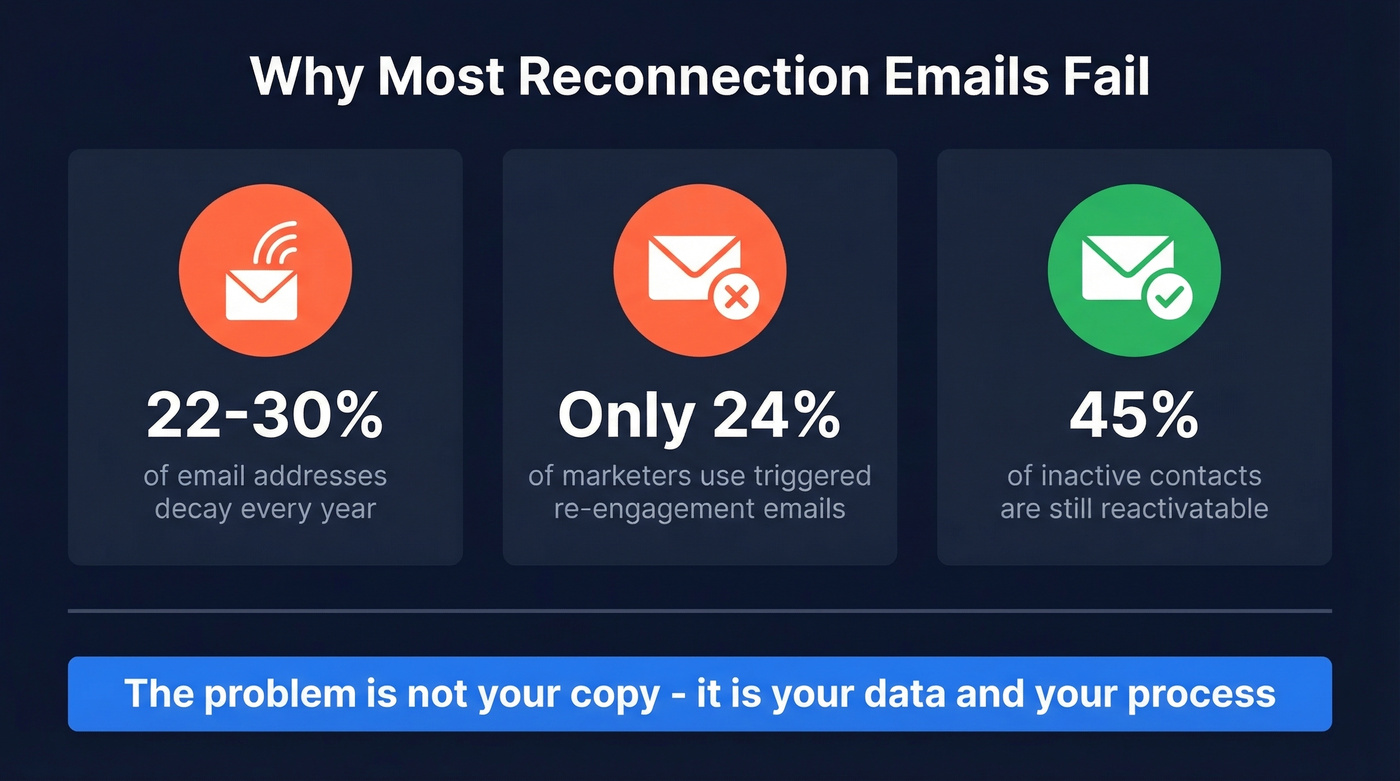
- Stale data. Email addresses decay 22-30% per year. A lot of the contacts in your "warm" list have moved companies, changed roles, or let old addresses die.
- One-and-done sending. Only 24% of marketers use inaction-triggered re-engagement emails - most people who try reactivation send a single message and give up.
- Generic messaging. "Just checking in" gives people nothing to respond to. No hook, no value, no reason to reply.
Here's the thing: 45% of inactive contacts are still reactivatable with the right message. You just need to reach them first.
What You Need Before Sending
- Verify your contact list. Addresses go stale fast. Run your list through a real-time email verification tool before you send a single email - bounces wreck your sender reputation.
- Pick the right template for your situation from the 15 below.
- Don't send one email and quit. Use the 4-touch sequence in Section 6 to lift your reply rate.
The Pre-Send Step Everyone Skips
A reconnection email only works if it arrives. If you're reaching out to contacts you haven't emailed in 6-18 months, a big chunk of those addresses will be stale.
We've watched teams spend hours personalizing campaigns only to see bounce rates spike and tank their deliverability - not just for that campaign, but for every email they send afterward. Hard bounces and spam complaints compound fast, and the damage is surprisingly difficult to undo once your domain gets flagged.
The fix is boring but non-negotiable: verify before you send. Upload your CSV, run verification, and clean the list. If someone changed companies, use an email finder to pull their current verified address so your message actually reaches them. Prospeo's email finder runs a 5-step verification process - including catch-all handling, spam-trap removal, and honeypot filtering - that delivers 98% email accuracy, which means your carefully crafted reconnection messages actually land in inboxes instead of bouncing.

Subject Lines That Get Opened
43% of recipients decide whether to open based on the subject line alone. For reconnection emails - where you're fighting the "who is this again?" instinct - the subject line carries even more weight.
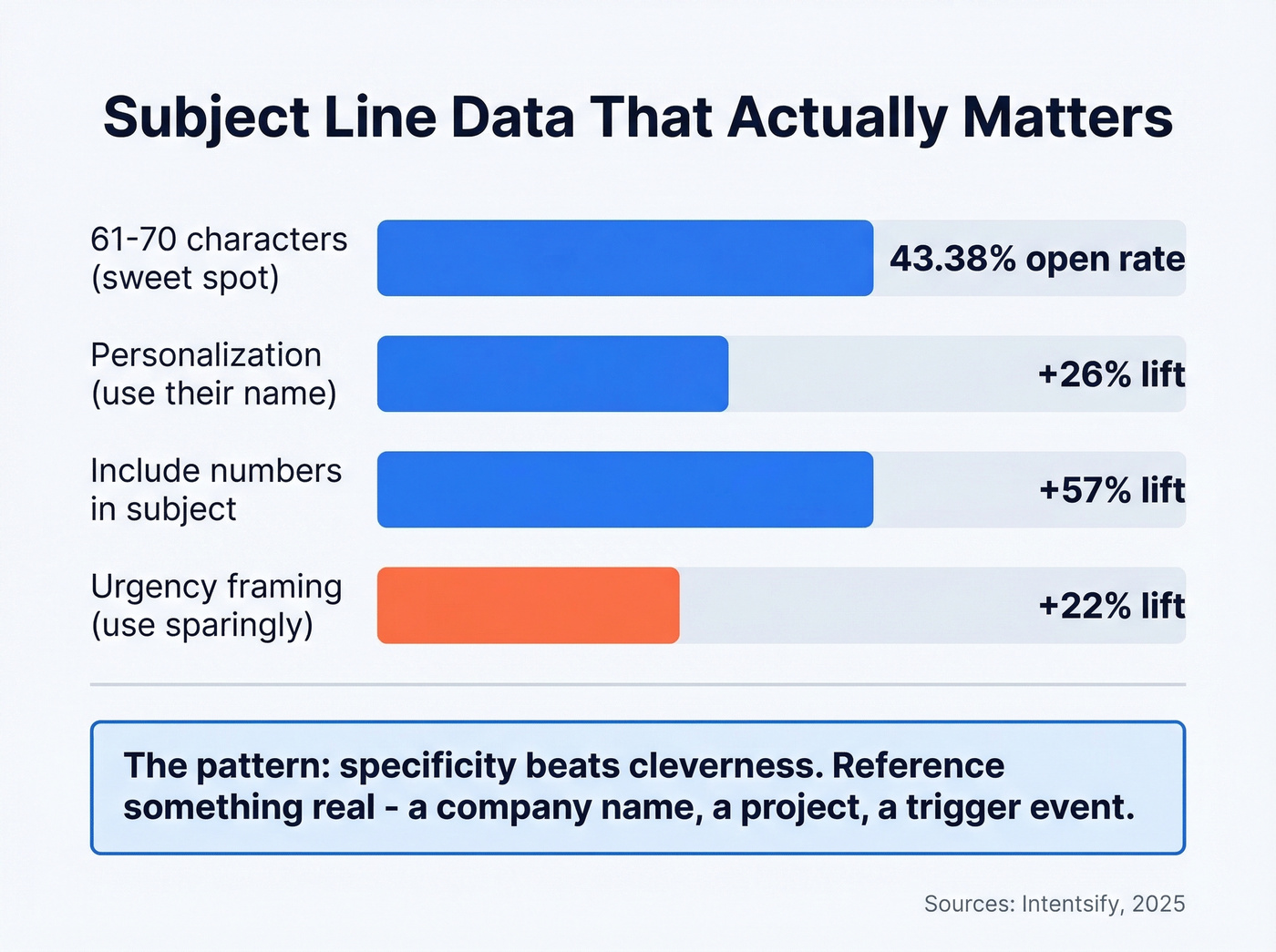
Subject lines in the 61-70 character range hit a 43.38% open rate, the highest of any length bracket. Personalization lifts opens by 26%. Including numbers boosts open rates by up to 57%. Urgency framing lifts opens by ~22%, but use it sparingly for reconnection - you're rebuilding trust, not creating FOMO.
Stop writing "I hope this email finds you well." Here are 10 subject lines that work:
- Past client - value check-in: "Quick thought on [their company]'s Q3 pipeline"
- Past client - new offering: "[First name], we built something you asked for"
- Past client - seasonal: "New year planning? Here's what changed since we last talked"
- Former colleague - no-ask: "Saw your move to [company] - congrats"
- Former colleague - shared memory: "Remember the [project name] launch? Still my favorite war story"
- Former colleague - mutual contact: "[Mutual name] and I were just talking about you"
- Cold prospect - insight-led: "3 things [their company] could steal from [competitor]"
- Cold prospect - trigger event: "Congrats on the Series B - quick question"
- Cold prospect - breakup: "Should I close your file?"
- Cold prospect - permission opener: "Worth 2 minutes, [First name]?"
The pattern: specificity beats cleverness. Reference something real - a company name, a project, a trigger event - and keep it under 70 characters.
If you want more options, pull from these email subject line examples and adapt them to a reconnection context.

Emails decay 22-30% per year. That warm list you're about to reconnect with? A chunk of it is already dead. Prospeo's 5-step verification - with catch-all handling, spam-trap removal, and honeypot filtering - delivers 98% email accuracy at $0.01 per email. Clean your list before your reconnection campaign tanks your domain.
Verify your reconnection list in minutes, not hours.
15 Reconnecting Email Templates
Templates for Old Clients
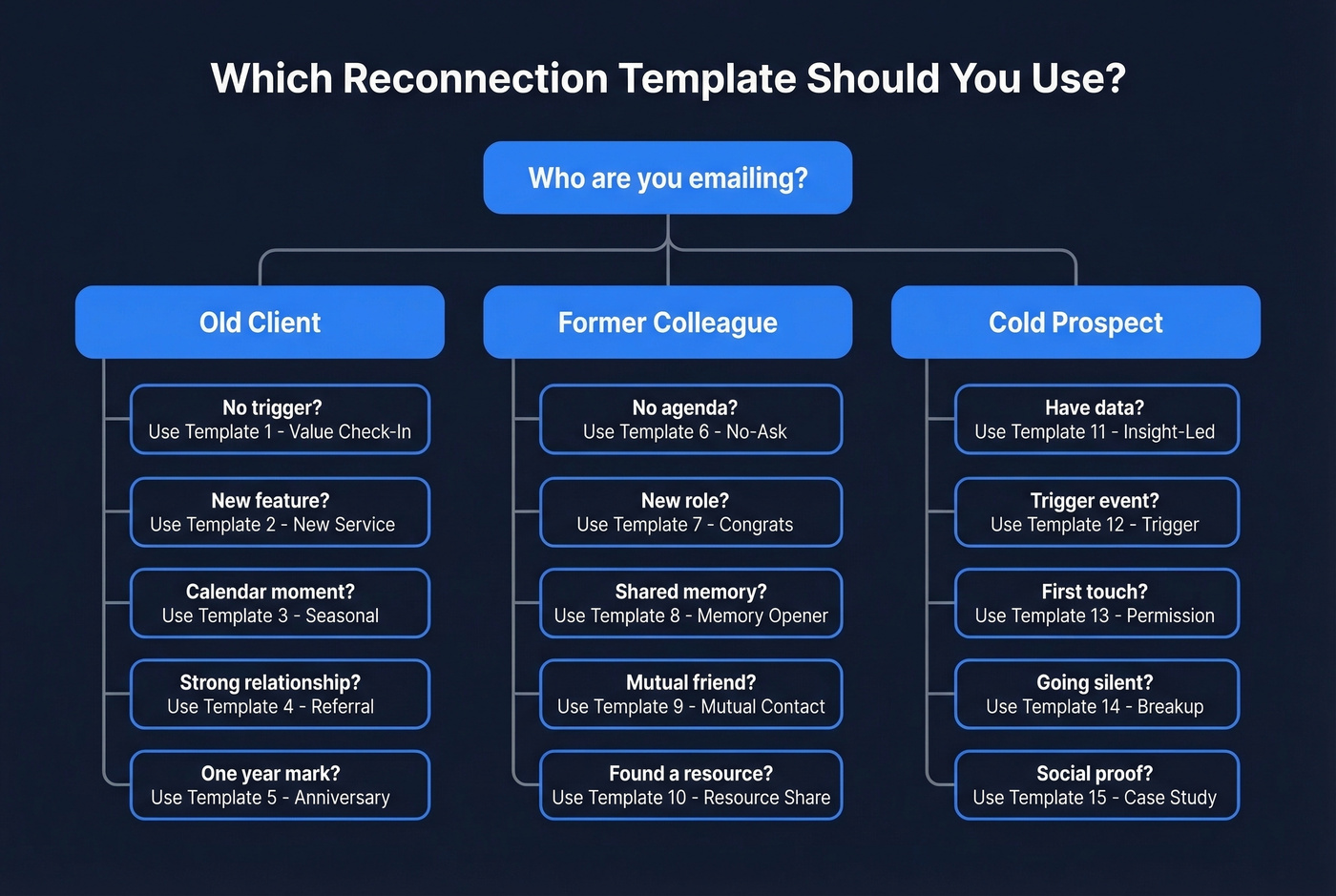
Template 1: Value-First Check-In Use when: 3-6 months since last project, no specific trigger.
Subject: Quick thought on [Company]'s [specific area]
Hi [First name],
We wrapped [project/service] back in [month]. Since then, I've been watching [their industry trend] and noticed something that could help [specific outcome]. Worth a 15-minute call this week?
Replace "noticed something" with an actual insight. Vague messages get ignored.
Template 2: New Service Announcement Use when: you've launched something relevant to their past needs.
Subject: [First name], we built something you asked for
Hi [First name],
You mentioned [specific pain point] during our work on [project]. We just launched [new service/feature] that solves exactly that - [one-liner on the result]. Want a quick walkthrough?
Why this works: You're referencing their own words back to them. It proves you listened and positions the outreach as a response, not a pitch. This is one of the most effective reconnection approaches because it ties directly to a need they already expressed.
Template 3: Seasonal Touchpoint Use when: natural calendar moment - Q1 planning, fiscal year, industry event.
Subject: [Season/event] planning - one idea for [Company]
Hi [First name],
[Season/event] is coming up, and I know [Company] usually [specific activity]. We helped [similar client] [specific result] last [time period]. If you're mapping out [relevant initiative], I'll send over what worked.
Template 4: Referral Request Use when: the relationship was strong and the work went well.
Subject: Quick favor, [First name]?
Hi [First name],
I really enjoyed working on [project] together. If you know anyone dealing with [specific challenge], I'd appreciate an intro. Happy to return the favor - I've got a solid network in [their industry].
Template 5: Project Anniversary Use when: it's been roughly a year since a major deliverable - a great approach for reaching out to a client after a long time.
Subject: One year since [project] - how's it holding up?
Hi [First name],
Hard to believe it's been a year since we launched [project]. Curious how it's performing - and whether [specific metric] hit the target we set.
Short, no ask, pure curiosity. That's what makes it disarming.
Keep in Touch Email Templates for Colleagues
Template 6: No-Ask Catching Up Email Use when: you genuinely want to reconnect with no agenda.
Subject: Been a while - how's [Company]?
Hi [First name],
I was thinking about the [team/project] at [old company] and realized we haven't talked in [timeframe]. No agenda - just wanted to say hi and see what you're working on. Coffee or a call sometime?
Forbes recommends leading with no ask on the first reconnection. Build the relationship before you need something. Also worth adding: include your professional profile URL in your email signature. After a long gap, people want to quickly remind themselves who you are.
Template 7: Congratulations on New Role Use when: they recently changed jobs or got promoted.
Subject: Congrats on the [title] role - well deserved
Hi [First name],
Saw you moved to [Company] as [title]. That's a great fit - [specific reason]. Would love to hear how the transition's going. Free for a quick call next week?
Template 8: Shared Memory Opener Use when: you have a specific, positive shared experience.
Let's look at a before/after to show why specificity matters:
Generic version: "Hey, it's been a while! We should catch up sometime." Better version:
Subject: Remember [specific moment]? Still makes me laugh
Hi [First name],
I was telling someone about [specific shared experience] and it reminded me we haven't connected in ages. What are you up to these days?
The generic version gives them nothing to grab onto. The specific version triggers a memory and an emotion - both of which drive replies.
Template 9: Mutual Contact Reunion Use when: a mutual connection came up in conversation.
Subject: [Mutual name] and I were just talking about you
Hi [First name],
Ran into [mutual contact] at [event/context] and your name came up. We should get the old [team/group] together - even a virtual coffee. You in?
Template 10: Resource Share Use when: you found something genuinely useful for them. A simple message like this maintains the relationship without any pressure.
Subject: Thought of you when I read this
Hi [First name],
Just came across [article/report/tool] on [topic relevant to their work]. Given your focus on [their area], figured it'd be useful: [URL]. How's everything on your end?
Cold B2B Prospects Gone Silent
Template 11: Insight-Led Re-engagement Use when: you have a relevant data point or industry insight.
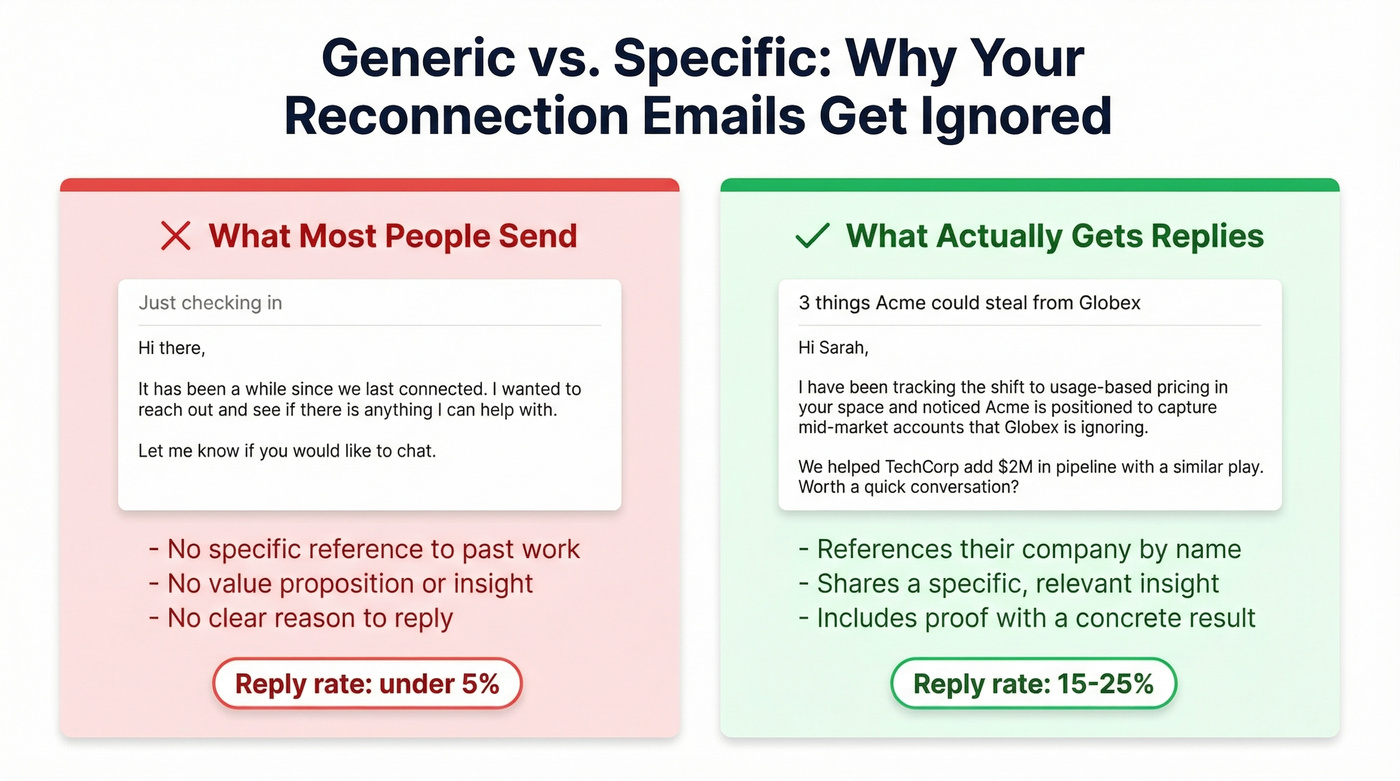
Subject: 3 things [Company] could steal from [competitor]
Hi [First name],
I've been tracking [industry trend] and noticed [Company] is positioned to [specific opportunity]. We helped [similar company] [specific result]. Worth a quick conversation?
Common mistake: Sending this template with a generic industry trend instead of something specific to their company. If you can't name the trend and tie it to their business, skip this one and use Template 13 instead.
Template 12: Trigger Event (Job Change/Funding) Use when: they changed roles, their company raised funding, or hit a growth milestone.
Subject: Congrats on the [funding round/new role] - quick question
Hi [First name],
Saw [Company] just [trigger event]. That usually means [specific challenge]. We've helped [X] companies navigate that exact transition. Let me know if it's worth sharing what worked.
If they changed companies, their old email is dead. Run their name through an email finder to pull their current verified address before you send.
Template 13: "Quick Question" Permission Opener Use when: you want to re-open dialogue without pressure.
Subject: Worth 2 minutes, [First name]?
Hi [First name],
I reached out a while back about [topic]. Timing might not have been right. Quick question - is [specific challenge] still on your radar, or has [Company] moved past it?
Template 14: Case Study Share Use when: you have a relevant success story.
Subject: How [similar company] solved [their problem]
Hi [First name],
We just wrapped a project with [similar company] - they were dealing with [same challenge you discussed]. Result: [specific metric]. I'll send the full breakdown if you're interested.
Template 15: Graceful Breakup Use when: you've sent 2-3 emails with no response.
Subject: Should I close your file?
Hi [First name],
I've reached out a few times about [topic] and haven't heard back - totally fine. If the timing's off, I'll stop here. But if [challenge] comes back up, I'm an email away.
Why this works: It flips the power dynamic. You're the one walking away, which paradoxically makes people more likely to respond. In our experience, breakup emails pull a higher reply rate than any other template in a sequence - the consensus on r/sales backs this up too.

The Multi-Touch Sequence
One email isn't a strategy. Most replies come on touch two or three.
Here's a 4-touch reconnection sequence spaced across about two weeks:
| Touch | Day | Angle | Template Reference |
|---|---|---|---|
| 1 | Day 0 | Value/insight | Templates 1, 11, or 12 |
| 2 | Day 3 | Resource share | Templates 10 or 14 |
| 3 | Day 7 | Direct ask | Templates 4 or 13 |
| 4 | Day 12 | Graceful exit | Template 15 |
Rotate your angle with each touch. If you led with an insight, follow up with a case study - not the same pitch reworded. Stop immediately after a clear rejection.
For warm contacts, space touches further apart. For cold prospects, tighter spacing of 2-4 business days keeps momentum before they forget you entirely.
If your average deal is under $5k, a 4-touch sequence is overkill. Send the value email, send the breakup, and move on. Your time is better spent finding new prospects than nursing cold ones.
If you need more follow-up angles, borrow from these sales follow-up templates.
5 Mistakes That Kill Reconnection Emails
1. Wrong channel. Don't reconnect via social DMs when email is more appropriate. Social messages get buried and read as too casual for professional outreach.
2. Over-familiarity after a long gap. Writing "Hey buddy!" to someone you haven't spoken to in two years feels forced. Be warm but honest about the gap - whether you're following up with a client after a long time or reaching out to a former colleague.
3. No follow-up. Sending one email and giving up is the most common mistake. Wait at least five days, then follow up with a different angle. (If you're unsure on timing, use this guide on when to follow up on an email.)
4. No hook. You still need a reason for them to reply - an insight, a result, a relevant trigger event. "Just checking in" gives them nothing to respond to. Better yet, proactively deliver a small win before making any ask: a quick audit of their website, a relevant intro, a resource you compiled. That earns the reply.
5. Sending to unverified addresses. We've seen sender reputations tank from a single unverified batch send. A bounced email doesn't just fail - it damages deliverability for every future email you send. Verify first, always. (If you want the deeper mechanics, read this email deliverability guide.)
What Results to Expect
Re-engagement open rates average 20-25%, with top-performing campaigns hitting 30%+. Overall reactivation success rates land in the 14-29% range depending on list quality and message relevance.
For cold prospects gone silent, expect 3-7% reply rates - that's solid. For past clients and former colleagues, 15-25% reply rates are achievable with a personalized, multi-touch approach.
The campaigns hitting 30%+ opens share two things: verified contact data and a multi-touch sequence. Skip either one and you're leaving results on the table. And here's the competitive reality: 76% of marketers aren't using inaction-triggered re-engagement emails, so a proper reconnecting email template paired with clean data and a structured follow-up sequence puts you ahead of almost everyone in your space.
FAQ
How long should I wait before reconnecting?
Three to six months is the sweet spot for most professional relationships. Use natural calendar moments - new year, quarterly planning, industry events - as built-in reasons to reach out. Templates 1-5 above are designed for exactly this window.
What if they don't reply after multiple emails?
After three to four touches, send the graceful exit (Template 15). Respect silence - but don't assume one ignored email means "no." People miss messages constantly; the breakup email often pulls the highest reply rate in a sequence.
Should I offer a discount to re-engage a past client?
Not in the first email. Lead with value - an insight, a case study, a relevant resource. Discounts in the opener signal desperation and anchor your price lower for any future negotiation. Save pricing conversations for after they've re-engaged.
How do I find someone's current email after they changed jobs?
Use an email finder tool - enter their name and current company, get a verified address in seconds. Addresses change faster than you'd expect, especially in B2B where 22-30% of emails decay annually. If you skip this step, you're sending messages into the void.
Is it awkward to email someone after two or more years?
No - specificity eliminates awkwardness. Reference a past project, their recent career move, or a shared experience. Specific emails feel thoughtful; generic ones feel random. Use the templates above as a starting point, then personalize with real details from your relationship.
Contact changed companies since you last spoke? Prospeo's email finder pulls their current verified address from 300M+ profiles refreshed every 7 days - so your perfectly crafted reconnection template reaches the right inbox, not a dead one. 15,000+ teams use it to keep outreach landing.
Find where your old contacts actually work now.