


Respond.io Pricing, Reviews, Pros and Cons: The Full Breakdown
You opened the respond.io pricing page, saw "$79/mo," and figured that was your number. It's not. The Starter plan doesn't include automation, AI Agents, or Workflows - the features that actually make the platform worth using. Here's what respond.io pricing really looks like, what reviews say, and the pros and cons most write-ups gloss over.
30-Second Verdict
Respond.io is a strong omnichannel messaging platform for teams that want WhatsApp, Instagram, and email in one inbox with serious routing and automation once you move past the entry tier. It earns a 4.8/5 on G2 across 464 reviews and a 4.6/5 on Capterra across 52 reviews - genuinely impressive scores. But the $79/mo Starter plan is a trap for anyone who needs automation. Most teams need Growth at $159/mo minimum.
If you're a small team doing under 200 conversations a month, this platform is overkill. Look at Wati or Zoko instead.
Pricing Breakdown for 2026
Respond.io runs on a Monthly Active Contacts (MAC) model - you pay only for contacts who send or receive a message in a billing month. That sounds efficient, but MAC tiers step up at 1,000 / 2,500 / 5,000 / 10,000 contacts, and each jump carries a meaningful price increase. Annual billing saves roughly 20%.
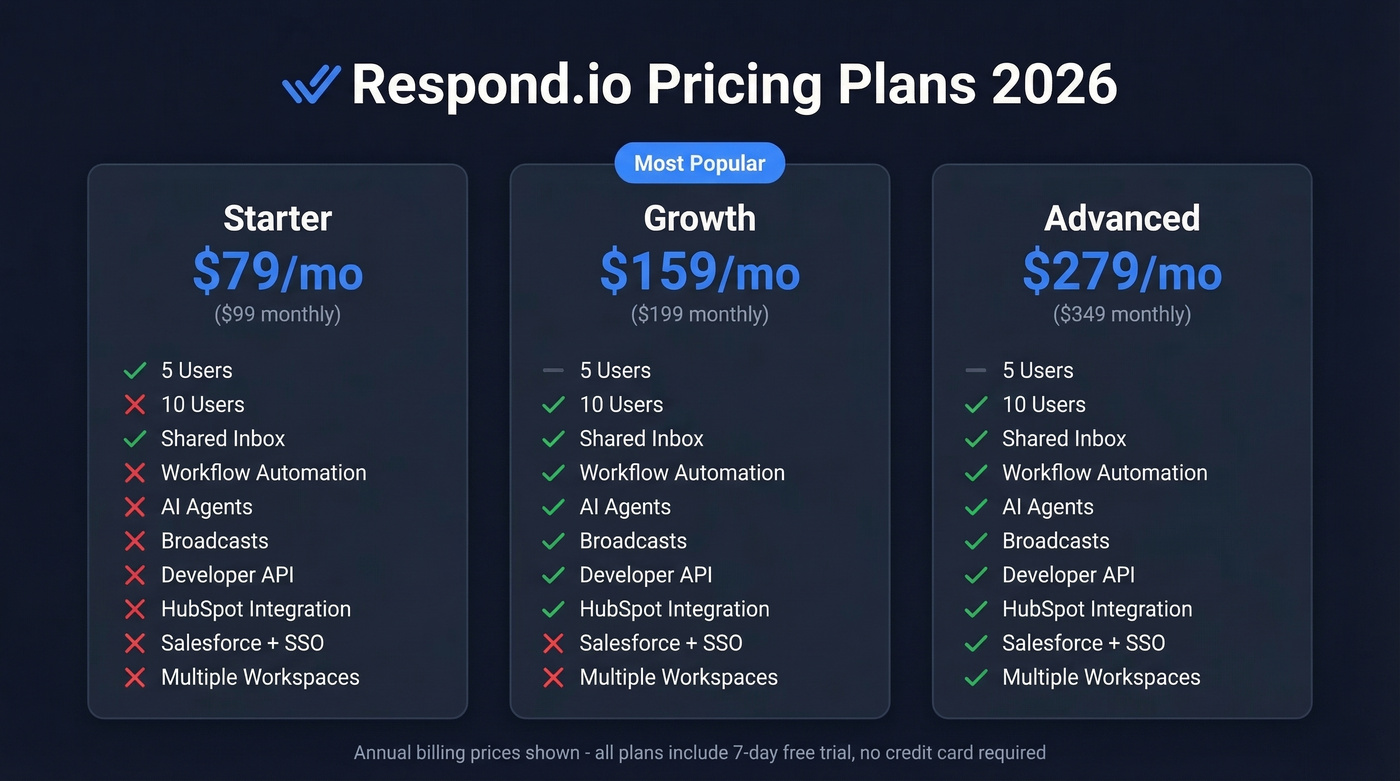
| Starter | Growth | Advanced | |
|---|---|---|---|
| Annual billing | $79/mo | $159/mo | $279/mo |
| Monthly billing | $99/mo | $199/mo | $349/mo |
| Included users | 5 | 10 | 10 |
| MAC included | - | 1,000 | 1,000 |
| Extra seat (annual) | $12/user/mo | $20/user/mo | $24/user/mo |
| Extra seat (monthly) | $15/user/mo | $25/user/mo | $30/user/mo |
Enterprise is custom-quoted with unlimited users - contact their sales team directly.
Starter is bare-bones inbox functionality: shared inboxes, lifecycle management, basic reports. No automation, no AI, no workflows.
Growth is where the platform becomes useful. You get AI Agents, workflow automation, broadcast messaging, the developer API, integrations via Zapier, Make, and n8n, HubSpot, and advanced reporting. This is the real entry point for any team doing structured routing or qualification.
Advanced adds Salesforce integration, SSO, webhook events, an HTTP request step, multiple workspaces, and data masking. Agencies managing multiple brands or enterprises with compliance requirements land here.
The 7-day free trial requires no credit card. Use it.
Hidden Costs to Watch
The subscription price is just the starting line.
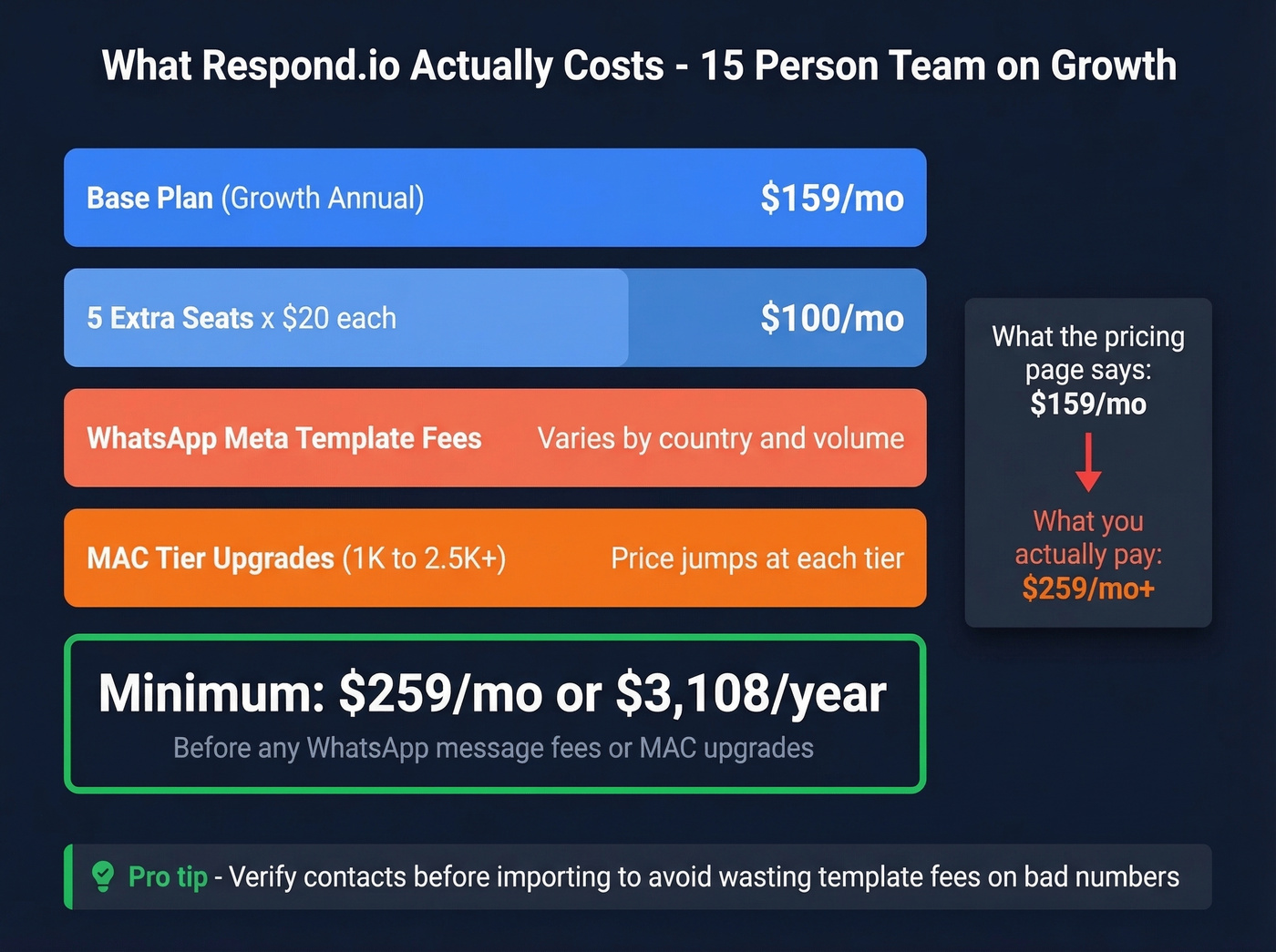
WhatsApp Meta fees. Business-initiated templates - marketing, utility, authentication - each carry per-message fees that vary by country and category. Marketing templates are the most expensive, and they add up faster than most teams expect.
BSP markups from competitors. Wati charges a 20% markup per message on top of Meta fees. SleekFlow charges $15/mo per WhatsApp Business phone number. Respond.io charges no additional BSP fees beyond your subscription, which is a real advantage at volume.
Seat add-ons. Let's do the math on a real scenario: a 15-person team on Growth at annual billing pays $159/mo base plus 5 extra seats at $20 each, totaling $259/mo. That's $3,108/year, not $1,908.
MAC tier jumps. Moving from 1,000 to 2,500 or 5,000 active contacts triggers price increases that aren't obvious from the base plan pricing. Budget for this before you scale.
Every bounced WhatsApp template message costs real money. Before loading contacts into any messaging platform, verify the numbers are real. Prospeo checks emails at 98% accuracy and verifies mobile numbers across 125M+ records - free tier available, no contracts.

Respond.io charges per Monthly Active Contact - and every invalid number you load wastes template fees. Prospeo verifies 125M+ mobile numbers and emails at 98% accuracy before they ever hit your messaging platform.
Clean your contact list before respond.io bills you for dead numbers.
What Users Love
Respond.io's G2 reviews tell a consistent story. Ease of use dominates with 98 mentions - the unified inbox genuinely reduces context switching across WhatsApp, email, Instagram, and Messenger, and teams get productive fast. Customer support pulls 51 mentions, with multiple reviewers calling out responsive, helpful reps. For a platform this complex, that matters more than most buyers realize upfront.
If you're building a qualification and routing motion, it helps to map your lead generation workflow before you automate anything.
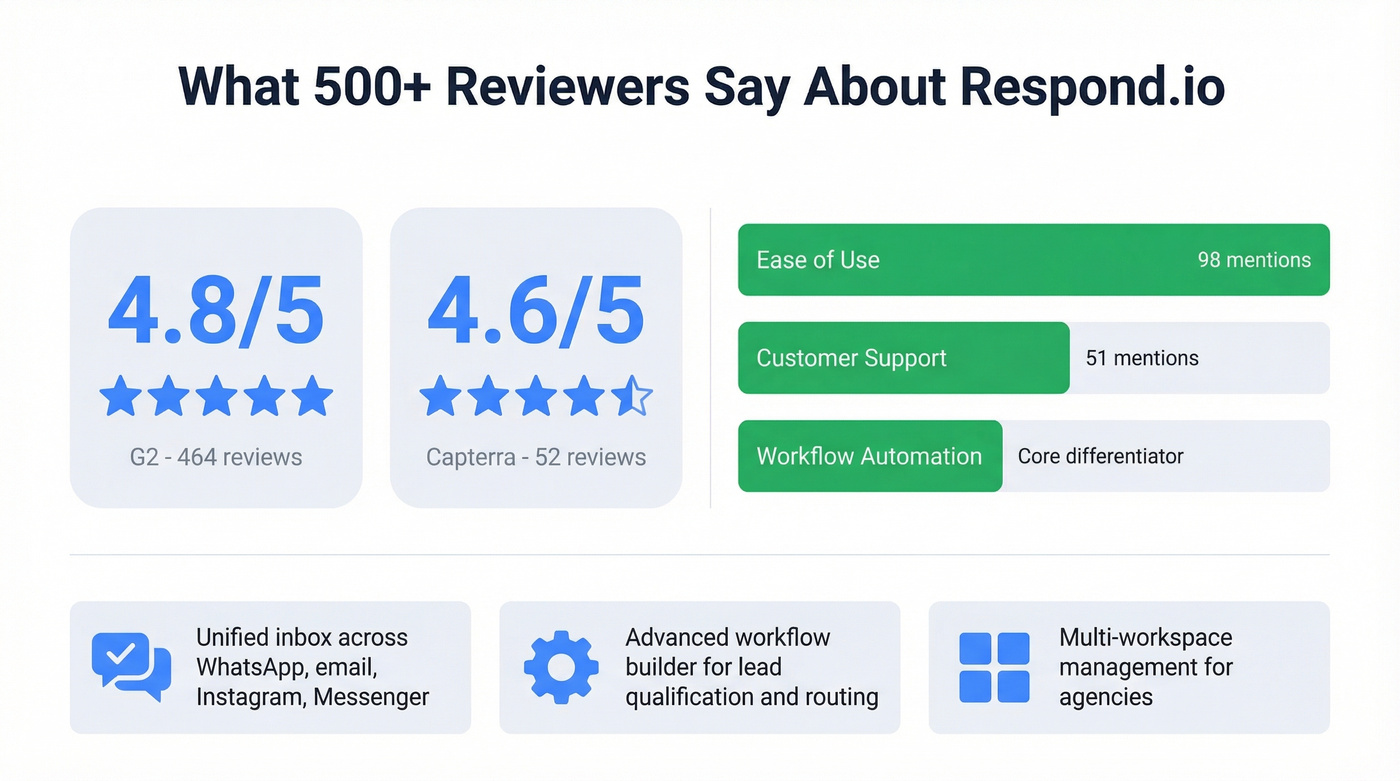
The workflow automation builder is respond.io's core differentiator. It handles lead qualification, agent assignment, and structured conversation flows at scale - something simpler tools like Wati can't touch. Multi-workspace management is another standout for agencies juggling multiple brands with distinct routing rules from one account.
What Users Complain About
The 4.8 rating doesn't tell the whole story.
Missing features got 18 G2 mentions. There's no A/B testing in the Flow Builder, which limits optimization for complex automation sequences. That's a frustrating gap for a platform at this price point.
Messaging quirks pulled 15 mentions. The platform can lag, and you can't edit or delete sent messages. Agents making typos in customer conversations have no recourse - they just have to live with it.
Pricing concerns came up 14 times across G2 and Capterra. The platform feels expensive for small businesses, especially since meaningful automation starts at $159/mo.
In our experience, the workflow builder's learning curve is real. Budget 2-3 hours for your first automation, and expect some trial-and-error figuring out how AI Agents and Workflows interact. There's also no old message import - connecting a channel only surfaces new messages, and older conversation history doesn't migrate. One Capterra reviewer reported their bank flagged payments as suspicious, the account was frozen, and they were still charged during the freeze. Worth watching your billing statements closely.
If you're trying to quantify the impact of these issues, track lead generation metrics and pipeline health before and after rollout.
Who Should (and Shouldn't) Buy
Here's the thing: respond.io is the best omnichannel messaging platform in its price range. But most teams shopping for it don't actually need omnichannel. If your conversations are 90%+ WhatsApp, you're paying for channel breadth you won't use.
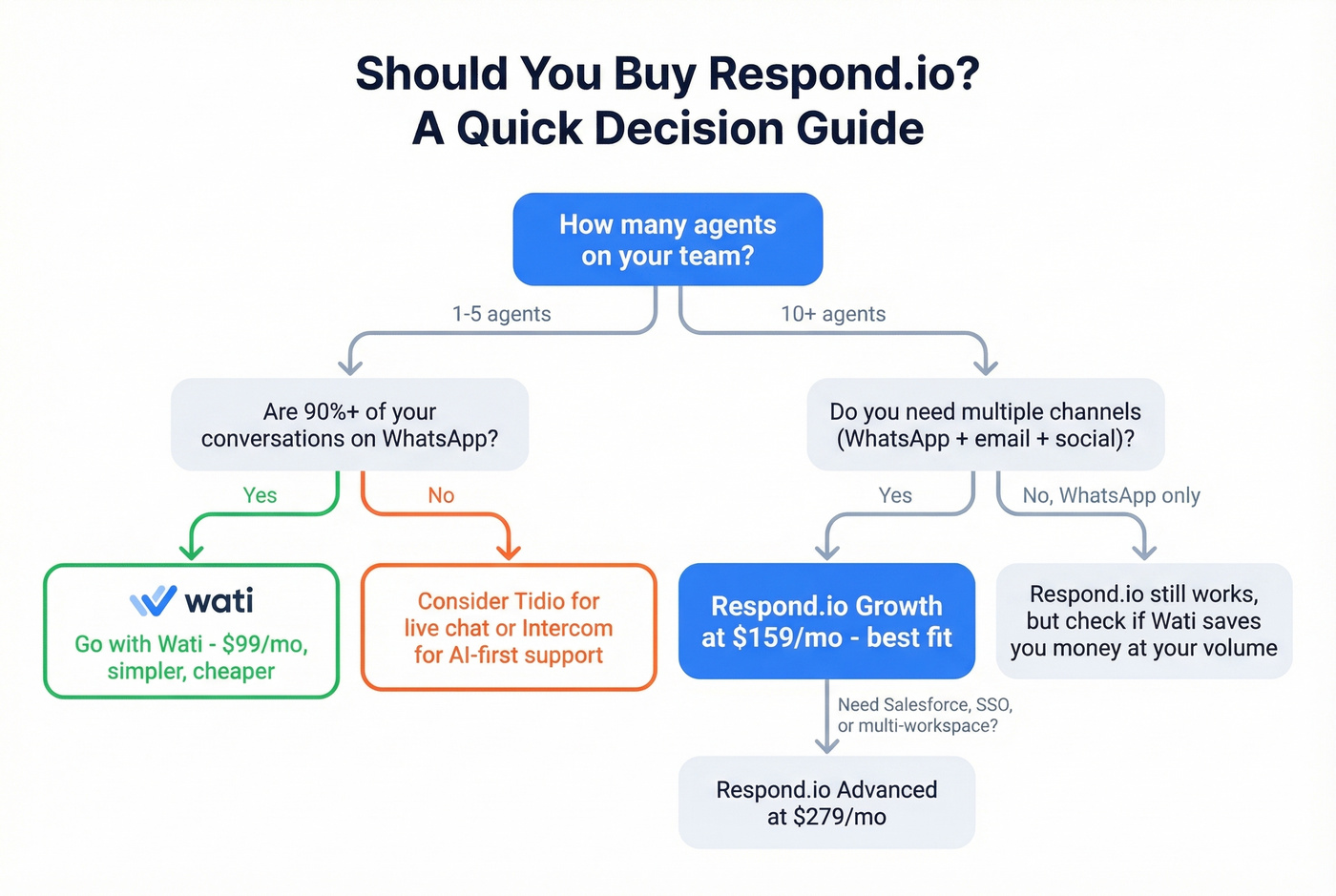
Buy respond.io if you run an operation with 10+ agents, need WhatsApp, email, and social channels in one inbox, want structured automation and AI routing at scale, or manage multiple brands from one account.
Skip respond.io if you have a 3-person team doing 200 conversations a month. It's overkill. For WhatsApp-only at the lowest cost, Wati at $99/mo (paid yearly) is simpler and cheaper despite the 20% message markup. For simple live chat, Tidio fits better. And if you prioritize AI-first support quality over channel breadth, Intercom with Fin is the stronger play.
If you're evaluating tools for a broader stack, compare options in our guide to contact management software.
How Respond.io Compares
In community discussions, the most common debate is respond.io vs. Wati for WhatsApp-heavy teams. The answer almost always comes down to whether you need automation depth and routing - if yes, respond.io wins; if no, save the money.
If you're also running outbound alongside messaging, it’s worth reviewing SDR tools and sales prospecting techniques to keep the motion consistent across channels.
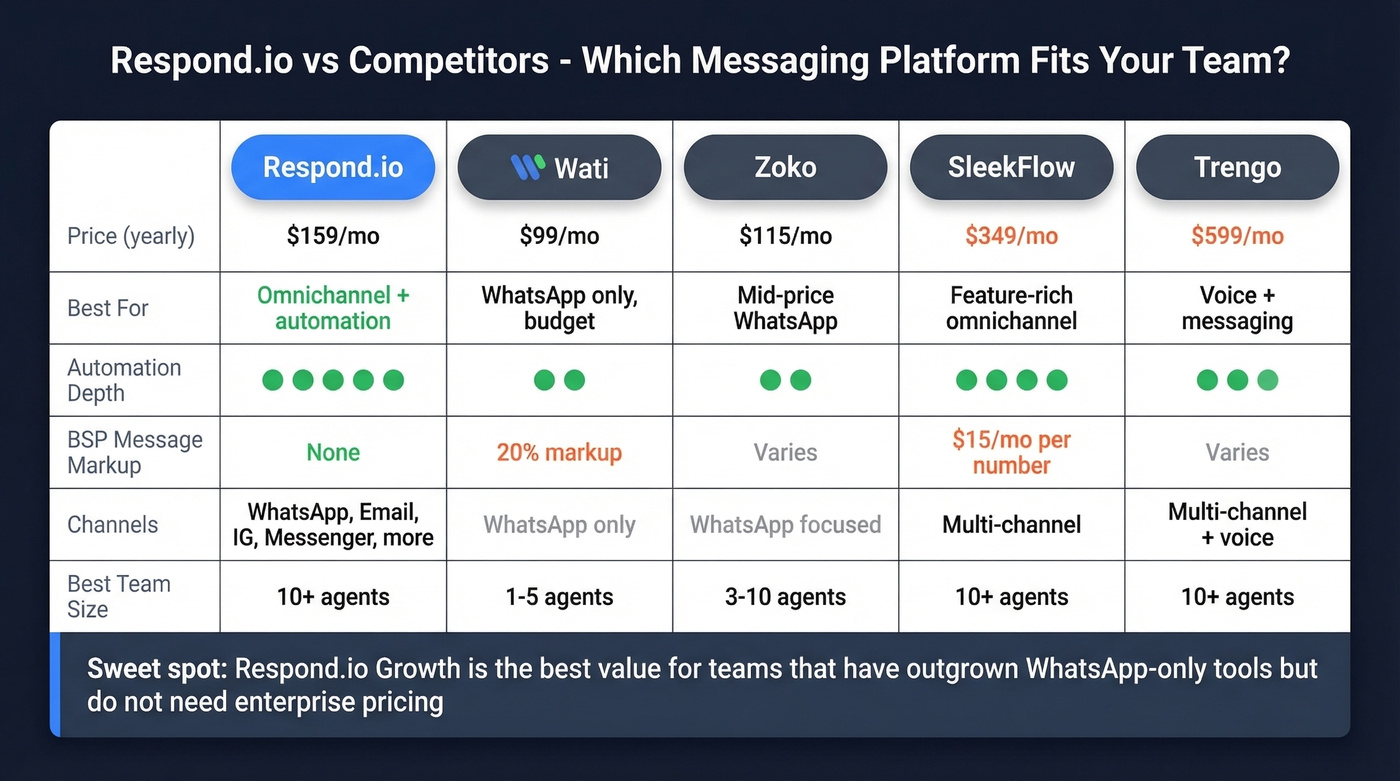
| Platform | Plan | Price (yearly) | Best For | Verdict |
|---|---|---|---|---|
| Respond.io | Growth | $199/mo | Omnichannel + automation | Best value for 10+ agent teams |
| Wati | Pro | $99/mo | WhatsApp-only, budget | Cheapest, but 20% message markup hurts at scale |
| Zoko | Elite | $114.99/mo | Mid-price WhatsApp basics | Decent middle ground, weaker automation |
| SleekFlow | Premium | $349/mo | Omnichannel, feature-rich | Hard to justify at 2x the price |
| Trengo | Pro | $599/mo | Voice + messaging | Only if you specifically need integrated calling |
Wati is the cheapest WhatsApp-only option, but that 20% per-message markup adds up fast at volume. Respond.io sits in the sweet spot for teams that've outgrown WhatsApp-only tools but don't need enterprise pricing - the automation builder and unified inbox are the real value drivers. Trengo at $599/mo is genuinely hard to justify unless you specifically need integrated voice calling alongside messaging.
If you're cleaning and enriching lists before import, see our roundup of data enrichment services.
Scaling to 10+ agents on respond.io Growth means every bad contact multiplies wasted spend across seats, MACs, and WhatsApp template fees. Prospeo's 7-day data refresh ensures the numbers and emails you import are current - not 6-week-old records that bounce.
Stop paying respond.io to message contacts who don't exist.
FAQ
Does respond.io have a free plan?
No. There's a 7-day free trial on any tier with no credit card required. After that, the cheapest option is Starter at $79/mo annually or $99/mo monthly. For budget-conscious teams, Wati starts lower at $49/mo.
What's the difference between Starter and Growth?
Starter covers basic inbox features - no automation, no AI Agents, no workflows, no broadcast, no developer API. Growth at $159/mo annually unlocks all of those plus HubSpot integration and advanced reporting. Most teams need Growth as their minimum viable plan.
Does respond.io charge extra for WhatsApp messages?
Respond.io doesn't charge additional BSP fees on top of your subscription. You still pay Meta's per-message fees for WhatsApp templates - marketing, utility, and authentication - which vary by country and category. Competitors like Wati add a 20% markup on top of Meta's fees, so this is a genuine cost advantage at scale.
How do I verify contacts before importing them?
Use a verification tool before uploading contacts to avoid wasting money on bounced template messages. We've seen teams cut their bounce rates from 35%+ down to under 4% just by running contacts through verification first. Any solid verification tool works - the important thing is doing it before you spend money on template messages that'll never land.