

Reverse DNS Lookup for Email: 2026 Setup Guide
Your emails are getting rejected with a 550 5.7.25-style error, and you're staring at a bounce log that mentions "PTR record." Meanwhile, 376.4 billion emails get sent every day - and the major inbox providers just tightened the rules on which ones they'll accept. If reverse DNS is missing or misconfigured on your sending IP, many receivers will block or reject the SMTP connection before they even evaluate SPF, DKIM, or DMARC. Running a reverse DNS lookup on your email infrastructure is the first diagnostic step.
What You Need (Quick Version)
- Want to trace who sent you an email? Extract the IP from the message headers and run a reverse lookup on it. But Gmail, Yahoo, and Outlook.com strip the sender's real device IP - you'll only see the mail server IP.
- Need to set up rDNS for your own mail server? Contact your IP or hosting provider, request a PTR record, create a matching A record, and verify forward-confirmed rDNS. Details below.
How Reverse DNS Works
Normal (forward) DNS takes a hostname like mail.yourcompany.com and resolves it to an IP address. Reverse DNS does exactly the opposite: it takes an IP address and resolves it back to a hostname.
This resolution happens through PTR records stored in a special zone called .in-addr.arpa. The IPv4 address gets its octets reversed and appended with .in-addr.arpa to form the lookup name. When a mail server receives an inbound connection from an IP, it queries that constructed name to find the PTR record. If the PTR returns mail.yourcompany.com, the receiving server now has a hostname to evaluate.
Here's the thing most people miss: PTR records aren't controlled by your domain registrar. They're controlled by whoever owns the IP block - typically your hosting provider or ISP. You can't just log into your DNS panel and add one. You need to contact the entity that assigned you the IP address.
What Is FCrDNS (and Why It Exists)
Most guides stop at "set a PTR record." That's incomplete.
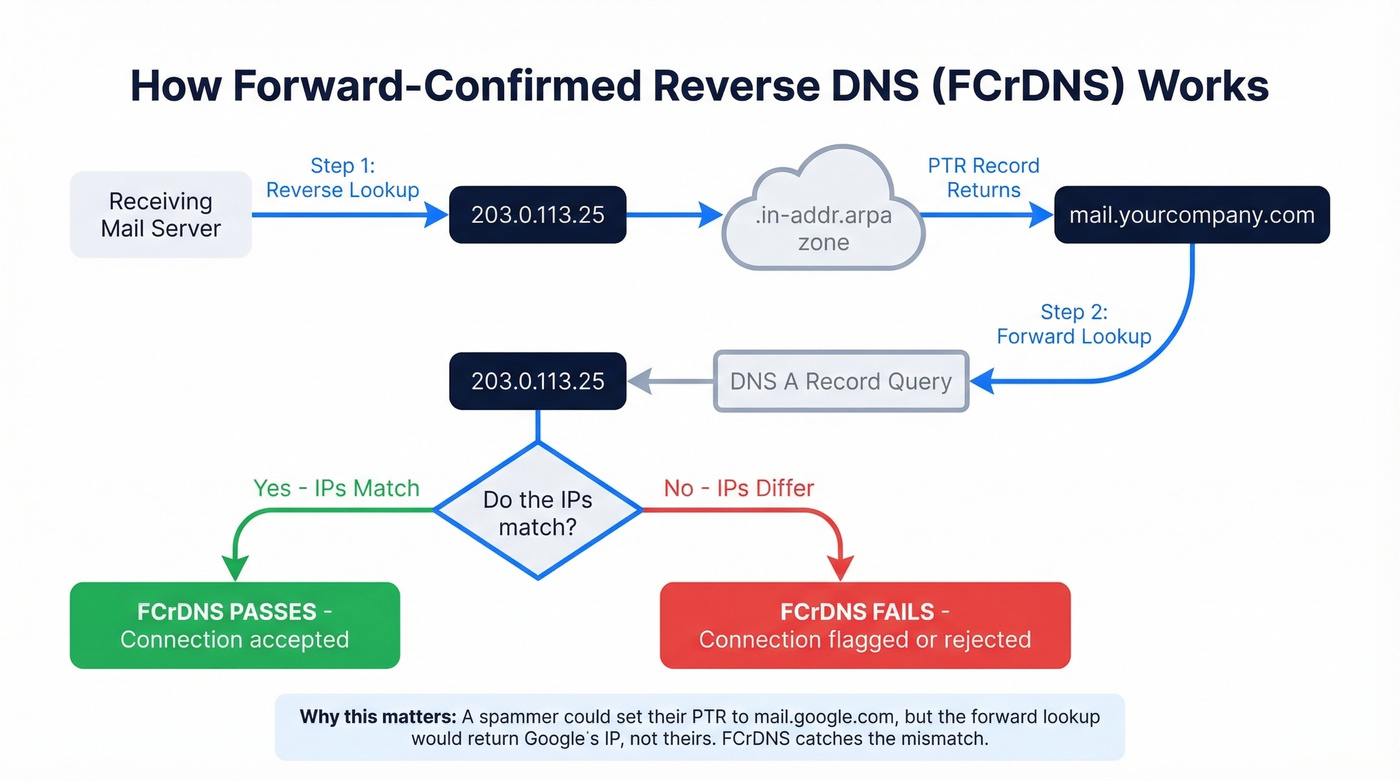
What receiving mail servers actually check is FCrDNS - Forward-Confirmed reverse DNS. The concept is simple but critical: anyone who controls an IP can set its PTR record to any hostname, even one they don't own. A spammer controlling 198.51.100.5 could set its PTR to mail.google.com. Without a forward-confirmation step, that spammer would inherit Google's domain reputation.
FCrDNS closes this loophole. The receiving server does a reverse lookup (IP to hostname via PTR), then immediately does a forward lookup (hostname to IP via A/AAAA record). If the forward lookup returns the original IP, FCrDNS passes. If it doesn't, the connection gets flagged or rejected. Best practice: use that same hostname in your SMTP server's EHLO/HELO greeting. Alignment across all three layers eliminates ambiguity.
Where rDNS Fits in Authentication
Reverse DNS is checked at the connection level - before message-level authentication like SPF, DKIM, and DMARC. Think of it as layer zero in the authentication stack:
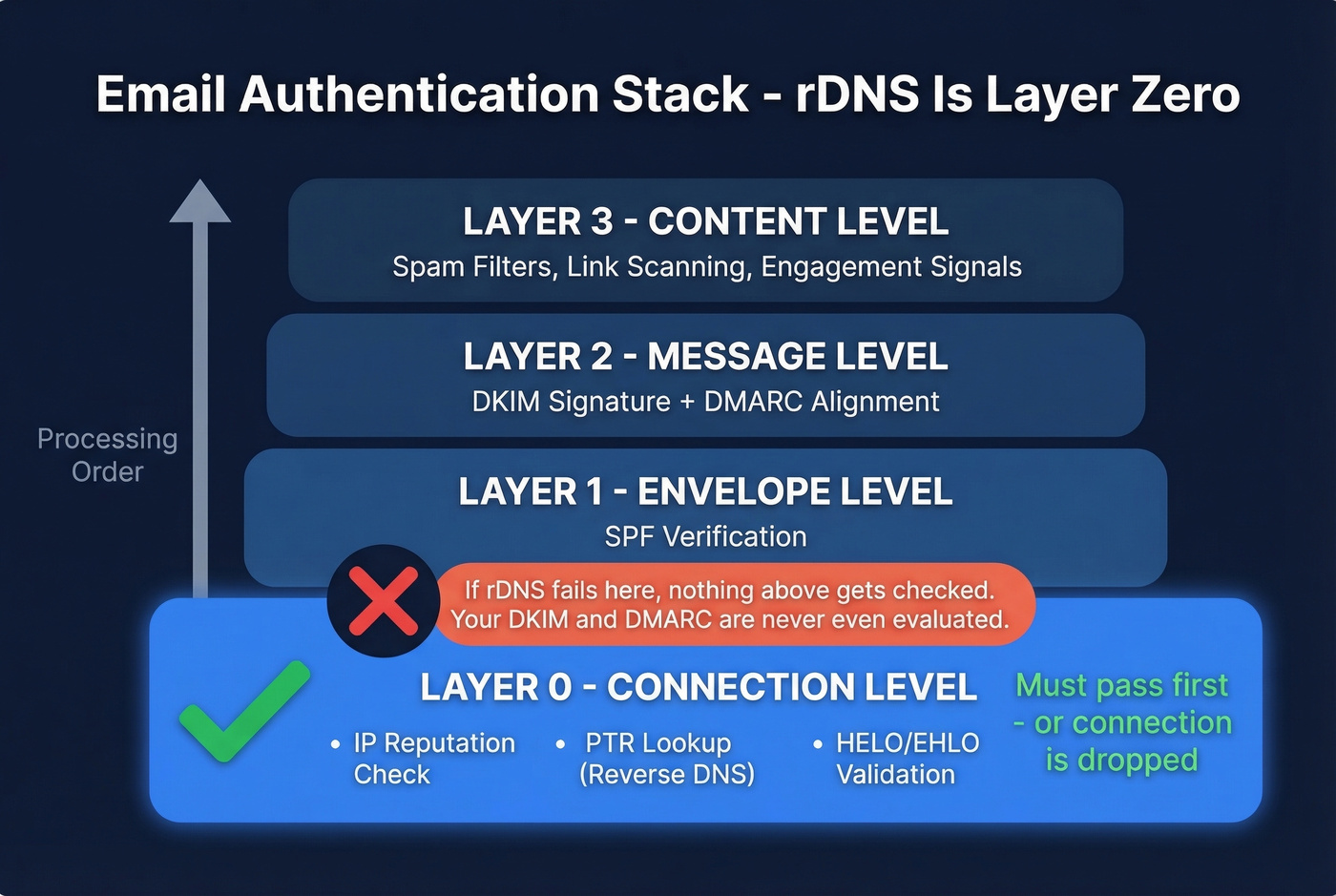
- Connection level - IP reputation check, PTR lookup, HELO/EHLO validation
- Envelope level - SPF verification (does the sending IP match the domain's authorized senders?)
- Message level - DKIM signature validation, DMARC alignment check
- Content level - Spam filtering, link scanning, engagement signals
If your rDNS fails at step one, the receiving server never even looks at your DKIM signature or your DMARC policy. We've seen teams spend weeks debugging DKIM alignment when their PTR was the actual blocker. Your email content is irrelevant if the connection gets dropped before it's evaluated.
This matters because Google, Yahoo, Microsoft, and Apple account for roughly 90% of a typical B2C email list. If your rDNS doesn't pass their checks, you're locked out of nearly every inbox that matters.

You're fixing rDNS to protect your sender reputation - smart. But bad contact data destroys deliverability just as fast as a missing PTR record. Prospeo's 5-step email verification delivers 98% accuracy, keeping your bounce rate under control.
Don't let bad data undo your DNS work. Start with verified emails.
2026 Provider Requirements
Major inbox providers expect valid PTR records and forward/reverse alignment on sending IPs, especially for bulk mail.
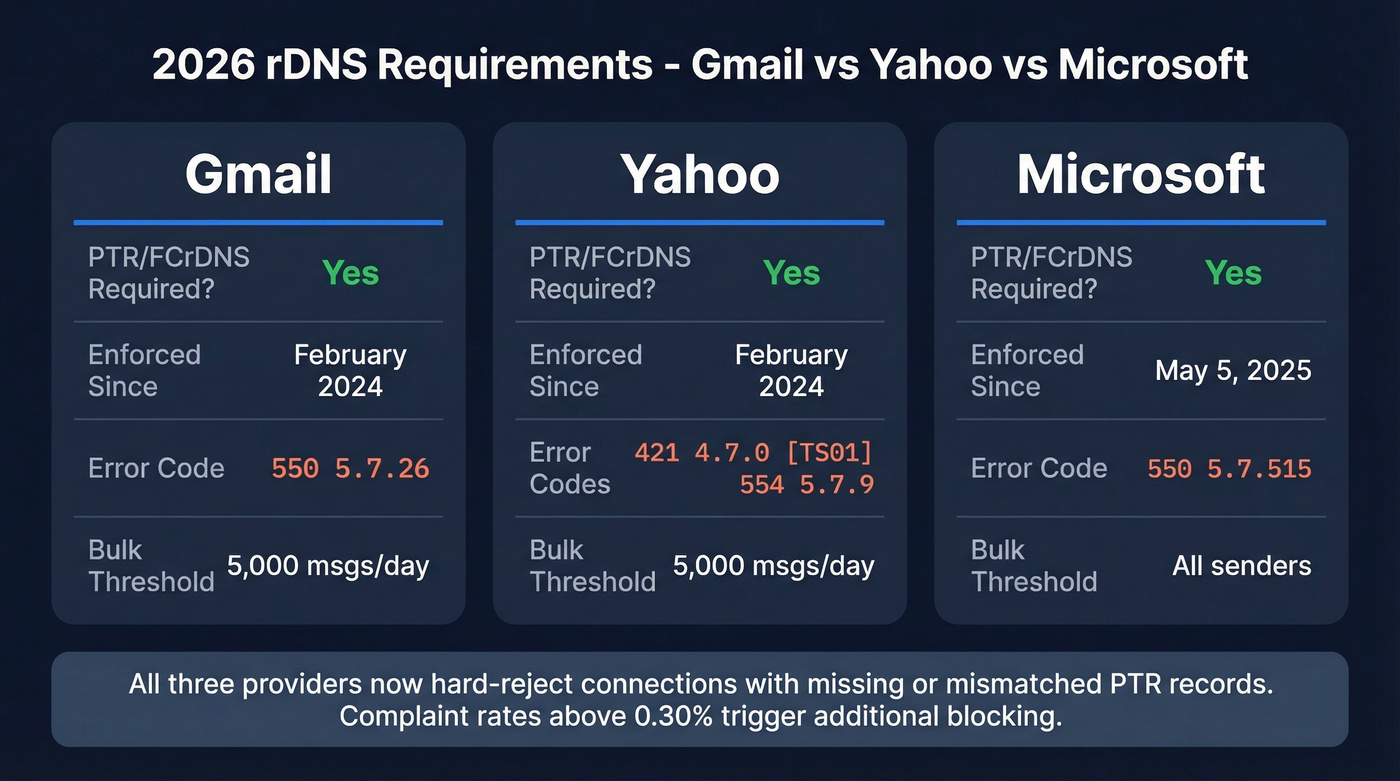
| Provider | PTR/FCrDNS Required? | Enforcement Date | Common Error Code |
|---|---|---|---|
| Gmail | Yes | Feb 2024 | 550 5.7.26 |
| Yahoo | Yes | Feb 2024 | 421 4.7.0 [TS01] / 554 5.7.9 |
| Microsoft | Yes | May 5, 2025 | 550 5.7.515 |
Gmail and Yahoo enforce forward + reverse DNS expectations for senders, with stricter scrutiny for bulk senders exceeding around 5,000 messages per day. Microsoft's enforcement began May 5, 2025, with forward/reverse DNS matching called out as a hard requirement.
The broader trend is unmistakable. DMARC adoption among top domains grew 75% between 2023 and 2025, and rDNS enforcement is part of the same tightening cycle. Keep complaint rates below 0.10% - sustained rates above 0.30% trigger deferrals and blocking across major providers.
Let's be honest: rDNS is the single most overlooked deliverability fix. Teams will spend thousands on warming tools and copywriting tweaks while their PTR record is missing entirely. Fix layer zero before you touch anything else. If you need a broader checklist, start with an email deliverability guide and then come back to rDNS.
How to Trace an Email Using Reverse DNS
If you're trying to trace an email back to its source, you need the sending server's IP from the message headers.
Gmail: Three-dot menu, then Show original. Opens full headers in a new tab.
Outlook: Open message, go to File, then Properties. Internet headers appear in the dialog box.
Yahoo: Three-dot menu, then View Raw Message.
Apple Mail: View, then Message, then Raw Source.
Once you have the headers, read the Received: lines from bottom to top. The bottom-most Received header is a good rule of thumb for the originating mail server hop. Look for the IP address in brackets - that's your target for a reverse DNS lookup.
Important limitation: if the sender used Gmail, Yahoo, or Outlook.com, you won't see their actual device IP. These providers strip the originating client IP from outgoing headers. You'll only see the provider's mail server IP. Identifying the true client IP requires the sending server's SMTP logs, which you almost certainly don't have access to.
How to Check and Set Up PTR Records
Checking Your PTR Record
The fastest way is a free online tool. MxToolbox and DNS Checker both let you paste an IP and see the PTR result instantly. For command-line checks, query an external resolver like 8.8.8.8 to see what the public internet sees:
# Successful PTR lookup
$ dig -x 203.0.113.25 @8.8.8.8

;; ANSWER SECTION:
25.113.0.203.in-addr.arpa. 3600 IN PTR mail.yourcompany.com.
# ✅ PTR exists   -   hostname is mail.yourcompany.com
# Failed PTR lookup (no record configured)
$ dig -x 198.51.100.50 @8.8.8.8

;; AUTHORITY SECTION:
100.51.198.in-addr.arpa. 3600 IN SOA ...
# ❌ NXDOMAIN   -   no PTR record found for this IP
You can also use nslookup 203.0.113.25 8.8.8.8 or host 203.0.113.25 8.8.8.8 for the same result in a different format.
If you're seeing lots of bounces while testing, compare your results against common email bounce rate benchmarks and codes to avoid chasing the wrong issue.
Setting Up PTR Records
Before you start, confirm these prerequisites:
- You have a dedicated, static IP. Shared IPs typically don't give you PTR control.
- You know who owns the IP block - your hosting provider or ISP, not your domain registrar.
- The hostname you want in the PTR already has a matching A record pointing back to the same IP.
- Outbound port 25 is open on your server. Some cloud providers like AWS block it by default. If it's blocked, you'll need an SMTP relay regardless of your DNS config.
- Best practice is one clear PTR per outbound sending IP. Multiple PTRs are allowed, but they create avoidable confusion in deliverability troubleshooting.
The setup process:
- Contact your hosting provider and request a PTR record for your IP, pointing to your mail server's hostname (e.g.,
mail.yourcompany.com) - Create a matching A record in your domain's DNS:
mail.yourcompany.com → 203.0.113.25 - Verify FCrDNS by running
dig -x 203.0.113.25 @8.8.8.8and confirming the returned hostname, then runningdig mail.yourcompany.com @8.8.8.8and confirming it returns the same IP
AWS and Azure offer reverse DNS configuration via their IP resource settings and console flows. cPanel-based hosts typically require a support ticket.
If you're also tightening authentication, use a clean SPF record example and confirm DMARC alignment so your domain-level checks match your connection-level setup.
IPv6 warning: If your server sends mail over IPv6, you need a separate PTR record under .ip6.arpa using nibble-reversed notation. A common failure pattern we see: the server sends over IPv6, but only an IPv4 PTR exists. The receiving server does a reverse lookup on the IPv6 address, finds nothing, and rejects the connection. If you're dual-stack, configure PTR records for both protocols. Skip this only if you've explicitly disabled IPv6 on your mail server's outbound interface.
Common rDNS Errors and Fixes
| Error Code | Provider | Meaning |
|---|---|---|
550 5.7.25 / 550 5.7.26 |
Gmail | Reverse DNS / PTR failure |
550 5.7.515 |
Microsoft | rDNS validation failure |
421 4.7.0 [TS01] |
Yahoo | rDNS deferral |
554 5.7.9 |
Yahoo | Permanent rejection |
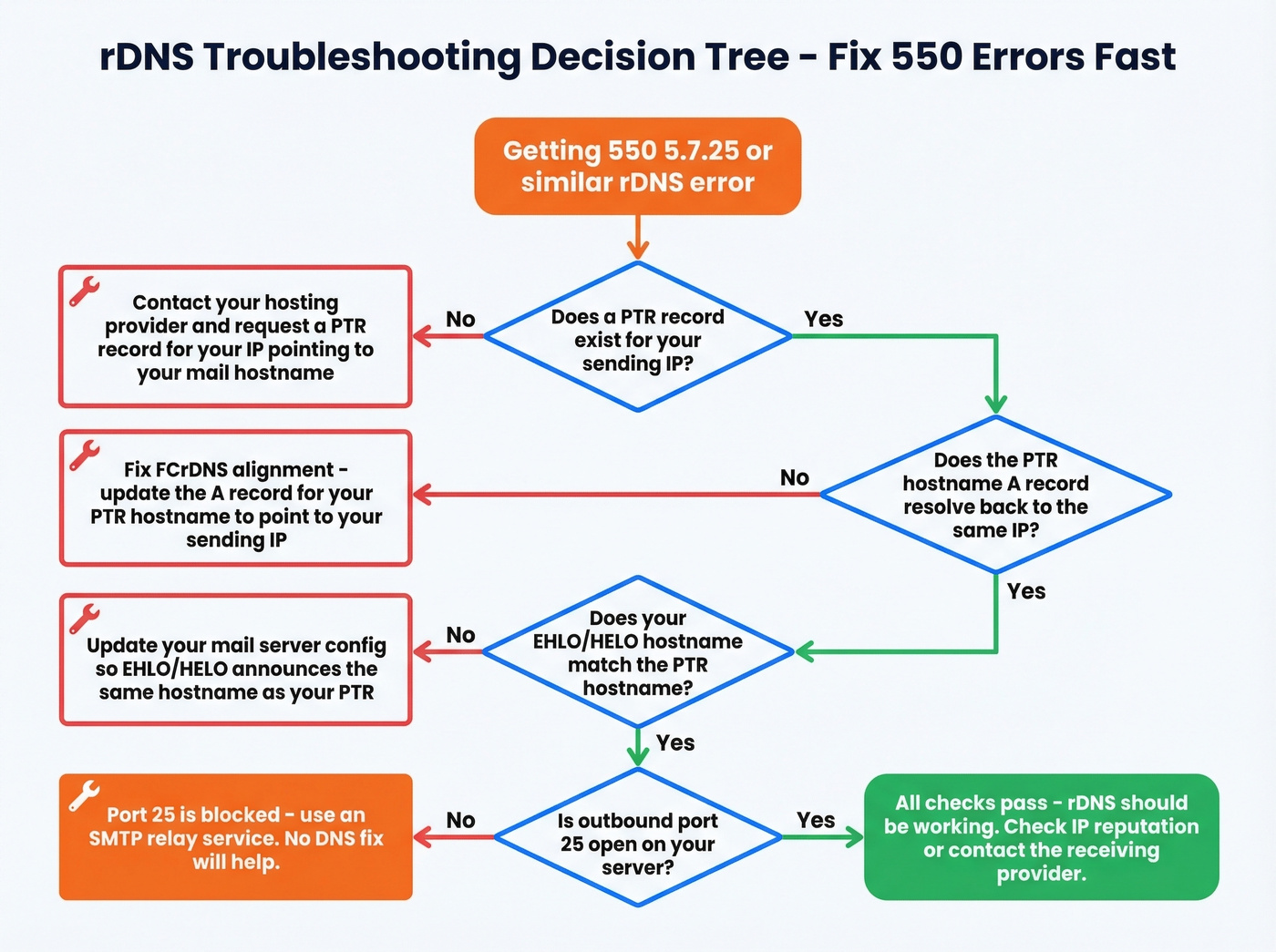
Quick decision tree for 550 5.7.25:
- Does a PTR record exist for your sending IP? If no, request one from your hosting provider.
- Does the PTR hostname's A record resolve back to the same IP? If no, fix FCrDNS alignment.
- Does your SMTP server's EHLO/HELO hostname match the PTR? If no, update your mail server config.
- Still failing? Check if outbound port 25 is open. This is the most common "invisible" blocker.
Generic/dynamic hostname rejections are a separate category. If your PTR resolves to something like 11-22-33-44.dynamic.provider.com, many receivers reject with 550 We do not accept mail from dynamic IPs. Use a clean mail hostname like mail.yourdomain.com and align it with your A record and EHLO/HELO.
Migrating servers? Stage your TTL reductions before the switch: drop from 86,400 to 3,600 to 300 seconds over 48 hours before the migration. This ensures DNS caches clear quickly and the new PTR propagates without a gap.
Real talk: before you spend hours debugging DNS, check whether outbound port 25 is even open. On forums like LowEndTalk, the most common "rDNS isn't working" complaint turns out to be a blocked port. If port 25 is blocked, use an SMTP relay service - no amount of PTR configuration will help.
If you're sending cold outreach, also watch your email velocity so you don't trigger throttling while you're fixing DNS.
rDNS Won't Save Bad Data
Fixing your reverse DNS won't save your deliverability if your contact data is garbage. rDNS is table stakes - it gets you through the door. But if 15% of your list bounces on the first send, your sender reputation craters regardless of how perfect your DNS configuration is.
Hard bounces signal to inbox providers that you're sending to unverified, purchased, or stale lists. That's a reputation killer no PTR record can fix. One team we worked with had flawless DNS across the board - SPF, DKIM, DMARC, PTR, the works - and still landed in spam because 12% of their list was dead addresses from a two-year-old CSV. They ran their list through Prospeo's 5-step verification, dropped it to under 2% bounce rate, and were back in the primary inbox within a week.
If you're building lists in the first place, follow a safer process for how to generate an email list and consider spam trap removal as part of ongoing hygiene.
Teams spend weeks debugging PTR records and DKIM alignment only to send outbound to stale, unverified email addresses. Prospeo refreshes 300M+ profiles every 7 days - not every 6 weeks - so your outreach hits real inboxes after you've fixed layer zero.
Your DNS is clean. Now make sure every email address is too.
FAQ
Does every mail server need reverse DNS?
Yes. As of 2026, Gmail, Yahoo, and Microsoft all require valid PTR records with forward/reverse alignment on sending IPs. Missing rDNS causes connection-level rejection before SPF or DKIM is evaluated. If you use a relay service, the relay handles rDNS for their IPs - you don't need to configure it yourself.
Can I set a PTR record at my domain registrar?
No. PTR records are controlled by the IP block owner - your hosting provider or ISP, not your registrar. Contact them directly to request configuration. Your registrar only manages forward DNS zones like A, MX, and TXT records.
What's the difference between rDNS and FCrDNS?
rDNS maps an IP to a hostname via a single PTR lookup. FCrDNS adds a forward-confirmation step: the returned hostname's A/AAAA record must resolve back to the original IP. This two-way check prevents spammers from pointing PTR records at domains they don't control.
My rDNS is correct but emails still bounce - why?
First check EHLO/HELO alignment with your PTR hostname, look for IPv6 PTR gaps, and verify your hostname isn't a generic/dynamic pattern. Beyond DNS, validate your contact list - bad addresses cause hard bounces that tank sender reputation fast. Prospeo catches invalid emails, spam traps, and catch-all domains that rDNS can't fix.