

Sales and Marketing Automation: How to Build One Revenue Engine (Not Two)
Your team runs a webinar. Four hundred leads come in. Marketing celebrates. Then nothing happens for 48 hours because nobody agreed on who follows up, the lead data is half-stale, and by the time an SDR reaches out, the prospect already booked a demo with a competitor.
That scenario plays out constantly - and it's not a people problem. It's a sales and marketing automation problem.
The market was valued at $6.65B in 2024 and is projected to hit $15.58B by 2030. Nucleus Research pegs the ROI at [$5.44 for every $1 spent](https://nucleusresearch.com/research/single/marketing-automation-returns-5-44-for-every-dollar-spent/). The money is there. The question is whether your automation actually works as one engine or two disconnected machines pretending to cooperate.
What You Need (Quick Version)
Most companies treat sales automation and marketing automation as separate categories with separate budgets, separate owners, and separate data. That's why 53% have a broken handoff where sales follows up with fewer than 35% of marketing-engaged prospects.
The companies hitting revenue targets run one unified workflow. Here's what that requires:
- A shared CRM as the backbone - one source of truth for contacts, stages, and engagement history
- Clean contact data feeding every automation - stale emails and wrong numbers silently kill even the best sequences
- Agreed-upon lead definitions - if marketing and sales can't agree on what an MQL is, no amount of tooling fixes the gap
Get those three right and the rest is plumbing.
What Is Sales and Marketing Automation?
Sales Automation vs. Marketing Automation
On paper, these are different disciplines with different goals:
| Dimension | Sales Automation | Marketing Automation |
|---|---|---|
| Focus | Pipeline management | Campaign optimization |
| Motive | Closing deals | Generating leads |
| Actions | Tracking, sequencing, forecasting | Nurturing, scoring, A/B testing |
| When to implement | Growth stage | Starting stage |
| Key tools | CRM, dialers, sequencers | Email platforms, landing pages, forms |
Sales automation handles the pipeline - deal tracking, outbound cadences, follow-up reminders, forecasting. Marketing automation handles the top of funnel - campaigns, lead capture, nurture sequences, scoring. Understanding how each stage works is what separates teams that generate pipeline from teams that generate noise.
Why They're One System, Not Two
The conjunction matters. Treating these as separate systems is why only 8% of companies report full alignment between sales and marketing. Eight percent.
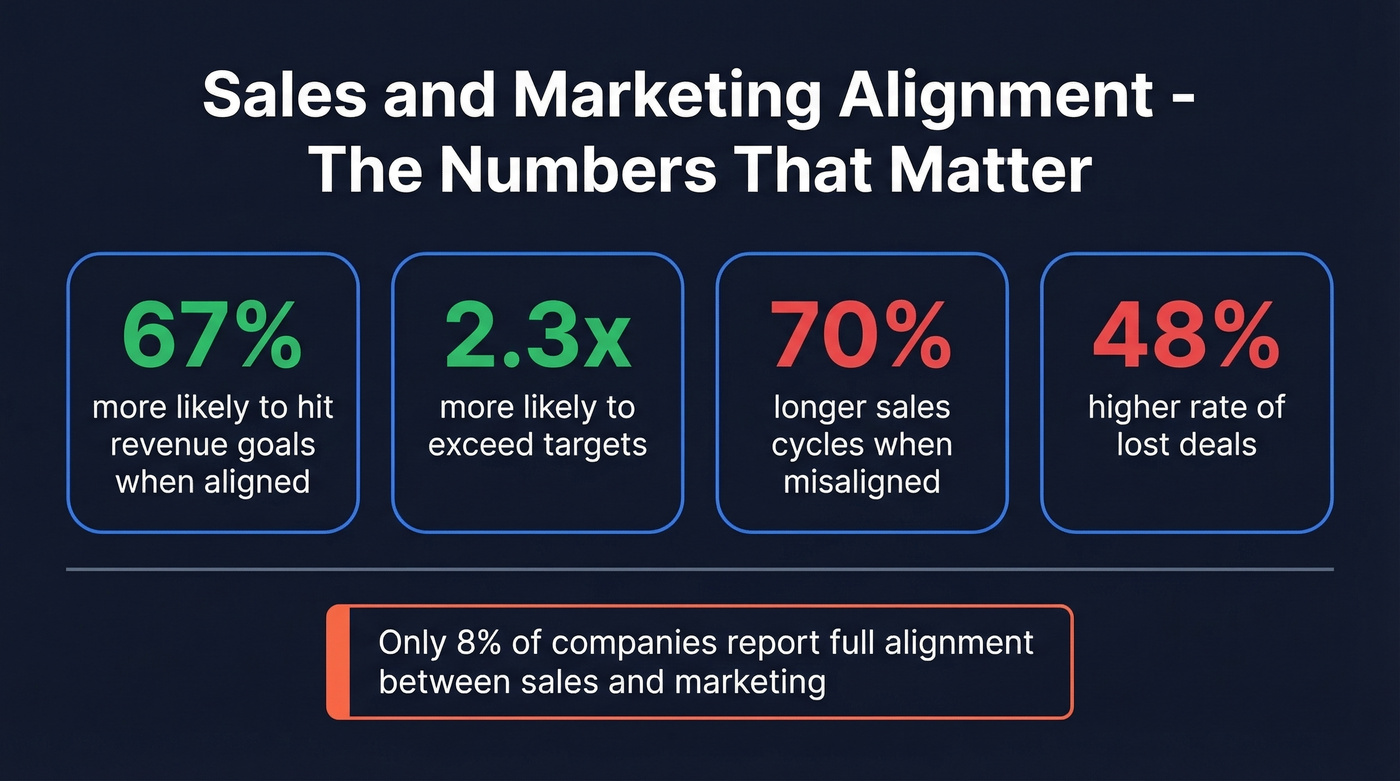
Aligned teams are 67% more likely to hit revenue goals and 2.3x more likely to exceed targets. Misaligned teams are 70% more likely to see extended sales cycles and face a 48% higher rate of lost deals.
The consensus on r/CRM and r/sales is pretty clear: "having CRM and MAP together saves a lot of headache in syncing data and personalizing comms." That's the understatement of the decade. One system, shared definitions, shared data, shared accountability - that's what separates revenue teams from two departments pointing fingers at each other.
How Alignment Drives Revenue
Aligned sales and marketing teams see 38% higher win rates and up to 208% more pipeline revenue. When alignment is real, marketing influences 29% of the pipeline. When it's broken, that drops to 10%.
The waste on the other side is staggering. Between 60-70% of marketing content goes completely unused by sales - months of case studies, one-pagers, and battle cards sitting in a shared drive nobody opens. Companies with strong alignment grow 19-20% faster, while companies with poor alignment can actually see revenue decline. This isn't a "nice to have" initiative. It's the difference between compounding growth and a leaky bucket.
When automation feeds sales with scored, enriched, and nurtured leads, reps spend time closing instead of qualifying. That's the core benefit that justifies the investment.
How a Unified Workflow Actually Works
A unified workflow isn't a diagram on a whiteboard. It's a set of triggers, actions, and outcomes that fire automatically across both sales and marketing - with no manual handoff required.
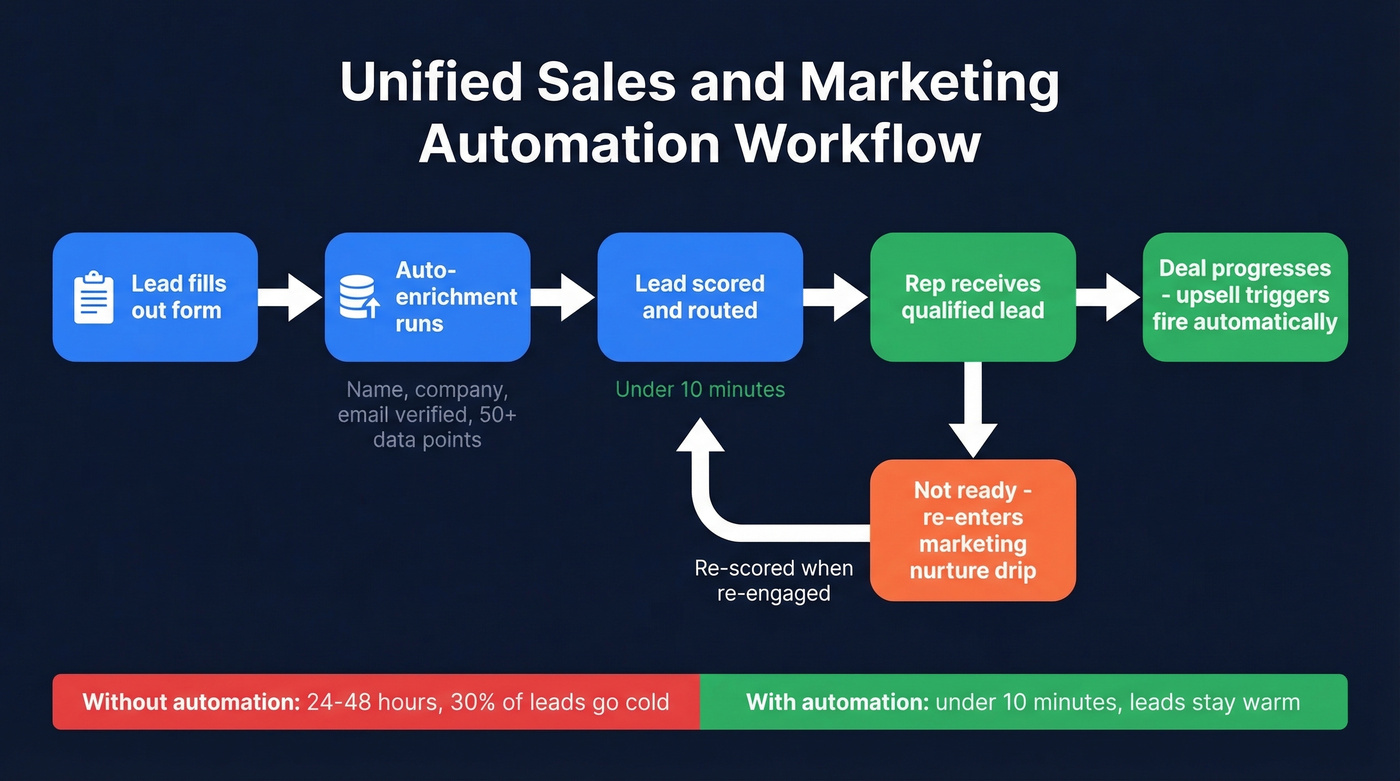
Here's what that looks like in practice:
- A lead fills out a form, enrichment runs automatically, and the lead is scored and routed to the right rep within 10 minutes - not the 24-48 hours that manual routing takes, where 30% of leads go cold
- A lead stage changes in the CRM, and a targeted nurture sequence triggers in the marketing platform
- A customer hits a usage milestone, and a loyalty or upsell message fires without anyone remembering to send it
- An SDR logs a "not ready" disposition, and the contact re-enters a marketing drip instead of dying in a spreadsheet
- A prospect engages across email, ads, and social, and cross-channel automation ensures consistent messaging regardless of where they interact
Without stage-based triggers, 40% of deals sit idle for 7+ days - pipeline quietly rotting while everyone assumes someone else is handling it.
Your stack isn't truly integrated until you can check all five boxes from a bi-directional sync audit: data flows both ways between CRM and marketing tools, campaigns trigger from live CRM changes, sales can see email clicks and page visits inside the contact record, attribution ties engagement through to closed revenue, and there's a single shared data model for contacts, leads, and opportunities.
We've seen teams that check three of five and think they're aligned. They're not. The last two boxes - attribution and shared data model - are where the real impact lives.
Your First 30 Days
Don't try to automate everything at once. Focus on three wins in the first month:
- Connect your CRM and marketing platform bidirectionally. No CSV exports. Real-time sync. Most major CRMs support this via native integrations or connectors like Zapier.
- Build one automated lead routing workflow. Form submission to enrichment to scoring to rep assignment. Get this under 10 minutes end-to-end.
- Agree on a single MQL definition with sales. Write it down. Put it in the CRM as a stage. If sales and marketing can't agree on this in week one, no automation will save you.
Everything else - nurture sequences, deal-stage triggers, attribution - comes in months two and three.

You just read that 60-70% of marketing content goes unused and 30% of leads go cold waiting for manual routing. The root cause? Stale data breaking every automation downstream. Prospeo enriches leads with 50+ data points at a 92% match rate - so your scoring, routing, and nurture triggers actually fire on real contacts with verified emails (98% accuracy) and direct dials.
Stop automating on top of bad data. Fix the foundation first.
How AI Changes This in 2026
Sales reps spend roughly 24 hours per week on admin tasks - data entry, scheduling, follow-up logging. For a 50-person sales team, that's approximately $3M in salary going to non-revenue work every year. AI is finally making a dent in that number.
The capabilities that matter in 2026 aren't chatbots or gimmicky "AI assistants." They're predictive lead scoring that actually learns from your closed-won patterns, conversation intelligence that captures what top performers do differently, stalled-deal flagging that alerts managers before pipeline rots, and generative content that drafts personalized follow-ups reps can edit in 30 seconds instead of writing from scratch.
Forecasting is another area where AI earns its keep. Gut-feel and spreadsheet forecasting carries 20-30% error rates. AI models trained on your pipeline data cut that significantly - especially when you’re using dedicated sales forecasting solutions.
Here's the thing: most teams don't need an AI-native sales platform. They need their existing CRM's AI features turned on and actually configured. We've watched companies buy Gong, Clari, and three other AI tools while ignoring the predictive scoring already built into their CRM. The gap isn't technology - it's adoption.
Five Mistakes That Waste Your Budget
1. Automating the personal touch. One team automated their post-webinar follow-ups - personalized-looking emails sent within an hour. Response rate: zero. Recipients recognized the automation immediately. The fix was automating the list sync and initial thank-you, but keeping the real follow-up human-written. Automation should handle logistics, not fake intimacy. If you need a baseline, start with proven sales follow-up templates.
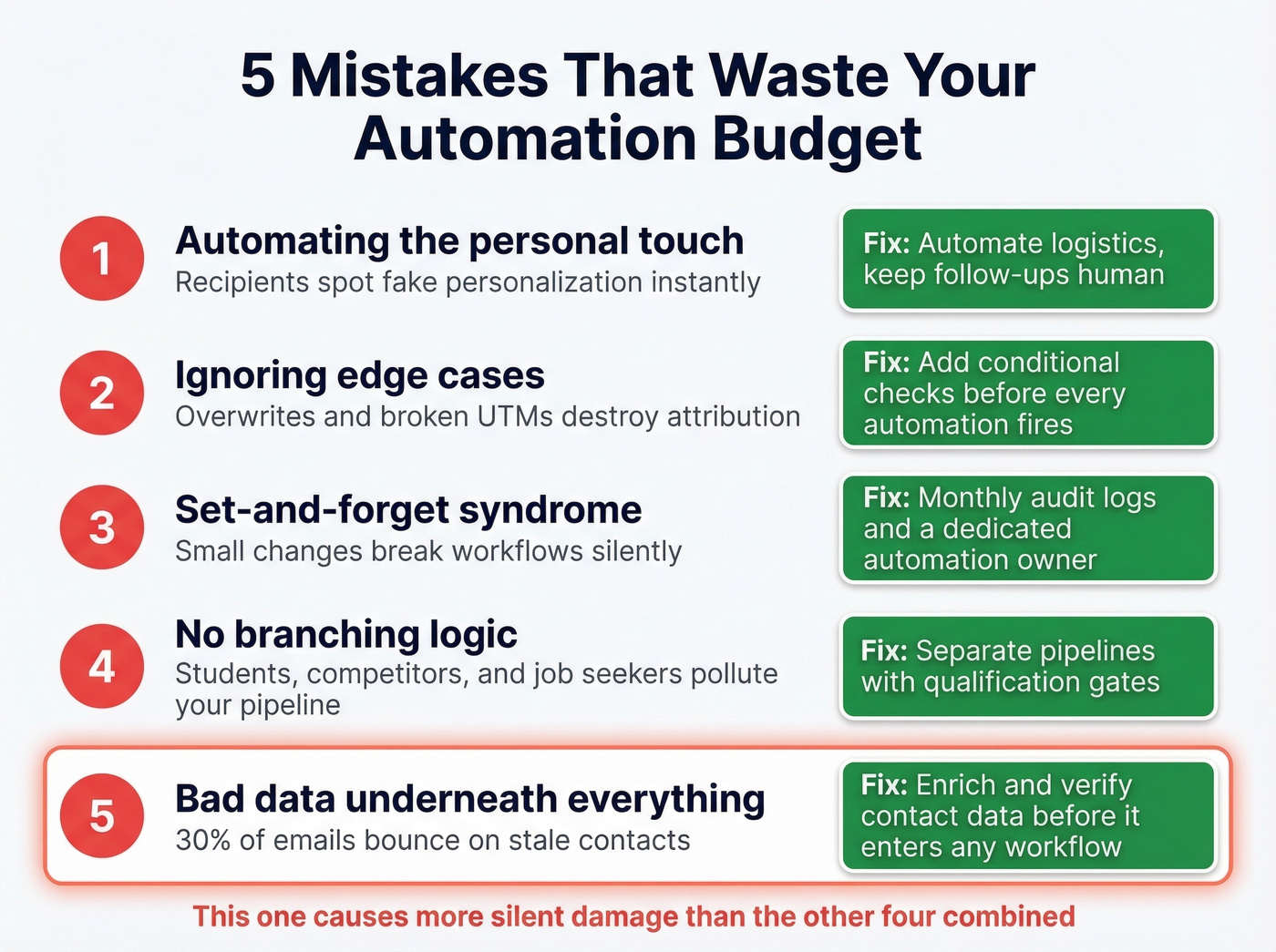
2. Ignoring edge cases. A marketing team auto-added UTM parameters to every link. Problem: it overwrote existing UTMs on co-marketing campaigns, broke attribution, and pushed revenue into "(other)" in their analytics. The fix was simple - only add UTMs if none exist - but it took weeks to diagnose.
3. Set-and-forget syndrome. A small form field change broke an automation and lost dozens of leads before anyone noticed. Automations aren't appliances. They need routine checkups, monitoring logs, and someone who actually owns them.
4. No branching logic. Website forms created contacts and deals in the CRM for everyone - including students, competitors, and job seekers. The pipeline got polluted. Separate pipelines, branching logic, and a human check before contacts enter the sales cycle would've prevented it entirely. This is also where a clear lead status setup prevents junk from entering your sales cycle.
5. Bad data underneath everything. You built a 12-step nurture sequence, but 30% of emails bounce because the contact data is six months old. In our experience, this mistake causes more silent damage than the other four combined. Every automation failure above gets worse when the underlying data is stale. No amount of workflow sophistication compensates for a rotten data foundation.
Best Automation Platforms for 2026
Comparison Table
| Tool | Best For | Starting Price | Free Tier | Key Caveat |
|---|---|---|---|---|
| Prospeo | Data quality layer | ~$39/mo | Yes (75 emails) | Complements any CRM |
| HubSpot | All-in-one SMB/mid-market | $15/user/mo | Yes | Gets expensive fast |
| ActiveCampaign | Email-heavy automation | $15/mo | Trial only | Sales CRM needs Plus + CRM add-on |
| Brevo | Budget-friendly starter | $12/mo | Yes (under 2K contacts) | Limited CRM depth |
| Pipedrive | Sales-first teams | $14/mo | Trial only | Marketing add-on extra |
| Zoho CRM | Feature density on budget | $14/mo | Yes (3 users) | Steeper learning curve |
| EngageBay | All-in-one on a shoestring | $12.74/mo | Yes | Smaller ecosystem |
| Freshsales | Simple CRM + automation | $9/mo | Yes | Basic marketing features |
| Keap | Small biz automation | $249/mo | Trial only | Price jump is steep |
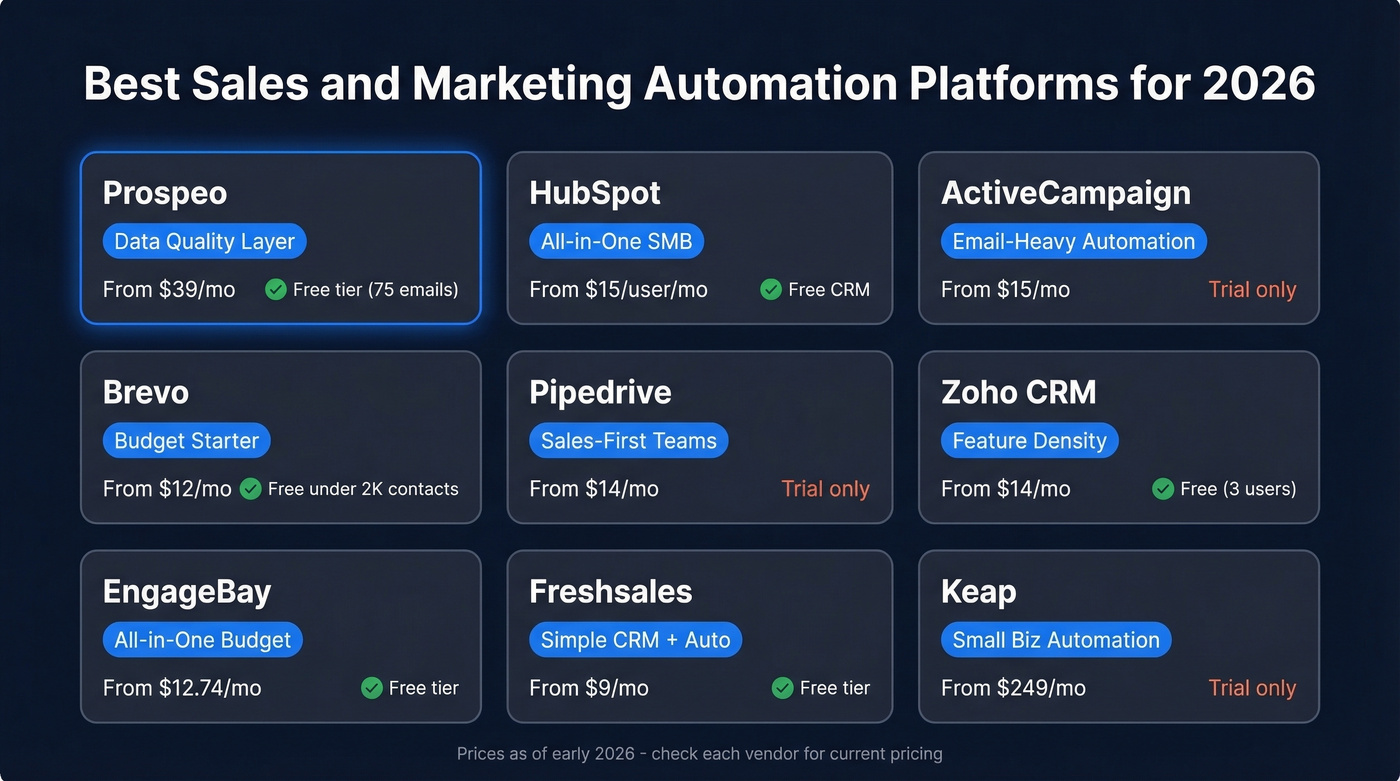
HubSpot is the obvious starting point for most SMB teams. The free CRM is genuinely useful, and the ecosystem is massive. But the features you actually need - custom reporting, advanced automation - typically live in Marketing Hub Professional at $800+/month. Per-contact pricing also bites as your database grows. Reddit threads consistently flag this: the tool that's "free" early on gets expensive fast once your database hits tens of thousands of contacts.
ActiveCampaign has the best email automation builder in the category, full stop. Used by 150,000+ small businesses, it's the go-to for teams that live and die by email sequences. If you want CRM access, you're looking at the Plus plan with the CRM add-on - $108/month for 1,000 contacts and one user. That's a meaningful jump from the $15/mo marketing-only starting price.
Brevo, Pipedrive, and Zoho each solve a piece of the puzzle well. Brevo's free plan under 2,000 contacts is hard to beat for startups. Pipedrive is the best pure sales CRM in this price range but needs a marketing add-on. Zoho packs an absurd amount of features into a $14/mo plan but has a learning curve that'll cost you a few weekends. If you’re still evaluating options, it helps to compare examples of a CRM side-by-side.
Skip Keap at $249/mo unless you specifically need its small-business automation workflows and can't replicate them elsewhere. For most teams, that money goes further split across two or three purpose-built tools.
We've tested most of these platforms, and the pricing gap between "starter" and "actually useful" is wider than any vendor admits. EngageBay is the scrappiest all-in-one at $12.74/mo. Freshsales is the simplest entry point at $9/mo.
Budget Reality Check
A startup with ~$18k/year in total tool budget and 7 seats can't afford most "all-in-one" platforms at their useful tiers. SSO requirements often push teams into higher pricing tiers, consuming half your annual budget on a single tool.
Watch out for per-contact pricing traps. A tool that costs $15/mo at 1,000 contacts can cost $150/mo at 25,000. Always model your 12-month contact growth before signing anything.
The Data Problem Nobody Mentions
You built the automation. You mapped the workflows. You aligned the teams. And then 30% of your emails bounce because the contact data is six months old.
Let's be honest - every automation failure mode discussed above traces back to data quality. Broken nurture sequences, polluted pipelines, wasted follow-ups. All of it.
94% of companies say CRM integration is critical. But integration without clean data just syncs garbage faster. If you’re shopping for providers, start with a shortlist of data enrichment services and validate match rates before you commit.
Snyk's team of 50 AEs saw bounce rates drop from 35-40% to under 5%, with AE-sourced pipeline up 180% and 200+ new opportunities per month after fixing their data layer. That's what happens when emails are verified before they enter sequences and contacts are refreshed weekly instead of quarterly - reps stop second-guessing the system and start trusting it enough to actually use it. (If bounce is a recurring issue, track it against email bounce rate benchmarks and codes.)
One unified revenue engine needs one clean data source. Prospeo's 7-day refresh cycle means your CRM never feeds stale contacts into nurture sequences or sales cadences. With 300M+ profiles, 30+ filters including buyer intent and technographics, and native integrations with HubSpot, Salesforce, and Clay - your automation stack finally runs on data you can trust at $0.01 per email.
Build your revenue engine on data that's actually current.
FAQ
What's the difference between sales automation and marketing automation?
Sales automation handles pipeline management, deal tracking, and outbound sequences. Marketing automation covers campaigns, nurturing, and scoring. The best results come from running both as one integrated system with shared data rather than treating them as competing priorities.
How much does a full automation stack cost?
Free CRM tiers exist from HubSpot, Freshsales, and Zoho. Paid plans range from $9/month to $249/month per tool. Budget $100-300/month for a solid SMB stack including CRM, automation, and a data quality layer like Prospeo, which offers a free tier of 75 emails/month.
What's the ROI of marketing automation?
Nucleus Research found $5.44 return per $1 spent. Aligned teams see 38% higher win rates and are 67% more likely to hit revenue goals - making automation one of the highest-return investments in B2B.
How do I keep automation data clean?
Use a verification tool with a weekly refresh cycle and 98%+ email accuracy. Bad data is the #1 reason automation workflows fail silently - bounced emails tank deliverability, stale contacts waste sequences, and reps lose trust in the system.
Can small businesses afford this?
Yes. Brevo offers free marketing automation under 2,000 contacts, EngageBay starts at $12.74/month, and HubSpot's free CRM includes basic workflows. A functional sales and marketing automation stack runs under $200/month for most small teams.