

The Best Sales CRM Software for Every Team Size and Budget
55% of CRM implementations fail to hit their planned objectives. Not because the software broke - because nobody used it. The median budget overrun sits between 30-49%, and only a quarter of projects land on time, on budget, and on target. Your CRM choice isn't a software decision. It's a bet on adoption.
That stat should reframe how you evaluate this entire category. The flashiest feature set doesn't matter if reps keep logging deals in spreadsheets. The cheapest per-seat price doesn't matter if you're paying for a tool that collects dust. And the most "enterprise-ready" platform doesn't matter if your 12-person team doesn't have a dedicated admin to run it.
91% of companies with 10+ employees already use CRM software. The question isn't whether you need one - it's whether you've picked the right one. Teams that get this right see 29% higher sales, 34% better productivity, and 42% more accurate forecasts. Teams that get it wrong spend six months migrating data and training reps on a tool they'll abandon.
Let's make sure you're in the first group.
Our Picks
Stop comparing 15 CRMs. Trial two or three, max. Here's where to start based on what actually matters for your team.
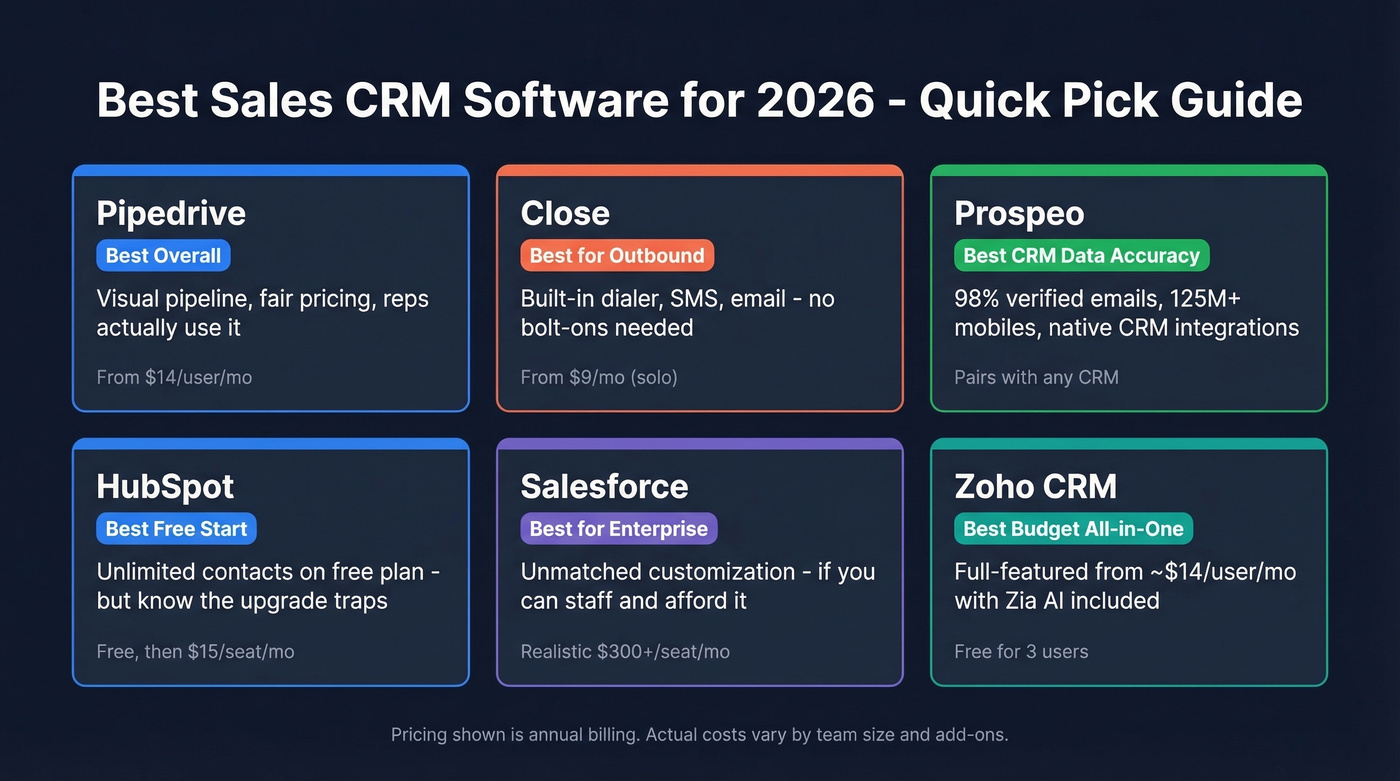
| Category | Pick | Why |
|---|---|---|
| Best overall | Pipedrive | Visual pipeline, fair pricing, reps use it |
| Best for outbound | Close | Built-in dialer, SMS, email - no bolt-ons |
| Best for CRM data accuracy | Prospeo | 98% verified emails, 125M+ mobiles, native CRM integrations |
| Best free start | HubSpot | Unlimited contacts (but know the traps) |
| Best for enterprise | Salesforce | Unmatched customization - if you can staff it |
| Best budget all-in-one | Zoho CRM | Full-featured from ~$14/user/mo with Zia AI |
Every CRM on this list is a container. The data you put inside it determines whether your reps trust it or ignore it. More on that below.
What Makes Great CRM Software in 2026
Before getting into individual tools, here's the checklist we use when evaluating any CRM for a sales team. Top CRMs on G2 generally sit around 4.2-4.6 out of 5, but ratings alone won't tell you whether a tool fits your workflow. These criteria will.

Pipeline visibility. Can reps see their deals at a glance? Drag-and-drop Kanban boards aren't a luxury - they're table stakes. If your CRM makes reps click through three screens to update a deal stage, they won't.
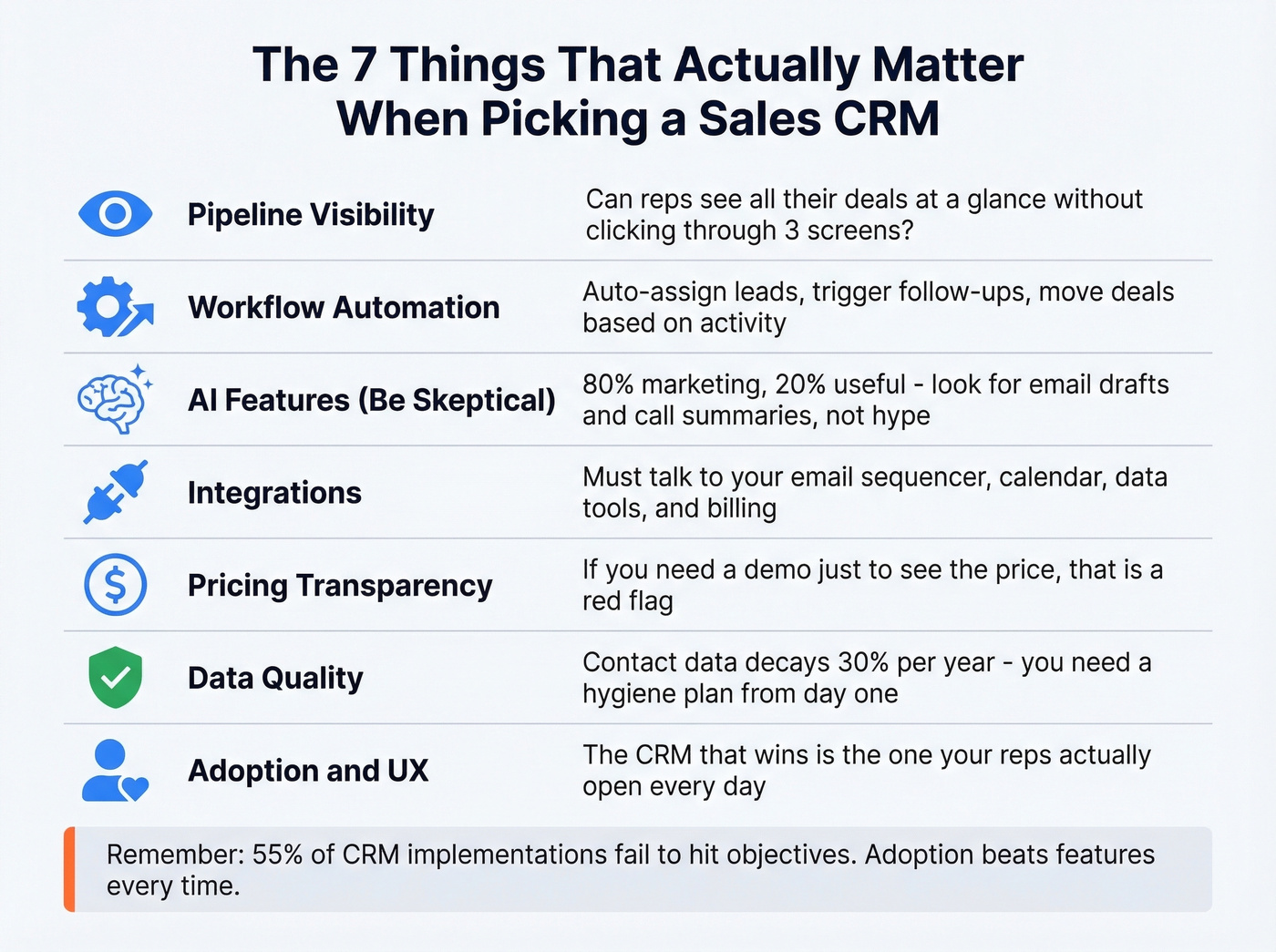
Workflow automation. Auto-assign leads, trigger follow-up tasks, move deals through stages based on activity. The best systems eliminate busywork, not create it. (If follow-ups are your bottleneck, keep a set of follow-up tasks ready to deploy.)
AI features (with a caveat). Every CRM vendor is shouting about AI right now. Here's the thing: it's about 80% marketing and 20% useful. AI-generated email drafts and call summaries are genuinely helpful. AI "deal scoring" that nobody trusts? Less so. Evaluate what the AI actually does, not the branding around it. If you're comparing tools, it helps to benchmark against broader generative AI sales tools too.
Integrations. Your CRM needs to talk to your email sequencer, your data tools, your calendar, and your billing system. Check the native integration list before you trial. (If you're wiring a sequencer into your CRM, use this setup guide.)
Pricing transparency. If you can't figure out what a CRM costs without booking a demo, that's a red flag. The best tools publish pricing and let you self-serve.
Data quality. A CRM full of outdated emails and wrong phone numbers is worse than no CRM at all. Contact data decays roughly 30% per year, so your CRM strategy needs a data hygiene plan from day one - teams that pair their CRM with a verified data source from the start avoid the "nobody trusts the CRM" spiral entirely. (If you're evaluating vendors, start with a shortlist of data enrichment services.)
Adoption and UX. The CRM that wins is the one your reps actually open. Simple beats powerful every time - unless you have the admin resources to make powerful simple.
The Best Sales CRMs Reviewed
Pipedrive - Best Overall for SMB Teams
Pipedrive restructured its plans in 2025, renaming Essential to Lite, Advanced to Growth, Professional/Power to Premium, and Enterprise to Ultimate. The new tiers are cleaner, and lower tiers actually got limit bumps - Lite now allows 2,500 leads/deals per user (up from 2,000), and Growth jumps to 5,000.

Use this if you're a team of 3-30 who wants a visual pipeline that reps will actually adopt. Pipedrive's drag-and-drop interface is the most intuitive in the category. The Lite plan at $14/user/month (annual) gives you pipeline management, calendar features, and AI-powered report creation - enough for early-stage teams. Growth ($39) adds email tracking, automations, and sequences. Premium ($59) includes LeadBooster, custom scoring, and e-signatures. Ultimate ($79) adds sandbox and advanced security.
Skip this if you need built-in calling or you're running a 100-person sales org that needs deep customization. Watch the add-on costs: LeadBooster starts from $32.50/company/month, Web Visitors from $41/company/month, and Projects from $6.67/company/month - they stack fast. The new Ultimate tier also introduces caps (500 custom fields, 500 reports per user) where Enterprise was previously unlimited. For most SMB teams, that won't matter. For power users migrating from Enterprise, it'll sting.
Pricing: Lite $14 → Growth $39 → Premium $59 → Ultimate $79 (all per user/month, annual). 14-day free trial, no credit card.
Close - Best for Outbound-First Teams
We watched a team switch from Pipedrive plus a separate dialer to Close, and their SDRs saved roughly 45 minutes per day just from not toggling between tools. That's the Close pitch in a nutshell: calling, SMS, and email live inside the CRM. No bolt-ons, no integrations to maintain. (If you're building an outbound stack, compare it against other SDR tools you may already be paying for.)
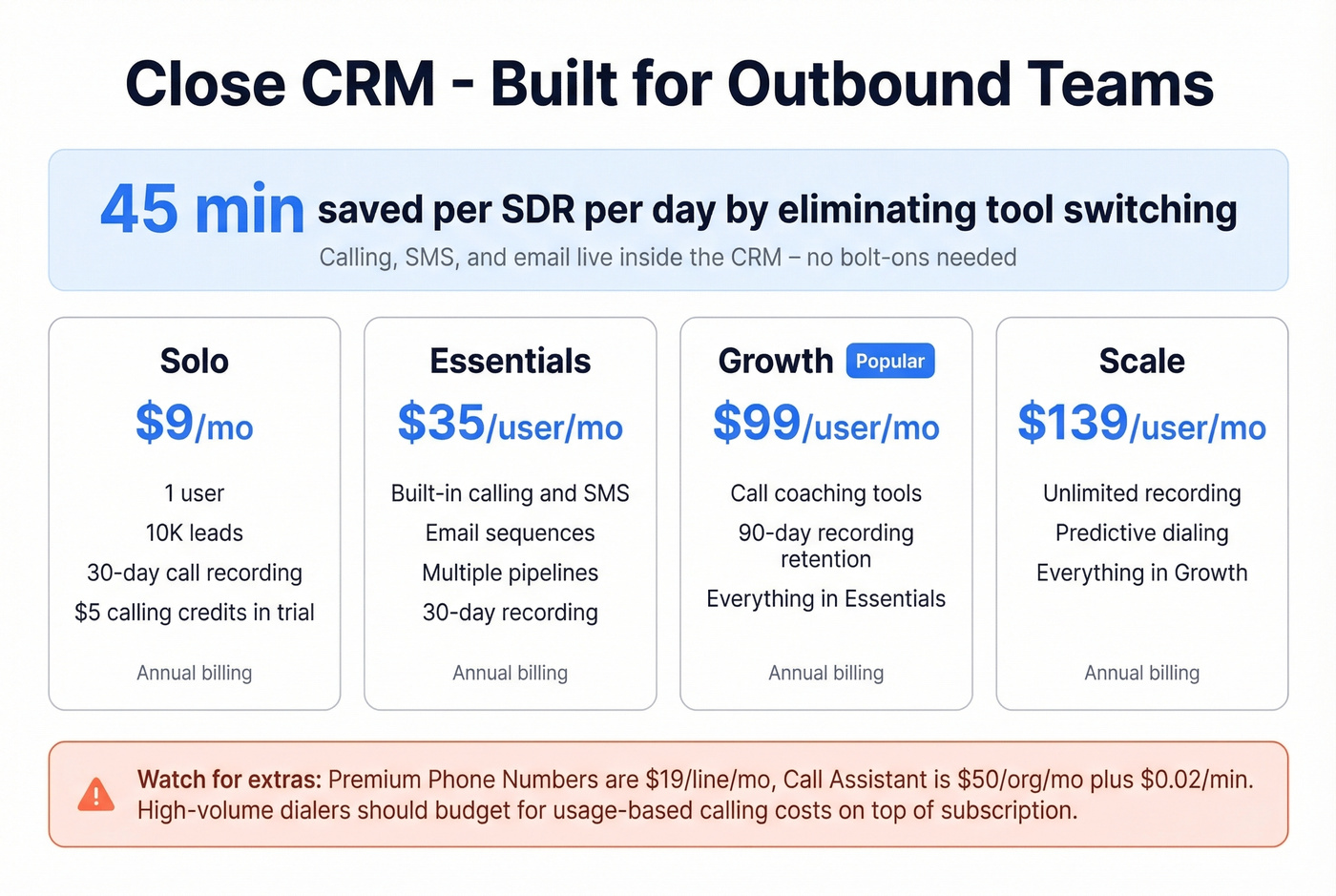
| Tier | Price | Highlights |
|---|---|---|
| Solo | $9/mo | 1 user, 10K leads, 30-day call recording, $5 calling credits in trial |
| Essentials | $35/user/mo | Built-in calling, SMS, email, multiple pipelines, 30-day recording |
| Growth | $99/user/mo | Call coaching, 90-day recording retention |
| Scale | $139/user/mo | Unlimited recording, predictive dialing |
All prices annual. Calling is usage-based on top of your subscription. Premium Phone Numbers run $19/line/month, and the Call Assistant add-on is $50/org/month plus $0.02/min. For high-volume dialers, those costs add up. But if your SDRs are making 50+ calls a day and you want the dialer, inbox, and pipeline in one place, nothing else in this category comes close.
HubSpot CRM - Best Free Starting Point
Let's get this out of the way: HubSpot's free plan is a marketing funnel, not a CRM.
You get unlimited contacts, one deal pipeline, up to two users, and 10 custom properties. You don't get automation workflows, lead scoring, branding removal, or full API access. HubSpot also allows unlimited users, but most are view-only - full edit access requires paid Core Seats. The moment you need a second pipeline, more than 10 custom properties, or any workflow automation, you're paying.
HubSpot knows this. The free tier is designed to get you hooked on the ecosystem. That's not a criticism; it's a business model. Go in with your eyes open.
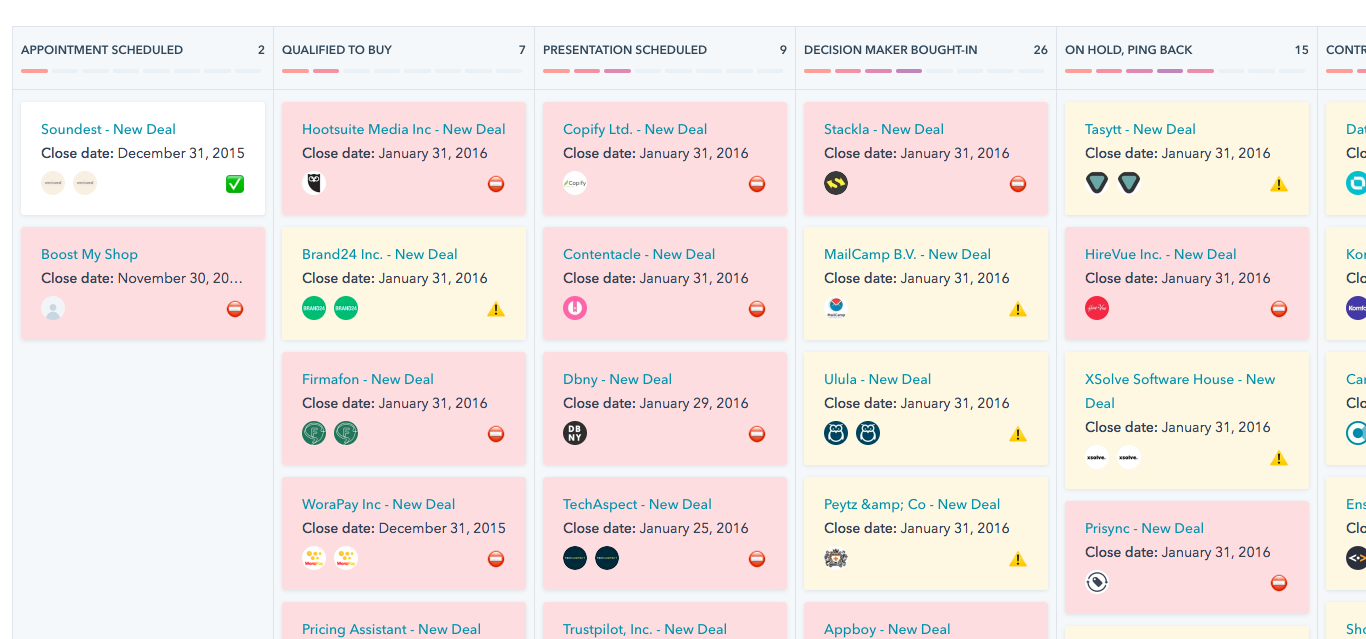
For teams that do commit, the ecosystem is powerful. Starter at $15/seat/month removes HubSpot branding and adds basic automation. Professional ($50/seat) unlocks sequences, custom reporting, and forecasting. Enterprise ($75/seat) adds predictive lead scoring and advanced permissions.
Pricing: Free $0 → Starter $15 → Professional $50 → Enterprise $75 (per seat/month). Free plan has real limits.
Salesforce Sales Cloud - Best for Enterprise
Here's our hot take: Salesforce is the right CRM for maybe 15% of the companies that buy it. For that 15%, nothing else comes close. For everyone else, it's an expensive lesson in overbuying. If your average deal size is under $10K and you have fewer than 20 reps, you almost certainly don't need Salesforce-level infrastructure. (If you're doing the math, this deeper breakdown of Salesforce pricing helps.)
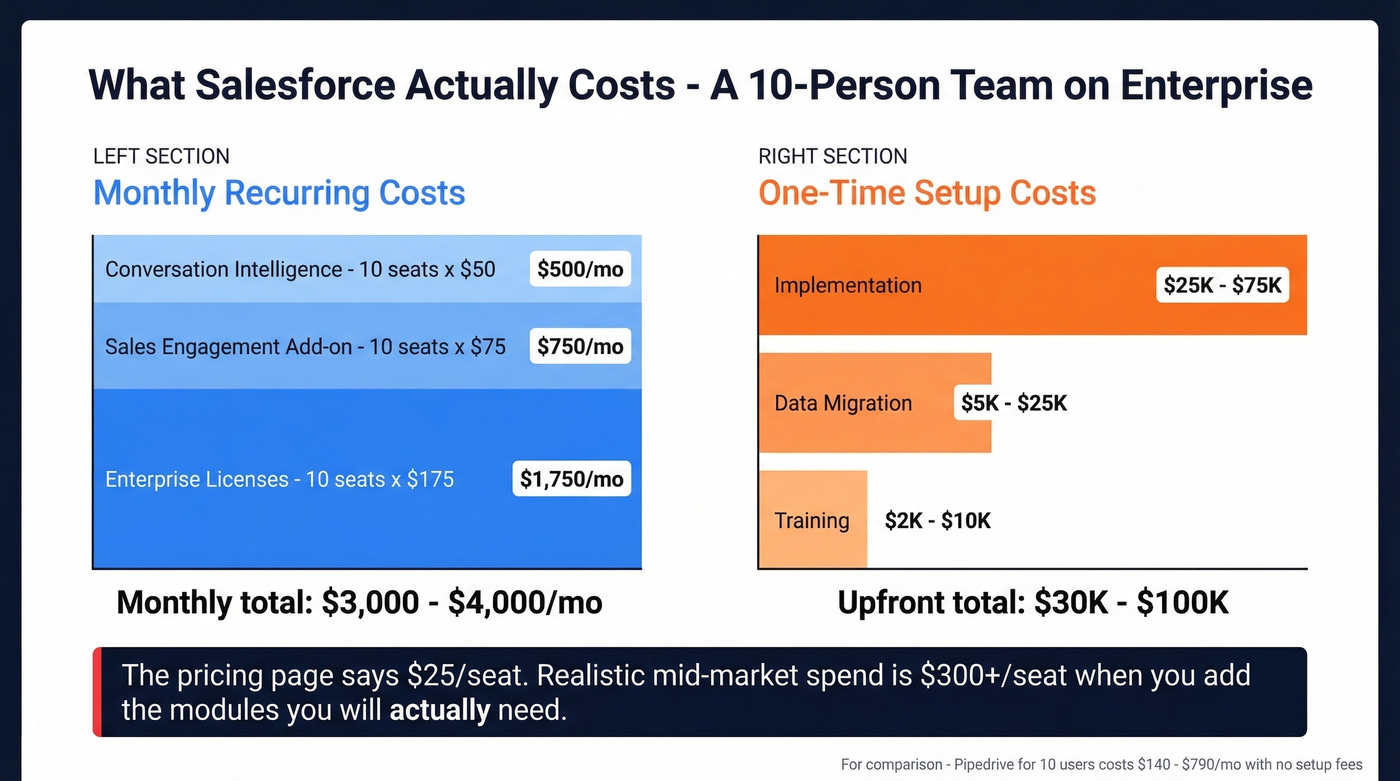
What Salesforce actually costs. The pricing page shows tiers from Free Suite ($0, max 2 users) through Starter ($25), Pro ($100), Enterprise ($175), Unlimited ($350), to Agentforce 1 Sales ($550). That looks manageable. It isn't. A 10-person team on Enterprise at $175/seat is already $1,750/month before you add anything. Layer on Sales Engagement (~$75/user) and Conversation Intelligence (~$50/user), and you're at $3,000/month in licenses alone. Implementation runs $25K-$75K for mid-market. Data migration adds $5K-$25K. Training is another $2K-$10K. A realistic 10-person Enterprise deployment costs $3,000-$4,000/month ongoing, plus $30K-$100K upfront.
Use this if you have 50+ reps, a dedicated Salesforce admin (or budget to hire one), and a 3-12 month implementation timeline you can stomach. The customization is genuinely unmatched. AppExchange has a massive integration ecosystem. Einstein AI forecasting is one of the most mature options in the category.
Skip this if you're under 20 reps without a dedicated admin. The pricing page shows $25/seat, but realistic mid-market spend is $300+/seat when you factor in the modules you'll actually need.
Zoho CRM - Best Budget All-in-One
Zoho CRM delivers more features per dollar than any other tool on this list. The free plan covers 3 users and 5,000 records. Paid plans run ~$14-$52/user/month. Zia, Zoho's AI assistant, supports lead scoring and anomaly detection. Go all-in on Zoho One and you get 40+ apps - email, project management, analytics, helpdesk - in a single ecosystem. The customization depth rivals Salesforce at a fraction of the cost, and for budget-conscious teams willing to spend a weekend configuring workflows, it's the best value play in the category.
Skip this if you value design polish or need deep integrations outside the Zoho ecosystem. The UI feels a generation behind HubSpot or Pipedrive, and once you're on Zoho One, switching costs get real.
Pricing: Free (3 users) → ~$14-$52/user/month paid tiers (annual).
Freshsales - Best Built-In Telephony
Freshsales is the quiet alternative for teams that want calling baked into their CRM without Close's complexity or Pipedrive's add-on costs. The free plan supports 3 users, paid tiers run ~$9-$59/user/month, and built-in telephony is included - not bolted on. Freddy AI handles lead scoring and deal insights. The telephony integration is the cleanest in this price range, and if your team makes 20-40 calls a day (not enough to justify Close's higher price, but enough to need a dialer), Freshsales hits the sweet spot.
Skip this if you need a massive integration ecosystem or deep customization. Freshsales is simpler than Zoho and less extensible than HubSpot.
Pricing: Free (3 users) → ~$9-$59/user/month (annual).
monday CRM - Best for Workflow Customization
monday CRM makes sense if you're already living in monday.com for project management. The no-code workflow builder is genuinely powerful - you can customize pipelines, automations, and dashboards without touching code. Free plan available; paid plans start around ~$12-$24/seat/month (annual). The visual boards are excellent for non-traditional sales processes, and teams that sell through complex, multi-stakeholder deals will appreciate the flexibility.
That said, monday's CRM product is newer and less battle-tested than Pipedrive, HubSpot, or Salesforce, so expect some rough edges.
Pricing: Free available → ~$12-$24/seat/month paid (annual). Pricing scales with both seats and feature tiers.
Copper - Best for Google Workspace Teams
Copper lives inside Gmail, Calendar, and Drive. If your team runs entirely on Google Workspace and hates context-switching, Copper is the obvious choice. Priced at ~$23-$134/user/month, it follows a zero data entry philosophy - designed to minimize manual input with inbox-based syncing. The tradeoff: if you ever leave Google Workspace, you leave Copper too. If you're deciding between the two, see Copper vs Pipedrive.
Less Annoying CRM - No-Nonsense Simplicity
$15/user/month. One plan. No tiers, no upsells, no enterprise trap. Deliberately simple contact and pipeline management for tiny teams (1-10 people) who want to track deals without drowning in features they'll never use. This is the CRM for people who hate CRMs.
Insightly - Post-Sale Project Delivery
Insightly bridges the gap between closing a deal and delivering on it. CRM plus project management in one tool, running ~$29-$99/user/month. Best for agencies and service businesses that need deal tracking through to project delivery without switching platforms.

Contact data decays 30% per year - that's why reps stop trusting the CRM. Prospeo enriches your Salesforce or HubSpot with 98% verified emails and 125M+ mobile numbers, refreshed every 7 days. At $0.01 per email, clean CRM data costs less than one bad bounce.
Stop filling your CRM with data your reps will ignore.
CRM Pricing Comparison Table
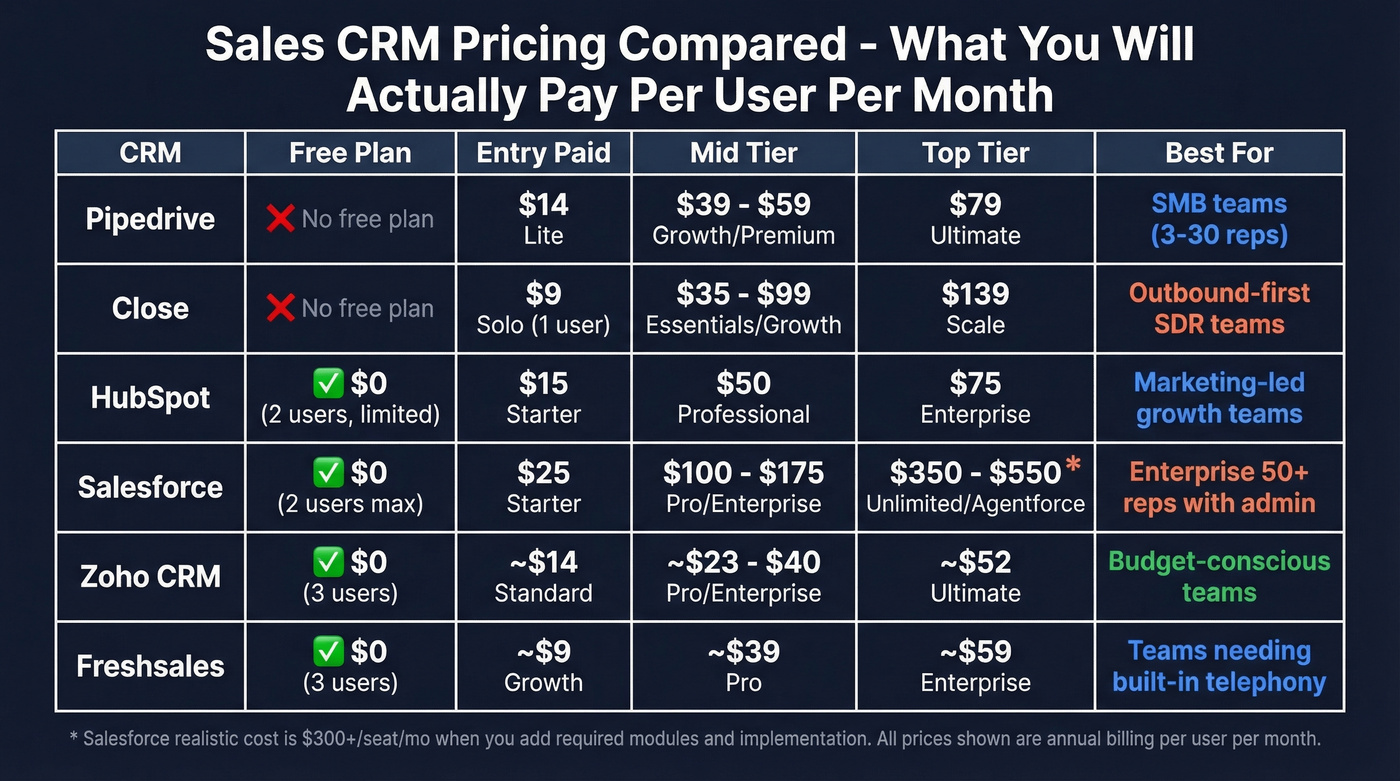
Here's every tool side by side. All prices are per user/month, billed annually unless noted.
| Tool | Free / Starting | Mid-Tier | Top Tier | Watch Out For |
|---|---|---|---|---|
| Pipedrive | $14 (Lite) | $39 (Growth) | $79 (Ultimate) | Add-ons stack fast |
| Close | Free solo ($9) / $35 (Essentials) | $99 (Growth) | $139 (Scale) | Usage-based calling |
| HubSpot | Free (limited) / $15 (Starter) | $50 (Pro) | $75 (Enterprise) | Free-to-paid jump |
| Salesforce | Free Suite (2 users) / $25 (Starter) | $175 (Enterprise) | $550 (Agentforce) | Real cost is 2-3x list |
| Zoho CRM | Free (3 users) / ~$14 | ~$23 | ~$52 | Ecosystem lock-in |
| Freshsales | Free (3 users) / ~$9 | ~$39 | ~$59 | Smaller app ecosystem |
| monday CRM | Free / ~$12 | ~$17 | ~$24 | Newer CRM product |
| Copper | ~$23 | ~$59 | ~$134 | Google-only |
| Less Annoying | $15 (flat) | $15 (flat) | $15 (flat) | Basic features only |
| Insightly | ~$29 | ~$49 | ~$99 | Niche use case |
The Salesforce column deserves a footnote: that $175 Enterprise price doesn't include Sales Engagement, Conversation Intelligence, implementation, or training. Realistic mid-market spend is $300+/seat when you add the modules most teams actually need.
The Data Problem Nobody Talks About
Every CRM on this list is a container. A beautifully designed, well-automated container - but still just a container. What you put inside it determines whether reps trust it or ignore it.
We've seen this pattern repeatedly: a team imports 10,000 contacts into their shiny new CRM, launches their first outbound sequence, and watches 30% of emails bounce. Reps lose confidence in the data. They stop logging activities. Six months later, someone's asking why the CRM "doesn't work."
The CRM worked fine. The data didn't. (If you're diagnosing bounces, start with these email bounce rate benchmarks and fixes.)

Prospeo solves this at the source. Its database covers 300M+ professional profiles with 143M+ verified emails and 125M+ verified mobile numbers. Email accuracy sits at 98%, and every record refreshes on a 7-day cycle where the industry average is six weeks. That means the contacts you push into HubSpot or Salesforce today are still accurate next month.
The proof is in the results. Snyk's 50-person AE team was running bounce rates of 35-40% before switching their data source. After: under 5%. They now generate 200+ new AE-sourced opportunities per month. That's not a CRM problem solved - it's a data problem solved. Native integrations with Salesforce, HubSpot, Lemlist, Instantly, and Smartlead mean clean data flows straight into your pipeline. Credit-based pricing starts at roughly $0.01 per email, with a free tier that gives you 75 verified emails and 100 Chrome extension credits per month. No contracts, no sales calls required.
Every CRM on this list is a container. Prospeo is what fills it. 300M+ profiles, 30+ search filters including buyer intent and technographics, and native integrations with Salesforce, HubSpot, and every major sequencer. Teams using Prospeo book 26% more meetings than ZoomInfo users.
Give your new CRM the data it deserves - free tier included.
How to Choose the Right Sales CRM
The consensus on r/CRM is blunt: "Most CRMs don't fail because they're missing features - they fail because no one wants to use them." Start with the bottleneck, not the brand.
Three questions will narrow your shortlist to two or three tools.
What's your team size? A 5-person team doesn't need Salesforce. They need something they can set up in an afternoon and start using tomorrow. Pipedrive Lite or HubSpot Starter will get them further than a $175/seat platform they'll never fully configure. (If you want more context, here are more examples of a CRM by team type and budget.)
What's your sales motion? Outbound-heavy teams making 50+ calls a day need a built-in dialer - that's Close or Freshsales. Inbound-heavy teams that need marketing alignment should look at HubSpot. Hybrid teams with complex deal cycles and 50+ reps are Salesforce territory, assuming they have the admin resources. If you're rebuilding outbound from scratch, start with these sales prospecting techniques.
What's your real budget? Not just the per-seat price - the total cost in six months. A CRM that starts at $14/seat but requires $100/month in add-ons isn't cheaper than one that starts at $35/seat with everything included. As one Reddit poster put it: "Look past the sticker price. Ask what it'll cost after you add the features you actually need."
Here's the scenario that keeps us up at night: an 8-rep team paying $175/seat for Salesforce Enterprise while reps log deals in spreadsheets because the CRM is too complex to use without training nobody budgeted for. Adoption beats features. Every time.
Trial with actual users for 14 days. Not a demo from the vendor - a real trial where your reps use the tool on live deals. If they hate it during the trial, they'll hate it after you sign the contract.
| Your Situation | Start Here |
|---|---|
| < 10 reps, visual pipeline | Pipedrive Lite |
| Outbound-heavy, 50+ calls/day | Close |
| Marketing + sales alignment | HubSpot Starter |
| 50+ reps, dedicated admin | Salesforce Enterprise |
| Tight budget, full features | Zoho CRM |
| Gmail-native team | Copper |
FAQ
Is free CRM software good enough?
For a solo founder or two-person team, HubSpot's free plan works - unlimited contacts, one deal pipeline, up to two users. But you lose automation, lead scoring, and branding removal. The moment you need a second pipeline or any workflow automation, you're upgrading. Budget for paid tiers from the start.
What does Salesforce really cost?
The $175/seat Enterprise price is just the beginning. Add Sales Engagement (~$75/user), Conversation Intelligence (~$50/user), implementation ($25K-$75K), and training ($2K-$10K). A realistic 10-person deployment runs $3,000-$4,000/month ongoing, plus $30K-$100K upfront.
How do I get reps to actually use the CRM?
Pick the simplest tool that solves your specific bottleneck - not the one with the most features. Involve reps in the trial. 55% of CRM implementations fail because of adoption, not functionality. If reps find the tool adds friction, they'll route around it every time.
How do I keep CRM data accurate over time?
Contact data decays roughly 30% per year as people change jobs and emails go stale. Manual updates don't scale past a handful of accounts. Pairing your CRM with a tool that refreshes records on a weekly cycle and maintains 98%+ email accuracy is the only reliable way to keep data trustworthy at scale.
Which CRM is best for small teams?
For teams under 10 reps, Pipedrive and Close consistently rank highest because they prioritize usability over feature bloat. Pipedrive's visual pipeline gets reps productive on day one, while Close bundles calling and email into a single workspace. HubSpot's free tier is also worth testing if budget is the primary constraint - just plan for the paid upgrade once you outgrow the limits.