

HubSpot Sales Pipeline Stages: The Practitioner's Playbook
It's Monday morning. You're staring at a pipeline review where half the deals are stuck in "Appointment Scheduled" and nobody can explain why. Understanding sales pipeline stages in HubSpot is the difference between a reliable forecast and a guessing game - yet HubSpot's docs tell you how to add stages but never which stages to add. That's the part you actually need.
HubSpot's 7 Default Deal Stages
HubSpot ships with seven deal stages out of the box. They're a starting point, not a strategy.
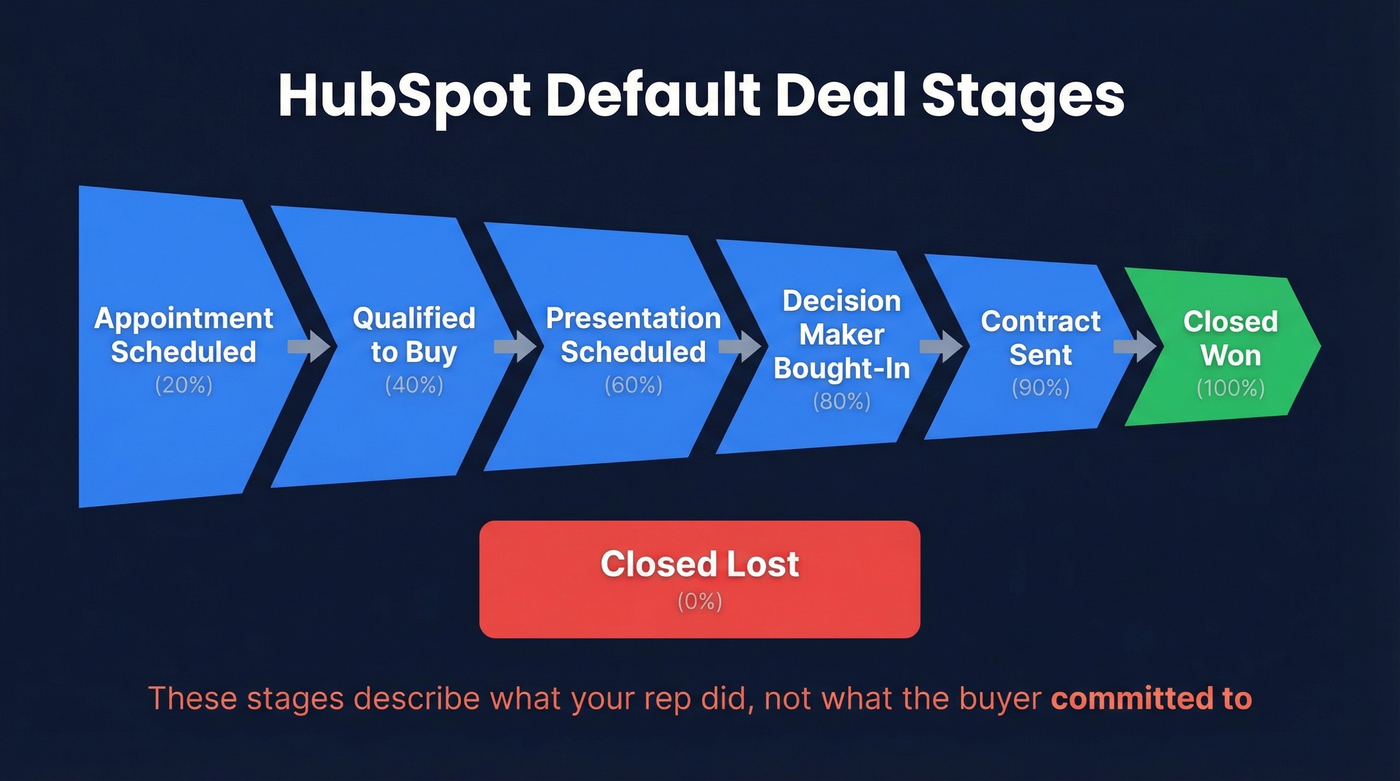
| Stage | Win Probability | What It Means |
|---|---|---|
| Appointment Scheduled | 20% | First meeting booked |
| Qualified to Buy | 40% | Budget + need confirmed |
| Presentation Scheduled | 60% | Demo or pitch on calendar |
| Decision Maker Bought-In | 80% | Economic buyer says yes |
| Contract Sent | 90% | Paperwork out the door |
| Closed Won | 100% | Deal done |
| Closed Lost | 0% | Dead or disqualified |
These defaults are seller-centric - they describe what your rep did, not what the buyer committed to. That gap is why forecasts drift. HubSpot supports pipelines beyond deals (leads, tickets, appointments), but deal stages are where most teams need the most help.
Designing Better Pipeline Stages
Every stage should reflect a buyer commitment, not an internal task. "Sent proposal" is something your rep did. "Proposal reviewed and feedback received" is something the buyer did. Name stages accordingly.
Five to seven stages is the sweet spot. Fewer than four and you're flying blind. More than eight and reps start skipping stages, which is worse than having no pipeline at all. Define entry and exit criteria for each gate, and use HubSpot's required fields per stage to enforce them. No close date? Deal doesn't advance.
Here's the thing: most pipeline problems aren't pipeline problems. They're data discipline problems. If your reps can move deals forward without proving the buyer did something, your stages are decoration.
One concept worth layering on top: forecast categories. Assign every deal a category - Commit, Strong Upside, Pipeline, or Early Stage - independent of its pipeline stage. This separates "where is this deal?" from "how confident are we?" and makes forecast reviews dramatically more useful. In HubSpot, you can implement this with a custom deal property and use it in your forecast views and reports.
Two Templates You Can Copy
SaaS Pipeline (4 Stages)
Built for teams selling software with a demo-to-close motion. We recommend running two pipelines - new business and expansions - and resisting the urge to add more until you've got 6 months of data.
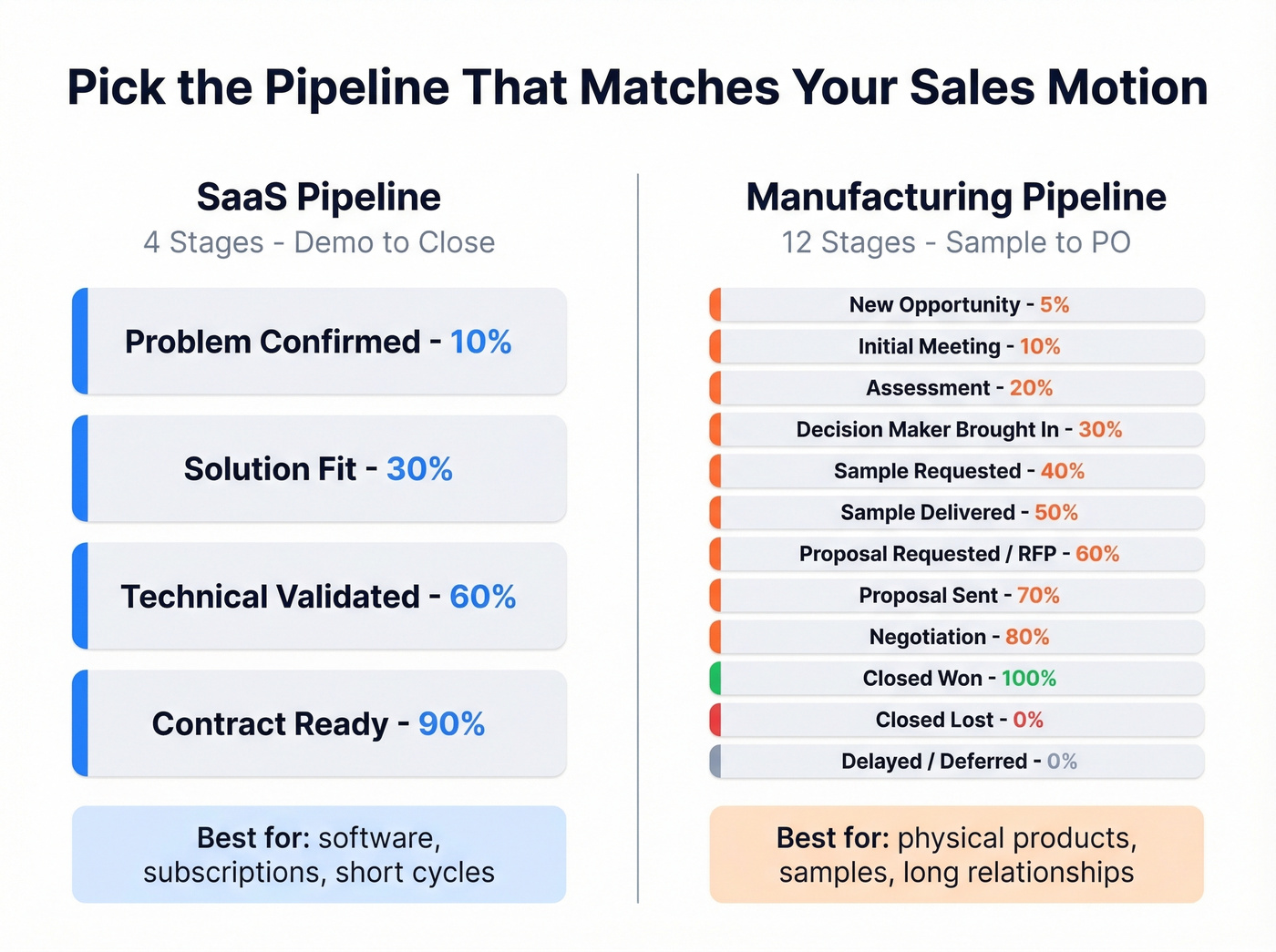
| Stage | Probability | Exit Criteria | Required Property |
|---|---|---|---|
| Problem Confirmed | 10% | Prospect articulates pain | Close date, deal amount |
| Solution Fit | 30% | Demo completed, use case mapped | Decision maker identified |
| Technical Validated | 60% | POC/trial passed, security reviewed | Technical contact |
| Contract Ready | 90% | Verbal yes, redlines resolved | Contract sent date |
Four stages sounds aggressive. It works because each one demands a real buyer commitment before the deal advances.
Manufacturing / Field Sales Pipeline
The top complaint on r/sales about HubSpot pipeline advice? It's all SaaS-centric. If you're selling physical products with samples, RFPs, and 6-month relationship cycles, this template fits better:
| Stage | Probability | Exit Criteria |
|---|---|---|
| New Opportunity | 5% | Lead qualified, company profiled |
| Initial Meeting Scheduled | 10% | Meeting confirmed |
| Assessment | 20% | Needs documented |
| Decision Maker Brought In | 30% | Economic buyer engaged |
| Sample Requested | 40% | Specs agreed, sample ordered |
| Sample Delivered | 50% | Sample received, feedback collected |
| Proposal Requested / RFP | 60% | Formal RFP or quote request |
| Proposal Sent | 70% | Pricing delivered |
| Negotiation | 80% | Terms under discussion |
| Closed Won | 100% | PO received |
| Closed Lost | 0% | Dead or disqualified |
| Delayed / Deferred | 0% | Pushed to next quarter |
Yes, 12 rows breaks the 5-7 rule. Manufacturing deals have physical milestones - sample requested, sample delivered - that SaaS templates don't account for. And separating "Closed Lost" from "Delayed/Deferred" matters: a dead deal and a deal pushed to Q3 require completely different follow-up sequences.
Automation Setup
Navigate to Settings > Objects > Deals > Pipelines > Automate. You'll need Super Admin or Workflow edit permissions.
Three recipes worth setting up immediately:
- Auto-create deals when a contact hits the "Qualified" lifecycle stage. This saves manual entry and ensures nothing slips through the cracks.
- Auto-assign the AE's manager when a deal moves to "Contract Ready" and create a task for legal review.
- Trigger a stale-deal task when any deal sits in a stage for 30+ days with no activity.
Sales Hub Starter covers basic pipeline automations, but you'll need Sales Hub Professional or Enterprise for the full workflow editor.

Automations keep deals moving, but bad contact data kills them before they start. Prospeo feeds your HubSpot pipeline with 98% verified emails from 300M+ profiles - refreshed every 7 days, not 6 weeks. Native HubSpot integration means enriched contacts flow straight into your deal stages.
Stop building a perfect pipeline on top of dirty data.
Five Mistakes That Break Your Pipeline
1. No exit criteria. Deals move on rep "feel" instead of buyer actions. Audits routinely find 80-150 active workflows with no naming convention - that's the symptom of a pipeline nobody governs.
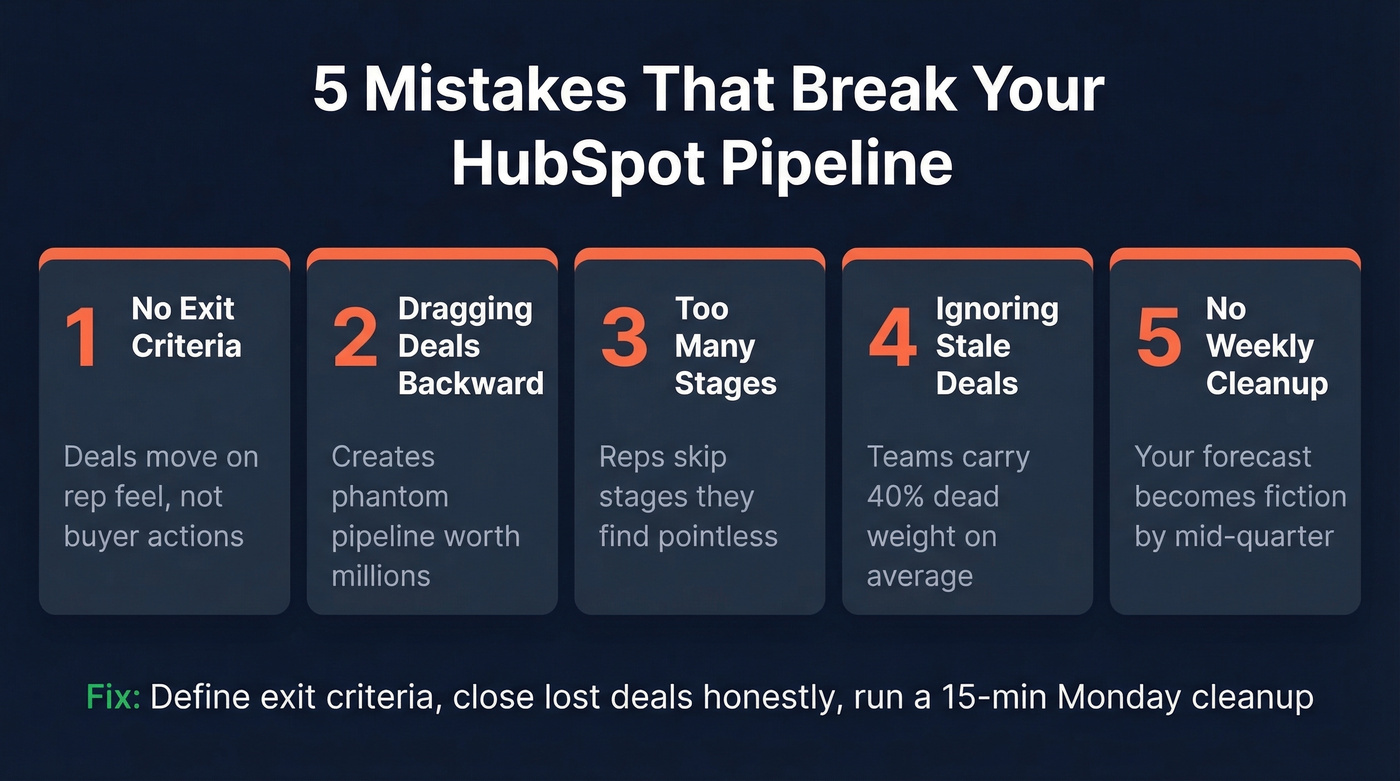
2. Dragging deals backward instead of closing lost. A rep loses a deal but thinks they'll re-engage in 6 months, so they drag it back to "Lead." Now you've got a $2M phantom pipeline. Close it lost. Re-open when the buyer actually re-engages.
3. Too many stages. If reps routinely jump from stage 2 to stage 5, your middle stages aren't earning their place. Kill them.
4. Ignoring stale deals. HubSpot has calculated fields called "Is Stalled After Timestamp" and "Average Deal Owner Duration In Current Stage" - use both. Build a report that flags deals past your activity threshold. We've seen teams carry 40% dead weight simply because nobody cleaned house.
5. No weekly cleanup routine. Pipeline hygiene isn't a quarterly project. It's a 15-minute Monday ritual: close dead deals, update amounts, verify next steps. Archive deals inactive for 18-24 months. Skip this and your forecast is fiction by mid-quarter.

Benchmarks Worth Tracking
Calibrate these with your own HubSpot data after 2-3 quarters.
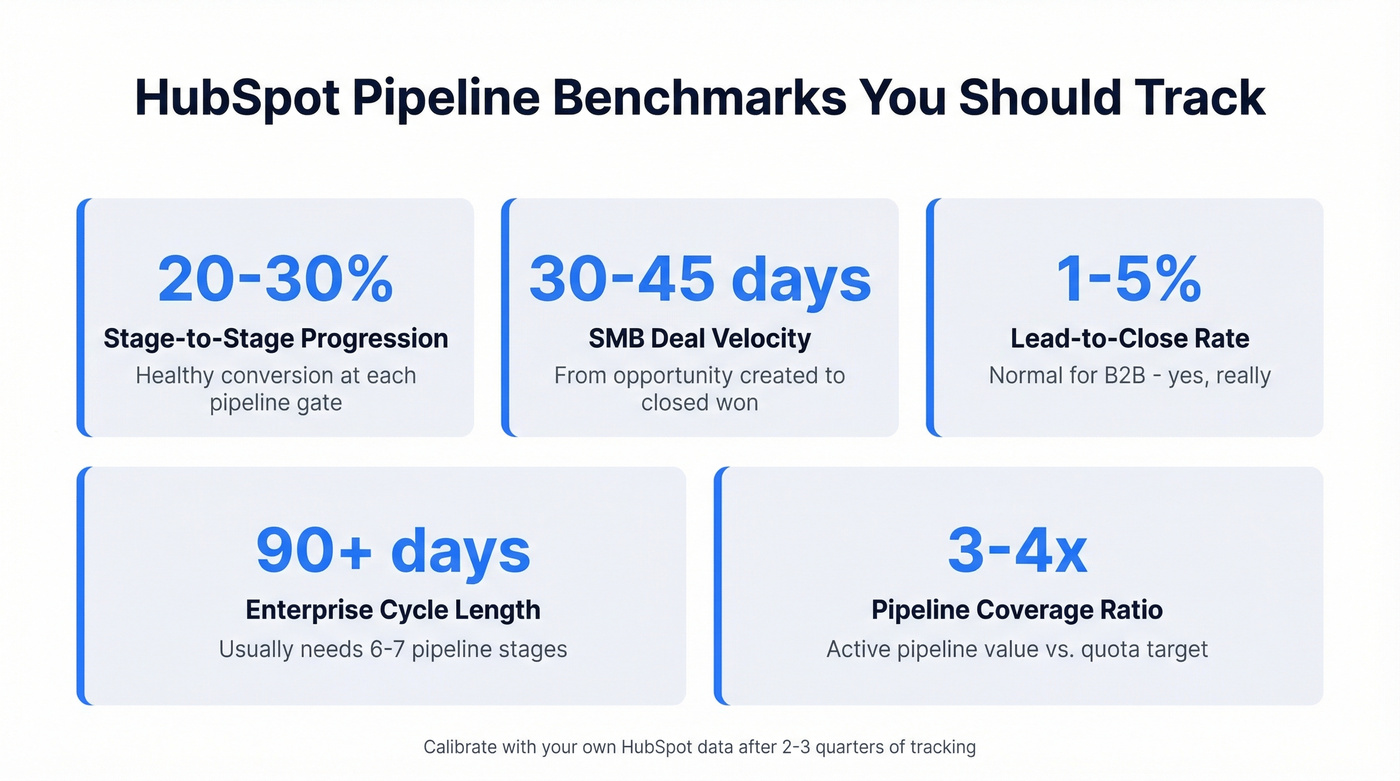
- Stage-to-stage progression: 20-30% is healthy at each gate
- SMB deal velocity: 30-45 days from opportunity to close
- Lead-to-close conversion: 1-5% for B2B (yes, that's normal)
- Enterprise cycles: 90+ days typically need 6-7 stages
- Pipeline coverage: Most RevOps teams target 3-4x quota in active pipeline value
Use HubSpot's sales analytics suite to track these natively. The "Deal Velocity" and "Stage Duration" reports are where the real insights live.
If you want a broader reference point, compare these to pipeline health and sales pipeline benchmarks across industries.
Fill Your Pipeline with Clean Data
Your stages are set. Your automations are live. Now the question becomes: what's actually entering this pipeline?
None of it matters if reps can't reach the contacts in their deals. Bad emails bounce, bad numbers ring out, and your beautifully designed stages sit empty. Prospeo's native HubSpot integration pushes 98% verified emails and direct dials straight into your CRM, so required stage properties - decision maker email, direct dial, company size - are already populated before a rep touches the deal. With a 7-day data refresh cycle, contacts stay current instead of decaying into dead ends.
If you're evaluating providers, start with a shortlist of data enrichment services and sanity-check your process against a modern lead enrichment workflow.
You just built exit criteria, stale-deal alerts, and forecast categories. Now make sure every deal entering your pipeline has a verified email and direct dial. Prospeo's CRM enrichment returns 50+ data points per contact at a 92% match rate - so reps spend Monday mornings closing deals, not hunting for contact info.
Fill every HubSpot deal stage with contacts that actually convert.
HubSpot Sales Hub Pricing (2026)
| Plan | Price | What You Get for Pipeline Work |
|---|---|---|
| Free CRM | $0 | Basic pipeline, limited reporting |
| Starter | From $20/user/mo | Basic automations, simple sequences |
| Professional | From $100/mo | Advanced automation, forecasting, multi-pipeline |
| Enterprise | From $150/mo | Custom objects, predictive scoring, advanced permissions |
Most teams doing serious pipeline work land on Professional. That's where you unlock the workflow editor and multi-pipeline support that makes everything above actually implementable. Typical mid-market annual spend runs $10K-$50K depending on seat count and add-ons.
FAQ
How many deal stages should a HubSpot pipeline have?
Five to seven stages aligned to buyer actions is the proven range. Fewer than four lacks forecasting visibility; more than eight creates friction reps will skip. Enterprise deals with 90+ day cycles may justify 6-7 stages, while SMB motions often work with 4-5.
Can I have multiple pipelines in HubSpot?
Yes. Professional and Enterprise portals support up to 50 pipelines. Most teams separate new business, renewals, and partner deals into distinct pipelines with their own stage definitions and automation rules.
How do I keep pipeline data clean for forecasting?
Define exit criteria per stage, require key properties before deals advance, and close lost deals instead of dragging them backward. Run a 15-minute weekly cleanup to purge stale deals and update amounts. For contact-level accuracy, pair your pipeline with a data provider that pushes verified emails and direct dials directly into HubSpot - deals start with complete records instead of decaying data.