Sales Sequencing: Benchmarks, Templates, and the Data Problem Nobody Talks About
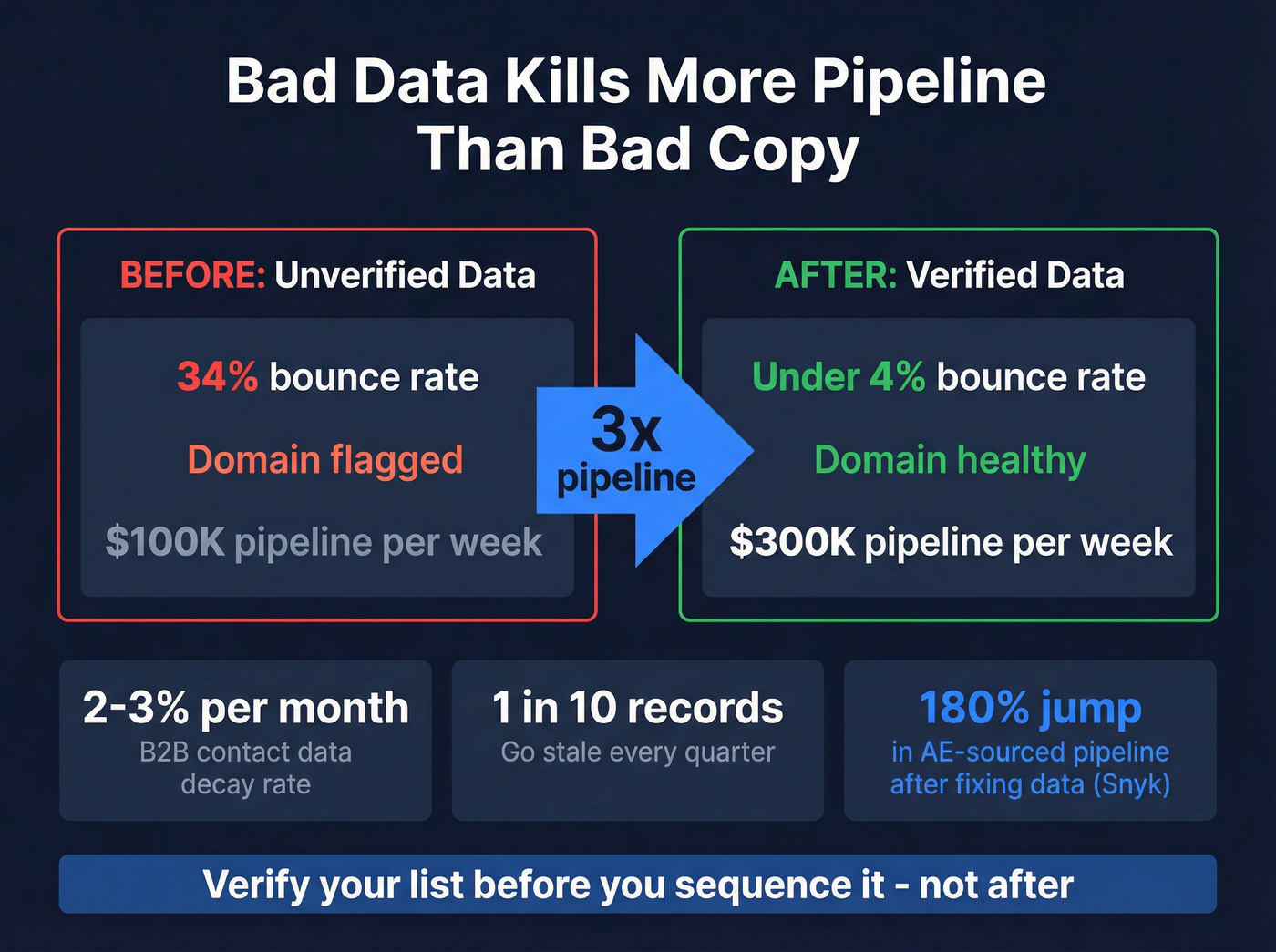
A RevOps lead we know ran a sales sequencing audit last quarter. Twelve reps, three months of outbound, thousands of emails sent. The result? A 34% bounce rate, a flagged domain, and a pipeline that looked like a parking lot. The sequences were fine. The data underneath them was garbage.
That's the story nobody writes about in most outbound sequence guides. Let's fix that - and cover everything else you actually need to build sequences that convert in 2026.
What Is a Sales Sequence?
A sales sequence is a pre-planned series of touchpoints - emails, calls, social messages, sometimes video - designed to move a prospect from "never heard of you" to "let's talk." SDRs, AEs, and founders all use them. In the founder-led sales era, sequences are often the first real outbound motion a company builds.
Don't confuse them with marketing drip campaigns. Drips are automated nurture flows sent to large lists with branching logic. Sales sequences are 1:1 follow-ups sent from a rep's inbox, and they stop automatically when a prospect replies or books a meeting. That distinction shapes how you write, how you time, and which tools you pick.
What You Need (Quick Version)
- Benchmark targets: Outreach says cold outbound reply rates should hit at least 12%; the typical range is 8-15%. The overall average is just 3.43%, so anything below 3% means something's broken.
- Channel mix matters more than copy: An analysis of 2.5 million touches found email-only sequences get 5.2% reply rates. Add social touches and phone calls, and that jumps to 18.3%. Multi-channel isn't optional anymore.
- Fix your data before your subject lines: The #1 reason sequences underperform isn't messaging - it's bad contact data. Verify your list before you sequence it.
2026 Benchmarks Worth Knowing
Let's put real numbers on the table.
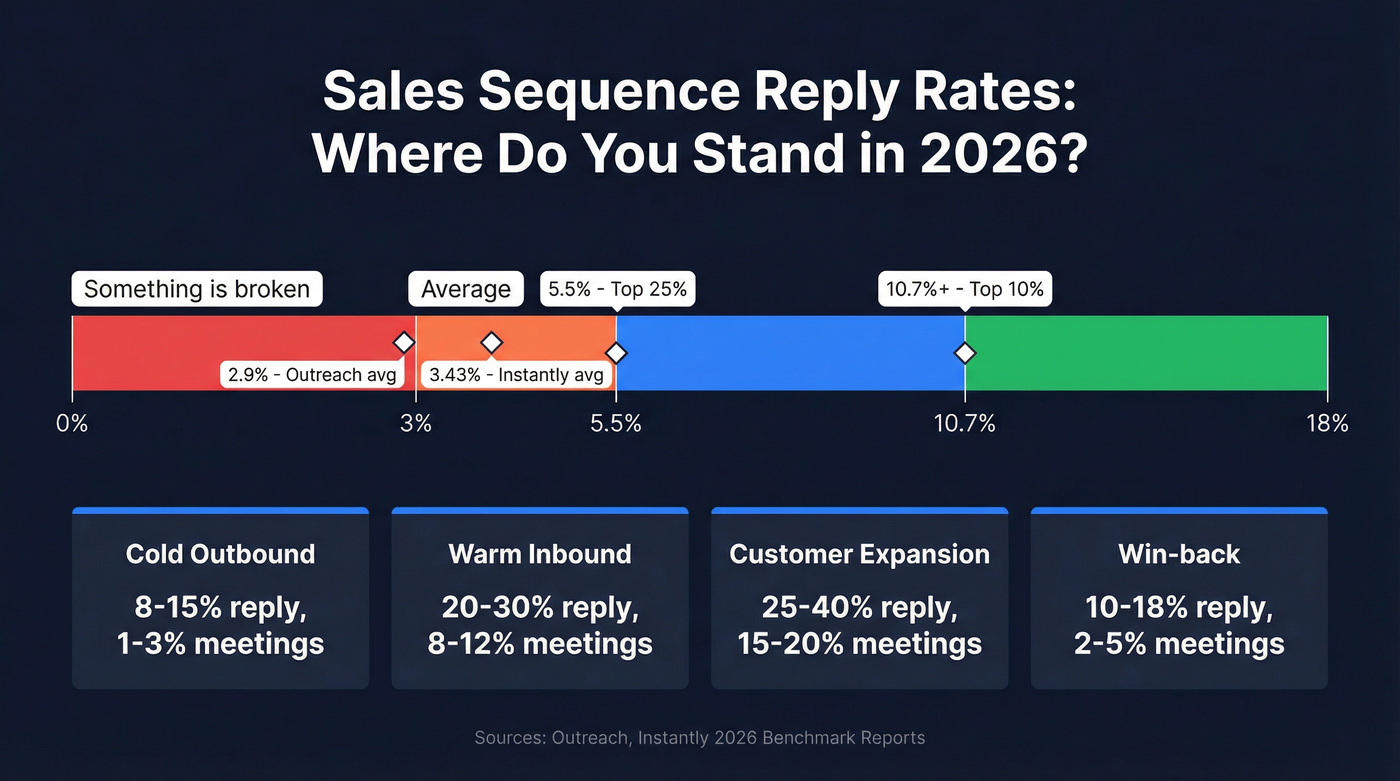
| Metric | Outreach | Instantly |
|---|---|---|
| Avg reply rate | 2.9% | 3.43% |
| Top 10% reply rate | - | 10.7%+ |
| Top 25% reply rate | - | 5.5%+ |
| Avg open rate | 27.2% | - |
| Avg bounce rate | 2.8% | - |
And here's what those numbers look like by sequence type, per Outreach's benchmarks:
| Sequence Type | Reply Rate | Meeting Rate |
|---|---|---|
| Cold outbound | 8-15% | 1-3% |
| Warm inbound | 20-30% | 8-12% |
| Customer expansion | 25-40% | 15-20% |
| Win-back / nurture | 10-18% | 2-5% |
Open rates are increasingly unreliable - Apple Mail Privacy Protection inflates them by 10-15+ percentage points. Reply rate is the metric that matters. If your cold outbound reply rate is below 3%, don't rewrite your subject lines yet. Check your bounce rate first. The benchmark is 2.8%; if you're above 5%, your list quality is the bottleneck.
The gap between average (3.43%) and top-decile (10.7%+) performers is massive, and it isn't explained by better copywriting alone. It's explained by better targeting, cleaner data, and multi-channel execution.
Why Multi-Channel Wins
Email-only sequences are leaving meetings on the table.
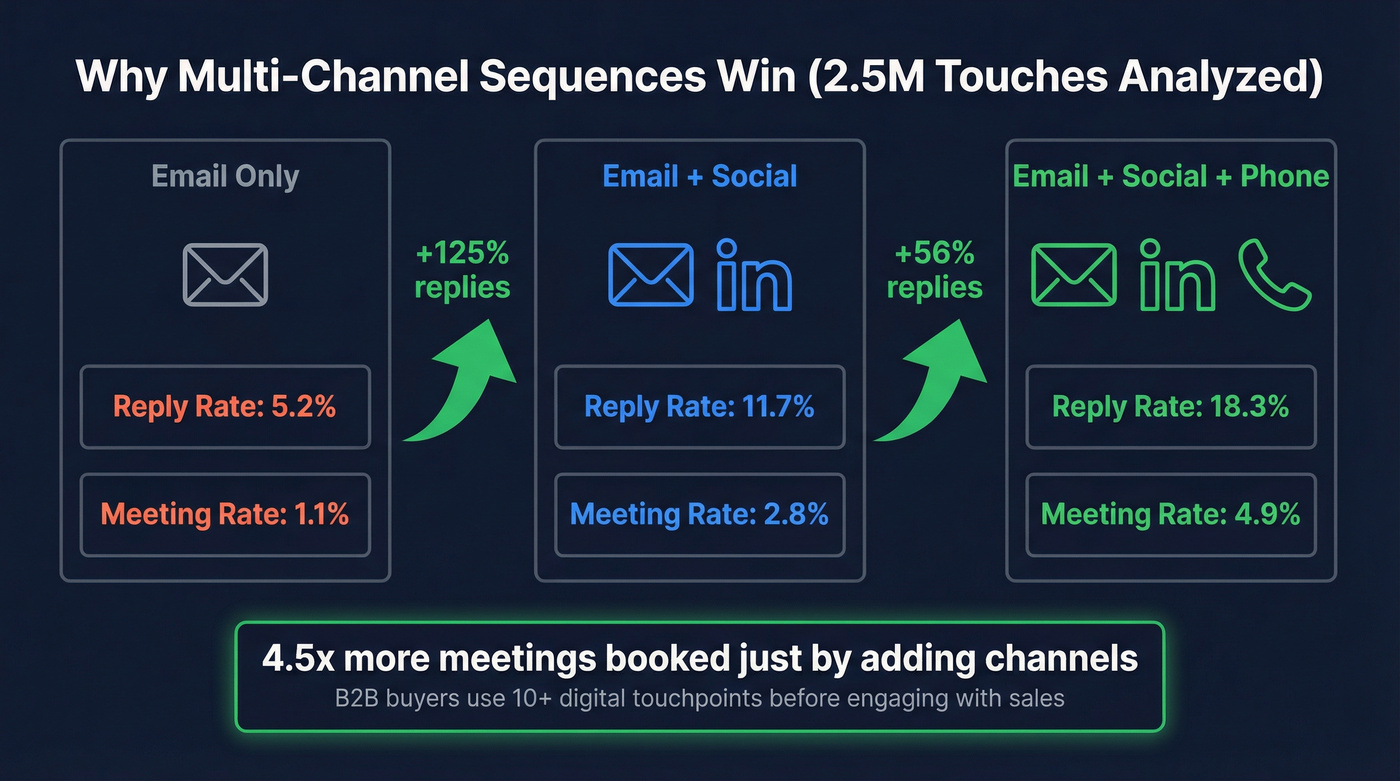
That 2.5 million-touch analysis breaks it down cleanly: email-only sequences produce a 5.2% reply rate and 1.1% meeting booking rate. Add social touches and reply rates jump to 11.7% - a 125% increase. Layer in phone calls and you hit 18.3% reply rates with 4.9% meeting bookings. That's a 4.5x improvement in meetings booked just by adding channels.
B2B buyers use 10+ digital touchpoints before engaging with sales. Coordinated outreach across email, phone, and social yields up to 250% higher conversion rates than single-channel approaches. This isn't a nice-to-have - it's table stakes for competitive outbound in 2026.
One tactic worth stealing: the "triple tap." Hit a prospect across three channels within a 24-hour window - an email in the morning, a social connection in the afternoon, a phone call the next morning. The compressed multi-channel burst creates a sense of presence that a drip-fed email sequence never will. It's aggressive, so reserve it for your highest-value accounts.
This doesn't mean every sequence needs to be a 14-step, three-channel production. But if you're running email-only and wondering why reply rates are stuck at 3%, the answer isn't another A/B test on your opening line. It's adding a phone call on Day 5.
How to Build a Sales Sequence
Step 1: Define Your ICP and Trigger
Every effective sequence starts with a reason to reach out. A trigger event - new funding round, job change, tech adoption, hiring surge - gives you a reason beyond "I found your name in a database." Without a trigger, you're just another cold email. With one, you're relevant.
Step 2: Source and Verify Contacts
This is where most teams cut corners and pay for it later. Build and verify your prospect list before loading it into your sequencer. A 30% bounce rate doesn't just kill that campaign - it damages your sender reputation for every campaign after it.
Step 3: Design Your Cadence
The sweet spot is 4-7 touchpoints for most sequences. Under 4 gives up too early - 58% of replies come from step 1, meaning 42% come from follow-ups. Cut your sequence short and you lose nearly half your replies. For aggressive cold outbound, 10-14 touches over 30 days works well, using multi-channel to "buy" more touches without fatiguing the prospect on any single channel.
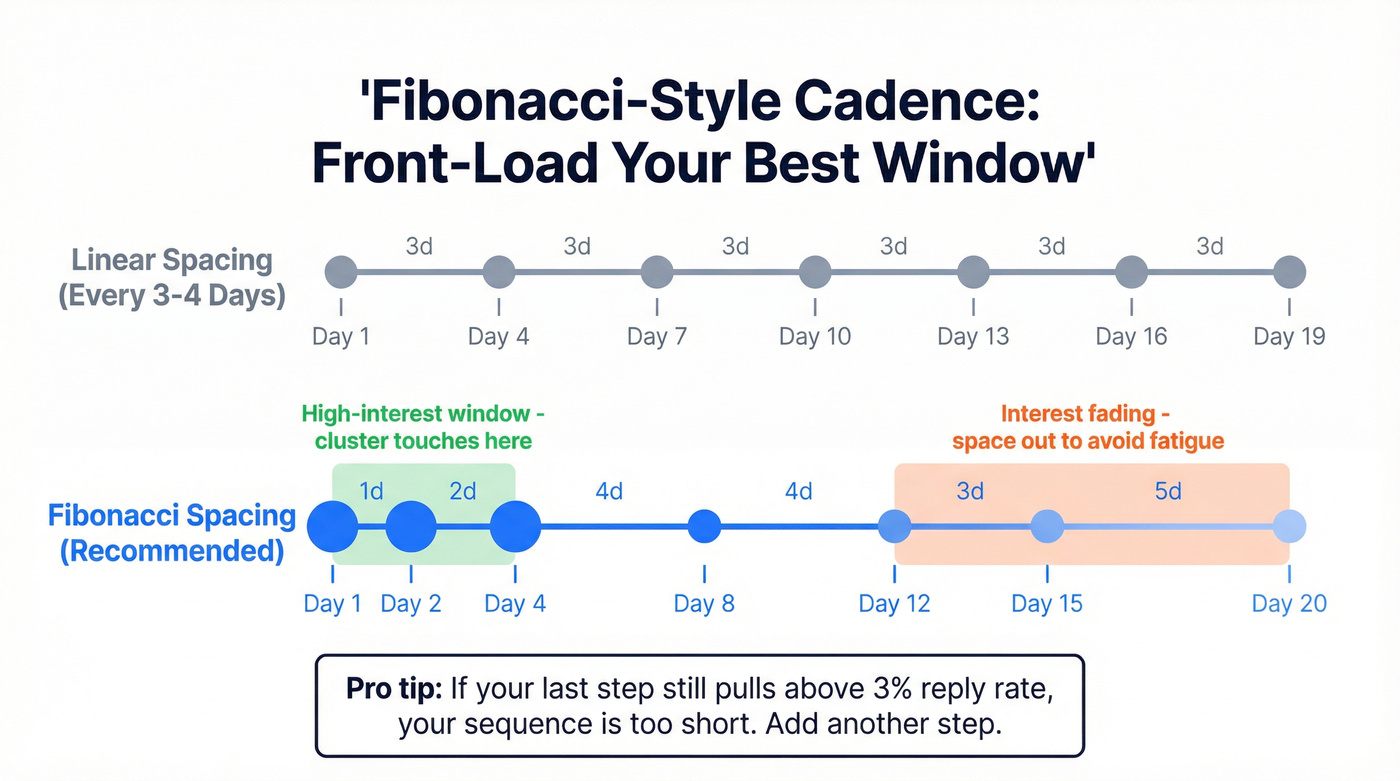
A useful diagnostic: if your last step still pulls a reply rate above 3%, the sequence is too short. Add another step.
An alternative to linear spacing is the Fibonacci-style cadence: Days 1, 2, 4, 8, 12, 15, 20. Touches cluster early when interest is highest, then space out as urgency fades. This front-loads your best window without burning the prospect out.
Step 4: Write Your Messaging
Keep emails under 80 words. The best performers consistently write shorter, not longer. Sell one thing at a time - one problem, one theme per set of touches. When you switch problems mid-sequence, change the subject line too. Your "bubble-up" follow-ups should reply in-thread to the original email and stay short. "Any thoughts on this?" outperforms a three-paragraph recap every time.
Step 5: Set Channel Mix and Spacing
Space touches 3-4 days apart. Tuesday and Wednesday consistently show the highest reply rates, with Wednesday edging out Tuesday in 2026 data. Monday works for launching new sequences. Avoid Friday - auto-reply rates spike and real engagement drops.
Step 6: A/B Test Weekly
Not monthly. Not quarterly. Weekly. The top 10% of senders iterate constantly. Test one variable at a time - subject line, opening line, CTA, send time - and let the data compound.
One warning: watch for what we call "Sequence Purgatory." Too many manual steps can bottleneck reps who can't keep up with the task queue. A manual email task might seem like a good idea for personalization, but if prospects aren't advancing because reps are 200 tasks behind, automate what you can and reduce manual steps to the ones that actually move the needle.

A 34% bounce rate doesn't just kill one sequence - it flags your domain for every campaign after. Prospeo's 5-step verification delivers 98% email accuracy, dropping bounce rates under 4%. Teams using Prospeo book 26% more meetings than ZoomInfo and 35% more than Apollo.
Verify your list before you sequence it. Start free with 75 emails.
Templates That Actually Work
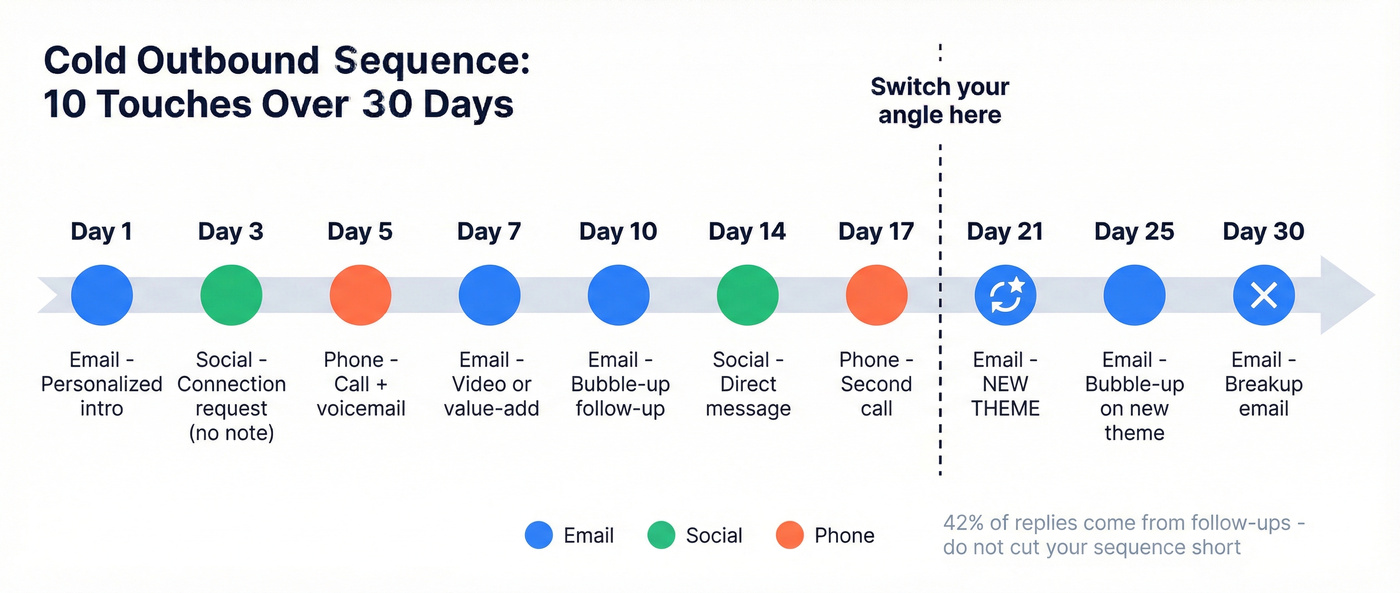
Cold Outbound (10-14 Touches / 30 Days)
This is the workhorse:
| Day | Channel | Action |
|---|---|---|
| 1 | Personalized intro (one problem) | |
| 3 | Social | Connection request (blank - no note) |
| 5 | Phone | Call + voicemail |
| 7 | Video or value-add email | |
| 10 | Bubble-up follow-up (reply in-thread) | |
| 14 | Social | Direct message |
| 17 | Phone | Second call attempt |
| 21 | New theme (different problem) | |
| 25 | Bubble-up on new theme | |
| 30 | Breakup email |
Change your theme and subject line around Day 21. If the first problem didn't resonate, try a different angle entirely. Blank connection requests on social tend to outperform notes - notes trigger "sales alarm" and reduce acceptance rates.
Warm Inbound (5-7 Touches / 14 Days)
Faster cadence, higher urgency. These prospects already raised their hand.
| Day | Channel | Action |
|---|---|---|
| 0 | Recap within 1 hour of form fill/demo | |
| 2 | Value-add (case study or resource) | |
| 4 | Phone | Call to discuss next steps |
| 7 | Follow-up with specific question | |
| 10 | Social | Connect + message |
| 14 | Final check-in |
Expect 20-30% reply rates here. If you're below 20%, your speed-to-lead is probably too slow - that first email within an hour of engagement is critical.
Post-Demo Follow-Up
| Day | Channel | Action |
|---|---|---|
| 0 | Recap + next steps (same day) | |
| 1 | Proposal or pricing confirmation | |
| 5 | Gentle nudge | |
| 10 | Phone | Check-in call |
| 14 | Decision timeline question |
For no-shows, send a follow-up within 15 minutes. Don't wait. The prospect's attention is already gone.
Win-Back / Re-Engagement
| Day | Channel | Action |
|---|---|---|
| 1 | "Things have changed" update | |
| 5 | New case study or feature | |
| 10 | Social | Reconnect message |
| 15 | Direct ask | |
| 21 | Breakup |
Target 10-18% reply rates. Breakup emails work because they trigger loss aversion - the prospect realizes they're about to lose access to you. Keep the tone professional. Overly cheeky breakup lines ("Is this the end of our love story?") damage credibility more than they help.
The Data Problem Nobody Talks About
Here's the thing most guides skip entirely: if your deal size is under $50K, bad data will kill more pipeline than bad copy ever will. The problem with your sequence isn't the sequence. It's the list.
We've seen this pattern repeatedly. An SDR manager pulls up the campaign report - 34% of emails bounced, the sending domain got flagged, and weeks of warming effort went up in smoke. The copy was solid. The cadence was textbook. The data was rotten.
This isn't anecdotal. Meritt saw their bounce rate drop from 35% to under 4% after switching to verified data, and their pipeline tripled from $100K to $300K per week. Snyk had 50 AEs prospecting 4-6 hours a week with bounce rates of 35-40%. After fixing the data layer, bounces dropped below 5% and AE-sourced pipeline jumped 180%.
CRM data goes stale fast. Industry estimates put B2B contact decay at 2-3% per month - meaning within a single quarter, roughly 1 in 10 records in your CRM are outdated. People change jobs, companies get acquired, email formats shift. If you aren't refreshing data regularly, you're sequencing into dead inboxes.
Prospeo's 7-day data refresh cycle and 98% email accuracy address exactly this problem. It integrates natively with Instantly, Lemlist, Smartlead, HubSpot, Salesforce, Outreach, and Salesloft, so verified contacts flow straight into your sequencer. The free tier gives you 75 emails plus 100 Chrome extension credits per month to test, and paid plans run about $0.01 per email.
Multi-channel sequences need verified emails and direct dials to work. Prospeo gives you both - 143M+ verified emails and 125M+ mobile numbers with a 30% pickup rate. Layer in intent data across 15,000 topics to trigger sequences when buyers are actually in-market.
Stop sequencing into the void. Get emails, mobiles, and intent signals in one platform.
Best Tools for the Job
Sales engagement platforms generated $2.3B in revenue last year, yet 67% of sales teams still rely on manual email tracking. You need one good sequencer and one source of clean data - not ten tools. Skip the enterprise platforms if you're a 5-person team. You shouldn't need a procurement process to send follow-ups.
| Tool | Best For | Starting Price | Notes |
|---|---|---|---|
| Prospeo | Data + verification | Free / ~$0.01/email | 98% accuracy, 7-day refresh |
| Apollo.io | Free-tier + database | Free / $49/user/mo | 275M contacts + sequencing |
| Instantly | Affordable cold email | $30/mo | Top 10% hit 10.7%+ reply |
| HubSpot Sales Hub | HubSpot ecosystem | $50/user/mo | Auto-stops on reply/book |
| Outreach | Enterprise SDR teams | ~$15-60K+/yr | Needs RevOps support |
| Salesloft | Enterprise alternative | ~$15-60K+/yr | Comparable to Outreach |
| Lemlist | Personalization | $55/user/mo | Image/video personalization |
| Reply.io | Multi-channel | $60-99/mo | Email + social + calls |
| Mixmax | Gmail-native teams | $29/user/mo | Lightweight, simple |
| La Growth Machine | Multi-channel EU | EUR50/mo per identity | Social-heavy sequences |
| Klenty | Mid-market | $50/user/mo | Solid mid-tier option |
| Salesforce Sales Engagement | Salesforce-native | $50/user/mo | For committed SF shops |
Apollo.io is the obvious starting point for most SMB teams. A 275M-contact database with built-in sequencing on a free plan is hard to argue with. The paid tiers ($49-99/user/mo) unlock more credits and features, but even the free plan lets you test the data quality. Where Apollo falls short is email accuracy at scale - bounce rates climb when you're pulling large lists without secondary verification. The consensus on r/sales is that Apollo's data is "good enough to start, not good enough to scale," which tracks with our experience.
Instantly is the budget king for cold email volume. It's primarily email-first, so teams that need calling and social tasks usually pair it with other tools. At $30/mo with solid deliverability infrastructure, it's the right tool for solo founders and small teams running email-only outbound.
HubSpot Sales Hub makes sense if you're already in the HubSpot ecosystem. Sequences stop automatically when a contact replies or books a meeting, which prevents the embarrassing "just following up" email that arrives after someone already said yes. Think of it as a CRM add-on rather than a standalone sequencer.
For Outreach and Salesloft, expect $15-60K+ per year and a real implementation process. They're built for 20+ seat SDR teams with dedicated RevOps. If that's not you, start with Apollo or Instantly and upgrade only when you outgrow those platforms.
Tools like Clay can enrich and route prospect data before it hits your sequencer, making it a useful addition when you need dynamic personalization at scale. It doesn't replace your sequencing tool, but it strengthens the data layer feeding into it.
Sequence Sharing and Organization
One underrated lever for improving outbound performance is making your top-performing sequences visible and replicable across the team. When one rep's sequence is booking 3x more meetings, the rest of the team shouldn't have to reverse-engineer why.
Build a shared library organized by persona, vertical, and use case. Tag each sequence with its reply rate and meeting rate so reps can quickly identify what's working. Name sequences consistently - something like "Cold_VP-Sales_SaaS_Q1-2026" - so they're searchable and sortable. Archive underperformers monthly. Without this discipline, reps end up with dozens of stale sequences cluttering their workspace, and new hires have no idea which ones to use.
AI in Sequences - What's Real in 2026
Gartner predicts that 40% of enterprise applications will feature AI agents by end of 2026, up from less than 5% in 2025. In practice, that's showing up in three ways: predictive send-time optimization, auto-prioritization of hot prospects based on engagement signals, and conversation intelligence that surfaces which messaging actually books meetings.
What's hype? Fully autonomous AI SDRs that write, send, and close without human input. We're not there, and the teams betting on it are burning budget. What's useful is AI-assisted optimization within human-designed sequences - flagging when a step is underperforming, auto-completing manual tasks that create Sequence Purgatory, and suggesting message variants based on what's working across the team.
In our experience, AI-assisted optimization improves a well-built sequence by 10-20%. That's real value. But it won't fix a bad list or a weak ICP definition.
FAQ
How many touchpoints should a sequence have?
4-7 for most sequences; aggressive cold outbound can stretch to 10-14 over 30 days. Under 4 gives up too early - 42% of replies come from follow-up steps. Beyond 7, diminishing returns kick in unless each touch adds distinct value or switches channels.
What's a good reply rate for cold outbound?
The overall average is 2.9-3.43% across major platforms. A well-targeted cold sequence should aim for 8-15%, and the top 10% of senders hit 10.7%+. If you're below 3%, check your data quality and targeting before rewriting copy.
What's the best day to send cold emails?
Tuesday and Wednesday consistently produce the highest reply rates, with Wednesday edging out Tuesday in 2026 data. Monday works well for launching new sequences. Avoid Friday - auto-reply rates spike and real engagement craters.
How do I stop my sequence emails from bouncing?
Verify every email before it enters your sequencer. Teams using pre-send verification typically see bounce rates drop from 30%+ to under 4%, protecting sender reputation and deliverability. At $0.01 per email, it's the single highest-leverage fix for underperforming outbound.
The throughline of everything above is simple: sales sequencing is a system, and every system is only as good as its weakest input. For most teams, that weak input isn't the copy, the cadence, or the tool. It's the data. Fix that first, and the rest compounds.