

The Sales Workflow Template That Actually Works
Monday morning pipeline call. One rep says "qualified" means they had a chat. Another says it means budget's confirmed. Half the deals have no next step, and your forecast is basically fan fiction.
A solid sales workflow template fixes this. 84% of reps missed quota last year, and 80% of B2B interactions are now digital - that Gartner projection is the baseline, not the future. Your workflow has to run clean even when nobody's in the room.
Most "templates" floating around are just signup gates for tools you don't need yet. Here's the actual template.
What a Sales Workflow Template Is
Your process is the philosophy - how you sell. Your pipeline is the set of stages you report on, where deals sit. Your workflow is the execution layer: the repeatable tasks, triggers, owners, and handoffs that move a lead from "new" to "closed" without relying on tribal knowledge.
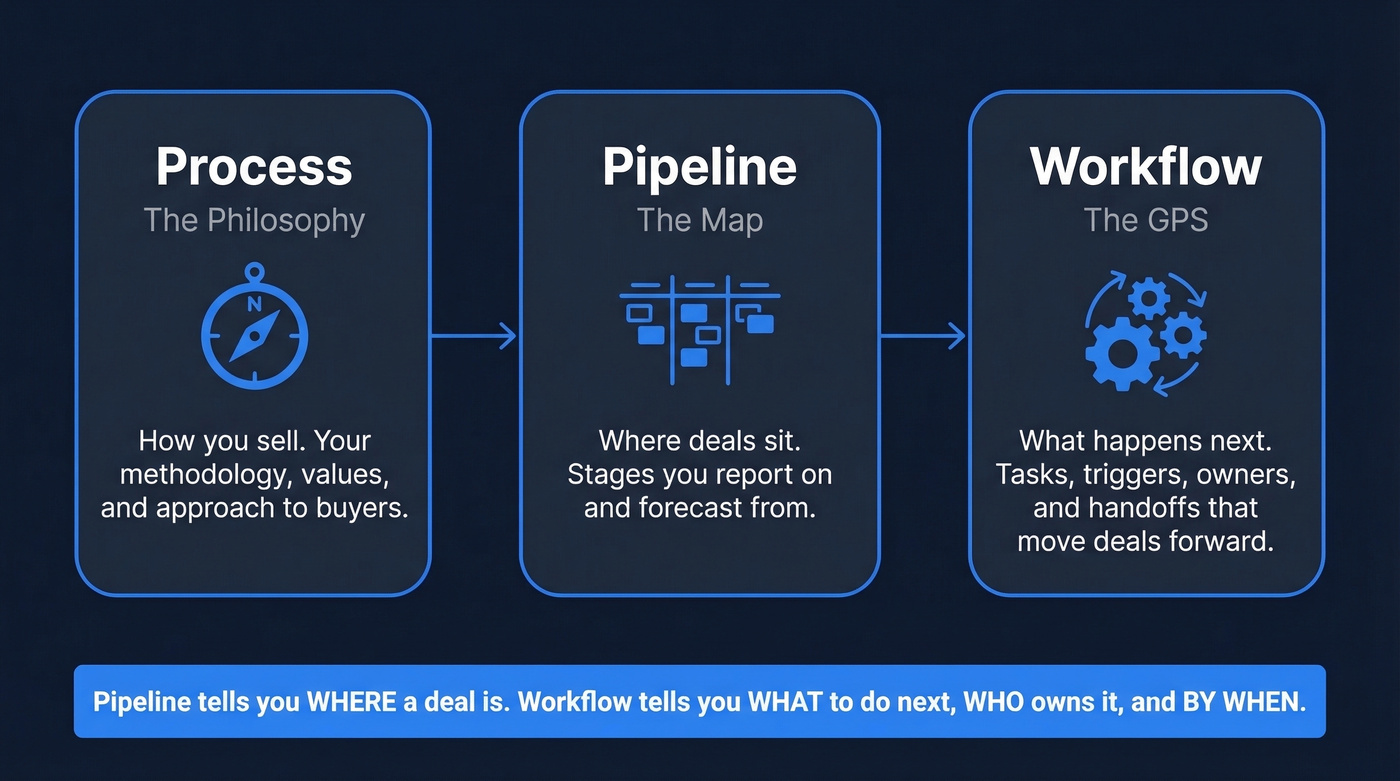
Pipeline is the map. Workflow is the GPS voice telling reps exactly where to turn.
The 12 Fields Every Template Needs
If your template doesn't force "what's next?" and "by when?", it's a spreadsheet-shaped comfort blanket.
| Field | Why it matters |
|---|---|
| Owner | Single-threaded accountability prevents "shared" deals dying quietly. |
| Stage | Enables forecasting, reporting, and stage-based automation. |
| Next step | Forces momentum; eliminates "stuck" deals with no action. |
| Next step date | Creates an SLA so "next step" isn't "sometime." |
| Last touch | Stops reps from ghosting accounts for weeks. |
| Lead source | Shows what's actually producing pipeline, not vibes. |
| ICP fit | Separates "could buy" from "should buy" early. |
| Deal amount | Drives prioritization and weighted forecasting. |
| Probability | Makes forecast math explicit instead of implicit optimism. |
| Close date | Gives you a timebox and exposes stalled deals fast. |
| Stakeholders | Multi-threading becomes visible, not accidental. |
| Risks | Captures deal killers early - legal, security, champion risk. |
Grab the free Google Sheets template with all 12 fields pre-built, stage definitions, and example rows. Customize the stages below to match your motion, connect Zapier for basic automation, and you're running a real workflow in under an hour.
Stages by Sales Motion
Enterprise and SMB workflows are fundamentally different. Any template that claims to work for both is lying.
SMB Outbound (5 Stages)
SMB deals run 1-3 months with fewer stakeholders. Keep stages simple with aggressive exit criteria so reps don't camp in discovery forever.
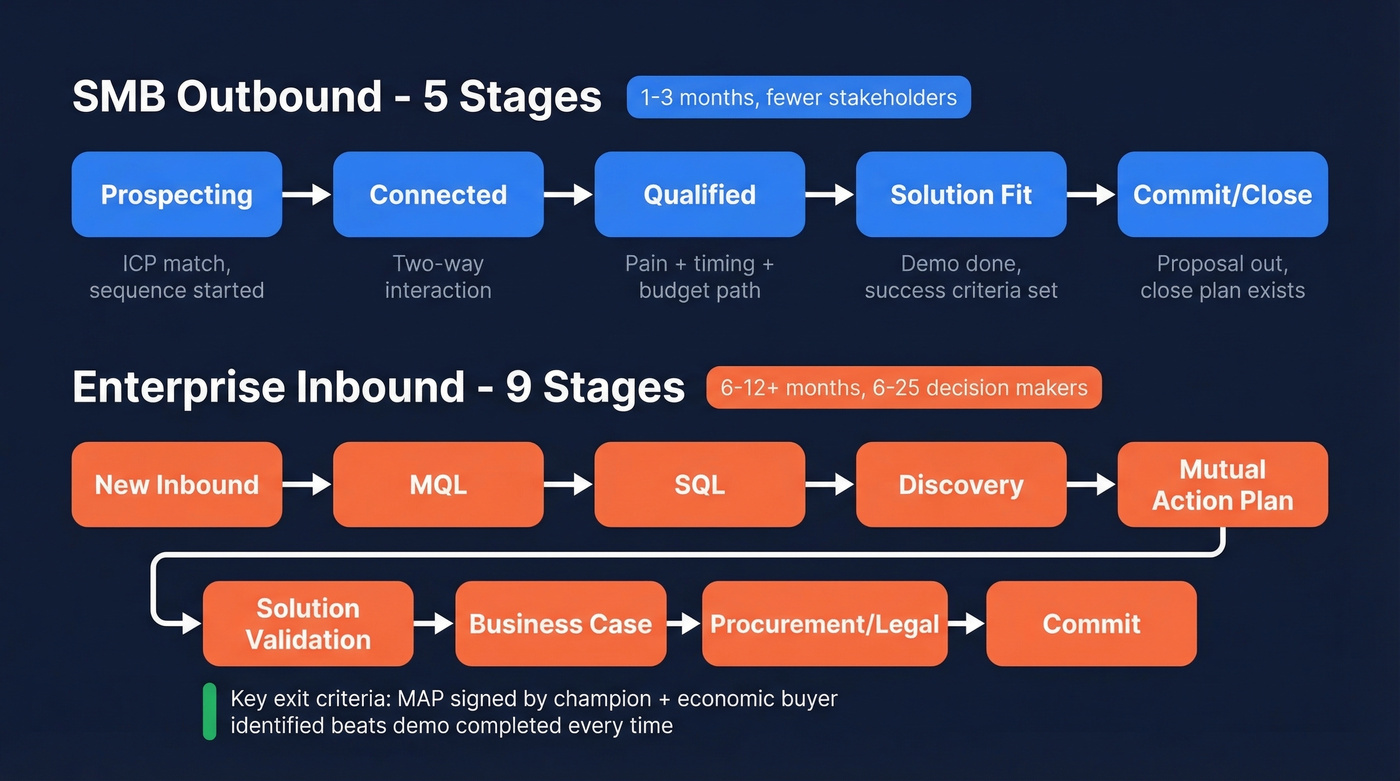
Prospecting (contact + account match ICP, sequence started) → Connected (real two-way interaction) → Qualified (pain + timing + path to budget confirmed) → Solution Fit (demo done, success criteria agreed) → Commit/Close (proposal out, close plan exists).
Five stages. That's it. We've seen teams try to bolt on eight stages for a $15k ACV deal and all it does is create admin work nobody does.
Enterprise Inbound (8+ Stages)
Enterprise cycles run 6-12+ months with 6-25 decision-makers and 15-20+ touchpoints. The average B2B tech sales cycle expanded to 6.5 months in 2025, up from 4.9 months in 2019 - which is exactly why enterprise workflows need more granular stages reflecting real internal milestones, not just "demo done."
A practical 9-stage enterprise inbound pipeline: New inbound (routed + SLA started) → MQL → SQL (meeting booked) → Discovery (problem + stakeholders mapped) → Mutual action plan (MAP with dates + owners) → Solution validation (trial or technical deep dive) → Business case (ROI + budget path confirmed) → Procurement/legal (security, DPA, redlines) → Commit (verbal yes + signature date) → Closed won/lost.
The exit criteria that matter: "MAP signed by champion + economic buyer identified" beats "demo completed" every time. And don't forget workflows beyond the pipeline itself - NDA requests, RFP approvals, and quote sign-offs all deserve their own automated sequences.

Your workflow template means nothing if sequences hit dead inboxes. Prospeo verifies emails in real time with 98% accuracy and refreshes every 7 days - so the "Data verification before sequences" automation above actually works. At $0.01 per email, protecting your pipeline costs less than one bounced reply costs your domain.
Build your workflow on data that doesn't bounce.
Conversion Benchmarks by Stage
Benchmarks don't run your business, but they tell you where your workflow is leaking.
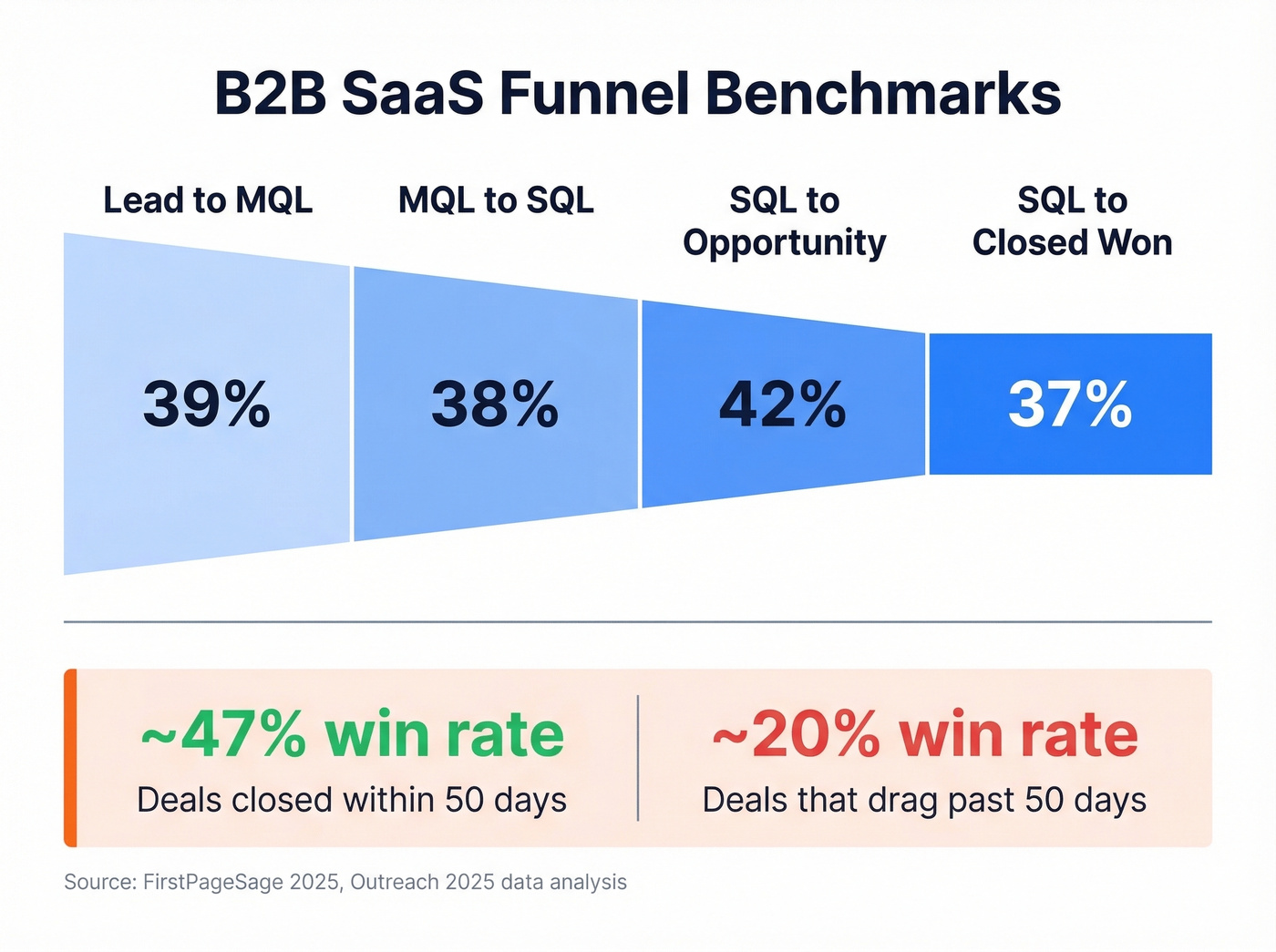
B2B SaaS funnel benchmarks from FirstPageSage:
| Stage conversion | Benchmark |
|---|---|
| Lead → MQL | 39% |
| MQL → SQL | 38% |
| SQL → Opportunity | 42% |
| SQL → Closed Won | 37% |
Now the uncomfortable part: velocity is a conversion lever. Opportunities closed within 50 days win ~47%; after 50 days, win rate drops to ~20% or lower. Your workflow should make "next step date" non-negotiable for this reason alone.
Five Automations to Build First
You don't need a fancy workflow tool. A Google Sheet with the right columns, clear stage definitions, and one automation layer - Zapier, Make, or native CRM workflows - outperforms a lot of the expensive platforms people buy and never configure.
Here's the thing: if your average deal size is under $25k, you almost certainly don't need a ~$150/seat engagement platform. A Sheet plus Zapier plus verified data will get you 80% of the way there at 10% of the cost.
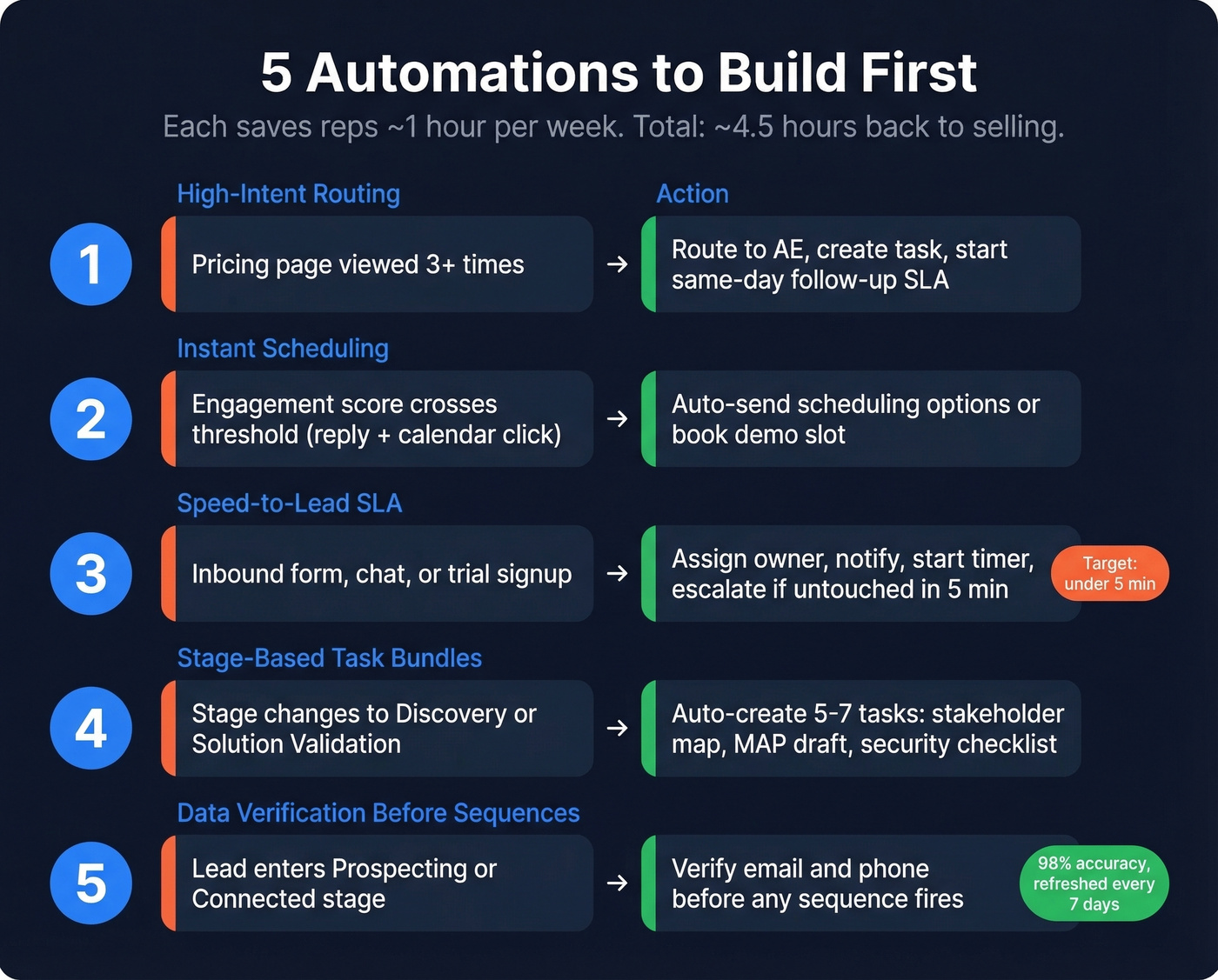
Reps spend only 29% of their time selling. Sales automation templates buy that time back - roughly 4.5 hours saved per rep per week when done right.
1) High-intent routing. Trigger: pricing page viewed 3+ times. Action: route to an AE, create a task, start a same-day follow-up SLA.
2) Instant scheduling on engagement. Trigger: engagement score crosses a threshold like a reply plus a calendar link click. Action: auto-send scheduling options or auto-book a demo slot.
3) Speed-to-lead SLA enforcement. Trigger: inbound form, chat, or trial signup. Action: assign owner, notify, start a timer, escalate if untouched in 5 minutes. The target is under 5 minutes - Default's case study shows OpenPhone cut speed-to-lead 67%, from 2.5 days to under 2 hours.
4) Stage-based task bundles. Trigger: stage changes to Discovery or Solution Validation. Action: auto-create the 5-7 tasks that always happen - stakeholder map, MAP draft, security checklist. (If you want a tighter discovery system, use a discovery questions checklist.)
5) Data verification before sequences. Trigger: lead enters Prospecting or Connected. Action: verify email and phone before any sequence fires. This is the automation that protects everything else. Prospeo verifies emails in real time with 98% accuracy and refreshes records every 7 days, so your sequences reach real inboxes instead of bouncing into spam. If you're troubleshooting bounces, start with email bounce rate and then lock in email deliverability basics.
Mistakes That Kill Sales Workflows
Most workflow failures aren't tool problems. They're design problems.
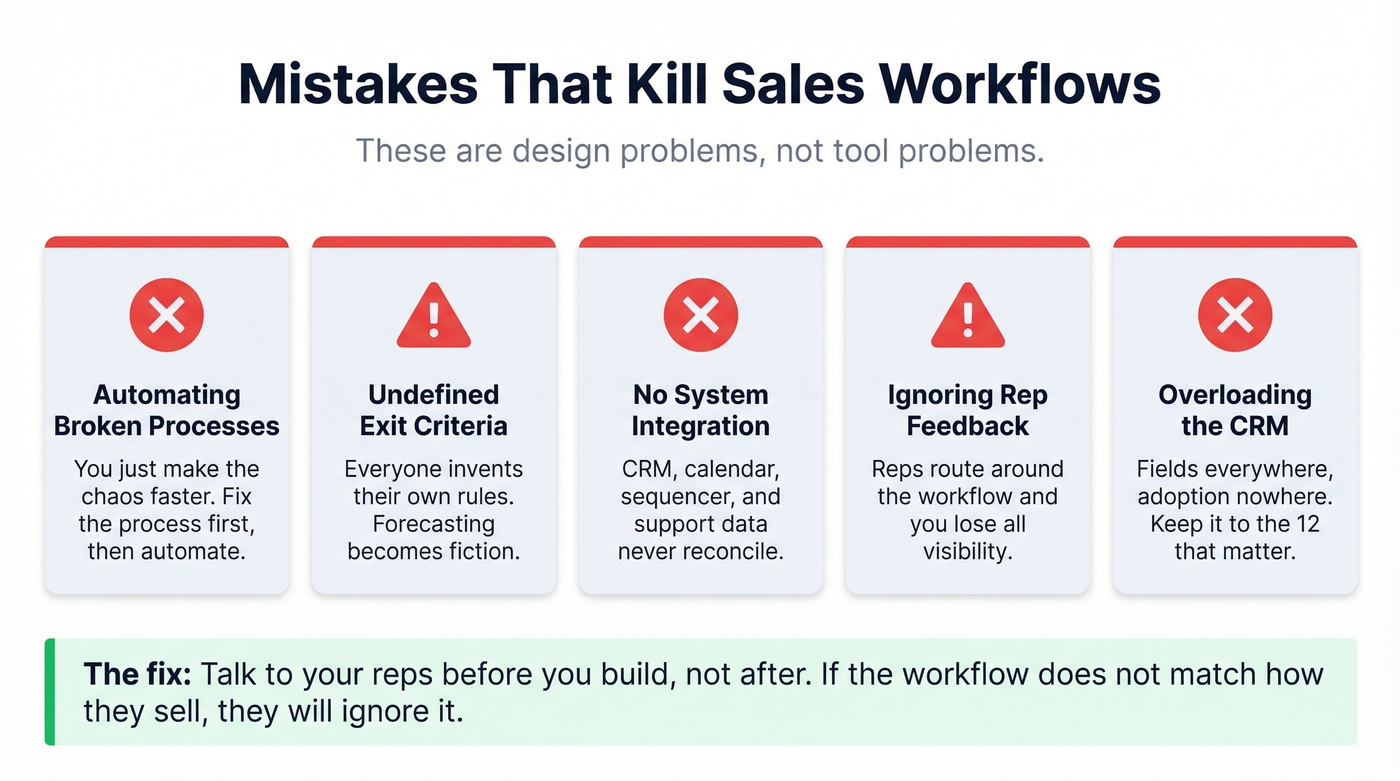
- Automating broken processes - you just make the chaos faster.
- Undefined stage exit criteria - everyone invents their own, and forecasting becomes fiction. (This is one of the most common sales pipeline challenges.)
- No integration between systems - CRM, calendar, sequencer, and support data never reconcile.
- Ignoring rep feedback - reps route around the workflow and you lose visibility.
- Overloading the CRM - fields everywhere, adoption nowhere. If you're rebuilding your stack, start with examples of a CRM and pick what you'll actually maintain.
Let's be honest: we've watched teams spend six months configuring a platform only to discover reps were logging deals in a personal spreadsheet the whole time. If the workflow doesn't match how your reps actually sell, they'll ignore it. Talk to your reps before you build, not after.
Tools to Power Your Workflow
Tools don't fix a bad workflow, but the right stack makes a good one stick. We've tested most of these across different team sizes, and the biggest variable isn't the tool - it's whether anyone actually configures it properly.
| Tool | Category | Starting price | One-line take |
|---|---|---|---|
| Prospeo | Data + verification | Free; ~$0.01/email | 98% email accuracy with 7-day refresh. Built for deliverability. |
| HubSpot | CRM + workflows | Free; paid from ~$20/user/mo | SMB default with solid automation. |
| Salesforce | CRM | ~$25/user/mo and up | Enterprise standard; needs admin investment. |
| Outreach | Sales engagement | ~$100-150/user/mo | Deep sequencing and analytics. |
| Salesloft | Sales engagement | ~$100/user/mo | Outreach alternative; team-friendly UI. |
| Google Sheets | Spreadsheet | Free | Fastest template to deploy. |
| monday.com | Work mgmt / CRM-lite | ~$39/mo | Lightweight pipelines and ops tracking. |
One integration worth knowing: HubSpot can enroll Salesforce contacts directly into workflows via its native integration - use HubSpot Embed, not the deprecated Visualforce module.
Skip Outreach or Salesloft if your team is under 5 reps and your ACV is below $20k. The ROI math just doesn't work at that scale. Start with a Sheet, add a CRM when you hit 5-10 reps, and layer engagement tooling when deal complexity demands it. If you're evaluating tooling, compare sales funnel automation tools and sales forecasting tools before you buy another platform.
Your workflow is only as good as your contact data. If emails bounce and numbers are dead, your automations "work" but outcomes don't. Prospeo's free tier includes 75 verified emails per month, and paid usage lands around $0.01/email - self-serve, no contracts. For teams that need more fields per record, look at data enrichment services.

Stage-based automations need accurate contact data at every handoff. Prospeo gives you 300M+ profiles with 30+ filters - buyer intent, technographics, job changes, headcount growth - so your ICP fit field isn't guesswork. Teams using Prospeo book 35% more meetings than Apollo users.
Fill every workflow stage with contacts that actually convert.
FAQ
What's the difference between a sales workflow and a sales pipeline?
A pipeline tracks where deals sit - stages for reporting and forecasting. A workflow defines the tasks, triggers, and handoffs that move deals through those stages. Pipelines answer "where is it?" Workflows answer "what happens next, who owns it, and by when?"
Can I run a sales workflow in Google Sheets?
Yes. Use the 12 fields above, define stage exit criteria, and add one automation layer via Zapier or Make for routing and follow-up triggers. In our experience, a simple Sheet plus lightweight automation often beats expensive platforms that never get configured. Most teams under 10 reps don't need more than that.
How do I keep my workflow data accurate over time?
Verify contacts before outreach, refresh records on a regular schedule, and enforce required fields like next step date and last touch. Stale data is the silent killer of every automation you build - the consensus on r/sales is that bad data wastes more rep time than any other single factor.
What's a good free tool for workflow data verification?
Prospeo's free tier gives you 75 verified emails per month with real-time verification. For comparison, Hunter caps free searches at 25/month without enrichment. If you're running real outbound, 75 credits with 50+ data points per contact goes further.