

How to Run Salesforce Cold Calling Without Losing Your Mind
Your SDR just burned through a 200-number call block and connected with six people. Two were wrong numbers. One hung up before the opener landed. The other three went to voicemail. Then the rep spent the next hour - sometimes two - logging those calls back into Salesforce.
That's not a Salesforce cold calling problem. It's an infrastructure problem.
The average rep spends just 28% of their time actually selling. The rest disappears into admin, data cleanup, and dialing numbers that never pick up. If your team has any outbound experience at all, you already know the frustration. Let's break down how to fix it.
The Four-Pillar Outbound Stack
Most teams treat cold calling as a single activity. It's actually four systems that need to work together:
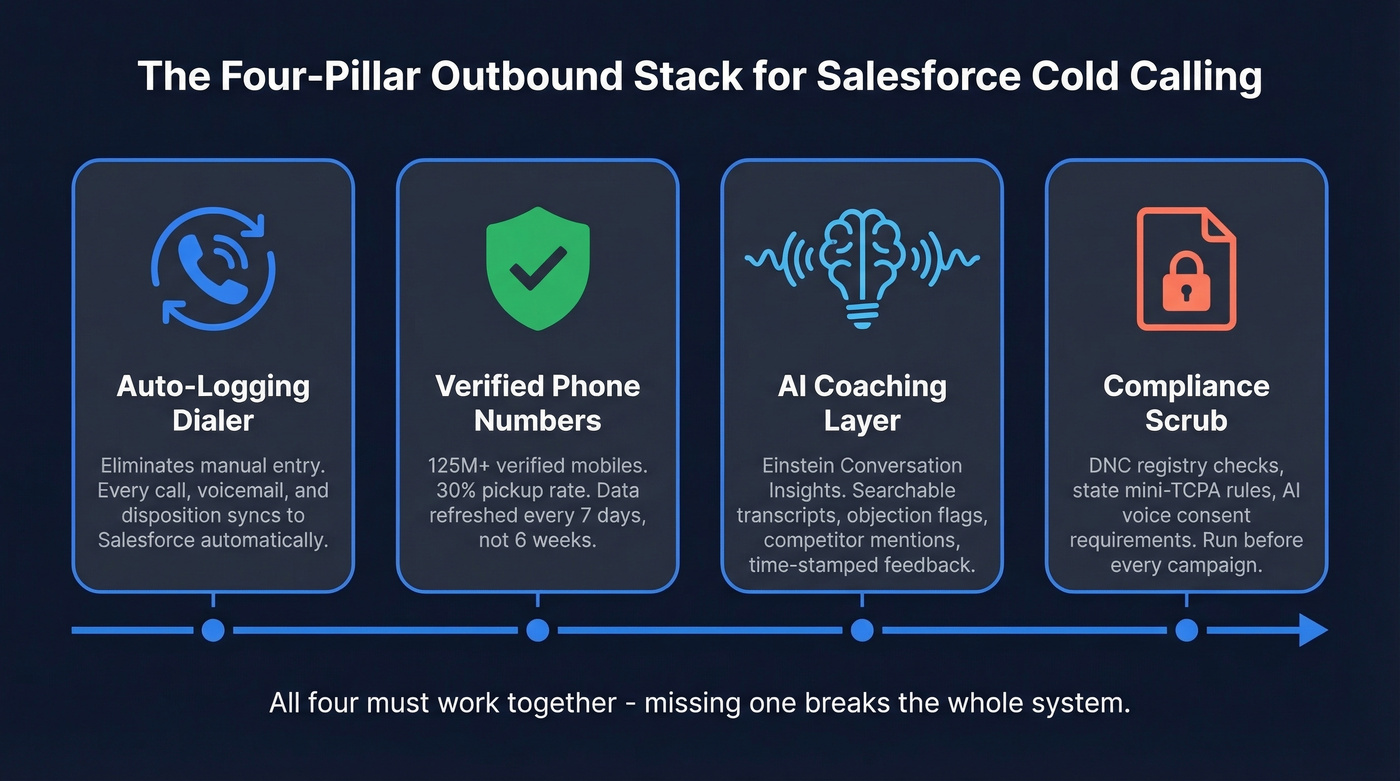
- A dialer that auto-logs calls. No more manual entry after every conversation.
- Verified phone numbers. Prospeo's 125M+ verified mobiles deliver a 30% pickup rate - around 2.4-2.7x what you'll get from ZoomInfo or Apollo. You're dialing lines that actually ring.
- AI coaching. Einstein Conversation Insights turns call recordings into searchable, coachable data.
- A compliance scrub before every campaign. TCPA litigation keeps climbing in 2026. Don't wing it.
Choosing a Dialer for Salesforce
Salesforce Sales Engagement - formerly High Velocity Sales - gives you click-to-dial, cadence-based logging, and basic recording without leaving the platform. It works for small teams running 30-50 calls a day. But if your reps are doing 150+ dials, you need a dedicated power or parallel dialer.
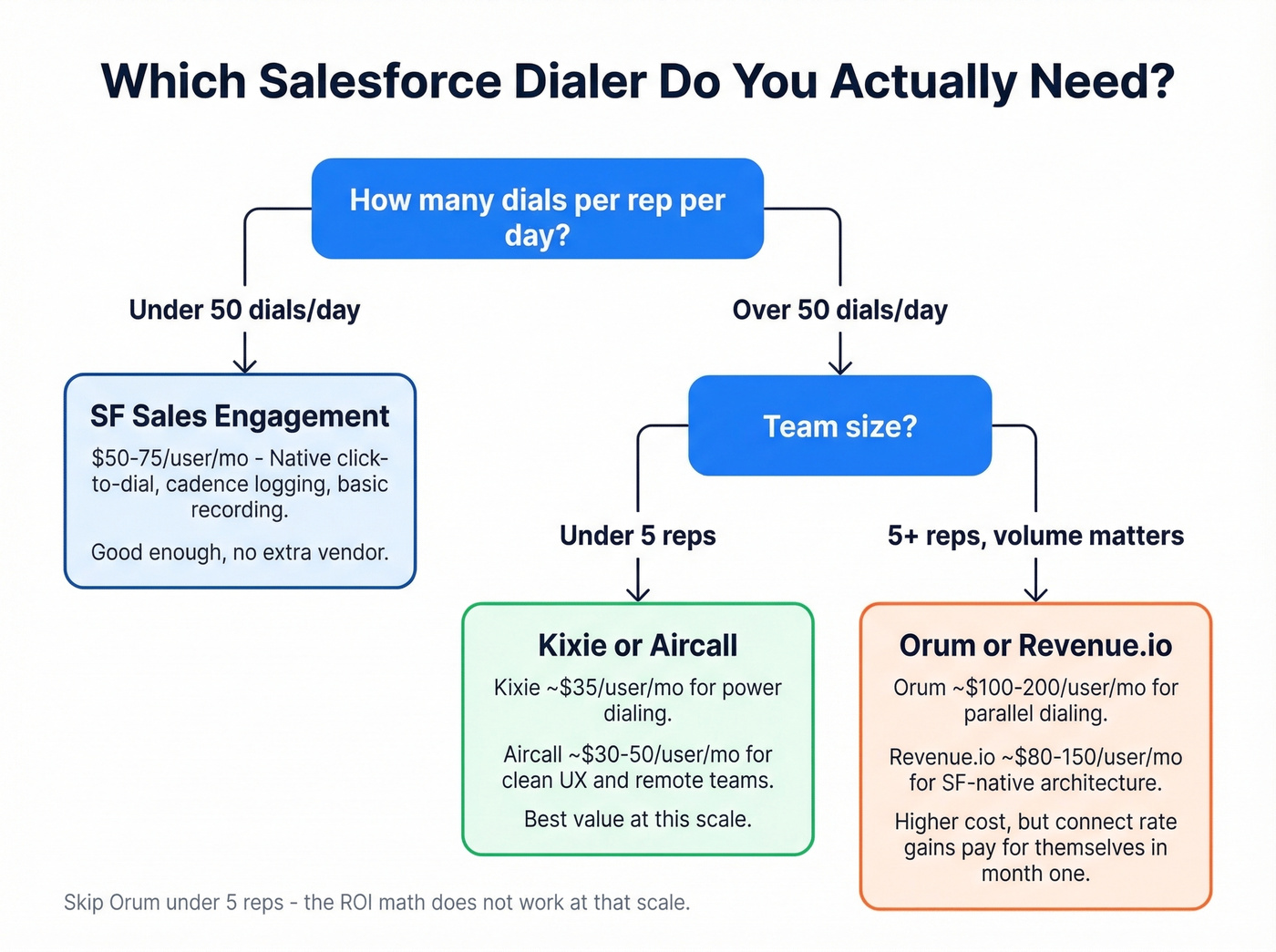
Evaluate four things: click-to-call, automated call logging, screen pops that show the contact record when someone picks up, and dial modes across power, progressive, and parallel. If you're still building your stack, start with a shortlist of SDR tools that integrate cleanly with Salesforce.
| Tool | Best For | Typical Price Range |
|---|---|---|
| SF Sales Engagement | Small teams, native | ~$50-75/user/mo |
| Kixie | Power dialing | ~$35/user/mo |
| Aircall | Clean UX, remote teams | ~$30-50/user/mo |
| Orum | Parallel dialing, volume | ~$100-200/user/mo |
| Revenue.io | SF-native architecture | ~$80-150/user/mo |
We've evaluated dozens of dialers, and the decision tree is simpler than vendors make it sound. Under 50 dials a day per rep? Salesforce's native dialer is enough. Past that threshold, Kixie or Aircall give you the best value. Orum's parallel dialing is the move for teams where connect rate matters more than cost per seat - if you're running a 10-person SDR floor and every percentage point of connect rate translates to pipeline, the higher seat cost pays for itself within the first month.
Skip Orum if your team is under five reps. The ROI math doesn't work at that scale.
Fix Your Phone Data Before You Dial
80% of sales calls go to voicemail, and only 2% result in an appointment. Most teams respond to those numbers by obsessing over scripts. That's backwards.
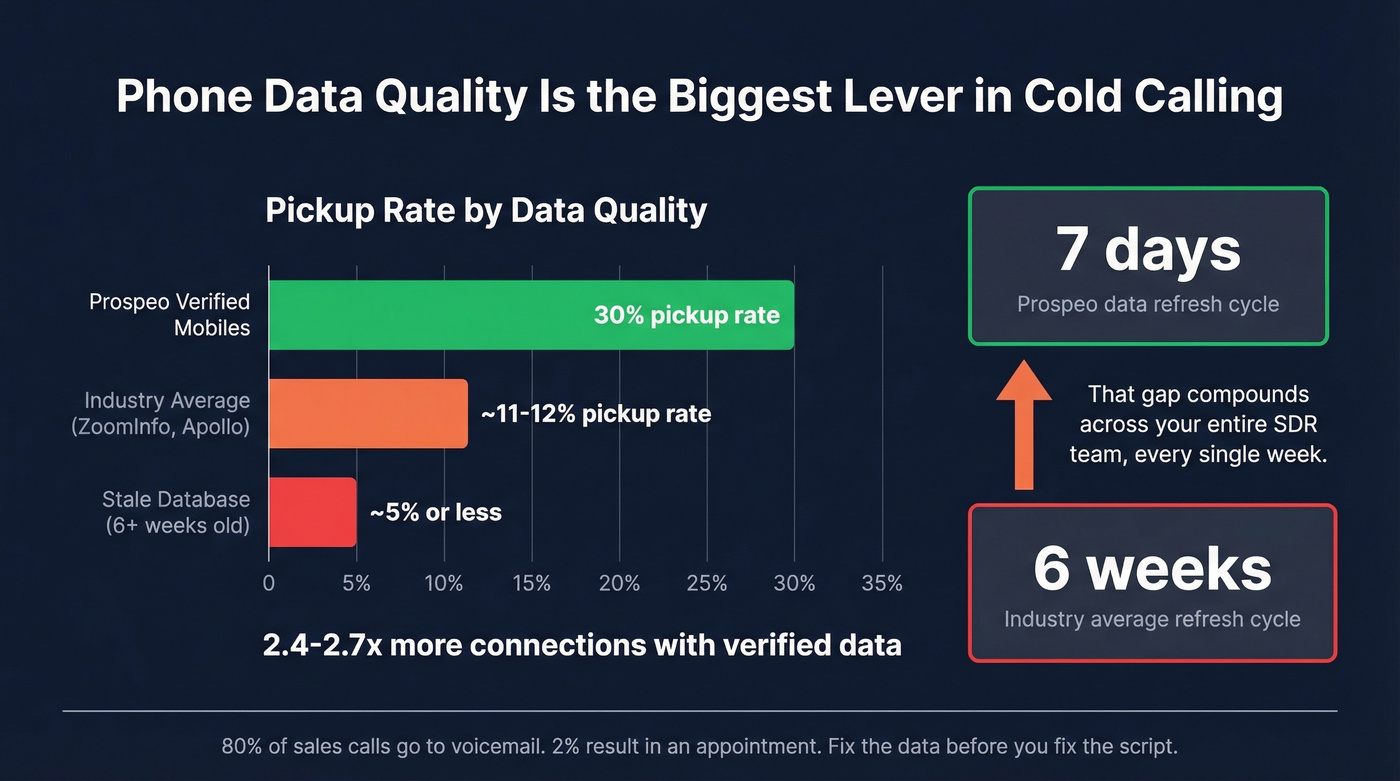
Here's the thing: if your connect rate is below 5%, no script on earth will save your quarter. Fix the phone data first.
Bad phone data is what actually kills outbound programs. Your reps don't know they're dialing disconnected numbers, landlines, or switchboards. They just know the day felt unproductive. We ran a side-by-side test with one of our teams last quarter - same reps, same scripts, same time blocks. The only variable was the phone number source. The batch using Prospeo's verified mobiles connected at 3x the rate of the batch pulled from a legacy database that hadn't been refreshed in weeks. That gap compounds fast when you multiply it across a full SDR team running five days a week.
Prospeo's database refreshes every 7 days while the industry average sits at 6 weeks, so you're not calling someone who changed jobs last month. It integrates natively with Salesforce, meaning verified numbers flow directly into your call queues without a CSV dance. If you're comparing vendors, start with a quick scan of data enrichment services and how they handle refresh cycles.
AI Coaching With Einstein
Think of Einstein Conversation Insights as your team's call tape library - except it's searchable and attached to every Salesforce record. ECI auto-generates transcripts in 36 languages, flags objections, pricing discussions, competitor mentions, and next steps. Managers can leave time-stamped comments on the call player and share a link to a specific moment. You can configure up to 25 keywords per insight across 100 custom categories, which makes tracking competitor mentions trivial.
Use ECI data to build a simple post-call scoring workflow: flag calls where three or more buying signals appeared, route those records to AEs automatically, and review the rest in weekly coaching sessions. Some managers curate hall-of-fame calls - the best conversations from top performers - and use them as onboarding material for new hires. In our experience, new reps who listen to 10-15 real winning calls during their first week ramp noticeably faster than those who only read playbooks.
One gap worth knowing about: ECI is post-call only. There's no live coaching while the rep is on the phone. Reddit threads in r/salesforce consistently flag this limitation. Agentforce is Salesforce's bet on closing that gap, but it's still early. For now, treat ECI as your coaching layer and pair it with a solid pre-call brief.

Your Salesforce cold calling stack is only as good as the phone numbers feeding it. Prospeo delivers 125M+ verified mobile numbers with a 30% pickup rate - 2.4x higher than ZoomInfo or Apollo. Numbers refresh every 7 days and sync natively into Salesforce, so your reps dial lines that actually ring.
Stop burning call blocks on dead numbers. Start connecting.
Balancing Outbound and Inbound
Cold calling is only half the equation. Most mature Salesforce orgs also handle a growing volume of inbound sales calls - prospects responding to content, ads, or referrals. The mistake is treating these as separate workflows.
Configure inbound call routing so reps receive warm leads through the same Salesforce queues they use for outbound. You get a single activity timeline per contact regardless of who initiated the conversation, and reps stop context-switching between two different systems. This is also where sales process optimization pays off fast.
Compliance Checklist for 2026
The regulatory environment isn't slowing down. Here's what keeps you out of trouble:
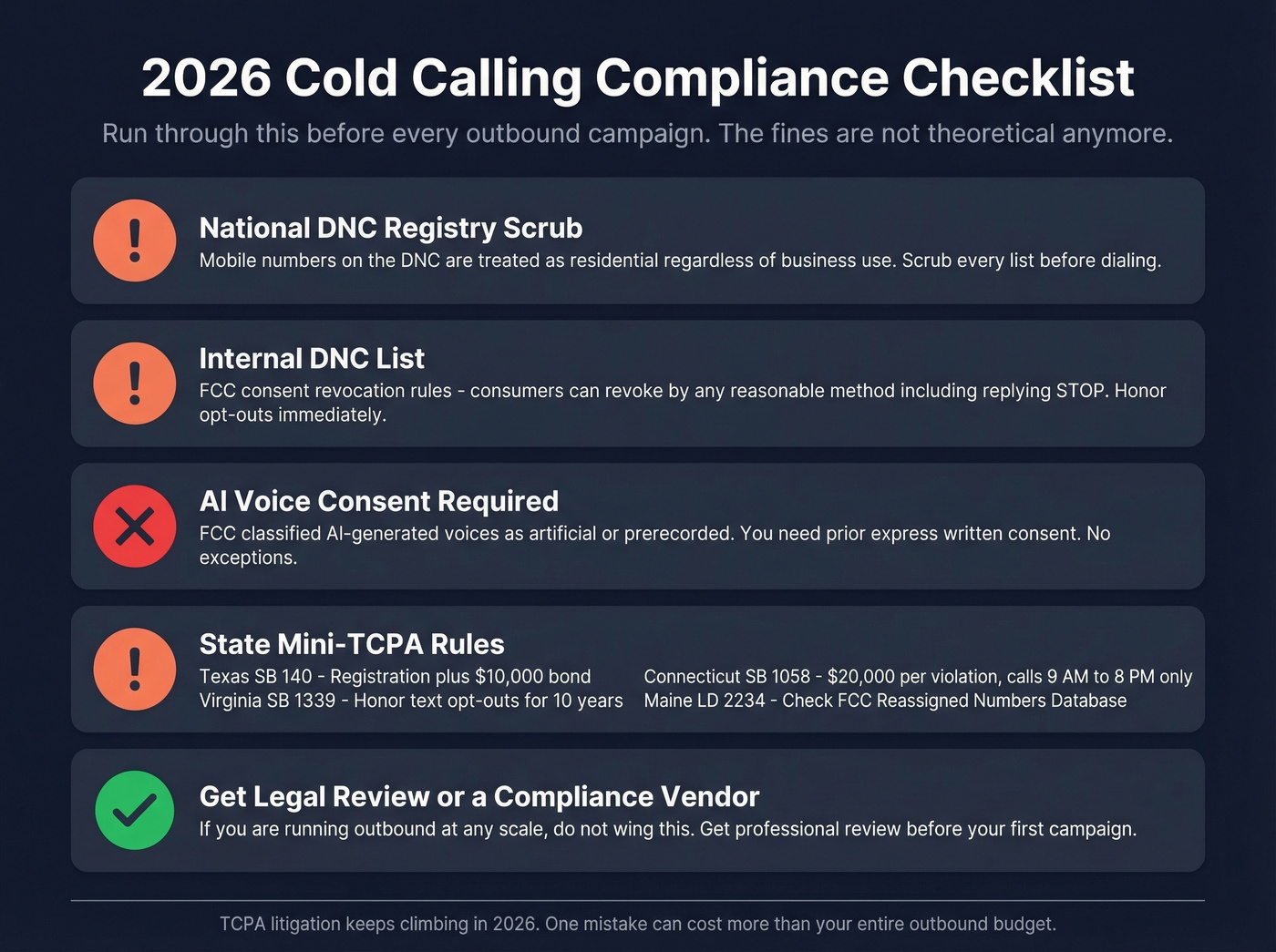
- Scrub every list against the National DNC Registry. Mobile numbers on the DNC are treated as residential regardless of business use.
- Maintain an internal DNC list. The FCC's consent revocation rules let consumers revoke by any reasonable method, including replying "STOP." Honor opt-outs immediately.
- AI voices require prior express written consent. The FCC classified AI-generated voices as "artificial or prerecorded." No exceptions.
- Watch state mini-TCPAs. Texas SB 140 requires registration plus a $10,000 security bond. Virginia SB 1339 mandates honoring text opt-outs for 10 years. Connecticut SB 1058 caps penalties at $20,000 per violation and restricts calling hours to 9 AM-8 PM. Maine LD 2234 requires checking the FCC Reassigned Numbers Database before dialing.
Real talk: if you're running outbound at any scale, get a compliance vendor or legal review before your first campaign. The fines aren't theoretical anymore. If you're considering SMS as a channel, read up on cold texting before you expand.
When to Call + Benchmarks
The data on optimal call timing is surprisingly consistent:
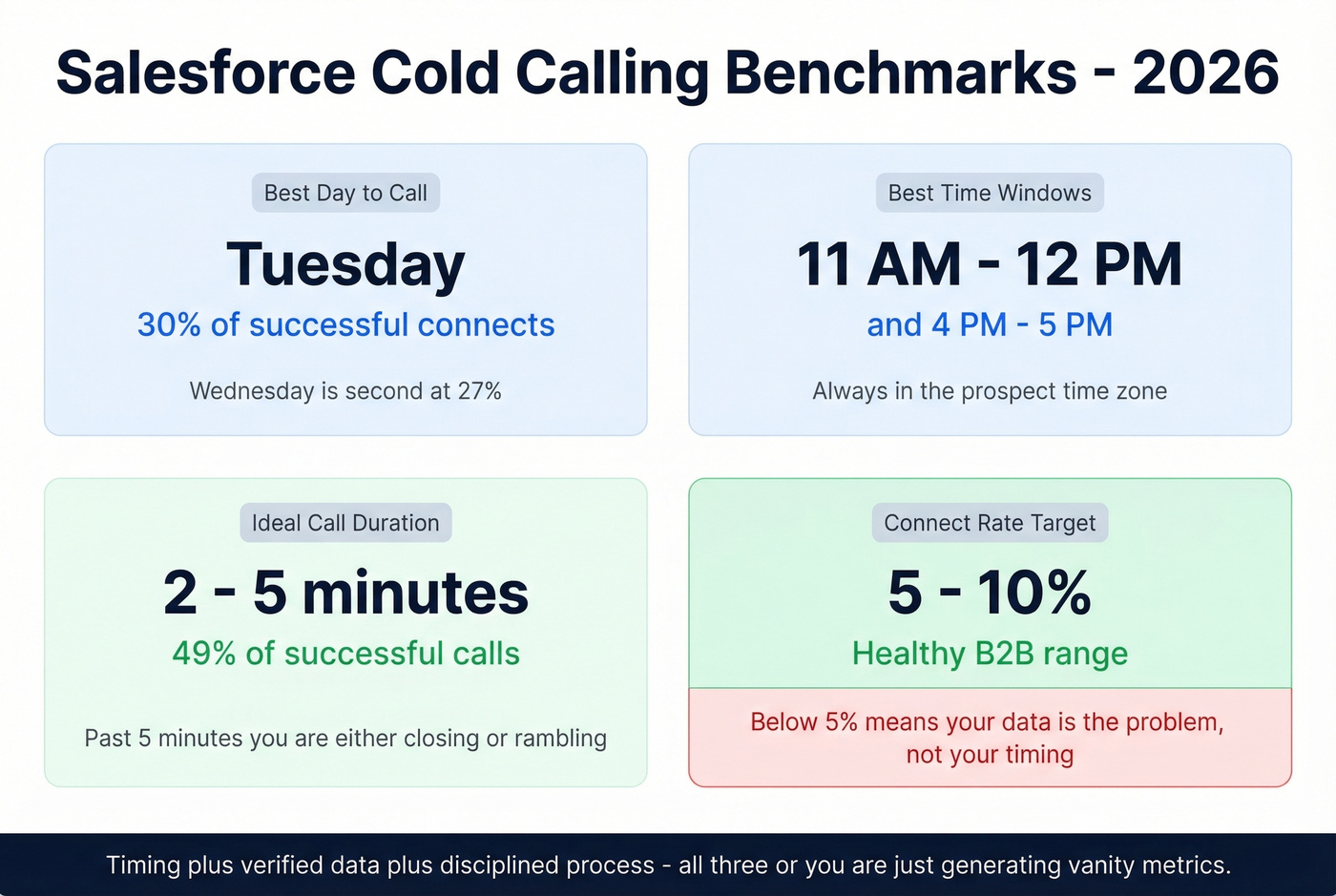
Best day: Tuesday accounts for 30% of successful connects, followed by Wednesday at 27%. Best windows: 11 AM-12 PM and 4-5 PM in the prospect's time zone. Call duration: 49% of successful cold calls last 2-5 minutes - past five minutes, you're either closing or rambling. Connect rate: Expect 5-10% for most B2B teams. Below 5% means your data is the problem, not your timing.
These benchmarks confirm what experienced teams already know: cold calling in Salesforce works when you combine the right timing with verified data and a disciplined process. Without all three, you're just generating activity metrics that make dashboards look busy.
Where Cold Calling Fits in the Sales Process
A common question - especially from newer reps - is which step of selling includes cold calling. It's part of the prospecting stage, the very first phase where you identify and reach out to potential buyers. It sits before qualification, discovery, and demo. Understanding this matters because it sets expectations: the goal of a cold call isn't to close. It's to earn the next conversation. If you want more ways to fill the top of funnel, pull from these sales prospecting techniques.
A Script That Actually Works
Keep it to 30 seconds. One opener, one qualifying question, one ask. Permission-based openers are more reliable at scale because they work regardless of personality:
"Hey [Name], this is [Your Name] with [Company]. I know I'm calling out of the blue - can I get 30 seconds? [Pause.] We help [role/team] solve [specific problem]. Are you seeing that on your end right now? ... Great - would it make sense to grab 15 minutes this week to see if we can help?"
Don't over-engineer this. The permission opener respects the prospect's time, the qualifying question filters fast, and the CTA is low-commitment. Adapt the problem statement to your ICP and move on. If you want to hear what great dials sound like, search for podcast episodes where top SDRs break down real calls - listening to a cold call teardown is one of the fastest ways to sharpen your own approach. If you need tighter positioning in the first 10 seconds, borrow from these sample elevator pitches.
Bad phone data costs your SDR team hours every week - and you're paying for it in missed pipeline. At roughly $0.01 per lead, Prospeo gives you direct dials that are verified within the last 7 days and flow straight into your Salesforce call queues. No CSV uploads, no stale data, no wasted dials.
Fix your phone data before you touch another cold calling script.