

Salesforce Data Cleansing: The Practitioner's Playbook for 2026
You just got tagged in a Slack thread: "Why does this account show up three times?" Two minutes later: "The VP of Ops at Acme left six months ago - why is she still in our sequence?" That's not a data problem. That's org debt - duplicates, broken Flows, unused fields, reports nobody trusts, and a CRM that's slowly becoming a liability instead of an asset.
Salesforce data cleansing goes beyond merging duplicate records. It's the discipline of auditing, standardizing, verifying, and maintaining every object in your org so that your team - and your AI agents - can actually trust what's in the system.
The Phased Workflow (Quick Version)
Bookmark this and come back to it.
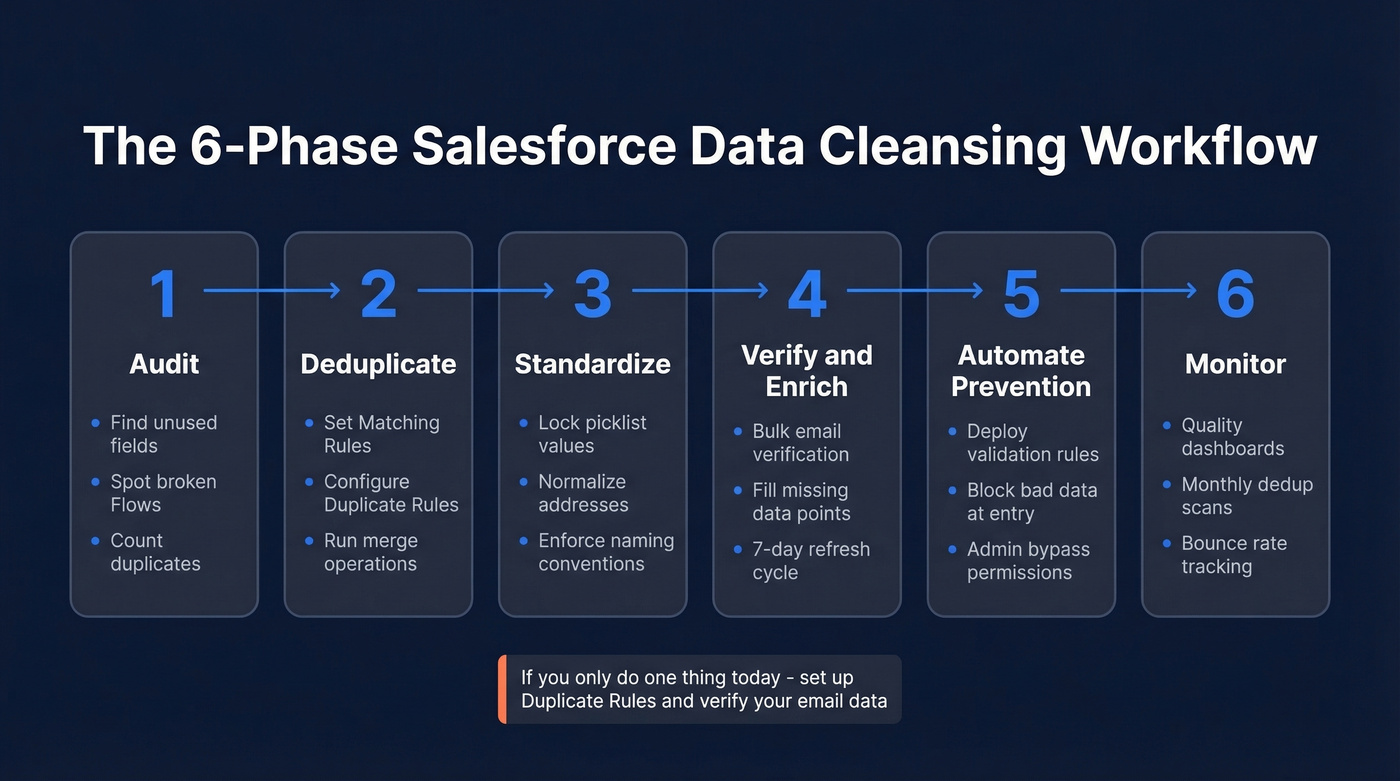
- Audit - Scope the damage: unused fields, broken automations, duplicate records, untrusted reports.
- Deduplicate - Configure Matching Rules, Duplicate Rules, and run merge operations.
- Standardize - Lock down picklist values, naming conventions, address and phone formats.
- Automate Prevention - Deploy validation rules and entry-point controls so bad data stops getting in.
- Monitor - Build dashboards, set quality thresholds, schedule recurring audits.
If you only do one thing today, set up Duplicate Rules and verify your email data. Those two steps eliminate the majority of CRM pain.
Why Clean CRM Data Matters More in 2026
Dirty CRM data has always been expensive. Gartner estimates the cost at $15M per year for the average organization. But in 2026, the stakes are structurally different because of AI agents.
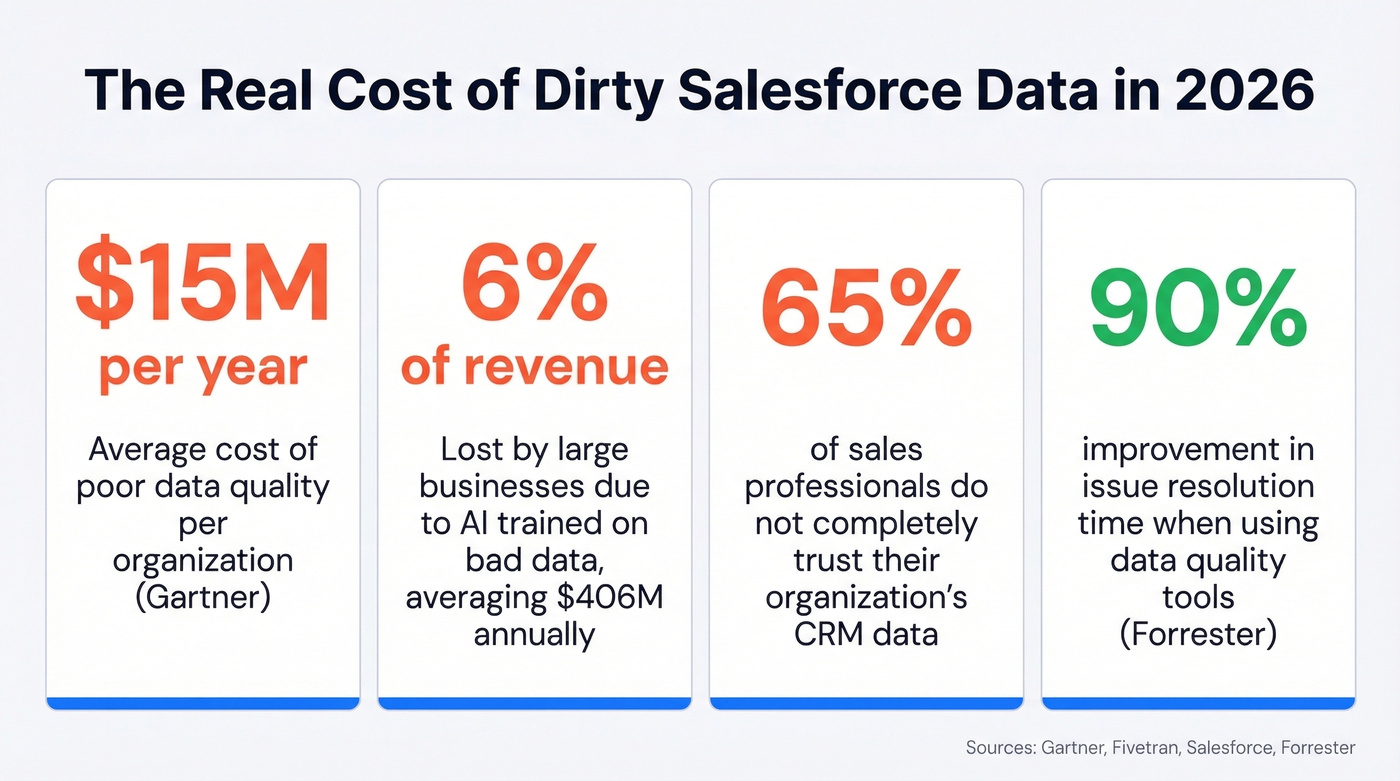
A Fivetran survey cited by Salesforce found that AI trained on inaccurate or incomplete data costs large businesses 6% of revenue - averaging $406M annually. That's not theoretical. If you've deployed Agentforce or any autonomous CRM agent, bad data means agents chasing obsolete leads, misquoting pricing from stale records, and generating forecasts built on garbage. Forrester research backs this up: organizations using data quality tools improved issue resolution time by 90% and saved 5,184 data engineer hours.

Here's the thing: 65% of sales professionals don't completely trust their organization's data. Incomplete records, inconsistent formats, and stale information are the top drivers. The regulatory angle compounds the problem too - GDPR right-to-erasure requests and CCPA data subject access requests become nightmares when the same person exists across three duplicate records with inconsistent data. Clean data isn't optional for AI features. It's the prerequisite.
The 6-Phase Data Cleansing Workflow
Phase 1 - Audit Your Org
Before you touch a single record, scope the full problem. Most teams jump straight to deduplication and miss the bigger picture.
Walk through these dimensions:
- Completeness - How many contacts are missing emails, phone numbers, or job titles?
- Accuracy - Are the emails that exist actually deliverable? (If you're tracking bounces, see bounce rate tracking.)
- Consistency - Do you have "United States," "US," "U.S.," and "USA" in the same country field?
- Timeliness - When were records last updated?
- Uniqueness - How many duplicates exist across Leads, Contacts, and Accounts?
Don't stop at records. Check for unused fields, broken Flows, and over-customized objects that previous admins or consultants left behind. If your reports aren't trusted, that's a data quality symptom too.
For Agentforce users, scope your cleanup to the data each agent topic actually touches. Don't boil the ocean. An agent handling case routing doesn't need pristine marketing attribution data - focus on the objects and fields that feed the agent's decisions first.
Phase 2 - Deduplicate
Salesforce's native dedup tools work in layers. Configure Matching Rules that define how the system identifies potential duplicates - by email, company name, phone, or a combination. Then create Duplicate Rules that determine what happens when a match is found: block the record, alert the user, or allow it but log it for reporting.
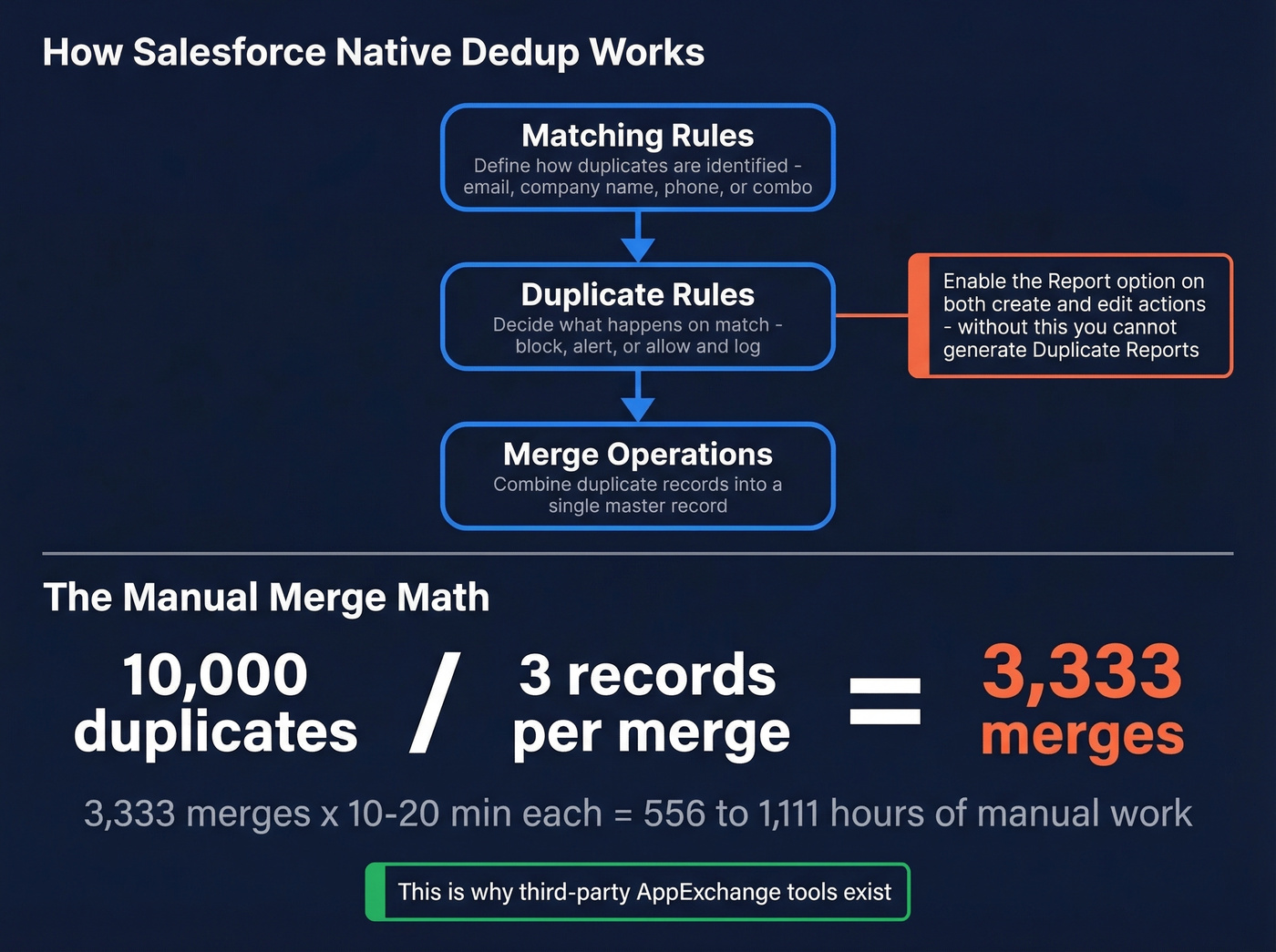
The critical step most admins skip: enable the Report option on your Duplicate Rules for both create and edit actions. Without this, you can't generate a Duplicate Report to see the scope of the problem. Build one by going to Setup, then Report Types, create a custom type with your primary object related to Duplicate Record Items, and group by Duplicate Record Set Name.
Now the manual merge math. Salesforce limits you to merging 3 records at a time. Each merge takes 10-20 minutes depending on complexity. If you've got 10,000 duplicates and you're merging three-at-a-time, that's roughly 3,333 merges - or about 556 to 1,111 hours of manual work. The fact that Salesforce still limits manual merges to 3 records at a time in 2026 tells you everything about why third-party AppExchange tools exist. Duplicate Jobs? Those are locked to Performance and Unlimited Editions.
Phase 3 - Standardize
Once duplicates are merged, standardize what remains. Lock down picklist values (no more freetext "Industry" fields), enforce naming conventions for Accounts, and normalize address and phone formats. Standardization is where you transform messy data into something consistent enough to report on and automate against. It sounds boring. It is boring. But skipping it means your dedup work unravels within weeks as new records come in with the same inconsistencies.
Phase 4 - Verify & Enrich
This is the step most cleansing guides skip entirely, and it's the most important one.
You can merge every duplicate and standardize every field, but if 15% of your emails bounce and half your contacts are missing direct dials, your data is still broken. We've seen orgs celebrate a "clean CRM" while their outbound team burns through sender reputation on unverified addresses - that's not clean, that's just organized garbage. (If you're diagnosing deliverability, start with an email deliverability guide and improve sender reputation.)
Once your duplicates are merged and formats are standardized, run your contact list through Prospeo. It verifies emails in bulk at 98% accuracy and enriches records with 50+ data points, filling gaps you didn't know existed. The native Salesforce integration means you don't need to export CSVs and re-import, and the 7-day refresh cycle keeps records current instead of decaying the moment you clean them.
Phase 5 - Automate Prevention
Validation rules are your first line of defense. Here are three you can deploy today:
Required email on all Contacts:
ISBLANK(Email)
Error message: "Email is required."
US zip code format enforcement:
NOT(REGEX(ShippingPostalCode, "^[0-9]{5}(?:-[0-9]{4})?$"))
Custom permission bypass so admins can override during bulk imports:
AND(NOT($Permission.Bypass_Validation__c), ISBLANK(Custom_Field__c))
Each rule evaluates to TRUE when the data is invalid, blocking the save and displaying your error message. That bypass permission is non-negotiable - without it, your data operations team will hate you during every import.
Phase 6 - Monitor & Measure
If your cleansing project ends with "now your data is clean," you've failed. It won't be clean in 6 months.
Set up recurring quality checks:
- Completeness threshold - Alert when completeness drops below 99% for fields that feed ACV reporting. Don't report quarterly ACV with a dataset that's only 90% complete.
- Duplicate scan cadence - Monthly automated dedup scans, quarterly full audits.
- Bounce rate tracking - If email bounce rates creep above 3%, your verification layer needs attention. (Benchmarks and fixes: email bounce rate.)
- Dashboard - Build a data quality dashboard that leadership actually sees. Visibility creates accountability.

Merging duplicates and standardizing fields is half the battle. If 15% of your emails still bounce, your CRM is organized garbage. Prospeo's native Salesforce integration verifies emails at 98% accuracy and enriches contacts with 50+ data points - no CSV exports, no re-imports.
Stop cleaning your CRM just to fill it with stale data again.
Tools Compared
| Tool | Best For | Starting Price | Key Differentiator |
|---|---|---|---|
| Prospeo | Email verify + enrich | Free tier; ~$0.01/email | 98% accuracy, 7-day refresh, native SF integration |
| Native SF | Basic dedup | Free (included) | No extra cost |
| No Duplicates | Dedup on a budget | $240/yr | Simple, affordable |
| Insycle | Multi-CRM stacks | 14-day trial (500 merges) | Record-based pricing; automation templates |
| Cloudingo | Merge automation | $2,500+/yr | Advanced merge automation |
| DemandTools | Enterprise | ~$10K-$50K+/yr | Full-suite data management |
| Plauti | Custom needs | Custom pricing | Highly configurable rules |
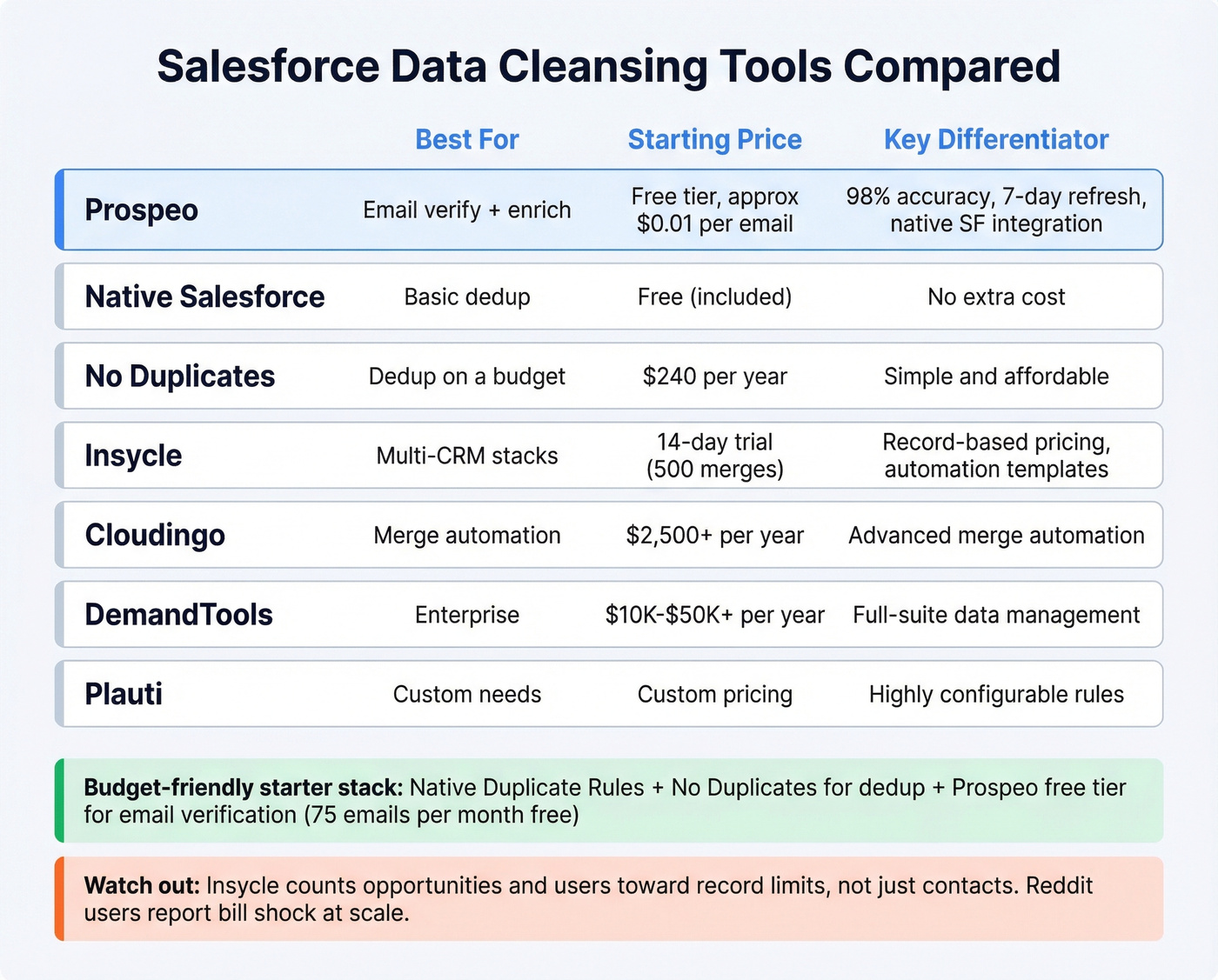
When budget is tight, start with native Duplicate Rules plus No Duplicates for dedup, and Prospeo's free tier for email verification - you can validate 75 emails/month before committing a dollar. (If you're evaluating vendors, compare options in data enrichment services.)
A few gotchas worth knowing. Insycle's pricing is based on the number of records connected to the platform, and that count can include opportunities and users - not just contacts. Reddit threads on r/salesforce consistently mention bill shock when record counts scale faster than expected. DemandTools is the enterprise workhorse, but skip it if your average deal size is under $15K. Native Salesforce controls plus a verification layer will get you 90% of the way there.
Who Owns Data Quality?
Let's be honest: the moment you frame data cleansing as "the admin's job," you've already lost.
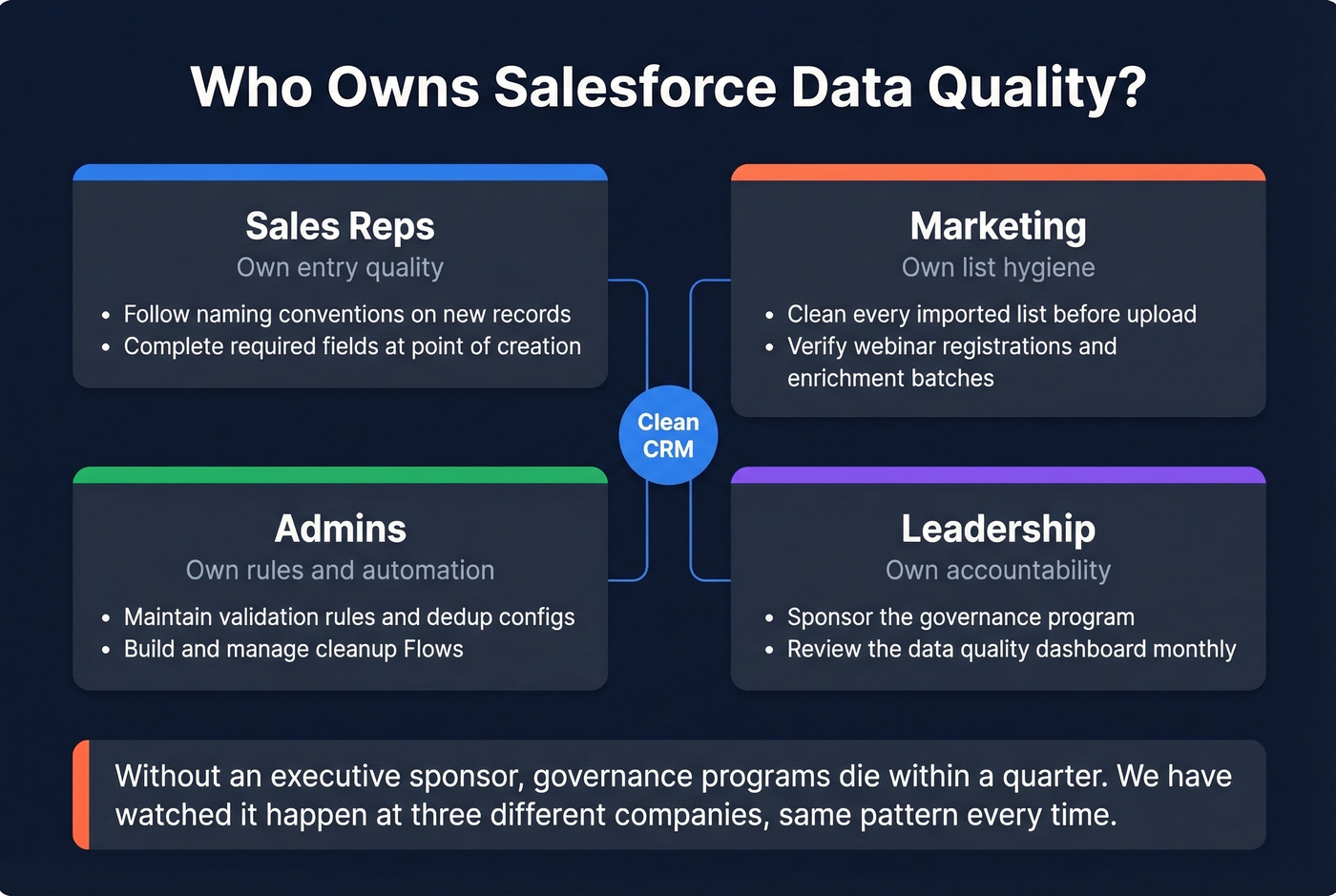
A practical ownership model breaks down like this. Reps own entry quality - they're creating records and need to follow the standards. Marketing owns list hygiene, covering every imported list, webinar registration, and enrichment batch. Admins own the rules and automation: validation rules, dedup configurations, Flow-based cleanup. Leadership owns accountability. If there's no executive sponsor, the governance program dies within a quarter. We've watched it happen at three different companies - same pattern every time. (This is also why sales operations metrics need a data-quality section, not just pipeline.)
The cross-object challenge makes this harder than it sounds. Leads, Contacts, and Accounts all interact differently, and a duplicate in one object cascades into bad data across all three. Clear ownership by object - not just by role - separates orgs that stay clean from orgs that do annual "data cleanup sprints" that never stick.
Keeping Your Org Clean After the Cleanup
Stop treating data cleansing as a one-time project. Prevention is 80% of the work. Scheduled dedup jobs, validation rules that block bad data at entry, and an enrichment layer with automatic refresh do more than any quarterly cleanup sprint ever will.
In our experience, teams can take their duplicate rate from 18% to 2% and email bounce rate from 12% to under 3% within 90 days of implementing this workflow. The key wasn't a magic tool - it was combining native Salesforce controls with a verification layer and making someone accountable for the dashboard every month. If you're preparing your org for Data Cloud, Agentforce, or any AI-driven feature, that's what AI-readiness actually looks like: not a one-time scrub, but a system that keeps data trustworthy by default. (If you're building outbound on top of this, align it with sales prospecting techniques so reps don't reintroduce junk data.)
A 7-day data refresh cycle means the contacts you cleaned today won't decay into the same mess next month. Prospeo keeps your Salesforce records current with verified emails, direct dials, and enrichment data - at $0.01 per email instead of $1.
Clean once, keep it clean automatically with weekly-refreshed data.
FAQ
How often should I clean my Salesforce data?
Run monthly dedup scans and quarterly full audits at minimum. If you're using Agentforce or any AI features, increase to weekly automated checks - AI agents act on stale data autonomously, turning decay into active liability faster than human-driven workflows.
Can Salesforce deduplicate records automatically?
Matching Rules and Duplicate Rules flag duplicates at entry, but they don't auto-merge. Bulk merging requires third-party AppExchange tools or manual effort at 3 records at a time. Duplicate Jobs exist but are locked to Performance and Unlimited Editions.
What's the fastest way to verify emails in Salesforce?
Use a verification tool with a native Salesforce integration. Prospeo connects directly to your org and runs bulk verification at 98% accuracy without exporting a single CSV. The whole process takes minutes, and the 7-day refresh cycle prevents immediate data decay.
Is Salesforce data cleansing a one-time project?
No - and treating it that way is the most common mistake. Data decays at roughly 30% per year as people change jobs, companies merge, and contacts go stale. Build automated prevention with validation rules, scheduled dedup scans, and enrichment refresh so your org stays clean by default.