

Sample Letter for Meeting Schedule: 12 Templates (2026)
You've been asked to "set up a meeting with the VP" and given zero other guidance. The cursor's blinking. You're overthinking every word.
We've written hundreds of these, and the ones that get replies all follow the same pattern. The average professional spends 28% of their workday on email, and scheduling is one of the easiest places to claw back time with a good template. Here are 12 covering every scenario - swap the bracketed fields, hit send, move on.
What You Need (Quick Version)
You need one of five types of meeting schedule letter. Jump to the one that fits:
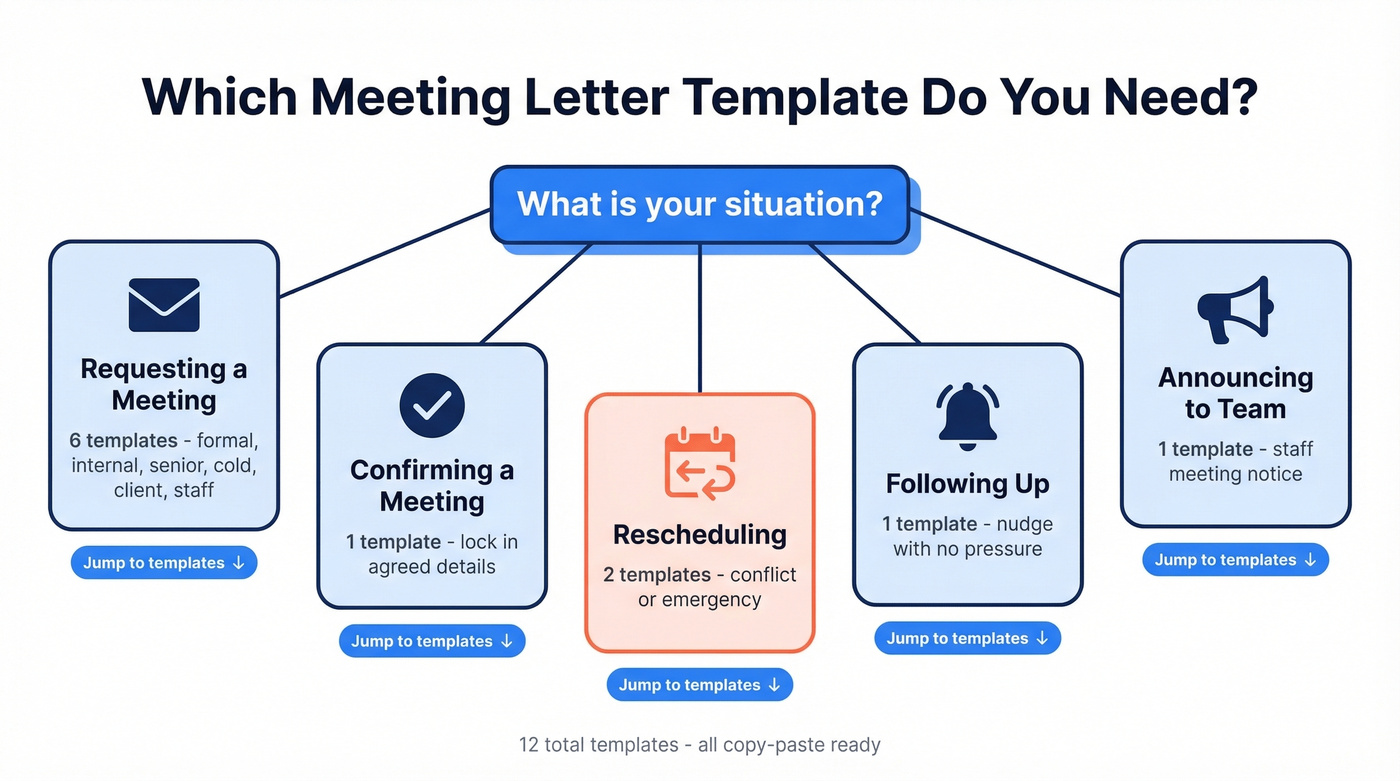
- Meeting Request Letters - asking someone for time (formal, internal, senior leadership, cold outreach, client, staff announcement)
- Confirmation Letter - locking in a meeting that's been discussed
- Reschedule Letters - moving a meeting due to conflict or emergency
- Follow-Up Letter - nudging someone who hasn't confirmed
- [Staff Meeting Notice](#staff-meeting-notice - announcement) - announcing a team or all-hands meeting
Each template is copy-paste ready. Customize the bracketed fields and send. If you're sending outbound meeting requests to external contacts, verify the email address first - a bounced request is worse than no request at all (and it can hurt sender reputation).
Anatomy of an Effective Meeting Letter
Every effective scheduling letter follows the same skeleton, whether it's a printed letter or an email:
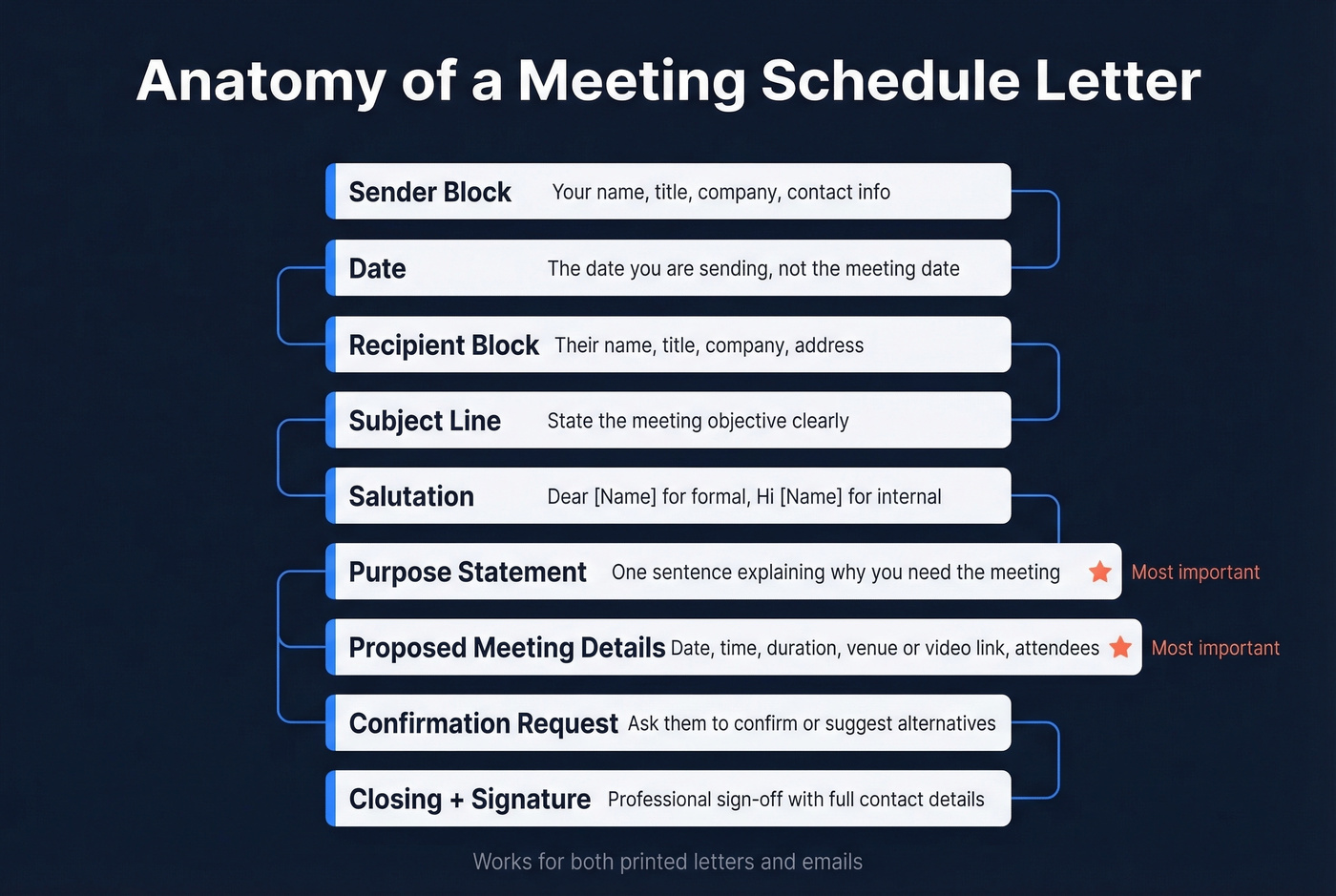
- Sender block - your name, title, company, contact info (formal letters only; emails pull this from your signature)
- Date - the date you're sending, not the meeting date
- Recipient block - their name, title, company, address (formal letters only)
- Subject line - state the meeting's objective, not just "Meeting with [Name]" (use these email subject line examples if you’re stuck)
- Salutation - "Dear [Name]" for formal, "Hi [Name]" for internal
- Purpose statement - one sentence explaining why you're requesting the meeting
- Proposed meeting details - date, time, duration, venue or video link, key attendees
- Confirmation request - ask them to confirm or suggest alternatives
- Closing + signature - professional sign-off with full contact details
For most business contexts, email is the default. Reserve printed letters for government officials, board communications, or organizational protocol.
Sample Meeting Request Letters
Formal Request (Printed)
Use this when protocol matters - government offices, board-level requests, or organizations that still run on paper.
[Your Name] [Your Title] [Your Company] [Your Address]
[Date]
[Recipient Name] [Recipient Title] [Recipient Company] [Recipient Address]
Subject: Meeting Request - [Topic/Objective]
Dear [Recipient Name],
I'm writing to request a meeting to discuss [specific purpose - e.g., "the proposed partnership between our organizations"]. I believe a [30/60]-minute conversation would allow us to [expected outcome].
I'd like to propose the following options:
- [Date 1], [Time], at [Location]
- [Date 2], [Time], at [Location]
Please let me know which works best, or suggest an alternative that suits your schedule. I'm happy to accommodate.
Sincerely, [Your Name] [Phone] | [Email]
Internal Email Request
For internal meetings, keep it tight. Your subject line should state the objective, not just "Meeting with [Name]."
Subject: Align on Q3 campaign timeline - 20 min this week?
Hi [Name],
I'd like to schedule 20 minutes this week to align on the Q3 campaign timeline before we brief the creative team. Could any of these work?
- Tuesday 2:00-2:20 PM
- Wednesday 10:00-10:20 AM
- Thursday 3:00-3:20 PM
Happy to adjust if none of these fit. I'll send an agenda beforehand.
Thanks, [Your Name]
Request to Senior Leadership
If you're a junior employee told to "set up a meeting with the VP" and given zero guidance, you're not alone. The key is deference plus clarity - be respectful of their time, but make it easy to say yes by offering specific windows. Drop your manager's name early. It signals legitimacy and saves the exec from wondering "who is this person?"
Subject: Request: 20-min alignment on [Project/Initiative] - at your convenience
Dear [Name],
[Your Manager's Name] suggested I reach out to schedule a brief meeting between you and our team to align on [specific topic - e.g., "priorities for the new product launch"]. We'd value your perspective on [specific question or decision].
Would any of the following work for a 20-minute conversation?
- [Date 1], [Time]
- [Date 2], [Time]
- [Date 3], [Time]
I'm happy to work around your schedule. Please let me know what's most convenient, and I'll send a calendar invite with an agenda.
Best regards, [Your Name] [Your Title]
Cold Outreach Meeting Request
Most cold meeting requests fail because they focus on what you sell instead of what the recipient gets. The r/coldemail community hammers this point - outcome-first framing books meetings; service-first framing gets deleted. If you’re building a sequence, borrow a structure from these cold email follow-up templates.
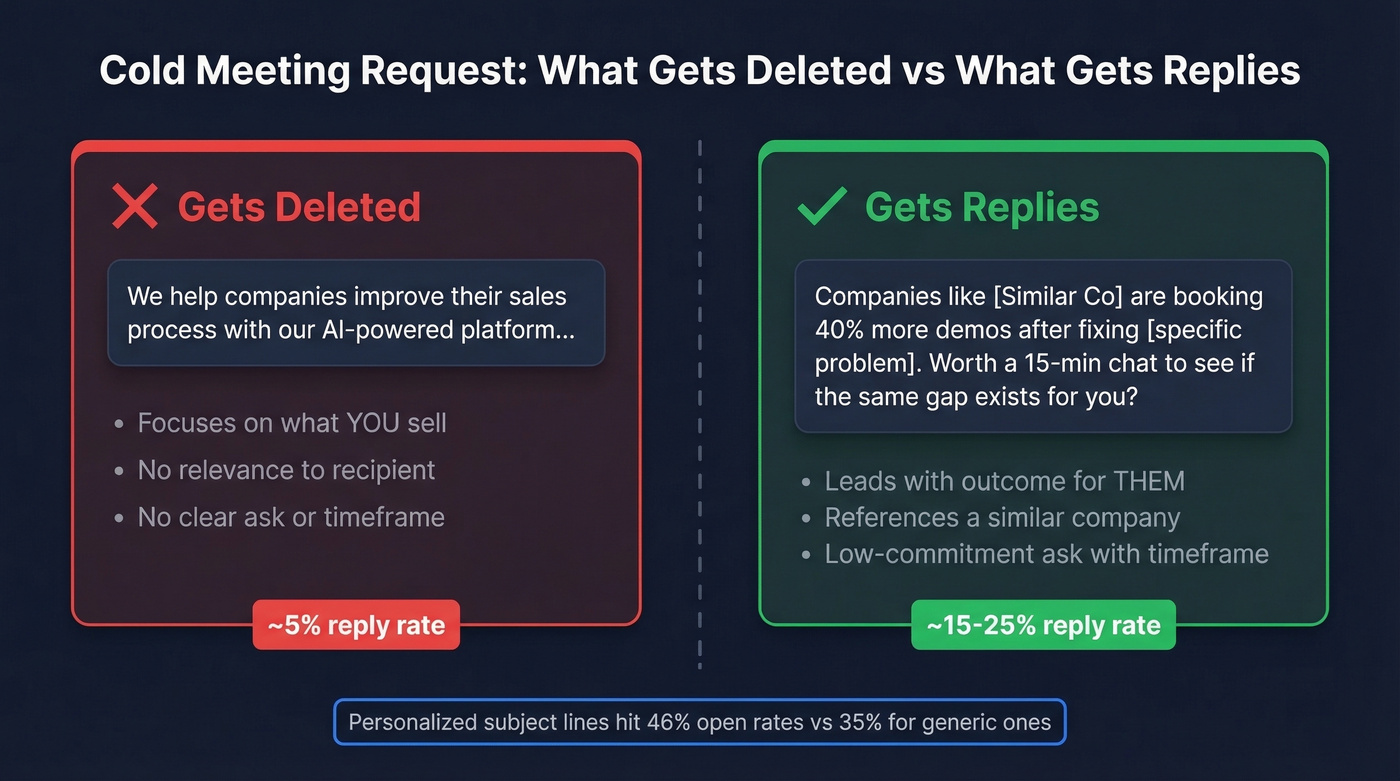
Bad (service-focused, gets deleted):
"We help companies improve their sales process with our AI-powered platform..."
Good (outcome-focused, gets replies):
"Companies like [Similar Company] are booking 40% more demos after fixing [specific problem]. Worth a 15-min chat to see if the same gap exists for you?"
Keep subject lines to 2-4 words. Personalized subject lines hit 46% open rates vs. 35% for generic ones. For more data-backed angles, see prospecting email subject lines.
Subject: Quick question
Hi [First Name],
[One sentence about a specific, relevant observation - e.g., "Noticed [Company] just expanded into EMEA - congrats."]
Teams scaling into new markets usually hit [specific pain point]. We helped [Similar Company] [quantified result] in [timeframe].
Worth a 15-minute call this week to see if it's relevant?
[Your Name] [Title] | [Company]
Address the email to the decision-maker directly. If you get redirected to a junior contact, reply with: "Happy to loop them in - would it make sense for [Decision-Maker] to join for the first 10 minutes?"
Here's the thing, though: this template only works if the email actually arrives. For outbound meeting requests, verify the recipient's address with Prospeo's Email Finder before you send. A bounced scheduling email wastes your time and damages your sender reputation (see email bounce rate benchmarks and fixes).
Client Meeting Request
For existing clients, propose specific times rather than just dropping a scheduling link in the first message. A link says "figure it out yourself." Specific options say "I've already thought about this."
| Do | Don't | |
|---|---|---|
| Times | Propose 2-3 specific slots | Send a bare Calendly link |
| Agenda | Promise it by a specific day | Say "we'll figure it out" |
| Tone | Collaborative, forward-looking | Transactional or rushed |
Subject: Quarterly review - proposed times for next week
Hi [Name],
It's time for our quarterly review. I'd like to walk through [specific topics - e.g., "campaign performance, upcoming priorities, and budget adjustments"].
Here are a few options:
- [Date 1], [Time] - [Location or Video Link]
- [Date 2], [Time] - [Location or Video Link]
Let me know what works, and I'll send over an agenda by [day].
Best, [Your Name]
Staff Meeting Notice & Announcement
When you're announcing a meeting to a team or department, include everything that's been finalized. If logistics aren't locked yet, say so explicitly - don't leave people guessing whether the Zoom link is coming.
Before sending, confirm you've included:
- Date, time, and duration
- Location or video link (or a note that it's coming)
- Agenda items
- RSVP deadline
- Who to contact if they can't attend
Subject: Staff meeting - [Date], [Time], [Location/Video Link]
Dear Team,
You're invited to a staff meeting on [Date] at [Time] in [Location/via Video Link]. The meeting will run approximately [duration].
Agenda:
- [Topic 1]
- [Topic 2]
- Open discussion
[If logistics aren't finalized: "Detailed logistics, including the conference room assignment and dial-in information, will follow by [date]."]
Please confirm your attendance by [RSVP date]. If you're unable to attend, let [Name] know so we can share notes afterward.
Thanks, [Your Name]

A perfect meeting request letter means nothing if it bounces. Prospeo's Email Finder verifies addresses with 98% accuracy before you hit send - so your scheduling email reaches the decision-maker, not a dead inbox.
Stop sending meeting requests into the void. Verify first.
Confirmation & Reschedule Letters
Confirming a Scheduled Meeting
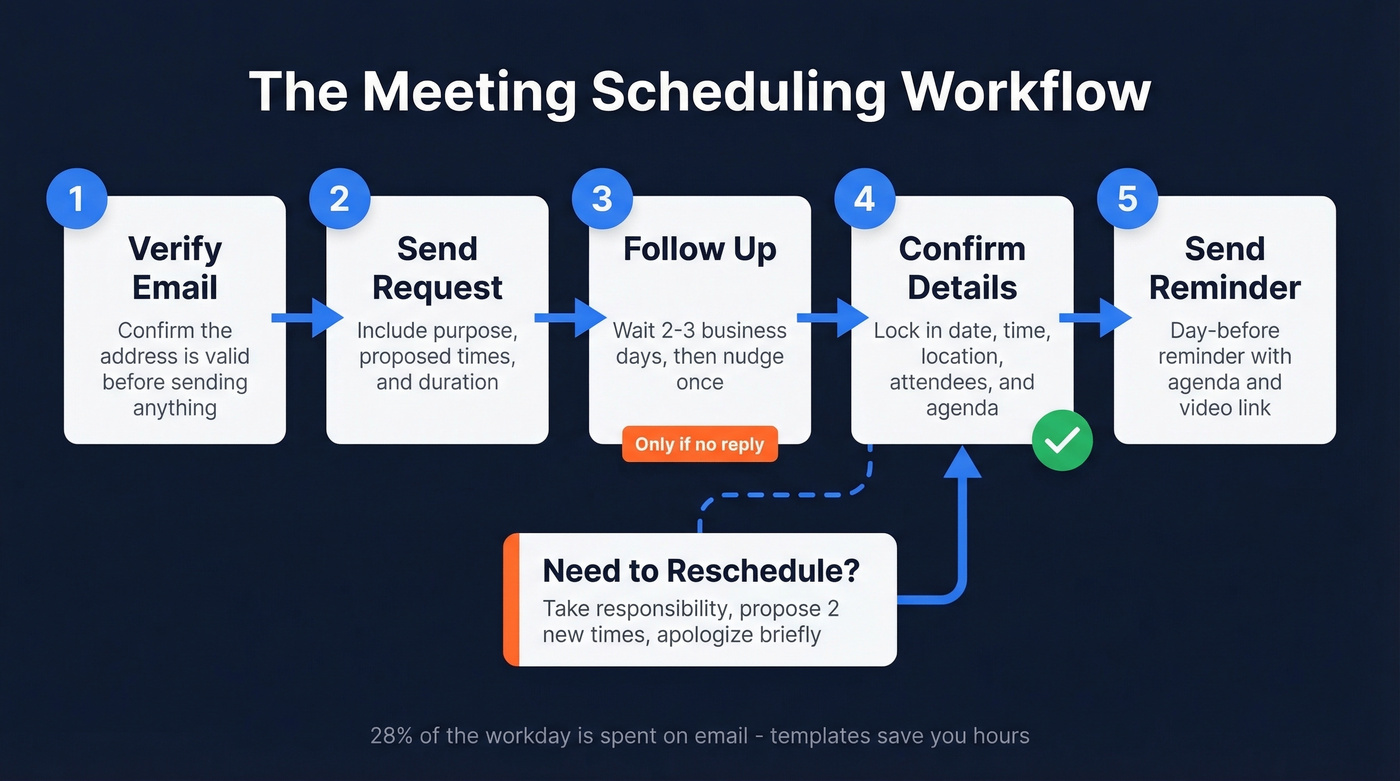
Once someone agrees to meet, lock it down immediately. A prompt confirmation email is just as important as the initial request - it eliminates ambiguity and prevents no-shows.
Subject: Confirmed: [Meeting Topic] - [Date], [Time]
Hi [Name],
Following our conversation on [date/context], I'm confirming our meeting:
- Date: [Date]
- Time: [Time] [Time Zone]
- Location: [Address / Video Link]
- Duration: [X minutes]
- Attendees: [Names]
I'll send the agenda by [date]. Let me know if anything changes.
Best, [Your Name]
Rescheduling Due to Conflict
Take responsibility. Don't hide behind vague language - if you double-booked, say so. Then immediately propose alternatives.
Subject: Reschedule request: [Original Meeting Topic]
Hi [Name],
I apologize, but I need to reschedule our meeting originally set for [Date/Time]. I have a scheduling conflict that I wasn't able to resolve.
Could either of these work instead?
- [New Date 1], [Time]
- [New Date 2], [Time]
I'm sorry for the inconvenience and appreciate your flexibility. This meeting remains a priority.
Best, [Your Name]
Rescheduling Due to Emergency
Same-day cancellations require speed and reassurance. Keep it brief - they don't need the details, just the new plan.
Subject: Urgent: Need to reschedule today's meeting
Hi [Name],
I'm very sorry, but an unexpected emergency requires me to reschedule our meeting today at [Time]. I want to assure you this remains a top priority.
Could we move to [proposed alternative date/time]? I'm also available [second option]. Please let me know what works best for you.
Thank you for understanding.
[Your Name]
Meeting Follow-Up Letter
If someone hasn't responded to your meeting request, follow up once - professionally and without passive aggression. Keep copies of all correspondence for your records, especially for external or cross-organizational meetings. If you need more options, use these sales follow-up templates as a base.
Subject: Following up: [Original Meeting Topic]
Hi [Name],
I wanted to follow up on my earlier request to schedule a meeting regarding [topic]. I understand schedules fill up quickly.
Would any of these times work?
- [Date 1], [Time]
- [Date 2], [Time]
If the timing isn't right, I'm happy to revisit next [week/month]. Just let me know.
Thanks, [Your Name]
Five Rules That Get Meetings Booked
Templates get you 80% of the way. These rules handle the other 20%.
1. Subject line = objective, not "Meeting with [Name]." "Align on Q3 budget" tells the recipient exactly what they're committing to. "Meeting with Sarah" tells them nothing. People accept meetings they understand.
2. Default to 20-30 minutes, not 60. A shorter ask signals you respect their time and makes it easier to say yes. You can always extend if the conversation warrants it.
3. Share the agenda at least 24 hours in advance. Attendees who know what's being discussed show up prepared, which means shorter meetings and better outcomes. We've seen this firsthand - our own internal meetings dropped from 45 minutes to 25 once we started sending agendas the day before.
4. Include all logistics. Dial-in link, parking instructions, time zone, click-to-dial phone number - every missing detail is a reason for someone to be late or confused. Put it all in the invite body, not buried in an attachment.
5. Propose specific days instead of leaving it open-ended. Vague "let me know when you're free" requests create endless back-and-forth. Offering two or three concrete slots collapses the scheduling loop and gets you a confirmed time faster (more on timing in when should you follow up on an email).
Bonus: Ask before you calendar-invite someone senior. A heads-up email first is a small courtesy that goes a long way. Nobody likes a surprise 60-minute block from someone they've never spoken to.
EA/Admin tip: If you're managing someone else's calendar, batch your scheduling emails on Fridays. It gives recipients the weekend to mentally slot the meeting in and respond Monday morning.
Tools That Kill the Back-and-Forth
Templates handle the first message. These tools eliminate the "does Tuesday work? No, how about Thursday?" loop.
Step 0: Verify the address
| Tool | Best For | Price |
|---|---|---|
| Prospeo | Verifying recipient emails before you send | Free (75/mo); ~$0.01/email |
Step 1: Schedule the meeting
| Tool | Best For | Price |
|---|---|---|
| Calendly | Simplest scheduling for individuals | Free; from $12/mo |
| SavvyCal | Collaborative mutual scheduling | Free; from $12/mo |
| Cal.com | Open-source, self-hosted option | Free; from $15/mo |
| Reclaim | AI-powered calendar optimization | Free; from $10/mo |
We've tested all of these. Calendly wins on simplicity - the free plan handles most individual needs. SavvyCal is better when you want the other person to overlay their calendar on yours, which feels more collaborative than a one-way booking page. Cal.com is the pick for teams that care about self-hosting or customization. Skip Reclaim unless your calendar is genuinely chaotic and you want AI to find open slots automatically - for most people it's overkill.
Let's be honest: if you're sending fewer than 50 meeting requests a month, Calendly's free plan plus verified email addresses is all you need. Don't overcomplicate this. If you’re doing higher-volume outbound, consider automated cold email scheduling to reduce manual work.
Cold outreach meeting requests live or die on reaching the right person. Prospeo gives you verified emails for 300M+ professionals at ~$0.01 each - so every scheduling letter you craft actually has a shot at getting opened.
Book more meetings by emailing people who actually exist.
FAQ
What's the difference between a meeting schedule letter and a meeting invitation?
A meeting schedule letter proposes or confirms a specific date, time, and venue. A meeting invitation is broader - it can announce an event without fixed logistics. Always include proposed times, duration, and location in your letter.
How long should a meeting request email be?
50-125 words. State the purpose, propose two or three time options, include logistics, and close with a confirmation request. Anything longer gets skimmed or ignored entirely.
How far in advance should I send a meeting request?
At least one week for external meetings, two to three days for internal ones. Share the agenda at least 24 hours before the meeting so attendees arrive prepared and the conversation stays focused.
How do I make sure my outbound meeting request doesn't bounce?
Verify the recipient's email address before sending. Paste a name and company domain into an email verification tool, get a verified address in seconds, and send with confidence. A bounced scheduling email wastes your time and damages sender reputation.
Can I use the same template for prospects and colleagues?
The structure is identical - purpose, proposed times, logistics, confirmation ask - but tone should differ. Internal emails can be casual and brief, while prospect-facing messages need more context on why the meeting is worth their time. The cold outreach template above is built for that distinction.