

The Complete Guide to Automated Cold Email Scheduling in 2026
An SDR spins up a new domain on Monday, loads 2,000 contacts on Tuesday, and blasts them all by Wednesday afternoon. By Friday, the domain's in the gutter - spam-flagged, reputation torched, three weeks of setup wasted. I've watched this exact scenario play out more times than I can count.
The difference between a cold email program that builds pipeline and one that builds a spam folder reputation isn't your copy. It's your automated cold email scheduling - the warmup cadence, the send-time logic, the throttling rules, the inbox rotation that keeps you out of spam at scale. Open rates fell from ~36% in 2023 to 27.7% in 2024, and the slide hasn't stopped. The average conversion rate sits at 0.2% - one deal per 500 emails. Every percentage point you claw back through better scheduling compounds across your entire outbound motion.
And 61% of decision-makers still prefer cold email as their primary communication channel. The opportunity is massive if you execute the mechanics correctly.
What You Need (Quick Version)
Before you get into the full playbook, here's the three-part stack that works:
- Sending platform (SMB): Instantly - easiest setup, unlimited accounts, solid deliverability infrastructure.
- Sending platform (Agency/Scale): Smartlead - timezone detection, API access, agency-friendly pricing.
Your scheduling is only as good as your data and your warmup. The sections below cover both - from day-of-week timing to week-by-week warmup calendars to the inbox rotation system that keeps you sending at scale.
Cold Email Benchmarks for 2026
You can't optimize what you don't measure. Here's where the industry actually stands - not the aspirational numbers vendors put in their case studies, but the medians across millions of sends.

| Metric | Benchmark |
|---|---|
| Avg open rate | 27.7% |
| Avg reply rate | 4.1-5.1% |
| Avg conversion | 0.2% |
| Good conversion | 2%+ |
| Exceptional | 5%+ |
| Inbox placement | 83.1% |
Campaign size matters more than most people realize. Smaller, targeted campaigns dramatically outperform spray-and-pray:
| Campaign Size | Avg Response Rate |
|---|---|
| 50 or fewer recipients | 5.8% |
| 51-200 | ~4.5% |
| 201-1,000 | ~3.2% |
| 1,000+ | 2.1% |
Industry open rates vary wildly. Software leads B2B verticals at 47.1%, followed by Education at 40.4% and Marketing at 35.7%. Legal sits at 27.3%, Financial Services at 22.8%, and Insurance at 22%. If you're selling into banking (19.7%), your scheduling and personalization need to be flawless just to hit average.
Three stats that should change how you think about scheduling:
- 81% of emails are now opened on mobile. Your send time needs to hit when people are checking their phones - morning commutes, lunch breaks, evening wind-down.
- 48% of reps never send a second follow-up. Your follow-up cadence is a competitive advantage by default.
- Almost 20% of cold emails get flagged as spam despite legitimate intent. Authentication, warmup, and throttling aren't optional - they're the price of admission.
Best Days and Times to Schedule Cold Emails
Tuesday and Thursday consistently outperform other weekdays. Not because prospects are less busy - because inbox competition is lower. Everyone's recovering from the weekend on Monday and mentally checked out by Friday.

| Day | Opens | Replies | Best Use |
|---|---|---|---|
| Monday | Often highest | Lower | Follow-up #2+ |
| Tuesday | High | High | Initial outreach |
| Wednesday | Moderate | Highest (7-11 AM) | Initial outreach |
| Thursday | High | High | Initial outreach |
| Friday | Moderate | Low | Follow-up #3+ only |
| Weekend | Decent opens | Very low replies | Avoid |
The two golden windows: mid-morning (9:30-11 AM) and post-lunch (1:30-3 PM) in the prospect's local timezone. Morning sends catch people during their first inbox triage. Post-lunch sends hit the second triage window before afternoon meetings stack up.
Wednesday between 7-11 AM specifically produces the highest reply rates. If you're only sending two campaigns a week, Tuesday and Wednesday morning is your best bet.
Monday's an interesting case. It has the highest open rate of any weekday, but reply rates lag. People see your email but don't act on it - they're triaging, not engaging. Use Monday for follow-ups where you just need the touchpoint, not for initial outreach where you need a response.
Friday works for follow-up #3 or later - the "graceful close" email where you're giving them an easy out. Low-pressure emails match Friday energy. Don't waste a first touch on it.
One nuance most guides miss: C-level executives respond 23% more often than non-C-suite contacts (6.4% reply rate), and they often answer emails late at night. If you're targeting the C-suite, a 7-8 PM send in their timezone can outperform mid-morning. SaaS verticals specifically see end-of-day reply spikes when execs hit quiet laptop time.
Subject Lines That Match Your Timing
Your send time and subject line work together. A few data points worth building into your scheduling workflow:
- Subject lines with numbers produce 45% higher open rates.
- Question-framed subject lines lift opens by 10%.
- The sweet spot is 3, 7, or 8 words - these hit a 33% open rate.
- Personalized subject lines boost opens by 22-36%.
Your Tuesday morning first touch should always carry a personalized, number-driven subject line. Save the shorter, curiosity-based lines for follow-ups later in the week.

Your warmup cadence and send-time logic are worthless if your contact data is stale. Prospeo refreshes 300M+ profiles every 7 days - not every 6 weeks like competitors. At 98% email accuracy, your bounce rate stays under 4% so your domains stay clean.
Stop torching domains with bad data. Fix the foundation first.
Cold Email Automation Time Zones - The 40% Response Rate Difference
This is where most cold email programs silently bleed performance.
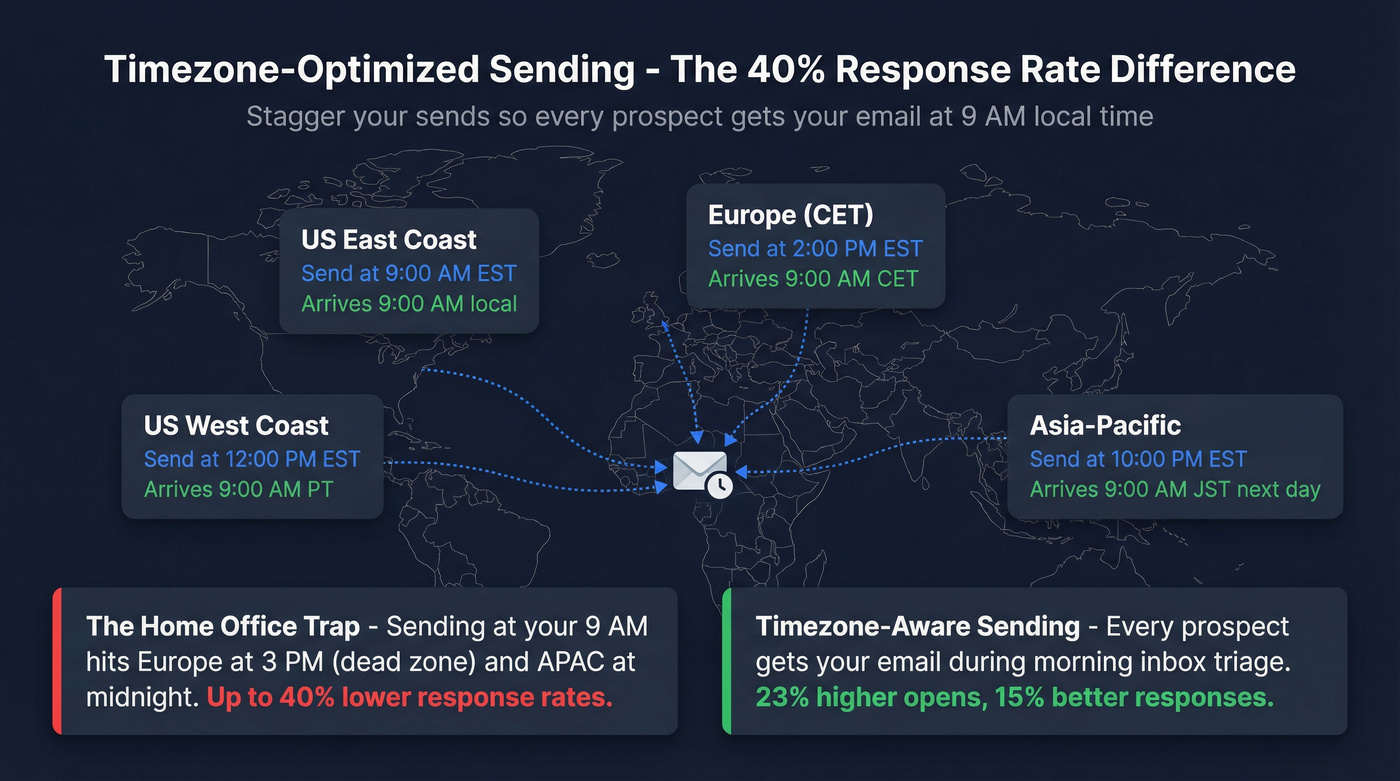
Timezone-optimized sends produce 23% higher open rates and 15% better response rates compared to poorly timed messages. Defaulting to your own business hours - the "Home Office trap" - can reduce response rates by up to 40% for international campaigns.
If you're a US-based team sending to European prospects at 9 AM EST, those emails land mid-afternoon in Europe. That's the dead zone - afternoon meetings, end-of-day fatigue. You're competing against a full day of inbox buildup.
Here's the staggered schedule that works:
| Region | Send Time (EST) | Local Arrival |
|---|---|---|
| US East Coast | 9:00 AM | 9:00 AM ET |
| US West Coast | 12:00 PM | 9:00 AM PT |
| Europe (CET) | 2:00 PM | 9:00 AM CET |
| UK (GMT) | 3:00 AM | 8:00 AM GMT |
| Asia-Pacific | 10:00 PM | 9:00 AM JST (next day) |
Most sending tools handle timezone-aware scheduling automatically - Smartlead's timezone detection is particularly strong here, and Instantly handles it well for simpler setups. The key is that your tool needs to know the prospect's timezone, which usually comes from company location data in your enrichment.
Cultural Timing You Can't Ignore
European markets effectively shut down in August. Sending cold outreach to French or Italian prospects in August is like sending to a void. Plan your campaigns around it.
Middle Eastern markets observe a Friday-Saturday weekend. Your Tuesday-Thursday playbook doesn't apply - Sunday through Wednesday is your window.
Asian markets extend into evening hours for business communication. A 6-7 PM local send works well in Japan and South Korea, where after-hours email is culturally normal.
The biggest mistake I see teams make: building one global campaign with one send time. Even a simple three-timezone split (Americas, EMEA, APAC) will outperform a single-timezone blast by a wide margin.
The Complete Cold Email Sequence Schedule
The optimal multichannel cold outbound sequence runs 7-10 touches over 10-14 days. Personalized emails see 32% higher response rates, so your first touch should always be customized - never templated. Here's the framework that consistently performs:

Day 1 - Email: Problem + proof + question. Lead with a pain point relevant to their role, drop one proof point, ask a question that's easy to answer. Emails between 50-125 words achieve ~50% response rates - keep it tight.
Day 2 - Call: Mirror the email. Reference it directly: "I sent you a note yesterday about [problem]." Leave a 15-second voicemail if they don't pick up.
Day 3 - Email follow-up: Outcome or case study. Don't repeat Day 1. Share a specific result: "We helped [similar company] cut [metric] by [number]."
Day 5 - Social touch: Signal-based message on a professional platform. Comment on something they posted or shared. Don't pitch - build familiarity. (If you want a system for this, see social touch.)
Day 7 - Email with asset: Send a 60-second video, a relevant report, or a one-pager. Something that provides value even if they never reply.
Day 9 - Call: Reference the asset. "Did you get a chance to look at [asset]? Happy to walk through it in 10 minutes."
Day 11 - Objection email: Address the most common objection for their persona head-on. "Most [role] tell us [objection]. Here's why that's changed..."
Day 12 - Graceful close: Useful tip + easy out. "If the timing's off, no worries. Here's [useful resource] either way. Want me to check back in Q3?"
Email-Only Adaptation
If you don't have phone numbers or can't do social touches, run a simple 3-email cadence and stretch the timeline:
- Day 1: Initial email
- Day 4: Follow-up #1 (case study angle)
- Day 11: Follow-up #2 (asset or value-add)
After 3 emails with no response, pause for 2-3 months before re-engaging.
The critical rule: your first follow-up should land 3 days after the initial email. That first follow-up alone boosts reply rates by roughly 50%. The second follow-up goes 6-7 days after the first. (More timing rules: follow-up cadence.)
48% of reps never send a second message. Just having a follow-up sequence puts you ahead of half the competition. Multichannel outreach (email + social + phone) boosts results by over 287% compared to email alone - that's not a typo.
What to Automate vs. What to Keep Manual
Here's my hot take: most teams automate the wrong things. They'll spend hours hand-picking send times but let a purchased list flow straight into campaigns unverified. Flip that.
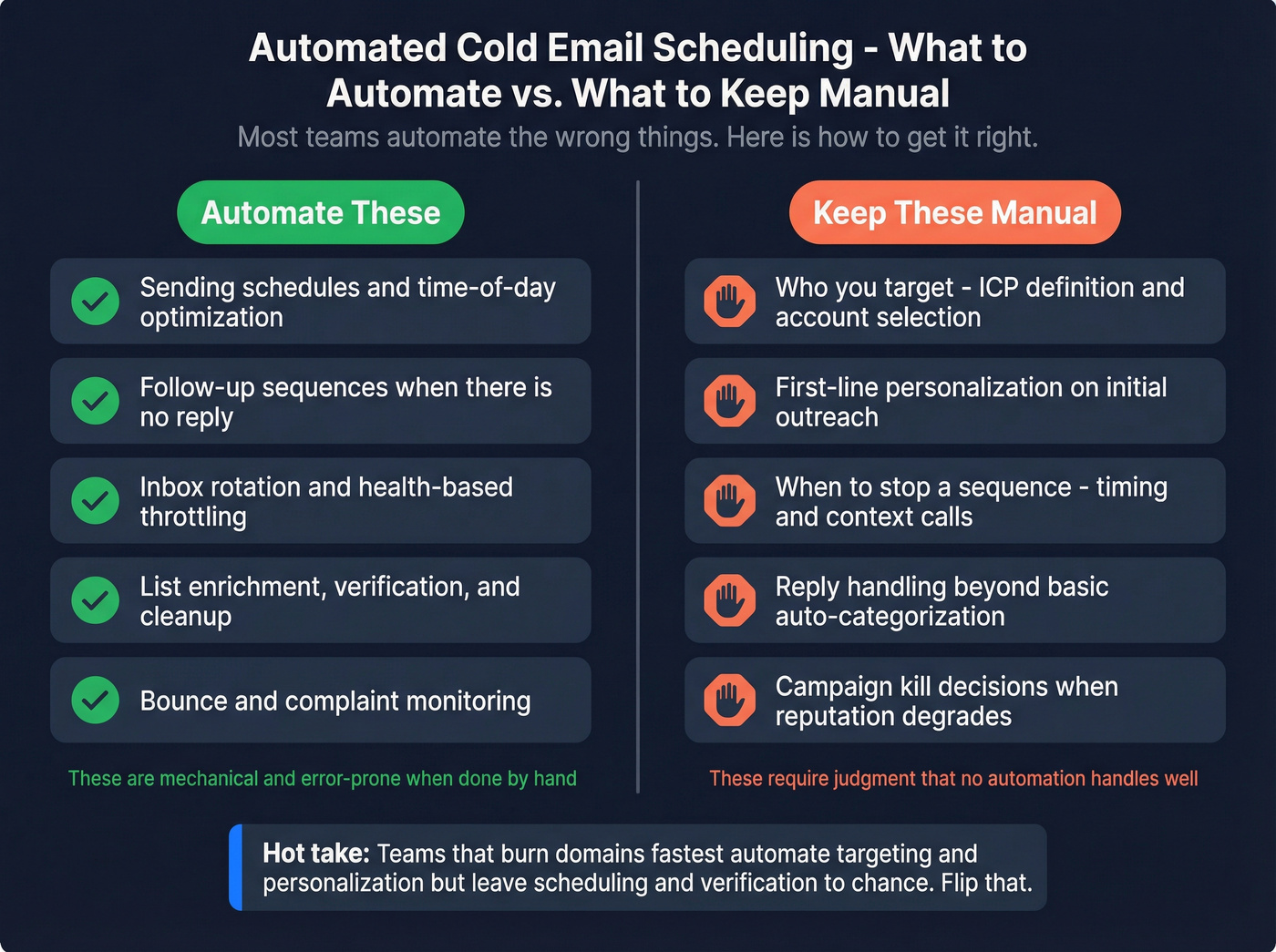
Automate these - they're mechanical and error-prone when done manually:
- Sending schedules and time-of-day optimization (especially send-time optimization)
- Follow-up sequences when there's no reply
- Inbox rotation and health-based throttling
- List enrichment, verification, and cleanup (see email verification)
- Bounce and complaint monitoring
Keep these manual - they require judgment that no automation handles well:
- Who you target (ICP definition, account selection) (use an ICP that’s actually validated)
- First-line personalization on initial outreach
- When to stop a sequence (prospect changed jobs, company got acquired, timing is wrong)
- Reply handling beyond basic auto-categorization
- Campaign kill decisions when sender reputation degrades
The teams that burn domains fastest are the ones who automate targeting and personalization but leave scheduling and rotation to manual processes. Do the opposite.
Automated Warmup Schedule - Week-by-Week Plan
Warmup isn't optional. It's not something you rush through.
Every domain that gets torched in cold email follows the same pattern: someone skipped warmup or ramped too fast. Here's the week-by-week calendar:
| Week | Daily Volume | Split | Notes |
|---|---|---|---|
| 1-2 | 5-10/day | All warmup | Zero cold emails |
| 3-4 | 15-20/day | Mostly warmup | Can test 3-5 cold |
| 5-6 | 30-40/day | 50/50 split | 15-20 warmup + 15-20 cold |
| 7+ | Max 50/day | 25 warmup + 25 cold | Never exceed this per inbox |
The rules that matter:
- Never increase volume faster than 20-30% per week. If you're at 10/day, go to 12-13 next week, not 20. Patience here saves you months of sender reputation repair later.
- Never turn off warmup. Even after your domain is fully ramped, keep warmup running alongside cold sends. The positive engagement signals continuously reinforce your reputation. (Full breakdown: email warmup.)
- Warm up for at least 2 weeks before any campaign. Two weeks is the minimum. Three is better. I've seen teams try to shortcut this to 5 days and regret it within a week.
- At max capacity, split 25 warmup + 25 cold per inbox.
- Buy secondary domains. Never use your primary company domain for cold outreach. If cold emails trigger spam complaints, you want those hitting yourcompanyhq.com, not yourcompany.com. Use .com domains - avoid .io, .co, or novelty TLDs for cold sending.
One pattern we see repeatedly: teams buy 10 domains, warm them all simultaneously, and launch campaigns from all 10 in week 3. Too aggressive. Stagger your domain purchases and warmups so you always have domains at different stages of maturity.
How to Schedule Bulk Cold Emails Without Killing Your Domain
Per-Mailbox Limits and Throttling Rules
The hard limits are non-negotiable:
- Google Workspace / Microsoft 365: Cap cold outreach at 50 emails per day per mailbox.
- New domains: After warmup, start cold at 3-5/day, then ramp gradually.
- Custom SMTP: 20-50/day. Shared IP pools are risky - dedicated IPs require expertise to warm properly.
Static caps are a starting point, not a strategy. When you schedule bulk cold emails across dozens of inboxes, dynamic throttling based on health signals is what separates teams that scale from teams that burn domains. (For pacing mechanics, see email pacing.)
Watch three signals daily:
- Bounce rate: Anything above 2% is a red flag. Pause and clean your list.
- Spam complaint rate: Gmail's ceiling is 0.3%. Hit it and you're in trouble immediately. (More limits: spam rate threshold.)
- Reply rate: If replies drop below 1% on a previously healthy campaign, something's wrong with placement.
Throttle down the moment any signal degrades. Don't wait for a full domain blacklist - by then, recovery takes weeks.
Scaling Past 5 Inboxes - Rotation and Pool Management
Simple round-robin rotation breaks at scale. Not all inboxes are equal - a 6-month-old domain with clean history handles volume differently than a 3-week-old domain still ramping.
The three-pool system works:
Primed - Mature domains with strong sender reputation. These handle your highest volume and most important campaigns.
Ramping - New domains still building reputation. Conservative volume, mostly warmup, limited cold sends.
Resting - Domains that crossed a health threshold. Warmup only, no cold sends, minimum 7 days before re-evaluation.
Movement triggers between pools:
| Trigger | Action |
|---|---|
| Health score < 85% | Move to Resting (7 days) |
| Spam complaints hit 0.3% | Move to Resting (immediate) |
| Daily bounce > 2% | Move to Resting (48 hours) |
| 7+ days resting, metrics clean | Move to Ramping |
| 4+ weeks ramping, strong metrics | Move to Primed |
Keep Gmail and Microsoft inboxes in separate sub-pools. Provider-specific monitoring matters - use Gmail Postmaster Tools and Microsoft SNDS to track reputation at the provider level. (If you’re diagnosing issues, start with domain reputation.)
Infrastructure cost reality check: Running 1,000 cold emails per day requires roughly 20-30 mailboxes across 10+ domains. Here's the budget:
- 10 domains: ~$150/year
- 30 Google Workspace accounts: ~$150/month
- Sending tool (Instantly Hypergrowth): $97/month
- Leads/data: ~$147/month
Total: ~$544 the first month, then ~$394/month ongoing.
Scheduling Mistakes That Kill Your Domain
Do this: Use secondary domains for all cold outreach.
Not that: Send cold emails from your primary company domain. One spam complaint wave poisons everything - your marketing emails, your transactional emails, your team's regular correspondence.
Do this: Warm up every domain for 2+ weeks before any campaign.
Not that: Blast 500 emails from a 3-day-old domain. A practitioner on Reddit put it perfectly: "Broke a domain early by scaling too fast with a 'perfect' workflow. Everything ran smoothly... straight into spam."
Do this: Set up custom tracking domains.
Not that: Use your sending tool's shared tracking domain. Shared domains tie your reputation to every other user on that domain. One bad actor tanks everyone.
Do this: One clear CTA per email.
Not that: Include three links, a calendar booking widget, and a PS with another ask. Multiple CTAs confuse recipients and trigger spam filters. (If you need better asks, use this CTA framework.)
Do this: Send plain text emails.
Not that: Use HTML templates with images, fancy formatting, and embedded logos. Plain text looks like a real email. HTML templates look like marketing - and spam filters treat them accordingly.
Do this: Configure SPF, DKIM, and DMARC before sending a single email.
Not that: Skip authentication setup. In 2026, unauthenticated emails don't just land in spam - many providers reject them outright. (Setup guide: SPF/DKIM/DMARC.)
Do this: Turn off open tracking and keep spam complaints below 0.3%.
Not that: Track opens with invisible pixels while ignoring complaint rates. Across 44 million emails analyzed, turning off open tracking more than doubled reply rates - 2.36% vs 1.08%. Tracking pixels are one of the strongest spam filter triggers. 0.3% is Google's hard ceiling for bulk senders - cross it and your entire sending infrastructure takes a hit.
Data Quality - The Scheduling Prerequisite Nobody Talks About
Look, nobody in the scheduling conversation wants to address this: perfect send-time optimization with bad data sends perfectly timed emails to spam.
The average cold email bounce rate is 7-8%, compared to under 2% for opt-in marketing lists. The safe threshold for cold outreach is under 2%. That gap between what most teams actually experience and what their domains can tolerate is where reputations die. Weeks of careful warmup, careful throttling, and optimized send times get undone by a list full of invalid addresses. (More on keeping lists clean: data quality.)
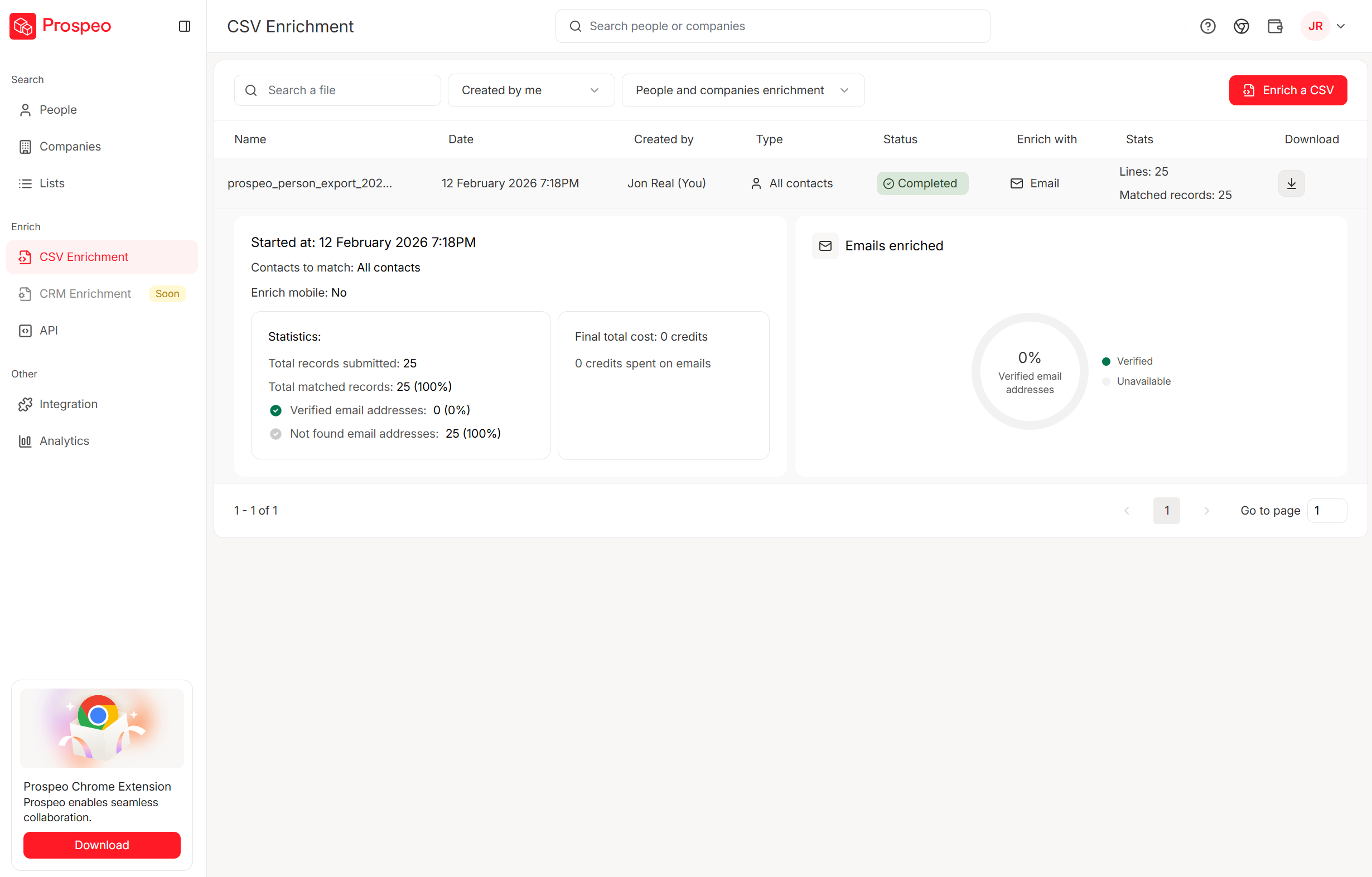
The workflow: build your list using 30+ search filters, verify in bulk, then push directly to your sending tool through native integrations. No CSV exports, no manual imports, no data degradation between steps. Stack Optimize built their agency to $1M ARR using this approach - 94%+ deliverability across all client campaigns, under 3% bounce rate, zero domain flags.
Timezone-optimized scheduling needs accurate company location data. Prospeo enriches every contact with 50+ data points - including company HQ and prospect location - so your sends land at 9 AM local, not 3 AM. At $0.01 per email, scaling across regions costs almost nothing.
Enrich your lists with location data and send at the right time, every time.
Best Tools for Automated Cold Email Scheduling in 2026
Here's how the major platforms compare on the features that actually matter for scheduling:
| Tool | Starting Price | Key Features | Unlimited Accts | Best For |
|---|---|---|---|---|
| Instantly | $97/mo | TZ detection, warmup, SISR rotation | Yes | SMB simplicity |
| Smartlead | $32.50/mo | TZ detection, warmup, API, client mgmt | Yes | Agencies/scale |
| Lemlist | $55/mo/user | TZ detection, Lemwarm, visual personalization | No ($9/inbox) | Multichannel |
| Saleshandy | $25/mo | TZ detection, warmup, rotation | Yes | Budget teams |
| Woodpecker | $24/mo | Basic scheduling, warmup | No | Low-volume |
| Reply.io | $49/user/mo | TZ detection, warmup, AI SDR agent | No | Enterprise |
Instantly
Instantly is the obvious starting point for most SMB teams, and there's a reason it dominates cold email conversations. The Hypergrowth plan at $97/month gives you 25,000 contacts, 100,000 emails, and unlimited sending accounts - that flat-fee model means you aren't penalized for scaling your inbox rotation.
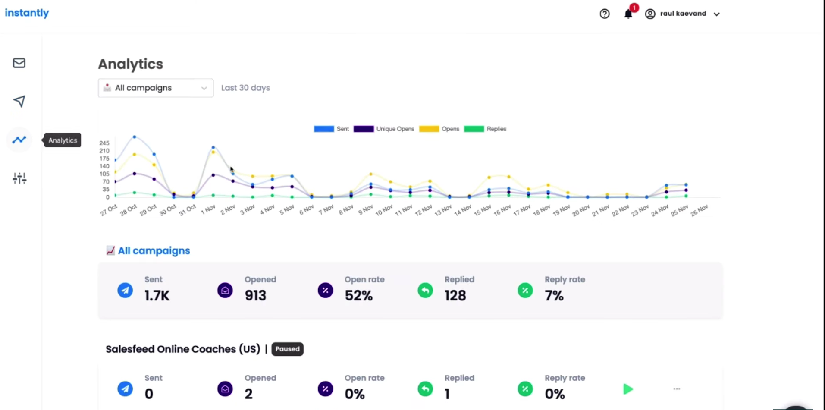
The SISR (Smart Inbox Selection and Rotation) deliverability infrastructure is what sets Instantly apart from cheaper alternatives. It doesn't just rotate inboxes - it dynamically selects which inbox sends based on health scores, domain age, and provider mix. Inbox placement testing lets you check whether your emails actually land before you scale a campaign. Warmup is built in and runs continuously. The AI Reply Agent handles basic responses so your team focuses on interested prospects, not "thanks but no thanks" replies.
Where Instantly falls short compared to Smartlead: API access is more limited, and agency-specific features (client management, white-labeling) aren't as mature. For a single team running outbound, though, it's the easiest path from zero to pipeline. (If you’re evaluating platforms, compare options in cold email outreach tools.)
Smartlead
I watched an agency try to run 15 client campaigns on Instantly before switching to Smartlead. The difference was immediate. Not deliverability - both are strong there - but operational sanity. Smartlead is built for complexity.

The Basic plan starts at $32.50/month (annual), and the Pro plan at $94/month gets you 30,000 active leads and 150,000 monthly emails. The agency pricing model - $29 per client add-on - is what makes it the default for outbound agencies. You aren't paying per-user; you're paying per client workspace.
Timezone detection and custom sending windows are where Smartlead genuinely excels. It auto-detects prospect timezones and schedules sends to hit local optimal windows without you building separate campaigns per region. The centralized master inbox pulls replies from all sending accounts into one view, which matters when you're managing 50+ inboxes. API access is strong enough for teams building custom workflows or integrating with internal tools.
If you're sending over 5,000 emails daily or managing multiple client campaigns, Smartlead is the right call.
Lemlist
Use this if you're running multichannel sequences where email, social touches, and personalized visuals all live in one workflow. Lemlist's visual personalization (dynamic images with prospect names, logos, screenshots) still stands out in a sea of plain-text tools.
Skip this if you're purely optimizing for email volume and cost. The Email Starter plan runs $55/month per user, with the multichannel tier at $79/user. Extra inboxes cost $9 each. Costs add up fast for teams scaling past 3-4 senders. Lemwarm handles warmup, but it's a separate system from your campaign sends. Best for creative outbound teams who want email cadences that feel different.
Saleshandy
Saleshandy is the budget play that doesn't feel like a compromise. Starting at $25/month (annual) for 2,000 active prospects with unlimited email accounts on every plan, it undercuts both Instantly and Smartlead on price. The Pro tier at $69/month handles 30,000 prospects and 150,000 emails.
If you're running smaller deal sizes and need solid scheduling, rotation, and warmup without paying $97/month, Saleshandy deserves a serious look. The tradeoff: the UI and deliverability infrastructure aren't as polished as Instantly's, and agency features are limited.
Woodpecker
Clean interface, simple pricing, good for teams sending under 500 emails per day who don't need the complexity of Smartlead or the scale of Instantly. Free trial covers 50 prospects. Starter plan at $24/month. Skip it if you're planning to scale past a handful of inboxes.
Reply.io
Enterprise-oriented with per-user pricing: $49/user/month (annual) for email volume, $89/user/month for multichannel. The AI SDR agent (Jason) at $500/month is interesting but expensive. Best for larger sales orgs that want sequences, calls, and social in one platform with CRM-grade reporting. Overkill for most SMB cold email operations.
FAQ
How many cold emails should I send per day per mailbox?
Cap cold outreach at 50 emails per inbox on Google Workspace or Microsoft 365. New domains should start at 3-5 cold sends per day after warmup and ramp 20-30% weekly. At max capacity, split evenly: 25 warmup and 25 cold.
How long should I warm up a new domain before sending cold emails?
Minimum two weeks of warmup-only sending before any cold campaign. Start at 5-10 emails per day and increase 20-30% weekly. Most domains reach safe sending volume (40-50/day) by week 6-7. Never turn off warmup - keep it running continuously alongside cold sends.
What's the best day and time to send cold emails?
Tuesday and Thursday outperform other weekdays for opens and replies. Best windows are 9:30-11 AM and 1:30-3 PM in the prospect's local timezone. Wednesday 7-11 AM produces the highest reply rates specifically. Monday has strong opens but weaker replies - use it for follow-ups, not first touches.
Does open tracking hurt cold email deliverability?
Yes. Turning off open tracking more than doubled reply rates (2.36% vs 1.08%) across 44 million emails studied. Tracking pixels are a strong spam filter trigger. If you must track opens, use a custom tracking domain, but understand you're trading deliverability for data.
What's a good free tool for verifying emails before cold campaigns?
Prospeo offers 75 free verified emails per month with full 5-step verification, including catch-all handling and spam-trap removal. For teams running real campaigns, the free tier gives enough credits to test the workflow and plugs directly into Instantly, Smartlead, and Lemlist.