

Schedule a Meeting Email Template (2026 Guide)
The average employee spends 392 hours a year in meetings. 62% of those meetings don't even have a stated goal in the invite, and 80% of professionals believe most could wrap up in half the time. That's not a meeting culture problem - it's a meeting email problem. The request sets the tone, and most people write terrible ones.
You don't need 32 templates. You need a framework, a handful of adaptable examples, and the discipline to keep things short.
The Quick Formula
Three rules cover 90% of meeting email success:
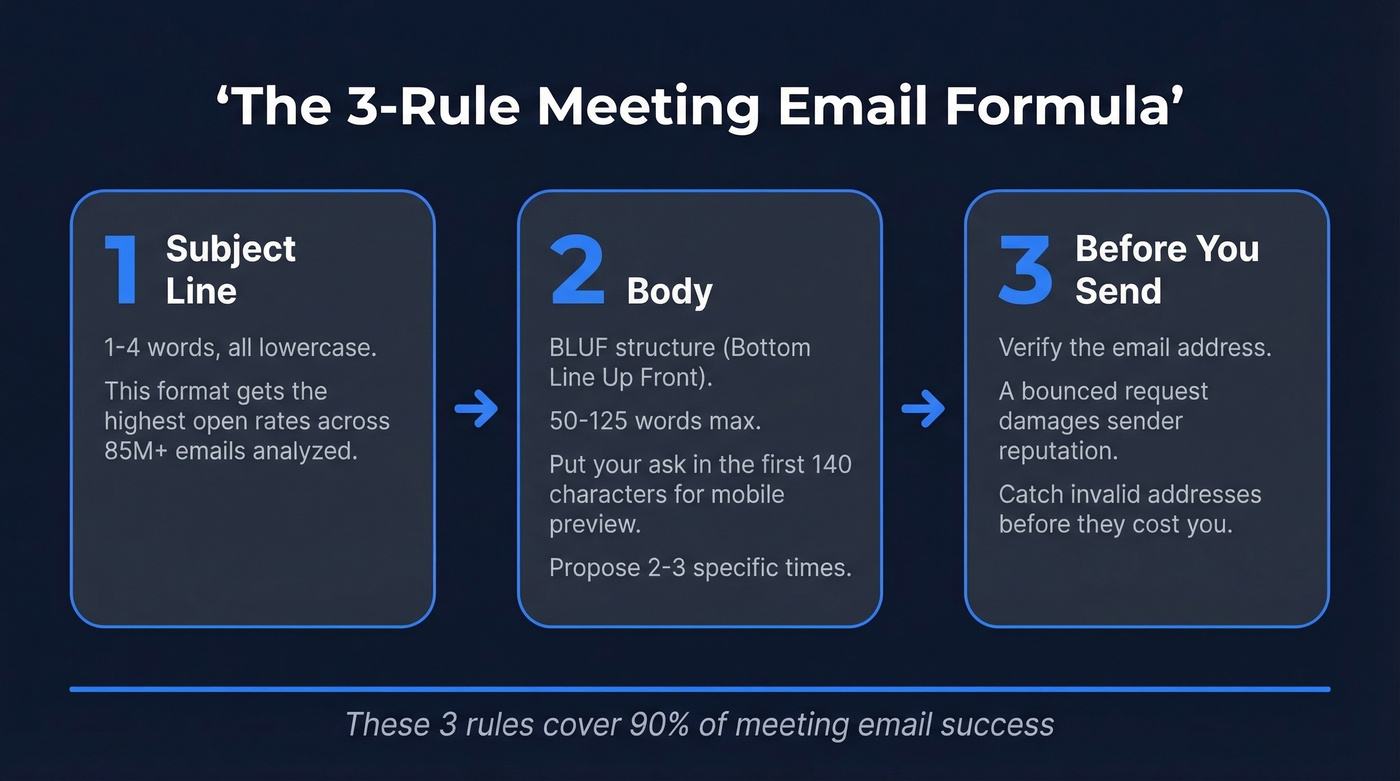
- Subject line: 1-4 words, all lowercase. An analysis of 85M+ cold emails found this format gets the highest open rates. (If you want more ideas, swipe these email subject line examples.)
- Body: BLUF structure) (Bottom Line Up Front). Keep it 50-125 words. Propose 2-3 specific times. Put your ask in the first 140 characters so it shows in mobile preview.
- Before you send: Verify the email address. A bounced meeting request doesn't just waste your time - it damages your sender reputation (here’s how to improve sender reputation). Prospeo catches invalid addresses and spam traps with 98% accuracy, and it's free to start.
Subject Lines That Get Opened
Subject lines matter more than body copy. That 85M-email analysis from Gong and 30MPC found top-performing reps hit 58%+ open rates - 2.1x the average rep. The difference isn't charisma. It's the subject line.
Keep it to 1-4 words. Write in all lowercase. "quick question" outperforms "Quick Question About Our Upcoming Q3 Strategy Session" every single time. Mobile inboxes display roughly 40-50 characters, so front-load the important words.
Empty subject lines boost opens by 30% but tank reply rates by 12%. That's a parlor trick, not a strategy. Salesy techniques like "[URGENT]" or "limited time" reduce opens by up to 17.9%. Your prospect's spam filter - both mental and technical - is well-trained by now.
How to Structure Your Meeting Request Email
Every effective meeting email follows the same skeleton: BLUF, context, options, exit ramp.
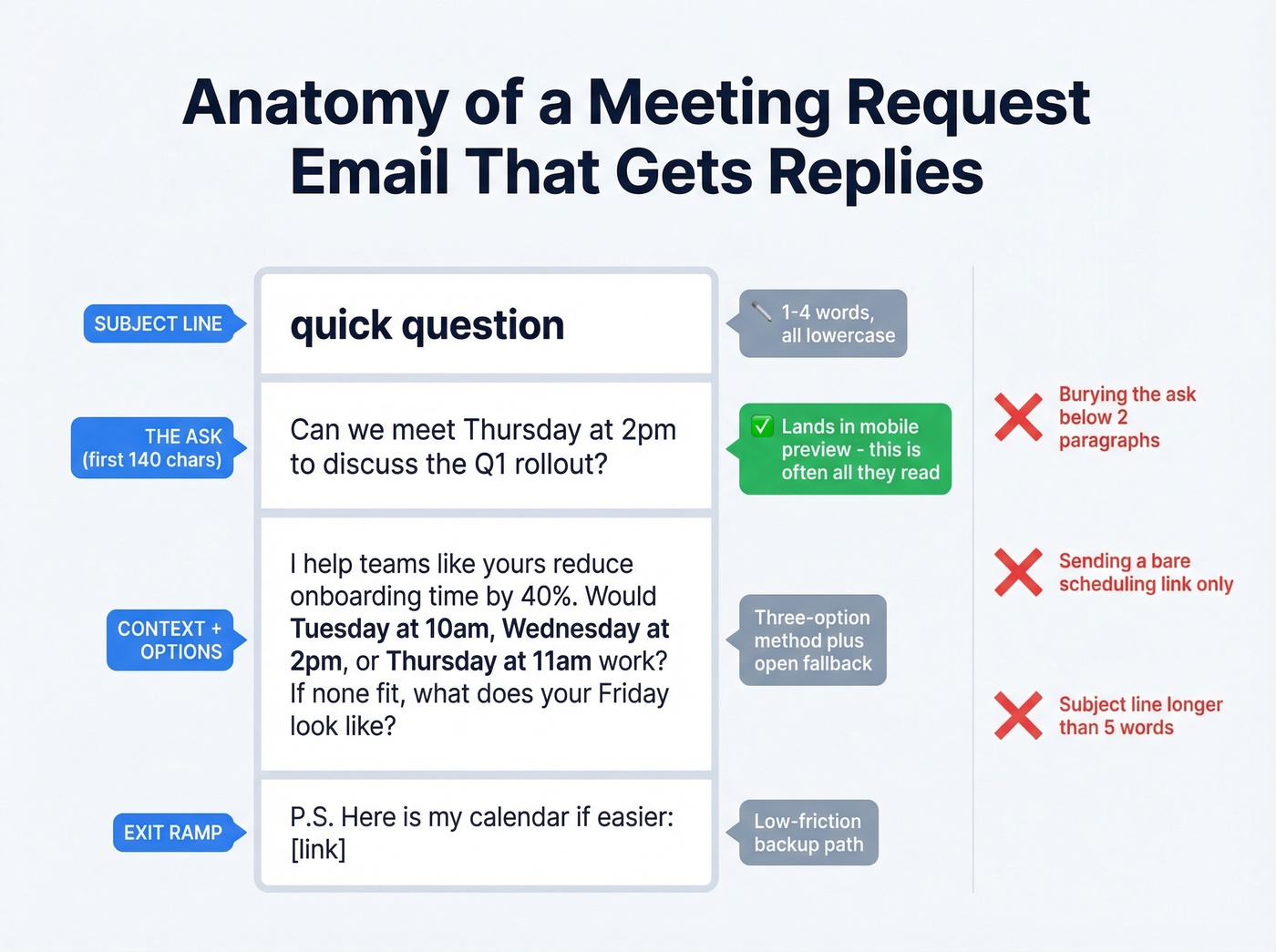
Your ask needs to land in the first 140 characters. That's the mobile preview window, and it's often the only thing your recipient reads before deciding to open or archive. "Can we meet Thursday at 2pm to discuss the Q1 rollout?" beats two paragraphs of context followed by a buried request every time, because the buried version never gets read.
The three-option method works. Propose 2-3 specific times, add an open fallback ("If none of those work, what does your Tuesday look like?"), and drop a scheduling link in the P.S. as a backup. This gives the recipient a low-friction path to say yes without forcing them to do calendar homework.
Keep paragraphs to 2-3 sentences max. Add warmth markers - a quick "thanks for the intro last week" or "appreciated your talk at the conference" - so your email doesn't read like a form letter. (More on writing emails that convert: email copywriting.)
Three mistakes that kill reply rates:
- Burying the ask below two paragraphs of context
- Sending a bare scheduling link as your entire message
- Writing a subject line longer than 5 words

A perfect meeting request email means nothing if it bounces. Prospeo verifies emails with 98% accuracy and catches spam traps before they torch your sender reputation - so every template you send actually lands in an inbox.
Stop crafting emails that never arrive. Verify first.
16 Email Templates for Every Scenario
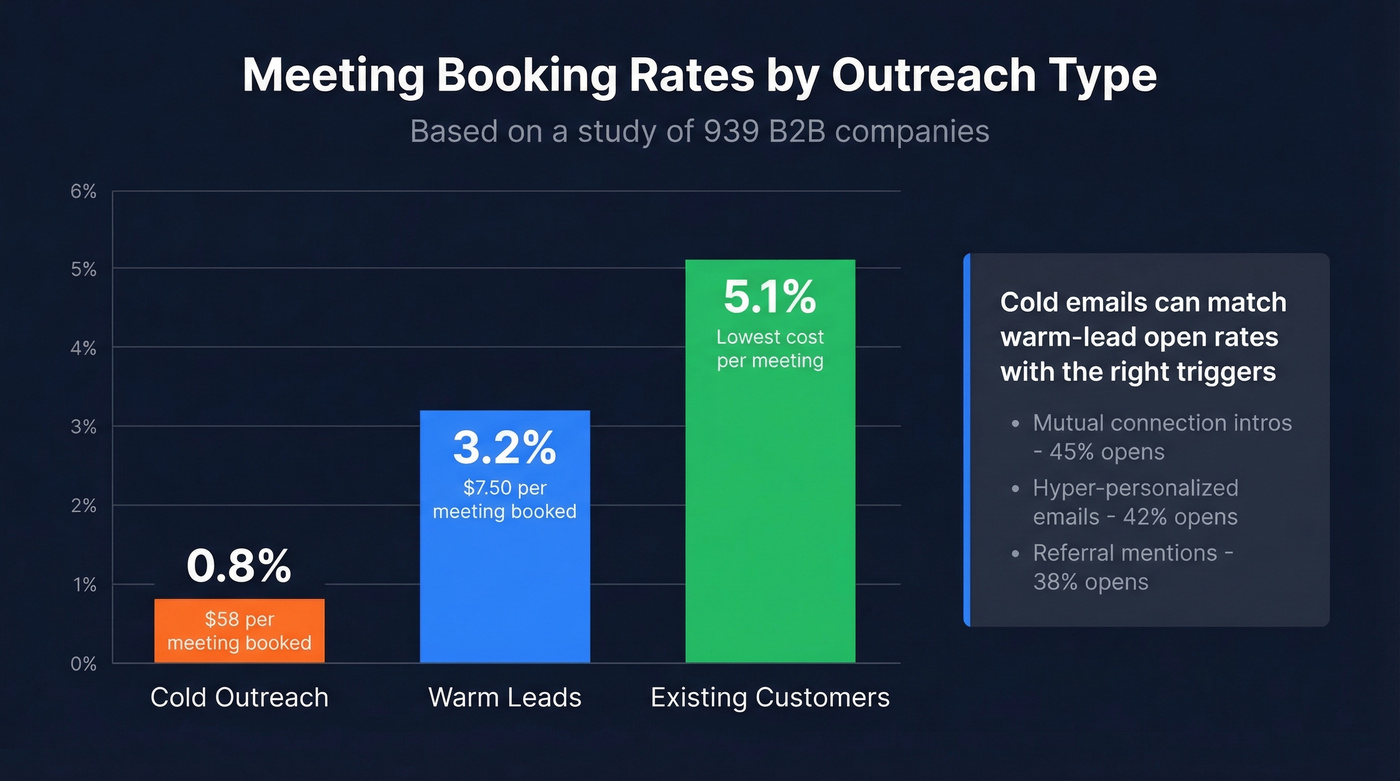
A study of 939 B2B companies found cold outreach books meetings at 0.8%, warm leads at 3.2%, and existing customers at 5.1%. Cold emails cost roughly $58 per meeting booked versus $7.50 for warm leads. The approach has to match the relationship. (If you’re building a full sequence, start with these sales follow-up templates.)
Cold Outreach Templates
Cold emails can match warm-lead open rates with the right triggers: mutual connection intros hit 45% opens, hyper-personalized emails reach 42%, and referral mentions land at 38%.
First-touch cold email:
Subject: quick question
Hi [First Name],
[One sentence about their company/role that proves you did homework]. I help [similar companies] [specific outcome] - would love to explore if that's relevant for [Company].
Would [Day] at [Time] or [Day] at [Time] work for a 15-min call? If not, [open fallback].
P.S. Here's my calendar if easier: [link]
Referral/mutual connection:
Subject: [Mutual Contact] suggested we talk
Hi [First Name],
[Mutual Contact] mentioned you're [working on X / looking at Y]. We helped [their company] [result] - thought it'd be worth a quick conversation.
Free [Day] at [Time] or [Day] at [Time]?
Before sending cold meeting requests at scale, run your list through an email verification tool. A single bounced email hurts your domain reputation more than one skipped prospect.
Warm Lead Templates
Post-demo/event follow-up:
Subject: next steps
Hi [First Name],
Great connecting at [event/demo]. You mentioned [specific pain point] - I've put together a few ideas on how we'd tackle that.
Can we do 30 minutes [Day] at [Time]? I'll keep it tight.
Inbound lead response:
Subject: re: your request
Hi [First Name],
Thanks for checking out [resource/page]. Looks like [Company] is exploring [topic] - happy to walk through how we've helped similar teams.
[Day] at [Time] or [Day] at [Time] work? If not, grab a slot here: [link]
Internal Meeting Templates
Manager/skip-level request:
Subject: 15 min - [topic]
Hi [Name],
I'd like to get your input on [specific topic]. I have a recommendation ready and want to align before [deadline/milestone].
Does [Day] at [Time] work? Happy to adjust.
Cross-team collaboration:
Subject: sync on [project]
Hi [Name],
[Your team] is working on [initiative] and we need [their team's] input on [specific area]. 20 minutes should cover it.
Proposing [Day] at [Time]. I'll send an agenda beforehand.
Client & Customer Templates
Client check-in / QBR:
Subject: quarterly check-in
Hi [First Name],
It's been [timeframe] since our last review. I've pulled together your usage data and a few recommendations for Q[X].
Can we block 30 minutes [Day] at [Time] or [Day] at [Time]?
Customer success / churn prevention:
Subject: wanted to check in
Hi [First Name],
I noticed [specific signal - usage drop, support tickets, contract approaching renewal]. Want to make sure everything's on track and see if there's anything we can adjust.
Free for a quick call [Day] at [Time]?
Logistics Templates
Rescheduling:
Subject: need to move our [Day] call
Hi [First Name], a conflict came up for [original time]. Could we shift to [New Day] at [Time] or [New Day] at [Time]? Apologies for the shuffle.
Confirmation:
Subject: confirmed - [Day] at [Time]
Hi [First Name], confirming our [meeting type] on [Day] at [Time] via [Zoom/phone/in-person]. I'll send the agenda by [day before]. See you then.
Reminder:
Subject: tomorrow at [Time]
Hi [First Name], quick reminder about our call tomorrow at [Time]. Here's the [link/location]. Looking forward to it.
Cross-timezone:
Subject: finding a time across zones
Hi [First Name], I'm in [your TZ] and I believe you're in [their TZ]. Would [Time in their TZ] on [Day] work? That's [Time in your TZ] for me. Happy to flex - nearly a third of meetings now span multiple time zones.
Specialty Templates
Investor/partnership meeting:
Subject: [Company] + [Their Company]
Hi [First Name],
[One sentence on why this meeting makes sense - shared market, portfolio fit, mutual interest]. I'd love 30 minutes to explore [specific angle].
Would [Day] at [Time] work? I'm flexible on format - video, phone, or in-person if you're in [city].
Recruiting/interview scheduling:
Subject: interview - next steps
Hi [First Name], we'd love to move forward with the next round. Are you available [Day] at [Time] or [Day] at [Time]? The session will be [duration] with [interviewer name/role].
54% of people leave meetings unclear about next steps - which is why the recap email matters more than most people think. (Use this sales meeting follow-up email framework to keep momentum.)
Post-meeting recap with next meeting:
Subject: recap + next steps
Hi [First Name], thanks for today. Key takeaways: [2-3 bullets]. Next step: [action item]. Let's reconvene [Day] at [Time] to review progress - I'll send a calendar invite.
Follow-up after no response:
Subject: re: [original subject]
Hi [First Name], circling back on this. I know things get buried - would [Day] at [Time] still work, or is next week better?
The Calendly Drop-Off Problem
Here's a pattern every sales rep recognizes: prospect replies "sure, let's talk." You send the Calendly link. Silence.
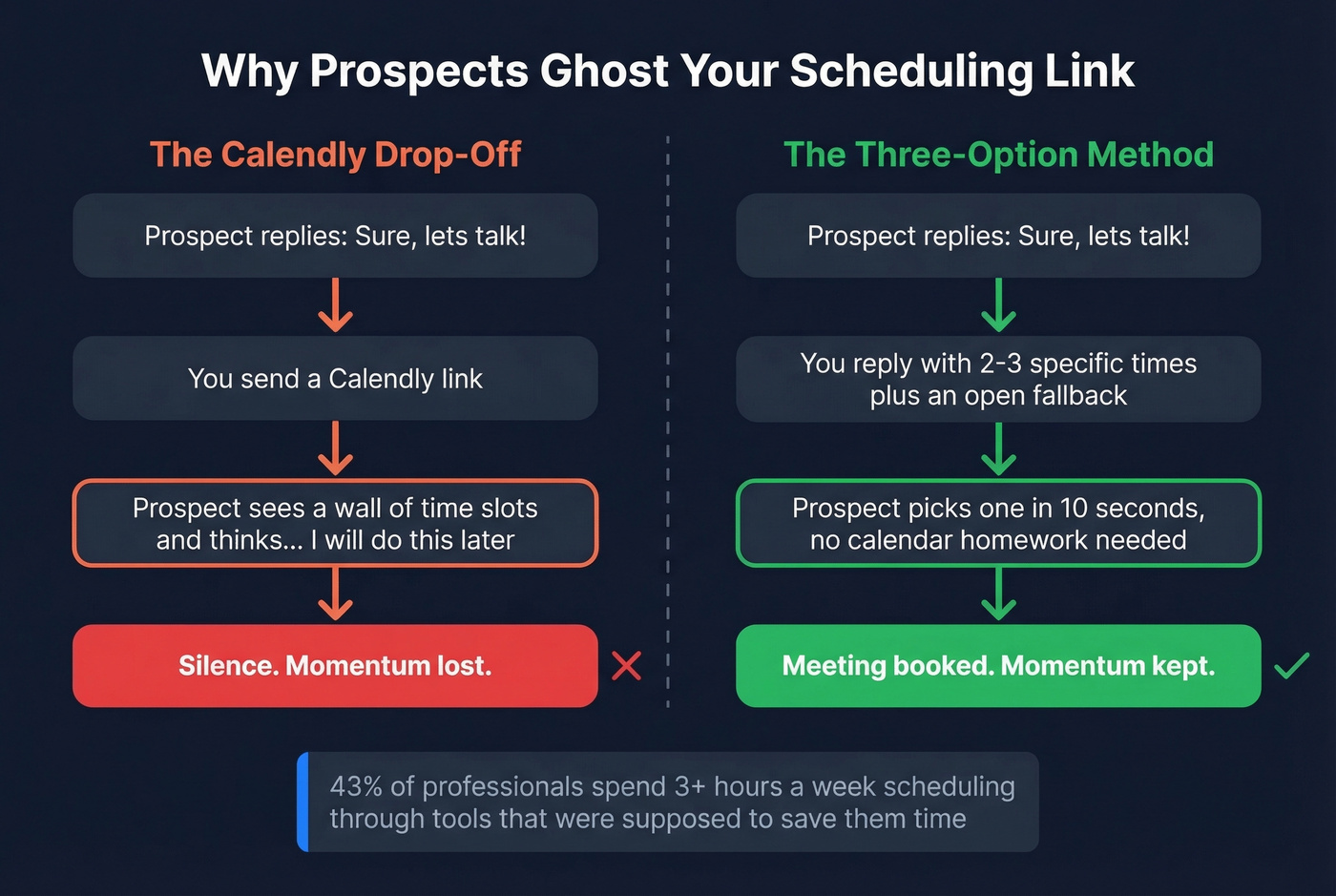
The r/sales subreddit is full of this exact complaint, and we've seen it ourselves running outbound campaigns. The problem isn't Calendly. It's the friction. A positive reply carries momentum, and a scheduling link says "now go do homework on my calendar." Use the three-option method instead. If you do use a scheduling tool, SavvyCal's calendar overlay - where the recipient sees their own calendar alongside yours - reduces that friction significantly.
Let's be honest: if your average deal size is under five figures, you probably don't need a scheduling tool at all. Propose two times, get a reply, send the invite. The back-and-forth people complain about usually takes less time than the 43% of professionals who spend 3+ hours a week scheduling and rescheduling meetings through tools and workflows that were supposed to save them time.
Follow-Up Cadence That Works
Most reps send one or two follow-ups and stop. The data says 4-9 follow-ups is the effective range for cold outreach. Here's the spacing we've found works best:
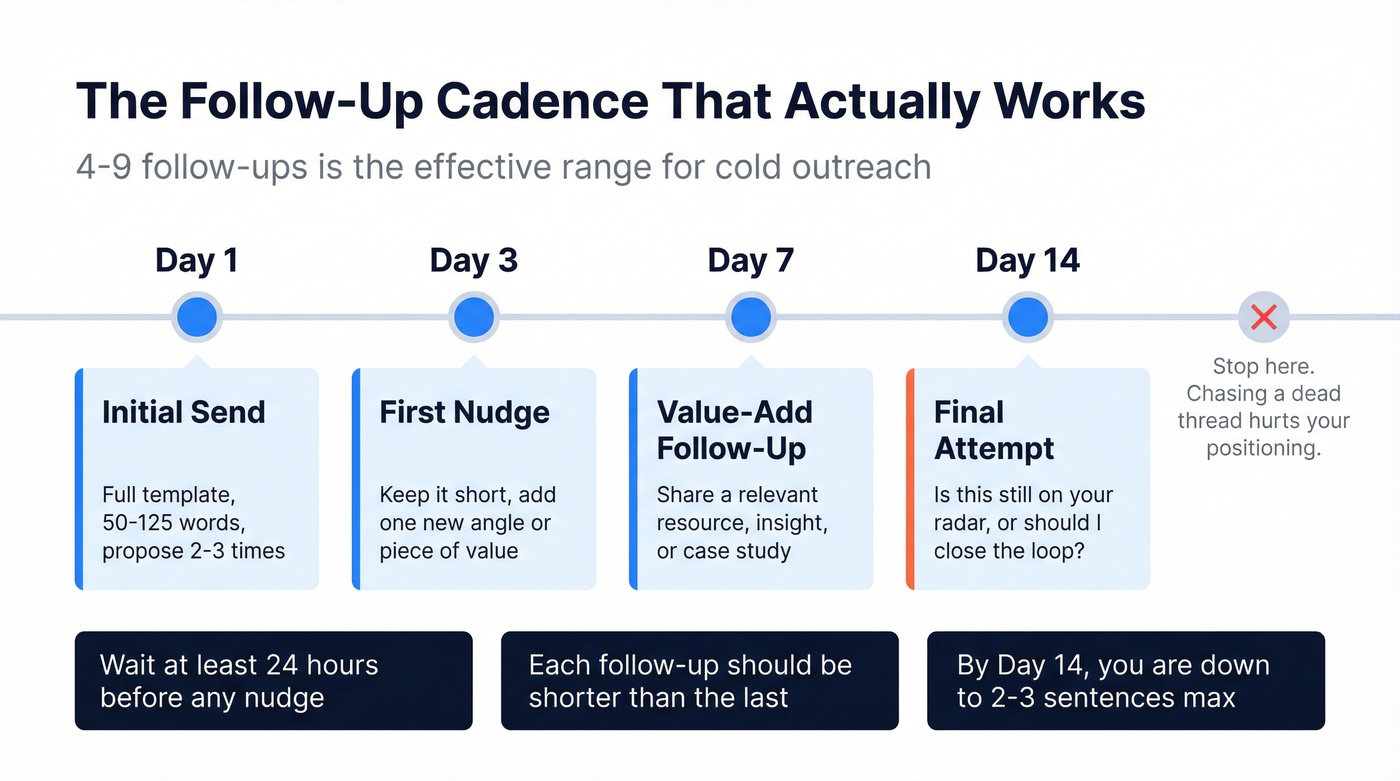
- Day 1: Initial send.
- Day 3: First nudge. Short, add one new angle.
- Day 7: Value-add follow-up. Share a relevant resource or insight.
- Day 14: Final attempt. "Is this still on your radar, or should I close the loop?"
Wait at least 24 hours before any nudge. Keep each follow-up shorter than the last. By Day 14, you're down to 2-3 sentences. If you haven't heard back by then, move on - chasing a dead thread hurts your positioning more than it helps your pipeline. (More timing guidance: when should i follow up on an email.)
Cold meeting emails book at 0.8% - but only if they reach real inboxes. Prospeo gives you verified emails for 300M+ professionals at ~$0.01 each, so you spend time writing great requests instead of recovering from bounces.
Find verified emails before you send a single meeting request.
Scheduling Tools Worth Knowing
If manual back-and-forth becomes a bottleneck, here are the tools worth evaluating. The right scheduling tool complements a strong meeting request email - it doesn't replace it.
| Tool | Best For | Starting Price |
|---|---|---|
| Calendly | Simple booking links | Free - ~$16/user/mo |
| SavvyCal | Collaborative calendar overlay | ~$12 - ~$20/user/mo |
| Chili Piper | Inbound lead routing | $30-$45/user/mo + platform fee |
| Cal.com | Open-source / budget | Free - $15/user/mo |
| Doodle | Group polls | Free - $19.95/user/mo |
| Reclaim | AI calendar optimization | Free - $10/user/mo |
Calendly is the default for a reason - it's simple, the free tier is generous, and everyone recognizes the interface. SavvyCal is the upgrade pick if your recipients are senior enough to care about the booking experience. Chili Piper is overkill unless you're routing inbound leads to specific reps based on CRM data, so skip it if you're a team of five or fewer. Cal.com is the scrappy open-source option that keeps getting better. Doodle and Reclaim solve different problems entirely - group scheduling and calendar optimization, respectively.
FAQ
How long should a meeting request email be?
50-125 words. Shorter emails consistently get higher reply rates. Put your ask in the first 140 characters so it appears in the mobile preview - that's often the only text your recipient reads before deciding to engage.
Should I propose times or send a scheduling link?
Propose 2-3 specific times first and include the scheduling link as a P.S. backup. Sending a bare link after a positive reply causes drop-off - the prospect has to do work instead of just saying "yes, Thursday works."
What's the best subject line for a meeting request?
Keep it to 1-4 words, all lowercase. An 85M-email analysis found this format gets the highest open rates. "quick question" or "next steps" outperforms anything clever or long.
How many follow-ups should I send?
4-9 follow-ups is the effective range for cold outreach. Space them at Day 1, 3, 7, and 14 with increasing gaps. Most reps quit after one or two - that's leaving meetings on the table.
How do I make sure my meeting email doesn't bounce?
Verify the recipient's address before sending. One bounced email hurts your sender reputation more than one skipped prospect, and it's an easy problem to solve with real-time verification before you hit send.