

How to Send Bulk Emails for Free in 2026
A small business owner on Reddit tried running a marketing campaign from their Outlook account. Two days later, locked out. That's what happens when you try to send bulk emails for free from a consumer inbox - with 4.48 billion email users worldwide and 81% of companies relying on email marketing, the demand is massive. The infrastructure to support it at zero cost? Not so much.
This article breaks down the free tools that actually work, the ones that don't, and the deliverability steps that separate "sent" from "delivered."
What You Need (Quick Version)
For the most generous free plan overall, go with Sender - 15,000 emails/month to 2,500 subscribers with unlimited automation. If you've got a large list and want room to grow, Brevo stores 100,000 contacts on its free tier, but you're capped at 300 sends/day. Newsletter creators should look at Kit, which gives you 10,000 subscribers with unlimited sends.
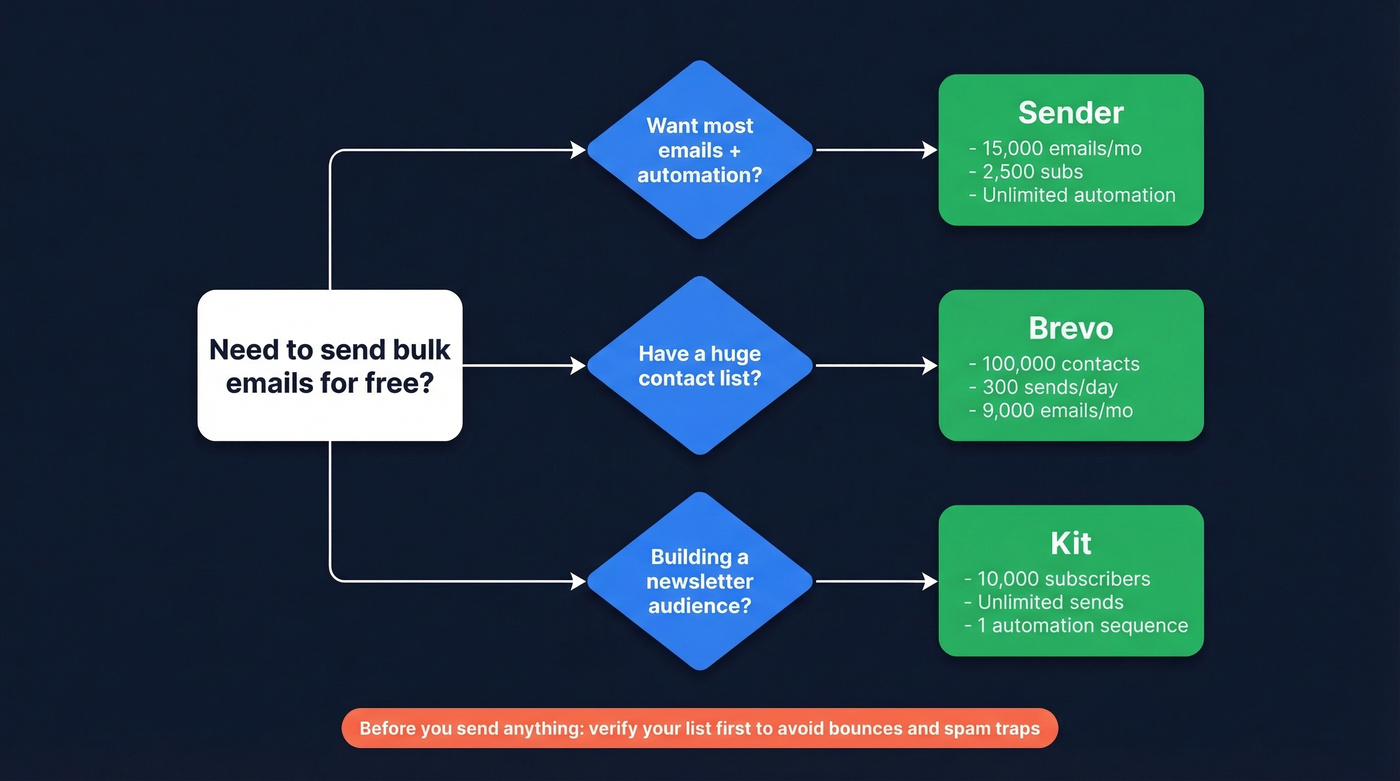
Once you've picked your ESP, there's one step before you send anything: verify your list. Bad addresses cause bounces, bounces destroy sender reputation, and wrecked reputation means your emails land in spam - even the good ones. Prospeo gives you 75 free email verifications per month, enough to clean a starter list and catch spam traps before they do damage.
Gmail Add-Ons vs. Dedicated ESPs
The first instinct most people have is to send mass emails straight from Gmail. It's free, you already use it, and add-ons like GMass and Mailmeteor bolt on mail merge and tracking. The problem is Gmail's hard ceiling.
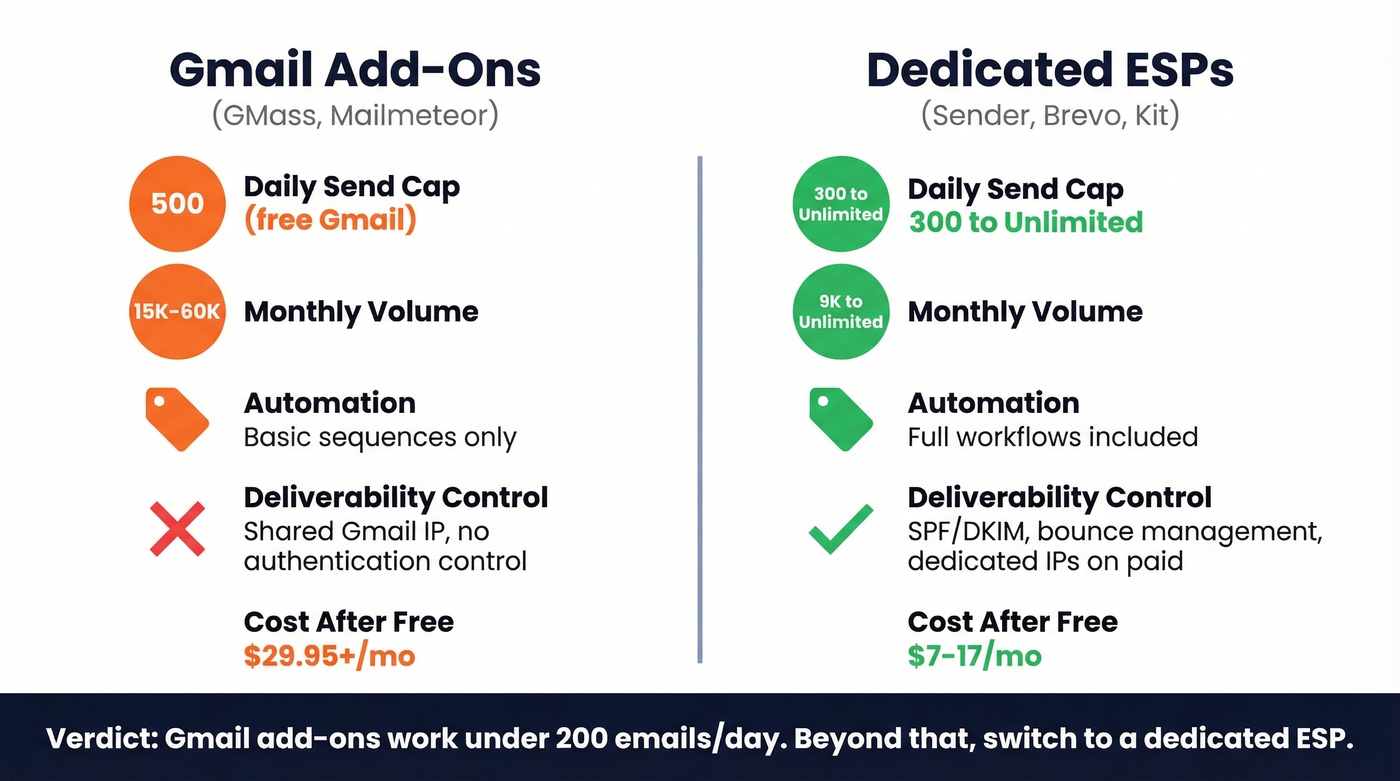
Free Gmail accounts cap you at 500 emails per day on a rolling 24-hour window - not a midnight reset. Google Workspace bumps that to 2,000/day, but new Workspace accounts are throttled to 500/day until the domain has paid at least $100 cumulatively and 60 days have passed. Exceed either limit and you're suspended from sending for 1-24 hours. Sending more than 20 emails in a single hour can trigger temporary lockouts too.
Here's what catches people off guard: auto-replies, internal replies, and alias sends all count toward your quota. Paying for a Gmail add-on like GMass doesn't increase Gmail's own limits. Per GMass's own FAQ, if Gmail is bouncing your emails because you've hit the cap, a $29.95/month subscription won't fix it.
| Feature | Gmail Add-Ons (GMass, Mailmeteor) | Dedicated ESPs (Sender, Brevo, Kit) |
|---|---|---|
| Daily cap | 500 (free) / 2,000 (Workspace) | 300-unlimited |
| Monthly cap | ~15,000-60,000 | 9,000-unlimited |
| Automation | Basic sequences | Full workflows |
| Deliverability control | None (shared Gmail IP) | SPF/DKIM, dedicated IPs (paid) |
| Cost after free | $29.95+/mo (GMass) | $7-17/mo |
Gmail add-ons work fine if you're sending under 200 emails a day and want personalized one-to-one outreach. Beyond that, you need a dedicated ESP - ideally one without daily sending caps. The deliverability control alone - domain authentication, dedicated sending infrastructure, bounce management - makes the switch worth it even before you hit Gmail's limits.
Best Free Bulk Email Tools in 2026
Dozens of email marketing platforms offer free tiers, but most are so restrictive they're basically demos. Here are the ones that actually let you do meaningful work without paying.
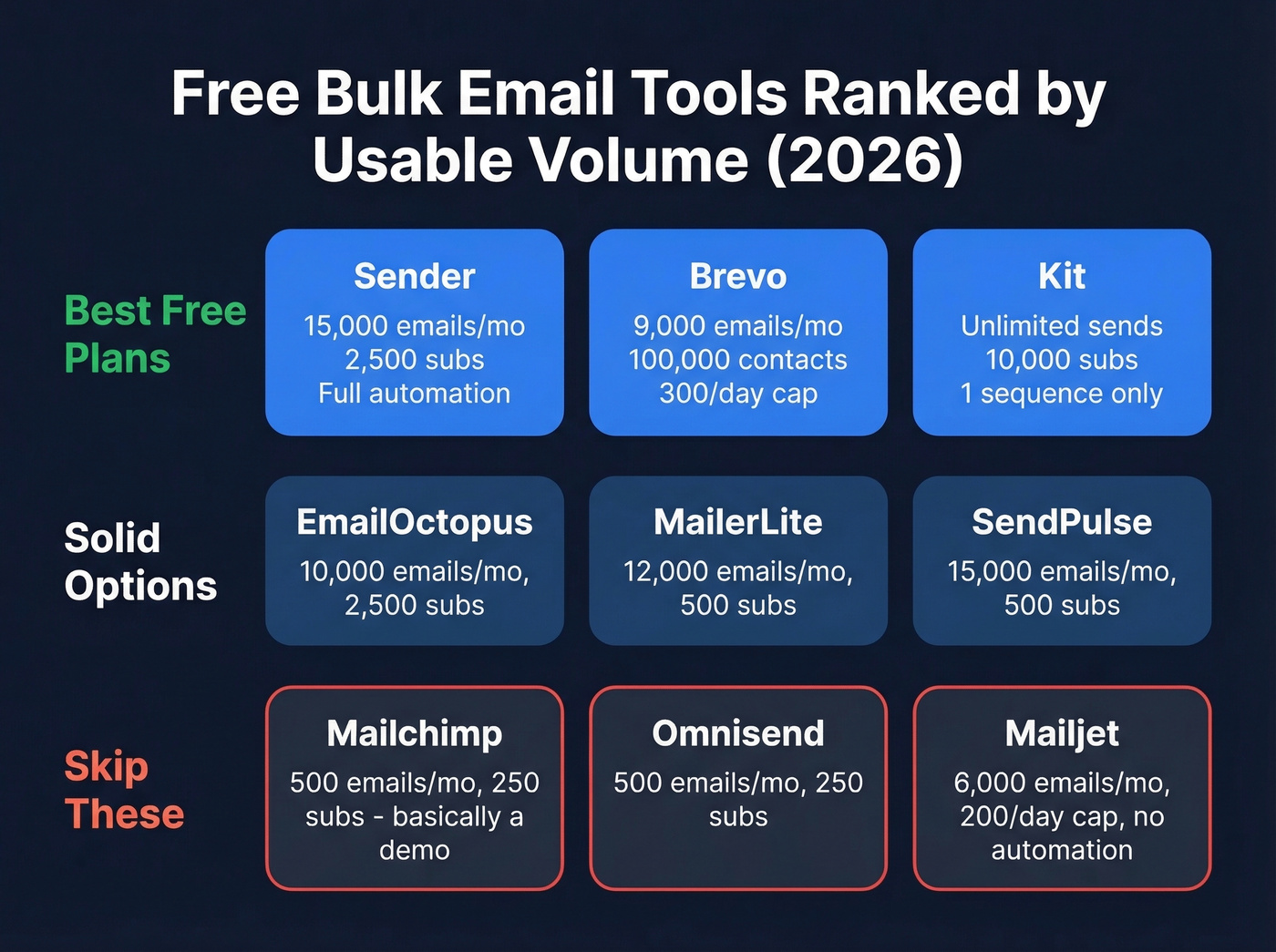
| Tool | Free Subscribers | Free Emails/Mo | Automation? | Best For |
|---|---|---|---|---|
| Sender | 2,500 | 15,000 | Yes (unlimited) | Overall best free plan |
| Brevo | 100,000 | 9,000 (300/day) | Limited (~2K subs) | Large contact lists |
| Kit | 10,000 | Unlimited | Limited (1 sequence) | Newsletter creators |
| EmailOctopus | 2,500 | 10,000 | Yes | Simple campaigns |
| MailerLite | 500 | 12,000 | Yes | Small lists, A/B testing |
| Mailjet | 1,500 | 6,000 (200/day) | No | Transactional + marketing |
| Mailchimp | 250 | 500 (250/day) | No | Avoid (see below) |
| Omnisend | 250 | 500 | Yes | E-commerce (limited) |
| SendPulse | 500 | 15,000 | Yes | Volume on small list |
| GMass | Trial only | 50/day (7 days) | Yes | Gmail power users (paid) |
Sender - Best Overall Free Plan
Use this if you want the most emails for free with real automation. Sender gives you 15,000 emails/month to 2,500 subscribers, and unlike most competitors, automation workflows are unlimited on the free tier. Welcome sequences, abandoned cart flows, re-engagement campaigns - all without paying. The drag-and-drop editor is clean, templates are included, and their team claims 99.98% of marketing emails deliver in under a minute. We've found it to be the strongest all-around free option for small teams getting started.
Skip this if you have more than 2,500 contacts. You'll hit the subscriber wall fast, and paid plans start at $7/month - still cheap, but the free tier is the draw here.
Brevo - The Math Problem
Brevo's free plan is deceptive in the best way. It stores 100,000 contacts - wildly more than anyone else. But here's the math you need to do before signing up: the 300 emails/day cap means roughly 9,000 sends per month. If you're sending a weekly newsletter to 2,000 people, that's 8,000/month and you're fine. Need to blast 10,000 contacts in one shot? Physically impossible on the free tier.
Automation on free is limited around the 2,000-subscriber mark. Paid plans start at $9/month and remove the daily cap. For teams sitting on a large contact database but sending infrequently, Brevo is the clear winner. For everyone else, the daily cap is the real constraint.
Kit - 10,000 Subscribers, One Catch
Kit (formerly ConvertKit) offers the most generous subscriber limit on this list by far: 10,000 subscribers with unlimited email sends on the free plan. For newsletter creators, that's hard to beat.
The trade-off is significant, though. You're limited to 1 visual automation and 1 email sequence. More importantly, you're required to participate in Kit's Creator Network, which means showing recommended newsletters to your subscribers. For independent creators building an audience, that's a reasonable exchange. For brands that don't want to cross-promote competitors, it's a dealbreaker. Paid plans start at $15/month and unlock full automation plus the ability to opt out of the Creator Network.
EmailOctopus
EmailOctopus keeps things simple - 2,500 subscribers, 10,000 emails/month, basic automation, and a clean interface that doesn't try to be everything. The main limitation is stats retention: you only get 30 days of reporting data on the free plan, which makes long-term campaign analysis impossible without exporting. Paid plans start at $10/month.
MailerLite
MailerLite used to be one of the better free options at 1,000 subscribers. Then on Sept 23, 2025, they cut the free tier to 500 subscribers and locked accounts over the limit immediately. What's left is still decent: 12,000 emails/month, automation, and A/B testing. But there's no template access on free, MailerLite won't let you send from a Gmail address (you need a custom domain), and they have a rigorous approval process that can delay your first send by days. Paid plans start at $10/month.
Mailchimp - Skip This One
Mailchimp's free plan isn't a free plan anymore. It's a demo. As of February 17, 2026, you get 250 contacts, 500 sends/month, and a 250/day cap. No automations, no advanced segmentation, no scheduling. If you go over 250 contacts, sending is paused until you upgrade or delete people. Reddit users were vocal about the change, and rightfully so. Mailchimp has the worst free plan on this list by a wide margin.
Mailjet, Omnisend, SendPulse, GMass
Mailjet gives you 1,500 contacts and 6,000 emails/month with a 200/day cap. No automation on free. It's better suited for transactional email - order confirmations, password resets - than marketing campaigns. Paid plans start at $17/month.
Omnisend targets e-commerce with 250 subscribers and 500 sends/month on free. Automation is included, but the volume is too low for anything beyond testing.
SendPulse matches Sender's volume at 15,000 emails/month but caps you at 500 subscribers. If you have a tiny, highly engaged list, it's worth a look. Otherwise, Sender gives you 5x the subscriber headroom at the same email volume.
GMass is the Gmail power-user tool. The free trial runs 7 days at 50 emails/day, then you're looking at $29.95/month minimum. Paying for GMass doesn't increase Gmail's sending limits. It's a solid tool for personalized outreach within Gmail, but it's not a free mass email solution.
Don't overthink the tool choice - the real risk is picking a plan that gets cut next quarter. Pick from the top 3, verify your list, authenticate your domain, and send. Switching cost between free plans is zero.

Bad addresses are the #1 reason free bulk email campaigns fail. One bounce spike and your ESP flags your account - even on a free plan. Prospeo verifies emails at 98% accuracy with 5-step verification, spam-trap removal, and catch-all handling. 75 free verifications/month to clean your list before you hit send.
Clean your list before your free ESP blacklists you.
Free Plans Are Shrinking
If you're thinking "I'll just pick a free plan and figure it out later," understand the trend: free tiers are getting worse, not better.
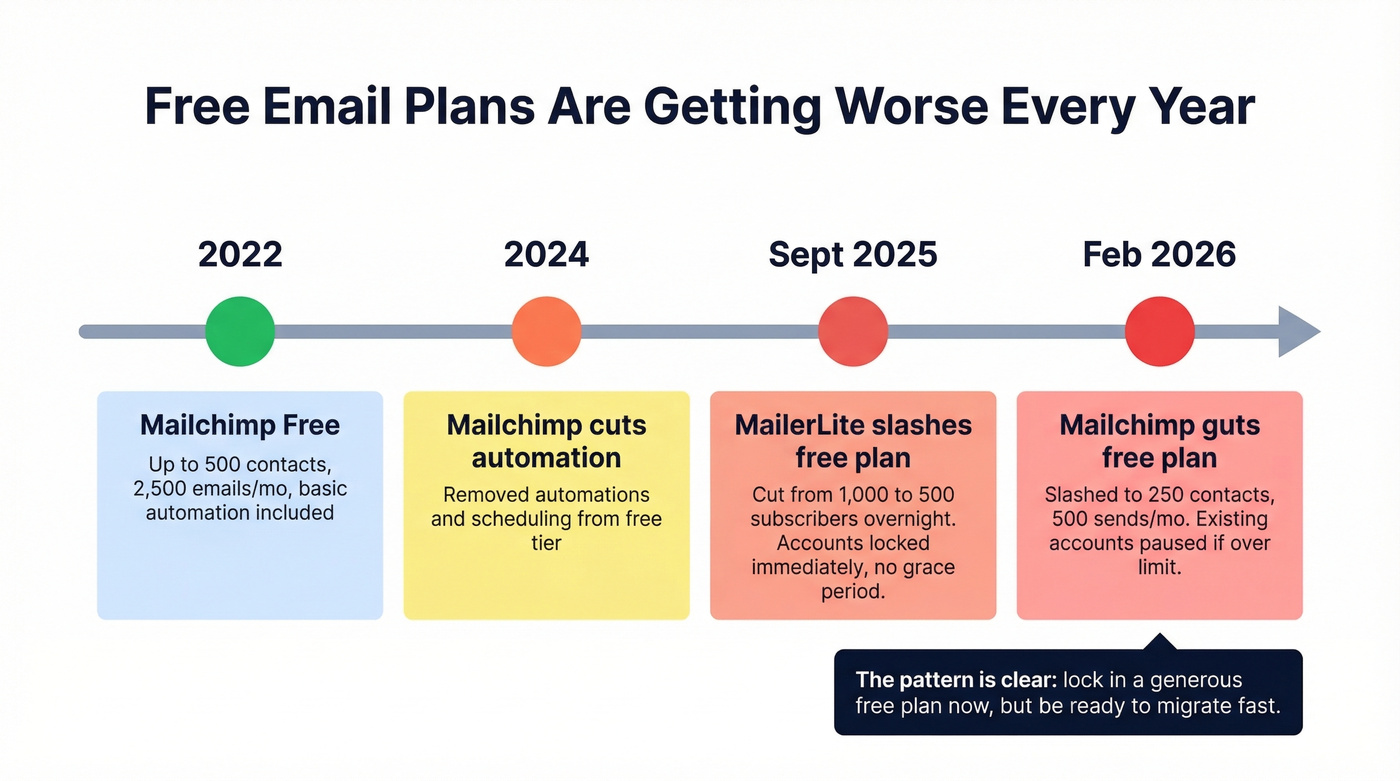
Mailchimp's February 2026 changes slashed existing free accounts to 250 contacts and 500 sends - accounts over the limit had sending paused immediately. MailerLite did the same thing in late 2025, cutting from 1,000 to 500 subscribers and locking accounts above the limit with no grace period. Both moves locked out users who'd been happily sending for months.
The pattern is clear. ESPs use free tiers to acquire users, then squeeze the limits once they've built enough market share. Sender and Kit are generous today. There's no guarantee they will be in 2027. Lock in a generous plan now, but build your workflow so you can migrate fast if the terms change.
Let's be honest: if your average deal size is under $5,000 and your list is under 2,500 contacts, you genuinely don't need to pay for email marketing software. Sender's free plan handles everything a small team needs. The money you'd spend on a paid ESP is better invested in list quality and content.
Deliverability Checklist Before Sending
Getting a free ESP account is the easy part. Getting your emails into the inbox - not the spam folder - is where most people fail. The average email marketing open rate is 36.5%, and if you're significantly below that, deliverability is the problem. Every undelivered email costs roughly $0.11 in wasted effort and lost opportunity.
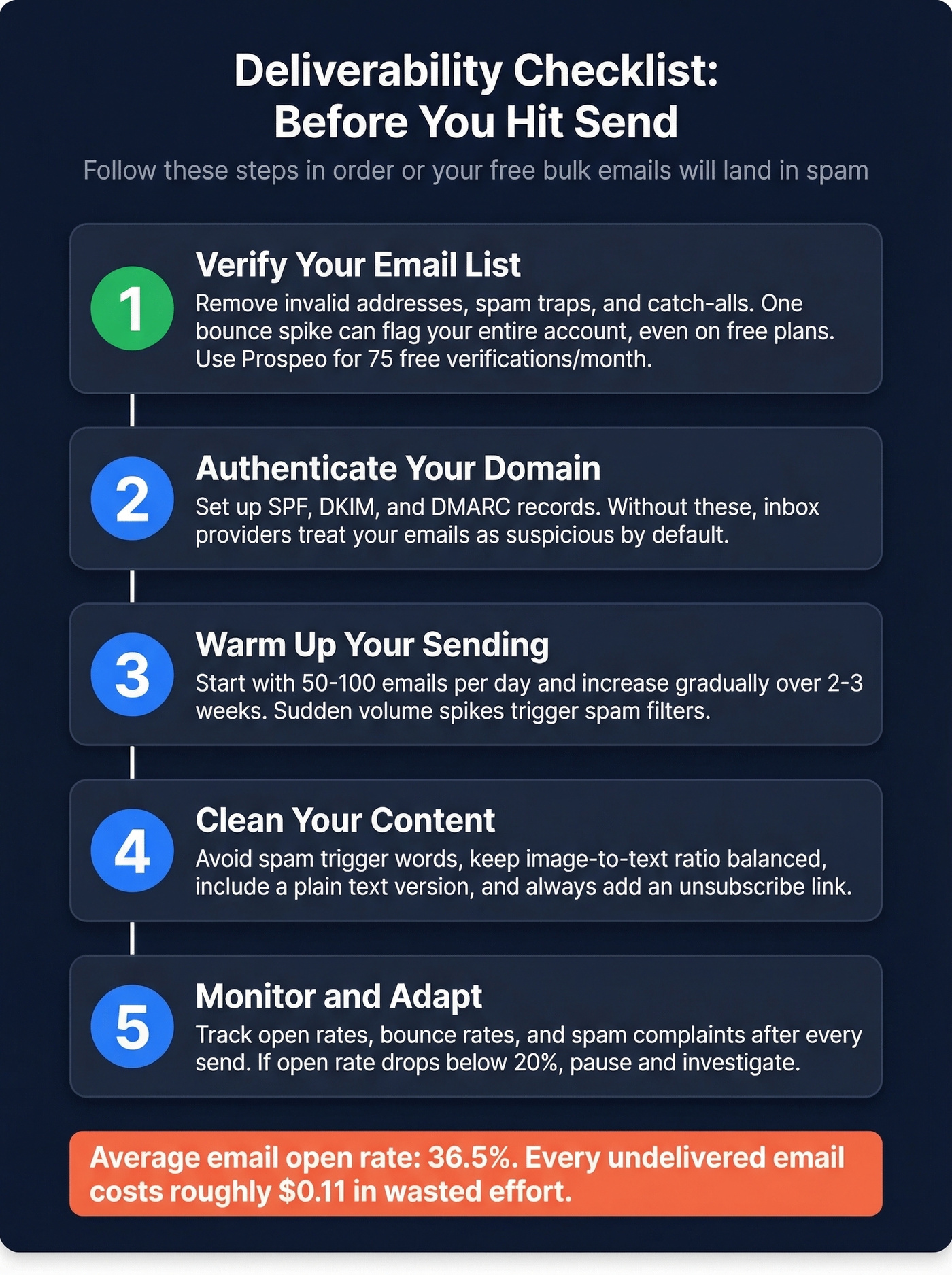
Here's the checklist, in order of importance.
1. Verify your email list. This is the step everyone skips, and in our experience, it's the single biggest reason first campaigns fail. Invalid addresses cause hard bounces, hard bounces tell inbox providers you're sending to garbage lists, your sender reputation tanks, and suddenly even your legitimate emails land in spam. Spam traps and honeypots are even worse - they're addresses specifically designed to catch sloppy senders, and hitting one can get your domain blacklisted.
Prospeo's email verification runs a 5-step process that catches invalid addresses, spam traps, honeypots, and catch-all domains before they damage your reputation. The accuracy rate is 98%. The free tier gives you 75 verifications per month - enough to clean a starter list before your first campaign. Run your list through verification before you hit send. Every time.
2. Authenticate your domain. Set up SPF, DKIM, and DMARC records for your sending domain. SPF tells inbox providers which servers are allowed to send email on your behalf. DKIM adds a cryptographic signature proving the email wasn't tampered with in transit. DMARC ties them together and tells providers what to do with emails that fail authentication. Every major ESP walks you through this during setup. Don't skip it. If you need a deeper walkthrough, see our guide to DMARC records and SPF records.
3. Warm up your sending. Don't blast 5,000 emails from a brand-new domain on day one. Start with 50-100 per day and ramp up over 2-3 weeks. Inbox providers watch for sudden volume spikes from new senders - it's one of the strongest spam signals. Google's bulk sender threshold kicks in around 5,000 recipients/day, and Yahoo has said there's no safe cutoff below that.
4. Segment your list. Sending the same email to your entire list is lazy and it hurts deliverability. Engaged subscribers who open and click improve your sender reputation. Inactive subscribers who ignore your emails drag it down. Segment by engagement, by interest, by purchase history - whatever makes sense for your audience. If you're building campaigns for outbound, targeted email campaigns are the fastest way to lift engagement.
5. Monitor bounces and complaints. Keep your bounce rate under 2% and your spam complaint rate under 0.1%. Most free ESPs show these metrics in their dashboard. If either number spikes, stop sending and clean your list before continuing. Use these email bounce rate benchmarks to sanity-check what you're seeing.
Legal Rules You Can't Ignore
Free doesn't mean unregulated. CAN-SPAM applies to every commercial email sent in the US - including B2B - and the penalties are steep: up to $53,088 per email in violation. Per email, not per campaign.
Your "From" name and email address must accurately identify who's sending, and your subject line must reflect the actual content of the email. Every message needs a physical postal address (a PO box works) and a clear unsubscribe mechanism that functions for at least 30 days after sending. You must honor opt-outs within 10 business days, and you can't charge a fee or require extra information to process them.
One thing people miss: you're responsible for compliance even when a third party sends on your behalf. If you hire an agency or use a tool, the legal liability is still yours. This applies whether you're using a paid platform or a free mass email service - the law doesn't care what you're paying. If you're tempted to shortcut list building, read this first: Is it illegal to buy email lists?
If you're sending to anyone in the EU, GDPR adds another layer: you need explicit consent before sending, and recipients have the right to request deletion of their data. Most free ESPs handle the unsubscribe mechanics for you, but the consent and compliance responsibility is yours.
When You Outgrow Free
You'll know it's time to upgrade when you're consistently hitting daily caps, when the ESP branding on your emails looks unprofessional, or when you need features like dedicated IPs and advanced automation. Here's what the jump costs:
| Tool | Paid Starting Price | What You Get |
|---|---|---|
| Sender | $7/mo | 12,000 emails, no branding |
| Brevo | $9/mo | 5,000 emails, no daily cap |
| MailerLite | $10/mo | 500 subs, unlimited emails |
| Kit | $15/mo | Full automation, no Creator Network |
| Omnisend | $16/mo | 6,000 emails, 500 contacts |
| Mailjet | $17/mo | 15,000 emails, no daily cap |
The jump from free to paid is small - $7-17/month for most tools. What changes more than the price is the stakes. A 5% bounce rate on 500 emails is 25 bounces. A 5% bounce rate on 10,000 emails is 500 bounces - enough to crater your sender reputation in a single campaign.
This is where list verification stops being optional. As your list scales past free-tier limits, building verification into your workflow is the difference between consistent inbox placement and a slow slide into spam. If you want more tooling options, compare email reputation tools and an email deliverability guide before you scale volume.

You picked a free ESP and built your campaign. Now who are you sending to? Prospeo's database has 143M+ verified emails across 300M+ professional profiles - refreshed every 7 days, not 6 weeks. Build a targeted list with 30+ filters, export verified contacts, and load them straight into Sender, Brevo, or any ESP without a single bounce.
Start with verified contacts and your free sends actually convert.
FAQ
Is it legal to send bulk emails?
Yes, as long as you comply with CAN-SPAM (US) and GDPR (EU). Every commercial email needs a physical address, an unsubscribe link, and honest subject lines. CAN-SPAM applies to B2B too. Violations carry penalties up to $53,088 per email - enforcement is real, not theoretical.
How many emails can I send from Gmail for free?
Free Gmail accounts allow 500 emails per day on a rolling 24-hour window. Google Workspace accounts get 2,000/day. Exceeding either limit suspends sending for 1-24 hours. Auto-replies, internal replies, and alias sends all count toward your quota.
What's the best free bulk email tool in 2026?
Sender offers the most generous free plan - 15,000 emails/month to 2,500 subscribers with unlimited automation. Brevo is best for large contact lists with 100,000 contacts stored free. Kit is best for newsletter creators with 10,000 subscribers and unlimited sends.
Why are my bulk emails going to spam?
Usually it's because your list contains invalid addresses causing bounces that damage sender reputation, your domain lacks SPF/DKIM/DMARC authentication, or you're sending from a shared IP with poor reputation. Verify your list first - catching spam traps and invalid emails before they hurt deliverability is the single highest-impact fix.
Are free email marketing plans getting worse?
Yes. Mailchimp cut its free plan to 250 contacts in February 2026. MailerLite dropped from 1,000 to 500 free subscribers in late 2025. The trend is clear - lock in a generous free plan like Sender or Kit now before they tighten further.