

How to Send a Reminder Email That Actually Gets a Reply
You sent the proposal last Tuesday. They said they'd review it by Friday. It's now Wednesday, your inbox is empty, and you're stuck in that awkward limbo between "should I nudge?" and "am I being annoying?" Meanwhile, 361.6 billion emails hit inboxes every single day - yours is buried somewhere between a Slack digest and a SaaS renewal receipt.
Most reminder email guides hand you 19 templates and zero data. That's backwards. Templates without strategy are just polite spam. We've spent a lot of time digging through the actual research on what makes people reply, and the patterns are clear - so let's break this down.
Before You Hit Send
Three rules before you write a single word:
- Keep it under 90 words, and send your first reminder 3-5 business days after your initial email.
- Personalize the subject line. Personalized subject lines hit a 46% open rate vs. 35% without.
- Stop after 3 follow-ups. Four or more emails in a sequence more than triples unsubscribe and spam complaint rates. You're not persistent at that point. You're spam.
- Verify the address first. A perfect reminder that bounces is worthless. Run your list through email verification before you send anything - bounce-heavy sends torch your domain reputation faster than bad copy ever will.
Subject Lines That Get Opened
A study of 5.5M B2B emails gives us hard numbers on what works.
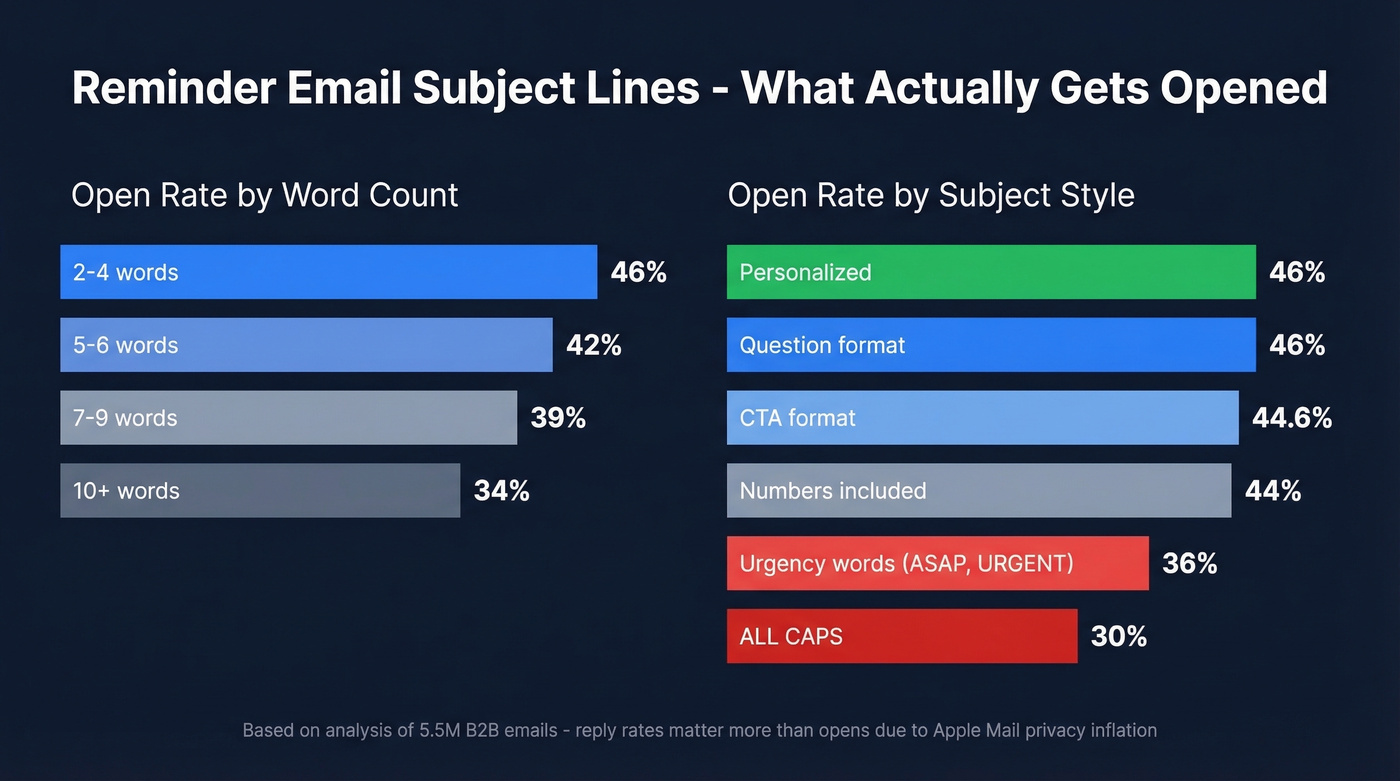
Keep it to 2-4 words. Two-to-four-word subject lines produced 46% open rates. Seven-plus words dropped to 39%. Ten-plus fell to 34%. Brutally short wins.
Personalize. Adding a name, company, or specific detail pushed open rates from 35% to 46% - a 31% lift. Reply rates jumped from 3% to 7%, a 133% increase from something that takes five seconds.
Frame it as a question. Question-framed subject lines hit 46% open rates. CTAs landed at 44.6%. Numbers came in at 44%.
Drop the urgency words. "ASAP," "URGENT," and marketing jargon pulled opens below 36%. ALL CAPS subjects cratered to around 30%. You're trying to get a reply, not trigger a spam filter.
One caveat worth knowing: Apple Mail Privacy Protection can inflate open rates by up to 18 percentage points, and Apple Mail holds roughly 46% market share. Focus on reply rates as the true signal.
How to Write a Reminder Email
Your SDR sent 47 "just checking in" emails last month. Reply rate: 2%. Here's what actually moves the needle.
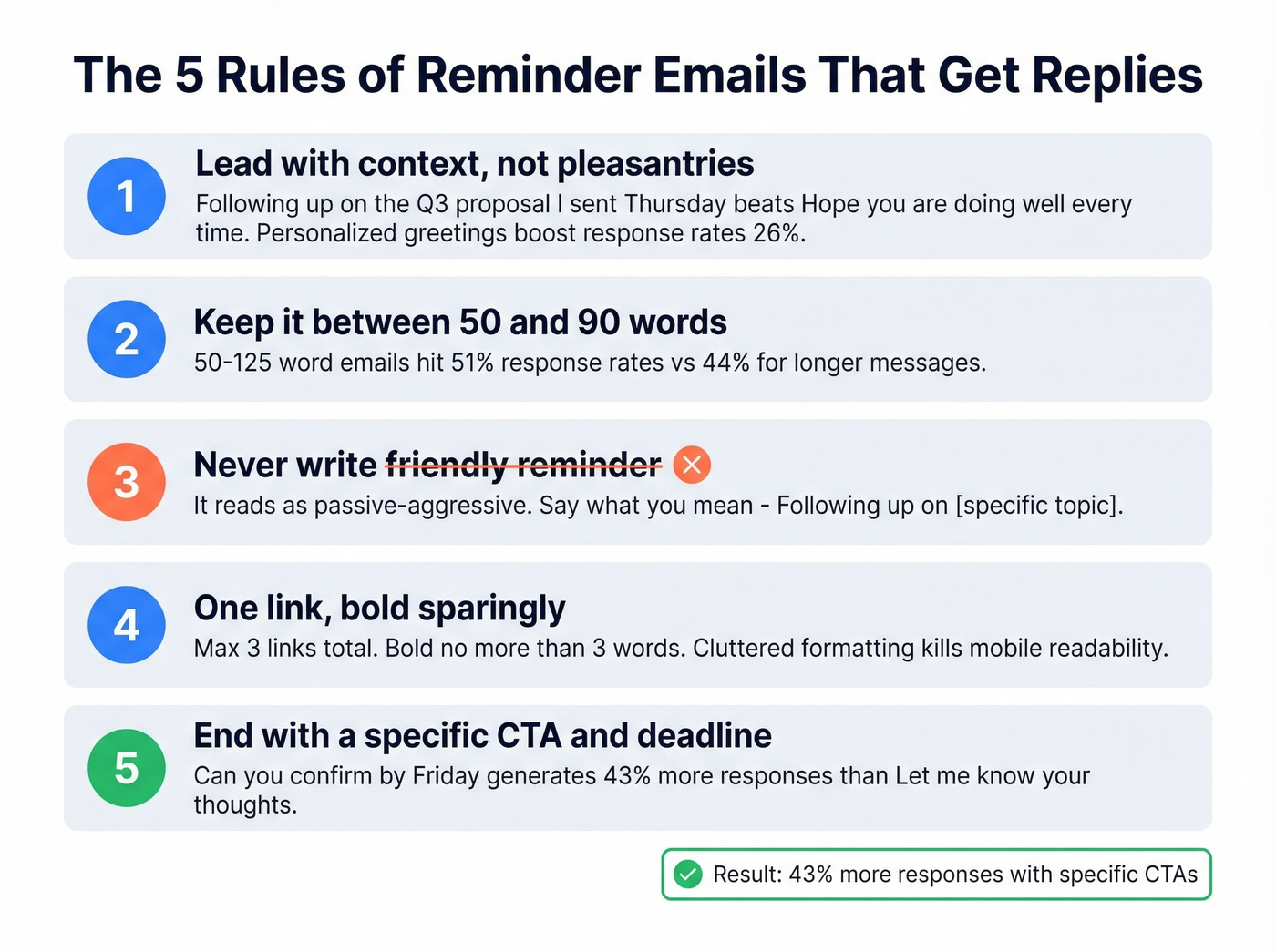
1. Lead with context, not pleasantries. Open with the specific thing you're following up on. "Following up on the Q3 budget proposal I sent Thursday" beats "Hope you're doing well!" every time. The reader should know why you're in their inbox within the first sentence - personalized greetings alone increase response rates by 26%.
2. Keep it between 50 and 90 words. Emails in the 50-125 word range achieve 51% response rates vs. 44% for longer messages. If you can say it in 60, even better.
3. Never write "friendly reminder." It reads as passive-aggressive to most recipients, and everyone knows it. Use direct language: "Following up on [specific topic]" or "Quick follow-up on [specific deliverable]." Say what you mean.
4. One link is best, bold sparingly. Aim for one link in the body and keep total links to three or fewer. Use boldface on no more than three words total. Cluttered formatting kills readability on mobile.
5. End with a specific CTA. Specific calls to action generate 43% more responses than vague endings. "Can you confirm by Friday?" works. "Let me know your thoughts" doesn't. Give them a concrete action and a timeframe.
7 Copy-Paste Reminder Templates
Each template below is under 90 words. If you're unsure how to send a reminder email without sounding pushy, start with one of these and adjust the tone to match your relationship with the recipient.
No Response Follow-Up
Use this when you sent a proposal or deliverable and got radio silence.
Subject: Quick question on [topic]
Hi [Name], I sent over [specific item] on [date] and wanted to make sure it didn't get buried. Any questions I can answer? Happy to hop on a 10-minute call this week if that's easier.
Payment Reminder
Use this when an invoice is approaching or past due.
Subject: Invoice #[number] due [date]
Hi [Name], heads-up that invoice #[number] for [amount] is due on [date]. I've attached it again for convenience. If it's already been processed, ignore this. Any issues, let me know and we'll sort it out.
Meeting Reminder
Send the afternoon before or morning of the meeting.
Subject: Tomorrow at [time] - [meeting topic]
Hi [Name], confirming our meeting tomorrow at [time] [timezone]. Here's the link: [meeting link]. I'll have [agenda item] ready to discuss. See you there.
Event Reminder
Send 24-48 hours before the event.
Subject: [Event name] - this [day]
Hi [Name], quick reminder that [event] is this [day] at [time]. [One sentence about what to expect or bring.] Looking forward to seeing you there.
Renewal/Deadline Reminder
Use this when a contract or subscription is expiring.
Subject: [Service/contract] expires [date]
Hi [Name], your [service/contract] renews on [date]. If you'd like to continue without interruption, we'll need confirmation by [deadline]. Want me to send over the renewal terms?
Proposal/Contract Follow-Up
Use this when a decision-maker has gone quiet on a deal.
Subject: Thoughts on the proposal?
Hi [Name], circling back on the proposal I sent [date]. I know these decisions take time - just want to make sure you have everything you need. Any questions or changes? A 15-minute call this week would work on my end.
Internal/Team Nudge
Use this when a colleague is blocking progress on a project.
Subject: Need your input on [project]
Hi [Name], still waiting on [specific deliverable] for [project]. We're blocked until we have it - can you get it over by [date]? If something's holding you up, let me know and I'll help clear the path.

You just wrote the perfect reminder email - 60 words, specific CTA, killer subject line. Then it bounces. Prospeo's 5-step email verification catches bad addresses, spam traps, and honeypots before they torch your domain reputation. 98% accuracy, $0.01 per email, 7-day data refresh.
Stop crafting perfect reminders that land in the void.
When to Send (and When to Stop)
70% of professionals delay sending reminder emails because they're afraid of damaging the relationship. The irony? Waiting too long does more damage - the original conversation goes cold and you lose the thread entirely.
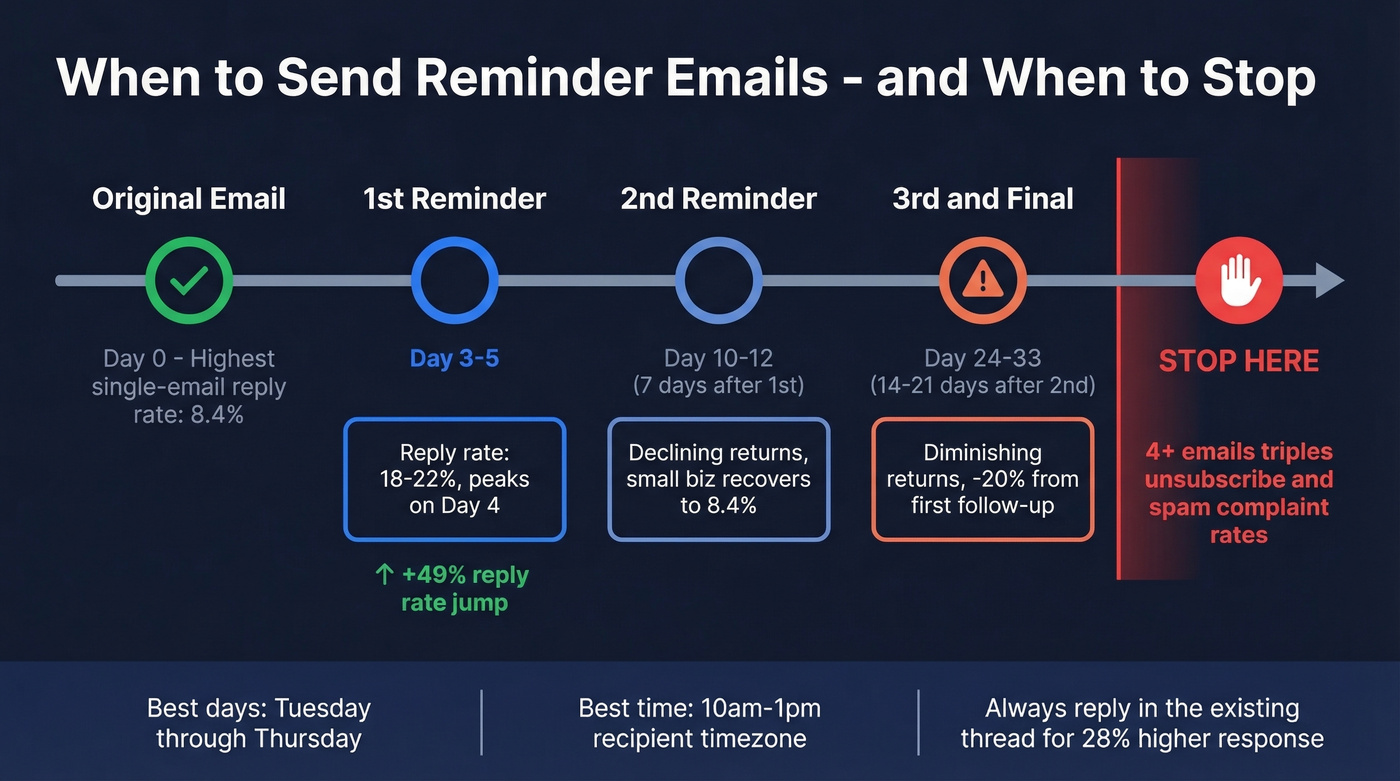
| Follow-Up | Timing | Expected Response Rate |
|---|---|---|
| First reminder | 3-5 business days | 18-22% |
| Second reminder | 7 days after first | Declining |
| Third (final) | 14-21 days after second | Diminishing returns |
Response rates peak on day 4. The best send window is Tuesday through Thursday, 10am-1pm in the recipient's timezone. If you want a deeper timing breakdown, see best time to send benchmarks.
Here's the thing: Belkins' analysis of 16.5M cold emails found the highest reply rate - 8.4% - came from a single email. Performance declines with each follow-up. And 4+ emails in a sequence more than triples your unsubscribe and spam complaint rates.
Another benchmark: one 2026 reminder-email analysis found reply rates can jump 49% after the first follow-up, then drop 20% by the third email.
Company size matters too. Small businesses (2-50 employees) tend to bounce back on the second follow-up, with reply rates recovering to 8.4%. Enterprises (1,000+ employees) ghost quickly and punish persistence - if you're emailing a VP at a large company, your third follow-up is probably doing more harm than good. For teams that have exhausted three email attempts, switch channels. A brief social message, call, or text often breaks through where email can't.
One tactical detail: reply in the existing thread. Emails in existing threads achieve 28% higher response rates than standalone messages. Don't start a new subject line - keep the conversation going.
How to Schedule Reminders in Gmail and Outlook
Gmail Schedule Send
On desktop, compose your email, click the arrow next to the Send button, select "Schedule send," then pick a date and time. On mobile, tap the three-dot menu in the compose window, then "Schedule send." Scheduled emails live in your "Scheduled" folder where you can edit, reschedule, or cancel.
One gotcha: Gmail schedules based on your current timezone settings. If you're traveling, double-check before scheduling. Gmail's native Schedule Send is also one-time only - for recurring reminders, you'll need Boomerang or a workflow tool.
Outlook Reminders and Flags
In Outlook, flag an email for follow-up and set a reminder date. When composing, use "Delay Delivery" under the Options tab to schedule a send for a specific date and time. The flag method works for personal reminders; Delay Delivery is better for timed sends to recipients.
Best Tools for Follow-Up Reminders
You don't need a reminder email tool. You need a system: clean contact data, a 3-email max cadence, and templates under 90 words. Once that's in place, these tools save time. If you've ever tried to automate follow-ups that stay in-thread and include the original attachments, you know it's harder than it sounds. If you're building a repeatable process, sequence management matters more than any single tool.
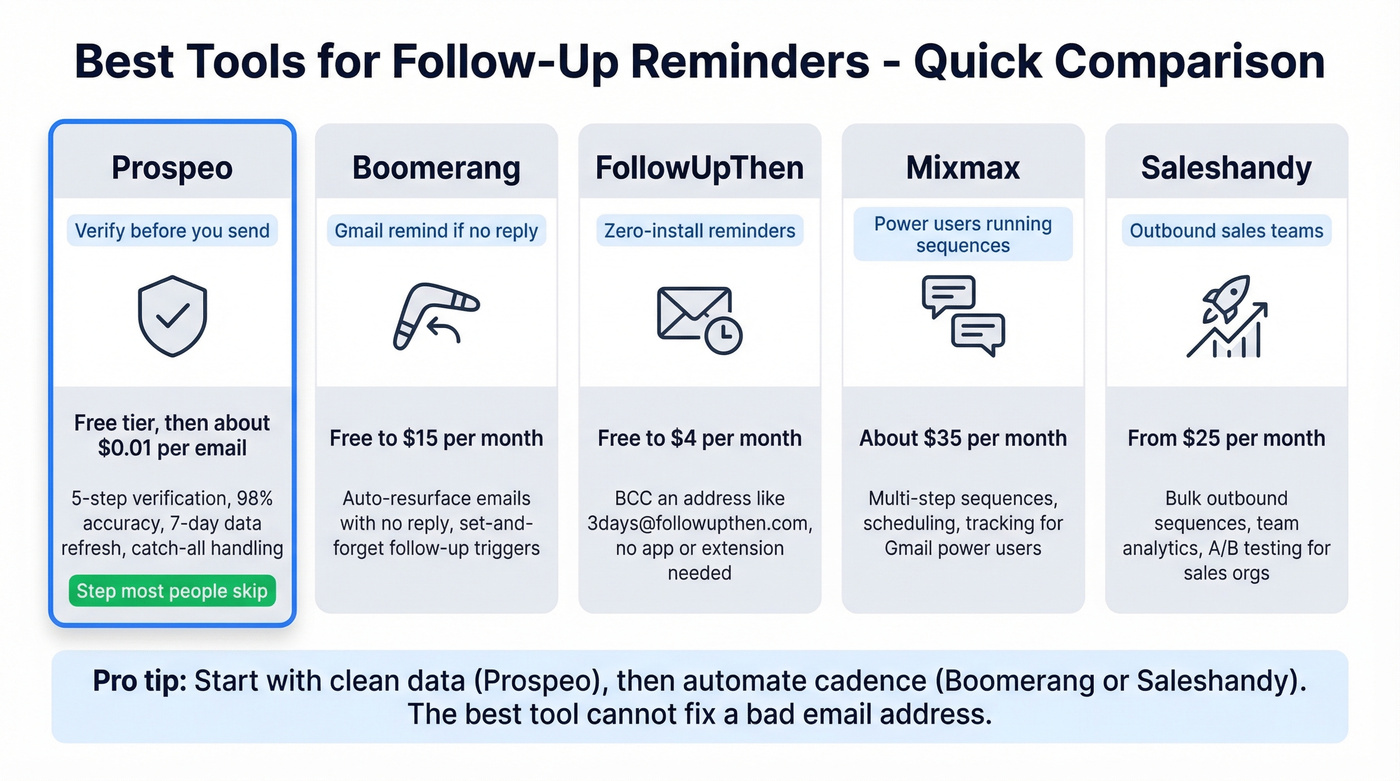
| Tool | Best For | Price |
|---|---|---|
| Prospeo | Verify before you send | Free tier; ~$0.01/email |
| Boomerang | Gmail "remind if no reply" | Free-$15/mo |
| FollowUpThen | Zero-install reminders | Free-$4/mo |
| Mixmax | Power users running sequences | ~$35/mo |
| Saleshandy | Outbound sales teams | From $25/mo |
Prospeo
The step most people skip: verifying that the address is still valid before sending. Contacts change jobs, inboxes get deactivated, and bounce-heavy sends tank your domain reputation. We've seen teams lose months of sender reputation because they skipped this step on a single campaign.
Prospeo's email verification runs a 5-step check with catch-all handling and spam-trap removal - 98% accuracy, free tier covers 75 emails/month, bulk verification at roughly $0.01 per email. All records refresh on a 7-day cycle, so you're not verifying against stale data. If you're comparing options, start with these email reputation tools.
Boomerang
Boomerang is the gold standard for Gmail-based follow-up reminders. The killer feature is "Boomerang if no reply" - you set it when you send, and the email pops back into your inbox if the recipient doesn't respond within your chosen timeframe.
It solves the exact problem r/sales users describe: "I'll follow up if they don't reply" turns into three weeks of silence because life gets in the way.
FollowUpThen
BCC an address like "3days@followupthen.com" when you send an email, and you'll get a reminder in three days. No browser extension, no app, no login. Free for 50 reminders/month, $4/mo for unlimited. Skip this if you need anything beyond basic time-based reminders - it's intentionally minimal.
Mixmax
Power-user territory. Mixmax adds email tracking, scheduling, templates, and sequences inside Gmail. At ~$35/mo it's overkill for reminders alone, but if you're running multi-step outbound from Gmail, it consolidates several tools into one. The r/Emailmarketing consensus is that it's good but expensive for reminder-only use cases.
Saleshandy
Saleshandy starts at $25/mo and covers automated follow-up sequences, email tracking, and template libraries. It's built for outbound sales teams running multi-touch sequences rather than one-off reminders. If you're already doing cold outreach and want reminders baked into the workflow, it's a solid pick.
Mistakes That Kill Reply Rates
Writing "friendly reminder." Passive-aggressive and everyone knows it. Say what you mean directly: "Following up on [specific topic]." If you need alternatives, use these professional "just checking in" lines.
Going over 120 words. Long reminder emails don't get read - they get skimmed and closed. 50-90 words is the target. For more examples, borrow from these sales follow-up templates.
Wrong timing. Sending the same day looks desperate. Waiting two-plus weeks means they've forgotten the original conversation. Three to five business days is the window. If you're unsure, use this follow-up timing guide.
No clear CTA. "Let me know your thoughts" isn't a call to action. "Can you confirm by Friday?" is. Vague endings get no response at all. Tighten your ask with these email call to action rules.
Sending to dead addresses. 70% of professionals already delay sending reminders. When they finally hit send, the email bounces because the contact changed jobs three months ago. Verify your list before any follow-up sequence - a single bounced campaign can land your domain on a blocklist. If you're troubleshooting, start with email bounce rate benchmarks and fixes.
Look, if your average deal size is under $5k, you probably don't need a multi-tool reminder stack. Gmail Schedule Send, a verified contact list, and the templates above will outperform most paid setups. Complexity is the enemy of follow-through.
Three follow-ups is all you get before spam complaints triple. Make every send count by starting with verified contact data. Prospeo gives you 143M+ verified emails across 300M+ profiles - so your reminder actually reaches the person who owes you that reply.
Find the right email first. Send the reminder once.
FAQ
How many reminder emails should I send?
Three, maximum. Belkins' study of 16.5M emails found the highest reply rate (8.4%) comes from a single email, and 4+ emails more than triples unsubscribe and spam complaint rates. Space them at 3-5 days, 7 days, then 14-21 days apart.
What's the best subject line for a reminder email?
Keep it to 2-4 words and personalize it with the recipient's name or company. Personalized subject lines hit 46% open rates vs. 35% without. Frame it as a question and avoid "URGENT" or ALL CAPS - those pull opens below 36%.
How long should I wait before sending a reminder?
Three to five business days after your initial message. Response rates peak on day 4. Send your second reminder 7 days later, and a final third 14-21 days after that - always Tuesday through Thursday, 10am-1pm in the recipient's timezone.
Is "friendly reminder" unprofessional?
It reads as passive-aggressive to most recipients. "Following up on the Q3 proposal" or "Quick follow-up on our Thursday conversation" is both more direct and more effective. Say what you actually need instead of softening it into vagueness.
How do I make sure my reminder email doesn't bounce?
Verify the email address before sending. Prospeo checks addresses with 98% accuracy using a 5-step process including catch-all handling and spam-trap removal. The free tier covers 75 emails/month, with bulk verification at ~$0.01 per email. Other options include NeverBounce and ZeroBounce, though neither matches a 7-day data refresh cycle.