

SMTP Meaning: What It Is, How It Works, and Why It Still Matters
Email feels "simple" until it breaks. Then you're staring at a 550 error, a port setting, and three DNS records you've never touched.
SMTP is the backbone of sending email - and the most misunderstood piece of the stack. Let's make it practical.
Quick Version
SMTP = Simple Mail Transfer Protocol. It's the standard for sending email across the internet. It doesn't retrieve email (that's IMAP and POP3) - it only sends and relays.
If something broke, jump to Common SMTP Error Codes or [SMTP Ports](#smtp-ports - which-one-to-use). If you're setting up outbound email, the authentication and cold email sections matter more than any "SMTP server" setting.
What Does SMTP Stand For?
SMTP stands for Simple Mail Transfer Protocol. It's the internet standard for sending and relaying email messages between mail servers, running over TCP to ensure reliable delivery of the conversation.
The protocol is outbound-only. It handles submitting a message, routing it across servers, and handing it off to the recipient's system. It never retrieves messages from a mailbox - that's what IMAP and POP3 handle. The current core specification most systems implement is RFC 5321 (2008), which defines the SMTP dialog: commands, responses, and how servers should behave.
How Email Actually Gets Sent
SMTP is a polite, line-by-line conversation between two systems. Your email app connects to a server, identifies itself, declares who the message is from and who it's going to, then transmits the content.
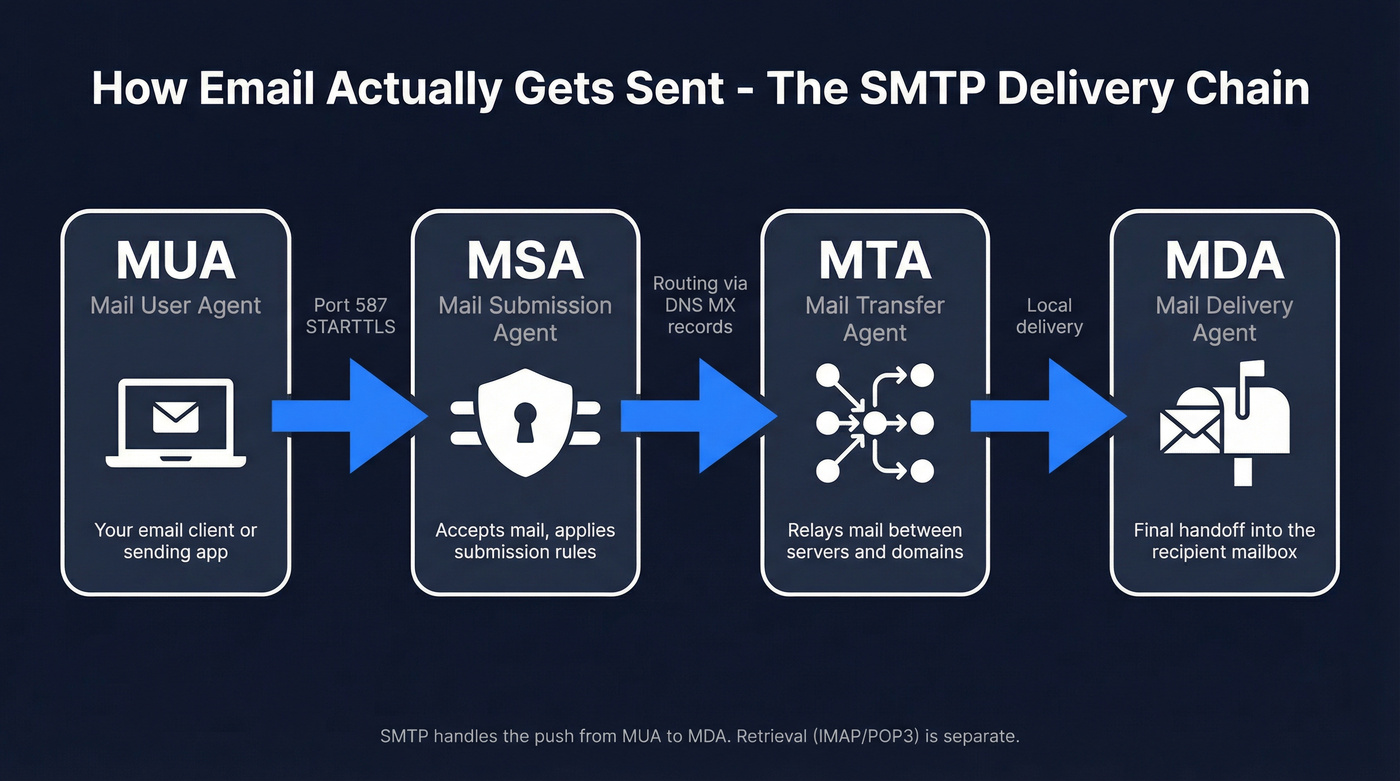
Under the hood, email moves through a chain of agents:
- MUA (Mail User Agent) - your email client or sending app
- MSA (Mail Submission Agent) - accepts mail from the client, applies submission rules
- MTA (Mail Transfer Agent) - relays mail between servers and domains
- MDA (Mail Delivery Agent) - final handoff into the recipient's mailbox
A simplified session looks like this:
S: 220 mail.receiver.com ESMTP ready

C: EHLO sender.example.com

S: 250-mail.receiver.com Hello

S: 250-STARTTLS

S: 250 AUTH LOGIN PLAIN

C: MAIL FROM:<alice@sender.example.com>

S: 250 OK

C: RCPT TO:<bob@receiver.com>

S: 250 Accepted

C: DATA

S: 354 End data with <CR><LF>.<CR><LF>

C: Subject: Hello

C: From: Alice <alice@sender.example.com>

C: To: Bob <bob@receiver.com>

C:

C: This is the body.

C: .

S: 250 Queued

C: QUIT

S: 221 Closing connection
Two practical details most people miss:
Recipient counting is per RCPT TO. That Reddit question about "500 To + 500 CC + 100 BCC" is exactly how providers think about it - each address becomes its own RCPT TO command and gets counted individually for limits and throttling. One message can still mean 1,100 recipients from the server's perspective.
Real constraints exist. In production, you'll hit limits like 510 characters per command line, 998 characters per data line, and often a hard cap around 2,000 recipients per message. These bite when you least expect them.
SMTP Commands Explained
The protocol is small on purpose. Most issues come down to a handful of commands and what the server allows.
| Command | What it does | Example |
|---|---|---|
| HELO | Basic greeting (legacy) | HELO mail.example.com |
| EHLO | Extended greeting (modern) | EHLO mail.example.com |
| MAIL FROM | Sets envelope sender | MAIL FROM:<a@ex.com> |
| RCPT TO | Adds one recipient | RCPT TO:<b@ex.com> |
| DATA | Starts message content | DATA |
| QUIT | Ends the session | QUIT |
| RSET | Resets the transaction | RSET |
| STARTTLS | Upgrades to TLS encryption | STARTTLS |
EHLO matters. It's the Extended SMTP greeting that enables modern capabilities like authentication and encryption. Without it, you're stuck in legacy mode.
VRFY and EXPN exist historically but are disabled on most servers for security reasons - they leak user and account info.
SMTP Ports - Which One to Use
Use 587 with STARTTLS. That's it. It's the modern standard for message submission, and it's what most apps and providers expect.
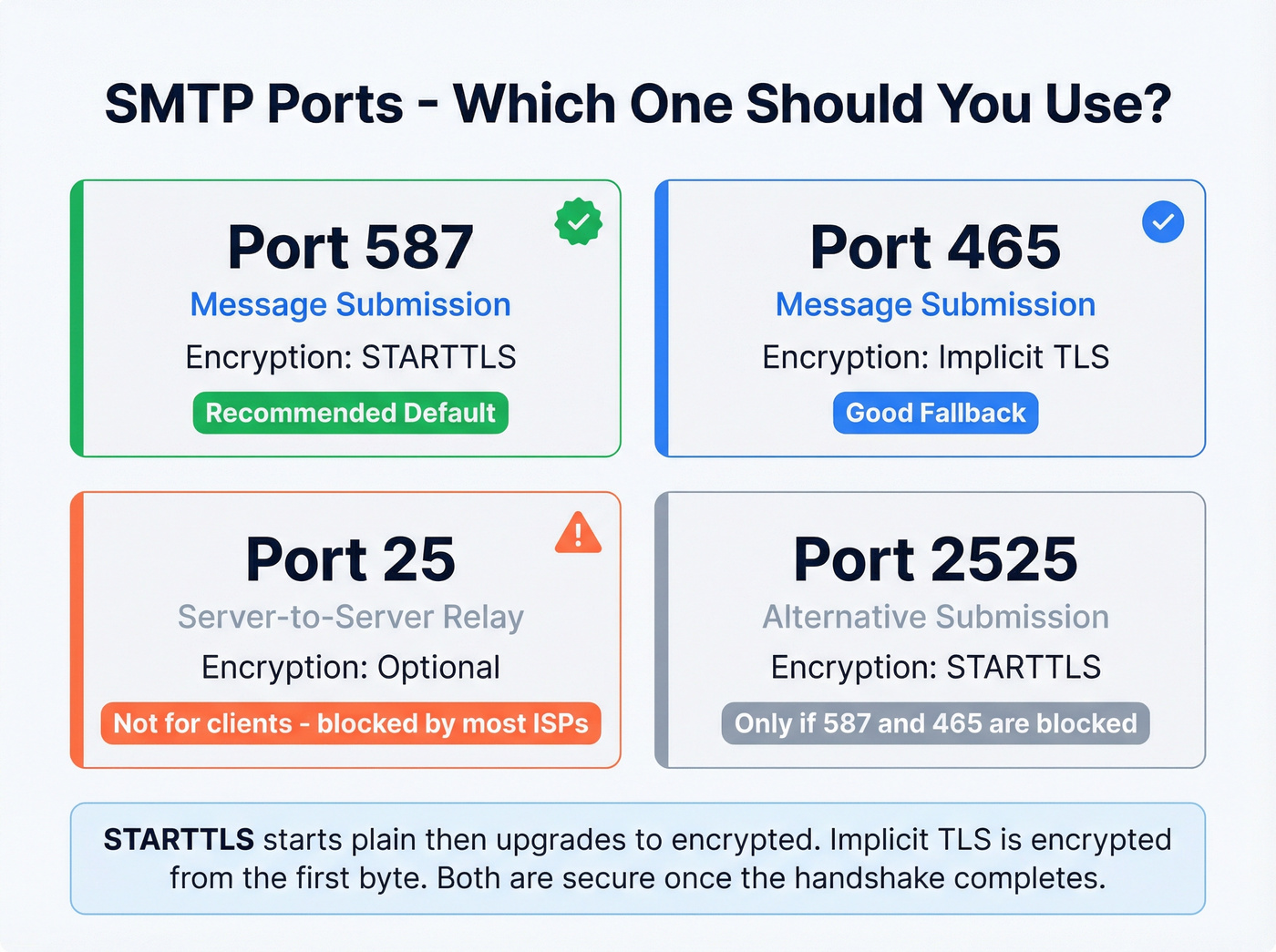
| Port | Purpose | Encryption | Use it? |
|---|---|---|---|
| 587 | Submission | STARTTLS | Yes (default) |
| 465 | Submission | Implicit TLS | Yes (fallback) |
| 25 | Server relay | Optional | No (clients) |
| 2525 | Alt submission | STARTTLS | Only if 587/465 blocked |
Here's the thing about STARTTLS vs implicit TLS: STARTTLS on port 587 starts in plain text, then upgrades the connection to encrypted once both sides agree. Implicit TLS on port 465 is encrypted from the first byte - if TLS negotiation fails, the connection dies immediately. Neither is inherently "more secure" once the encryption handshake completes, but implicit TLS removes the window where a downgrade attack could theoretically strip encryption.
Port 25 is for server-to-server relay, not end-user apps. Most residential ISPs block outbound 25 to reduce spam, making it a classic "works on the server, fails on my laptop" trap.
For server-to-server connections, MTA-STS (RFC 8461) is the modern mechanism for enforcing TLS. Worth implementing if you're managing mail infrastructure.

Every 550 "mailbox doesn't exist" error is a wasted send and a hit to your sender reputation. Prospeo's 5-step email verification - with catch-all handling, spam-trap removal, and honeypot filtering - delivers 98% accuracy so your SMTP sessions end with 250 OK, not 550 bounces.
Stop debugging bounce codes. Start with emails that actually exist.
Common SMTP Server Addresses
If you're configuring an email client or sending tool, you'll need the hostname for your provider:
| Provider | Server Address | Port | Encryption |
|---|---|---|---|
| Gmail | smtp.gmail.com | 587 | STARTTLS |
| Outlook/365 | smtp.office365.com | 587 | STARTTLS |
| Yahoo | smtp.mail.yahoo.com | 465 | Implicit TLS |
Your ESP or workspace admin panel will have the equivalent for custom domains.
SMTP vs IMAP vs POP3
SMTP pushes mail out. IMAP and POP3 pull mail in. They're complementary, not competing.
| Protocol | Purpose | Direction | Default Ports |
|---|---|---|---|
| SMTP | Send/relay | Push | 25/587/465 |
| IMAP | Retrieve + sync | Pull | 143/993 |
| POP3 | Download mail | Pull | 110/995 |
When configuring an email client, you set SMTP for sending and IMAP for receiving. POP3 still exists for legacy workflows where "download and store locally" is the goal, but unless you have a specific reason to use it, IMAP is the better default because it syncs state across devices.
Common SMTP Error Codes
Response codes are three digits. The first digit tells you the category: 2xx = success, 4xx = temporary failure, 5xx = permanent failure.
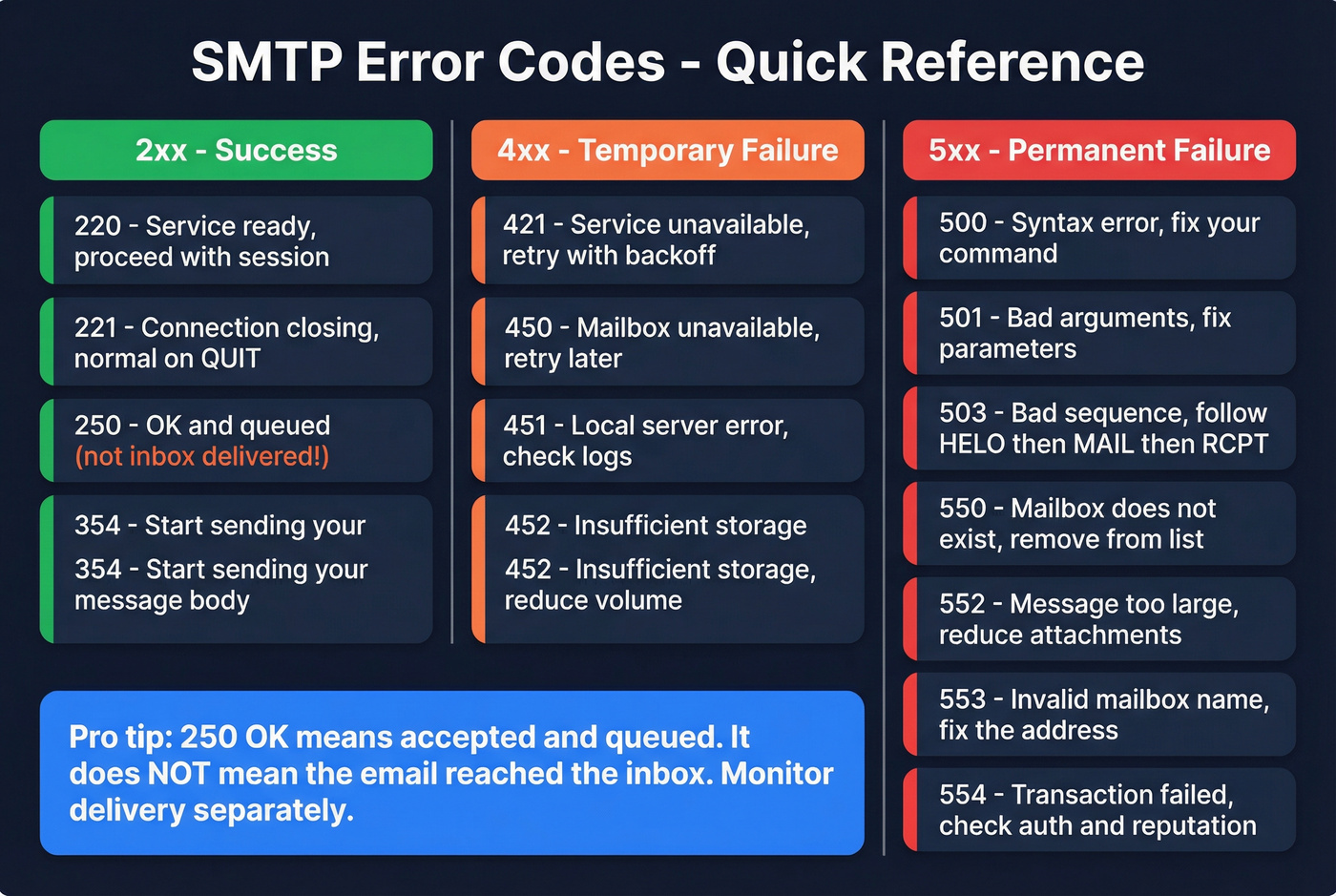
One important nuance: 250 OK means accepted and queued, not "inbox delivered." The message can still land in spam or get filtered after acceptance.
| Code | Category | Meaning | What to do |
|---|---|---|---|
| 220 | 2xx | Service ready | Proceed with session |
| 221 | 2xx | Closing connection | Normal on QUIT |
| 250 | 2xx | OK / queued | Not inbox - monitor delivery |
| 354 | 3xx | Start mail input | Send DATA body + . |
| 421 | 4xx | Service unavailable | Retry with backoff |
| 450 | 4xx | Mailbox unavailable | Retry; check mailbox status |
| 451 | 4xx | Local error | Retry; check server logs |
| 452 | 4xx | Insufficient storage | Retry; reduce volume |
| 500 | 5xx | Syntax error | Fix command format |
| 501 | 5xx | Bad arguments | Fix parameters |
| 503 | 5xx | Bad sequence | Follow HELO->MAIL->RCPT |
| 550 | 5xx | Mailbox doesn't exist | Remove address from list |
| 552 | 5xx | Message too large | Reduce size/attachments |
| 553 | 5xx | Mailbox name invalid | Fix address format/domain |
| 554 | 5xx | Transaction failed | Review auth, content, reputation |
Chronic 550 errors aren't a server problem. They're a list hygiene problem. The upstream fix is verifying addresses before you send - tools like Prospeo catch invalid mailboxes, spam traps, and honeypots before they ever hit your sending pipeline.
Authentication - SPF, DKIM, and DMARC
The consensus on r/sysadmin keeps circling the same confusion: people lump "SMTP, SPF, DKIM, DMARC" together as if they're all the same kind of protocol. They aren't. SMTP is the transport conversation; SPF, DKIM, and DMARC are authentication policies that receivers check during and after delivery.
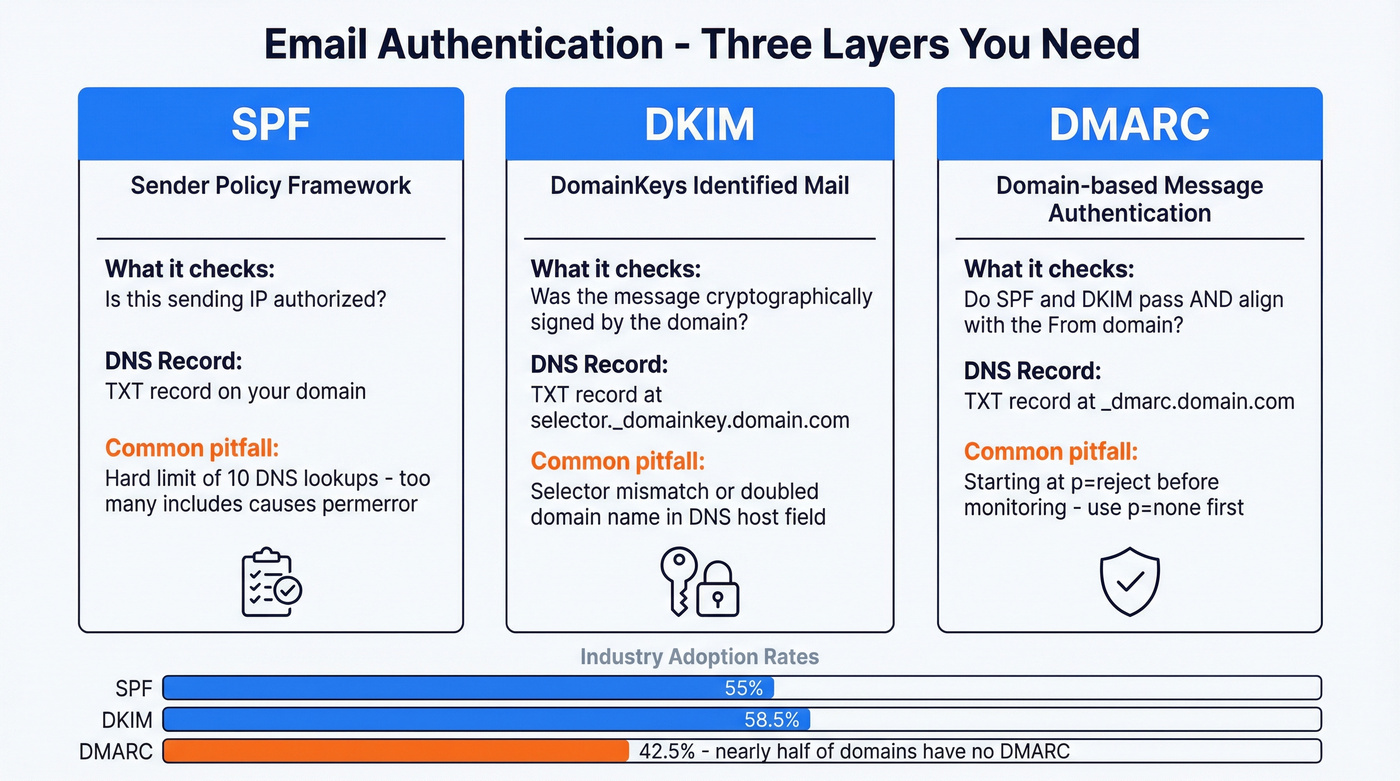
Authentication isn't optional anymore. Gmail, Yahoo, and Outlook expect authenticated mail from everyone, and unauthenticated mail gets rejected or shoved into spam. If you're sending without all three configured, you're sending to spam.
| Protocol | What it checks | DNS record type |
|---|---|---|
| SPF | Is this sending IP allowed? | TXT |
| DKIM | Was the message signed by domain? | TXT (selector) |
| DMARC | What to do if SPF/DKIM fail + alignment | TXT |
SPF is an IP allowlist published in DNS as a single TXT record. It has a hard 10-lookup limit, so stacking too many include: entries causes SPF permerror - and when that happens, receivers treat you like you have no SPF at all. We've seen teams add six SaaS tools to their SPF record without realizing they'd blown past the limit three includes ago. If you need syntax help, use a SPF record reference.
DKIM signs each message with a private key; receivers fetch the public key from DNS using a selector like selector._domainkey.example.com. The most common failure is a selector mismatch or a DNS host field that accidentally doubles the domain name. If you're troubleshooting, follow a quick checklist to verify DKIM is working.
DMARC tells receivers what to do when authentication fails and enforces alignment - the visible From domain must align with SPF/DKIM domains. Start with p=none, move to quarantine, then reject once you're confident. Google's DMARC documentation walks through the progression well. For the alignment piece specifically, see DMARC alignment.
Adoption is still surprisingly low: SPF sits around 55%, DKIM at 58.5%, and DMARC at just 42.5% per industry surveys. That means nearly half of all sending domains are flying without a safety net.
Once DMARC is enforced, you can add BIMI for brand logos in supporting inboxes. That's the "nice to have" layer - DMARC is the "don't get junked" layer.
Cold Email and Deliverability
The protocol is the plumbing. Deliverability is the outcome. For cold email, you need both - plus discipline.
Here's the checklist we'd actually run: use a dedicated IP when you need reputation control (shared IPs mean you're inheriting other senders' behavior), and set up SPF, DKIM, and DMARC before the first send - not after you see spam placement.
Warm up volume gradually. Start around 20-30 emails per day per inbox, then ramp toward 100-200/day over 2-4 weeks as engagement and reputation stabilize. Track bounces aggressively: temporary 4xx bounces mean "slow down and retry," while 5xx bounces mean "fix the root cause." If you're managing sending limits, email velocity is the metric to watch.
Skip building your own mail infrastructure unless you're becoming an ESP. r/coldemail is full of people trying to run personal SMTP servers with IP and domain rotation because deliverability keeps getting tighter. It can work, but you're signing up for rDNS management, feedback loops, throttling logic, and constant monitoring. For most teams, a good ESP plus clean data gets you further, faster. If you're building outbound at scale, use a dedicated email deliverability guide to avoid the common traps.
Understanding SMTP is step one. Keeping your bounce rate under 4% is what actually protects your domain. Prospeo refreshes 300M+ profiles every 7 days - not every 6 weeks - so the addresses you send to are current, verified, and deliverable.
Clean data in, 250 OK out. That's the entire cold email formula.
Brief History of SMTP
The protocol dates back to November 1981 with RFC 788, then got formalized in 1982 as RFC 821. In 1995, RFC 1869 introduced ESMTP - the extension framework that made modern features possible. The current core spec is RFC 5321 (2008), and RFC 8314 (2018) formalized the recommendation to use ports 465 and 587 for client submission.
The ecosystem hardened because spam forced it to. The open relay era peaked with 55% of servers running as open relays in 1998, dropping to under 1% by 2002. That's not a gradual shift - that's an industry getting burned and slamming the door shut.
Running your own mail server in 2026 is almost never worth it unless you're an ESP. You're signing up for deliverability ops, not "just email." If you're trying to recover from reputation damage, start with how to improve sender reputation and a plan for spam trap removal.
FAQ
What does SMTP stand for?
SMTP stands for Simple Mail Transfer Protocol - the internet standard (RFC 5321) that governs how email is sent and relayed between servers. It handles outbound delivery only; retrieving messages from a mailbox requires IMAP or POP3.
Is SMTP secure by default?
No. Original SMTP transmits in plain text. Modern implementations use STARTTLS on port 587 or implicit TLS on port 465 to encrypt the connection. Authentication via SPF, DKIM, and DMARC adds sender verification and is required by Gmail, Yahoo, and Outlook in 2026.
What's the difference between SMTP and IMAP?
SMTP sends email; IMAP retrieves and syncs it. Your email client uses SMTP to submit outgoing messages and IMAP to download incoming mail. They're complementary protocols that handle opposite directions of the same workflow.
Why do my emails bounce with a 550 error?
A 550 means the recipient mailbox doesn't exist or the server permanently rejected your message - usually from typos or deactivated accounts. Verifying addresses before sending eliminates most 550 bounces.
Which SMTP port should I use in 2026?
Use port 587 with STARTTLS. It's the modern default for message submission. Port 465 with implicit TLS works as a fallback. Avoid port 25 for client apps; most ISPs block it, and it's designed for server-to-server relay only.