

Best SMTP Testing Tools in 2026
Your SMTP test says "250 OK." Your emails still bounce.
That gap between a server accepting a message and that message actually reaching an inbox is where most testing workflows fall apart. Online testers check connectivity and call it a day. Sandboxes capture emails but don't tell you if real recipients exist. CLI tools show you the protocol handshake but nothing about what happens after. We've spent weeks testing tools across every layer of the SMTP stack - online diagnostics, cloud sandboxes, local dev servers, CLI debuggers, and the data verification step that most guides skip entirely. Here's what's worth your time.
Here's the thing most teams miss: a perfectly configured mail server sending to invalid addresses will bounce all day long, and no amount of server tuning fixes that. Most "SMTP problems" are actually data problems in disguise. If you're seeing persistent bounces, start with your email bounce rate and work backward.
Our Picks (TL;DR)
| Tool | Best For | Price | Verdict |
|---|---|---|---|
| Mailpit | Local dev testing | Free, open-source | MailHog's successor - faster, maintained, self-contained binary |
| Mailtrap | Team QA & CI/CD | Free tier; from ~$17/mo | Shared inboxes + spam scoring in the cloud |
| swaks | CLI debugging | Free, open-source | Raw SMTP transcripts without leaving the terminal |
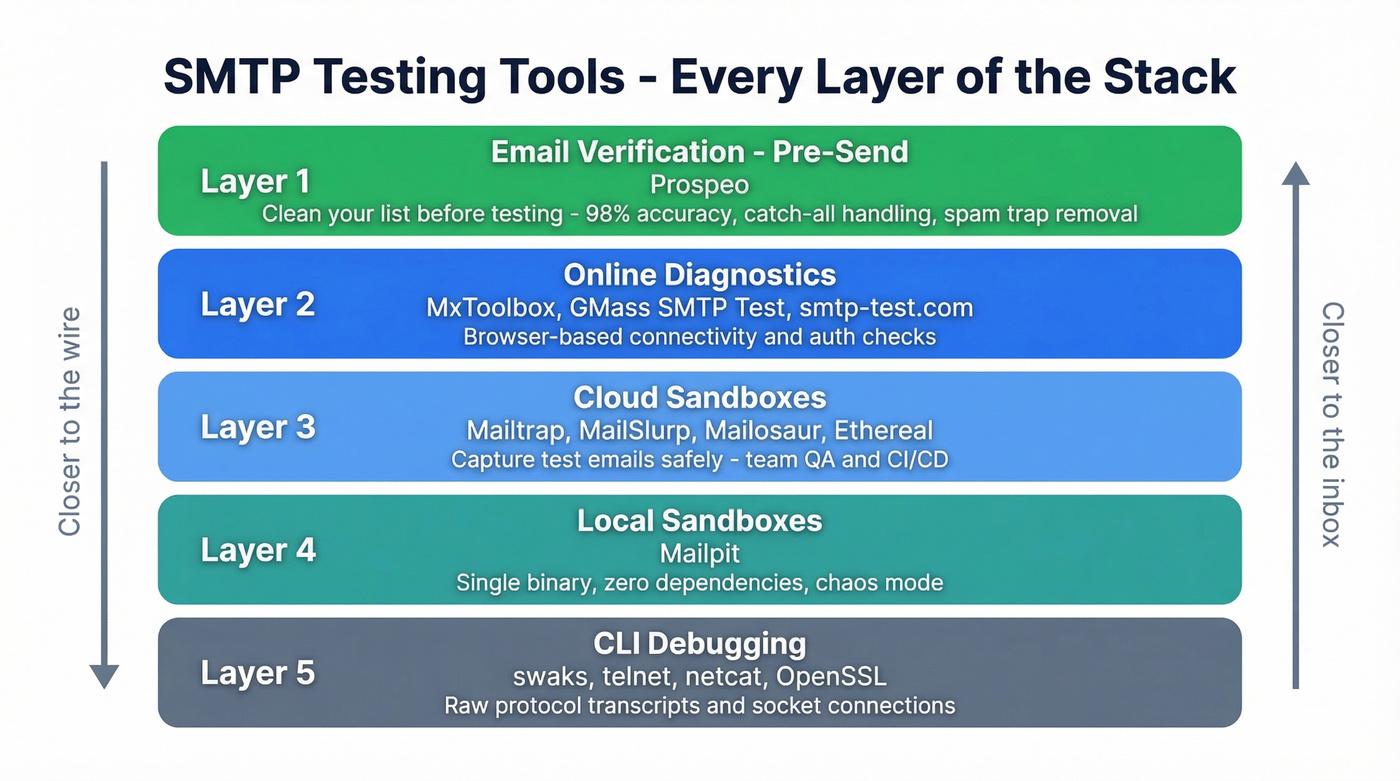
Online SMTP Test Tools
Browser-based tools that fire a test message at your SMTP server and inspect the handshake. They're the fastest way to confirm connectivity, authentication, and TLS across ports 25, 465, 587, and 2525 - no installs, no config files.
MxToolbox
MxToolbox goes beyond a simple send-and-check. It runs open relay tests, reverse DNS lookups, and response-time checks against your mail server in one pass. When we're troubleshooting why a specific provider is rejecting mail, this is where we start every time - you can begin from an MX lookup and work your way toward the actual mail server, peeling back layers until you find the issue. The free diagnostic tool covers most use cases.
Use this if you suspect a DNS or blacklist issue. Skip this if you just need to confirm SMTP credentials work.

GMass SMTP Test
GMass offers a clean, free online tester that displays the full SMTP conversation transcript - every EHLO, AUTH, and response code. That transcript is genuinely useful for debugging authentication failures because you can see exactly where the handshake breaks. You don't need their paid email product (starts around $25/mo) to use the tester. If you're running outbound at scale, pair this with a broader email deliverability guide so you don't confuse handshake success with inbox placement.
smtp-test.com
A no-frills free tester with a handy provider settings guide baked into the page. Punch in your SMTP host, port, and credentials, hit send, get a pass/fail. Nothing fancy - and that's the point.
SMTPer, DNSChecker, Zoho ZeptoMail, SocketLabs
Worth bookmarking for quick checks. SMTPer is the lightest option - paste in server details, get a response code, done. DNSChecker wraps its SMTP tester inside a broader DNS tool ecosystem, useful if you're already checking MX records there. Zoho ZeptoMail bundles an online tester with their transactional email service. SocketLabs focuses on connection and authentication validation. All four are free for basic use and work well as a second opinion when your primary tester gives you a result you don't trust.
Email Sandbox Tools (Cloud)
Sandboxes capture outgoing emails in an isolated environment so they never reach real recipients. Essential for dev and QA - you don't want test emails hitting actual customers.
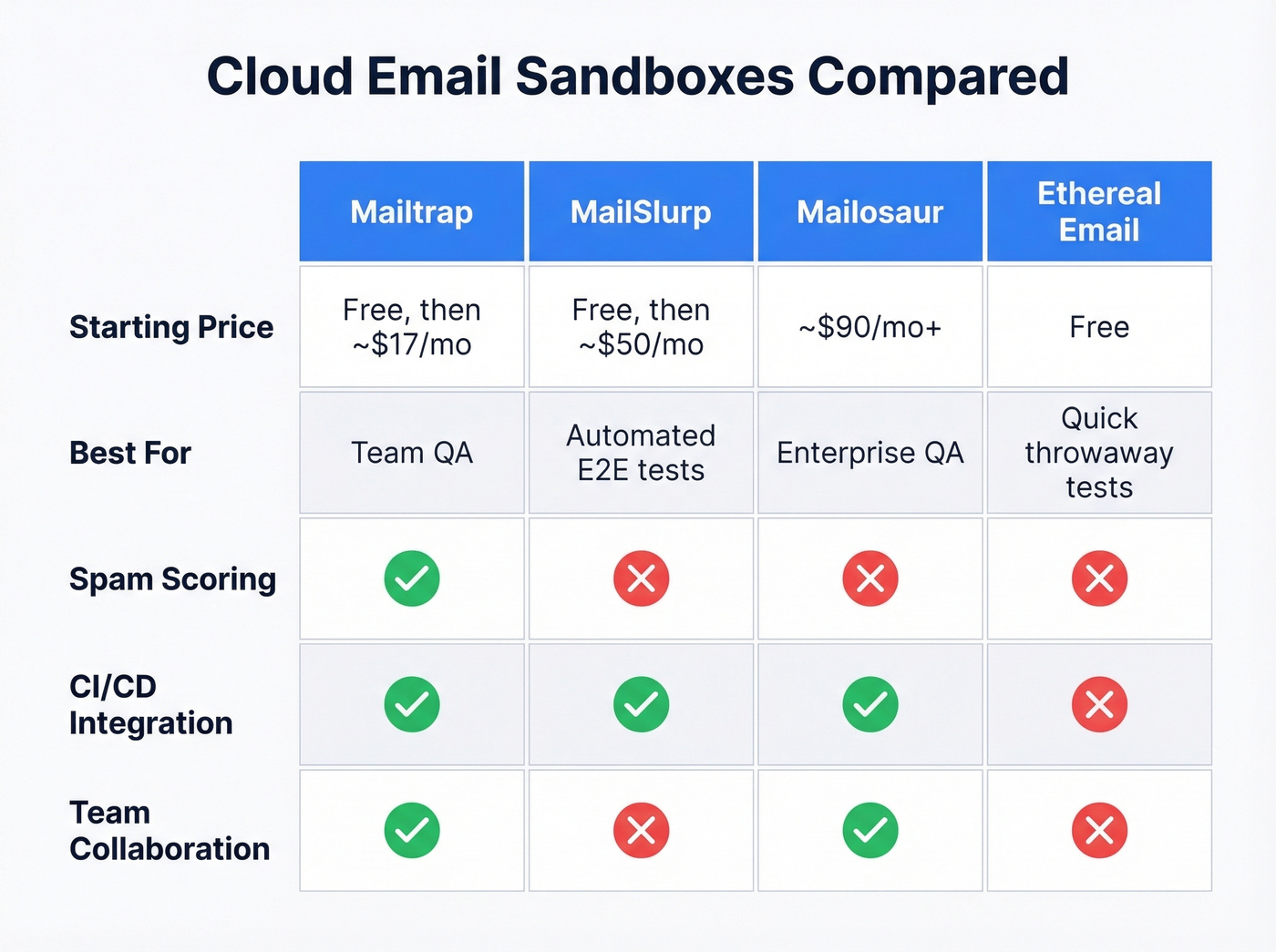
One thing sandboxes can't do: verify real inbox placement or preview rendering in actual email clients. They simulate the receiving end, not the delivery chain. For production deliverability validation, you still need to send to real inboxes with tools like Google Postmaster Tools monitoring the results. But for catching bugs before they reach production, sandboxes are indispensable.
Mailtrap
Mailtrap is the default cloud sandbox for good reason. Shared inboxes let your whole team inspect test emails without forwarding screenshots around. SpamAssassin scoring flags deliverability issues before you push to production. HTML/CSS previews catch rendering bugs across clients. And CI/CD integration means your test suite can point its SMTP config at Mailtrap and validate email flows automatically.
Pros:
- Spam score analysis built in
- Team collaboration with shared inboxes
- HTML compatibility checks
- API for automated testing pipelines
Cons:
- Free sandbox tier caps at 50 test emails/month
- Sending and sandbox are separate products with separate pricing
Free sandbox tier handles 50 emails/mo. Sandbox plans from ~$17/mo. On the sending side: free tier (4K emails/mo), Basic from $15/mo, Business from $85/mo, Enterprise from $750/mo.
MailSlurp
MailSlurp is API-first, built for developers who want real inboxes inside their test suites. It integrates with Playwright and Selenium, so you can programmatically send an email, wait for it to arrive, and assert on the content - all inside a CI pipeline. Free tier available, paid plans from ~$50/mo.
Use this if you're writing end-to-end tests that include email flows. Skip this if you just need a visual inbox for manual QA.
Mailosaur and Ethereal Email
Mailosaur targets enterprise QA teams with API-driven testing and real email addresses for end-to-end validation. Expect ~$90/mo and up. Ethereal Email is the opposite end of the spectrum - free disposable SMTP accounts from the Nodemailer project. Spin one up, point your app at it, inspect the captured messages in a web UI. Perfect for throwaway testing when you don't need persistence or team features.
Local SMTP Sandboxes
Mailpit
Mailpit is a single binary with no external dependencies that catches every email your local app sends. It's inspired by MailHog, which is no longer maintained and lacks active development and security updates. Mailpit is the drop-in replacement, and it's not close.
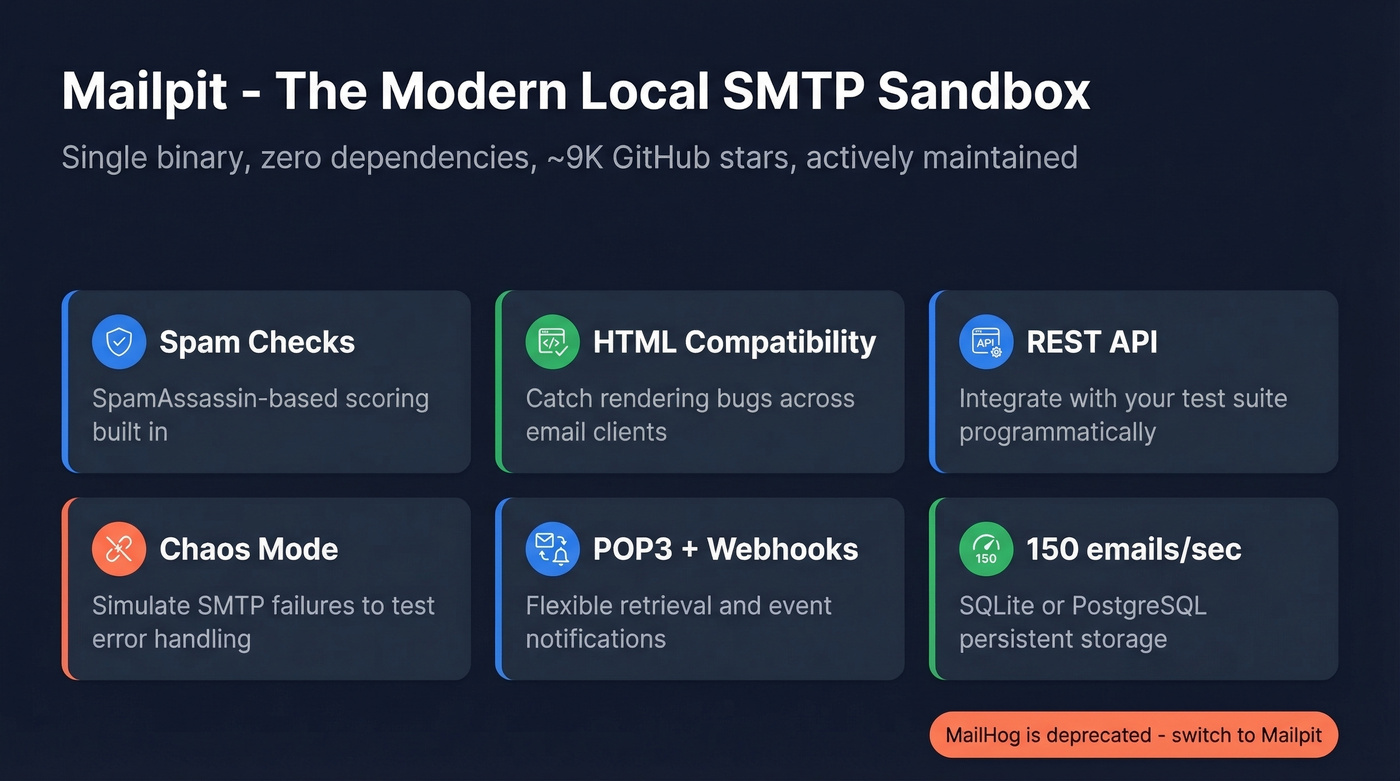
The feature set punches well above "local test server." SpamAssassin-based spam checks, an HTML compatibility checker, link verification, a REST API for integration testing, POP3 server support, webhooks, and a chaos engineering mode that simulates SMTP failures so you can test how your app handles errors gracefully. Storage is persistent via SQLite or PostgreSQL. In our testing, throughput hit ~150 emails/second on a standard dev machine - more than enough for any local workflow.
With ~9k GitHub stars and active development (v1.29.3 shipped March 2026), it's the clear standard for local email testing.
MailHog is deprecated. It's unmaintained, has no TLS support, and stores everything in memory - you lose all captured emails on restart. If you're still using MailHog, switch to Mailpit. Same default ports, minimal migration effort.

Most SMTP bounces aren't server problems - they're bad email addresses. Prospeo's 5-step verification with catch-all handling, spam-trap removal, and honeypot filtering delivers 98% email accuracy. Stop debugging your mail server when the real fix is cleaner data.
Fix your bounce rate at the source - verify before you send.
CLI Tools for SMTP Debugging
swaks
swaks - the "Swiss Army Knife for SMTP" - has been the go-to CLI tool since 2003, and it's still the fastest way to debug SMTP issues from a terminal.
Testing STARTTLS on port 587 with authentication takes one command:
swaks - server mail.example.com:587 - auth plain - tls \
  --auth-user you@example.com - auth-password yourpass \
  --to recipient@example.com
For implicit TLS on port 465, swap --tls for --tls-on-connect. Need to replay a saved message? --data @message.eml. Attach a file? --attach report.pdf.
The output is readable: > lines are what you sent, < lines are server responses, * flags errors. Free, open-source, available on every platform that matters.
telnet, netcat, and OpenSSL
For quick connectivity checks, nc mail.example.com 25 tells you if the server is listening - look for the 220 ESMTP banner. To validate TLS negotiation, openssl s_client -connect mail.example.com:25 -starttls smtp shows you the certificate chain and negotiated cipher. These ship with most operating systems, so there's nothing to install. When you need to check email server responsiveness at the protocol level, nothing beats a raw socket connection.
Email Verification - The Step Before Testing
You can have a perfectly configured SMTP server and still get 550 5.1.1 bounces all day long. The server isn't the problem - the data is.
Prospeo runs a 5-step verification process against 143M+ verified emails with 98% accuracy. It handles catch-all domains, removes spam traps, and filters honeypots - the kinds of addresses that silently destroy sender reputation. Think of it as a pre-send validator that checks the receiving end before you ever hit send, so your test results reflect actual server health rather than bad data. If you want a deeper workflow, see how to check if an email exists and how to check if an email will bounce.
The impact is real. Meritt tripled pipeline from $100K to $300K/week while cutting bounce rate from 35% to under 4% after cleaning and verifying their data. The free tier gives you 75 email verifications per month, and paid plans run ~$0.01 per email with no contracts.

You've tested connectivity, sandboxed your templates, and debugged the SMTP handshake. None of that matters if 35% of your list is invalid. Prospeo refreshes 300M+ profiles every 7 days - not every 6 weeks - so your outbound hits real inboxes, not dead ends.
Clean data turns a perfect SMTP setup into actual pipeline.
Full Comparison Table
The table below groups every tool by category so you can jump to the right one for your workflow.
| Tool | Category | Price | Best For | Key Feature |
|---|---|---|---|---|
| Mailpit | Local sandbox | Free | Solo dev testing | Chaos mode + spam checks |
| Mailtrap | Cloud sandbox | Free-$85/mo+ | Team QA & CI/CD | Shared inboxes + scoring |
| swaks | CLI | Free | SMTP debugging | Full protocol transcript |
| MxToolbox | Online tester | Free | DNS & relay checks | Open relay detection |
| GMass SMTP Test | Online tester | Free | Quick credential check | SMTP conversation log |
| MailSlurp | Cloud sandbox | Free-$50/mo+ | Automated E2E tests | Playwright integration |
| smtp-test.com | Online tester | Free | Beginners | Provider settings guide |
| Mailosaur | Cloud sandbox | ~$90/mo+ | Enterprise QA | API-driven real inboxes |
| Ethereal Email | Disposable SMTP | Free | Throwaway testing | Instant setup, no signup |
| Prospeo | Email verification | Free-~$0.01/email | Pre-send list cleaning | 98% accuracy, 5-step verify |
Common SMTP Errors and Fixes
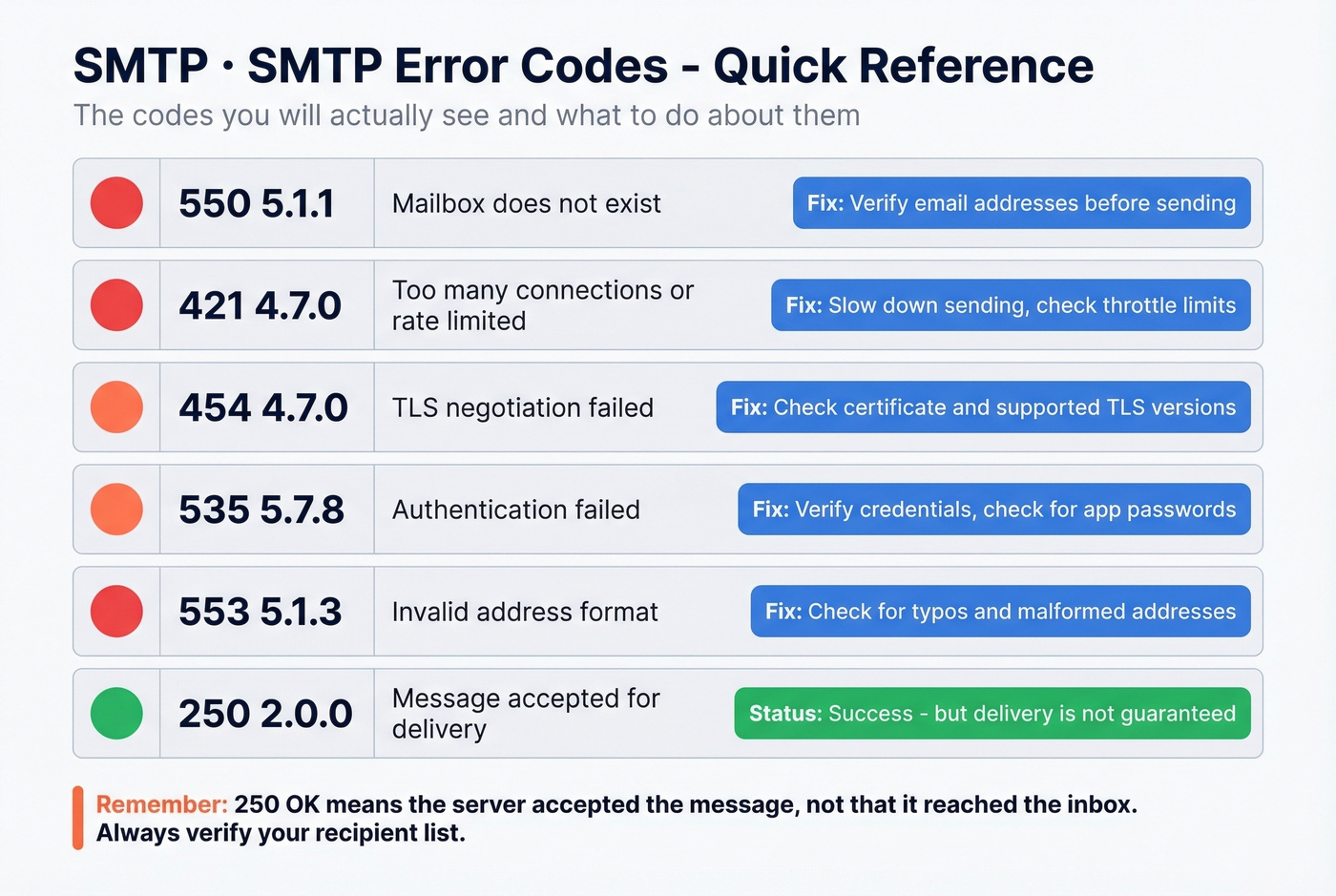
Most SMTP errors fall into a handful of patterns. Here's what the codes actually mean.
| Error Code | Meaning | Fix |
|---|---|---|
| 550 5.1.1 | Invalid recipient | The address doesn't exist. Verify recipients before sending. |
| 550 5.7.1 | Policy/reputation block | Your IP or domain is flagged. Check blacklists, review SPF/DKIM/DMARC. Also check Google Postmaster Tools or Microsoft SNDS for domain-specific reputation data. |
| 421 4.7.0 | Rate-limited | You're sending too fast. Back off and implement throttling. |
| 554 5.7.5 | Spam filter rejection | Content or headers triggered filtering. Check spam scores in Mailtrap or Mailpit. |
Two patterns to watch for. Delays on delivery often indicate greylisting - the server temporarily rejects your message to see if you retry. Legitimate senders do; spammers usually don't. Immediate rejections with 5xx codes on first attempt typically mean a blocklist hit or hard policy failure. If you're diagnosing reputation issues, use dedicated email reputation tools alongside SMTP-level testing.
Let's be honest: the 550 5.1.1 error is the most common bounce code in outbound campaigns, and it has nothing to do with your SMTP configuration. The fix isn't a server setting - it's cleaning your list before you send.
SMTP Provider Settings Cheat Sheet
| Provider | Server | Port | Security | Auth Notes |
|---|---|---|---|---|
| Gmail | smtp.gmail.com | 587 | STARTTLS | App Password if 2FA on |
| Microsoft 365 | smtp.office365.com | 587 | STARTTLS | Full email as username |
| Amazon SES | email-smtp.{region}.amazonaws.com | 587 | TLS | SES SMTP credentials |
| SendGrid | smtp.sendgrid.net | 587 | TLS | API key as password |
Port 587 with STARTTLS is the modern standard across all major providers. Port 465 (implicit TLS) works too, but 587 is what you should default to. If you're auditing auth failures, it helps to validate alignment and records (SPF/DKIM/DMARC) - start with SPF record examples and then how to verify DKIM is working.
FAQ
What's the difference between an SMTP tester and an email sandbox?
An SMTP tester checks connectivity, authentication, and TLS against a live mail server - it validates your server configuration. A sandbox captures outgoing emails in an isolated environment so they never reach real recipients, letting dev and QA teams inspect content, rendering, and spam scores without risking accidental sends.
Is MailHog still safe to use in 2026?
No. MailHog is unmaintained, lacks TLS support, and stores everything in memory. Mailpit is the actively maintained drop-in replacement with persistent storage, spam checking, chaos mode, and a modern web UI. Same default ports - migration takes minutes.
Why does my SMTP test pass but emails still bounce?
"SMTP accepted" means the server took the message - not that it reached an inbox. Bounces typically come from invalid recipient addresses (550 5.1.1), blocklisted sending IPs, or missing SPF/DKIM/DMARC records. Verify your list before testing to isolate server issues from data quality problems.
Which SMTP ports should I test?
Port 587 (submission with STARTTLS) is the modern default for all major providers. Port 465 (implicit TLS) works as a fallback. Port 25 handles server-to-server relay but many ISPs block it. Port 2525 is an unofficial alternative when standard ports are blocked.
What's the difference between sandbox, staging, and production email testing?
Sandbox testing captures emails in a fake environment - nothing leaves your test server. Staging sends real emails through your actual SMTP infrastructure to seed addresses you control, validating DNS, TLS, and authentication end-to-end. Production monitoring uses tools like Google Postmaster Tools and Microsoft SNDS to track live deliverability. Most teams need all three layers.